

Snapchat Profile Scraper: Subscribers, Spotlight & Stories
Pricing
from $1.00 / 1,000 profiles
Snapchat Profile Scraper: Subscribers, Spotlight & Stories
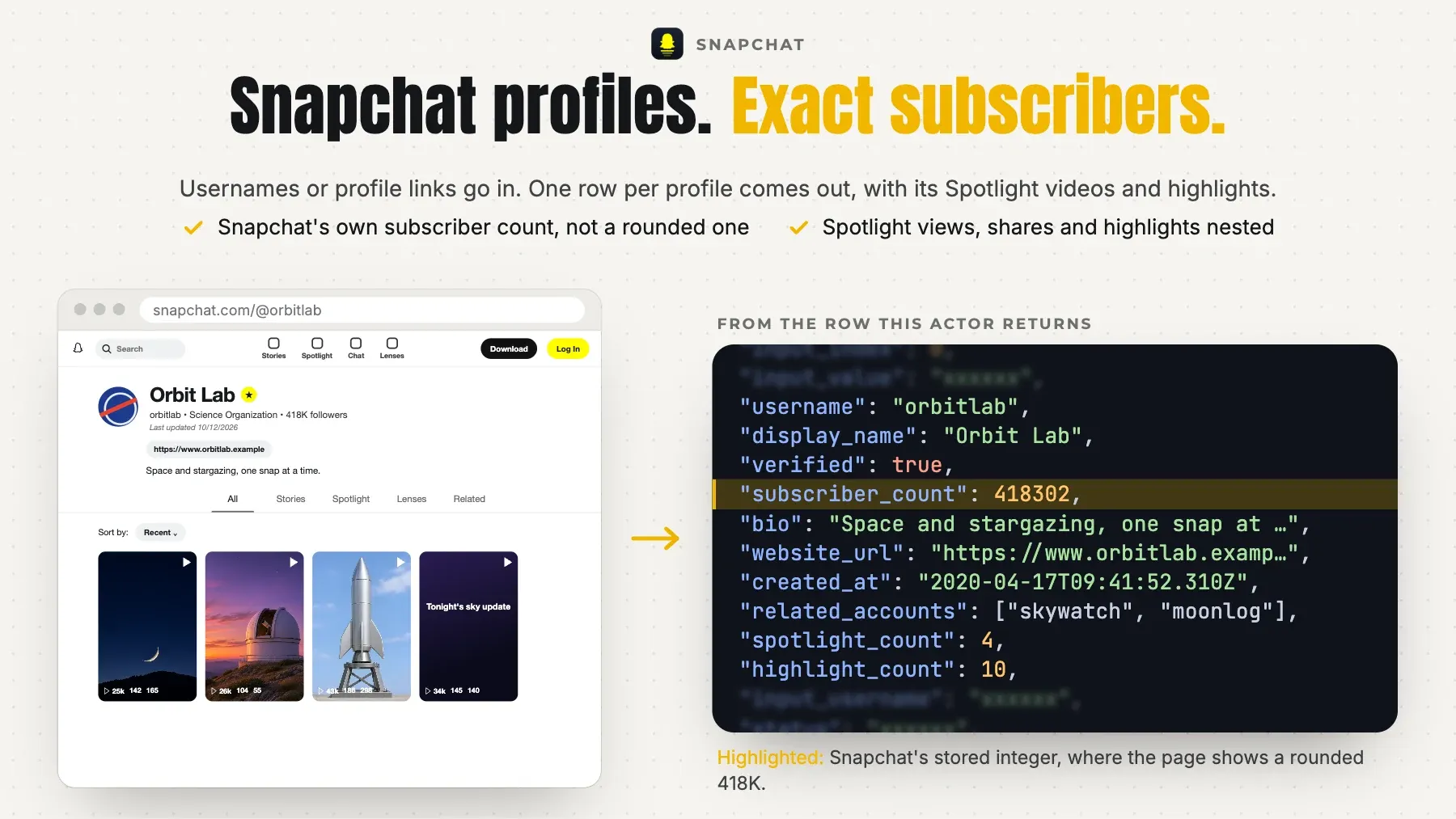
Scrape public Snapchat profiles by username or URL: display name, bio, exact subscriber count, verified badge, category, website, profile picture and Snapcode, plus the Spotlight videos (views, shares, comments, date, thumbnail, video URL), story snaps and highlights the page lists. No login.
Pricing
from $1.00 / 1,000 profiles
Rating
0.0
(0)
Developer

Hyperbach
Maintained by CommunityActor stats
0
Bookmarked
2
Total users
0
Monthly active users
6 days ago
Last modified
Categories
Features
Share
Snapchat public profiles by username or profile link, logged out: the display name, username, bio, exact subscriber count, verified badge, category, website, address, profile picture, Snapcode and hero image, the created and updated times and the related accounts — and nested in the same row the public Spotlight videos (views, shares, comments, boosts, upload time, duration, thumbnail, video URL, hashtags), the public story snaps and the saved highlights the profile page lists, with a max per profile. Several profiles in one run; a free row for every name Snapchat does not know. No login, no cookie, no browser, proxies handled for you.
$2.00 per 1,000 profile rows on the Free plan, $1.70 on Starter. A run start is $0.0025. The default input returns about 3 rows for about $0.0085. A value that names nothing is a free row that says why.
Why this Snapchat scraper
- Usernames or links, mixed. Paste
nasa,@nasa,snapchat.com/add/nasa,snapchat.com/@nasaor a story.snapchat.com link, one a line; the same profile given twice is read once. - The exact subscriber count. Snapchat's own integer (4,080,500 for fcbarcelona on 2026-10-30), not the rounded "4.1m" the page shows, beside the bio, the website, the address, the category and the verified badge.
- Spotlight, stories and highlights in the profile's row. Each Spotlight video with its id, URL, views, shares, comments, boosts, recommends, upload time, duration, size, thumbnail, video URL, hashtags and sound; each public story snap and each saved highlight with its media and preview links and times. Cap each list per profile, or take every item the page lists.
- Honest counts.
spotlight_count,story_snap_countandhighlight_countare the page's own counts before your caps; Spotlight slots the page serves empty are skipped and counted, never delivered as blank videos. - Every input a row. A username Snapchat does not know is a free
not_foundrow, checked on two connections; a value that is not a profile a freeinvalidrow. A personal account gives its username, name, Snapcode and Bitmoji.
Who it's for
- Influencer marketing and talent agencies — a creator's exact subscriber count and the views, shares and comments of their recent Spotlight videos, side by side for a shortlist.
- Brand and social media teams — their own and their competitors' profiles read again every week: subscribers, new Spotlight videos and their views, the live story.
- Researchers and lead generation teams — bios, websites, addresses and categories of business profiles, and the related accounts Snapchat links to each one.
Quick start
Three profiles, every item the page lists
A shortlist of creators, 5 Spotlight videos each, no stories
Output
One row per profile (and one free row per value that gives no profile):
| field | meaning |
|---|---|
input_index | The 1-based position of the value this row answers in profiles. |
input_value | The value as you gave it. |
input_username | The username the value names, in lower case (empty for a value that is not a profile). |
status | ok (a profile, charged) or not_found, invalid, duplicate, failed, not_read (free; see the FAQ). |
status_detail | Why a row is not ok, or a note on an ok row (empty Spotlight slots skipped, a personal account), in a sentence. |
scraped_at | When the row was read (UTC). |
username | The profile's username, as Snapchat's page names it. |
display_name | The profile's display name. |
profile_type | public (a public profile: every field the page gives) or personal (a personal account: username, name, Snapcode and Bitmoji only). |
profile_url | The profile on snapchat.com. |
verified | true when the profile carries Snapchat's official badge. |
category | Snapchat's category of the profile (business-group, people, …), when the page gives one. |
subcategory | Snapchat's subcategory (government-org, sports-team, creator, …), when the page gives one. |
subscriber_count | The exact subscriber count, as Snapchat stores it. |
bio | The profile's bio. |
website_url | The website the profile links to (with https:// added when the page gives a bare domain). |
address | The address or place the profile shows. |
profile_picture_url | The profile picture on Snapchat's CDN. |
snapcode_url | The profile's Snapcode (an SVG image Snapchat serves). |
hero_image_url | The profile's square hero image. |
bitmoji_url | A personal account's Bitmoji avatar image. |
created_at | When the public profile was created (UTC). |
updated_at | When the public profile last changed (UTC). |
related_accounts | The usernames of the accounts Snapchat links to this profile. |
spotlight_count | How many Spotlight videos the profile page lists (before maxSpotlightsPerProfile). |
spotlight_slots_empty | Spotlight slots the page serves empty (no id, no data): skipped, never delivered. |
spotlights | The Spotlight videos, as the page lists them: id, url, description, hashtags, view_count, share_count, comment_count, boost_count, recommend_count, uploaded_at, duration_ms, width, height, thumbnail_url, video_url, sound. |
story_snap_count | How many public story snaps the page lists (before maxStoriesPerProfile). |
story_snaps | The public story snaps: id, media_type (image or video), media_url, preview_url, posted_at. |
highlight_count | How many saved highlights the page lists (before maxStoriesPerProfile). |
highlights | The saved highlights: id, title, url, thumbnail_url, snap_count, latest_snap_at and their snaps (as in story_snaps). |
Example record:
Pricing
Pay for the profiles a run delivers, plus one run start; no platform usage is billed to you. The profile price falls with your Apify plan.
| event | unit | Free | Starter | Scale | Business |
|---|---|---|---|---|---|
Profile (profile) | per 1,000 | $2.00 | $1.70 | $1.40 | $1.00 |
Run start (start) | per run | $0.0025 | $0.0025 | $0.0025 | $0.0025 |
A profile row is $2.00 per 1,000 on the Free plan ($0.002 a profile), its Spotlight videos, story snaps and highlights included. Each run that delivers a profile also pays the run start, $0.0025 once; a run that delivers no profile pays nothing at all. So 100 profiles cost $0.2025 on the Free plan. A username Snapchat does not know (not_found), a value that is not a profile (invalid), a repeated profile (duplicate), a profile left at the cap or the time limit (not_read) and a refusal the run could not pass (failed) are never charged. A run that stops early (a timeout, an abort) is charged for the profiles it delivered. maxItems counts the charged rows; before the first request the log names the price of a profile at your plan and the most the run can cost. Enterprise plans have their own rates: the Actor's Pricing tab shows the price for your plan.
Usage patterns
- Profiles —
profilestakes Snapchat usernames (nasa,@nasa) and profile links (https://www.snapchat.com/add/nasa,https://www.snapchat.com/@nasa,https://story.snapchat.com/@nasa, with any?share_id=or?locale=). Share links (t.snapchat.com/…), Spotlight-only and lens links are not read (a freeinvalidrow says so). - What a row is — One row per input value.
status=ok: a profile, withprofile_typepublic (every field the page gives) or personal (username, name, Snapcode and Bitmoji only), and the nested listsspotlights,story_snapsandhighlights. Any otherstatusis a free row that says why instatus_detail. - How many Spotlight videos and stories — Snapchat shows a logged-out visitor a profile's recent Spotlight videos (7 to 30 on the profiles measured), its public story and its saved highlights; no logged-out page lists more, so that is the depth.
maxSpotlightsPerProfileandmaxStoriesPerProfile(0 = all) cut the lists in each row; the_countfields keep the page's own counts.maxItemscaps the profiles of the whole run.
Input configuration
| field | type | default | what it does |
|---|---|---|---|
profiles | array | Profiles to read, one a line: a username (nasa, @nasa) or a profile link (https://www.snapchat.com/add/nasa, https://www.snapchat.com/@nasa, https://story.snapchat.com/@nasa). A value that is not a profile (a share link t.snapchat.com/…, a Spotlight-only or lens link, another site) gets a free invalid row; a profile given twice a free duplicate row; a username Snapchat does not know a free not_found row. | |
maxSpotlightsPerProfile | integer | 0 | Keep at most this many Spotlight videos in each profile's row, newest first as the page lists them. 0 = every Spotlight the profile page lists (7 to 30 on the profiles measured; Snapchat shows a logged-out visitor its recent ones only). spotlight_count always gives the page's own count. |
maxStoriesPerProfile | integer | 0 | Keep at most this many public story snaps, and at most this many saved highlights (each with at most this many snaps), in each profile's row. 0 = every one the page lists. story_snap_count and highlight_count always give the page's own counts. |
maxItems | integer | 0 | Stop the whole run after this many profile rows (the charged rows). 0 = no run cap. The free rows (not found, invalid, duplicate) do not count. |
feedback | string | A note to the people who maintain this Actor: what you needed and did not get. For example a missing field, a wrong or empty result, or the Actor you switch from or to, and why. The run does not read it: the rows and the charges stay the same. A person reads every note. |
Errors
A run does not fail because of your input. When an input cannot be used — a date that is not a date, an id in the wrong form, two settings that contradict each other — the run ends Succeeded, charges nothing, and says what to change:
- the status message starts with
INPUT REJECTED; - the dataset holds one row,
{"error": true, "code": "…", "message": "…"}, and no results; - the key-value store record
ERRORholds the same object.
From code, check error on the first row before reading results.
A value that is not a Snapchat profile (a share link, a Spotlight-only or lens link, another site) or a username Snapchat does not know is not an error: it gets one free row with status invalid or not_found that says why, and the run goes on with the others. A run that ends Failed is a fault on our side, never your input; it charges nothing, and we are alerted.
FAQ
Which status is which?
ok (a profile), not_found (Snapchat has no profile with that username; checked on two connections), invalid (an empty value, or a value that is not a Snapchat username or profile link), duplicate (the same profile again in the input: read once), failed (Snapchat refused every try; free) or not_read (left at maxItems, the charge limit or the run's time limit).
Does it give every Spotlight video of a profile?
It gives every Spotlight video the public profile page lists, which is the recent ones (7 to 30 on the profiles measured on 2026-10-30). Snapchat lists no older ones to a logged-out visitor. spotlight_count says how many the page listed.
Does it download the videos?
No. Each Spotlight video and story snap comes with its video_url or media_url and a thumbnail or preview link on Snapchat's CDN; the files stay there.
Does it read private accounts or friends-only stories?
No. It reads what Snapchat shows a logged-out visitor of a public profile. A personal account gives its username, display name, Snapcode and Bitmoji only.
Does it need a Snapchat account or a cookie?
No. Everything is read from Snapchat's public profile pages, logged out.
Do I need Apify Proxy or my own proxy?
No. The Actor uses its own connections, at no extra cost to you.
Integration
JavaScript
Python
CLI
REST
AI agents and MCP
Apify's MCP server offers this Actor as a tool to Claude, Cursor, VS Code and any other MCP client. Connect https://mcp.apify.com?tools=hyperbach/snapchat-scraper and ask, for example: "Get the subscriber count, bio and Spotlight videos of the Snapchat profiles nasa, kyliejenner and fcbarcelona". The agent fills the input from the table above and reads the rows from the run's dataset. The input names are the ones in the table above. An agent or a person can add feedback to any run and say what was needed and not delivered: a missing field, a wrong or empty result, the Actor switched from or to, and why. The run returns the same rows at the same price, and a person reads every note.
n8n, Make and Zapier
The Apify node in n8n, the Apify app in Make and the Apify integration in Zapier run this Actor on a schedule or from a trigger and read its dataset. A webhook on the run's end (Integrations on the Actor page) sends the rows on to your own endpoint. Nothing to install on our side.
Support
Disagree with a charge? Write to apify@hyperbach.com with the run ID. We will ask Apify to compensate you, and the charge comes back to your Apify account as platform credit.
Did it do the job? A short review on the Store, at any rating, helps the next buyer choose.
See also
- Telegram Profile Scraper — Telegram channels, groups, bots and users by username or link, with the exact subscriber or member count.
- YouTube Channel Search Scraper — the YouTube channels a keyword finds, with subscribers, the exact video and view counts and the country.
- Threads Scraper — Threads profiles with the exact follower count, their posts and replies with view counts, and keyword and tag search, without a login.
- Substack Scraper — the posts of a Substack newsletter with the full text of free posts, the date, the paywall flag and the likes.
- Weibo Scraper — Weibo posts, profiles, search, comments and the hot-search boards, without a login.
- Pinterest Search Scraper — the pins of a Pinterest search, with the link each pin points to, the image and the pinner.
This page is generated from the Actor's schemas and a live sample — it cannot describe a field the Actor does not have.


