

VK Posts Scraper: VK Wall, Comments (VKontakte, ВКонтакте)
Pricing
from $1.53 / 1,000 posts
VK Posts Scraper: VK Wall, Comments (VKontakte, ВКонтакте)
VK (VKontakte) posts scraper and API, no login: every post of a community or profile wall with exact time, likes, reactions, reposts and views, text, photos, videos, links, polls, the reposted post, author and wall owner; comments with replies on request; post links too. Misses free.
Pricing
from $1.53 / 1,000 posts
Rating
0.0
(0)
Developer

Hyperbach
Maintained by CommunityActor stats
0
Bookmarked
3
Total users
2
Monthly active users
5 days ago
Last modified
Categories
Features
Share
VK (VKontakte) wall posts, logged out: every post of a community's or a person's wall with its exact time, likes, reactions by type, reposts, comments count and exact views, the text with its mentions, hashtags and links, every photo, video, link, document, poll and article, the copied post of a repost, the author and the wall owner (members, followers), and on request each post's comments with their replies inside the row. Handles, community and profile links, owner ids and post links in, one row per post out, and one free row per wall with a verdict: COMPLETE, CAPPED (your limit), DATE_LIMIT, SCAN_LIMIT, TRUNCATED (VK's own limit) or PARTIAL. No login, no token, no cookies, no browser, proxies handled for you.
From $3.06 per 1,000 rows (post) on the Free plan, $2.601 on Starter; every row and add-on is priced under Pricing below. A run start is $0.002. The default input returns about 51 rows for about $0.155. A value that names nothing is a free row that says why.
How it compares
- automation-lab's VK Posts Scraper is 8 times cheaper: $0.28 per 1,000 posts, against our $2.24. We give more data: 34 fields per post, against 13.
- 6 times faster and cheaper than maximedupre's VK Posts Scraper, with more data: 20 posts in 7.7 s, against 42 s; $2.24 per 1,000 posts, against $3.60; 34 fields per post, against 11.
Measured on 2026-11-17. Each line compares one job, run by both scrapers at the same time. Prices are per 1,000 posts: Apify Actors at the Scale plan's prices.
Tested head-to-head on 2026-11-17
The job: the 20 newest posts of one public VK community wall (tproger), pinned posts and reposts included. Every Actor ran on it the same day from the same harness; every run's cost is at the Scale plan's prices: a rival's charged events at its price for that plan, this Actor's at its list price. Fields counts the filled fields of a typical row. One community wall's 20 newest posts. maximedupre reads each post's comments in every run (no switch), automation-lab reads the mobile pages; ours reads VK's own API and reads comments only when asked. Re-measured monthly.
| Actor | Rows | First row | Run time | Cost | Fields | Failures |
|---|---|---|---|---|---|---|
| this Actor | 20 | 7.3 s | 7.7 s | $0.045 | 34 | none |
maximedupre/vk-posts-scraper | 20 | 20 s | 42 s | $0.072 | 11 | none |
automation-lab/vk-posts-scraper | 20 | 8.5 s | 8.4 s | $0.006 | 13 | none |
Why this VK posts scraper
- Every post of the wall, none left out. VK's own API with the page's anonymous desktop token serves the video-only clip posts a mobile token drops (on VK's own community wall 1,161 of its 1,162 posts, where the mobile token gave 1,109); the walk pages 100 posts a call to the wall's first post, and its end is read again on a fresh connection before the row says COMPLETE.
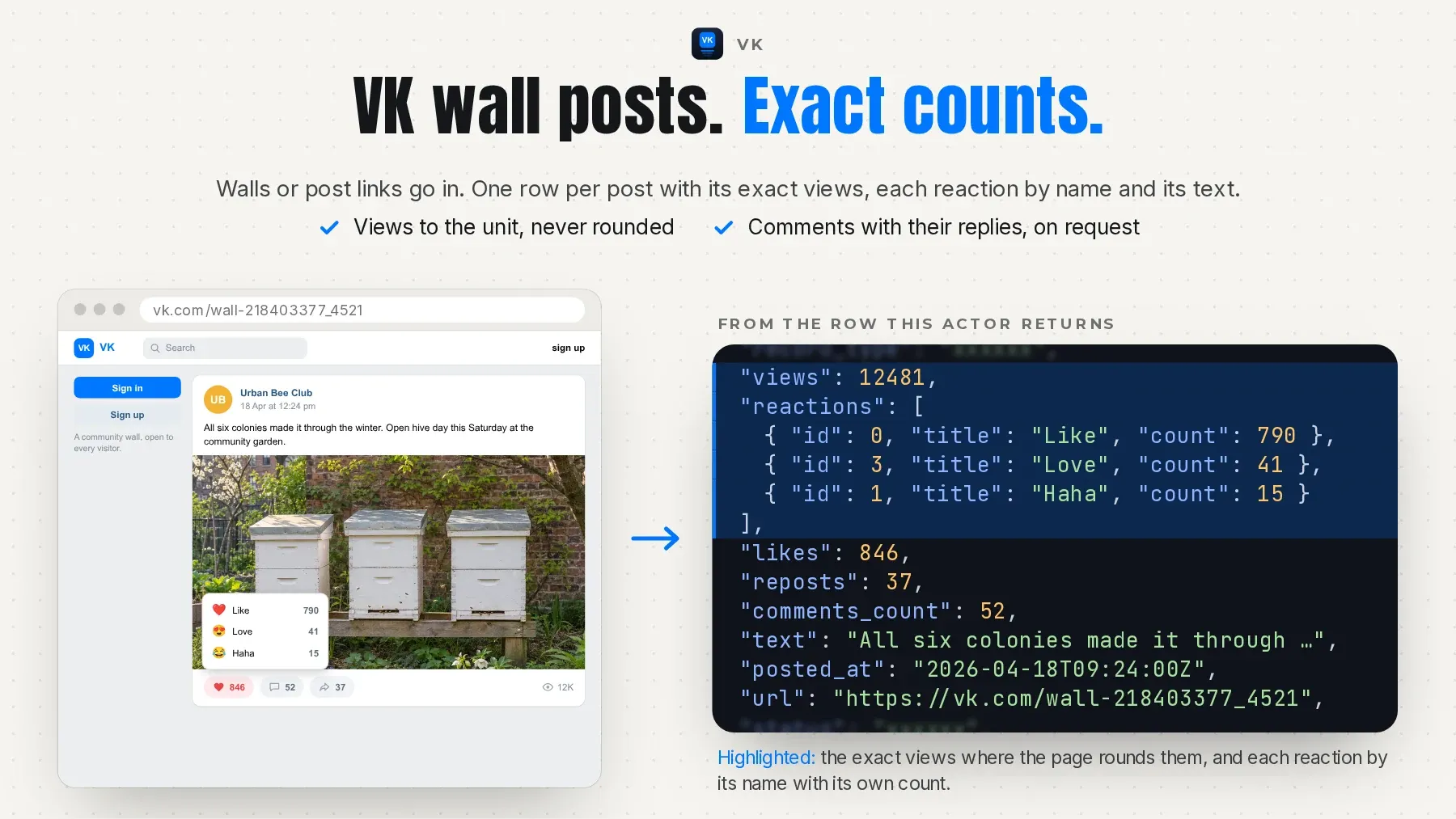
- Exact numbers. The exact publish time to the second and the exact views, likes and reposts of each post as VK counts them, never a rounded "1.2K", and each reaction by its name (Like, Haha, Wow!, Love, Sad, …).
- The wall's own posts in the wall's order. VK shows other communities' co-published posts on a wall, out of its date order: they are left out unless you ask (
includeOtherOwners), each saysis_co_published, and a date window stops only at the wall's own unpinned post, so a pinned or a co-published old post never ends a walk early. - Comments with their replies in the post row. On request, each post's comments oldest first with their likes, attachments and replies, up to your cap, with the count read against VK's own; a post whose comments are closed says so.
- The owner with each wall. The community's members or the person's followers, its activity, status, site and description come with the wall's first page (no extra call), on every post row and on the wall's free row.
- Honest runs. Every wall and post link gets a free
targetrow: a hidden, blocked, members-only, disabled or deleted wall says so in VK's own words, an unknown handle is checked on two connections, and a run that delivers nothing charges nothing.
Who it's for
- Marketers and social media analysts — what a brand's or a competitor's VK community posts, and how many views, likes, reactions, reposts and comments each post gets, day by day.
- Researchers and journalists — a public figure's or a media outlet's VK wall to its first post, with exact times and counts, and the comments under the posts that matter.
- Data and AI builders — clean VK post text (mentions turned into names, hashtags and links listed) and comments with replies, as rows for search, a knowledge base or sentiment analysis.
Quick start
A wall's 50 newest posts
Posts with their comments and replies
Posts of a date window that mention a word
Switching from maximedupre/vk-posts-scraper?
Your input works as it is. Each name in the left column is read as this Actor's own field and the run log says so (read <theirs> as <ours>); a name marked not read is ignored with a note. A value in the other Actor's shape, an object list or its own date form, is read too.
| maximedupre/vk-posts-scraper | this Actor | what to know |
|---|---|---|
targets | targets | The same values: handles, community or profile links, wall links, post links, owner ids and community ids. |
maxItems | maxItems | The post rows of the whole run; 0 = no cap. |
maxItemsPerTarget | maxItemsPerTarget | The post rows of each wall; 0 = the whole wall. |
containsText | containsText | One word or phrase in the post's own text, case-insensitive; matchRepostText reads the reposted text too. |
publishedAfter | publishedAfter | YYYY-MM-DD (UTC); the wall stops at its first own unpinned post older than the day. |
publishedBefore | publishedBefore | YYYY-MM-DD (UTC), through the end of the day. |
includePinnedPosts | includePinnedPosts | On by default, as on the leader. |
includeReposts | includeReposts | On by default, as on the leader; each repost carries the shared post in repost_chain. |
What differs:
- The leader's input runs as it is:
targets,maxItems,maxItemsPerTarget,containsText,publishedAfter,publishedBefore,includePinnedPostsandincludeRepostsare this Actor's own names with the same meaning. - Comments are off unless you ask (
includeComments, up tomaxCommentsPerPost, 100 by default); the leader reads up to 100 top-level comments of every post and has no switch for them. Replies come on request (includeCommentReplies). - Other communities' co-published posts on a wall are left out, as the leader does;
includeOtherOwnerskeeps them. - Output fields are snake_case (
post_id,posted_at,views,attachments,author) rather than the leader's camelCase, and every row carries the wall owner's block and the reactions by name.
Output
One row per post (record_type post), and one free target row per wall or post link:
| field | meaning |
|---|---|
record_type | post (charged) or target (the free row of one wall or post link). |
status | ok; on a target row why a wall gave no post: not_found, private, blocked, members_only, wall_disabled, deleted, invalid_input, failed, not_read, duplicate (see the FAQ). |
input | The value you gave that this row answers. |
target_type | How the input was read: handle, owner_id, post or invalid. |
post_id | The post's VK id, <owner id>_<post id> (a community's owner id is negative). |
url | The post's page, https://vk.com/wall<owner>_<id>. |
owner_id | The post's owner: a community (negative) or a person (positive). Another community's id on a co-published post. |
from_id | Who posted it: the owner, or a person on a profile wall's visitors' posts. |
wall_owner_id | The wall the post was read from (it differs from owner_id on a co-published post). |
wall_post_id | A co-published post's id on the wall it was read from, <wall owner>_<id>. |
text | The post's text as a reader sees it: VK's mention markup `[id1 |
text_raw | The post's text as VK stores it, with its markup. |
mentions | The people and communities the text mentions: id, type, screen_name, text. |
hashtags | The hashtags of the text. |
links | The links of the text. |
posted_at | When it was posted (UTC, to the second). |
posted_at_unix | The same time as Unix seconds. |
edited_at | When it was last edited (UTC), or null. |
likes | Likes, exact. |
reposts | Reposts, exact. |
comments_count | VK's comment count of the post (comments and replies). |
views | Views, exact; null where VK shows none (old posts). |
reactions | Each reaction with its name and count: id, title (Like, Haha, Wow!, Love, Sad, …), count. |
is_pinned | The post the wall pins at its top. |
is_repost | The post shares another post (repost_chain). |
is_co_published | Another community's post that VK shows on this wall (kept with includeOtherOwners). |
co_owners | The other owners a co-authored or co-published post names. |
post_type | VK's post type (post). |
post_source | How the post was made: type (vk, api, …), platform, data. |
marked_as_ads | VK's ad marker. |
is_donut | A paid (VK Donut) post. |
comments_open | Whether a visitor can read the post's comments. |
geo | The post's place, when it has one: type, coordinates, place. |
signer_id | The signed author of a community post, when the community signs it. |
copyright | The post's source link, when it names one: id, link, name, type. |
author | Who posted it: id, type (community or profile), name, screen_name, url, photo, verified. |
owner | The wall's owner: the author fields and members_count (a community) or followers_count (a person), is_closed, community_type, activity, description, site, status. |
attachments | Every attachment by type: photo (url, width, height, every size), video (page url, player link, title, duration, views, image), link, doc, poll (question, answers, votes), article, audio, sticker. |
media_types | The attachment types of the post. |
photo_urls | The largest size of each photo. |
video_urls | Each video's page link. |
repost_chain | The post a repost shares (and the post that one shared): post_id, url, owner_id, author, text, posted_at, attachments. |
comments | With includeComments: the post's comments oldest first: id, author, text, posted_at, likes, attachments, replies_count and, with includeCommentReplies, replies. |
comments_read | The comments and replies in comments (the comment event's count). |
comments_status | served, capped (maxCommentsPerPost), closed (VK shows a visitor no comments of this post), failed, cut (the run stopped while they were read), trimmed (more comments than one dataset item holds, about 4 MB: the row keeps its first comments) or not_asked. |
raw | With includeRaw: the post as VK's API gives it. |
posts_count | On a target row: VK's own post count of the wall. |
posts_scanned | On a target row: the posts of the wall the walk read. |
verdict | On a target row: COMPLETE, CAPPED, DATE_LIMIT, SCAN_LIMIT, TRUNCATED or PARTIAL (see the FAQ). |
rows_delivered | On a target row: the post rows it delivered. |
note | Why a target row has the status or the verdict it has, in VK's own words where VK gave them. |
scraped_at | When this row was read (UTC). |
Example record:
Pricing
Pay only for the posts a run delivers, and for comments only when you ask for them, plus one run start. No platform usage is billed to you, and the prices fall with your Apify plan.
| event | unit | Free | Starter | Scale | Business |
|---|---|---|---|---|---|
Post (post) | per 1,000 | $3.06 | $2.601 | $2.142 | $1.53 |
Comment (comment, with includeComments) | per 1,000 | $2.00 | $1.70 | $1.40 | $1.00 |
Run start (start) | per run | $0.002 | $0.002 | $0.002 | $0.002 |
A post is $3.06 per 1,000 on the Free plan ($0.00306 a post) and $2.601 on Starter, with everything its row carries: the exact time, views, likes, reposts and comments count, each reaction by name, the text with its links, every attachment with the video player link, the copied post of a repost, the author and the wall owner. A comment or a reply ($0.002 on Free, $0.0017 on Starter) is charged only when you switch on includeComments (or includeCommentReplies), counted by each post row's comments_read. Each run that delivers a post pays the run start, $0.002 once.
So the example input (the 50 newest posts of one wall) costs $0.155 on the Free plan and $0.13205 on Starter; 10 walls with 1 post each $0.0326 and $0.02801; a wall of 651 posts read to its end $1.99406 and $1.695251; 20 posts with up to 20 comments each and their replies (our gate run of 2026-11-17 read 1,258 comments and replies on VK's own community wall) $2.5792 and $2.19262. Free: every wall's and post link's target row, a hidden, blocked, members-only, disabled or deleted wall, an unknown handle, a value that is not a VK wall or post, a second spelling of a target already read, the posts a date window or a text filter leaves out, a post whose comments are closed (no comment charged), and a run that delivered nothing (no run start either). A run that stops early (a timeout, an abort, the charge limit) is charged for the rows it delivered.
Before the first request the log names the prices at your plan and the most the run can cost: maxItems, maxItemsPerTarget for each wall, one post for each post link, maxCommentsPerPost for each post (and as many replies under each comment with includeCommentReplies) and your charge limit bound it; a wall read to its end has no bound but VK's own count of its posts. Enterprise plans have their own rates: the Actor's Pricing tab shows the price for your plan.
Usage patterns
- Walls and posts —
targetstakes a handle (durov,@durov), a community or profile link (vk.com, vk.ru, m.vk.com),club<id>,public<id>,id<id>, an owner id (-22822305a community,1a person), a wall link (https://vk.com/wall-22822305) or a post link (https://vk.com/wall-22822305_1736006, also?w=wall…inside a page link). Post links are read together, 100 a call, and ignore the filters: you named the post. - What a row is —
record_type=post(charged) ortarget(the free row of each wall or post link: itsstatus,verdict,rows_delivered, VK's own post countposts_count, the posts it readposts_scanned, the wall owner's block and thenotethat says how the walk ended). A post row names the input that found it (input,target_type), the post (post_id=<owner>_<id>,url), its author (author) and the wall's owner (owner). - Filters and the order — Posts come in the wall's own order, newest first, the pinned post at the head (
is_pinned).publishedAfter/publishedBeforekeep a date window;postedWithinDayskeeps the last N days (for a schedule).containsTextkeeps posts whose text holds a phrase andexcludeTextdrops posts with any of its words; with a text filter each wall's filter reads up tomaxPostsToScanposts inside the date window (2,000 by default), and the posts a filter leaves out are free. ApublishedBeforedeep in a large wall is found by a few short reads that skip the newer posts, not by reading every one of them.includePinnedPosts,includeRepostsandincludeOtherOwners(other communities' co-published posts) switch those posts in or out;postFilterreads all posts, the owner's posts, or other people's posts on a person's wall. - How far a run goes —
maxItemsPerTarget(default 0 = the whole wall) caps the posts of each wall,maxItemsthe posts of the whole run;maxCommentsPerPost(default 100; 0 = all) the comments of each post and the replies of each comment. A cap that stopped a walk is named on its wall's row (CAPPED) and in the run summary; a wall read to its end says COMPLETE with VK's own count beside it.
Input configuration
| field | type | default | what it does |
|---|---|---|---|
targets | array | [] | One value a line: a handle (durov, @durov), a community or profile link (https://vk.com/team, m.vk.com and vk.ru too), club123 / public123 / id123, an owner id (-22822305 for a community, 1 for a person), a wall link (https://vk.com/wall-22822305) or a post link (https://vk.com/wall-22822305_1736006, also ?w=wall…). A value that names no wall gets a free row that says why. |
maxItems | integer | 0 | The most post rows of the whole run; 0 = no cap beyond your charge limit (every post of every wall). |
maxItemsPerTarget | integer | 0 | The most post rows of each wall; 0 = the whole wall (to its first post). |
containsText | string | One word or phrase. Only posts whose own text holds it are kept (case does not matter). The wall is read newest first up to 'Posts to read for a text filter'. | |
excludeText | array | [] | Words or phrases: a post whose text holds any of them is left out. |
matchRepostText | boolean | false | On: the text filters also read the text of the post a repost shares. Off: only the post's own text. |
maxPostsToScan | integer | 2000 | With a text filter, the most posts read on each wall to find matches (100 a call); 0 = the whole wall. The posts the filter leaves out are free. |
publishedAfter | string | YYYY-MM-DD. The wall is read newest first and stops at its first own post older than this day; pinned and co-published posts never stop it. | |
publishedBefore | string | YYYY-MM-DD. Posts newer than the end of this day are left out. | |
postedWithinDays | integer | 0 | For a scheduled run: only the posts of the last N days (the later of this and the date above); 0 = off. |
includePinnedPosts | boolean | true | The post a wall pins at its top. It still follows the text and date filters. |
includeReposts | boolean | true | Posts that share another post; each carries the shared post in repost_chain. |
includeOtherOwners | boolean | false | VK shows some posts of other communities on a wall (co-published posts). Off: only the wall's own posts. On: those too, each with is_co_published true. |
postFilter | all / owner / others | "all" | all: every post VK lists on the wall; owner: the owner's posts; others: posts other people wrote on a profile's wall. |
includeComments | boolean | false | Each post's comments inside its row, oldest first. A post whose comments are closed says so (comments_status). |
maxCommentsPerPost | integer | 100 | The most top-level comments read for each post (and the most replies of each comment); 0 = every comment. |
includeCommentReplies | boolean | false | Each comment's replies under it. Turns comments on. |
includeRaw | boolean | false | Adds the post as VK's API gives it (the raw column). |
feedback | string | A note to the people who maintain this Actor: what you needed and did not get. For example a missing field, a wrong or empty result, or the Actor you switch from or to, and why. The run does not read it: the rows and the charges stay the same. A person reads every note. |
Errors
A run does not fail because of your input. When an input cannot be used — a date that is not a date, an id in the wrong form, two settings that contradict each other — the run ends Succeeded, charges nothing, and says what to change:
- the status message starts with
INPUT REJECTED; - the dataset holds one row,
{"error": true, "code": "…", "message": "…"}, and no results; - the key-value store record
ERRORholds the same object.
From code, check error on the first row before reading results.
A value that is not a VK wall or post (another site, a VK video, photo or search page, an unknown handle) is not an error: it gets one free target row that says why (invalid_input, or not_found checked on two connections), and the run goes on with the others. A run that ends Failed is a fault on our side, never your input; it charges nothing, and we are alerted.
FAQ
Which status is which?
A post row's status is ok. A target row's status is ok (read; see its verdict), not_found (VK knows no such handle or post; checked on two connections), private (the person hid the wall), blocked (VK blocked the community), members_only (the community shows its wall to members only), wall_disabled (the community turned its wall off), deleted (the person's page was deleted or banned), invalid_input (not a VK wall or post), failed (VK refused every try), not_read (left at maxItems, the charge limit or the run's time limit) or duplicate (the same wall or post as another input, in another form such as a link beside its handle: read once, on that input's rows). The note carries VK's own words.
Which verdict is which?
COMPLETE: the wall was read to its first post and the end was read again on a fresh connection. CAPPED: your maxItemsPerTarget or maxItems stopped it. DATE_LIMIT: it reached a post older than publishedAfter. SCAN_LIMIT: a text filter read maxPostsToScan posts. TRUNCATED: VK's list ended well under its own count. PARTIAL: a page failed, or the time limit, an abort or the charge limit stopped the run (the note says which).
Does it need a VK account, a token or cookies?
No. It reads what VK shows a visitor who is not logged in, through VK's own API with the anonymous token every VK page gives a visitor. A wall a person hides or a community shows only to members is a free row that says so.
Can it search all of VK for a word?
No. VK serves its posts search only to a logged-in user (an anonymous visitor's search page offers people, communities and videos), so this Actor filters the walls you name by a word (containsText) instead.
Why are some posts of a wall missing from my rows?
Check the wall's row: posts_count is VK's own count and posts_scanned what the walk read. Co-published posts of other communities are left out unless includeOtherOwners is on, and the filters and caps skip posts (each skip is counted in the run summary).
Does it download photos or videos?
No. It delivers every photo's links in each size, each video's page link and its player link (player, the embed page VK serves logged out) with its title, length, cover and views, and each document's link. The video stream links VK gives a visitor are bound to the connection that read them, so they are not delivered.
Do I need Apify Proxy or my own proxy?
No. The Actor uses its own connections, at no extra cost to you.
Integration
JavaScript
Python
CLI
REST
AI agents and MCP
Apify's MCP server offers this Actor as a tool to Claude, Cursor, VS Code and any other MCP client. Connect https://mcp.apify.com?tools=hyperbach/vk-posts-scraper and ask, for example: "Get the 50 newest posts of the VK community team with their likes, views, reactions and comments". The agent fills the input from the table above and reads the rows from the run's dataset. A field under the name another Actor gives it is read as this Actor's own: startUrls, urls, url, links as targets; maxPosts, maxTotalPosts, maxResults, resultsLimit as maxItems; maxPostsPerUrl, maxPostsPerTarget, maxPostsPerCommunity, postsPerCommunity as maxItemsPerTarget; keyword, textFilter, filterText, contains as containsText (and more). An agent or a person can add feedback to any run and say what was needed and not delivered: a missing field, a wrong or empty result, the Actor switched from or to, and why. The run returns the same rows at the same price, and a person reads every note.
n8n, Make and Zapier
The Apify node in n8n, the Apify app in Make and the Apify integration in Zapier run this Actor on a schedule or from a trigger and read its dataset. A webhook on the run's end (Integrations on the Actor page) sends the rows on to your own endpoint. Nothing to install on our side.
Support
Disagree with a charge? Write to apify@hyperbach.com with the run ID. We will ask Apify to compensate you, and the charge comes back to your Apify account as platform credit.
Did it do the job? A short review on the Store, at any rating, helps the next buyer choose.
See also
- Telegram Profile Scraper — Telegram channels, groups, bots and users by username or link, with the exact subscriber or member count.
- YouTube Channel Search Scraper — the YouTube channels a keyword finds, with subscribers, the exact video and view counts and the country.
- Threads Scraper — Threads profiles with the exact follower count, their posts and replies with view counts, and keyword and tag search, without a login.
- Substack Scraper — the posts of a Substack newsletter with the full text of free posts, the date, the paywall flag and the likes.
- Weibo Scraper — Weibo posts, profiles, search, comments and the hot-search boards, without a login.
- Pinterest Search Scraper — the pins of a Pinterest search, with the link each pin points to, the image and the pinner.
This page is generated from the Actor's schemas and a live sample — it cannot describe a field the Actor does not have.


