

VK Posts & Comments Scraper - No Login
Pricing
from $3.60 / 1,000 vk posts
VK Posts & Comments Scraper - No Login
Scrape public VK posts and their comment threads — author, text, likes, shares, views, media, plus commenter names and replies. Filter any wall by keyword or date. Works with handles, community URLs, owner IDs, and post links. No VK login. JSON/CSV, monitoring mode included.
Pricing
from $3.60 / 1,000 vk posts
Rating
0.0
(0)
Developer

Muhamed Didovic
Maintained by CommunityActor stats
0
Bookmarked
133
Total users
55
Monthly active users
10 hours ago
Last modified
Categories
Share
VK Posts & Comments Scraper

The fastest way to turn public VK walls into structured post data — including the comments no other VK scraper delivers. Start from any handle, profile or community URL, owner ID, or direct post link, and get clean post rows with author, text, engagement, media, and an optional inline comment thread. No VK login, no cookies, no credentials.
Why Use This Scraper?
- ✅ Every VK entry point — handles, profile/community URLs, owner IDs,
club…forms, wall URLs, direct post links - ✅ Comments included — commenter name + profile link, text, date, likes, and thread structure on every post
- ✅ Full engagement per post — likes, shares, views, plus author with verified badge
- ✅ Keyword filter — narrow any wall to posts containing your term, so you only pay for matches
- ✅ Date-window filters that also stop pagination early, so you never pay for posts you don't want
- ✅ Monitoring mode — schedule it and receive only posts you haven't seen before
- ✅ Works without VK credentials — public walls and posts only
- ✅ One row per post, export as JSON, CSV, Excel, XML, or feed it to the API / webhooks
Overview
The VK Posts & Comments Scraper is built for social-media monitoring teams, market researchers, and agencies who need structured post data from VK (vk.com) — the dominant social network in Russian-speaking markets.
The output is post-shaped rows. Whether you start from a community URL, a personal profile handle, an owner ID, or a direct post link, the resulting dataset is a stream of post rows — comments are attached inline on their parent post row (as a comments array), not scattered as separate rows. That keeps one post = one row, which is what spreadsheet and BI workflows expect.
Supported Inputs
Target types
| Target type | Pattern | Example |
|---|---|---|
| Handle / screen name | {handle} | durov, kinopoisk |
| Profile / community URL | https://vk.com/{handle} | https://vk.com/kinopoisk |
| Owner ID | {id} (negative = community) | 1, -108468 |
| Club / public / event form | club{id}, public{id}, event{id} | club22822305 |
| Wall URL | https://vk.com/wall{ownerId} | https://vk.com/wall-108468 |
| Direct post URL | https://vk.com/wall{owner}_{post} | https://vk.com/wall-108468_3539459 |
Copy-pasteable input
Unsupported inputs
- ⚠️ VK-wide keyword search across the whole network needs a real account. Filtering inside the walls you list works out of the box via
searchQuery; searching all of VK works only if you supply your own token invkAccessToken. - ❌ Private profiles, hidden walls, login-only content
- ❌ Direct video/photo file downloads (media metadata and URLs are returned)
Use Cases
| Audience | Use case |
|---|---|
| Brand & PR teams | Monitor what communities post about your brand in Russian-speaking markets — and what people say in the comments |
| Market researchers | Bulk-export posts + audience reactions from competitor and industry communities |
| Media & OSINT analysts | Track official channels and public figures with post history and engagement over time |
| Content teams | Mine high-engagement posts and comment sentiment for content ideas |
| Agencies | Deliver client-ready VK datasets on a schedule without writing scrapers |
How It Works
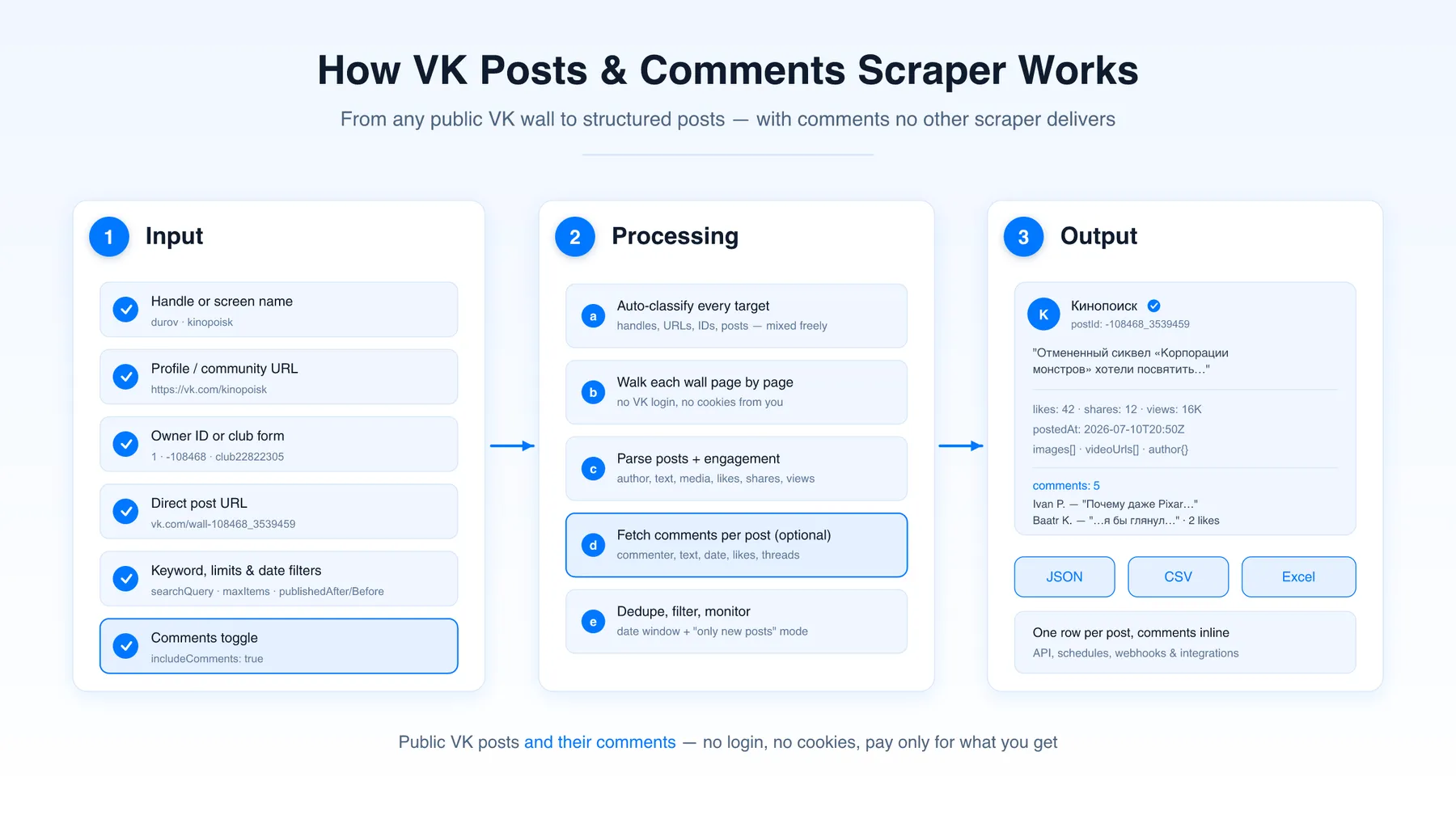
- Input — add any mix of VK handles, profile/community URLs, owner IDs, or direct post links
- Auto-classify — each target is routed to the right resolver automatically
- Walk the wall — posts are collected page by page with author, text, date, engagement, and media metadata
- Optional comments — with
includeComments, each post's visible comment thread is fetched and attached inline - Output — one row per post in your dataset, ready for JSON/CSV/Excel export, API access, schedules, and webhooks
Input Configuration
Input fields
| Field | Type | Required | Notes |
|---|---|---|---|
targets | array<string> | yes | VK handles, URLs, owner IDs, club forms, or post URLs — mixed freely |
searchQuery | string | optional | Keep only posts containing this text. Applies inside the targets above, or across all of VK when vkAccessToken is supplied |
vkAccessToken | string | optional | Your own VK API token. Only needed for VK-wide search; leave empty for normal runs |
maxItems | integer | optional | Max posts saved across the whole run (default 100 in the UI) |
maxItemsPerTarget | integer | optional | Per-wall cap; empty lets the global max control the run |
includeComments | boolean | optional | Attach each post's visible comments inline (default false) |
maxCommentsPerPost | integer | optional | Cap comments saved per post; empty saves all visible ones |
publishedAfter | string (date) | optional | Only posts on/after this date; also stops pagination early |
publishedBefore | string (date) | optional | Only posts on/before this date |
monitoringMode | boolean | optional | Skip posts already delivered to you on previous runs |
resetMonitoringState | boolean | optional | One-shot: forget the "already seen" record and rebuild the baseline |
maxConcurrency | integer | optional | Parallel page fetches (default 10) |
Common scenarios
1. Latest posts from a community, with comments
2. Several walls, capped per wall, posts only
3. Scheduled monitoring — only new posts since the last run
Run it on an Apify schedule; the first run seeds your baseline, every later run returns (and charges for) only posts you haven't received before.
Output Overview
Each dataset item is one VK post row containing:
- Core fields —
postId,ownerId,sourceUrl,text,dateRaw,postedAt,scrapedAt,target - Author — name, VK profile URL, avatar URL, verified badge
- Engagement —
likes,shares,views(parsed numbers plus VK's raw display values) - Media — attachment image URLs, video links, outbound links, repost flag + quoted text
- Comments (when
includeComments: true) — inlinecommentsarray with commenter name + profile URL + avatar, text, date, likes, thread parent, and permalink
All target types resolve to the same post shape. Fields VK doesn't expose for a given post (e.g. views on very old posts) are null rather than invented.
Output Samples
Community post with comments
Personal profile post (posts-only run)
Key Output Fields
Post core
postId,ownerId,sourceUrl,target,text,dateRaw,postedAt,scrapedAt
Author
author.name,author.profileUrl,author.avatarUrl,author.verified
Engagement
likes/likesRaw,shares/sharesRaw,views/viewsRaw
Media & links
images[],videoUrls[],outboundLinks[],isRepost,repostText
Comments (when includeComments: true)
comments[].author.{name, profileUrl, avatarUrl},comments[].textcomments[].postedAt,comments[].likes,comments[].threadOfCommentId,comments[].commentUrlcommentsScraped— how many comments were saved for the post
FAQ
Does this scraper need my VK login or cookies?
No. It reads the public, server-rendered VK pages and never asks for credentials, cookies, or tokens.
Do you return post rows or comment rows?
Post rows. Comments are attached inline as a comments array on their parent post, so one post is always one dataset row — cleaner for CSV and BI tools.
How many comments do I get per post?
The comments VK exposes to anonymous visitors — the visible thread on the post page (typically the most recent top-level comments plus their visible replies). Very long threads are returned partially; that's a VK limitation for any scraper working without your login, and this is still the only VK actor that returns comments at all. Use maxCommentsPerPost to cap them further.
Are the like/view counts exact?
VK displays large counts abbreviated ("48K", "9.1M"). The scraper returns both the parsed number (likes: 48000) and VK's raw display value (likesRaw: "48K"). Small counts are exact.
Can I use this as a VK keyword search scraper?
Partly, and the distinction matters. Set searchQuery and the scraper keeps only posts containing that text — but the search runs inside the targets you list, not across all of VK. Searching the whole network requires a logged-in account, so nobody can offer it without your credentials.
In practice the scoped version is what monitoring work needs: give it the communities and profiles you care about plus a brand or product term, and you get the matching posts with their comments.
If you do want the whole network, bring your own VK token. Leave targets empty, set searchQuery, and put the token in vkAccessToken — the run then searches all public VK instead of the walls you named. VK restricts network-wide search to real accounts, which is why this cannot be offered without a token of your own. The token is used for that run and never stored.
Why did some posts come back with zero comments?
Those posts have commenting switched off. VK exposes this per post, and the scraper checks it before asking for the thread, so a closed post returns commentsScraped: 0 instead of an error. Pavel Durov's wall is the best-known example: the posts carry six-figure like counts but no readable comments. You are never charged a comment event for them.
Can I scrape private profiles or hidden walls?
No. Only publicly available walls and posts are accessible. Private, hidden, deleted, or login-only content is skipped with a log message and never charged.
How do I get only new posts on a schedule?
Enable monitoringMode and run the actor on an Apify schedule. The actor keeps a private per-user record of delivered post IDs; each run returns only posts you haven't seen (and you're only charged for those). Use resetMonitoringState once if you ever want to rebuild the baseline.
What happens when a target cannot be read?
Private, deleted, or restricted walls are logged and skipped, and nothing is charged for them. If every target fails, the run ends as failed rather than reporting success with an empty dataset — so a run that returns nothing is never quietly billed as a good one.
Support
Found a bug or have a feature request? Open a ticket on the actor's Issues tab — I typically respond within 24 hours.
Additional Services
Need a custom export shape, deeper comment coverage, another VK surface (videos, communities directory), or scheduled delivery to your warehouse? I do tailored work — open an issue or contact me through Apify.
Explore More Scrapers
If you found this useful, you might also like:
- Facebook Public Group Posts & Comments Scraper — public FB group posts + comments, no cookies
- LinkedIn Posts Scraper — profile + company posts without cookies
- Instagram Comments Scraper — post/reel comments incl. replies
- YouTube Comments Scraper — video comments with replies
- Reddit Scraper — posts and users around any topic
- Yandex Maps Reviews Scraper — review text, stars and owner replies for businesses in Russia and the CIS
- Yandex Maps Scraper — businesses with phones, websites and ratings from Yandex Maps
Full list at apify.com/memo23.
🤖 For AI Agents & LLM Apps
What it does: returns public VK (VKontakte) wall posts as one row per post, with the comment thread attached inline when asked. No VK account, cookie, or token is required from the caller.
Minimal tested input
Accepted target forms: handle (durov), community (club1, public1, event1), numeric owner ID (-108468), wall URL, and direct post URL (https://vk.com/wall1_2442097). Mixed freely in one run.
Output fields (flat): target, postId, ownerId, sourceUrl, author{name,profileUrl,avatarUrl,verified}, text, postedAt, dateRaw, likes, likesRaw, shares, sharesRaw, views, viewsRaw, isRepost, repostText, images[], videoUrls[], outboundLinks[], comments[], commentsScraped, scrapedAt.
Comment entries: commentId, author, text, postedAt, likes, threadOfCommentId, commentUrl.
Billing: one vk-post event per saved post, one vk-comment event per saved comment, plus the standard actor-start event. Skipped and failed targets are not charged.
Behaviour worth planning around:
searchQueryfilters within the listed targets. VK-wide search needs the user's ownvkAccessToken; with it, leavetargetsempty to search all of VK. Never invent or guess a token — ask the user, or stay scoped.- Posts with commenting disabled return
commentsScraped: 0, not an error. postedAtis ISO 8601 UTC;dateRawis the raw Unix seconds.- Owner IDs are negative for communities and positive for people.
- A run where every target failed exits failed, so an empty dataset is never reported as success.
monitoringModereturns only posts not delivered on previous runs, which makes scheduled polling cheap.
⚠️ Disclaimer
This Actor is an independent tool and is not affiliated with, endorsed by, or sponsored by VK Company Limited (V Kontakte LLC) or any of its subsidiaries. All trademarks mentioned are the property of their respective owners.
The scraper accesses only publicly available VK wall and post pages — no authenticated endpoints, paid features, or content behind the vk.com login wall. Users are responsible for ensuring their use complies with vk.com's Terms of Service, applicable data-protection law (GDPR, CCPA, etc.), and any contractual obligations of their own organization.
SEO Keywords
vk scraper, scrape vk, vk posts scraper, vk comments scraper, vk.com scraper, Apify vk, vkontakte scraper, vk wall scraper, vk community scraper, vk group posts export, social media monitoring russia, vk data extraction, vk post comments export, vk engagement data, russian social media scraper, vk brand monitoring, vk API alternative, vk posts to csv, social listening vk, vk osint tool


![ForRentUniversity.com [$1.25💰] Scraper · Emails avatar](https://images.apifyusercontent.com/knob38rf08RjbTFOtyPTLKbUpJqNv69gLvD9GZvNHdY/rs:fill:76:76/cb:1/aHR0cHM6Ly9hcGlmeS1pbWFnZS11cGxvYWRzLXByb2QuczMudXMtZWFzdC0xLmFtYXpvbmF3cy5jb20vbmduOHZSRVNUa3NleVdFNnAtYWN0b3Itb2ZkQkJZZ0QzMndpZHZSemotT25mdk55NHJTQS1mcnUuanBlZw.webp)
![Collecting Cars [$3💰] | 33k SOLD prices + live bids avatar](https://images.apifyusercontent.com/Hbn_LDWbVTHAyPL8k_edq8GAZOEin7g5i4_bFf2WimM/rs:fill:76:76/cb:1/aHR0cHM6Ly9hcGlmeS1pbWFnZS11cGxvYWRzLXByb2QuczMudXMtZWFzdC0xLmFtYXpvbmF3cy5jb20vbmduOHZSRVNUa3NleVdFNnAtYWN0b3ItRm1EYVRESkEyWGNYU0s4N24tVkJhU3V5RENuYi1Db2xsZWN0aW5nX0NhcnMud2VicA.webp)


