

YouTube Channel Email Scraper & YouTube Email Finder
Pricing
from $1.13 / 1,000 channel with an e-mails
YouTube Channel Email Scraper & YouTube Email Finder
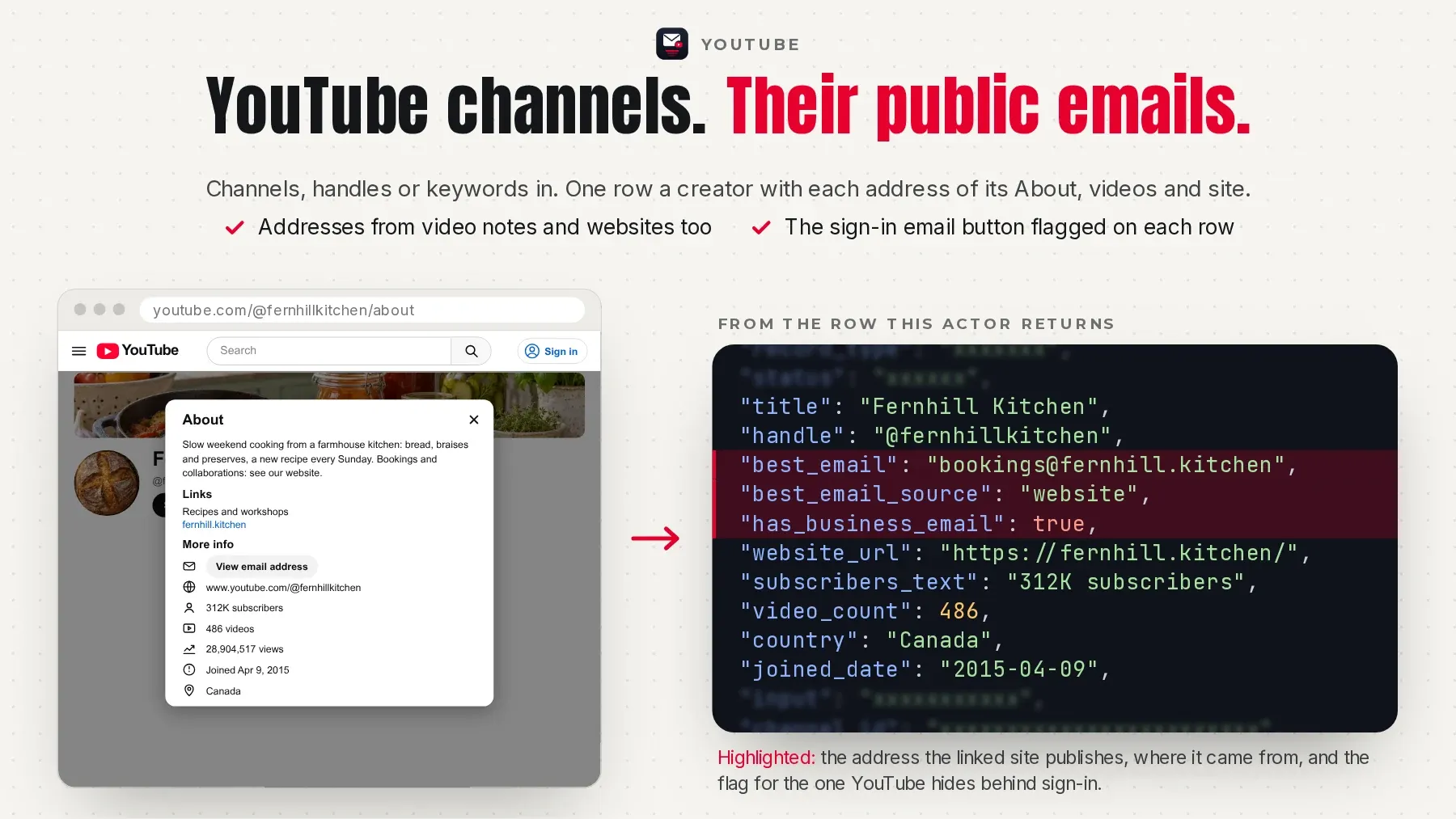
Find the emails YouTube channels publish: channels, handles, video URLs or keywords in; one row per channel with every email of the About, the newest video descriptions and its website (source, kind, mail check), the business email flag, socials and stats. Channels without an email are free.
Pricing
from $1.13 / 1,000 channel with an e-mails
Rating
0.0
(0)
Developer

Hyperbach
Maintained by CommunityActor stats
0
Bookmarked
2
Total users
1
Monthly active users
3 days ago
Last modified
Categories
Features
Share
Get the public e-mail addresses of YouTube channels: every address a channel shows logged out, from its About description, its newest videos' descriptions and its own website's home and contact pages, each with its source, its kind (role, brand or person) and an MX check, the best one first. Give channel URLs, @handles, channel IDs or video URLs, or search channels by keyword. Each row also says whether the channel has YouTube's "View email address" button, lists its social links by platform and carries its record: subscribers, views, videos, country, joined date, verified badge. A channel without a public address costs nothing. No login, no cookies, no API key, proxies handled for you.
From $1.13 per 1,000 rows (channel) on the Free plan; every row and add-on is priced under Pricing below. A run start is $0.003. The default input returns about 3 rows for about $0.00639. A channel with no public address, a handle that does not exist, a terminated channel, a channel your filters leave out, a repeat: each is a free row that says why, in YouTube's own words where it gives them.
How it compares
- 14 times cheaper than exporter24's Youtube Email Bulk Scraper, with more data: $2.13 per 1,000 channels, against $30.00; 38 fields per channel, against 3. It is 3 times faster: 3 channels in 4.4 s, against our 14 s.
- 3 times faster and 9 times cheaper than lurkapi's YouTube Channel Email Scraper, with more data: 3 channels in 14 s, against 42 s; $2.13 per 1,000 channels, against $18.35; 38 fields per channel, against 28.
Measured on 2026-11-17. Each line compares one job, run by both scrapers at the same time. Prices are per 1,000 channels: Apify Actors at the Scale plan's prices.
Tested head-to-head on 2026-11-17
The job: The public e-mails of 3 YouTube channels (@veritasium, @mkbhd, NASA: the input schema's example), with each channel's website read. Every Actor ran on it the same day from the same harness; every run's cost is at the Scale plan's prices: a rival's charged events at its price for that plan, this Actor's at its list price. Fields counts the filled fields of a typical row. dataovercoffee/Youtube-Channel-Business-Email-Scraper has more users but sells the hidden e-mail behind YouTube's sign-in button, another job; exporter24/youtube-email-bulk-scraper, the next one that reads public addresses, runs the same 3 channels. Re-measured monthly.
| Actor | Rows | First row | Run time | Cost | Fields | Failures |
|---|---|---|---|---|---|---|
| this Actor | 3 | 9.9 s | 14 s | $0.006 | 38 | none |
lurkapi/youtube-channel-email-scraper | 3 | 39 s | 42 s | $0.055 | 28 | none |
exporter24/youtube-email-bulk-scraper | 3 | 3.4 s | 4.4 s | $0.090 | 3 | none |
Why this YouTube e-mail scraper
- Three places, not one. The About description is where most channels write their address, but not all: MrBeast's newest video descriptions carry an address his About does not show; of 26 channel websites we read, the home page alone gave an address on 4 and the home with two contact-like pages on 10, and 3 hid their only addresses behind Cloudflare's e-mail protection, which this Actor decodes.
- The best address first, and its kind on every address. Each address carries its source (description, video, website and the page), its kind (
rolesuch as contact@ or business@,brand, orperson), its domain (the channel's own, a free-mail provider, another company) and an MX check. A staff member's address on a website is never ranked over the channel's own contact address: on NASA's channel the 28 addresses of its press pages givepublic-inquiries@hq.nasa.govas the best one. - No charge without an address. A channel row is charged only when it carries at least one public e-mail. A channel without one is still delivered, with its record, its links and the business-button flag, at no cost; so is every miss: a handle that does not exist, a terminated channel, a value that names nothing.
- The hidden address, said plainly. YouTube shows the address behind "View email address" only to a signed-in viewer after a CAPTCHA. This Actor reads YouTube logged out, so it does not return that address; every row says whether the button is there (
has_business_email) and why its address is not on the row, instead of an empty field. - Clean addresses. Upper and lower case are one address (business@MKBHD.com once, as written), JSON-escape debris such as
u003e…@never becomes an address, image names and template placeholders are left out, and a channel named twice by two different links is read and charged once. - Plain HTTP, no browser. Several channels are read at a time, each with its videos and its website, and each row goes out as soon as its channel is read; the card at the top gives the seconds to the first row and to the run's end for this Actor and two rivals on the same 3 channels, measured the same way on the same day.
Who it's for
- Influencer marketers and agencies — a creator list for a niche or a list you have, with the address each creator publishes for business, its kind and source, and the audience size, country and activity to choose by.
- Sales and partnership teams — the public contact of every channel on your list, the role address first, with the website and social links behind it, and no charge for the channels that publish none.
- Recruiters and researchers — who runs a channel (with the optional labels), where it is based, how active it is, and how to reach it.
- Developers and agents — one typed row per channel, a free row with the reason for every miss, and a run summary per input and per search.
Quick start
The addresses of channels you already have
Channels for a keyword, only those with an address
Mid-size US channels with a business domain address
The channels a channel features
Switching from dataovercoffee/Youtube-Channel-Business-Email-Scraper?
Your input works as it is. Each name in the left column is read as this Actor's own field and the run log says so (read <theirs> as <ours>); a name marked not read is ignored with a note. A value in the other Actor's shape, an object list or its own date form, is read too.
| dataovercoffee/Youtube-Channel-Business-Email-Scraper | this Actor | what to know |
|---|---|---|
channels | channels | The same name and the same values: channel URLs, @handles, 24-character channel IDs; video URLs are read too. |
scrape_fresh_emails | not read | Not needed: every read here is live, with no cache and no surcharge, so the value changes nothing (the run's log names it as a field it did not read). |
What differs:
- The leader returns the address behind YouTube's "View email address" button, which YouTube shows only to a signed-in viewer after a CAPTCHA. This Actor reads YouTube logged out and does not: it returns every public address (About, video descriptions, website) and flags the button on every row.
- One row per channel with every public address in
emailsand the best one inbest_email, where the leader's row has oneEmail. - Keyword search, featured channels of a seed channel, filters (subscribers, country, joined date, activity, domain type) and the social links are extra here.
- Every read is live: there is no cached value and no surcharge for a fresh one.
Output
One row per channel (and one free summary row per keyword search):
| field | meaning |
|---|---|
record_type | channel on a channel's row; search on a keyword's or a seed's free summary row; input on the one free row of a rejected input. |
status | ok: a channel with at least one public address (charged). Free rows: no_email (the channel shows no public address; its record is on the row), not_found, terminated, unavailable, no_about (a topic channel YouTube makes itself), invalid (a value that names no channel), duplicate, filtered, failed, not_read (the run stopped first); on a search row ok, no_results, or not_read (the run stopped before the search delivered a row). |
input | The value you gave that this row answers: the channel as you wrote it, or the keyword or seed that found it. |
channel_id | YouTube's channel ID (UC…). |
channel_url | The channel's page. |
handle | The channel's @handle. |
title | The channel's name. |
best_email | The address to write to first: the About description's, then a role address on the channel's website, then a video description's, then a person's address on the website. |
best_email_source | Where best_email was read: description, website or video. |
emails | Every public address found, the best first: email (lower-cased), written (as written, when it differs), source and source_url (the video or the page), kind (role, brand, person), domain (own, free_mail, other), domain_type (business or free), mx (valid, no_mx, null_mx, nxdomain, unknown). |
email_count | How many addresses emails holds. |
has_business_email | Whether the channel shows YouTube's "View email address" button. |
business_email_note | On a channel with the button: why the address behind it is not on the row (YouTube shows it only to a signed-in viewer after a CAPTCHA). |
website_url | The channel's website as read (after a short link or a link page). |
website_status | read, none (no website link), not_a_website (the link leads to a social, shop or link page), refused (refused on both connection types), failed, cut (the run's time limit came first), off (scanWebsite off). |
website_pages_read | The website pages read: the home and up to two contact-like pages. |
subscribers | Subscribers as a number (YouTube's rounded count, as the channel page shows it). |
subscribers_text | Subscribers as YouTube writes it ("21.4M subscribers"). |
view_count | The channel's total views (exact). |
video_count | The channel's videos (exact). |
country | The country the channel names on its About page. |
country_code | Its two-letter code. |
joined_date | The day the channel joined YouTube (YYYY-MM-DD). |
verified | Whether the channel carries YouTube's verified badge. |
description | The channel's full About description. |
links | Every external link of the About page: title and the real url (YouTube's redirect removed). |
instagram_url | The first Instagram link. |
x_url | The first X (Twitter) link. |
tiktok_url | The first TikTok link. |
facebook_url | The first Facebook link. |
linkedin_url | The first LinkedIn link. |
twitch_url | The first Twitch link. |
discord_url | The first Discord link. |
patreon_url | The first Patreon link. |
telegram_url | The first Telegram link. |
whatsapp_url | The first WhatsApp link. |
aggregator_url | The first link page (Linktree, Beacons …). |
last_upload_ago | The newest long-form video's age as YouTube writes it ("2 days ago"). |
last_upload_days | That age in days (the lower bound of YouTube's text). |
uploads_last_30_days | Long-form uploads in the last 30 days, among the newest 30. |
recent_avg_views | The average views of the newest long-form videos. |
videos_read | How many video descriptions were read for addresses (videoDescriptions). |
avatar_url | The channel's avatar image. |
banner_url | The channel's banner image. |
keywords | The channel's own keywords. |
analysis_niche | With labelChannels: the channel's niche (gaming, tech, science_education, food_cooking, diy_crafts …). |
analysis_channel_kind | With labelChannels: who runs it (creator, brand, media, institution, music_artist, other). |
analysis_business_inquiries | With labelChannels: whether its own words invite business inquiries (explicit, contact_only, none). |
analysis_confidence | With labelChannels: the confidence of each label, 0 to 1. |
query | The keyword or seed that found the channel. |
discovered_via | How the run found it: channel_input, channel_search, seed_featured. |
rank | Its place in your list, in the search results or on the seed's shelf. |
region | The search region whose list found it. |
source_video_id | The video whose URL you gave, when the channel came from a video link. |
verdict | On a search row: LIST_END (YouTube's list ended, an empty last page read again on fresh connections), CAPPED (the per-keyword limit), PARTIAL (the run stopped first), TRUNCATED (the page limit). |
rows_delivered | On a search row: the channel rows it delivered. |
reason | Why a row has its status, in YouTube's own words where it gives them; on a charged row, what was not read (a website refused, a cut). |
scraped_at | When this row was read (UTC). |
Example record:
Pricing
Pay only for the channels that have a public e-mail, plus one run start. No platform usage is billed to you.
| event | unit | Free | Starter | Scale | Business |
|---|---|---|---|---|---|
Channel with an e-mail (channel) | per 1,000 | $1.13 | $1.13 | $1.13 | $1.13 |
Channel labels (label) | per 1,000 | $0.20 | $0.20 | $0.20 | $0.20 |
Run start (start) | per run | $0.003 | $0.003 | $0.003 | $0.003 |
A channel row with at least one public e-mail is $1.13 per 1,000 ($0.00113 a channel; the same on every plan), with everything the row carries: every address of the About description, the newest video descriptions and the website, each with its source, kind and MX check, the business-email button flag, the social links and the channel record. A channel without a public address is delivered free. labelChannels adds $0.20 per 1,000 on a charged row that got its labels. Each run that delivers a charged row pays the run start, $0.003 once.
So the example (3 channels, each with an address) costs $0.00639; 20 listed channels of which 13 show an address $0.01769; a keyword at the default 50 channels of which 15 show an address $0.01995, and $0.02295 with the labels. Free: a channel without a public address, a channel your filters leave out, a handle that does not exist, a terminated channel, a value that names nothing, a channel the run already delivered (one row, one charge), every search's and seed's own summary row, the labels of a row that did not get them, and a run that delivered no charged row (no run start either). A run that stops early (a timeout, an abort, the charge limit) is charged for the rows it delivered.
Before the first request the log names the prices at your plan and the most the run can cost: one row a listed channel, maxChannelsPerQuery rows a keyword or a seed, capped by maxItems and by your charge limit. Enterprise plans have their own rates: the Actor's Pricing tab shows the price for your plan.
Usage patterns
- A contact list from a channel list — Paste the channels (any link form, handles or IDs): one row each, charged only when it carries a public address.
best_emailis the one to write to first;emailslists every address with its source, kind, domain type and MX. A channel with no public address still gets its row, free, with its links and whether it has the business-e-mail button. - Prospects for a niche — Search channels by keyword with the filters you need (subscribers, country, joined date, recent uploads, domain type) and
onlyWithEmailto leave out the ones without an address. Each keyword's list ends by itself, often at a few hundred channels: the keyword's summary row says where it ended and why. - Fewer reads, lower cost per channel — Set
videoDescriptionsto 0 and turnscanWebsiteoff to read only the About description: the fastest run, for lists where the About is where the channels write their address.
Input configuration
| field | type | default | what it does |
|---|---|---|---|
channels | array | [] | YouTube channels to read, one per line: a channel URL (youtube.com/@name, /channel/UC…, /c/name, /user/name, any tab), an @handle, a 24-character channel ID (UC…), or a video URL (watch, Shorts, live, youtu.be), which reads the channel that uploaded it. Each channel gives one row, the same channel once a run whatever form names it. |
searchQueries | array | [] | Keywords to search YouTube's channel results for (a niche, a topic, a brand). Each keyword's channels are read like the channels above, up to the per-keyword limit below. |
maxChannelsPerQuery | integer | 50 | The most channel rows one keyword search or one seed channel delivers, with or without an e-mail. A keyword's list ends by itself, often at a few hundred channels: the search row says where it ended. |
region | US / GB / CA / AU / NZ / IE / IN / PK / PH / ID / MY / SG / JP / KR / TW / HK / DE / AT / CH / FR / BE / NL / ES / PT / IT / PL / SE / NO / DK / FI / CZ / RO / HU / GR / TR / UA / BR / MX / AR / CO / CL / PE / ZA / NG / KE / EG / SA / AE / IL / TH / VN | "US" | The country whose YouTube search results the keywords read: YouTube shows each country its own channel list for one keyword. It changes the search only, never a channel's own record. |
similarToChannels | array | [] | Seed channels (any form the Channels field takes): each seed's featured-channels shelf is read, and every channel on it gives a row like the channels above. |
videoDescriptions | integer | 5 | How many of each channel's newest long-form videos to read the description of, for an address the About page does not show. 5 found every address 15 found on our test channels; 0 reads none. |
scanWebsite | boolean | true | Read the first website the channel links (a link page such as Linktree leads to it): its home page and up to two contact, business or about pages, for the addresses published there. Social, shop and platform links are never read as the website. |
labelChannels | boolean | false | Add three labels to each channel row with an e-mail, read by a classification model from the channel's own words: its niche (20 options), who runs it (creator, brand, media, institution, music artist) and whether it invites business inquiries. Each label answer has a confidence. |
onlyWithEmail | boolean | false | Leave out the channels a search or a seed finds that show no public address. A channel you list yourself always gets its row, with or without an address. A row without an address is never charged either way. |
emailDomainType | any / business / free | "any" | Keep business addresses only (the channel's own or a company domain), free-mail addresses only (Gmail, Outlook, Yahoo …), or any. |
minSubscribers | integer | 0 | Leave out channels with fewer subscribers (YouTube's rounded count, as the channel page shows it). 0 = no minimum. |
maxSubscribers | integer | 0 | Leave out channels with more subscribers. 0 = no maximum. |
countries | array | [] | Two-letter country codes (US, GB, DE …): keep only channels whose About page names one of these countries. A channel that names no country is left out while this is set. |
activeWithinDays | integer | 0 | Keep only channels whose newest long-form video is at most this many days old (YouTube's own "3 weeks ago" text, its lower bound). 0 = no filter. |
joinedAfter | string | "" | Keep only channels that joined YouTube on or after this date, written YYYY-MM-DD. Empty = no filter. |
joinedBefore | string | "" | Keep only channels that joined YouTube on or before this date, written YYYY-MM-DD. Empty = no filter. |
excludeChannels | array | [] | Channels (any form the Channels field takes) a search or a seed must not deliver, such as the ones you already have. |
maxItems | integer | 0 | The most charged rows of the whole run: channels with at least one public e-mail. Rows without an address and every other free row do not count. 0 = no cap beyond your charge limit. |
feedback | string | A note to the people who maintain this Actor: what you needed and did not get. For example a missing field, a wrong or empty result, or the Actor you switch from or to, and why. The run does not read it: the rows and the charges stay the same. A person reads every note. |
Errors
A run does not fail because of your input. When an input cannot be used — a date that is not a date, an id in the wrong form, two settings that contradict each other — the run ends Succeeded, charges nothing, and says what to change:
- the status message starts with
INPUT REJECTED; - the dataset holds one row,
{"error": true, "code": "…", "message": "…"}, and no results; - the key-value store record
ERRORholds the same object.
From code, check error on the first row before reading results.
A search that matches nothing is not an error: the dataset is empty and nothing is charged. A run that ends Failed is a fault on our side, never your input; it charges nothing, and we are alerted.
FAQ
Does it get the e-mail behind YouTube's "View email address" button?
No. YouTube shows that address only to a signed-in viewer after a CAPTCHA, and this Actor reads YouTube logged out with no account. Every row says whether the button is there (has_business_email) and, when there is no public address, why the row has none. The address the channel publishes anywhere else (its description, its videos, its website) is on the row.
Why did a channel I listed cost nothing?
A row is charged only when it carries at least one public e-mail address. A channel without one, a handle that does not exist, a terminated channel and a channel your filters leave out are free rows with the reason.
Which address should I use?
best_email: the channel's own words first (its About description), then a role address on its website (contact@, business@, press@), then one from a video description, then a person's address on its website. Every address is in emails with its source and kind, so you can choose differently.
Is a website's staff list included?
Yes, as person addresses after the role ones, each with the page it was read from. A link page (Linktree, Beacons) is read only for the channel's own website, never for the link service's own addresses, and social, shop and platform links are never read as the website.
Does the search region change a channel's record?
No. YouTube shows each country its own channel list for a keyword, so region picks whose list the search reads. A channel's own record and addresses are the same from every country.
Do I need Apify Proxy or my own proxy?
No. The Actor uses its own connections, at no extra cost to you.
Integration
JavaScript
Python
CLI
REST
AI agents and MCP
Apify's MCP server offers this Actor as a tool to Claude, Cursor, VS Code and any other MCP client. Connect https://mcp.apify.com?tools=hyperbach/youtube-channel-email-scraper and ask, for example: "Get the business contact e-mails of these YouTube channels from their About pages, video descriptions and websites". The agent fills the input from the table above and reads the rows from the run's dataset. A field under the name another Actor gives it is read as this Actor's own: channelUrls, channelHandles, channelIds, handles as channels; keywords, queries, searchTerms, search as searchQueries; seedChannels, lookalikeChannels, similarChannels as similarToChannels; maxResults, maxChannels, limit, resultsLimit as maxItems (and more). An agent or a person can add feedback to any run and say what was needed and not delivered: a missing field, a wrong or empty result, the Actor switched from or to, and why. The run returns the same rows at the same price, and a person reads every note.
n8n, Make and Zapier
The Apify node in n8n, the Apify app in Make and the Apify integration in Zapier run this Actor on a schedule or from a trigger and read its dataset. A webhook on the run's end (Integrations on the Actor page) sends the rows on to your own endpoint. Nothing to install on our side.
Support
Disagree with a charge? Write to apify@hyperbach.com with the run ID. We will ask Apify to compensate you, and the charge comes back to your Apify account as platform credit.
Did it do the job? A short review on the Store, at any rating, helps the next buyer choose.
See also
- YouTube Video Scraper — videos and Shorts by keyword, channel, playlist or hashtag, with views, likes and the full description.
- YouTube Channel Search Scraper — the YouTube channels a keyword finds, with subscribers, the exact video and view counts and the country.
- YouTube Transcript Scraper — the transcript of any video, channel, playlist or search, each row saying which caption track it is.
- YouTube Comments Scraper — the comments under videos, Shorts and community posts, with their replies on request.
- YouTube Scraper & Video Downloader — videos, Shorts, playlists and channels with every stream link, and the MP4 / MP3 file or subtitles on request.
- Telegram Profile Scraper — Telegram channels, groups, bots and users by username or link, with the exact subscriber or member count.
Run them together: Put the channel_url of the channels this run finds into YouTube Video Scraper to get each channel's videos with their views and likes.
This page is generated from the Actor's schemas and a live sample — it cannot describe a field the Actor does not have.


