

YouTube Transcript Scraper: Full Channel + AI Clone
Pricing
from $3.00 / 1,000 video transcripts
YouTube Transcript Scraper: Full Channel + AI Clone
Get the transcripts of every video or Short of a YouTube channel (by number or date range) and turn them into a complete 'Clone of X' knowledge profile: beliefs, frameworks, voice and FAQ, ready for a Custom GPT, Gemini Gem or Claude Skill.
Pricing
from $3.00 / 1,000 video transcripts
Rating
0.0
(0)
Developer

Ingeniela
Maintained by CommunityActor stats
0
Bookmarked
2
Total users
1
Monthly active users
13 days ago
Last modified
Categories
Features
Share
YouTube Channel Transcripts & AI Clone Builder (GPT, Claude)
Paste a YouTube channel link and get the transcripts of its videos or Shorts: the newest 200 videos, 300 Shorts, or everything published between two dates. Add AI and the Actor reads every transcript and writes a complete "Clone of X" knowledge profile: the creator's core beliefs, frameworks, opinions, stories, voice and an FAQ answered in their style. It also gives you instructions ready to paste into a Custom GPT or Gemini Gem, and a Claude Skill (.zip) you can upload as it is.
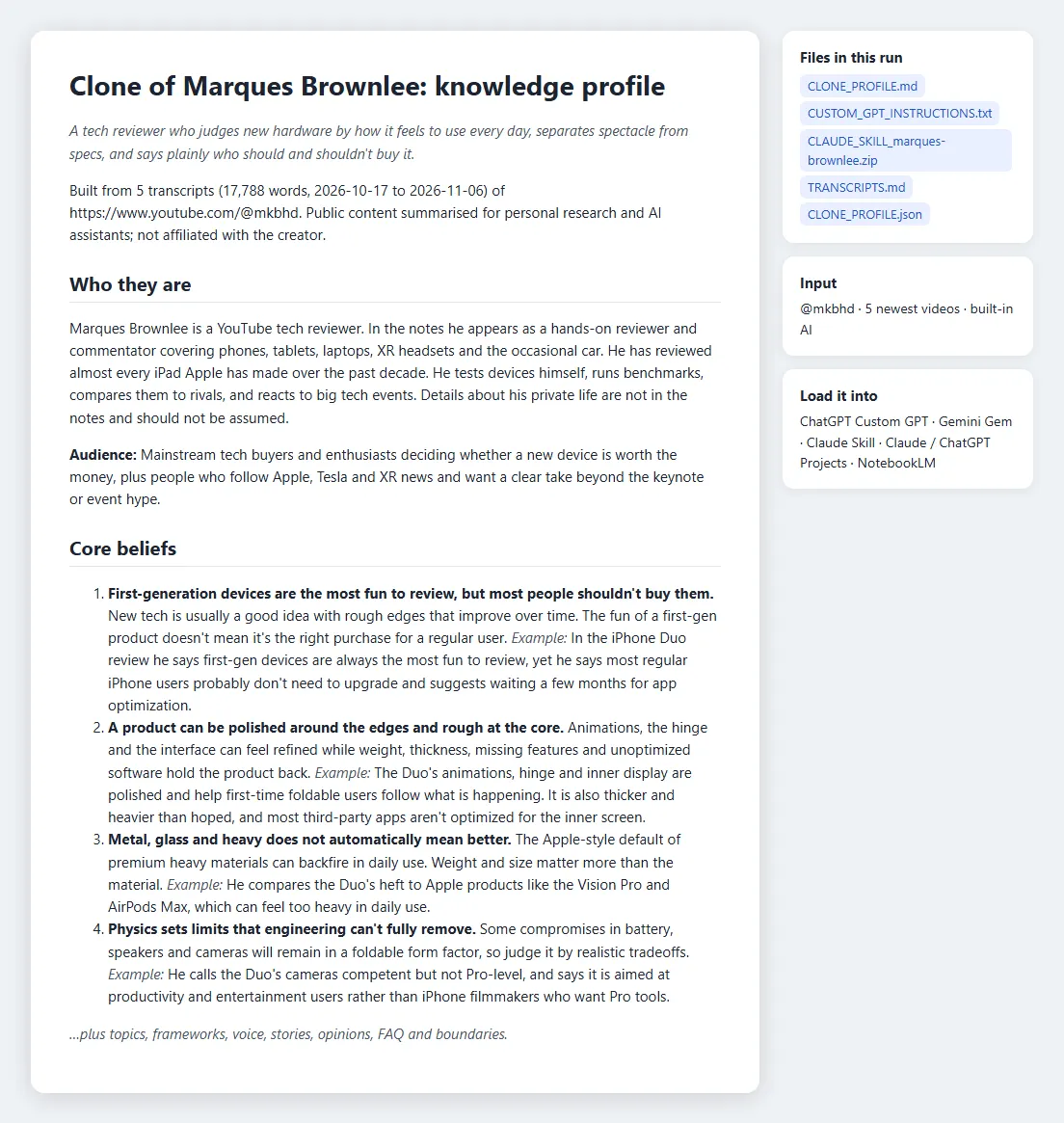
Real output from a run on @mkbhd (5 newest videos, 17,788 words, built-in AI). The full profile continues with topics, frameworks, voice, stories, opinions, FAQ and boundaries. The run cost $0.565 in events.
Tutorial (1 minute)
Every result in this tutorial comes from a real run.
What you get
- Transcripts of every selected video or Short: clean text without timestamps or the repeated lines of automatic captions, with title, date, views, likes, length and language. Human-made subtitles are preferred over automatic ones.
- TRANSCRIPTS.md: all transcripts in one Markdown file, newest first. Ready to use as a knowledge file.
- CLONE_PROFILE.md (with AI): who the creator is, 8-15 core beliefs with examples, main topics, every framework with its steps, voice and style (tone, structure, hooks, signature phrases, words they avoid), recurring stories, stances on debated topics, recommended books and tools, 12-20 FAQ answers in their voice, how the message changed over time, and boundaries.
- CUSTOM_GPT_INSTRUCTIONS.txt (with AI): instructions under the 8,000-character limit of ChatGPT Custom GPTs and Gemini Gems.
- CLAUDE_SKILL_ (with AI): a Claude Skill folder with
SKILL.md, the profile and all transcripts as references. - CLONE_PROFILE.json: the same profile as structured data, for your own apps.
How to use it
- Paste the channel (link, @handle or channel ID).
- Choose videos, Shorts or both.
- Choose Number of videos (for example 200 videos or 300 Shorts, newest first) or Date range (from one date to another).
- Keep Build the AI clone profile on to get the profile. You can use the built-in AI or add your own AI key (Anthropic, OpenAI, OpenRouter, Gemini, Grok, DeepSeek or Mistral).
- Click Start. 50 videos take about 3-6 minutes.
- Open the Output tab: transcripts table, profile, GPT instructions and all files.
Load the clone into your assistant
| Assistant | What to do |
|---|---|
| ChatGPT Custom GPT | Explore GPTs > Create > Configure. Paste CUSTOM_GPT_INSTRUCTIONS.txt into Instructions and upload CLONE_PROFILE.md and TRANSCRIPTS.md as Knowledge. |
| Gemini Gem | Gem manager > New Gem. Paste the instructions and add both Markdown files as knowledge. |
| Claude Skill | Settings > Capabilities > Skills > Upload skill, and choose the .zip. In Claude Code, unzip it into ~/.claude/skills/. |
| Claude or ChatGPT Project | Add CLONE_PROFILE.md and TRANSCRIPTS.md to the project files and the instructions to the project instructions. |
| NotebookLM or your own RAG | Upload TRANSCRIPTS.md, or read the dataset through the API. |
Input example
Date range example: "selectBy": "dates", "dateFrom": "2026-01-01", "dateTo": "2026-06-30", "contentType": "shorts".
Output (one row per video)
How it works
- The Actor collects, on your Apify account (about US$0.004 per video), the channel's videos or Shorts, newest first, with their subtitles.
- Subtitles become clean text. Rolling duplicates of automatic captions are removed, and in date mode only videos inside your dates are kept.
- With AI, a fast model reads every transcript and takes structured notes: ideas, beliefs, advice, stories, quotes, frameworks and recommendations.
- Notes are merged step by step, so even 500 videos fit.
- A stronger model writes the final profile from the merged notes and the dated list of videos.
Pricing
Pay per event. You only pay for results:
| Event | Price |
|---|---|
| Video transcript in the results | $0.003 |
| Video read by the built-in AI | $0.01 |
| Clone profile + GPT instructions + Claude Skill (built-in AI) | $0.50 |
Collecting the videos runs on your Apify account (about US$0.004 per video). With your own AI key the two AI events are not charged.
Examples with the built-in AI: 50 videos ≈ $0.15 + $0.50 + $0.50 = $1.15. 200 videos ≈ $0.60 + $2 + $0.50 = $3.10. Transcripts only, 300 Shorts ≈ $0.90.
FAQ
Can I get transcripts without AI? Yes. Turn off Build the AI clone profile, or leave the AI keys empty and turn it off. You get the dataset and TRANSCRIPTS.md.
What if a video has no subtitles? It is listed without a transcript and not charged. Turn on Transcribe videos without subtitles to transcribe it with AI (about US$0.05 per minute, on your Apify account).
Which language is the profile in? The language of most transcripts, or the one you choose in Profile language.
Is this legal? The Actor reads public videos and summarises them for research and personal assistants. The profile says it is not affiliated with the creator, and the assistant instructions tell the AI to never claim to be the creator. Do not use a clone to impersonate a person or to sell their content.
How long can the channel be? Up to 5,000 videos and 5,000 Shorts per run. For very large channels, use date ranges.


