


Naver Search API | Web, News, Image, Video, Shopping (Korea)
Pricing
from $0.01 / 1,000 results
Naver Search API | Web, News, Image, Video, Shopping (Korea)
Scrape Naver, Korea's largest search engine, across web, news, image, video, and shopping results as structured JSON. Run many queries at once, pick the vertical, and paginate. Built for Korean market research, SEO, and AI agents. Pay per result, MCP-ready.
Pricing
from $0.01 / 1,000 results
Rating
0.0
(0)
Developer

John
Maintained by CommunityActor stats
1
Bookmarked
2
Total users
1
Monthly active users
16 hours ago
Last modified
Categories
Share
한국어 안내 (Korean)
소개
한국 최대 검색 엔진 네이버를 검색하고, 웹·뉴스·이미지·동영상·쇼핑 등 다섯 가지 결과 유형을 깔끔한 JSON으로 받을 수 있습니다. 여러 검색어를 한 번에 실행하고, 검색 영역을 선택하고, 페이지네이션과 내보내기까지 지원합니다. 한국 시장 조사, K-콘텐츠 인텔리전스, 이커머스 가격 분석, SEO, AI 에이전트 연동에 적합합니다. 결과 건당 과금이며 월 최소 요금은 없습니다.
네이버는 한국 검색 시장을 지배하며, Google과는 전혀 다른 결과 구조를 가집니다. 이 API는 HTML 파싱 대신 정형화된 행(row) 데이터로 결과를 제공하므로, 한국 웹·뉴스 흐름·상품 시장·동영상 생태계를 바로 분석할 수 있습니다.
제공 기능
where 입력값으로 검색 영역을 선택합니다. 통합 검색(nexearch)은 한 번의 호출로 여러 결과 블록을 반환하고, 단일 영역 검색은 해당 유형에 집중해 페이지네이션합니다.
where 값 | 반환 내용 | 주요 필드 |
|---|---|---|
nexearch (기본값) | 통합 검색: 광고 + 웹 + 쇼핑 + 뉴스 블록 | 혼합, result_type으로 구분 |
web | 웹 자연 검색 결과 | title, link, snippet, source, displayed_link |
news | 뉴스 결과 | title, link, snippet, news_info (언론사, 날짜) |
image | 이미지 결과 | title, link, original, width, height, thumbnail |
video | 동영상 결과 | title, link, channel, duration, views, publish_date |
모든 행에는 result_type (web_organic, ad, shopping, news, image, video), 원본 query, where 영역, position(순위)이 포함됩니다.
활용 사례
- 브랜드·인물·주제에 대한 한국 뉴스 흐름을 여러 검색어로 추적
- 네이버 쇼핑 가격·평점·리뷰 수를 수집해 경쟁 가격 분석
- K-뷰티, K-pop, K-콘텐츠 키워드를 웹·뉴스·동영상에서 모니터링
- 검색·NLP·AI 학습용 한국어 데이터셋 구축
- MCP 한 번의 호출로 AI 에이전트에 실시간 네이버 검색 결과 제공
입력
| 필드 | 타입 | 설명 |
|---|---|---|
query | string | 단일 검색어. 한국어 또는 다른 언어 가능 (예: 서울 맛집). query, queries 중 하나 또는 둘 다 입력 |
queries | string 배열 | 여러 검색어를 한 번에 실행. query와 병합 후 중복 제거 |
where | string | 검색 영역: nexearch(통합, 기본값), web, news, image, video |
maxResultsPerQuery | integer | 검색어당 결과 행 수. 기본 30, 최대 300 |
입력 예시
출력 예시
쇼핑 행에는 price, rating, reviews, stores가 추가됩니다. 동영상 행에는 channel, duration, views가, 이미지 행에는 original, width, height가 포함됩니다.
Naver Search API | Web, News, Image, Video, Shopping (Korea)
Search Naver, South Korea's largest search engine, and get clean structured JSON across five result types: web organic, news, images, video, and shopping. Run many queries at once, pick the vertical, paginate, and export. Built for Korean market research, K-content intelligence, e-commerce pricing, SEO, and AI agents. Pay per result, with no monthly minimum.
Naver dominates search in Korea, and its results look nothing like Google's. This API gives you that data as structured rows instead of brittle HTML, so you can analyze the Korean web, news cycle, product market, and video landscape directly.
What you get
Pick a vertical with the where input. The integrated view returns several result blocks in one call; the single-vertical views drill in and paginate.
where value | Returns | Typical fields |
|---|---|---|
nexearch (default) | Integrated page: ads + web + shopping + news blocks | mixed, tagged by result_type |
web | Web organic results | title, link, snippet, source, displayed_link |
news | News results | title, link, snippet, news_info (press, date) |
image | Image results | title, link, original, width, height, thumbnail |
video | Video results | title, link, channel, duration, views, publish_date |
Every row carries a result_type (web_organic, ad, shopping, news, image, video), the query it came from, the where vertical, and a position.
Use cases
- Track the Korean news cycle for a brand, person, or topic across many queries
- Pull Naver shopping prices, ratings, and review counts for competitive pricing
- Monitor K-beauty, K-pop, and K-content terms across web, news, and video
- Build Korean-language datasets for search, NLP, or AI training pipelines
- Give an AI agent live Naver results for the Korean market in one MCP call
Input
| Field | Type | Description |
|---|---|---|
query | string | A single search query, in Korean or any language, e.g. 서울 맛집. Provide this, queries, or both. |
queries | array of strings | A batch of queries to run in one go. Merged with query and de-duplicated. |
where | string | Vertical to search: nexearch (integrated, default), web, news, image, or video. |
maxResultsPerQuery | integer | Result rows per query. Default 30, maximum 300. |
Example input
Sample output
A shopping row adds price, rating, reviews, and stores; a video row adds channel, duration, and views; an image row adds original, width, and height.
Pricing
Pay-per-result: a small actor_start fee plus a per-result charge. The per-result price scales down with your Apify plan.
| Plan | Per result | Start fee |
|---|---|---|
| Free | $0.005 | $0.00005 |
| Bronze | $0.004 | $0.00005 |
| Silver | $0.0035 | $0.00005 |
| Gold | $0.003 | $0.00005 |
Beyond a negligible per-run start fee, you only pay for the result rows you receive. No monthly minimum.
How to get started
- Open Naver Search API on the Apify Store.
- Enter a
query(or aquerieslist) and pick awherevertical. - Set
maxResultsPerQuery, then run the Actor. - Export the dataset as JSON, CSV, or Excel, or pull it from the API.
Prefer code? See the Naver Search API example repo for a Python quick-start and MCP setup guides.
Run from the API
🔌 Use this API from AI agents (MCP)
This Actor works with the Model Context Protocol (MCP), an open standard that lets AI assistants call external tools. Instead of copying curl commands or pasting JSON into a chat, your agent can search Naver directly: pick a vertical (web, news, image, video, or integrated nexearch), run batch queries, and read structured rows back into the conversation.
Why connect via MCP?
- Live Korean search data - Agents get current Naver results (news, shopping prices, video metadata) without you writing API glue code.
- Structured output - Each row includes
result_type,query,position, and vertical-specific fields, so the model can summarize, compare, or export without parsing HTML. - Pay per result - Runs use your Apify account; you only pay for rows returned, same as running the Actor in the Console.
- Works across clients - One hosted Apify MCP server connects to Cursor, Claude, ChatGPT, and other MCP-capable tools.
Prerequisites
Before you connect any client:
- Apify account - Sign up if you do not have one.
- Apify API token - From Settings → API & Integrations in Apify Console. The hosted MCP server uses OAuth on first connect, or you can pass the token in an
Authorizationheader (see Apify MCP docs). - An MCP-capable client - Cursor, Claude Desktop, Claude on the web, Claude Code, Claude Cowork, or ChatGPT (Developer Mode; plan details below).
Actor-specific MCP URL
Use this URL so the Apify MCP server loads Actor discovery, Apify docs search, and this Naver Search API as callable tools:
You can also build the same URL in the Apify MCP configurator (select tools visually, then copy the config or one-click install for supported clients).
Example prompt after setup: "Search Naver news for 삼성전자 and return the top 20 results with title, link, and press name."
Video walkthrough: Integrate Apify Actors with Claude via MCP
Full reference: Apify MCP server documentation
MCP setup by client
The hosted server URL is the same everywhere: paste https://mcp.apify.com/?tools=actors,docs,johnvc/naver-search-api (or use OAuth with https://mcp.apify.com and add this Actor via tool selection). On first connect, your browser opens to sign in to Apify and authorize the connection.
Visual setup guides for each client (source and more assets: ApifyPublicData on GitHub):
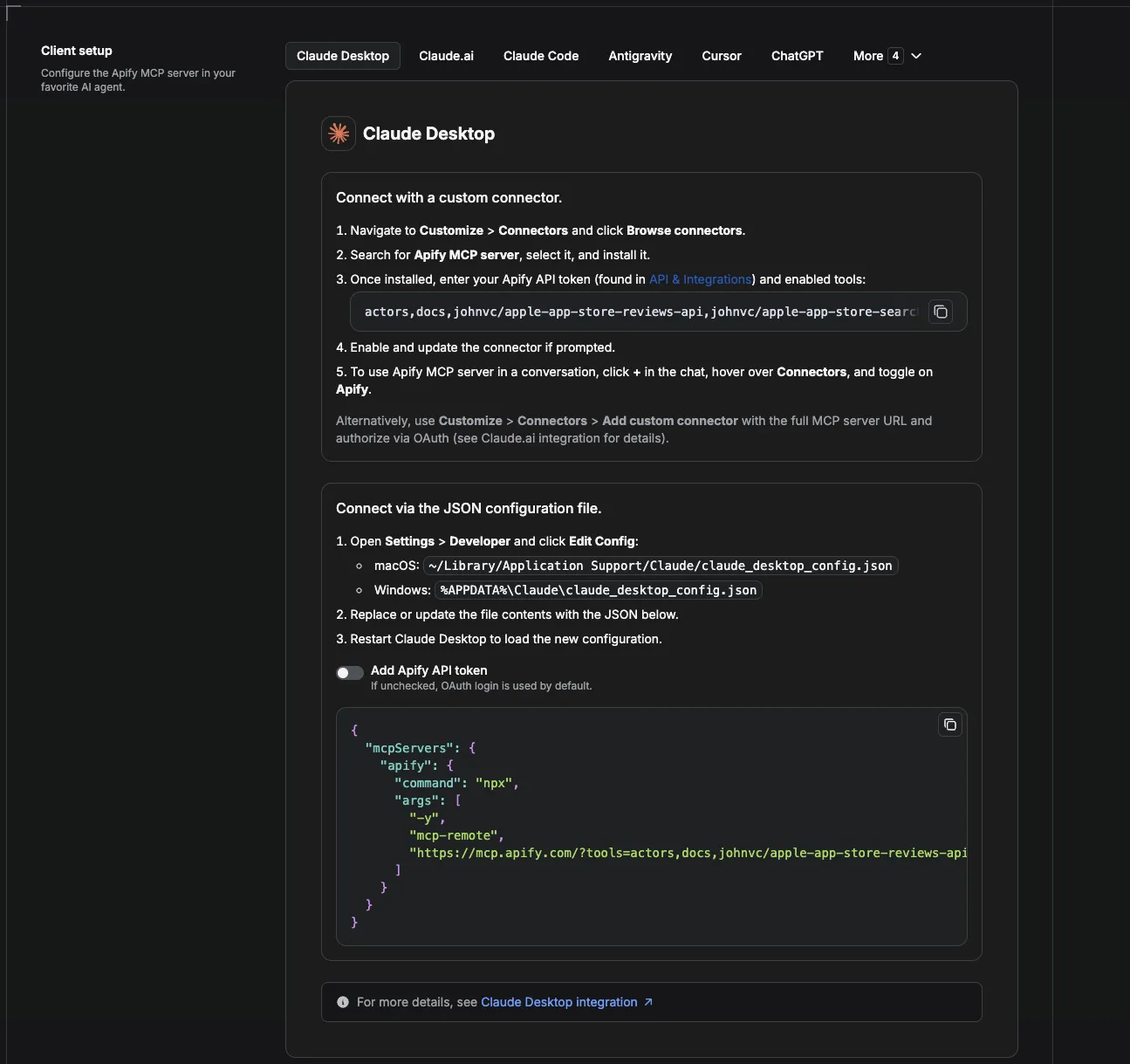
Claude Cowork Desktop
Cowork runs multi-step agent tasks on your machine. Remote MCP connectors are tied to your Claude account; traffic to Apify goes through Anthropic’s infrastructure, not a local stdio process.
- Open Settings → Connectors (or Customize → Connectors).
- Click Add custom connector and paste the Actor-specific MCP URL above.
- Complete OAuth when prompted (Apify sign-in).
- In a Cowork task, ask for a Naver search; the agent can call the Naver Search API tool.
- Install guide: Get started with custom connectors (remote MCP)
- Connectors page: claude.ai/customize/connectors
- Try Cowork: Claude Cowork (free trial)
Claude Code
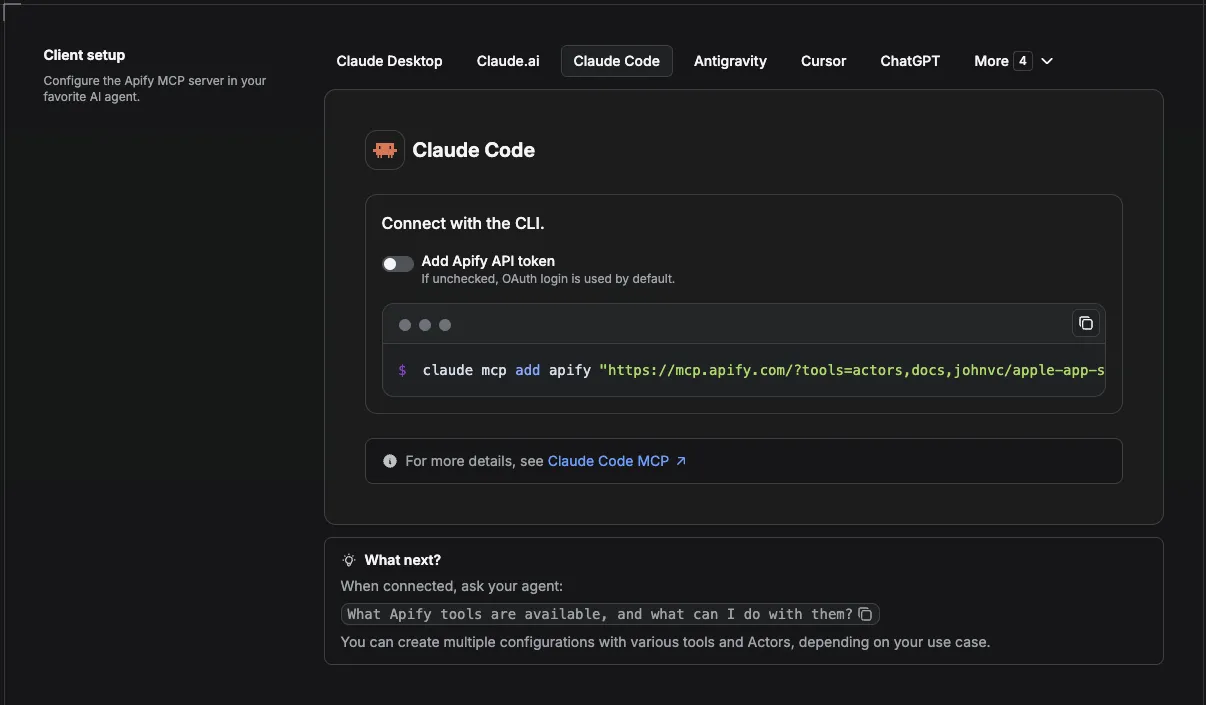
Claude Code is Anthropic’s terminal-based coding agent. Add the Apify MCP server with the CLI or a project config file so coding sessions can pull Naver data while building scripts or dashboards.
CLI (HTTP / recommended):
Then run /mcp inside a session to verify the server and list tools. Authenticate via OAuth when prompted.
Project file: Add the same URL under mcpServers in .mcp.json at your project root (share the server definition with your team; keep tokens in env or OAuth, not in git).
- Install guide: Connect Claude Code to tools via MCP
- Try Claude Code: Claude Code (free trial)
Claude (website - claude.ai)
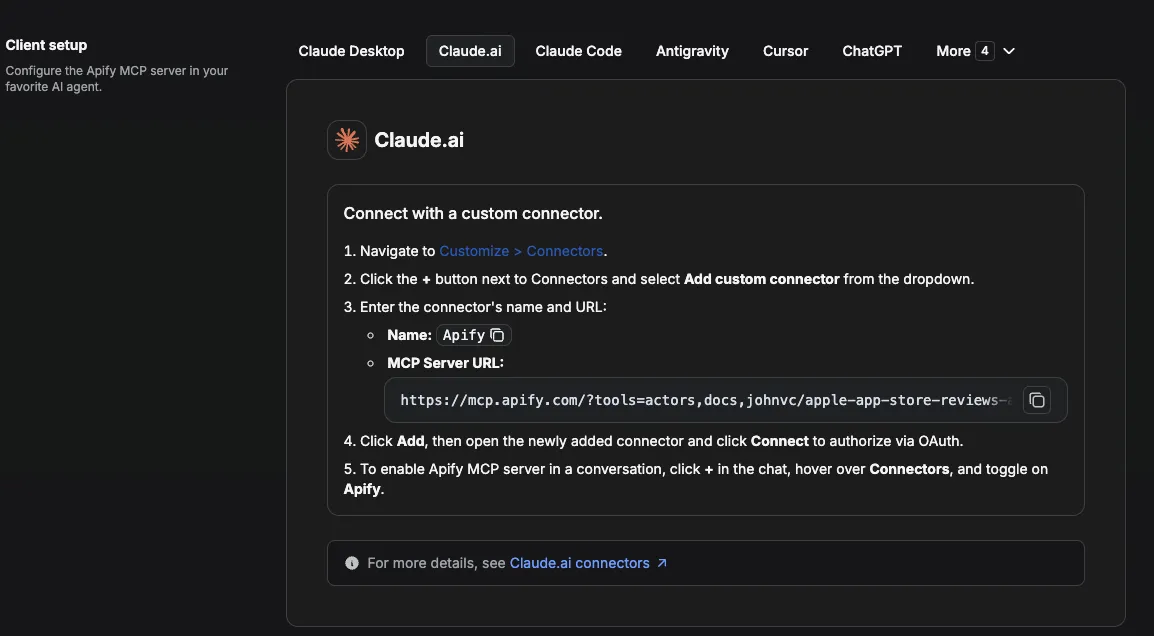
On the web app, custom connectors use the same remote MCP flow as Cowork. Free plans can add one custom connector; Pro/Max/Team/Enterprise allow more (see Anthropic’s connector limits).
- Go to Customize → Connectors.
- Click + → Add custom connector.
- Paste the Actor-specific MCP URL and finish OAuth with Apify.
- Start a chat and enable the connector for that conversation.
- Install guide: Get started with custom connectors using remote MCP
- Local desktop alternative: Claude Desktop MCP / extensions (search the connector directory for “Apify” or add the same remote URL under Settings → Connectors)
Cursor
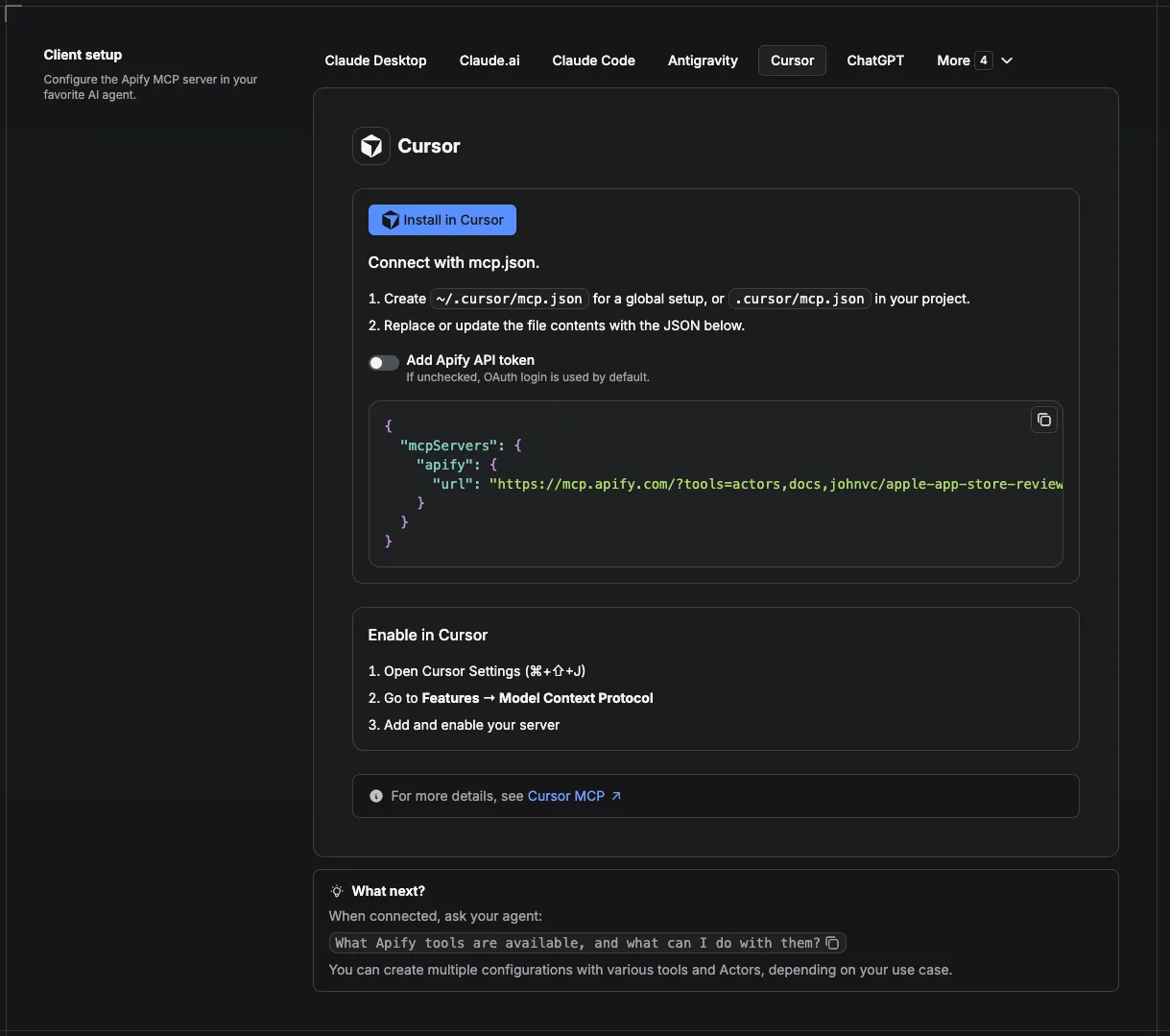
Cursor’s agent can call MCP tools from Composer and Chat. Apify’s configurator offers a one-click Add to Cursor button; you can also edit JSON manually.
- Open Cursor Settings → MCP (or create
.cursor/mcp.jsonin your project, or~/.cursor/mcp.jsonglobally). - Add the Apify server with the Actor-specific URL:
- Restart Cursor or reload the window. On first use, complete Apify OAuth in the browser.
- In Agent mode, ask for a Naver search; confirm apify-naver tools appear under available MCP tools.
- Install guide: Model Context Protocol (MCP) - Cursor Docs
- Apify + Cursor details: Apify MCP - Cursor section
ChatGPT
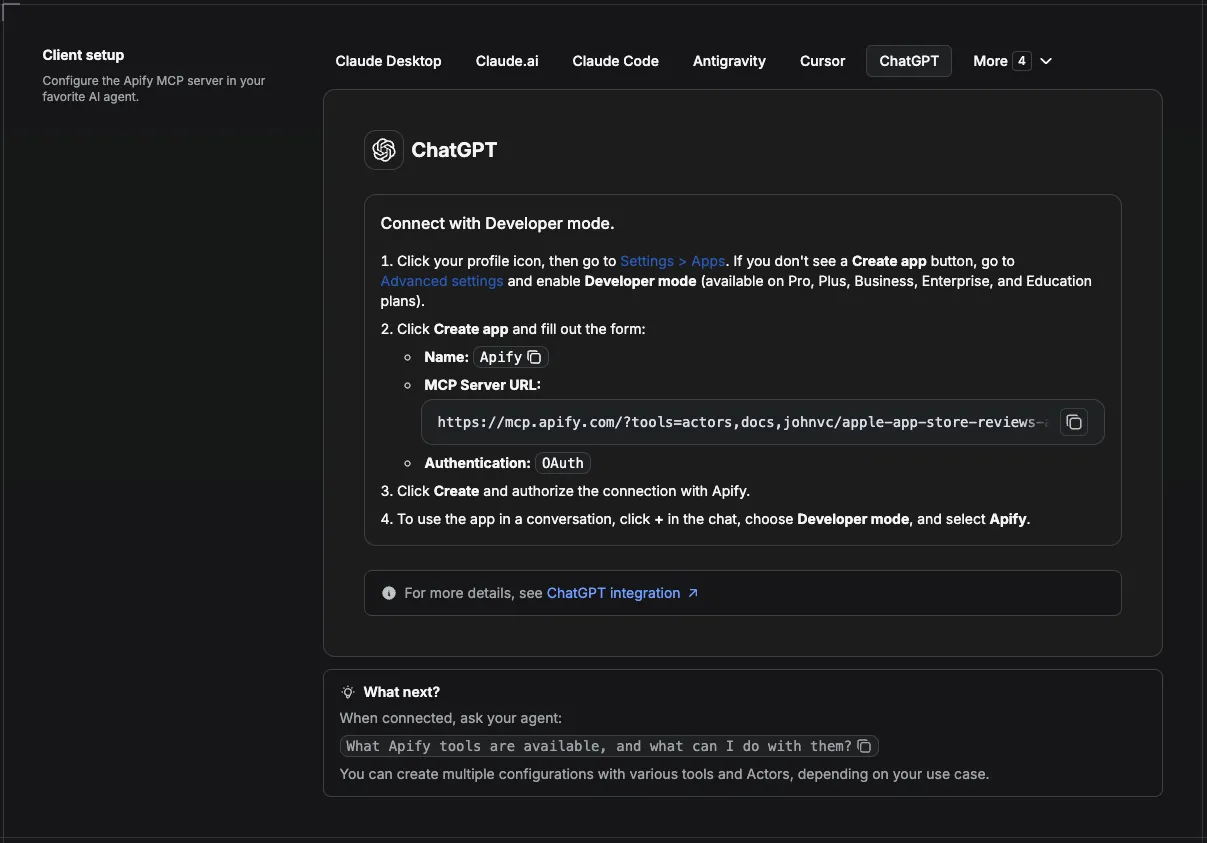
ChatGPT connects to remote HTTPS MCP servers through Developer Mode (Apps / Connectors). Availability depends on your plan: Pro users can add custom connectors with read-oriented tools; full write-capable MCP is primarily for Business, Enterprise, and Edu workspaces (OpenAI Help Center).
- Settings → Apps & connectors → Advanced - turn on Developer Mode (workspace admins may need to enable this for Business/Enterprise).
- Connectors → Create - name the app (e.g. “Apify Naver”), paste the Actor-specific MCP URL, choose auth (OAuth is recommended for Apify).
- Authorize when ChatGPT lists the tools, then prompt in a new chat with the app enabled.
If your MCP server is only on a private network, OpenAI’s Secure MCP Tunnel can expose it without a public URL.
FAQ
What is nexearch? It is Naver's integrated results page. One call returns several blocks at once (ads, web, shopping, news), each row tagged with its result_type. Use it for a broad snapshot; use web, news, image, or video to go deep on one type.
Can I search in Korean? Yes. Queries can be Korean or any language. Naver indexes the Korean web, so Korean queries return the richest results.
How many results per query? Set maxResultsPerQuery (default 30, maximum 300). The Actor paginates and stops early when a query runs out of results, so you only pay for what exists.
Does it return shopping prices? Yes. Shopping rows include price, rating, reviews, and stores. Shopping blocks appear in the integrated nexearch view for product-intent queries.
Can I run many queries at once? Yes. Pass a queries list; each is searched independently and tagged with its source query.
Last Updated: 2026.06.03


![Gumtree $1.75💰 [AUS-UK-NZ-SA] Search By URL or Keywords avatar](https://images.apifyusercontent.com/kgmlrObtAUBzodAVIvIlEOYc5nL28EawQHmrI3258Tk/rs:fill:76:76/cb:1/aHR0cHM6Ly9hcGlmeS1pbWFnZS11cGxvYWRzLXByb2QuczMudXMtZWFzdC0xLmFtYXpvbmF3cy5jb20vbmduOHZSRVNUa3NleVdFNnAtYWN0b3ItSG9wcTN5ZWJXRVRkVko0d0EtaDJ2ZVBuZ3RGMC1ndW10cmVlLnBuZw.webp)


