

X (Twitter) Advanced Search Scraper 𝕏
Pricing
from $0.35 / 1,000 results
X (Twitter) Advanced Search Scraper 𝕏
Advanced X (Twitter) post search with 50+ filters: content, users, geo, time, engagement, media. Dual modes: simple queries or structured filters. Enterprise-grade reliability for precise data extraction
Pricing
from $0.35 / 1,000 results
Rating
4.9
(43)
Developer

API ninja
Maintained by CommunityActor stats
112
Bookmarked
3.5K
Total users
497
Monthly active users
2.8 hours
Issues response
a month ago
Last modified
Categories
Share
🚀 X (Twitter) Advanced Search Actor
X (Twitter) Advanced Search Actor is a powerful web scraping tool that extracts tweets, user profiles, and engagement metrics from X (formerly Twitter) without requiring official API access. Get comprehensive Twitter data including tweets, replies, quotes, retweets, and detailed user information using simple search queries or advanced filtering options—no Twitter API key needed.
Perfect for market research, social listening, sentiment analysis, competitor monitoring, and academic studies. Extract thousands of tweets with full engagement metrics, author details, hashtags, and more in minutes.
What is X (Twitter) Advanced Search Actor?
X (Twitter) Advanced Search Actor is the most sophisticated Twitter scraper and X.com scraper available on Apify. It serves as a powerful Twitter search API alternative that enables you to scrape data from X (Twitter) without API keys or rate limits. Whether you need to extract tweets for research, monitoring, or analysis, this Twitter data extraction tool provides unmatched flexibility and reliability.
Why Use This Twitter/X Search Scraper?
Trend Monitoring: Track hashtags, keywords, and conversations over time to identify emerging trends before they go viral.
Brand Monitoring & Competitor Tracking: Monitor brand mentions, customer sentiment, and competitor activities in real-time across the Twitter ecosystem.
Lead Generation & Influencer Discovery: Find potential customers discussing problems your product solves, and identify decision-makers and influencers in your industry.
Research & Sentiment Analysis: Collect comprehensive datasets for academic research, sentiment analysis, market intelligence, and social listening initiatives.
💼 Why Scrape Twitter Data?
Twitter (X) is one of the world's largest real-time information networks, making it invaluable for business intelligence and research. Here's why thousands of users scrape Twitter data:
Market Research & Competitor Analysis
- Track brand mentions and customer sentiment in real-time
- Monitor competitor activity, product launches, and marketing campaigns
- Identify emerging trends before they go mainstream
- Analyze audience reactions to events and announcements
Social Listening & Customer Insights
- Gather customer feedback and feature requests
- Understand pain points and common complaints
- Track crisis management and reputation issues
- Discover what your audience cares about most
Lead Generation & Sales Intelligence
- Find potential customers discussing problems your product solves
- Identify decision-makers and influencers in your industry
- Track job changes and business opportunities
- Build targeted outreach lists based on interests and engagement
Content Strategy & Marketing
- Analyze what content performs best in your niche
- Find trending topics and conversation starters
- Discover influential voices and partnership opportunities
- Track hashtag performance and viral content patterns
Academic & Social Research
- Study information diffusion and network effects
- Analyze political discourse and public opinion
- Research social movements and community formation
- Track misinformation and content moderation patterns
How to Use X (Twitter) Advanced Search Actor to Scrape Twitter Data
Extracting Twitter data with our Advanced Search Actor is simple, even if you've never used Apify before:
- Open the Actor - Click "Try for free" on this page or go to Apify Console
- Choose your search method - Use a simple text query for quick searches (like Twitter's search bar) or advanced filters for precision targeting
- Enter your search criteria - Type keywords, hashtags, or usernames in simple mode, or configure detailed filters like date ranges, engagement thresholds, and geographic locations
- Select search type - Choose Latest (chronological), Top (most relevant), Media (photos/videos), or People (user accounts)
- Set the number of tweets - Specify how many tweets you want to collect (default: 100)
- Run the Actor - Click "Start" and watch as your data is collected in real-time

- Download your dataset - Export results in JSON, CSV, Excel, HTML, or XML format for immediate use
First time on Apify? Every new account gets $5 in free credits—enough to scrape tweets at no cost. No credit card required to start.
✨ What Can X (Twitter) Advanced Search Do?
Our Actor is the most sophisticated Twitter scraping solution on Apify, offering unmatched flexibility and control:
🎯 Dual Search Modes for Every Use Case
- Simple Query Mode: Use familiar Twitter search syntax for quick searches—just like searching on Twitter itself
- Advanced Filter Mode: Leverage 50+ structured filter options across 8 categories for surgical precision in data collection
🔍 Industry-Leading Filter System
- Content Filters: Keywords, exact phrases, hashtags, cashtags, language, emoticons, emojis, and more
- User Filters: Target specific accounts, verified users, blue checkmarks, or filter by follower counts
- Geographic Filters: Search by location, city, coordinates, radius, or specific place IDs
- Time Filters: Date ranges, relative time windows, specific timestamps, or tweet ID ranges
- Engagement Filters: Set minimum/maximum thresholds for likes, retweets, replies, and quotes
- Media Filters: Filter by images, videos, links, news content, or safe content only
- Tweet Type Filters: Target original tweets, replies, quotes, retweets, or conversation threads
- Source Filters: Filter by posting device/app (iPhone, Android, web, TweetDeck, etc.)
🧠 Smart Features That Save You Time
- Intelligent Query Optimization: Automatic query refinement for better performance and results
- Engagement Presets: One-click filters for viral (1000+ likes), high (100-1000 likes), medium (10-100 likes), or low engagement content
- Robust Input Validation: Prevents invalid filter combinations before you waste compute units
- Automatic Pagination: Seamlessly handles datasets of any size with cursor-based navigation
- Structured JSON Output: Clean, consistent data format ready for analysis, databases, or integrations
🚀 Apify Platform Advantages
When you use this Actor on Apify, you get much more than just a scraper:
- ☁️ Cloud Infrastructure: No server setup required—runs in Apify's robust cloud environment
- 📅 Scheduled Runs: Automate daily, weekly, or custom scraping schedules for ongoing monitoring
- 🔗 API Access: Integrate Twitter data directly into your applications with simple API calls
- 📊 Unlimited Storage: Store all your datasets in the cloud with no size limits
- 🔄 Webhooks: Get instant notifications when runs complete or encounter issues
- 🌐 Proxy Rotation: Built-in residential and datacenter proxies ensure reliable, unblocked scraping
- 🔌 Integrations: Connect seamlessly with Make, Zapier, Google Sheets, and thousands of other tools
- 📈 Monitoring & Alerts: Track performance, costs, and success rates with detailed analytics
- 👥 Team Collaboration: Share Actors and datasets with your team members
This isn't just a Twitter scraper—it's a complete data extraction platform.
📊 What Data Can You Extract from Twitter?
Our Actor returns comprehensive, structured data for each tweet and user profile:
| Data Category | Available Fields |
|---|---|
| Tweet Basics | Tweet ID, Tweet URL, Full text content, Creation date/time, Language, Source/device |
| Engagement Metrics | Like count, Retweet count, Quote count, Reply count, View count, Bookmark count |
| Author Information | Username, Display name, User ID, Profile URL, Profile picture, Bio/description, Location, Website |
| Verification Status | Verified status, Blue verification, Verification type, Account creation date |
| Audience Metrics | Follower count, Following count, Total tweets, Listed count |
| Content Entities | Hashtags (with positions), URLs (with full expansions), User mentions (with IDs), Media attachments |
| Tweet Context | Is reply?, Is quote?, Conversation ID, Quoted tweet ID, Replied-to user |
| Media Details | Photo URLs, Video URLs, Media types, Thumbnail images |
Sample Output
Here's what a typical tweet object looks like in your dataset:
Export Formats: Download your data in JSON, CSV, Excel, HTML, or XML—whatever works best for your workflow.
You can download the dataset extracted by X (Twitter) Advanced Search Actor in JSON, CSV, Excel, or via API.
Want to see the complete schema? Check out our dataset_schema.json file for full technical specifications.
⚙️ Input Configuration
X (Twitter) Advanced Search Actor has the following input options (see the Input tab in Apify Console for full details):
query– raw Twitter/X search query using advanced search syntaxadvancedFilters– structured filters (content, users, engagement, geo, time, media, tweet types, apps)search_type– Latest / Top / Media / PeoplenumberOfTweets– maximum tweets to scrape (default: 100)
For the full technical specification, see input_schema.json.
Simple Query Example
Perfect for straightforward searches using Twitter's native search syntax:
Advanced Filters Example
Use our structured filter system for complex, highly targeted data collection:
See a preview of the input interface:
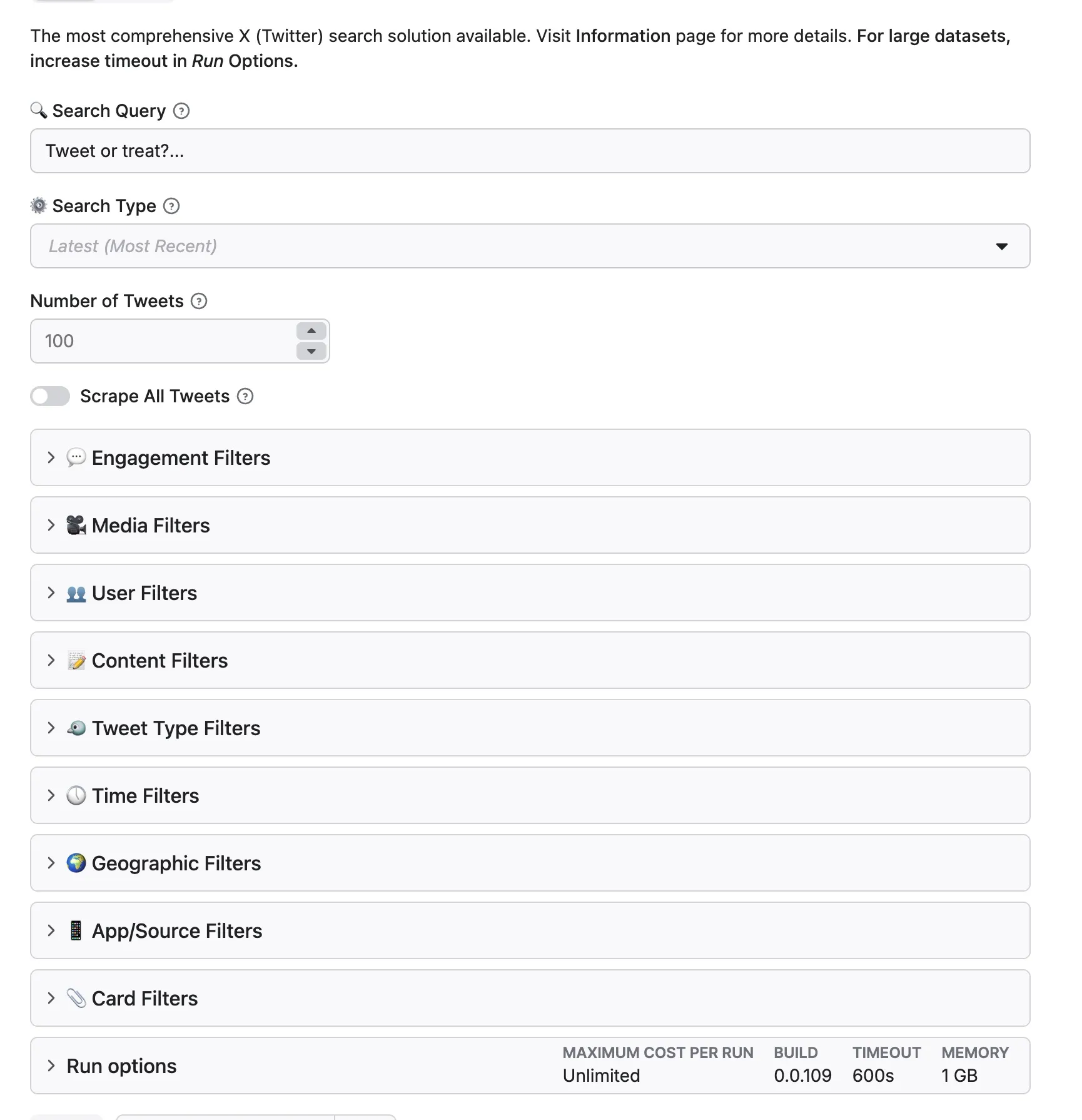
For complete documentation of all 50+ filter options, see the sections below or refer to input_schema.json.
📖 Complete Twitter Search Syntax Reference
📖 Complete Twitter Search Syntax Reference (Click to expand)
Content Operators
| Operator | Description | Example |
|---|---|---|
"exact phrase" | Search for exact phrases | "machine learning" |
keyword1 keyword2 | Both keywords (implicit AND) | AI technology |
keyword1 OR keyword2 | Either keyword | AI OR artificial intelligence |
+forced_term | Force inclusion (prevent spelling correction) | +radiooooo |
-excluded_term | Exclude terms | AI -spam |
#hashtag | Hashtag search | #AI |
$cashtag | Stock symbol search | $TSLA |
? | Questions only | What is AI? |
:) or :( | Positive/negative emoticons | :) OR :( |
url:domain.com | URL content search | url:github.com |
lang:en | Language filter | lang:en |
User Operators
| Operator | Description | Example |
|---|---|---|
from:username | Tweets from specific user | from:elonmusk |
to:username | Replies to specific user | to:support |
@username | Mentions of specific user | @openai |
list:list_id | Tweets from list members | list:715919216927322112 |
filter:verified | Verified users only | filter:verified |
filter:blue_verified | Blue checkmark users | filter:blue_verified |
Geographic Operators
| Operator | Description | Example |
|---|---|---|
near:"city" | Geotagged in location | near:"San Francisco" |
within:radius | Within radius of location | within:10km |
geocode:lat,long,radius | Precise coordinates | geocode:37.7764,-122.417,10km |
place:place_id | Specific place ID | place:96683cc9126741d1 |
Time Operators
| Operator | Description | Example |
|---|---|---|
since:2024-01-01 | From date (inclusive) | since:2024-01-01 |
until:2024-12-31 | Before date (exclusive) | until:2024-12-31 |
since_time:timestamp | Unix timestamp from | since_time:1640995200 |
until_time:timestamp | Unix timestamp until | until_time:1672531199 |
within_time:2d | Relative time window | within_time:24h |
Engagement Operators
| Operator | Description | Example |
|---|---|---|
min_retweets:5 | Minimum retweets | min_retweets:100 |
min_faves:10 | Minimum likes | min_faves:1000 |
min_replies:100 | Minimum replies | min_replies:50 |
filter:has_engagement | Has any engagement | filter:has_engagement |
Media Operators
| Operator | Description | Example |
|---|---|---|
filter:media | All media types | filter:media |
filter:images | Images only | filter:images |
filter:videos | Videos only | filter:videos |
filter:links | Contains links | filter:links |
filter:news | News content | filter:news |
Tweet Type Operators
| Operator | Description | Example |
|---|---|---|
filter:retweets | Retweets and quotes | filter:retweets |
filter:replies | Reply tweets | filter:replies |
filter:quote | Quote tweets | filter:quote |
conversation_id:id | Conversation thread | conversation_id:1140437409710116865 |
Full reference: Twitter Advanced Search Operators on GitHub
🔬 Advanced Filter System Deep Dive
Content Filters
Control what text and content appears in your results:
User Filters
Target or exclude specific accounts and user types:
Geographic Filters
Find tweets from specific locations:
Time Filters
Control the date range and timing of tweets:
Engagement Filters with Smart Presets
Filter by engagement levels with one-click presets or custom ranges:
Quick Engagement Presets:
- Low: 1-10 likes, 0-2 retweets (good for niche discussions)
- Medium: 10-100 likes, 2-10 retweets (active conversations)
- High: 100-1000 likes, 10-50 retweets (popular content)
- Viral: 1000+ likes, 50+ retweets (trending content)
Media Filters
Target tweets with specific media types:
Tweet Type Filters
Filter by tweet type and conversation structure:
App/Source Filters
Filter by the device or app used to post:
Common Source Values:
twitter_for_iphone- Posted from iPhone apptwitter_for_android- Posted from Android apptwitter_web_app- Posted from twitter.comtweetdeck- Posted from TweetDeckbuffer- Scheduled via Bufferhootsuite- Scheduled via Hootsuitesprout_social- Scheduled via Sprout Socialsendible- Scheduled via Sendible
💰 How Much Does It Cost to Scrape Twitter Data?
This Actor uses pay-per-event pricing with a $0.10 minimum total charge per run.
| Charge | Free plan | Bronze-Diamond plans |
|---|---|---|
| Actor start | $0.01 | $0.01 |
| Result saved to the default dataset | $0.015 per result | $0.00035 per result |
The Actor start event is charged once per GB of memory, with at least one event per run. On Bronze-Diamond plans, 1,000 saved results cost $0.35 in result charges; on the Free plan, 1,000 results cost $15.00. The $0.10 minimum still applies to small runs. Use focused filters and a small result limit while testing, then check the Actor's Pricing tab for the latest rates before starting a large run.
⚖️ Is It Legal to Scrape Twitter Data?
Short answer: Yes, when done ethically and responsibly, scraping publicly available Twitter data is legal in most jurisdictions.
Our approach: X (Twitter) Advanced Search Actor is designed with ethics and legality in mind. Here's what you need to know:
What We Scrape (Legally)
✅ Publicly available tweets - Only content users have chosen to share publicly ✅ Public profile information - Names, bios, follower counts visible to all users ✅ Public engagement metrics - Like counts, retweet counts, reply counts ✅ Public hashtags and trends - Publicly visible topic data ✅ Public media - Images and videos shared in public tweets
What We Don't Scrape
❌ Private accounts - We cannot and will not access protected tweets ❌ Direct messages - Private communications are completely off-limits ❌ Private user data - Email addresses, phone numbers, private locations ❌ Non-public information - Anything requiring authentication beyond public access
Legal Framework
Our scraper operates within established legal precedents:
- Public Data Doctrine: Courts have repeatedly ruled that publicly available data can be collected (e.g., hiQ Labs v. LinkedIn)
- No Authentication Required: We don't bypass login walls or access restrictions
- Terms of Service: While Twitter's ToS prohibit scraping, ToS violations are typically civil matters between users and platforms, not criminal offenses
- GDPR Compliance: When processing personal data, ensure you have a lawful basis under GDPR if operating in the EU
- Computer Fraud and Abuse Act (CFAA): Our methods don't involve unauthorized access or circumvention
Your Responsibilities
While our tool is designed for ethical use, you are responsible for how you use the data:
- ✅ Do use data for research, analysis, and business intelligence
- ✅ Do respect privacy and handle personal data responsibly
- ✅ Do comply with data protection regulations (GDPR, CCPA, etc.)
- ✅ Do consider the ethical implications of your use case
- ❌ Don't use data for harassment, doxxing, or malicious purposes
- ❌ Don't collect data from minors without proper safeguards
- ❌ Don't sell personal data without legal basis and consent
- ❌ Don't use data in ways that violate privacy laws
Best Practices for Ethical Scraping
- Only collect what you need - Don't scrape indiscriminately
- Respect rate limits - Our built-in safeguards prevent excessive requests
- Store data securely - Protect any personal information you collect
- Have a legitimate purpose - Market research, academic study, journalism, etc.
- Provide transparency - If publishing research, explain your data collection methods
- Delete when done - Don't retain personal data longer than necessary
Need legal advice? We are not lawyers, and this is not legal advice. For specific questions about your use case, consult with your legal counsel. Every situation is different based on jurisdiction, purpose, and data handling practices.
Further reading:
❓ FAQ
General Questions
Q: How is this different from Twitter's official API?
Our Actor provides several advantages over Twitter's official API:
- No API key required - Start scraping immediately without application approval
- No rate limits - Collect as much data as you need without hourly caps
- Usage-based pricing - On Bronze-Diamond plans, result charges are $0.35 per 1,000 saved tweets
- Historical data - Access older tweets without API restrictions
- Advanced filtering - More sophisticated search options than basic API endpoints
However, the official API is better if you need real-time streaming or want to post tweets programmatically.
Q: Can I scrape private or protected accounts?
No. Our Actor only collects publicly available information. We cannot access protected accounts, private tweets, or direct messages. This is both a technical limitation and an ethical stance—we respect user privacy.
Q: How fast does it run?
Scraping speed depends on several factors:
- Small datasets (100-1,000 tweets): 1-3 minutes
- Medium datasets (1,000-10,000 tweets): 5-15 minutes
- Large datasets (10,000-100,000 tweets): 30-90 minutes
- Very large datasets (100,000+ tweets): 2-6 hours
Speed varies based on search complexity, Twitter's response times, and proxy performance.
Q: What's the maximum number of tweets I can scrape?
There's no hard limit imposed by our Actor. You can scrape millions of tweets if needed. However, very large runs (500,000+ tweets) may take several hours and consume significant compute units. We recommend breaking large jobs into smaller scheduled runs for better reliability.
Q: Can I scrape tweets in languages other than English?
Absolutely! Use the language filter to target specific languages. We support all languages Twitter supports, including:
- English (en), Spanish (es), French (fr), German (de)
- Japanese (ja), Korean (ko), Chinese (zh)
- Arabic (ar), Hindi (hi), Portuguese (pt)
- And 50+ more languages
Q: How do I export data to Google Sheets or Excel?
After your run completes:
- Go to the "Storage" tab in your run results
- Click "Export" and select your preferred format
- For Google Sheets: Use Apify's Google Sheets integration in the "Integrations" tab
- For Excel: Download as XLSX or CSV format
You can also automate exports using webhooks and integrations with Make or Zapier.
Technical Questions
Q: Can I use this Actor via API?
Yes! Every Actor on Apify can be controlled via API. Here's a quick example:
Check out our API documentation for complete details.
Q: Can I schedule automatic scraping runs?
Yes! Use Apify's built-in scheduler to run the Actor automatically:
- Go to the "Schedule" tab in Console
- Set your desired frequency (hourly, daily, weekly, custom CRON)
- Configure your search parameters
- Enable notifications for when runs complete
Perfect for daily brand monitoring, weekly competitor analysis, or monthly trend reports.
Q: Does it work with proxies?
Yes, proxy support is built-in and handled automatically by Apify. The platform rotates through residential and datacenter proxies to ensure reliable, unblocked scraping. You can configure proxy settings in the Actor input if you want specific proxy types or locations.
Q: What happens if Twitter blocks the scraper?
Our Actor includes multiple anti-blocking measures:
- Automatic proxy rotation
- Request throttling and delays
- User-agent rotation
- Error handling and retry logic
If a run fails, the Actor will automatically retry with different proxies. In rare cases of persistent blocking, reduce your scraping rate or contact our support team.
Q: Can I filter tweets by specific engagement levels?
Yes! Use our engagement presets or set custom ranges:
- Presets: Low, Medium, High, Viral
- Custom: Set exact min/max values for likes, retweets, replies, quotes
- Example: Only tweets with 100-1000 likes and 10+ retweets
This is perfect for finding high-quality, engaging content and filtering out low-engagement noise.
Data & Output Questions
Q: What format is the output data?
By default, the Actor returns clean, structured JSON. You can export in multiple formats:
- JSON - Best for APIs and technical integrations
- CSV - Great for Excel and data analysis
- XLSX - Native Excel format with proper formatting
- HTML - Human-readable web table
- XML - For legacy systems
Q: How long is data stored?
Free accounts: Datasets stored for 7 days Paid accounts: Datasets stored for 30 days minimum
🔄 Other X (Twitter) Scraping Tools
If you like this Actor, you might also find these X (Twitter) tools useful:
- 💬 X (Twitter) Replies & Retweets Scraper: Collect replies, retweets, and detailed information for known posts.
- 👥 X (Twitter) Followers Scraper: Export followers, following, list members, and community members.
- 👤 X (Twitter) Profile Scraper: Extract public profile information, posts, followers, following, and affiliates.
- 🐦 X (Twitter) Community Search Post Scraper: Collect posts from selected X communities.
🆘 Support & Community
We're committed to helping you succeed with your Twitter data extraction projects!
🚀 Get Help Fast
- 💬 Questions & Feature Requests: Use the Issues tab for any questions
- 📧 Direct Support: Contact us at apify@dziura.online
🎯 Professional Support
Need custom solutions or enterprise-level assistance?
- Custom Actor Development: We can build specialized Twitter scrapers for your unique needs
- Data Consulting: Expert guidance on Twitter data collection strategies
- Integration Support: Help with connecting Twitter data to your systems
🤝 Community & Feedback
- ⭐ Rate Our Actor: Your feedback helps us improve and helps other users discover our work
- 🔄 Share Your Success: Let us know how you're using the actor - we love featuring interesting use cases
- 🐛 Bug Reports: Found an issue? Please report it with details about your search parameters
📚 Resources
- 📖 Documentation: Complete API reference and advanced configuration guides
- 🔗 Integrations: Connect with Make, Zapier, Google Sheets, and 1000+ tools
- 📊 Best Practices: Check our blog for Twitter scraping tips and strategies
🏆 Why Choose Our Actors?
- 🚀 Regular Updates: We actively maintain and improve our actors based on user feedback
- 🛡️ Reliable Performance: Built-in error handling, retries, and monitoring
- ⚡ Optimized for Apify: Full platform integration with scheduling, webhooks, and storage
- 🌍 Global Support: Users in 50+ countries trust our Twitter data solutions
Have a suggestion or need help? Don't hesitate to reach out - we're here to ensure your Twitter data projects succeed!


