

Code to Image: Beautiful Code Screenshots as PNG & SVG
Pricing
Pay per event
Code to Image: Beautiful Code Screenshots as PNG & SVG
Turn code into beautiful images like Carbon and ray.so: VS Code themes, 235 languages, ligature fonts, line highlights and diffs, as PNG, SVG or WebP. Paste code or link GitHub files. Built for AI agents, docs, blogs and social posts.
Pricing
Pay per event
Rating
0.0
(0)
Developer

Jumble Mog
Maintained by CommunityActor stats
0
Bookmarked
2
Total users
1
Monthly active users
a day ago
Last modified
Categories
Share
Turn code into beautiful images. Send a snippet, a batch of snippets or links to files on GitHub, and get back a polished picture of an editor window on a gradient background, as PNG, SVG or WebP with a download link. The colors come from VS Code's own grammars and themes (through Shiki), so code looks exactly as it does in the editor: 235 languages, 65 themes, 11 coding fonts with ligatures, line numbers, highlighted and focused lines, and diffs in green and red. Like Carbon or ray.so, but as an API that people, automations and AI agents can call.
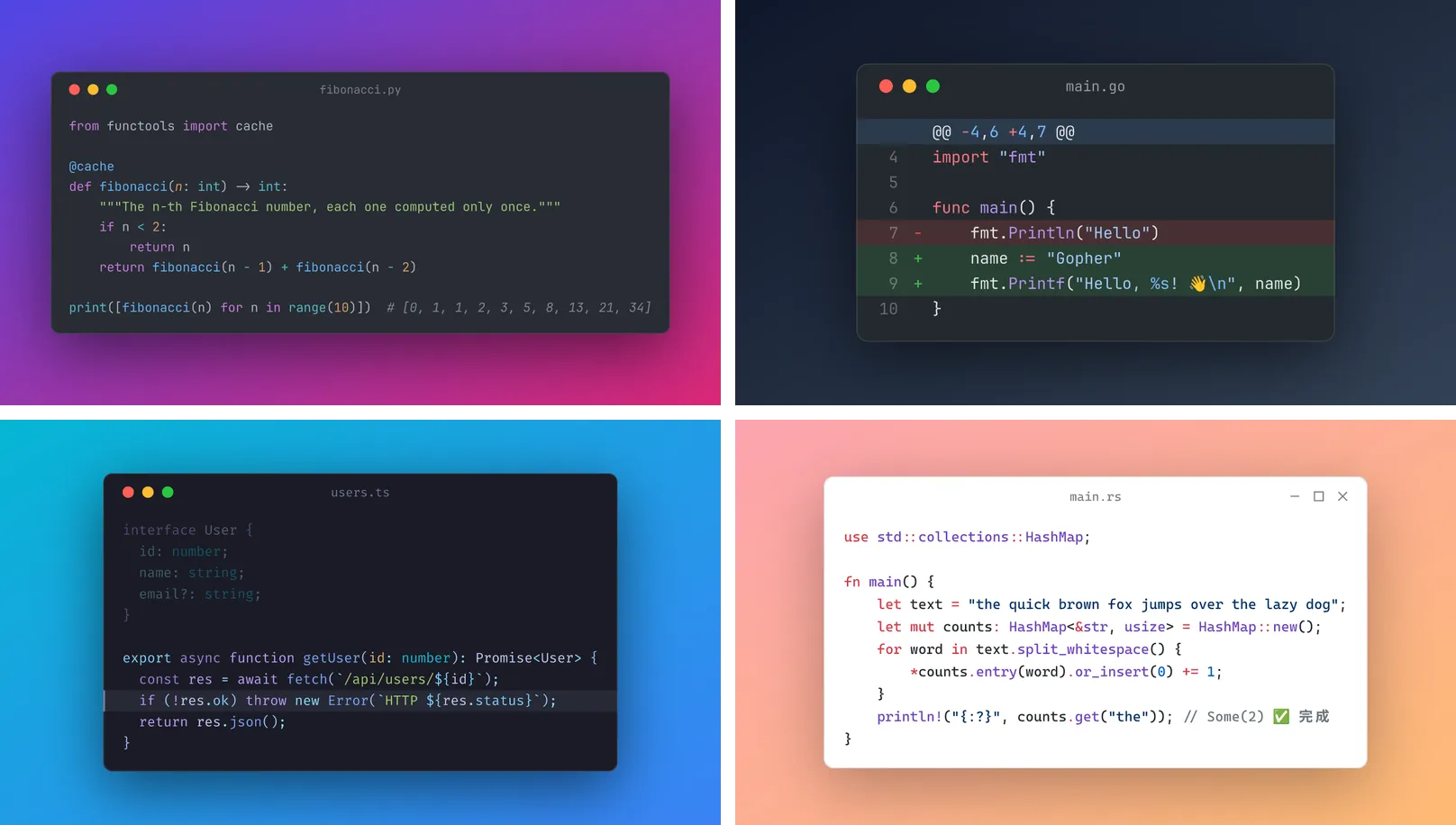
What it does
- Exact VS Code colors: TextMate grammars and themes from VS Code, so keywords, strings, types, decorators, template literals and embedded languages are colored the way the editor colors them, in 235 languages from Python, TypeScript, Go, Rust, Java, C#, C++, PHP, Ruby, Swift and Kotlin to SQL, Bash, YAML, Dockerfile, Terraform, Solidity, Zig and Vue.
- 65 themes: One Dark Pro, Dracula, GitHub Dark and Light, Tokyo Night, Catppuccin, Nord, Monokai, Night Owl, Solarized, Gruvbox, Rosé Pine, Vitesse, Synthwave '84 and many more, dark and light.
- 11 coding fonts: JetBrains Mono, Fira Code, Cascadia Code, Source Code Pro, IBM Plex Mono, Roboto Mono, Geist Mono, Hack, Ubuntu Mono, Space Mono and DejaVu Sans Mono, with bold and italics where the font has them and ligatures (
->=>!====) you can switch off. - Detects the language with telltale patterns and VS Code's own language detection model, or takes it from a file name or a Markdown code fence (
```python), the way AI models write code. - Links to code: GitHub file links (a range like
#L10-L25shows just those lines, numbered as in the file), raw links, gists and other public raw files. - Line tools: line numbers, highlighted lines, focus lines (everything else fades), a range of lines to show, and diffs: lines starting with
+and-turn green and red while keeping the code's own colors. - Window and background: macOS or Windows title bar or none, a window title, 12 backgrounds (gradients and solid colors), your own colors, the theme's color, transparent or none, a soft shadow, padding, rounded corners and a caption line.
- Fixed shapes for social media: 16:9 for slides and YouTube, 1.91:1 for link previews and X, 1:1 and 4:5 for Instagram, 9:16 for stories and Shorts, with the window centered.
- Emoji and every script: color emoji, Chinese, Japanese and Korean, Greek, Cyrillic and symbols, kept on the character grid so columns line up.
- PNG, SVG and WebP: PNG at 1× to 4× pixel density, lossless WebP, and SVG with the fonts embedded (only the characters used) so it looks the same everywhere. One charge per image, whatever the number of formats.
- Fast and private: about half a second per image, and nothing is sent to outside services.
- Image straight from the API: the first image is also the run's
OUTPUT, so the run-sync endpoint answers with the image itself.
Who it's for
- AI agents and LLM apps that write code and need to show it as a picture: in chats, posts, slides, emails and documents.
- Developer advocates, bloggers and course creators making code images for articles, tutorials, tweets, LinkedIn posts, newsletters and YouTube thumbnails, in batches with a consistent look.
- Automation builders in n8n, Make or Zapier who turn new snippets, release notes or GitHub files into social media posts.
- Docs and changelog teams who want diffs and highlighted lines as images that look the same on every platform.
How to use it
- Paste your code into Code (and, if you like, a window title such as
app.py). - Pick a theme, background and font, or keep the defaults.
- Click Start. The image appears in the Output tab with its download link.
For many images, put snippets in More snippets or links in Links to code files. You can also run it through the Apify API, on a schedule, or from Make, n8n, Zapier and other integrations.
How-to examples
Each example below is a complete input, checked with a run of the Actor.
How to turn a code snippet into an image (like Carbon or ray.so)
Result: a 978 x 538 PNG of an editor window titled hello.py, in Tokyo Night colors on a blue gradient, made in 0.12 seconds. Leave out language and it is detected from the code.
How to make an image of a code diff
Result: a 16:9 image with the removed line on red and the added line on green, each with its - or +, ready for a post or a slide.
How to screenshot lines of a file on GitHub
Result: lines 1 to 12 of the file as a light image, with lines 3 and 4 highlighted. The language comes from the file name, and the line numbers in the link pick the lines.
How to let an AI agent share code as an image
Add this Actor to the Apify MCP server with https://mcp.apify.com/?tools=jumblemog/code-to-image. The agent sends the code in code and shows the user imageUrl, for a tweet, a slide or a chat that can't show code blocks.
FAQ
Which languages and themes are there? 235 languages and 65 VS Code themes, colored by the same grammars VS Code uses.
Can I get SVG? Yes. formats takes png, svg and webp.
Can I make many images at once? Yes. Put them in snippets, each with its own settings, or give several links in urls.
Can I change the window and background? Yes: the window style, title, padding, shadow, corner radius, font, line numbers, a gradient or solid background, or a transparent one.
Does it work with Zapier, Make or n8n? Yes. Call the Actor with its Apify app or an HTTP request and post imageUrl.
Input
| Field | What it does |
|---|---|
code | The code to draw. A Markdown code fence also sets the language. |
language | auto (default) or a language name, alias, extension or file name: python, ts, rust, c++, Dockerfile. |
snippets | More images: code strings, or objects with code (or url) and their own settings, such as {"code": "...", "language": "go", "title": "main.go", "highlightLines": "3"}. |
urls | Links to code files: GitHub file links (with #L10-L25 line ranges), raw links, gists, public raw files up to 1 MB. |
theme | One of 65 VS Code themes (default one-dark-pro). |
background | violet (default), sunset, ocean, mint, candy, peach, aurora, lime, midnight, charcoal, silver, white, theme, transparent or none. |
backgroundColors | Your own background: one hex color, or two or three for a gradient (#f97316, #db2777). |
fontFamily, fontSize, lineHeight, ligatures | Font (default JetBrains Mono, 14 px, 1.6), and ligatures on or off. |
windowStyle, title, fileName | mac (default), windows or none; the title bar text; the file name (sets the language and title). |
shadow, padding, cornerRadius, caption | Drop shadow (on), space around the window (56 px), corner radius (10 px) and a line of text under the window. |
aspectRatio | auto (fit the code), 16:9, 1.91:1, 2:1, 4:3, 1:1, 4:5 or 9:16. |
lineNumbers, startLine | Show line numbers, starting from 1 or any number. |
lines, highlightLines, focusLines | Show part of the code (10-30), highlight lines (3, 7-9), or fade all but some lines (4-6). |
diff | Show lines starting with + and - as added and removed. |
wrapColumns, minColumns, tabSize, maxLines | Wrap long lines (100 characters), minimum width (40), tab width (4), and the most lines drawn (300). |
formats | Any of png (default), svg and webp. |
scale | Pixel density of PNG and WebP, 1 to 4 (default 2). |
maxImages | Stop after this many images (default 100). |
The language, title, file name and line settings in the form belong to the code field. Every snippet and link has its own (or gets them detected), while the look and output settings apply to all of them unless a snippet sets its own.
Example with a batch:
Output
Each snippet becomes one dataset item, and the files are saved in the run's key-value store:
When a snippet can't be drawn (for example a link to a private file), the item says why and isn't billed:
Download your files within your plan's data retention period, or copy them to your own storage, because run storage expires.
Pricing
You pay per image created, at the price shown on this page, whatever the number of formats (PNG, SVG and WebP of the same snippet count once). Snippets that can't be drawn are never charged. If you set a maximum cost per run, the Actor stops when the next image wouldn't fit.
Speed
Measured on Apify at the default 1 GB of memory: a batch of 5 PNG images (7 to 11 lines each, mostly 16:9) was finished 4.4 seconds after the run started, at 0.4 to 0.7 seconds per image, and a whole run-sync call for one image took 4.5 seconds from request to PNG. Adding SVG and lossless WebP copies of every image makes each one take 1 to 2 seconds. Starting a run adds a few seconds, more when a server downloads the Actor for the first time, so for many images one run with a batch is much quicker than one run per image.
Tips and limits
- Code can be up to 500,000 characters per snippet, and the image is cut after
maxLineslines (300 by default, 5,000 at most). Very tall images are drawn at a lower scale to stay under 25 megapixels, and WebP files can't be taller or wider than 16,383 pixels. - Indentation shared by all lines and blank lines at the start and end are removed, and tabs become spaces (
tabSize). - Links: GitHub file links are fetched from raw.githubusercontent.com. GitLab and Bitbucket raw files aren't fetched, because their robots.txt files forbid it; every other host's robots.txt is checked first. Only public files work: there are no logins.
- Unknown language names fall back to plain text, and the item's
notessay so. - Fira Code and Geist Mono have no italics, so italic tokens use their upright letters.
- SVG files embed the fonts as small WOFF2 subsets, so they look right in browsers and design tools without installing anything.
For AI agents and developers
This Actor works with the Apify MCP server, so AI agents can call it as a tool: pass code (a model's fenced answer works as it is) and read imageUrl from the dataset item. For a direct API call that waits for the result:
To get the image itself as the response, call run-sync instead. It returns the run's OUTPUT, which is the first image (or the error as JSON):
Credits
- Shiki (MIT) with VS Code's TextMate grammars and themes (each under its own license, mostly MIT), VS Code's language detection model (MIT), highlight.js (BSD-3-Clause), resvg (Apache-2.0 / MIT), fontTools (MIT) and Pillow (MIT-CMU).
- Fonts: JetBrains Mono, Fira Code, Cascadia Code, Source Code Pro, IBM Plex Mono, Roboto Mono, Geist Mono and Space Mono (SIL Open Font License), Hack (MIT and Bitstream Vera), Ubuntu Mono (Ubuntu Font Licence), DejaVu Sans Mono (Bitstream Vera), and Noto Color Emoji and Noto Sans CJK (OFL) for emoji and East Asian characters.
- This Actor isn't affiliated with Carbon, ray.so, VS Code or the projects above.


