

Excel Model API: Recalculate Workbooks, What-If & Goal Seek
Pricing
Pay per event
Excel Model API: Recalculate Workbooks, What-If & Goal Seek
Run your Excel or Google Sheets model as an API: set inputs by cell, name or label, recalculate every formula and get the results as JSON. Scenarios, sweeps over one or two inputs, goal seek, and a list of a workbook's inputs and results.
Pricing
Pay per event
Rating
0.0
(0)
Developer

Jumble Mog
Maintained by CommunityActor stats
0
Bookmarked
2
Total users
1
Monthly active users
9 days ago
Last modified
Categories
Security
Limited permissionsShare
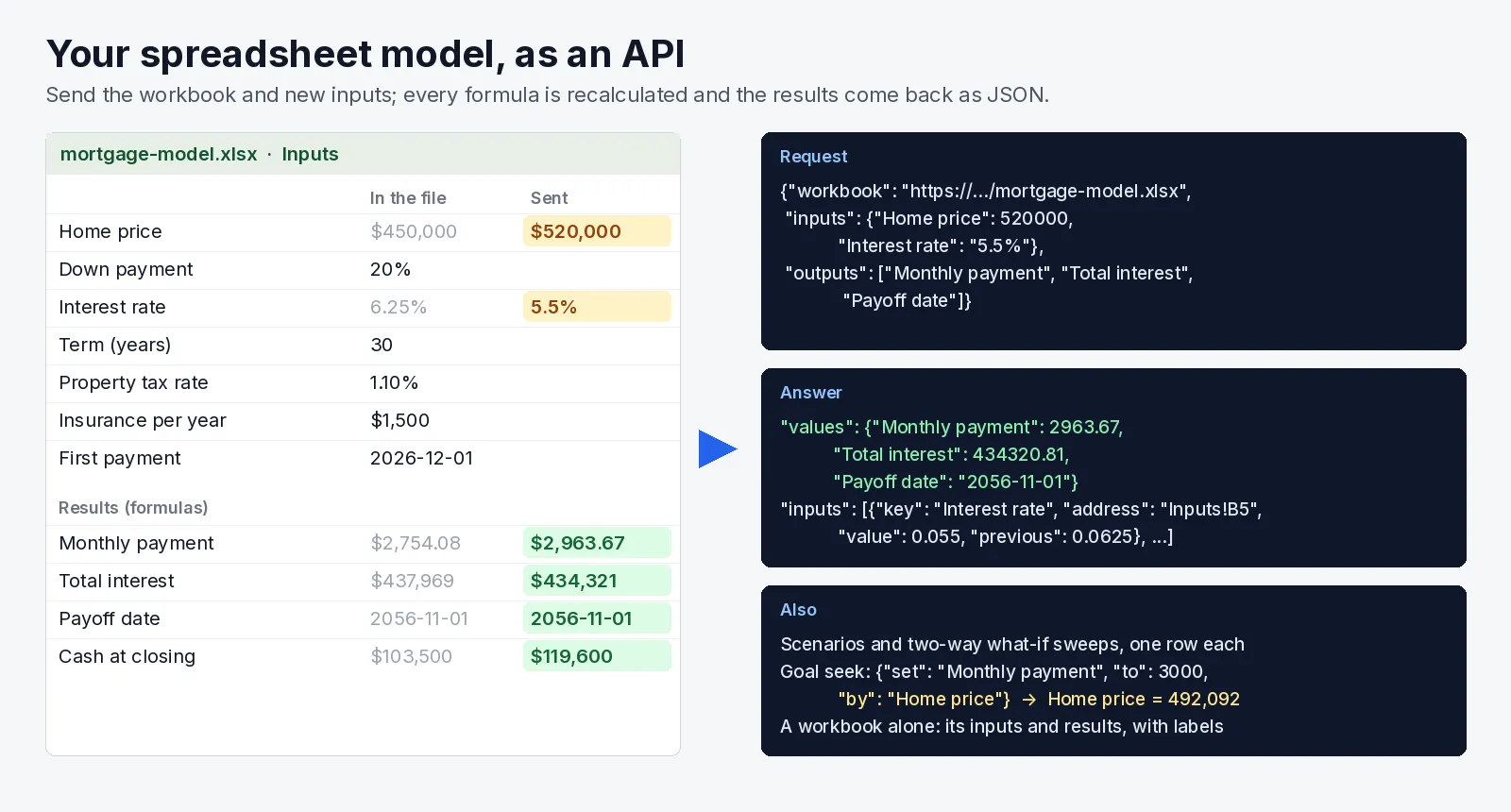
Run your spreadsheet model as an API. Send an Excel or Google Sheets workbook with the inputs to change, by the label next to the cell ("Home price"), a defined name or an address (Inputs!B3). Every formula is recalculated and the results come back as JSON. You can also run many scenarios, sweep one or two inputs through a range, or goal seek a result to a target. A workbook sent alone lists the inputs and results it has, with their labels and current values.
- Your workbook, unchanged. It runs as built, with no formulas to rewrite and no code to port. The pricing sheet, quote calculator, loan model or engineering workbook a team already trusts becomes something a program or an AI agent can call.
- Inputs by label.
{"Interest rate": "5.5%", "Start date": "2027-01-15", "Plan": "Business"}is read the way a person would type it: currency, percentages, dates and TRUE/FALSE. A list fills a range, such as line items or monthly figures. - Scenarios, sweeps and goal seek.
- Up to 1,000 calculations per workbook, from a list, a CSV, an Excel file or a Google Sheet of scenarios.
- One-way and two-way what-if tables over any input.
- Excel-style goal seek: "what home price gives a $3,000 payment?"
- Every request with more than one calculation also gets a CSV with one row per calculation.
- It finds the model for you. A workbook sent alone comes back with:
- its inputs: the constants that formulas point at;
- its results: the formulas nothing else uses, then the labeled ones other formulas build on;
- the lookup tables it reads;
- a sample request to send back.
- Recalculated copies. Optionally get back the workbook with the new inputs and recalculated values, as .xlsx (or .ods).
It's made for:
- AI agents that need a company's real numbers: a pricing model, a commission plan, a capacity or ROI calculator kept in Excel, called as a tool instead of guessed at.
- Back-office and SaaS apps that quote, price or forecast with a spreadsheet the business owns, without re-implementing it in code.
- Analysts who want a sensitivity table or a batch of 500 scenarios run against a model, without copying and pasting.
- Zapier, Make and n8n flows that need "put these numbers in the sheet and give me the total".
How to use it
- Give the workbook: a link to the .xlsx, .xlsm, .xlsb, .xls or .ods file, a Google Sheets link shared with "Anyone with the link", or upload it.
- Put the inputs to change and the outputs to read in by their labels, names or addresses. Leave the outputs empty to get every result the workbook has.
- Click Start. Each calculation is a row in the results, with the inputs set, the outputs read and their values as the workbook shows them.
Not sure what a workbook takes? Run it with the workbook alone and you get its inputs and results, with a sample request to send back.
Naming cells
| Write | Means |
|---|---|
"Home price", "home_price", "Term (years)" | The cell next to that label: the value to its right, or below a column heading. Case, spaces and units in brackets don't matter. |
"closing_costs" | A defined name. |
"B3", "Inputs!B3", "'Rate Table'!A2:B4" | An address (without a sheet: the first sheet, or the one you set as sheet). |
"Revenue (2027)" | In a table with years across the top, the row label with the column heading. |
Values
520000, "$520,000", "5.5%" (0.055), "2027-01-15" (a date), true, "Business" (text). A number given for a cell formatted as a percentage is read as a percentage when it's over 1: 5.5 becomes 5.5%, and the result says so. [1200, 1350, 1500] fills a range down from the cell; [[...], [...]] fills rows. Inputs are put back after each calculation, so scenarios never leak into each other.
What you can send
| Field | What it takes |
|---|---|
workbook | A link, a data: URI or base64. Or upload it in uploads. |
inputs | Cells to change and their values, applied to every calculation. |
outputs | Cells or ranges to read. A range ("Schedule!A2:E13") comes back as rows of values. |
scenarios | A list of input sets, one calculation each. A scenario key names each one. Or scenariosUrl: a CSV, Excel or JSON link, a Google Sheet, or CSV text, one scenario per row. |
sweep | One input stepped from/to by step (or steps points, or values), or two inputs for a two-way table. |
goalSeek | [{"set": "Monthly payment", "to": 3000, "by": "Home price"}]: the input value that makes the result hit the target. |
sheet | The sheet that plain addresses refer to. |
returnWorkbook | true saves the recalculated workbook for each calculation (the first 20). |
requests | More workbooks in one run, each with its own fields. |
Examples
These use the example workbook in the input form, a mortgage model with a 360-month schedule sheet.
- New inputs.
{"Home price": 520000, "Interest rate": "5.5%"}gives a monthly payment of $2,963.67, total interest of $434,321 and a payoff date of 2056-11-01. - Goal seek. Setting "Monthly payment" to 3000 by changing "Home price" finds a home price of $492,092.
- The workbook alone. It lists:
- 8 inputs: Home price, Down payment, Interest rate, Term (years) and the rest;
- its results: Monthly payment, Total interest, Payoff date, Cash needed at closing, plus the schedule's Date column as one range;
- a sample request.
- Two-way sweep. Interest rate 4% to 8% by 0.5%, crossed with a 15-year or 30-year term, makes 18 calculations: 18 rows plus one CSV table.
How-to examples
These use the example workbook in the input form, a mortgage model with a 360-month schedule sheet.
How to run an Excel model with new inputs through an API
Result: a monthly payment of $2,963.67, total interest of $434,321 and a payoff date of 2056-11-01, read from the recalculated workbook. Cells are named by the label next to them, so you don't need cell addresses.
How to goal seek in Excel from code
Result: the home price that gives a $3,000 monthly payment, $492,092.
How to make a sensitivity table from a spreadsheet
Result: 18 calculations, every rate from 4% to 8% by 0.5% for both terms, as 18 rows and one CSV table.
How to let an AI agent use your spreadsheet
Add this Actor to the Apify MCP server with https://mcp.apify.com/?tools=jumblemog/excel-model-api. The agent first sends the workbook alone and gets its inputs, its results and a sample request. Then it sends the values the user gave, and the answer comes from your own formulas instead of the model's guess.
FAQ
Do I have to rewrite my formulas? No. The workbook runs as it is, recalculated by LibreOffice Calc. You only name the inputs to change and the results to read.
Which files work? Excel .xlsx, .xlsm, .xlsb and .xls, OpenDocument .ods, and Google Sheets links shared with "Anyone with the link".
Are macros run? No. Macros are never run and external links are never updated, so the result comes from the formulas alone.
Can I run many scenarios at once? Yes, as a list in scenarios, from a CSV or Google Sheet with one scenario per row, or as a one-way or two-way sweep.
Does it work with Zapier, Make or n8n? Yes. Call the Actor with its Apify app or an HTTP request, for example to turn a form's answers into a quote from your pricing workbook.
Output
There is one dataset item per calculation. They are also saved together in the run's OUTPUT record:
How values come back:
- Dates come back as ISO text and TRUE/FALSE as booleans. Each value also comes formatted as the workbook shows it.
- A formula that fails (
#DIV/0!,#N/A,#NAME?) comes back aserror, with what it usually means and a warning.
Other item types:
- A goal seek item has
"type": "goalSeek"andgoal: the value found, the result achieved and whether it converged. - A workbook sent alone gives
"type": "describe"withinputs,results,tables,sampleand the workbook's defined names.
Every item has warnings, notes and a Markdown report. A workbook that can't be read, or a label that isn't in it, gives "status": "failed". The error explains why and lists the labels it does have. Failed requests aren't billed.
How it works
-
Reading the workbook. LibreOffice Calc opens it headless, with macros never run and external links never updated. It reads Excel (.xlsx, .xlsm, .xlsb, .xls), OpenDocument and Google Sheets (exported as .xlsx).
-
Finding the model. Every formula's references are read, including other sheets, ranges, whole columns and defined names. From those:
- the inputs are the constants that formulas point at one by one;
- the results are the formulas no other formula uses;
- a column of a table is reported as one range;
- each cell is labeled with the text to its left or the heading above it.
-
Calculating. For each calculation:
- the inputs are set;
- the whole workbook is recalculated (a hard recalculation, so cached values never leak through);
- the outputs are read, rounded to Excel's 15 significant digits;
- the inputs are restored.
Goal seek is Calc's own.
Pricing
You pay one low price per calculation, at the price shown on this page:
- Each scenario, sweep point or goal seek is one calculation.
- Listing a workbook's inputs and results counts as one.
- Recalculated copies and the CSV table are included.
- Failed requests are never charged.
- If you set a maximum cost per run, the Actor runs only the calculations that fit.
Speed
The example model (about 1,450 formulas) takes about 0.03 s per calculation, so a 100-point sweep runs in about 5 seconds. A run through the API answers in about 10 to 15 seconds for one calculation, which includes starting the cloud container and LibreOffice.
Tips and limits
- Functions. LibreOffice Calc has nearly all Excel functions, including XLOOKUP, XMATCH, FILTER, SORT, UNIQUE, SEQUENCE and LET. LAMBDA and a few of the newest Excel functions aren't available, and neither are Google-only functions (QUERY, GOOGLEFINANCE, IMPORTRANGE). Formulas using them come back as
#NAME?with a warning. - Macros and add-ins. VBA macros, Power Query, data connections and add-in functions don't run. Their last values stay unless a formula depends on them.
- Iterative calculation. Workbooks with intentional circular references calculate if iterative calculation is turned on in the file.
- Limits:
- 20 workbooks per run;
- 1,000 calculations per workbook;
- 30 MB per workbook;
- 20,000 cells per output range;
- for finding inputs and results, the first 400,000 cells of each sheet are read (any cell can still be named by address).
For AI agents and developers
This Actor works with the Apify MCP server, so AI agents can call it as a tool. First call it with the workbook alone to get inputs, results and sample. Then call it with inputs filled in and read values.
A direct API call that waits for the answer:
run-sync returns the run's OUTPUT instead: the status, the counts and every result as JSON.
In Python, with the apify-client package, here is a batch of scenarios from a local workbook and CSV:
Credits
- LibreOffice (MPL-2.0) Calc recalculates the workbooks, driven through its UNO API.
- openpyxl (MIT) reads scenario spreadsheets.
- The Carlito and Liberation fonts (SIL Open Font License) give text the widths of Calibri and Arial.


