

Vocal Remover & Stem Splitter (AI, Demucs)
Pricing
Pay per event
Vocal Remover & Stem Splitter (AI, Demucs)
Remove vocals from songs or extract them with Meta's Demucs AI. Get a clean instrumental (karaoke) track and an a cappella vocal track, or split music into vocals, drums, bass and other instruments. MP3, WAV, FLAC or M4A out, from audio or video files.
Pricing
Pay per event
Rating
0.0
(0)
Developer

Jumble Mog
Maintained by CommunityActor stats
0
Bookmarked
2
Total users
1
Monthly active users
11 hours ago
Last modified
Categories
Share
Remove the vocals from any song, or pull them out, with Demucs, the open-source music separation AI from Meta AI Research. Give it an MP3, WAV, FLAC, M4A or a music video, and get back a clean instrumental (karaoke) track and an a cappella vocal track, or split the song into vocals, drums, bass and other instruments. Every track comes back as a download link, in MP3, WAV, FLAC or M4A. No GPU, no software to install, and you pay only for the minutes you separate.
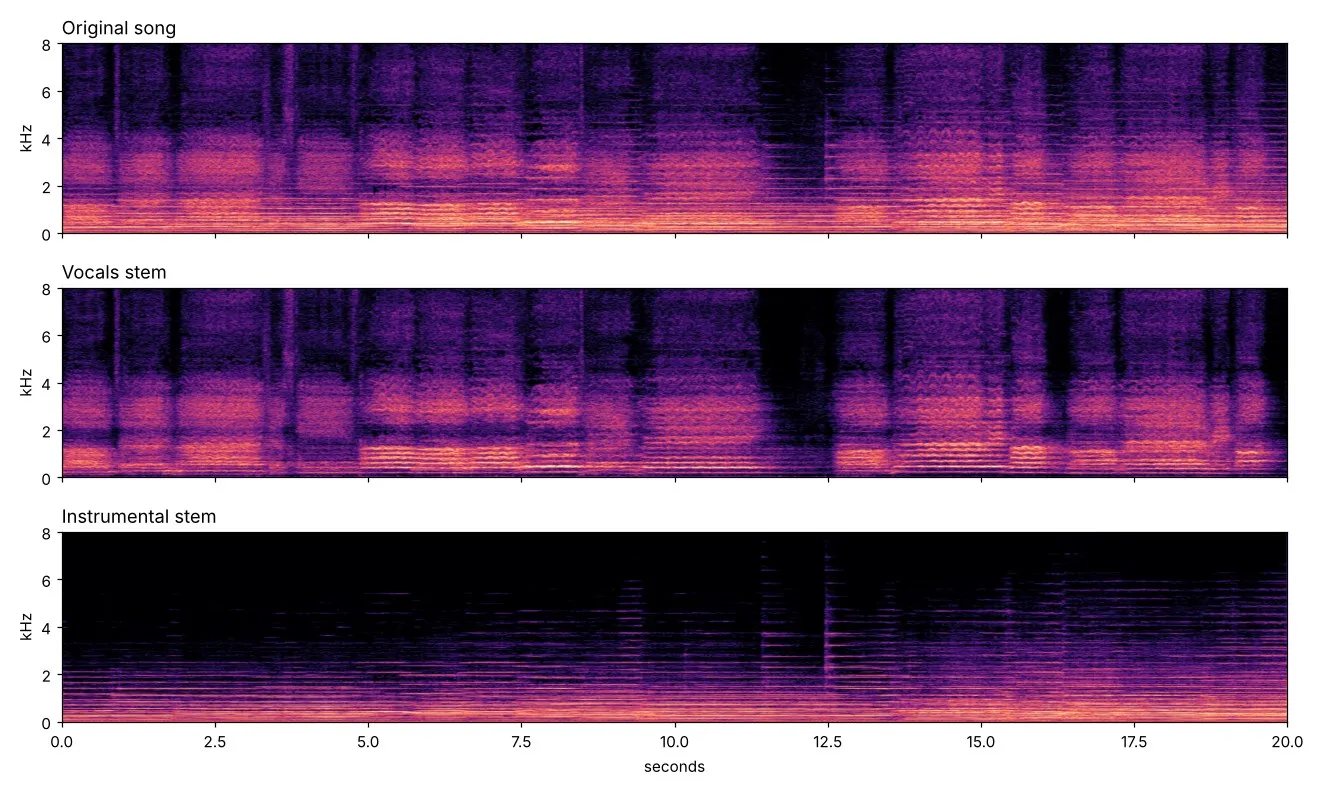
Listen: the original recording (20 s), the vocals it found and the instrumental without vocals. Sample: "America the Beautiful" by the United States Navy Band and Sea Chanters (public domain, U.S. government work).
What it does
- Vocal remover: an instrumental version of any song, for karaoke, covers, practice or background music.
- Vocal extractor: the isolated vocals (a cappella), for remixes, mashups, samples and lyric transcription.
- 4-stem splitter: vocals, drums, bass and "other" (guitars, keys, synths, strings) as separate tracks, for remixing, DJ edits, practice and production.
- Meta's latest Demucs model: Hybrid Transformer Demucs (v4), one of the best open-source music separation models, run at full quality.
- Whole songs in one go: files up to 30 minutes are separated in steps with crossfaded joins, so there are no clicks or gaps.
- Lossless output if you need it: WAV or FLAC (16-bit, 44.1 kHz stereo) for your DAW, or MP3 at 320 kbps and M4A for everything else.
- Takes files from anywhere: direct links, Google Drive and Dropbox share links, uploads, and video files (the soundtrack is used). Up to 2 GB per file.
- Peak level of every track in the results, so you or your code can tell when a song has no singing.
- Many songs per run, each with its own row of download links. You pay per minute of audio; files that fail cost nothing.
Who it's for
- Singers, karaoke fans and music teachers who want backing tracks of real songs.
- DJs, producers and remixers who need a cappellas, instrumentals and drum or bass stems.
- Musicians who practice along with a song with their own instrument taken out.
- Video creators who need a song's music without the vocals under their own voice-over.
- App developers and AI agents adding karaoke, remix or music analysis features, or cleaning vocals before transcribing lyrics or melodies.
- Music researchers separating many recordings at once.
How to use it
- Paste links to songs, or upload the files.
- Pick the tracks you want: vocals and instrumental, or vocals, drums, bass and other.
- Click Start. Each song appears in the Output tab with a download link for every track.
You can also run it through the Apify API, on a schedule, or from Make, n8n, Zapier and other integrations.
Input
| Field | What it does |
|---|---|
audioUrls | Links to audio or video files, or Google Drive and Dropbox share links. |
files | Files uploaded from your computer or picked from an Apify key-value store. |
stems | two (default): vocals and instrumental. four: vocals, drums, bass and other. all: the four stems plus the instrumental. Same price for each. |
outputFormat | mp3 (default, 320 kbps), wav, flac or m4a. |
maxFiles | Stop after this many files (default 100). |
Example:
Output
Each song becomes one dataset item, and the tracks are saved in the run's key-value store:
Tracks you didn't ask for are null. A file that couldn't be downloaded or read gets status: "failed" and an error that says why, and isn't billed. Download your tracks within your plan's data retention period, or copy them to your own storage, because run storage expires.
Pricing
You pay per started minute of audio, at the price shown on this page, whether you ask for two tracks or five. A 3½-minute song is 4 minutes; a 20-second clip is 1 minute. Files that fail are never charged. If you set a maximum cost per run, the Actor stops before a file that wouldn't fit.
Speed
Separation takes about as long as the song itself. Measured on Apify at the default 8 GB of memory: a 3½-minute song took about 4 minutes and a 20-second clip about 20 seconds, plus a few seconds to start the run. The model runs on the CPU, and giving the run more memory gives it more CPU; 4 GB also works, but takes longer.
Tips and limits
- Studio recordings separate best. Live recordings, heavy reverb and choirs can leave some bleed: a faint trace of the voice in the instrumental, or of instruments in the vocals.
- Backing vocals and harmonies count as vocals, so they're removed together with the lead.
- "Other" holds everything that isn't vocals, drums or bass: guitars, piano, synths, strings and winds.
- Tracks come out as 44.1 kHz stereo. Only the first audio track of a file is used.
- Links to YouTube, TikTok, Instagram, SoundCloud and Spotify aren't supported, because those platforms' terms don't allow downloading. Use your own copy of the file.
- Separating a song doesn't change who owns it. Use the tracks only in ways the song's rights allow.
For AI agents and developers
This Actor works with the Apify MCP server, so AI agents can call it as a tool: pass audioUrls and read vocalsUrl and instrumentalUrl (or the drum, bass and other links) from each dataset item. Every item has the same documented fields, and status tells you whether a file succeeded. For a direct API call:
The synchronous endpoint waits up to 5 minutes. For long songs or batches, start a run with /runs and read the dataset when it finishes.
Privacy
Files are downloaded into the run, processed there and saved only to your own Apify storage. Nothing is sent to an outside service.


