

Container Load Planner: 3D Truck, Trailer & Pallet Loading
Pricing
Pay per event
Container Load Planner: 3D Truck, Trailer & Pallet Loading
3D load plans for shipping containers (20ft, 40ft, 40ft HC), trailers, trucks and pallets: weights, payloads, stacking limits, this-side-up, floor-only, delivery stops, center of gravity. Loading steps, 3D viewer, PDF and CSV. Text, JSON or CSV input. For AI agents.
Pricing
Pay per event
Rating
0.0
(0)
Developer

Jumble Mog
Maintained by CommunityActor stats
0
Bookmarked
2
Total users
1
Monthly active users
8 days ago
Last modified
Categories
Security
Limited permissionsShare
Find out what fits in a container, and exactly how to load it. List your cargo and what you're shipping it in, as short text lines like Carton: 60 x 40 x 40 cm, 14 kg, qty 120, JSON, CSV or a Google Sheet, and it works out where every piece goes in 20ft, 40ft and 40ft high cube containers, 53ft and 13.6 m trailers, box trucks, vans and pallets. It handles weights and payload limits, this-side-up and any-side rotation, pieces that can't carry anything, weight limits on top, floor-only pieces, support under each piece, delivery stops, and several container types with prices. Every plan comes back with each piece's position and the loading order, the space and payload used, the load length and the center of gravity of each container, plus a 3D drawing (PNG and SVG), an interactive 3D viewer that steps through the loading, a loading PDF, a CSV and Markdown. Made for freight forwarders, shippers, importers and exporters, warehouse and dispatch teams, moving companies and e-commerce sellers shipping pallets, for developers of logistics, TMS and quoting tools, and for AI agents that need a real load plan from one API call.
What it does
- How many containers, trucks or pallets you need, and which pieces go in each, with the fewest containers it can find (or the lowest cost when you give prices). When the plan meets the volume and weight lower bound, the result says no plan can use fewer.
- Every piece's place: its position from the front wall, the left wall and the floor, its size as loaded and how it was turned, in the order to load it: deepest first, and each piece after the ones it rests on.
- Real loading rules: the container's payload, the support under each piece (75% of its base by default), pieces kept upright (the default) or allowed on any side, pieces that must not be stacked on (
no stack,fragile), a weight limit on top of a piece (max load 100 kg, passed down through the stack), floor-only pieces for heavy items, and must-ship or optional cargo. - Delivery stops: give pieces a stop number and each stop's cargo is loaded so that it can be unloaded without moving cargo for a later stop. The result checks this and says so.
- The numbers a dispatcher checks: space used, payload used, floor used, load length and the length left at the doors, and the center of gravity of each container as an offset from the middle, with a warning when the weight sits off to one side.
- Named containers and pallets: ISO containers (20ft, 40ft, 40ft and 45ft high cube, reefers) with their usual inside sizes, payloads and door sizes; 53ft and 48ft dry vans, 13.6 m and mega trailers, 26ft, 16ft and 7.5 t box trucks with typical sizes; EUR, US (48 x 40), UK and half pallets with their deck height and a stack height limit. Or give your own inside sizes.
- Pallets both ways: build a pallet (cartons onto a EUR pallet, layer by layer, as low as they go), or load whole pallets into a trailer (
EUR pallet, 150 cm tall, 450 kg, qty 26). - Files for the warehouse and the customer: a 3D drawing of every container (PNG and SVG), a 3D viewer page you can turn, zoom and step through, a PDF with a summary page and, for each container, a 3D view, views from above and from the side and the numbered loading steps, a CSV of every piece's position, and Markdown for a chat reply or an email.
- Reads what you have: text lines in centimeters, millimeters, meters, inches or feet, kilograms, pounds or tonnes; JSON objects with many spellings of each field; CSV or TSV; Excel files; or a Google Sheet link.
- Many loads in one run: one per order, customer or week, up to 50, each with its own cargo, containers and settings.
Who it's for
- Freight forwarders, shippers, importers and exporters: how many 20ft or 40ft containers an order needs before booking, and a load plan for the warehouse.
- Warehouse, dispatch and transport teams: pallets into trailers and trucks, multi-stop routes loaded in the right order, and payload checks.
- E-commerce sellers and 3PLs: cartons onto pallets for freight shipments and FBA-style pallet builds, with the pallet's height and weight.
- Moving and furniture companies: boxes and furniture into a box truck or a container, with fragile pieces on top.
- Developers: a 3D bin packing and container loading API for TMS, WMS, ERP, quoting tools and no-code flows (Make, n8n, Zapier), billed per plan with no monthly plan.
- AI agents and LLM apps: language models can't pack boxes in 3D or check payloads reliably. An agent can pass the cargo and the container as plain text and get back a checked plan, its numbers and a 3D viewer link to show the user.
How to use it
- List the cargo in Cargo to load, one line per kind of piece, such as
Carton: 60 x 40 x 40 cm, 14 kg, qty 120. The form starts with a mixed load, so you can click Start right away. - List what to load into in Containers, such as
20ft container,40ft HC, $2,800,53ft trailerorEUR pallet, max height 180 cm. - Change the rules if you need to: how cargo may turn, the support under each piece and what to optimize for.
- Click Start. The Plans view shows the drawing, the summary and the 3D viewer and PDF links, Containers each container's load, Loading steps every piece in order, and Not loaded anything that didn't fit, with the reason.
You can also run it through the Apify API, from Make, n8n, Zapier and other integrations, or as a tool for AI agents.
Writing cargo and containers
Cargo as text: the name (before a colon), length x width x height, then any of these, separated by commas:
| Cargo | Examples |
|---|---|
| Size | 60 x 40 x 40 cm, 600x400x400 mm, 48 x 40 x 36 in, L 60 W 40 H 40, or a loaded pallet: EUR pallet, 150 cm tall |
| Weight (each) | 14 kg, 30 lbs, 1.2 t, weight 14, or total 1,680 kg (split over the quantity) |
| Quantity | qty 120, 120 pcs, 120 cartons, x 120, (120), 120x Carton: ... |
| Turning | upright / this side up (turns on the floor only), any side (may lie on any side), fixed (no turning) |
| Stacking | no stack / fragile (nothing on top), max load 100 kg (most weight on top), stack 3 high |
| Floor | floor only (never on top of other cargo) |
| Stop | stop 2 (stop 1 is unloaded first) |
| Priority | priority / must ship (loaded first when not everything fits), optional (loaded last) |
| Other | group: PO-4512, color: #2a78d6 (for the drawings) |
Cargo as an object (field names are matched loosely, so Name, qty, L, W, H, kg or this side up work too):
Containers as text: a name from the list below or your own inside size, with an optional price, quantity and limits: 40ft HC, $2,800, 20ft x 2, 53ft trailer, max 44,000 lb, Van: 330 x 170 x 180 cm, max 1,200 kg, EUR pallet, max height 180 cm, max 800 kg. Without a quantity there are as many as needed; with several types the plan picks the mix.
| Name | Inside size | Payload |
|---|---|---|
20ft, 20GP, 20' dry | 589.8 × 235.2 × 239.3 cm | 28,180 kg |
40ft, 40GP | 1203.2 × 235.2 × 239.3 cm | 26,730 kg |
40ft HC, 40HQ, 40' high cube | 1203.2 × 235.2 × 269.8 cm | 26,540 kg |
45ft HC | 1355.6 × 235.2 × 269.8 cm | 27,700 kg |
20ft reefer, 40ft HC reefer | 544.4 × 229.4 × 227.6 cm, 1158.3 × 229.4 × 255.4 cm | 27,400 kg, 29,000 kg |
53ft trailer, 48ft trailer (typical) | 52' 6" or 47' 6" × 100" × 108" | 45,000 lb |
13.6 m trailer, mega trailer (typical) | 1360 × 248 × 270 or 300 cm | 24,000 kg |
26ft box truck, 16ft box truck, 7.5 t truck (typical) | 26' × 8' × 8', 16' × 92" × 87", 610 × 245 × 240 cm | 10,000 lb, 4,000 lb, 2,600 kg |
EUR pallet, US pallet, UK pallet, half pallet | 120 × 80, 48" × 40", 120 × 100, 80 × 60 cm, up to 180 cm (72") with the deck | 1,000 kg, 2,500 lb, 1,000 kg, 500 kg |
Trailer and truck sizes vary by make, so the result notes when a typical size was used; give your own inside size if you know it.
As a table: paste CSV or TSV into Cargo as CSV with a header row such as name,length,width,height,quantity,weight,stackable,rotation,stop, or give a link to a CSV, Excel or JSON file or a Google Sheet. Without a header the columns are name, length, width, height, quantity and weight.
Units: sizes and weights take the unit written with them. Bare numbers take the most common written unit, or are read as centimeters (inches next to North American trailers and pallets), and the notes say what was assumed. Results come in centimeters and kilograms, or in inches and pounds when the sizes are imperial.
Examples
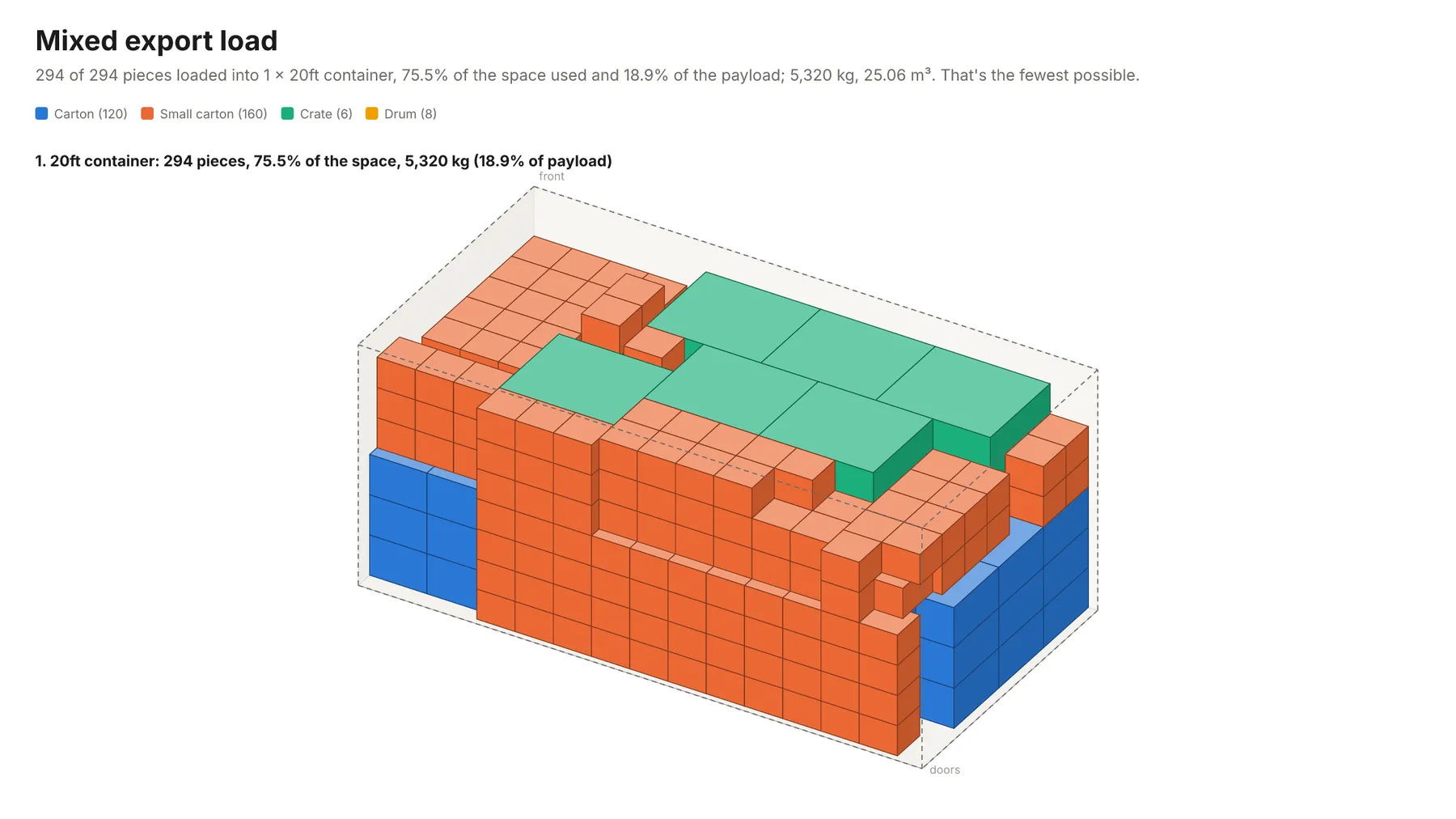
A mixed export load in a 20ft container (the form's example):
294 of 294 pieces loaded into 1 × 20ft container, 75.5% of the space used and 18.9% of the payload; 5,320 kg, 25.06 m³. That's the fewest possible.
Pallets into a European trailer:
36 of 36 pieces loaded into 1 × 13.6 m trailer, 50.2% of the space used and 77.2% of the payload; 18,520 kg, 45.7 m³. That's the fewest possible.
Furniture, choosing the cheapest mix of containers:
A delivery truck with three stops, each stop's cargo reachable when the truck gets there:
28 of 28 pieces loaded into 1 × 26ft box truck, 23.6% of the space used and 40.3% of the payload; 1,830 kg, 11.12 m³. That's the fewest possible. Every stop's cargo can be unloaded without moving another stop's.
Building a pallet from cartons, with a height limit:
Several loads in one run: settings given at the top apply to every job unless a job sets its own, and a job with its own cargo or containers doesn't take the shared ones.
How-to examples
These are examples from Examples above; the result lines are what their runs say in summary.
How to work out how many boxes fit in a shipping container
Result: "294 of 294 pieces loaded into 1 × 20ft container, 75.5% of the space used and 18.9% of the payload; 5,320 kg, 25.06 m³. That's the fewest possible." Every piece gets its position and the order to load it, with a 3D drawing.
How to plan pallets in a truck or trailer
Result: "36 of 36 pieces loaded into 1 × 13.6 m trailer, 50.2% of the space used and 77.2% of the payload; 18,520 kg, 45.7 m³. That's the fewest possible." The weight limit counts as well as the space.
How to load a delivery truck in stop order
Result: "28 of 28 pieces loaded into 1 × 26ft box truck, 23.6% of the space used and 40.3% of the payload; 1,830 kg, 11.12 m³. That's the fewest possible. Every stop's cargo can be unloaded without moving another stop's."
How to let an AI agent plan loads
Add this Actor to the Apify MCP server with https://mcp.apify.com/?tools=jumblemog/load-planner. The agent writes the cargo as short lines like Carton: 60 x 40 x 40 cm, 14 kg, qty 120, names the container, and gives the user the summary and the 3D viewer link.
FAQ
Which containers does it know? ISO containers (20ft, 40ft, 40ft and 45ft high cube, reefers), 53ft and 48ft dry vans, 13.6 m and mega trailers, box trucks and pallets, with their usual inside sizes, payloads and doors. You can also give your own sizes.
Does it follow stacking rules? Yes: no stack, floor only, upright or any side, the payload, and support under each piece.
Can it choose the cheapest mix of containers? Yes. Give each container a price and set "goal": "cheapest".
Does it check the weight balance? Yes. It reports each container's center of gravity and warns when it is off.
Which files do I get? A 3D drawing of every container (PNG and SVG), a 3D viewer page you can turn and step through, and a PDF with views and the loading order.
Input
| Field | What it's for |
|---|---|
cargo | The cargo: text lines or objects with name, length, width, height, unit, weight, quantity, rotation, stackable, maxLoad, floorOnly, stop, priority, group, color. |
containers | What to load into: names or text lines, or objects with name, length, width, height (inside), unit, maxWeight, price, quantity, maxHeight. Empty: 40ft high cube containers. |
cargoCsv, containersCsv | The same as CSV or TSV text, or a link to a CSV, Excel or JSON file or a Google Sheet. |
units | auto (default), cm, mm, m, in, ft, metric or imperial: the unit of bare numbers. |
weightUnit | auto (default: kg, or lb with imperial sizes), kg, lb or t. |
rotation | For cargo that doesn't say: upright (default), any or fixed. |
minSupport | The share of each piece's base that must rest on something, in percent (default 75). |
goal | fewest containers (default) or cheapest. |
currency, title | The currency of prices (default the one written with them, or $) and the plan's name. |
timeLimitSeconds | How long to try other loading orders (default 10, up to 300). |
jobs | Several loads in one run. |
Output
One dataset item per load (shortened here):
Positions are measured from the front wall (x, toward the doors), the left wall (y, looking from the doors) and the floor (z), or from the pallet's corner and deck. Steps are in loading order. A load where some pieces didn't fit is incomplete, and unplaced says why, such as "too big for every container in any allowed orientation", "heavier than every container's weight limit" or "no room left in the containers given".
report is the whole plan as Markdown, ready for a chat reply or an email. The run's OUTPUT record holds every plan as one JSON object, so the run-sync API endpoint answers with them directly.
How it works
Sizes become whole millimeters, rounding cargo up and containers down, so every check is exact. Pieces are placed one at a time on extreme points, the corners that earlier pieces leave, choosing for each piece the deepest, lowest, leftmost spot and the best way to turn it, with every candidate checked against all placed pieces at once with NumPy. A spot counts only when the piece is supported, nothing below it is a no-stack piece or would carry more than its limit (weight is passed down through the stack by contact area), the container's payload holds, floor-only pieces are on the floor, and nothing for a later stop stands between the piece and the doors. Pieces of one cargo line stay together, so identical cartons build up in walls from the front.
Many plans are tried within the time limit: different orders of the cargo lines (by volume, footprint, height, weight, length), with no-stack pieces first or last, and three ways of building (walls, compact fronts or layers), then shuffled orders. The best plan loads the most must-ship and other cargo, then uses the fewest containers (or the lowest cost), then the shortest load. With several container types, each next container is chosen to take the remaining cargo at the best fill (or volume per price), and the last one is the cheapest or smallest that takes everything left. Volume and weight lower bounds tell when the number of containers can't go lower.
Checks
Every plan is checked again by separate code before it's returned: each piece inside the container, at its own size in an allowed orientation, overlapping nothing, resting on enough support, floor-only pieces on the floor, and the payload kept. The tests cover exact fits (64 cubes in a 2 m box), 34 EUR pallets in a 13.6 m trailer, weight-limited trucks, no-stack, top-load and floor-only rules, stops loaded in order, and random mixed loads in 20ft and 40ft containers. 16 tests pass, and a load of 2,300 mixed cartons fills three 40ft high cubes (the fewest possible) in about 4 seconds.
Pricing
You pay per load plan made, at the price shown on this page, with every file included. Loads where nothing fits are never charged. Searching past the first 30 seconds of a plan adds a small solver time charge per started 10 seconds, so with the default 10-second time limit it never applies. If you set a maximum cost per run, the Actor checks before each plan that it fits and shortens the time limit to stay within it.
Speed
Most loads (up to a few hundred pieces) are planned in one to three seconds, and a run through the API answers in about 10 to 20 seconds, including the cloud container starting and the files being saved. Thousands of pieces take a few seconds per plan tried, so the time limit decides how many orders are compared; give them 30 to 60 seconds to search further.
Tips and limits
- Upright by default: cargo turns on the floor only unless a line says
any sideor How cargo may turn is set to any side. Usefixedfor pieces that must keep their length along the container. - Support: 75% of each piece's base must rest on something by default. Use 100 for no overhang at all, or less for sturdy cartons.
- Heavy and fragile pieces:
floor onlykeeps heavy pieces on the floor,no stackkeeps everything off fragile ones, andmax load 50 kglets light cargo go on top up to that weight. - Doors and real-world loading: positions assume cargo can be placed anywhere it fits; pieces taller or wider than a container's door are not checked against the door, and nothing is secured or braced. Treat the plan as a guide for the loading crew.
- Axle weights are not computed; the center of gravity and the warnings show when a load is off-center.
- Limits: 500 cargo lines and 5,000 pieces per load (load whole pallets as single pieces for bigger shipments), 30 container types, 50 loads per run, and up to 300 seconds of searching per plan. A run stops once loads that can't be planned have taken 3 minutes.
- Links: CSV, TSV, JSON and Excel files, GitHub file links and Google Sheets links (shared as "Anyone with the link" or published to the web). Every site's robots.txt is checked first.
For AI agents and developers
This Actor works with the Apify MCP server, so AI agents can call it as a tool: send the cargo and containers as text lines and read summary, containers, unplaced and the viewerUrl and pdfUrl links from the result. A direct API call that waits for the answer:
run-sync instead returns the run's OUTPUT: the status, how many plans were made and every plan as JSON.
In Python, with the apify-client package:
Credits
- Packing: NumPy (BSD-3-Clause).
- Files: vl-convert (BSD-3-Clause) for the PNG and PDF pages, pypdf (BSD-3-Clause) to join them, the Inter font (SIL Open Font License), subset with fontTools (MIT), and three.js (MIT) in the 3D viewer.


