

Project Scheduler: Gantt Chart, Critical Path & Leveling
Pricing
Pay per event
Project Scheduler: Gantt Chart, Critical Path & Leveling
Turn a task list into a dated schedule: dependencies with lags, working calendars with public holidays, critical path and float, resource leveling, finish-date odds, costs. Gantt chart PNG/PDF, Excel, MS Project XML, CSV, iCal, Mermaid. Text, JSON or CSV. For AI agents.
Pricing
Pay per event
Rating
0.0
(0)
Developer

Jumble Mog
Maintained by CommunityActor stats
0
Bookmarked
2
Total users
1
Monthly active users
8 days ago
Last modified
Categories
Security
Limited permissionsShare
Turn a task list into a dated project schedule, with the critical path, a Gantt chart and an MS Project file. Write the tasks as short lines like Backend: 8-12d after Design; needs 2 developers, or send JSON, a CSV, an Excel file or a Google Sheet, and it works out when every task starts and finishes on a real working calendar (your working days and hours, public holidays for over 100 countries, company closures, people's days off). You get the critical path, every task's total and free float, resource leveling so nobody is booked twice (solved with Google's OR-Tools CP-SAT), who does what inside each team, costs from hourly or day rates, whether the deadline is met, and, when tasks have ranges, the finish-date odds (P50, P80, P90, P95) from a Monte Carlo simulation. Files come with every schedule: a Gantt chart (PNG, SVG and a paged PDF), an Excel workbook with a cell-colored Gantt sheet, MS Project XML that opens in MS Project, ProjectLibre and GanttProject, CSV, an iCalendar (.ics) file, a Mermaid gantt chart and a Markdown report. Made for project managers, construction and event planners, agencies, consultants and software teams, for developers who need a scheduling API, and for AI agents that need a real schedule from one API call.
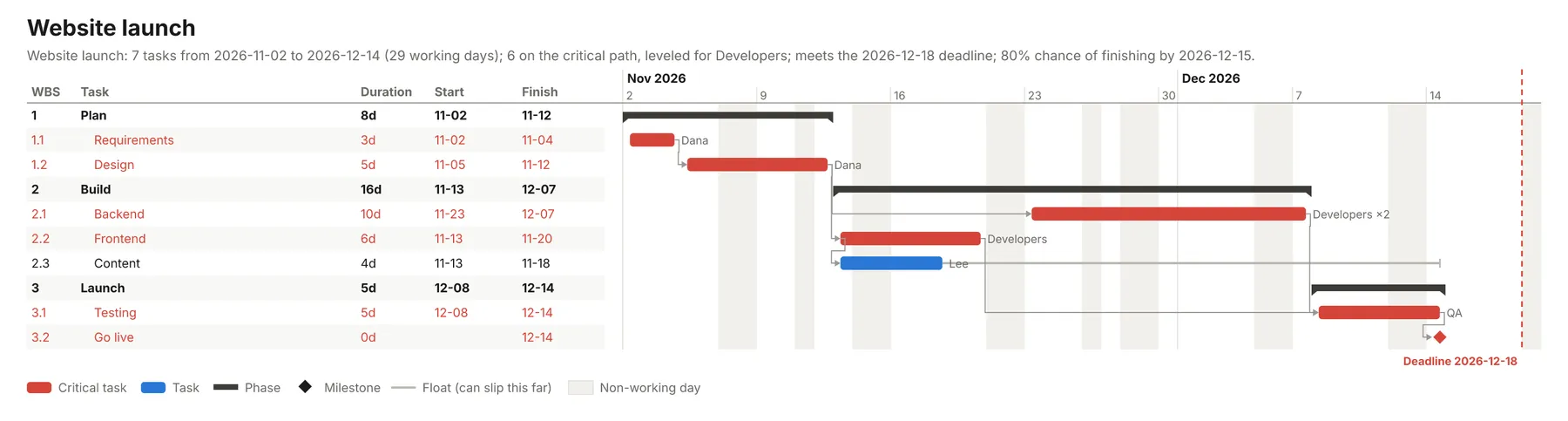
What it does
- Dates on a real calendar: durations in working days, hours, weeks or months, counted over your working week (Mon-Fri, Sun-Thu, six days or every day), your hours per day, public holidays by country or region (
US,GB-SCT,DE-BY,IN), your own closures and each person's days off. - Every kind of dependency: finish-to-start, start-to-start, finish-to-finish and start-to-finish, with lags and leads in time or in percent (
after Design +2d,starts with Framing,3FS+1d,Build FF+20%), "not before" dates and task deadlines. A phase can depend on a phase. - Critical path method (CPM): early and late dates, total float and free float for every task, and the critical path in order. A deadline that can't be met shows up as negative float on the tasks that cause it.
- Resource leveling: people, teams (
Developers: 3) and equipment with part-time assignments (Dana (50%)). When someone is overbooked, OR-Tools CP-SAT finds the earliest finish date with nobody booked twice, then pulls every task as early as it can go, and says when that finish is proven the earliest possible. Days off are respected, and team work is dealt out to team members (Developers 1,Developers 2). - Finish-date odds: give tasks ranges (
3-5d) or best/likely/worst estimates (3/5/10d), or a general uncertainty, and a Monte Carlo simulation (PERT distributions, 2,000 runs by default) gives the P50, P80, P90 and P95 finish dates, the chance of meeting the deadline and each task's chance of being critical. - Costs: hourly or day rates per person or team, fixed task costs, and totals per task, phase and project.
- Phases and WBS: headings group tasks into phases and sub-phases with WBS numbers, phase dates and rollups.
- Files for the team and the client: a Gantt chart (PNG, SVG, PDF with every row), Excel (schedule, Gantt, resources, odds, holidays), MS Project XML (MSPDI), CSV, iCalendar for Google Calendar, Outlook or Apple Calendar, Mermaid for GitHub, Notion or a chat reply, and a Markdown report.
- Reads what you have: plain text lines, JSON objects with common field names, CSV or TSV, Excel files or a Google Sheet link, including exports with MS Project style predecessors.
- Many projects in one run: up to 50, each with its own tasks, resources and calendar.
Who it's for
- Project and program managers: a quick, checked schedule and Gantt chart from a task list, with the critical path, float and deadline risk, without opening desktop software.
- Construction, renovation and trades: phase plans with crews and subcontractors, inspections, lead times and holidays, exported to MS Project or ProjectLibre.
- Event, marketing and launch planners: work back from a date and see whether the deadline holds and how likely it is.
- Agencies and consultants: proposal timelines with costs per phase and a client-ready Gantt PDF.
- Software and product teams: release plans with team capacity, ranged estimates and P80 dates instead of single guesses.
- Developers and no-code builders: a project scheduling API for apps, CRMs, ticket systems and Make, n8n or Zapier flows, billed per schedule.
- AI agents and LLM apps: language models can't do calendar arithmetic, critical paths or leveling reliably. An agent can send the plan as plain text and get back dates it can trust, plus files to hand to a person.
How to use it
- List the tasks in Tasks, one per line, such as
Design: 5d after Requirements; by Dana. The form starts with a website launch, so you can click Start right away. - List people and teams in Resources, such as
Developers: 2, $95/horDana: off 2026-11-23 to 2026-11-27. - Set the Start date, Working days, Holidays (a country code such as
US) and an optional Deadline. - Click Start. The Schedules view shows the Gantt chart, summary and files, Tasks every task with its dates and float, Resources each person's work and cost, Milestones and Phases their dates.
You can also run it through the Apify API, from Make, n8n, Zapier and other integrations, or as a tool for AI agents.
Writing tasks
One task per line: a name, a colon, then the duration and anything else, separated by semicolons or commas.
| You write | It means |
|---|---|
Design: 5d | 5 working days. Also 4h, 2w, 1mo (4 working weeks), 30m, 1.5d. |
Backend: 8-12d | A range: planned at 10 days, simulated between 8 and 12. |
Testing: 3/5/10d | Best, likely and worst case: planned at 5 days. |
Go live: milestone | A milestone (0 days). |
after Design, Content | Starts when both finish (finish-to-start). |
after Design +2d | Two working days after Design finishes; -1d overlaps by a day. |
starts with Framing or SS Framing | Start-to-start; finishes with Framing or FF Framing is finish-to-finish. |
after 3FS+2d, 4SS | MS Project style: task 3 plus two days, start-to-start with task 4. |
after Build | When Build is a phase: after its last tasks. |
by Dana, by Dana and Lee | Assigned people. |
needs 2 developers, uses crane | Two members of the Developers team; one crane. |
by Dana (50%) | Dana at half time. |
not before 2026-11-09 | Can't start earlier (materials arrive, permit date). |
deadline 2026-12-04 | Must finish by then; shows negative float if it can't. |
$500 or cost $500 | A fixed cost for the task. |
## Build or Build: alone | A heading: the tasks below form the Build phase. ## Build: after Plan makes the whole phase wait. |
Lines may start with -, * or a number (3. Pour slab: 1d); numbers become task IDs for after 3. Durations without a unit are days.
Resources, one per line: Dana, Developers: 3 (a team of three), $95/h or $600/day, and off 2026-12-21 to 2026-12-31. People named on tasks but not listed are taken as one person (or as many as one task needs), and the result says so.
Tables (CSV, JSON, Excel, Google Sheets) need a task name and a duration column; other columns are optional and many spellings work: ID, Task, Duration (or Days, Hours, Weeks), Predecessors, Resources (Dana, Developer[200%]), Optimistic/Most likely/Pessimistic, Start no earlier than, Deadline, Phase, Milestone, Cost, Notes.
Examples
A product launch with a team, ranges and a deadline (the form's example):
Backend needs both developers, so it can't run beside Frontend: leveling puts Frontend first and adds six working days. The project finishes on 2026-12-14 (Veterans Day and Thanksgiving skipped), four working days before the deadline, with an 80% chance of finishing by 2026-12-15.
A house build from a table with MS Project style predecessors:
46 working days; the critical path runs Permits, Foundation, Framing, Roofing, Drywall, Finishing, Handover, and Electrical has 3 days of float.
An office move in the UK with uncertainty on every task:
Several projects in one call: put each in jobs, such as {"jobs": [{"title": "Audit", "tasks": [...]}, {"title": "Training", "tasks": [...]}], "holidays": ["US"]}. Settings outside jobs apply to every project that doesn't set its own.
How-to examples
These are the examples under Examples above, with what their runs gave.
How to make a Gantt chart from a task list
Result: a dated schedule with a Gantt chart. Backend needs both developers, so leveling puts Frontend first and adds six working days. The project finishes on 2026-12-14, with Veterans Day and Thanksgiving skipped and four working days to spare before the deadline, and an 80% chance of finishing by 2026-12-15.
How to find the critical path of a project
Result: 46 working days. The critical path runs Permits, Foundation, Framing, Roofing, Drywall, Finishing, Handover, and Electrical has 3 days of float. MS Project style predecessors such as 2FS+3d and 3SS+5d are read as they are.
How to estimate the odds of finishing by a deadline
Give tasks ranges (8-12d), three-point estimates (3/5/10d) or a general uncertaintyPercent, and a deadline. A Monte Carlo simulation of 2,000 runs gives the P50, P80, P90 and P95 finish dates and the chance of meeting the deadline, as in the office move example above.
How to let an AI agent plan a project
Add this Actor to the Apify MCP server with https://mcp.apify.com/?tools=jumblemog/project-scheduler. The agent writes the tasks as short lines like Backend: 8-12d after Design; needs 2 developers, then gives the user the dates, the critical path and the links to the Gantt chart and files.
FAQ
Can I open the schedule in MS Project or Excel? Yes. Each run gives MS Project XML (MSPDI), an Excel workbook with the schedule and a Gantt sheet, and a CSV.
Does it skip weekends and holidays? Yes. It counts over your working week and skips public holidays for the country or region you give (US, GB-SCT, DE-BY), plus your own closed days.
What if one person is booked on two tasks at once? Resource leveling moves tasks so nobody is booked twice, and finds the earliest finish date that allows.
Can I add the schedule to Google Calendar? Yes, from the iCalendar file. There is also a Mermaid version for GitHub and Notion.
Does it work with Zapier, Make or n8n? Yes. Call the Actor with its Apify app or an HTTP request and send the Gantt chart or the files on.
Input
| Field | What it is |
|---|---|
title | The project's name. |
tasks | Task lines (or JSON objects) as above. |
tasksCsv | A task table: CSV/TSV/JSON text, or a link to a CSV, JSON or Excel file or a public Google Sheet. |
resources, resourcesCsv | People, teams and equipment as lines or a table (Name, Capacity, Rate, Days off). |
startDate | The first day (YYYY-MM-DD); empty means the first working day after today. |
workDays, hoursPerDay, dayStarts | The working week (default Mon-Fri), hours per day (8) and start time (09:00). |
holidays | Country or region codes, dates, ranges and named closures. |
deadline | The date the project must finish by. |
leveling | auto (default): level only when someone is overbooked. off: dependencies only, overbooking reported. |
uncertaintyPercent | A range for tasks without one: best case this much shorter, worst case twice this much longer. |
simulations | Monte Carlo runs (default 2,000; 0 turns the simulation off). |
currency | A currency code for costs; empty takes it from the rates. |
timeLimitSeconds | Time for leveling (default 10, up to 300). |
jobs | Several projects in one run. |
Output
One dataset item per project, and every project in the run's OUTPUT record (schedulesMade, schedulesFailed, schedules). Shortened:
Each task also has startTime and finishTime (with hours), earlyStart, earlyFinish, lateStart, lateFinish, resources with units, optimisticDays and pessimisticDays, notBefore, deadline and deadlineMet. report holds the whole schedule as Markdown. Projects that can't be scheduled come back with status: "failed" and an error that says what to change (such as the tasks in a dependency loop).
How it works
- Read: tasks, links, resources and dates are read from text, JSON or tables; names are matched without regard to case, and phases are expanded to their first or last tasks.
- Calendar: time is counted in working minutes from the start date, skipping non-working weekdays, holidays and closures, so durations and lags are always working time.
- Critical path: a forward pass gives each task's earliest dates, a backward pass from the finish (or an earlier deadline) gives the latest, and float is the difference.
- Leveling: if a person or team is overbooked, the schedule becomes a resource-constrained scheduling problem for CP-SAT: interval variables for tasks, cumulative constraints for each resource with days off as blocked time, and the links as precedence constraints. It first minimizes the finish date (starting from a quick priority-rule schedule), then, keeping that date, moves every task as early as possible. Float is then recomputed with each person's order of work, so the critical path reflects resources too.
- Simulation: task durations are drawn from PERT distributions over their ranges, with the links and each person's order of work kept, and the finish dates of all runs give the odds.
- Files: the Gantt chart is drawn as SVG and turned into PNG and PDF; Excel, MS Project XML, CSV, iCalendar, Mermaid and Markdown are written from the same result.
Checks
The build runs three sample projects end to end (a leveled website launch, a house build from a table, and a dependency loop that must fail with its reason), and over 30 unit tests cover the reader, the calendar, CPM floats against a textbook case, every link type, leveling with independent checks that no resource is overbooked and no link is broken, days off, the simulation and every file.
Pricing
You pay per schedule made, at the price shown on this page, with every file included. Projects that can't be scheduled are never charged. Leveling past the first 30 seconds of a project adds a small leveling time charge per started 10 seconds, so with the default 10-second time limit it never applies. If you set a maximum cost per run, the Actor checks before each project that it fits and shortens the time limit to stay within it.
Speed
Most projects (up to a hundred or so tasks) are scheduled in well under a second, and a run through the API answers in about 10 to 15 seconds, including the cloud container starting and the files being saved. Leveling large projects takes longer: in tests, 400 random tasks shared by five people and teams were leveled, and proven the shortest possible, in about 4 seconds.
Tips and limits
- Fixed durations: a task takes the same time whoever does it; adding people to a team doesn't shorten a task. Split work into smaller tasks to let it run in parallel.
- Days off: a task doesn't stop for someone's days off; leveling schedules it before or after them. Days off for a team take the whole team away on those days, so list a person separately to take just them away.
- Working time only: durations and lags count working time. For waiting time that runs over weekends (concrete curing), use a lag in working days that covers it.
- Months are 4 working weeks, and weeks are your working days per week.
- Constraints: "not before" dates and deadlines; there are no "must start on" constraints and no progress tracking with actual dates yet.
- The simulation keeps each person's leveled order of work, and tasks without ranges stay fixed unless you set
uncertaintyPercent. - MS Project XML: tasks the leveling moved carry a "start no earlier than" date, so MS Project, ProjectLibre or GanttProject open the leveled plan as it is here rather than leveling again.
- Sizes: up to 1,500 tasks and 300 resources per project and 50 projects per run. The PNG shows the first 60 rows; the PDF, Excel and CSV have them all.
For AI agents and developers
This Actor works with the Apify MCP server, so AI agents can call it as a tool: send the tasks as text lines and read summary, criticalPath, tasks, finishOdds, mermaid and the file links from the result. Unknown words in a task line come back as an error that shows the accepted forms, so an agent can correct itself. A direct API call that waits for the answer:
run-sync instead returns the run's OUTPUT: the status, how many schedules were made and every schedule as JSON.
In Python, with the apify-client package:
Credits
- Scheduling: Google OR-Tools CP-SAT (Apache License 2.0) and NumPy (BSD-3-Clause) for the simulation.
- Holidays: the holidays library (MIT).
- Files: openpyxl (MIT) for Excel, vl-convert (BSD-3-Clause) for the PNG and PDF pages, pypdf (BSD-3-Clause) to join them, and the Inter font (SIL Open Font License), subset with fontTools (MIT).


