

Background Noise Remover: AI Audio & Video Cleanup
Pricing
Pay per event
Background Noise Remover: AI Audio & Video Cleanup
Remove background noise from voice recordings, podcasts, interviews, calls and videos with DeepFilterNet3 AI. Keeps the speech, removes fans, traffic, hum, wind and room noise. Optional loudness normalization. MP3, WAV, M4A, MP4 and more. No API key needed.
Pricing
Pay per event
Rating
0.0
(0)
Developer

Jumble Mog
Maintained by CommunityActor stats
0
Bookmarked
2
Total users
1
Monthly active users
2 days ago
Last modified
Categories
Share
Remove background noise from speech in podcasts, interviews, voice-overs, lectures, calls, voice memos and videos. This Actor runs DeepFilterNet3, a state-of-the-art AI speech enhancement model, to keep the voice and strip away fans, air conditioning, traffic, hum, wind, keyboard clatter, crowd murmur and room noise. Videos keep their picture and get clean sound. Everything runs inside the Actor: no API key, no GPU and no audio software needed.
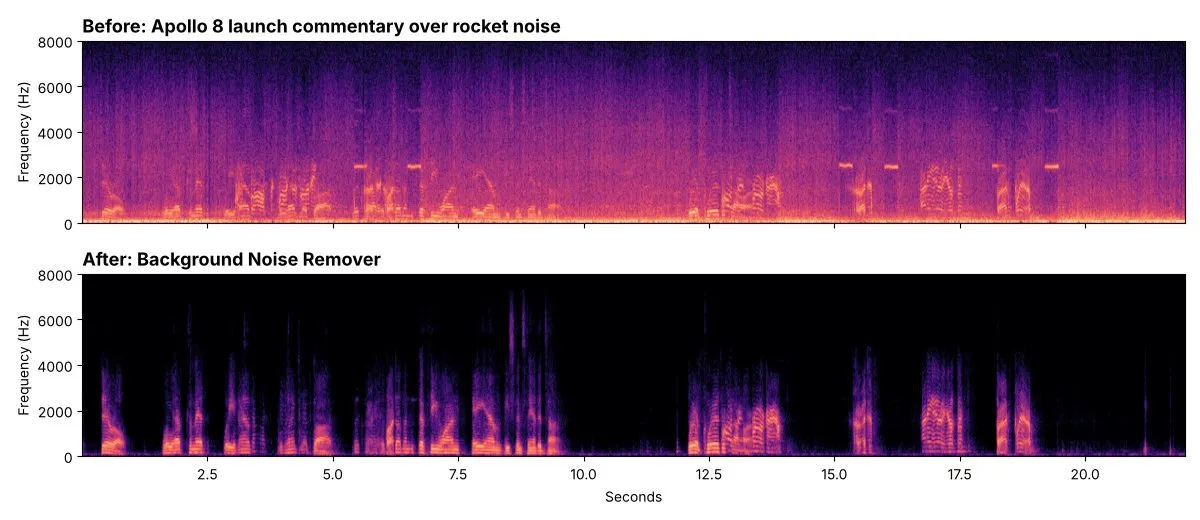
Listen for yourself: before and after (22 seconds, MP3).
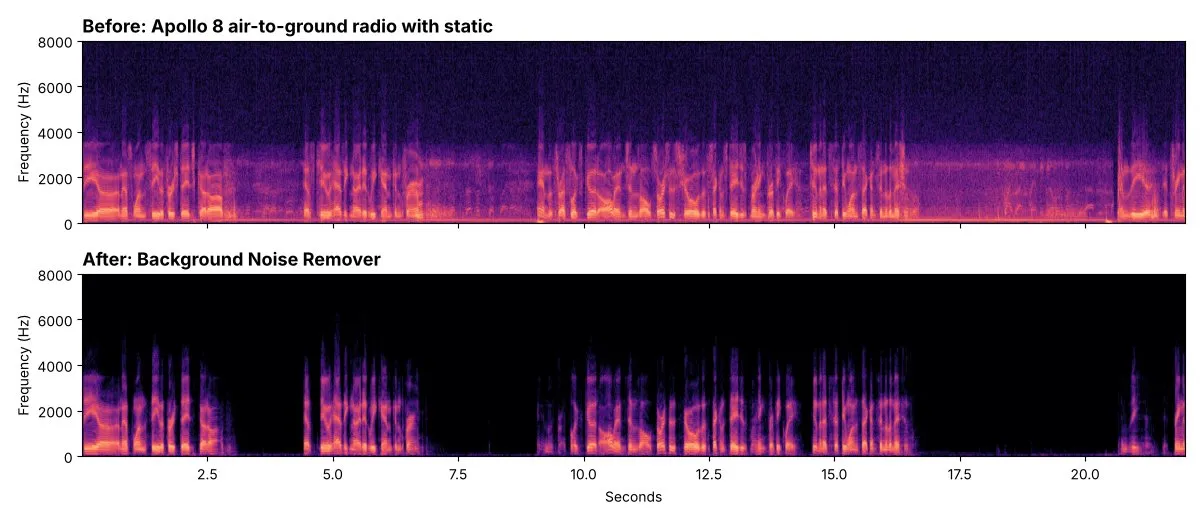
Radio static: before and after.
Samples: NASA Apollo 8 mission audio (public domain), cleaned with the default settings. The background between words dropped by 51 dB and 41 dB.
What it does
- Removes background noise from speech with DeepFilterNet3, trained on large collections of speech and noise. Steady noise (fans, hum, hiss) and changing noise (traffic, clatter, wind, chatter) both go.
- Cleans videos too: MP4, MOV, MKV and WebM come back as the same video with clean sound. The picture is copied as it is, without re-encoding.
- Keeps your format: MP3 stays MP3, WAV stays WAV, at the original sample rate. Or convert to MP3, WAV, FLAC, M4A, OGG or Opus, also to pull clean audio out of a video.
- Three strengths: full removal, natural (keeps a little room sound) or light.
- Optional loudness normalization to podcast (-16 LUFS), streaming (-14 LUFS) or broadcast (-23 LUFS) standards, measured in two passes like professional tools.
- Handles long recordings: files up to 6 hours, processed in chunks so memory never runs out.
- Takes files from anywhere: direct links, Google Drive and Dropbox share links, or uploads.
- Shows the result in numbers: every file reports how much quieter the background became.
- Fair billing: you pay per minute of audio. Files that fail cost nothing.
Who it's for
- Podcasters and YouTubers cleaning episodes recorded at home or on the road.
- Journalists and researchers making interviews and field recordings easier to hear and to transcribe. Clean audio also gives speech-to-text tools fewer errors.
- Course creators and teachers fixing lecture and screen recordings.
- Developers and AI agents that need a noise removal step in a media pipeline, through the API or MCP.
How to use it
- Paste links to audio or video files, or upload them.
- Keep the defaults or pick a strength, loudness target and output format.
- Click Start. Each cleaned file appears in the Output tab with a download link.
You can also run it through the Apify API, on a schedule, or from Make, n8n, Zapier and other integrations.
Input
| Field | What it does |
|---|---|
mediaUrls | Links to audio or video files, or Google Drive and Dropbox share links. |
files | Files uploaded from your computer or picked from an Apify key-value store. |
strength | full (default) removes as much noise as possible; natural lowers it by up to 24 dB; light by up to 12 dB. |
normalizeLoudness | off (default), podcast (-16 LUFS), streaming (-14 LUFS) or broadcast (-23 LUFS). |
outputFormat | same (default) keeps the input's format; or mp3, wav, flac, m4a, ogg, opus for audio only. |
maxFiles | Stop after this many files (default 100). |
Example:
Output
Each file becomes one dataset item. The cleaned file is saved in the run's key-value store, and outputUrl is its download link:
A file that couldn't be downloaded or read gets status: "failed" and an error that says why, and isn't billed. Download your files within your plan's data retention period, or copy them to your own storage, because run storage expires.
Pricing
You pay per started minute of audio, at the price shown on this page: a 30-minute episode is 30 minutes, a 20-second clip is 1 minute. Loudness normalization and format conversion are included. Files that fail are never charged. If you set a maximum cost per run, the Actor stops before a file that wouldn't fit.
Speed
With the default 4 GB of memory, the Actor cleans about 8 minutes of audio per minute of processing: a 22-second clip took 2 seconds and an 8.5-minute recording about a minute, including download, loudness normalization and encoding. Runs take about 10 more seconds to start. More memory makes long files faster; the price per minute stays the same.
Tips and limits
- The model is made for speech. It treats music and sound effects as noise and removes them too, so don't use it on songs or on videos where the music should stay.
- Very loud noise that completely covers the voice can't be fully undone; the speech that comes out may sound thin.
- Stereo files stay stereo. Files with more than two channels (5.1) come back as stereo.
- Files can be up to 2 GB and 6 hours long.
- Links to YouTube, TikTok, Instagram, Facebook, X, Vimeo, SoundCloud and Spotify aren't supported, because those platforms' terms don't allow downloading. Use your own copy of the file.
For AI agents and developers
This Actor works with the Apify MCP server, so AI agents can call it as a tool: pass mediaUrls and read outputUrl from each dataset item. Every item has the same documented fields, and status tells you whether a file succeeded. For a direct API call:
Privacy
Files are downloaded into the run, processed there and saved only to your own Apify storage. Nothing is sent to an outside AI service.
Credits and licenses
- Noise removal: DeepFilterNet3 by Hendrik Schröter et al., MIT / Apache-2.0.
- Audio and video processing: FFmpeg.


