

Section Properties Calculator (Moment of Inertia, Steel Shapes)
Pricing
Pay per event
Section Properties Calculator (Moment of Inertia, Steel Shapes)
Cross-section properties from plain text: moment of inertia, section modulus, centroid, radius of gyration, torsion and warping constants and shear centre for any shape or 824 steel profiles (W, IPE, HE, UB, angles), plus stresses and column buckling.
Pricing
Pay per event
Rating
0.0
(0)
Developer

Jumble Mog
Maintained by CommunityActor stats
0
Bookmarked
2
Total users
1
Monthly active users
6 days ago
Last modified
Categories
Security
Limited permissionsShare
Moment of inertia, section modulus and the rest for any cross-section, from one line of text. Type IPE 300, W12x26, RHS 200 x 100 x 8 mm, 2x10 lumber or IPE 300 with a 200 x 12 mm plate on the bottom flange. You get back:
- Every section property: area, centroid, Ix, Iy, Ixy, principal moments I1 and I2 and their angle, elastic section moduli to each face, plastic moduli, radii of gyration, shape factors, the torsion constant J, the warping constant Iw, the shear centre, shear areas and the mass per length.
- Any shape: 824 standard steel profiles (W, IPE, IPN, HEA/HEB/HEM, HD, HP, UB, UC, UBP, UPN, UPE and angles), rectangles, circles, tubes and pipes (CHS, NPS schedules, RHS, SHS, HSS), I-sections, channels, tees, angles, lipped C and Z purlins, regular polygons, ellipses, triangles, US lumber, any polygon with holes, and built-up sections of several parts.
- Stresses under axial force, bending about either axis, shear and torque: the largest tension, compression, shear and von Mises stress, and the safety against yield.
- Column buckling: flexural, torsional and flexural-torsional elastic loads, the AISC 360 compressive strength (φPn and Pn/Ω) with a local buckling check, and Shigley's Euler-Johnson load.
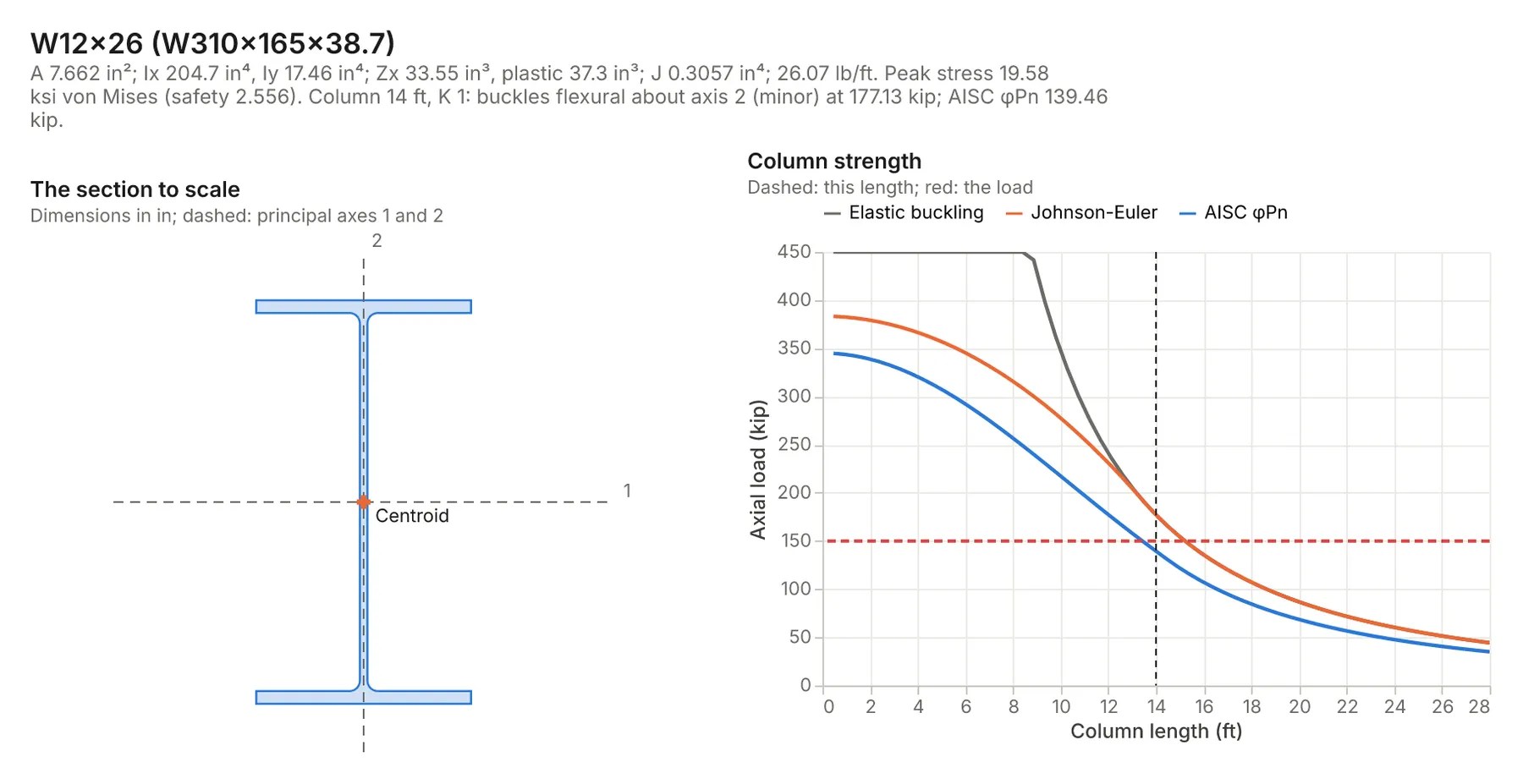
- A chart: the section to scale with its centroid, shear centre and principal axes, next to the column strength curves or the main properties.
It computes the properties with finite elements (the open-source sectionproperties package), so fillets, odd shapes and the torsion and warping constants come out right, not just the textbook shapes. Metric (mm, kN, MPa) or inch (in, kip, ksi): results come back in the units you wrote.
It's made for:
- Structural and mechanical engineers checking beams, columns, purlins, brackets and extrusions.
- Fabricators and estimators who need a section's weight and capacity.
- Engineering students working mechanics of materials and steel design problems.
- AI agents that need real section properties instead of a guess.
How to use it
- Write Sections, one per entry. The form has examples.
- Optionally set a default material or the Units.
- Click Start. Each section is a row in the results, with its summary, chart and report.
Writing a section
| You write | It means |
|---|---|
IPE 300, HE 200 B, W12x26, W310x38.7, UB 203x133x25, UPN 100, L 100x100x10 | a standard steel profile |
rectangle 100 x 200 mm, square bar 40 mm, circle 50 mm, ellipse 100 x 60, triangle 100 x 80 | solid shapes (width x depth) |
CHS 114.3 x 6 mm, NPS 4 sch 40 pipe, tube OD 60 mm wall 3 mm, RHS 200 x 100 x 8 mm, SHS 100 x 5, HSS 6x4x1/4 | tubes and pipes |
I-beam 300 x 150 x 7.1 x 10.7 mm, channel 200 x 75 x 6 x 10, tee 150 x 100 x 10 x 12 | depth x width x web x flange, then root radius 15 |
angle 100 x 75 x 8 mm, lipped C 200 x 75 x 20 x 2, Z 200 x 75 x 20 x 2, hexagon 30 mm across flats | other shapes |
2x10 lumber | US lumber at its actual size (1.5 x 9.25 in) |
polygon (0,0) (100,0) (100,10) (10,10) (10,80) (0,80), then hole (..) (..) (..) | any outline |
IPE 300 with a 200 x 12 mm plate on the bottom flange, ... cover plates top and bottom | built-up sections |
S355, A992, 6061-T6, fy 50 ksi, E 70 GPa | the material |
axial 200 kN, moment 50 kN·m, My 5 kN·m, shear 100 kN, torque 5 kN·m | forces for stresses |
column 3 m long, pinned ends, fixed-free, K 0.7, load 500 kN | a column check |
rotated 30 degrees | turn the shape |
Objects work too, including built-up sections of any parts; see Input.
Examples
All of these ran on this Actor; the numbers are from the results.
| Section | Result |
|---|---|
IPE 300 | A 5,387 mm², Iy 83.67×10⁶ mm⁴ (catalog 83.56), Iz 6.038×10⁶, Wpl 629.1×10³ mm³ (catalog 628.4), It 198.8×10³ mm⁴, 42.3 kg/m |
W12x26 column, 14 ft long, pinned ends, A992, load 150 kips | A 7.66 in², Ix 204.7 in⁴, Zx 37.3 in³; minor-axis buckling at 177 kips; AISC φPn 139.5 kips, so the load is 8% over; the web is slender for compression, and it says so |
RHS 200 x 100 x 8 mm, S355, moment 50 kN·m, shear 100 kN | Ix 20.89×10⁶ mm⁴, J 18.13×10⁶ mm⁴; peak von Mises 240 MPa, safety 1.48 |
IPE 300 with a 200 x 12 mm plate on the bottom flange | A 7,787 mm², Ix 124.1×10⁶ mm⁴ (by hand with the parallel axis theorem: 124.1), the centroid moves 48 mm down |
angle 100 x 100 x 10 mm, S355, column 2 m pinned, load 150 kN | I1 2.87×10⁶, I2 0.734×10⁶ mm⁴ at 45°; buckles about the minor axis at 380 kN; AISC φPn 289 kN |
tee 150 x 100 x 10 x 12 mm, S355, column 3 m, pinned | buckles flexural-torsionally at 223 kN, below both the flexural (233) and torsional (1,991) loads; AISC φPn 176 kN |
2x10 lumber | 1.5 x 9.25 in, Ix 98.93 in⁴, Sx 21.39 in³, as in the NDS tables |
NPS 4 sch 40 pipe | 4.5 x 0.237 in, A 3.17 in², I 7.23 in⁴ |
The tests check that:
- Rectangles, circles and tubes match their closed-form area, I, Z, plastic modulus and torsion constant (Roark's β for a rectangle).
- IPE 300, HEA 200, UPN 100 and L 100x100x10 match the ArcelorMittal catalog, and W12x26 the AISC Manual, within 0.5% (J within 3%, since catalogs use approximate formulas).
- A channel's shear centre matches the thin-wall formula e = 3b²tf/(6b·tf + h·tw).
- Euler, AISC E3 (both branches) and Johnson loads match their formulas, and a tee buckles flexural-torsionally below its flexural and torsional loads.
- Built-up sections match the parallel axis theorem, and the text reader handles every form above.
How-to examples
Each example is a complete input; the results are from runs of the Actor (also listed under Examples).
How to find the moment of inertia and section modulus of a steel beam
Result: IPE 300 with A 5,387 mm², Iy 83.67×10⁶ mm⁴ and Wpl 629.1×10³ mm³, within 0.2% of the catalog; W12x26 with Ix 204.7 in⁴ and Zx 37.3 in³; a 2x10 with Ix 98.93 in⁴ and Sx 21.39 in³, as in the NDS tables; and the pipe with I 7.23 in⁴.
How to calculate a built-up section with a plate
Result: A 7,787 mm² and Ix 124.1×10⁶ mm⁴, the same as by hand with the parallel axis theorem, and the centroid moves 48 mm down.
How to check column buckling of a steel section
Result: minor-axis buckling at 177 kips and an AISC φPn of 139.5 kips, so the load is 8% over. The web is slender for compression, and the result says so. Angles and tees are checked for flexural-torsional buckling too.
How to let an AI agent look up section properties
Add this Actor to the Apify MCP server with https://mcp.apify.com/?tools=jumblemog/section-properties-calculator. The agent types the section the way an engineer would ("RHS 200 x 100 x 8 mm") and uses the computed properties instead of recalled catalog values.
FAQ
Which shapes does it know? 824 standard steel profiles (W, IPE, IPN, HEA/HEB/HEM, HD, HP, UB, UC, UBP, UPN, UPE and angles), CHS, NPS, RHS, SHS and HSS tubes and pipes, lumber sizes, and any rectangle, circle, I, channel, tee or angle by its dimensions, plus built-up sections.
How are the properties worked out? With a finite-element section analysis (the sectionproperties library), checked against the ArcelorMittal catalog and the AISC Manual within 0.5%.
Does it give the torsion constant and shear centre? Yes, along with the plastic modulus, principal axes and radii of gyration.
Can it check stresses? Yes. Give a moment, a shear or an axial load and it reports the peak von Mises stress and the safety factor.
Does it work with Zapier, Make or n8n? Yes. Call the Actor with its Apify app or an HTTP request and pass the properties on.
Input
| Field | What it is |
|---|---|
sections | Sections, as text or objects. |
material | Default material (plain steel, E 200 GPa with no yield strength, if unset). |
units | mm (mm, kN and MPa, default) or in (inches, kips and ksi), for numbers written without a unit. |
charts | Draw charts (default on). |
A section as an object takes shape (rectangle, circle, ellipse, triangle, chs, pipe, rhs, i, channel, tee, angle, cee, zed, regular polygon, polygon, profile or built-up) and:
- Sizes:
name(a profile likeIPE300orW12x26),b(width),d(depth or diameter),t,tw,tf,r(root or corner radius),lip,sides,pointsandholes(lists of [x, y]),npsandschedule,angle(rotation in degrees),mirror. - Built-up:
parts, each a shape like the above (or a line of text) withat(top,bottom,left,rightorinsidewhat's already there), orxandy, andhole: trueto cut it out. - Material:
material,e,yieldStrength,density. - Forces:
load(compression),tension,mx,my,vx,vy,torque. - Column:
length,k,kz(for twisting),ends. units,title,text(a line of text, with the other fields overriding what it says).
Output
One dataset item per section, also saved together in the run's OUTPUT record:
Items also have shape, material, capacities (with a yield strength: first-yield and plastic moments, squash load), stresses (with forces) and column (with a length: the elastic loads and mode, aisc, johnson, localBuckling, and the load's utilization). Every item has summary, warnings, notes (the method and assumptions), a Markdown report and links to the chart and report. A section that can't be computed has "status": "failed" and the reason in error, and isn't billed.
How it works
- Reading: each line is read for the shape, its dimensions, the material, the forces and the column; numbers carry their units.
- Shape: standard profiles are drawn from their table dimensions with root and toe radii (and the sloped flanges of IPN and UPN); other shapes from their dimensions; built-up parts are placed and joined, and holes cut out.
- Properties: the section is meshed into quadratic triangles and analyzed by the sectionproperties package: geometric properties by integration, J, Iw, the shear centre and shear areas from the warping function, plastic moduli from the plastic neutral axes.
- Stresses: the same finite elements give the normal and shear stress everywhere for the forces given.
- Columns: Pe = π²EI/(KL)² about each principal axis, Pz = (GJ + π²EIw/(KzL)²)/r0², and the flexural-torsional load from AISC eq. E4 with the shear centre's coordinates; AISC E3 turns the lowest into Fcr; Johnson's parabola applies below the slenderness √(2π²E/Fy).
Results are engineering estimates for the stated assumptions; check designs against the code and the maker's tables.
Pricing
You pay one low price per section, at the price shown on this page. It includes the chart and the report. Sections that can't be computed are never charged. If you set a maximum cost per run, the Actor stops before a section that wouldn't fit.
Speed
A section takes about a second, plus the chart. A run through the API answers in about 10 to 20 seconds, including the cloud container starting.
Tips and limits
- Axes: x is horizontal and y vertical as drawn; for an I-section Ix is the strong axis. Coordinates are from the lower-left corner of the section's bounding box.
- Standard profiles are European and ArcelorMittal tables (W shapes by their metric names;
W12x26style names are matched by depth and weight). US channels, angles and HSS are not in the tables: give their dimensions. - HSS use the AISC design wall (0.93 t); RHS and SHS get EN 10219 corner radii unless you give one.
- The column check treats the member as concentrically loaded with one K for both axes (give
kzfor twisting); slender elements are flagged but AISC E7's reduction isn't applied, and single angles don't get E5's connected-leg slenderness. - Shear stresses at sharp re-entrant corners are local peaks; give a root radius for a realistic maximum.
- Separate pieces in one section are treated as acting together, without J, Iw or shear stresses.
- Limits: 200 sections per run.
For AI agents and developers
This Actor works with the Apify MCP server, so AI agents can call it as a tool. Pass sections as plain text and read summary, properties, column and warnings. A direct API call that waits for the answer:
run-sync instead returns the run's OUTPUT: the status, the counts and every result as JSON.
In Python, with the apify-client package:
Credits
- Section analysis: sectionproperties by Robbie van Leeuwen (MIT license).
- Steel profile dimensions: the structuralcodes project (Apache License 2.0), from Euronorm and ArcelorMittal tables.
- Pipe sizes: fluids by Caleb Bell (MIT license).
- Charts: Vega-Lite and vl-convert (BSD-3-Clause), with the Inter font (SIL Open Font License).
- Methods: Pilkey, Analysis and Design of Elastic Beams; AISC 360-16 Chapter E and Table B4.1a; Budynas and Nisbett, Shigley's Mechanical Engineering Design, section 4-14.


