
Google Images Scraper: Image Search Results & URLs
Pricing
from $1.05 / 1,000 images
Google Images Scraper: Image Search Results & URLs
Google Images results in bulk for any keyword, country and language: each image's original URL, width and height, thumbnail, title, source page and site, file size and dominant color, in Google's order. Filter by size, color, type, time and usage rights. Use the API or paste a Google Images link.
Pricing
from $1.05 / 1,000 images
Rating
0.0
(0)
Developer

Kaleidoscope Labs
Maintained by CommunityActor stats
1
Bookmarked
2
Total users
1
Monthly active users
a day ago
Last modified
Categories
Security
Limited permissionsShare
What can Google Images Scraper do?
Google Images Scraper: scrape Google Images search results for any keyword, country and language, with each image's original URL and size, thumbnail, title, source page and site, as data you can export, schedule and call from an API.
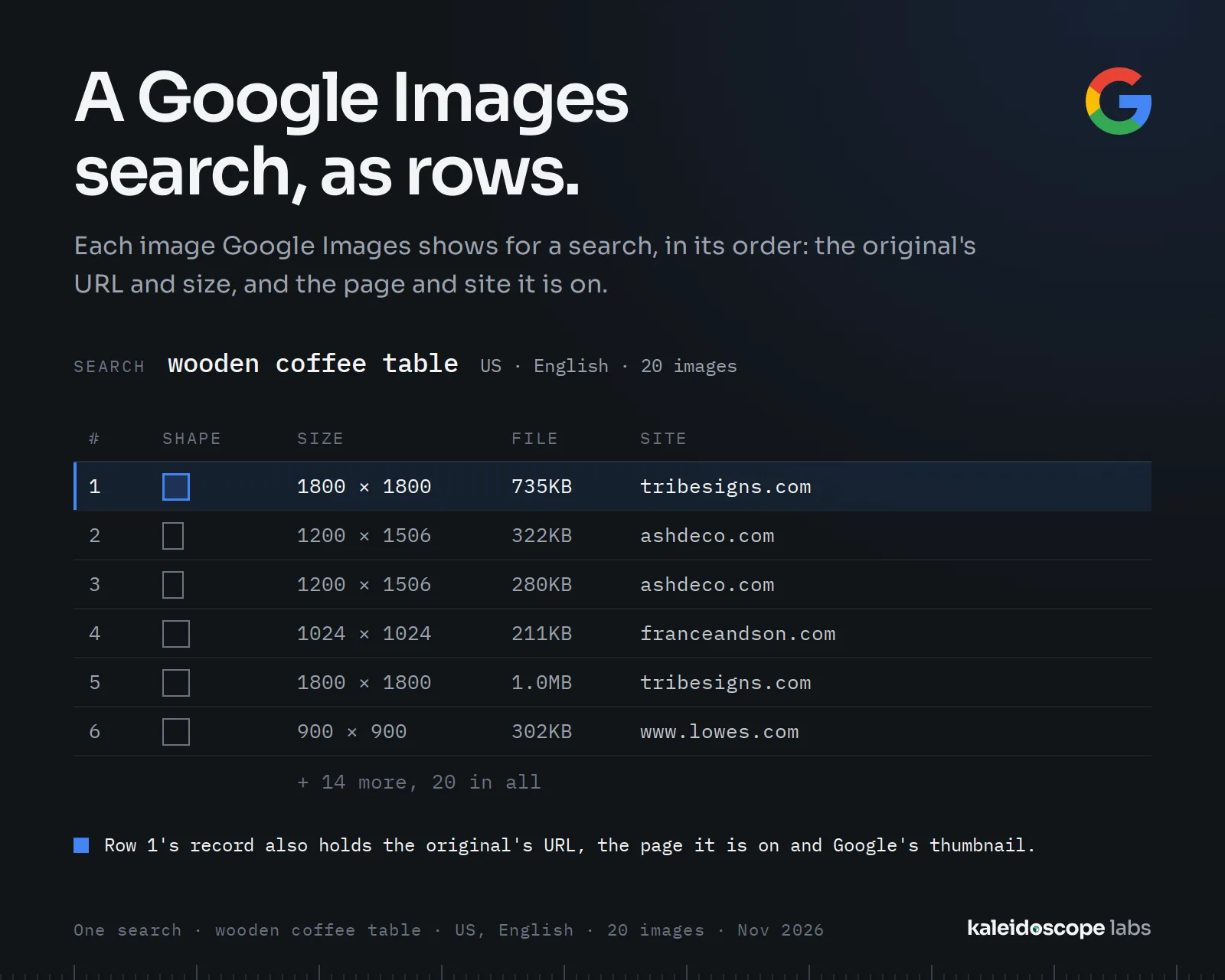
- 🖼️ Image results: up to 400 images per search, in Google Images' order, each with its original URL, width and height.
- 🔗 Where each image lives: the page it is on, its site and the site's name, as Google Images shows them.
- 🎨 Details: Google's thumbnail, the file size and the image's dominant color.
- 🌍 Any country and language: set the country and language Google Images searches for.
- 🧰 Google Images' filters: size, color, type, time and usage rights (Creative Commons or commercial licenses), and SafeSearch.
- 🔎 Google Images links: paste a search link and its country, language and filters are kept.
Run it from Apify Console, through the API, on a schedule, or from an AI agent. The prefilled input reads one search, so you can see the output before a larger run.
| You want to | Use | What it costs |
|---|---|---|
| Find the images Google shows for a product or a place | A search, with its country | $1.50 per 1,000 images |
| Find images you may reuse | Usage rights: Creative Commons | the same |
| Collect transparent icons or clip art | Color: transparent, Type: clip art | the same |
What data can you get from Google Images?
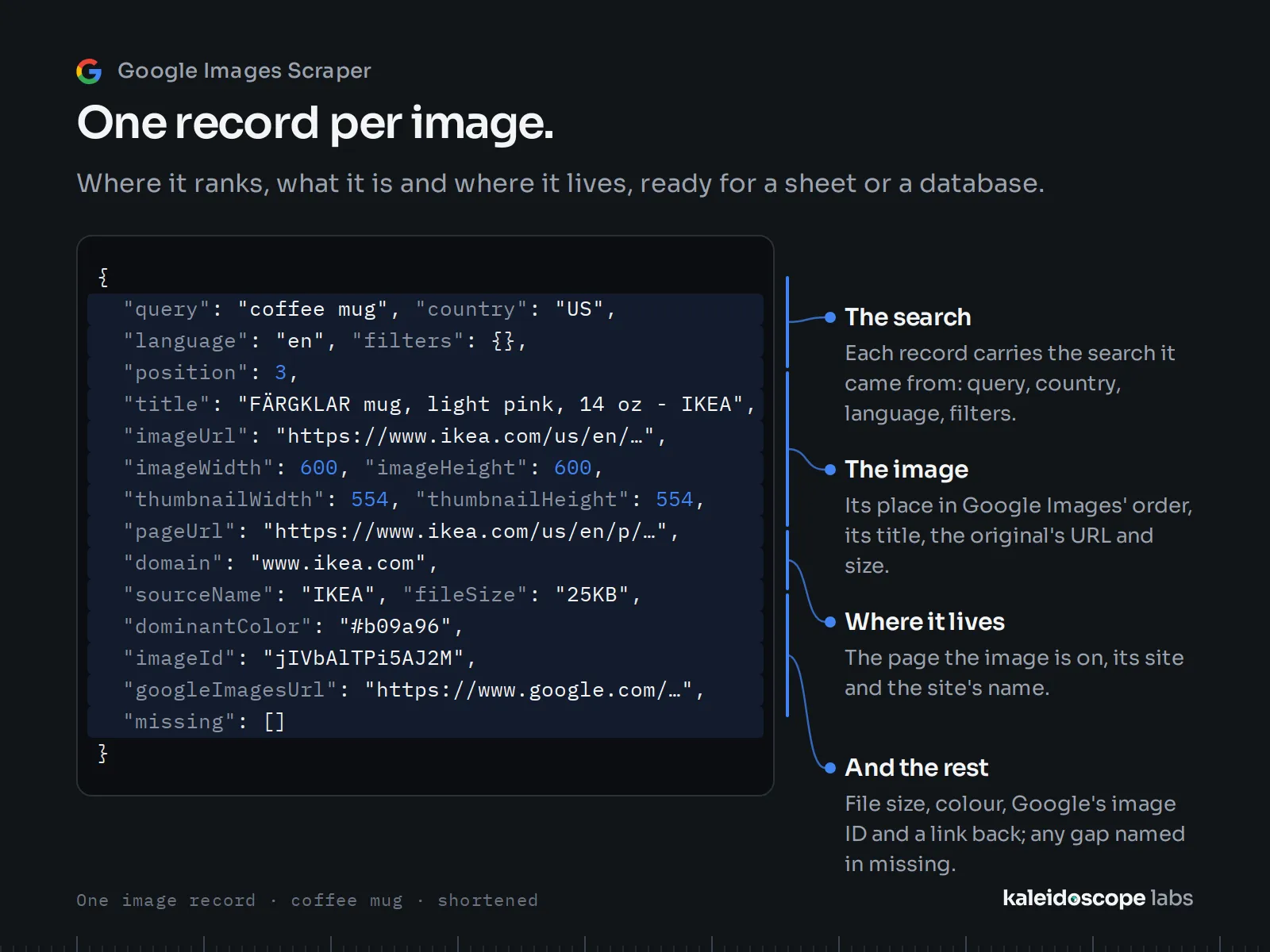
One record per image.
| Data | Field |
|---|---|
| The image's place in Google Images' results, from 1; Google's own, so a page that held fewer images leaves gaps (1–50, then 101–150) | position |
| The original image's URL, width and height | imageUrl, imageWidth, imageHeight |
| Google's thumbnail and its size | thumbnailUrl, thumbnailWidth, thumbnailHeight |
| The image's title, as Google Images shows it | title |
| The page the image is on, its site and the site's name | pageUrl, domain, sourceName |
| The file size as Google shows it, and the dominant color | fileSize, dominantColor |
| Google Images' ID of the image | imageId |
| The search on Google Images, to open in a browser | googleImagesUrl |
| What the record lacks and why | missing |
Every record also carries the search it came from: query, line, country, language and filters. The Actor stores URLs and details only: it never downloads an image.
How to use Google Images Scraper
- Create a free Apify account and open Google Images Scraper.
- In Searches, enter one search per line, as you would type it in Google Images, or paste a Google Images search link.
- Choose the Country and Language, and how many Results per search you want (up to 400).
- Set any of Google Images' Filters.
- Click Start. Records appear in the Output tab; export them as JSON, CSV or Excel, or read them from the API.
How much does it cost to scrape Google Images?
Google Images Scraper is priced per event, with no usage fees on top:
| Event | Price | When |
|---|---|---|
| Image | $1.50 per 1,000 | each image stored |
The platform also charges $0.00005 when a run starts. Prices shown are for Apify's free plan; on paid plans they are up to 30% lower.
| You read | It costs |
|---|---|
| 100 searches, 100 images each (10,000 images) | $15.00 |
| 50 searches, up to 400 images each (at most 20,000 images) | at most $30.00 |
| 1,000 searches, 20 images each (20,000 images) | $30.00 |
| The prefilled input (20 images) | $0.03 |
- Apify's free plan credit of $5 a month covers about 3,300 images.
- Not charged: a search with no results, a search that repeats an earlier one in the same run (read once), and anything the run could not read. Set a maximum total charge in the run options to cap a run: the Actor stops before it.
Input recipes
Each recipe is a complete input to paste.
Product images in one market
Images you may reuse: Creative Commons photos
Transparent icons
The same search in Germany, in German
A Google Images link, as set on the site
Output example
A record of a search for "coffee mug" in the US (November 2026):
Integrations and API
Use it as a Google Images API: start a run from any language and read its records as JSON, CSV or Excel.
- Make, Zapier, n8n: start a run and send its records on when it finishes.
- Google Sheets, webhooks, the Apify API and clients for JavaScript and Python.
- AI agents: through Apify's MCP server, an agent can call the Actor as a tool.
Run a recipe and get its records in one call (with your Apify API key in the APIFY_TOKEN variable):
Building on this Actor
- Output stability: fields are added, never renamed or removed without a new major version; every change is in the changelog.
- What a run's end means: a finished run read every search it was given, or names what it could not read in the run's
RUN_SUMMARYrecord (searchesNotRead, andsearchesReadInPartfor a search whose later pages could not be read) and says so in its closing status; searches without results are listed insearchesWithoutResults, and searches whose images start at Google Images' second page insearchesFromSecondPage. An input the Actor cannot read ends the run SUCCEEDED with nothing read and no image charged, its reason as the status message and inRUN_SUMMARY'sinputError; on a normal runinputErroris null. - Cost per call: the event and its price are on the Pricing tab; what is not charged is listed above; your maximum charge holds.
- Notice: price changes follow Apify's 14-day notice.
For AI agents
Connect an MCP client (Claude, Cursor and others) to https://mcp.apify.com?tools=kaleidoscopelabs/google-images-scraper with your Apify API key, then ask, for example:
-
"Find 20 large Creative Commons photos of mountain lakes."
-
"Which sites show up in Google Images for 'wooden coffee table' in the US?"
-
Minimal input:
{"queries": ["wooden coffee table"]}reads up to 100 images in the US, in English, with SafeSearch on. -
Fields to read:
position,imageUrl,imageWidth,imageHeight,pageUrl,domain,title;missingfor what a record lacks. -
What to know:
- A Google Images link's own country, language, filters and SafeSearch win over the form's for its line.
- A search with no results stores nothing and is listed in
RUN_SUMMARY'ssearchesWithoutResults. - An empty dataset with
inputErrorset inRUN_SUMMARYis an input mistake, not "no results".
Tips
- Country matters: Google Images' results follow the country; the language changes the titles Google shows and some of the results.
- Links keep their settings: set the filters on Google Images and paste its link.
- Check the license: the usage-rights filter is Google's; check each image's license on its page before you use it.
- A long input: a run that would not finish in its timeout says so at its start, reads what fits and lists the searches left; give it a longer timeout or split the input.
Did it save you time? A rating on this page helps others find it; an Issue tells us what to fix.
FAQ
Is there an official Google Images API?
Google offers no API for Google Images' results. Its Custom Search JSON API searched the sites set up in a Programmable Search Engine; Google has closed it to new customers and ends it on 1 January 2027. This Actor reads what Google Images shows anyone for a search and returns it as records you call from the Apify API.
Does it download the images?
No. It stores each image's URLs and details; the images stay on their sites.
Why does a record lack a field?
Google Images does not list that detail for the image; the record names the field in missing with the reason "notGiven".
Why did a search return fewer images than I asked for?
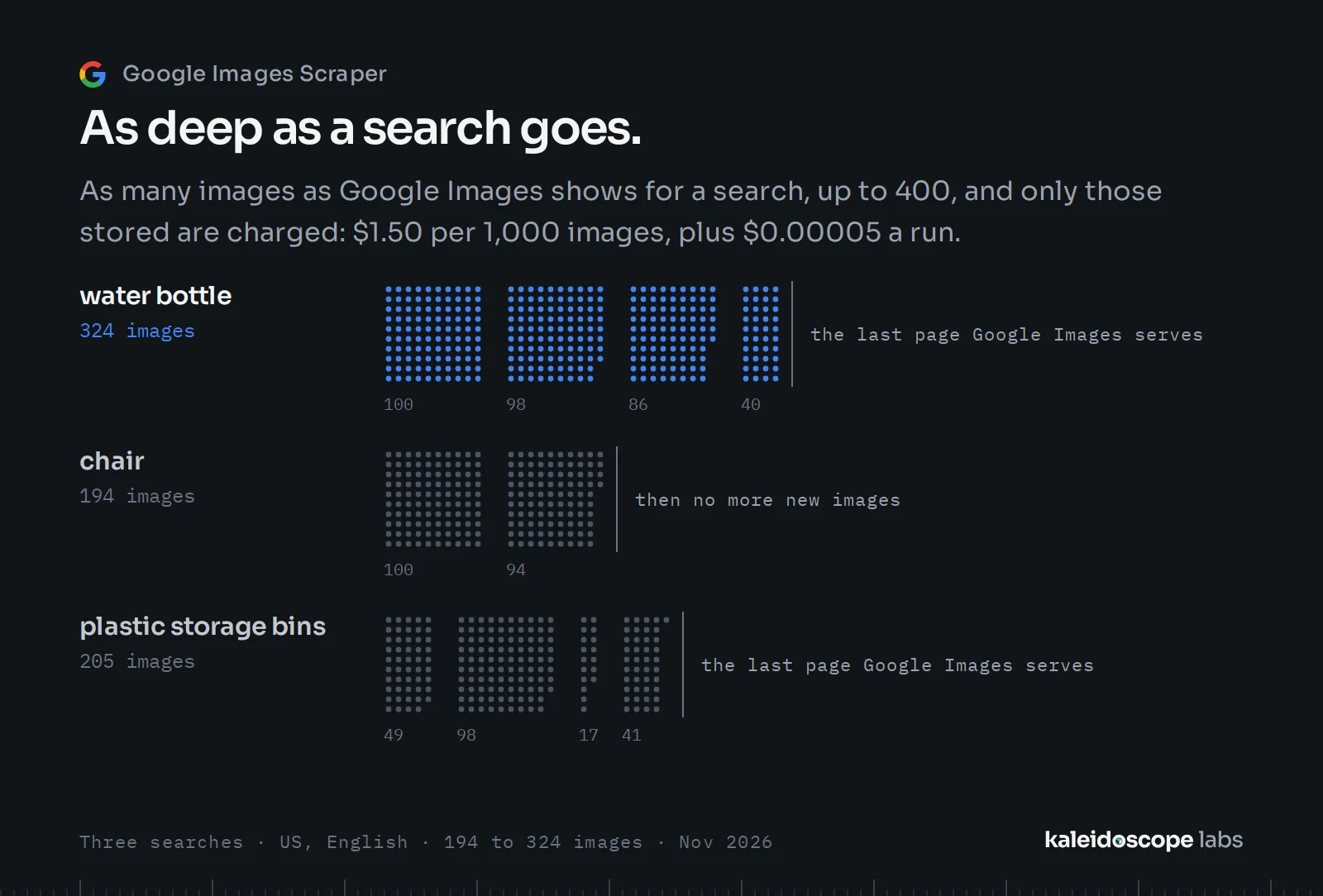
In our tests (November 2026), Google Images showed about 150 to 400 images for a search, fewer for some; you get as many as it shows, up to your number. Some of Google Images' pages hold fewer images; the Actor goes on to the next page for the rest. Images that sit inside documents, such as PDFs, have no image URL and are left out. You pay only for the images stored.
Why do some results start at position 101?
For some searches, mostly shopping ones, Google Images' first page of results comes without its images. The Actor then reads the search from its second page: the records keep Google's own positions, from 101, the run says so, and the search is listed in RUN_SUMMARY's searchesFromSecondPage. Nothing is charged for the first page.
Why do my results differ from what I see in Google Images?
Google Images' results depend on the country, the language, SafeSearch and the time; the Actor searches without a signed-in account or your history, so its results are the ones Google shows anyone for that country and language.
Does it collect personal data?
It stores what Google Images shows anyone for a search: image and page URLs, titles and site names. It has no field about a person, but an image or a title can show one; if your results hold personal data, data-protection law (such as the GDPR) applies to what you do with them.
Is it legal to scrape Google Images?
The Actor reads only what Google Images shows anyone and stores links and details, never the images. Images are usually protected by their owners' copyright: check each image's license on its page before you reuse it. Whether your use of the data is lawful depends on what you do with it; if you are unsure, ask a lawyer.
Limits
- Up to 400 images per search (in our tests Google Images showed about 150 to 400); 1,000 searches a run.
- Search by keyword or link; search by image is not offered.
Other Actors
| You want to | Actor |
|---|---|
| See how search interest in a product moves through the year, and where it is searched most | Google Trends Scraper |
Support and feedback
Open an issue on the Issues tab for a bug or a feature you need; we answer within 24 hours. If the Actor saves you time, bookmark it and leave a review in Apify Store: it helps others find it.
Google Images Scraper is an independent tool, not affiliated with, endorsed by or sponsored by Google LLC. Google and Google Images are trademarks of Google LLC.


