

Instagram Posts Scraper: Captions, Likes, Media
Pricing
from $0.35 / 1,000 posts
Instagram Posts Scraper: Captions, Likes, Media
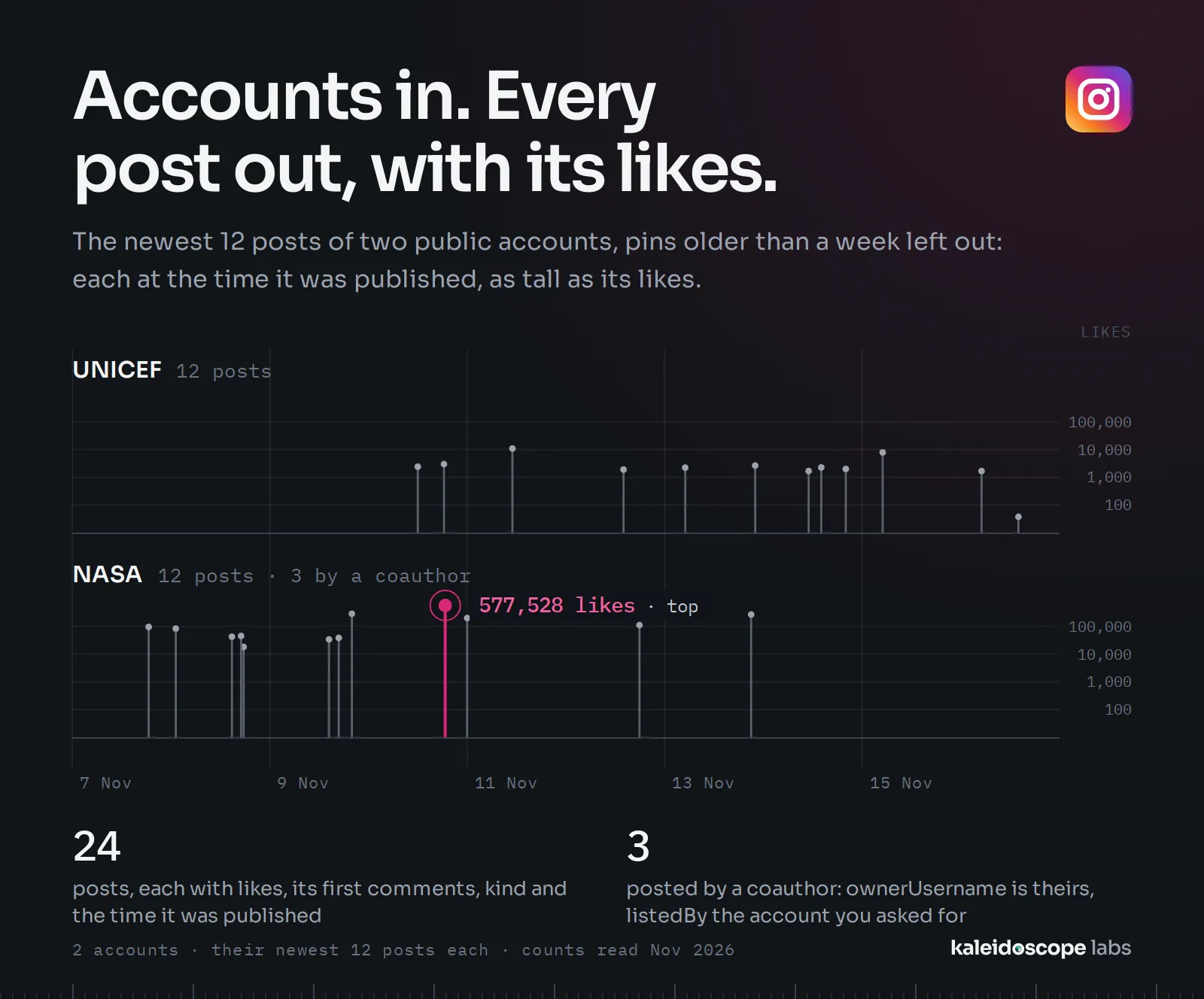
Get Instagram posts: accounts' newest posts or posts by link, each with its caption, hashtags, mentions, date, likes, comments count, images, video link, location and tagged accounts. No login; a post that does not exist is stored as not found and not charged.
Pricing
from $0.35 / 1,000 posts
Rating
0.0
(0)
Developer

Kaleidoscope Labs
Maintained by CommunityActor stats
1
Bookmarked
1
Total users
1
Monthly active users
6 days ago
Last modified
Categories
Features
Share
Scrape Instagram posts: give this Instagram Posts Scraper accounts or post links and get each post as a clean record, with caption, hashtags, mentions, date, likes, comments count, images, video link, location and tagged accounts.

- 📄 Read the newest posts of public Instagram accounts, or the posts since a date
- 🔗 Read single posts and reels by their link
- 📊 Get each post's likes, comments count, publishing date, every image of a carousel and the video link
- 🔔 Monitor accounts on a schedule and get only the posts you have not had before
- ✅ Know what the run read: which accounts and posts do not exist, and what any record lacks
No Instagram account or login is needed: the Actor reads what Instagram shows a visitor who is not signed in.
What data do you get from Instagram posts?
One record per post. The fields you decide on:
| Field | What it is |
|---|---|
shortCode, url, id | The post's code, its address and Instagram's ID |
ownerUsername, ownerFullName, ownerId, ownerVerified | The account that owns the post |
publishedAt | When it was published, in UTC |
createdAt | When the post was made on Instagram, read from its ID: within minutes of publishing, earlier for a post prepared ahead |
type, productType | photo, video or carousel; Instagram's own kind (feed, clips for a reel) |
caption, hashtags, mentions | The caption as posted, and the hashtags and accounts it names |
likesCount, commentsCount | Likes and comments at the time of the run; countsHidden says the owner hides the like count |
latestComments | The first comments the post shows, about ten to a dozen, each with its text, author, time and likes |
displayUrl, images, videoUrl, videoDuration | The image or video cover, every image of a carousel, the video file and its length in seconds |
childPosts | A carousel's items, each with its kind, image, video and tagged accounts |
location, taggedUsers, coauthors, audio | The place, the accounts tagged, the coauthors, a reel's sound |
alt | Instagram's description of the image for screen readers |
listedBy | The account whose list gave the post; empty for a post asked by link |
missing | The parts this record lacks, each with its reason; empty when nothing is missing |
scrapedAt | When the run read the post |
Every field is described in the dataset schema.
What can you use Instagram posts for?
- Track competitors' and clients' accounts: schedule a run with
modeset tonewand each run stores only the posts that appeared since the last one. - Report on a period: every post of a list of accounts since a date, with likes and comments, for a weekly or monthly report.
- Benchmark content: compare likes and comments across accounts, post kinds and hashtags.
- Feed posts into your own tools: rows for a sheet, a database, a dashboard or an AI pipeline.
How to scrape Instagram posts
- Create a free Apify account and open this Actor.
- Enter accounts, one per line: a username (
unicef), with or without@, or a profile link. Or paste post links. - Choose how many posts to read from each account, and a date if you only want recent posts.
- Click Start. Download the posts as JSON, CSV or Excel, or read them through the API.
How much does it cost to scrape Instagram posts?
You pay per post stored: $1.50 per 1,000 posts with details (a post at $0.50 per 1,000 plus its details at $1.00 per 1,000), or $0.50 per 1,000 posts without details (postDetails: false: caption, kind, image and createdAt, no likes or publishing date). Posts asked for by link always come with details. A monitor (mode: new) also charges a check of $0.002 per account in each run, whether the account has new posts or not. Beside these there is only the platform's start event ($0.00005 a run); a date costs nothing extra. Prices shown are for Apify's free plan; on paid plans they are up to 30% lower.
| What you run | Posts | Checks | Cost |
|---|---|---|---|
| The newest 12 posts of one account, with details | 12 | – | $0.018 |
| The last 7 days of 25 accounts, about 10 posts each, with details | 250 | – | $0.375 |
| The newest 100 posts of 100 accounts, without details | 10,000 | – | $5.00 |
| A monitor of 20 accounts, once a day for a month, with details: 400 posts in its first run (20 an account), then about 30 new posts a day | 1,300 | 600 | $3.15 |
| The same monitor, every hour | 1,300 | 14,400 | $30.79 |
An account or a post that does not exist and a post Instagram does not show without signing in are not charged. A monitor that runs daily costs $0.06 a month per account in checks; hourly, $1.44. A run stops before your maximum charge.
Input
The newest posts of a few accounts
Everything published in the last 7 days
Only new posts, on a schedule (a monitor)
Posts by link
Output
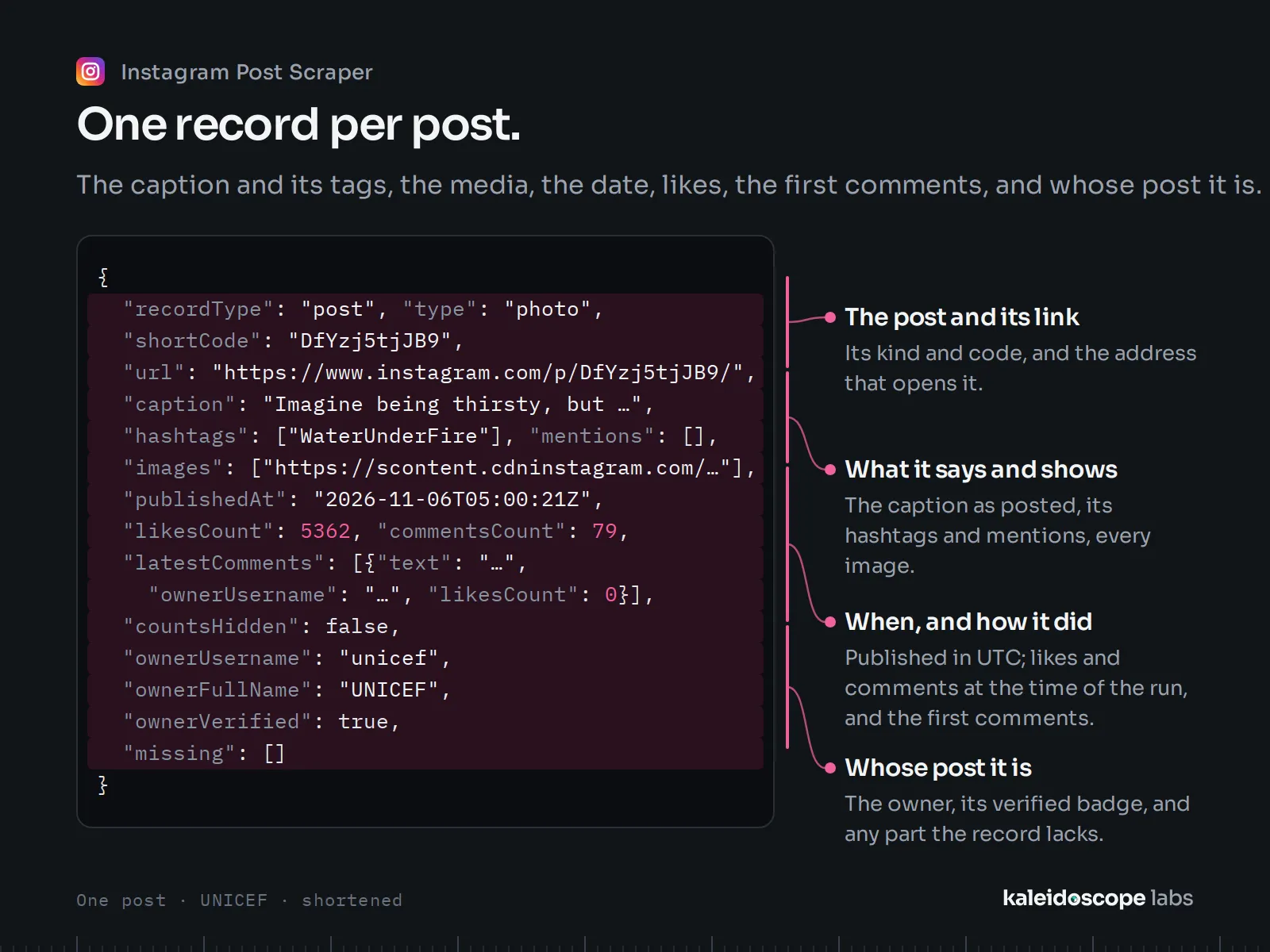
One post asked by link, shortened (the comment's text and author left out here):
Monitoring: get only the new posts
With mode set to new, the Actor remembers the posts it has met for each account. The first run stores each account's newest posts as usual (postsPerProfile, newerThan); every later run stores only the posts that appeared since, up to postsPerProfile for each account, and nothing when there is none. When an account has more new posts than that, the log names it and the next runs store the rest. A run with nothing new ends with an empty dataset and charges only the accounts' checks.
The memory lives in a key-value store in your account named instagram-post-monitor, one record per account: delete a record to start that account over. Use monitorName to keep several monitors of the same accounts apart. A post is new when the monitor has not met it, not because it sits on top: pinned posts it has met are not stored again. A recent post that an account pins after the monitor's first run can be stored once.
Posts since a date, without the pinned ones
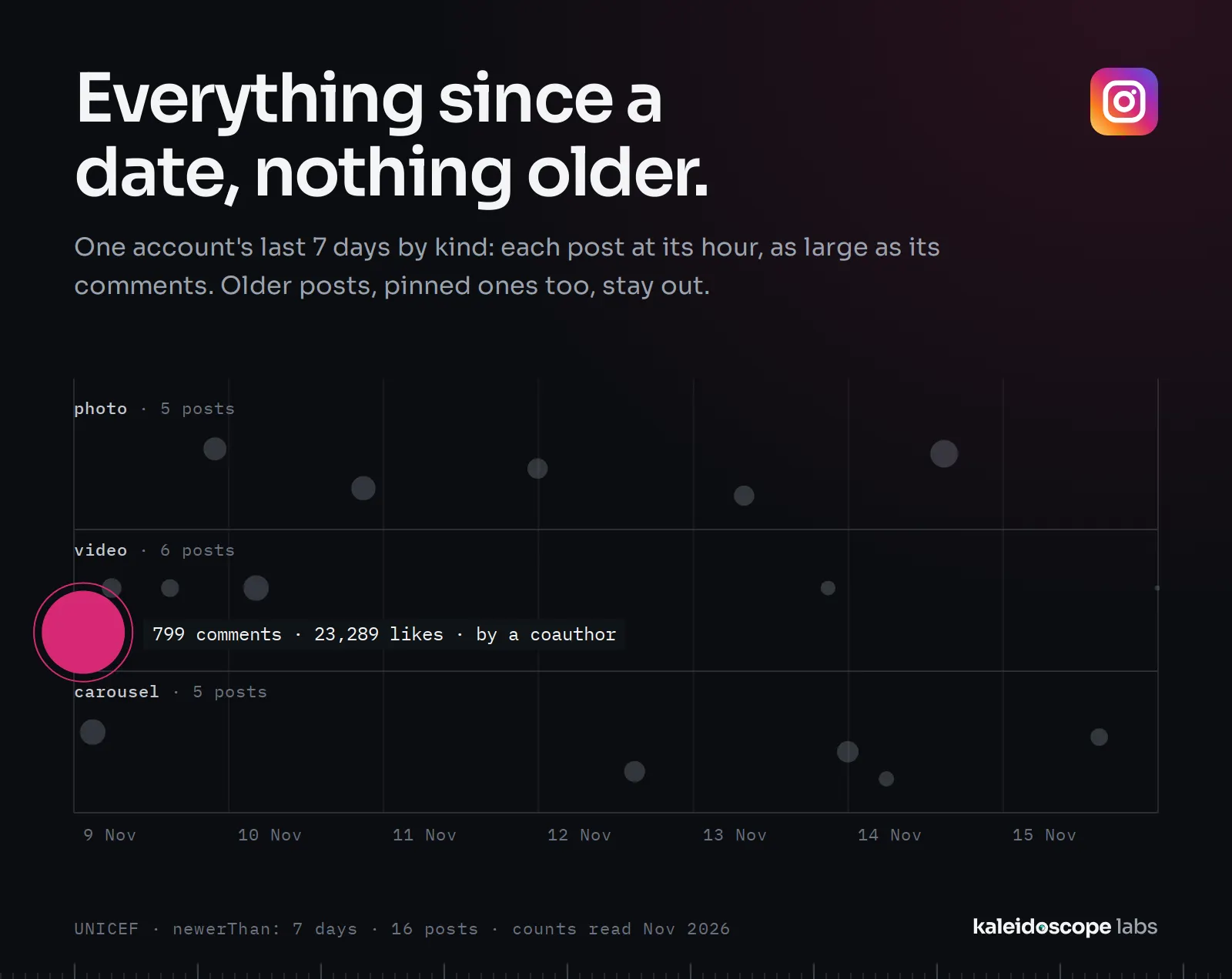
newerThan takes a date (2026-10-01) or a span back from the run's start (7 days, 2 weeks, 3 months). With details, each post's own publishing date decides, and older posts pinned to the top of a profile are left out. Without details (postDetails: false) posts cost less time to read and have no publishedAt; they are then dated by createdAt.
Integrations and the API
Run it from the Apify API or on a schedule, or let an agent call it as a tool (below).
Building on this Actor
- Output: fields are added, never renamed or removed within a major version; every change is in the changelog.
- What a run's end means: a finished run read every account and post or names it in the summary (
RUN_SUMMARYin the key-value store:postsNotRead,postsNotListed,accountsNotFound, andcomplete). A run that could not reach Instagram fails; it does not succeed empty. An input that cannot be read ends as succeeded with nothing read or charged, the reason in the status message and in the summary'sinputError. - Cost: one event,
post, per stored post; one more,post-details, when the post has its details; with a monitor one event,check, per account and run. Your maximum charge holds. - Record-level reasons:
missinglists a part with the reason "notGiven" (Instagram did not give it) or "notRequested" (the input left it out). A post that does not exist hasnotFound: true.
For AI agents
AI agents can call it through the Apify MCP server (setup prompt for your agent). Minimal input: {"usernames": ["<username>"], "postsPerProfile": 12}, or {"postUrls": ["<post link>"]}. Add newerThan (a date or a span such as 7 days) for recent posts only. Read caption, publishedAt, url, type, likesCount, commentsCount and ownerUsername. An empty dataset with complete: true in RUN_SUMMARY means there are no posts for the input; accountsNotFound there lists usernames with no public account. A record's missing names any part it lacks.
Tips
- Try one account with
postsPerProfile: 12first: it costs $0.018. - For captions and images alone, turn
postDetailsoff: a third of the price, and much faster. - A span (
7 days) counts back from the run's start. To track accounts on a schedule usemode: "new"instead: it goes by the posts it has met, not by the clock, so runs that come late or overlap neither repeat nor skip posts. - An account's list also holds posts it coauthors:
ownerUsernameis the owner,listedBythe account you asked for. A post that two accounts of your input coauthor is stored once. - Media addresses are Instagram's own and expire: download what you need to keep.
Did it save you time? A rating on this page helps others find it; an Issue tells us what to fix.
FAQ
Is there an official Instagram API for posts? Meta's Instagram Graph API gives an account's posts to apps the account has authorised, and limited public data of other professional (business and creator) accounts to apps that hold its permissions. This Actor needs neither: it reads what a public account shows any visitor.
Why does an account return nothing? Private accounts show no posts to visitors. An account that does not exist, or is not shown to a visitor who is not signed in, is named in accountsNotFound, and nothing is charged for it.
How long does a run take? Accounts are read in parallel: about 1,000 posts with details across many accounts take a few minutes. One account's long history takes longer, because its list is read 12 posts at a time.
Can it skip pinned posts? It does by itself: pinned posts a week or more older than the account's newest are left out, and postsPerProfile counts the newest posts past them. With newerThan, each post's date decides. The posts list the Actor reads for a visitor who is not signed in does not mark pinned posts, so there is no pinned field.
Is it legal to scrape Instagram posts? The Actor reads only what accounts publish to everyone. How you use the data is your responsibility: follow the laws that apply to you, including copyright and data protection law.
Does it collect personal data? Posts can name or show people: captions, comments and their authors, mentions, tagged accounts, the owner's name and the media. If you process personal data, you need a lawful basis under GDPR, KVKK or the law that applies to you.
Limits
- Public accounts only, as shown to a visitor who is not signed in. Private accounts, stories and posts shown only to signed-in visitors are not read.
- A post's first comments, about ten to a dozen, are collected, not all of them.
- Counts are what Instagram shows at the time of the run.
- Up to 1,000 accounts and 1,000 post links a run.
Support and feedback
Open an Issue on the Actor's page: we answer within 24 hours. If the Actor is useful to you, a bookmark helps others find it.
Other Actors
| Actor | Use it with this one to |
|---|---|
| Instagram Profile Scraper: Followers, Bio, Links | Get the same accounts' followers, posts count, biography and links, one record per account |
Instagram Posts Scraper is an independent tool, not affiliated with, endorsed by or sponsored by Instagram, LLC or Meta Platforms, Inc. Instagram is a trademark of Instagram, LLC.


