

Wayback Machine Scraper: Captures, Pages & URLs
Pricing
from $0.70 / 1,000 captures
Wayback Machine Scraper: Captures, Pages & URLs
Every capture the Wayback Machine holds of a URL, a path, a host or a whole domain: date, HTTP status, content type, digest and archive links. Read the archived pages as text, markdown or HTML, or list a site's URLs with their first and latest capture.
Pricing
from $0.70 / 1,000 captures
Rating
0.0
(0)
Developer

Kaleidoscope Labs
Maintained by CommunityActor stats
1
Bookmarked
1
Total users
1
Monthly active users
3 days ago
Last modified
Categories
Features
Share
What can Wayback Machine Scraper do?
List every capture the Wayback Machine holds of a URL, a path, a host or a whole domain, read the archived pages as text, markdown or HTML, and list a site's URLs, as JSON, CSV or Excel.

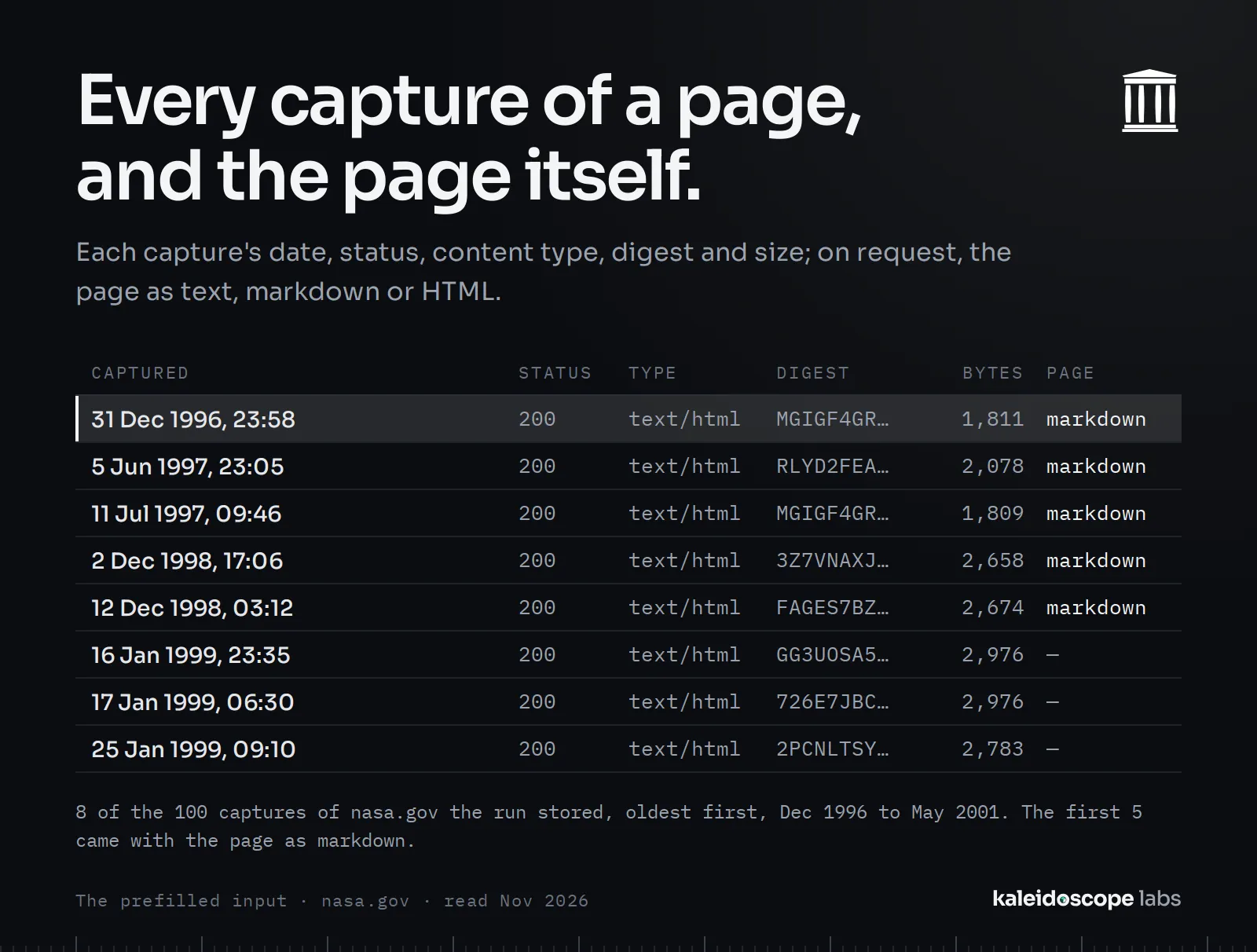
- 🗂️ Captures: each capture's date, the HTTP status the site answered with, its content type, a digest of its content and its stored size.
- 📄 The archived page itself: on request, the title and the text, markdown or HTML of the page each capture holds, read from the bytes as they were captured.
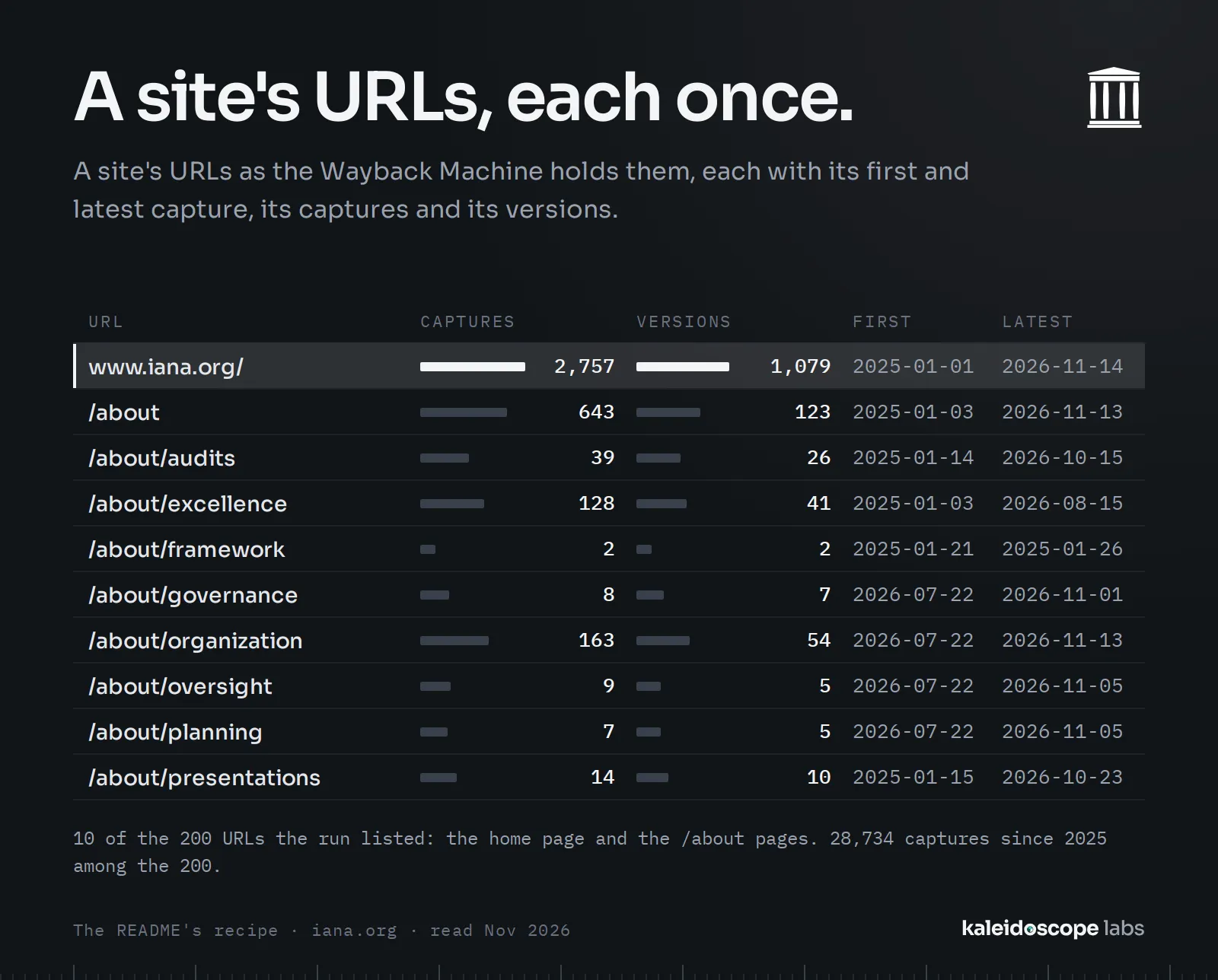
- 🧭 A site's URLs: every URL the Wayback Machine holds of a site, each once, with its first and latest capture, how many captures it has and how many versions of its content.
- 🔗 Archive links: the archived page as the Wayback Machine shows it, and the capture's original bytes without the toolbar and rewritten links.
- 📅 Dates and thinning: a date range, one capture per hour, day, month or year, or one each time the content changed; or the one capture closest to a date.
- 🔎 Filters: pages that loaded, redirects, errors or pages that were gone (404 and 410); HTML pages, PDF files or every file type.
Run it from Apify Console, through the API, on a schedule, or from an AI agent.
What data do you get from the Wayback Machine?
| Field | What it holds | When |
|---|---|---|
url | The captured address, as the Wayback Machine holds it | always |
timestamp, capturedAt | When it was captured: the Wayback Machine's 14 digits, and the same as a UTC date | always |
status, mimeType | The HTTP status the site answered with, and the content type of what was captured | when the Wayback Machine lists them; a revisit of unchanged content sets isRevisit |
digest, length | A hash of the content (the same digest is the same content), and the stored size in bytes | when the Wayback Machine lists them; missing says when not |
archiveUrl, rawUrl | The capture as the Wayback Machine shows it, and its content as it was captured | always |
title, text, markdown, html | The page the capture holds: its title, and its text, its markdown with links written whole, or its HTML | with Read each capture's page |
captures, versions | How many captures the URL has, and how many differ from the capture before | in a list of URLs |
firstCapturedAt, firstArchiveUrl | The URL's first capture among those the dates and filters keep; the fields above are then its latest capture's | in a list of URLs |
target | The line of your input the record was found for | always |
daysFromDate | How many days after the date you asked for the capture was made; negative when before | with Closest to a date |
scrapedAt | When the run read the record, as a UTC date | always |
missing | What the record lacks, and why | always; empty when nothing is missing |
What is it used for?
- Recover a site's old pages: list the URLs the Wayback Machine holds of a domain, before a migration, for redirects, or to see what an expired domain used to hold.
- See how a page changed: one capture each time the content changed, with the page as markdown, for a pricing page, terms of service or a product page.
- Show what a page said on a date: the captures between two dates, with links to the archived page.
- Build text over time: a page's text once a month or once a year, for research or as input to a language model.
How to use Wayback Machine Scraper
- Create a free Apify account and open Wayback Machine Scraper in Apify Console.
- In URLs or domains, enter what to read, one per line, with or without https:// and www.
- In Read, choose the page itself, the addresses under it, the whole host, or the whole domain (whatever path the line has).
- Set Captures per URL or domain, and, if you want, the dates, One capture per, Page status and Content.
- To get the archived pages too, choose text, markdown or HTML in Read each capture's page.
- To get a site's URLs, each once, set List to URLs.
- Click Start, then download the records as JSON, CSV, Excel or HTML, or read them through the API.
How much does it cost to scrape the Wayback Machine?
Wayback Machine Scraper is priced per event, with no usage fees on top:
| Event | Price | When |
|---|---|---|
| Capture | $0.001 | One capture stored without its page |
| Capture with its page | $0.003 | One capture stored with the page it holds, in place of the capture event |
| URL | $0.001 | One URL stored, in a list of URLs |
So 1,000 captures of a page cost $1.00, 120 captures with their pages $0.36, and 5,000 URLs of a site $5.00.
Prices shown are for Apify's free plan; on paid plans they are up to 30% lower. The prefilled input (100 captures of one page, the first 5 with their page as markdown) costs at most $0.11, plus the platform's $0.00005 for the run's start. Apify's free plan gives you $5 of usage a month, which covers about 5,000 captures, or 1,650 captures with their pages.
An address without captures stores nothing and costs nothing, a capture whose page could not be given is charged as a capture, and a run stops before your maximum total charge.
Input recipes
Every capture of a page since 2020, one a month:
How a page changed: 50 captures, one each time its content changed, each with its page as markdown:
A site's URLs captured since 2025, each once, up to 200:
Output example
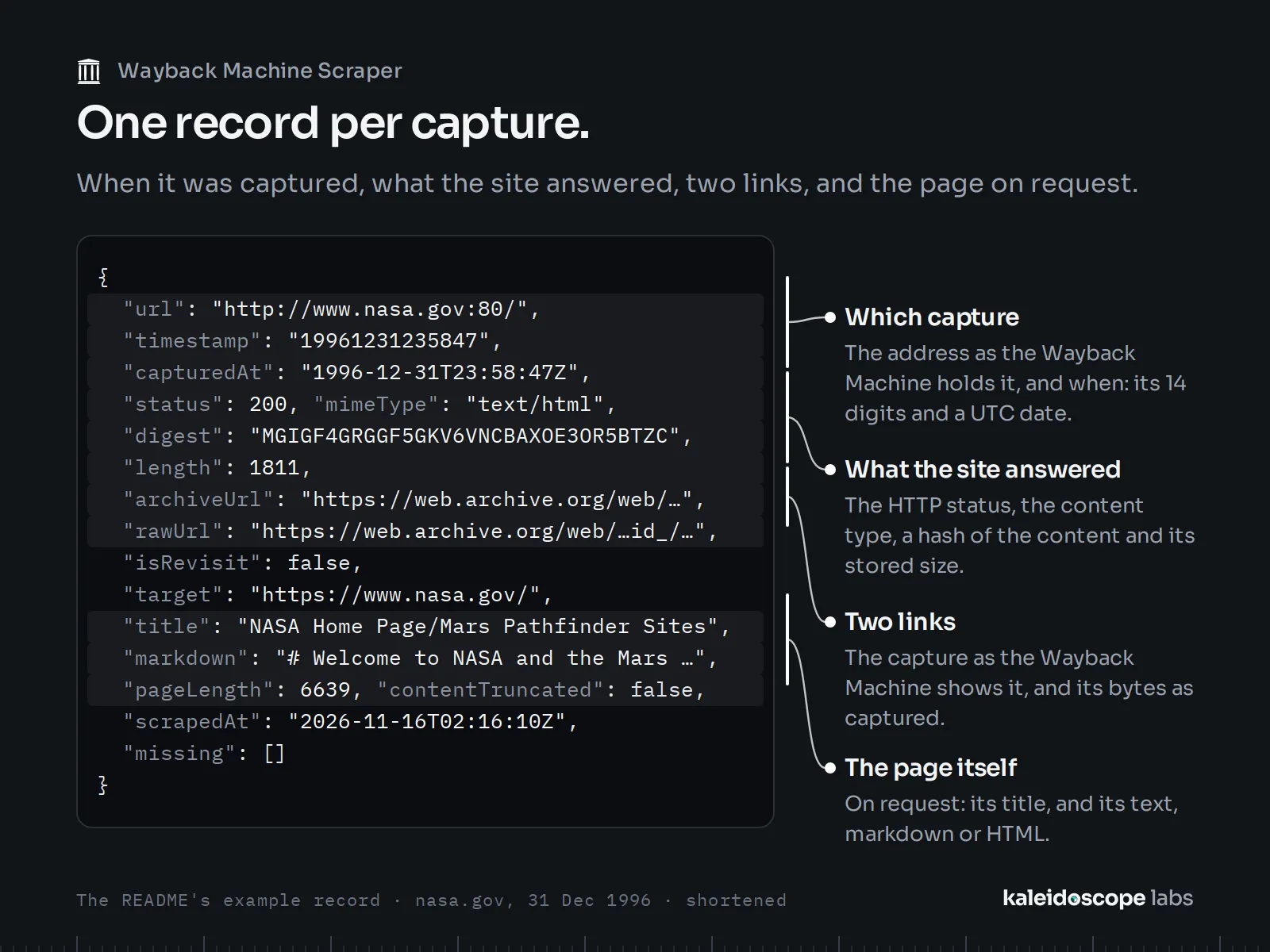
A capture with its page as markdown (shortened):
A URL in a list of a site's URLs (shortened): its latest capture, and what the Wayback Machine holds of it:
Integrations and API
- Make, Zapier, n8n: start a run with a URL and get its captures when it finishes.
- Google Sheets, webhooks, the Apify API and clients for JavaScript and Python.
- AI agents: through Apify's MCP server, an agent can call the Actor as a tool.
Run a recipe and get its records in one call (with your Apify API key in the APIFY_TOKEN variable):
Building on this Actor
- Output stability: fields are added, never renamed or removed without a new major version; every change is in the changelog, and a breaking one is announced here before the build.
- What a run's end means: an address that could not be read to its end is named in RUN_PROGRESS, and RUN_SUMMARY then says the run is not complete. A run that stores nothing because the Wayback Machine did not answer fails; an input the Actor cannot read ends at once, with the reason and nothing charged.
missing: each entry names a part and a reason: notGiven, unexpectedValue, notText, tooLarge or notRead (a page that could not be read; the run is then not complete). The output schema describes each.- Notice: price changes follow Apify's 14-day notice; retiring the Actor is announced here first.
For AI agents
AI agents can call it through the Apify MCP server (setup prompt for your agent). Connect an MCP client to https://mcp.apify.com?tools=kaleidoscopelabs/wayback-machine-scraper with your Apify API key, then ask, for example, "What did https://www.nasa.gov/ say in January 1999?"
- Minimal input:
{"urls": ["https://www.nasa.gov/"], "capturesPerUrl": 10}: the page's first ten captures. - Fields to read:
capturedAt,statusandarchiveUrlfor a capture;markdownortextfor its page;capturesandfirstCapturedAtin a list of URLs. - What to know: an empty dataset with
inputErrorset in RUN_SUMMARY means the input could not be read, not that nothing was captured. A capture chosen for its page and stored without one namescontentinmissing.
Did it save you time? A rating on this page helps others find it; an Issue tells us what to fix.
FAQ
Is there an official Wayback Machine API?
Yes: the Wayback Machine has a public capture index, and this Actor reads it. The Actor adds the paging over large sites, the page's text and markdown, the list of a site's URLs, and records that say what is missing.
Is it legal to scrape the Wayback Machine?
The Actor reads the Wayback Machine's public capture index and public captures, the same data its website shows to any visitor, without signing in. What you do with the captures is your responsibility: archived pages belong to their publishers, and their content can be protected by copyright.
Does it collect personal data?
A record holds a captured address and facts about the capture, and, when you ask for pages, the page's title, text, markdown or HTML as it was published. An address can itself name a person, for example a profile page's path, and a page can hold whatever its publisher wrote, personal data included. If you process such data, laws such as the GDPR or KVKK can apply to you; make sure you have a lawful reason.
What happens to an address without captures?
It stores no record and costs nothing; RUN_PROGRESS names it by its input line.
In what order are the records?
Oldest first for each address, with the captures that have their page stored last: sort by timestamp for date order. A list of URLs is ordered by host, then path.
Limits
- The Wayback Machine holds what it captured: a page it never visited, or one its publisher had excluded, has no captures, and the run says which addresses those are.
- A page is read from its captured HTML: content a page loaded with scripts after it opened is not in it.
- A page larger than 5 MB is not read; text and markdown are stored up to 1 MB and HTML up to 2 MB, and
contentTruncatedsays when a part was cut. - A whole host or domain answers slowly, and a list of URLs reads every capture of the site: a very large site can take longer than a run's hour. A run whose time ran out says so; resurrect it to continue. An hour stores about 800,000 to 1.7 million captures of a domain, as fast as the Wayback Machine answers, and the default 512 MB of memory holds about 3 million in one run with its resurrections: for more, split the dates over runs or raise the run's memory.
- With Content set to PDF files, a capture that repeats a PDF unchanged is not listed.
- With Content set to HTML pages and no Captured from, a list of URLs leaves out a URL the Wayback Machine lists no content type for, such as a style sheet captured unchanged; the log says how many.
Support and feedback
Open an issue on the Actor's Issues tab: we answer within 24 hours. A run that ended short of its work gives a Ref in its last message: quote it, and we can find the cause without your data.
Wayback Machine Scraper is an independent tool, not affiliated with, endorsed by or sponsored by the Internet Archive. Wayback Machine and Internet Archive are trademarks of the Internet Archive.


