

YouTube Comments Scraper - Replies & Dates
Pricing
from $0.35 / 1,000 comments
YouTube Comments Scraper - Replies & Dates
Scrape YouTube comments and replies from any video or Shorts: comment text, author, channel, likes as numbers, reply count, date, pinned, hearted by the creator, edited. Top or newest first, a date filter, video details on request. Videos with comments off get a free record.
Pricing
from $0.35 / 1,000 comments
Rating
0.0
(0)
Developer

Kaleidoscope Labs
Maintained by CommunityActor stats
1
Bookmarked
1
Total users
0
Monthly active users
6 days ago
Last modified
Categories
Features
Share
What can YouTube Comments Scraper do?
Scrape YouTube comments and replies from any video or Short: the text, the author, likes as numbers, the reply count, the date, and whether the creator pinned or hearted it, as JSON, CSV or Excel.

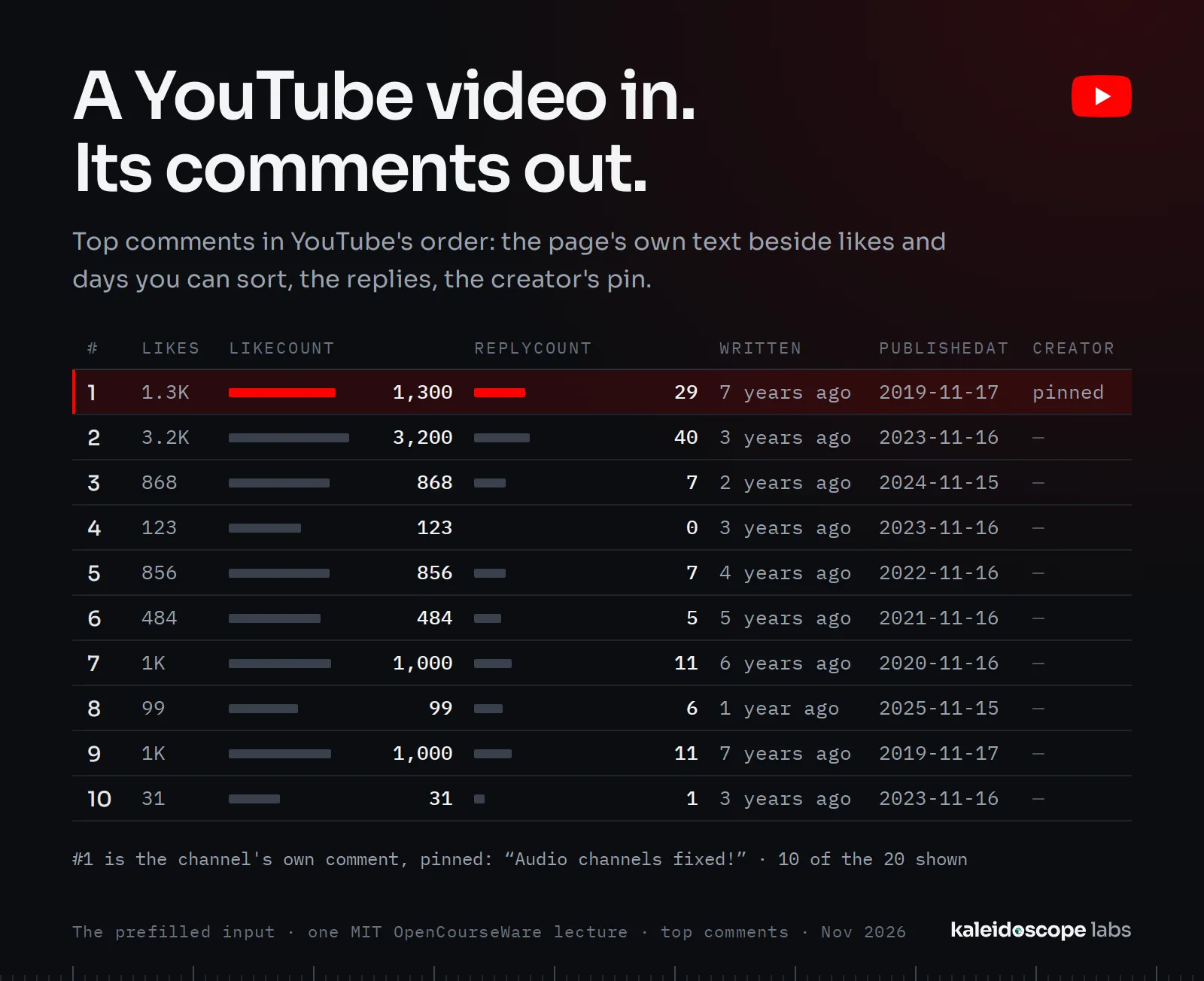
Give it links to videos or Shorts, or video IDs; it reads their comments as a signed-out visitor sees them, top comments or newest first, and you get one record per comment, and per reply when you ask for them. You pay $0.50 per 1,000 comments, and nothing for a video with comments off.
- 💬 Comments and replies: every comment with its text, author, channel, likes and reply count; replies with the comment they answer.
- 🔢 Numbers you can sort: likes as a number (1,300 for "1.3K") beside the page's own text, and the reply count.
- 📅 Dates and a date filter: each comment's day, from the page's "3 weeks ago", and only comments since a day or a span such as 7 days.
- 📌 Pinned, hearted, by the creator: whether the creator pinned a comment, gave it a heart, or wrote it.
- 🎬 Video details on request: one record per video with its title, channel, views, length and publish date, free.
- ✅ Videos without comments are free: comments off, a live chat, a private or removed video: one record that says which, in YouTube's words where it gives them, not charged.
Run it from Apify Console, through the API, on a schedule, or from an AI agent. The prefilled input reads 20 top comments of one video, for $0.01, in under 30 seconds, so you can see the output before a larger run.
| You want | Use | What it costs |
|---|---|---|
| A video's top comments | Its link or ID | $0.50 per 1,000 comments |
| Every comment of a video | Comments per video: 0 | $0.50 per 1,000 comments |
| Only comments since yesterday | Newest first, Comments published on or after: 1 day | The recent comments only |
| Threads with their replies | Include replies | Each reply is a comment |
| Which videos have comments off | Any input | Free: one record per video |
What data do you get from a YouTube comment?
| Field | What it holds |
|---|---|
text | The comment as written |
author, authorChannelId, authorUrl, authorThumbnail | The author's name as the page shows it, channel, page and picture |
authorIsVerified, isCreatorComment | A verified channel; the video's own channel |
likeCount, likeCountText | Likes as a number, and as the page writes them |
replyCount | The comment's replies |
publishedAt, publishedTimeText | The comment's day (approximate, from the relative time) and the page's own text; isEdited |
isPinned, isHearted | Pinned by the creator; given a heart by the creator |
commentId, parentCommentId, commentUrl | The comment's ID, a reply's thread, and a link that opens it |
recordType | comment, reply, or video |
videoId, pageUrl, sortBy, position | The video, the order read, and the comment's place in it from 1 |
missing | What the record lacks and why, such as a date the page's time does not give; empty on a whole record |
A video record has status (commentsOff, liveChat, unavailable, noComments, noCommentsSinceDate, commentsNotAllRead; with video details also commentsRead), message with YouTube's words where it gives them, and with video details title, channelName, channelId, viewCount, durationSeconds, videoPublishedAt, uploadedAt, category and description.
How to use YouTube Comments Scraper
- Create a free Apify account and open YouTube Comments Scraper in Apify Console.
- In YouTube video URLs, enter the videos, one per line: a watch, youtu.be or Shorts link, or an ID.
- Set Comments per video (0 for every comment) and Sort by: top comments or newest first.
- If you want, set Comments published on or after, turn on Include replies, or Include video details.
- Click Start, then download the comments as JSON, CSV, Excel or HTML, or read them through the API.
How much does it cost to scrape YouTube comments?
YouTube Comments Scraper is priced per event, with no usage fees on top:
| Event | Price | When |
|---|---|---|
| Comment | $0.50 per 1,000 | each comment or reply stored |
Prices shown are for Apify's free plan; on paid plans they are up to 30% lower.
- Charged: each comment or reply stored.
- Not charged: a video record (comments off, a live chat, unavailable, no comments, video details); a video the run could not read (named by ID in RUN_PROGRESS); a run that stops on an input mistake (only the platform's start fee); a comment a restarted run had already stored.
The platform also charges $0.00005 when a run starts. Set a maximum total charge in the run options to cap a run: the Actor stops before it.
The recipes below, run on 2026-11-15 on one MIT OpenCourseWare lecture:
| Run | Records | Time | Cost |
|---|---|---|---|
| The video's top 100 comments | 100 comments | 31 s | $0.05 |
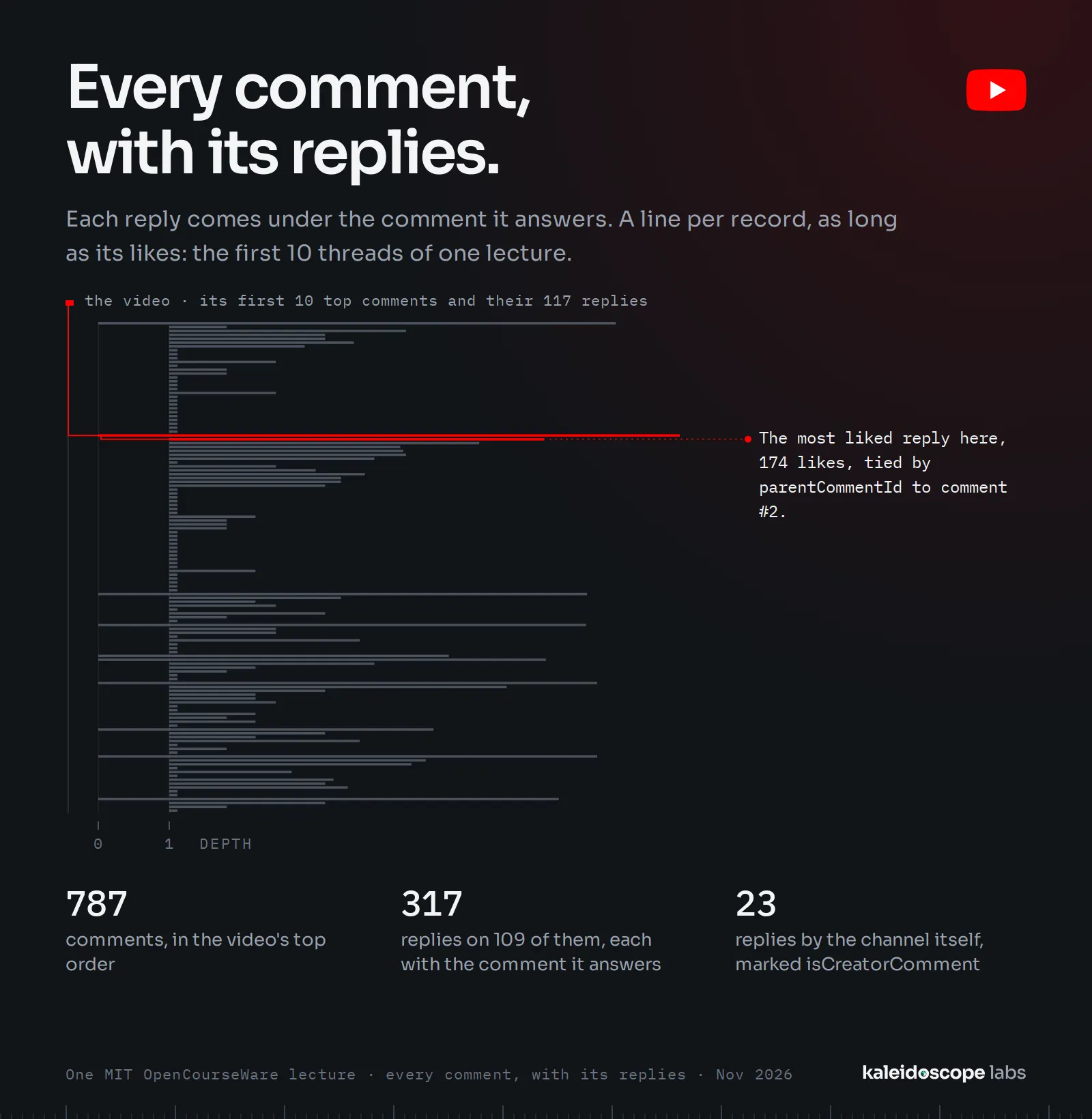
| Every comment, with its replies | 787 comments and 317 replies | 11 min | $0.55 |
| Comments of the last day, newest first | 1 comment | 6 s | $0.00055 |
Input recipes
Each recipe is a complete input: paste it into the JSON tab of the input form, or send it through the API. Fields left out take their defaults. The table above gives each one's result.
A video's top 100 comments:
Every comment, with its replies:
Recent comments, every day (schedule it daily; keep one record per commentId when you join the runs):
API and agent calls that leave maxComments out get up to 100 comments per video, replies included; 0 reads every comment. Comments published on or after takes a date such as 2026-01-31 or a span back from today such as 7 days.
| You see | Why, and what to do |
|---|---|
A record with recordType video and no comments | The video has comments off, is a live stream, or is unavailable: status and message say which. Not charged |
| Fewer comments than the video's count | YouTube's count includes replies, and its list can be shorter than its count; set Include replies, and Comments per video 0 |
| No records, and the input's own message | Nothing was read or charged: correct the input as it says (RUN_SUMMARY's inputError names the kind, for a program) |
Output example
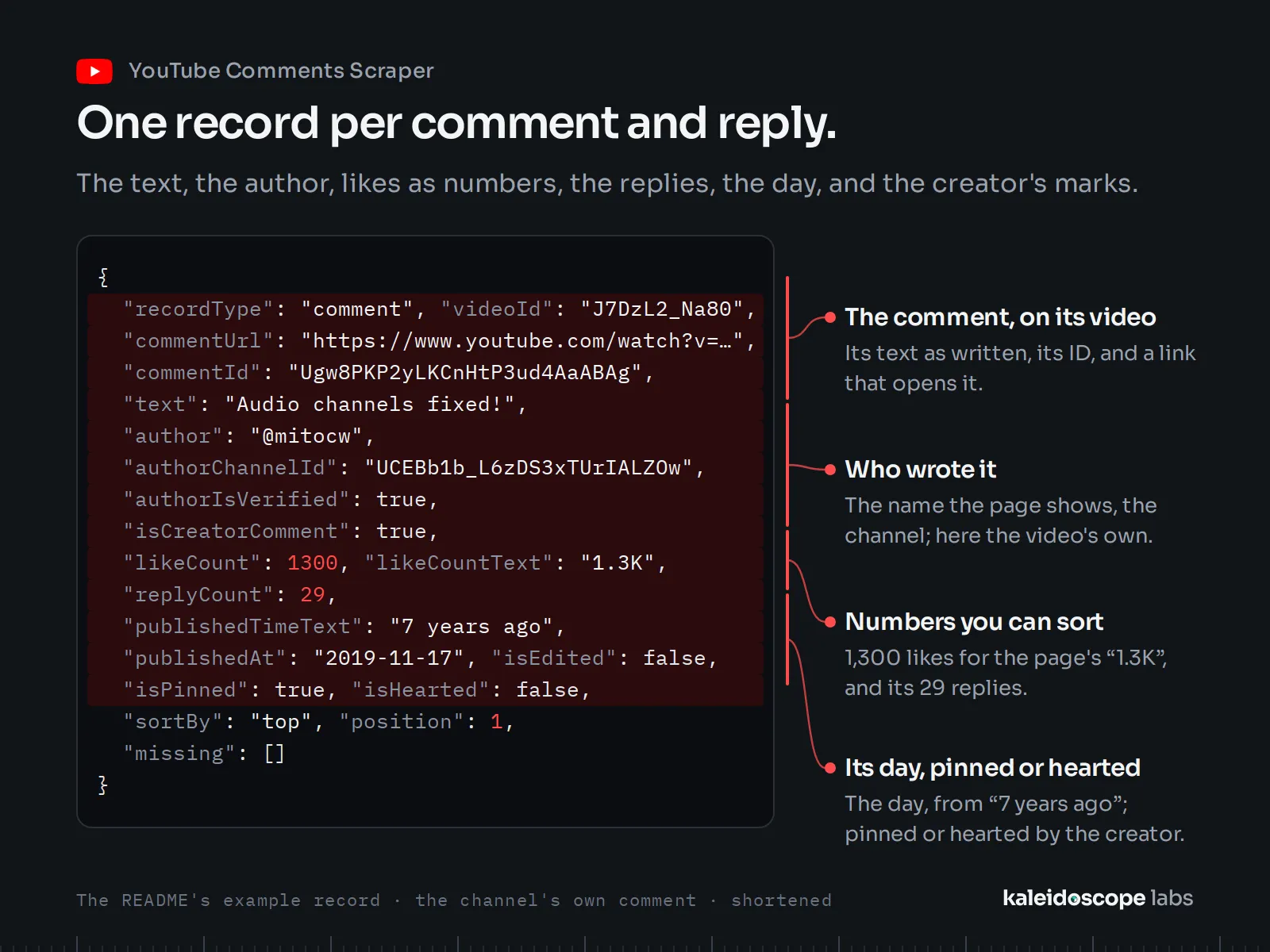
A comment from a run on 2026-11-15 (the channel's own, pinned) and a video record from one with video details on, on 2026-11-14:
The run's default key-value store also holds RUN_SUMMARY: the comments stored, the videos without comments by kind, the videos whose answers could not all be read, the videos that could not be read, how the run ended and whether it is complete, and a Ref to quote if you report a problem. RUN_PROGRESS names, by ID, the videos the run could not read, kept up to date as the run goes.
The dataset has two views: Comments (the video, position, text, author, likes, replies, date, pinned, hearted, the link) and Videos (each video's status, message, title, channel, views, length and publish date).
Integrations and API
- Make, Zapier, n8n: start a run with a video and get the comments when it finishes.
- Google Sheets, webhooks, the Apify API and clients for JavaScript and Python.
- AI agents: through Apify's MCP server, an agent can call the Actor as a tool.
Building on this Actor
- Output stability: fields are added, never renamed or removed without a new major version; every change is in the changelog with its date.
- What a run's end means: every video read ends in comments or a video record that says why it has none; a video that could not be read is counted in the run's last message and named in RUN_PROGRESS. A run that stores nothing because YouTube did not answer fails instead of succeeding empty. An input the Actor cannot read ends the run at once, nothing read or charged.
- Cost per call: one event, $0.50 per 1,000 comments; a video record is never charged; the run stops before your maximum total charge.
- Notice: price changes follow Apify's 14-day notice; retiring the Actor is announced here first.
For AI agents
AI agents can call it through the Apify MCP server (setup prompt for your agent). Connect an MCP client to https://mcp.apify.com?tools=kaleidoscopelabs/youtube-comments-scraper with your Apify API key, then ask, for example, "What do viewers say about https://www.youtube.com/watch?v=J7DzL2_Na80?"
- Minimal input:
{"startUrls": ["https://www.youtube.com/watch?v=J7DzL2_Na80"], "maxComments": 50}. - Fields to read:
text,likeCount,replyCount,publishedAt,isPinned,isHearted;recordTypeto tell comments, replies and video records apart. - What to know: a video with no comments gives one
videorecord withstatus, never an empty result; an input mistake ends SUCCEEDED with an empty dataset and RUN_SUMMARY'sinputErrorset.
Tips
- Try it cheap: the prefilled input reads 20 comments; raise the count once the output looks right.
- Newest first with a date stops early: a video's reading ends at its first older comment. With top comments, older ones are skipped, but the whole list is read.
- Daily runs overlap: a comment shown as "1 day ago" is kept by two days' runs, as the page gives no exact time: keep one record per
commentId. - The date applies to comments: a comment older than the date is left out with its replies, even a reply written today.
- Dates are approximate: YouTube gives "3 weeks ago", not a date;
publishedAtis the run's day less that, and the date filter keeps a comment near its edge rather than drop it: with 30 days, a comment shown as "1 month ago" is kept, though it can be up to two months old. - Very long lists take time: one video's 1,104 comments and replies took 11 minutes; for a video with more than about 5,000, raise the run's timeout above its default hour.
- Replies count toward Comments per video: 100 with replies on is 100 comments and replies together.
Did it save you time? A rating on this page helps others find it; an Issue tells us what to fix.
FAQ
Is it legal to scrape YouTube comments?
The Actor reads comments that YouTube shows to every visitor of a public video, at a modest pace. YouTube's terms of service govern how its site is used, and how you use the comments is your responsibility: check the laws and terms that apply to you and the purpose you use them for.
Does it collect personal data?
The Actor reads public videos as a signed-out visitor sees them. Comments carry their authors' names, channels and pictures, and what people wrote, which can contain personal data. If you store or process such data, you are responsible for a lawful basis under the GDPR, KVKK or the laws that apply to you; ask a lawyer when in doubt.
Is there an official YouTube comments API?
YouTube's Data API gives comments with an API key and a daily quota of its own. This Actor needs no key of yours for YouTube: it reads what a public video's page shows, and gives likes as numbers and the pinned and hearted flags beside each comment.
Why are some comments missing?
YouTube's count includes replies, and with top comments it shows its featured comments: on one video counted at 901, top gave 580 comments and newest first 584, the rest being replies. A video with comments off, a live stream's chat, or a private video gives a video record that says so.
Limits
- Videos and Shorts only: give each video's link; channels and playlists are not read yet.
- Dates are approximate: the page gives relative times only; a month counts as 30 days, a year as 365.
- Likes above 1,000 are rounded, as the page writes them ("1.3K").
- Live chat is not read; a live stream or premiere gives a video record.
Other Actors
| Actor | Use it with this one to |
|---|---|
| YouTube Transcript API & Scraper - Subtitles | Read what the video says, beside what viewers say about it |
Support and feedback
Open an issue on the Actor's Issues tab: we answer within 24 hours. If the Actor helps you, a review and a bookmark help others find it.
YouTube Comments Scraper is an independent tool, not affiliated with, endorsed by or sponsored by Google LLC. YouTube is a trademark of Google LLC.


