

Hermes Birkin/Kelly & Chanel Classic Cross-Platform Arbitrage
Pricing
from $2.10 / 1,000 normalized listings
Hermes Birkin/Kelly & Chanel Classic Cross-Platform Arbitrage
Find resale spread candidates for Hermes Birkin/Kelly and Chanel Classic Flap across Vestiaire, Rebag, Fashionphile, and 1stDibs. Normalize condition, size, material, hardware, price, and estimated ROI for daily sourcing workflows.
Pricing
from $2.10 / 1,000 normalized listings
Rating
0.0
(0)
Developer

KazKN
Maintained by CommunityActor stats
1
Bookmarked
5
Total users
1
Monthly active users
a month ago
Last modified
Categories
Share
Hermes Birkin/Kelly + Chanel Classic Flap Arbitrage Scraper
Hermes Birkin/Kelly + Chanel Classic Flap Arbitrage is an Apify Actor for comparing active Birkin, Kelly, and Chanel Classic Flap resale listings across Vestiaire Collective, Rebag, Fashionphile, and 1stDibs. Use it as a luxury handbag resale price monitor, sourcing scraper, strict buyer watchlist, or API-driven market research tool.
The Actor finds public listings, normalizes bag attributes, groups comparable items, and estimates whether a cross-platform spread still looks interesting after fees, shipping, repair/authentication buffers, and FX/tax assumptions. It separates strict arbitrage opportunities from review candidates, so you can see useful spreads without pretending incomplete marketplace data is an exact comp.
Run the Actor on Apify or connect it to Apify schedules, datasets, webhooks, API clients, Google Sheets, Slack, Make, Zapier, or MCP-compatible workflows.

Quick Links
- Start here: Quick Start, Example Input, Input Fields Explained, and Output Records.
- Deal logic: Deal Thresholds, Why You Might See 0 Opportunities, and FAQ / Common Questions.
- Automation: API Usage, Cost And Performance Tips, Apify API docs, Apify schedules, and Apify webhooks.
- Data export: Apify dataset docs for JSON, CSV, Excel, XML, HTML, and API output.
- Related KazKN resale tools: Vinted Smart Scraper and Vinted Turbo Scraper.
Quick Start
Use these settings for your first run:
| Section | Recommended first value | Why |
|---|---|---|
| Marketplaces | Vestiaire, Rebag, Fashionphile, 1stDibs | Compare all supported resale sources. |
| Bag models | Birkin, Kelly, and Chanel Classic Flap | Start broad before narrowing to a buyer brief. |
| Targeting mode | Broad scan | Finds market spread candidates without requiring exact target fields. |
| Max listings per marketplace | 20 | A capped first run for checking source quality and output. |
| Max pages per marketplace | 1 | Keeps the first run fast and predictable. |
| Minimum price gap before costs | 12% | Filters tiny price differences before fees. |
| Minimum profit after costs | 8% | Keeps only candidates that still look interesting after estimated costs. |
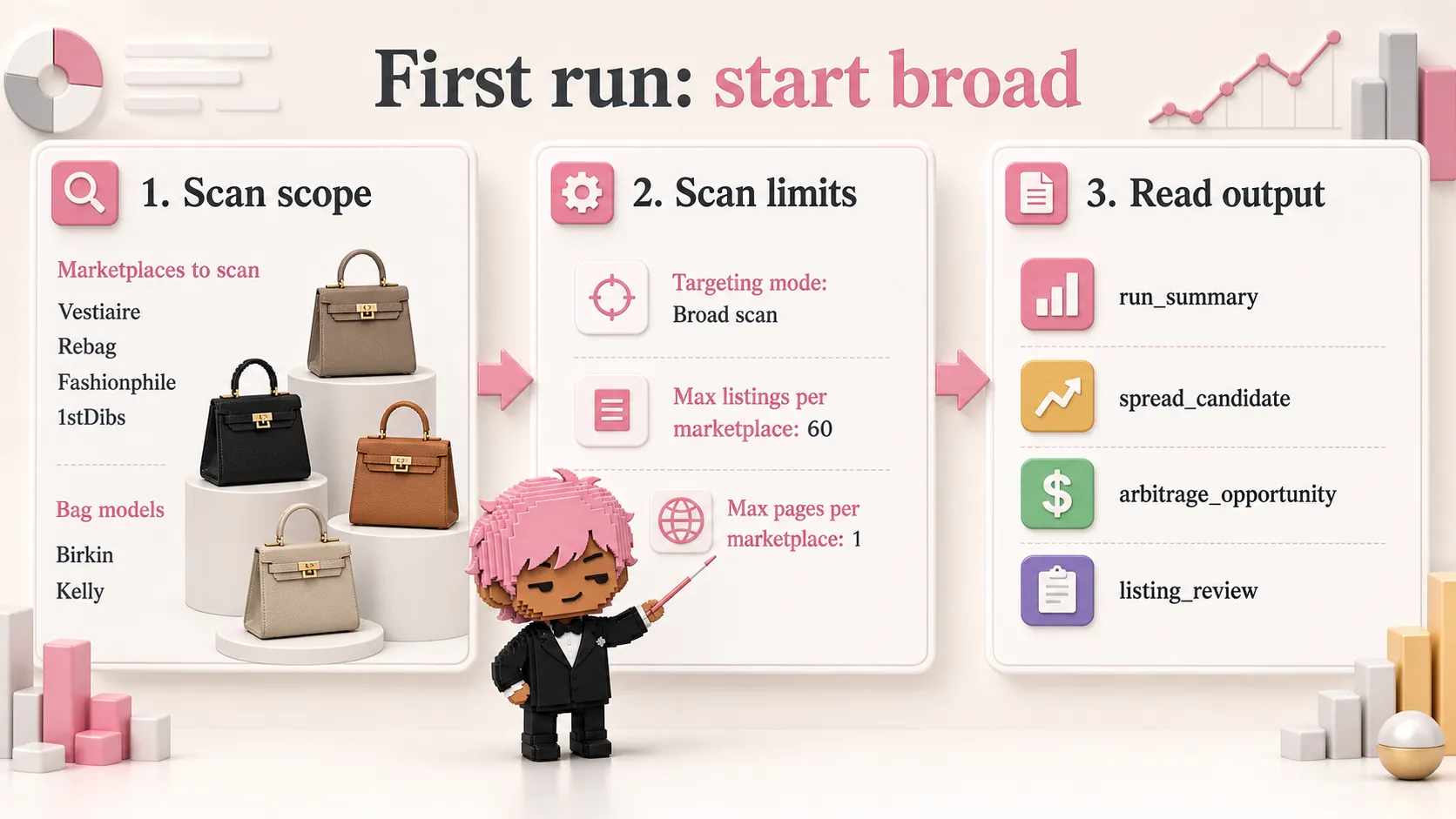
After the run, open the dataset in this order:
run_summary- check marketplace status and total counts.spread_candidate- review useful cross-platform spreads that need human verification.arbitrage_opportunity- strict comps that passed spread and ROI gates.listing_review- normalized listing-level rows for spreadsheet review.unmatched_listing- optional diagnostics when a listing lacked enough data for strict matching.
What You Get In One Run
| Output | What it answers |
|---|---|
| Normalized listings | What Birkin/Kelly/Classic Flap inventory is live across the four marketplaces? |
| Strict opportunities | Which comparable bags pass price gap and estimated net ROI thresholds? |
| Spread candidates | Which relaxed comps look promising but need manual checks? |
| Watchlist candidates | Which listings match a known buyer target? |
| Run summary | Did each marketplace work, and how many rows did the Actor classify? |
| Dataset views | Which rows should I inspect first without filtering JSON manually? |
Verified smoke run on build 0.0.18: a broad 4-platform scan with 60 listings
per marketplace and 1 page per marketplace returned 167 listings, 8
spread candidates, 0 platform errors, and 0 suspicious non-bag rows. Live
inventory changes every run, so treat this as a working-output example, not a
guarantee of future deal volume.
Who This Actor Is For
| Good fit | Not a good fit |
|---|---|
| Luxury handbag resellers checking public asking prices. | Buyers expecting automatic authentication. |
| Sourcing teams building a daily Birkin/Kelly/Classic Flap shortlist. | Users who need sold-comps or final transaction prices. |
| Personal shoppers monitoring one strict buyer request. | Users who want the Actor to buy, reserve, or message sellers. |
| Analysts exporting luxury handbag resale data to spreadsheets or dashboards. | Users who need legal, tax, investment, or resale business advice. |
| Developers who want a luxury handbag price comparison API on Apify. | Users who need a generic Rolex/jewelry/luxury scraper. |
FAQ / Common Questions
| Question | Short answer |
|---|---|
| What should I run first? | Use Broad scan, all 4 marketplaces, 20 listings, and 1 page. |
Why do I see 0 strict opportunities? | Strict matching may be doing its job. Check Why You Might See 0 Opportunities. |
| Which dataset rows matter first? | Start with run_summary, then spread_candidate, then arbitrage_opportunity. |
| Can I automate this? | Yes. Use Apify schedules, webhooks, or the API. |
| Can I export to CSV or Excel? | Yes. Use Apify dataset exports or the dataset API. |
For edge cases, fees, strict targeting, legality, and API details, see the Detailed FAQ.
Important Disclaimer
It is not a profit guarantee, sold-comps database, authentication service, financial advisor, or legal advisor. It is a strict screening tool for building a cleaner shortlist before manual due diligence.
This Actor is independent and is not affiliated with, endorsed by, or sponsored by Hermès, Chanel, Vestiaire Collective, Rebag, Fashionphile, or 1stDibs. Brand and marketplace names are used only to describe public listing sources and products being compared.
What Does This Luxury Handbag Arbitrage Actor Do?
The Actor scrapes active public resale listings from four luxury marketplaces and returns a structured dataset with:
- Normalized Hermes Birkin, Hermes Kelly, and Chanel Classic Flap listings.
- Model, size, color, material, hardware, condition, price, currency, image, and URL fields where available.
- Watchlist candidates for known target bags.
- Strict cross-platform match groups.
- Review candidates when model, size, color, and condition match but marketplace data is too incomplete for a strict deal.
- Gross price spread before costs.
- Estimated net ROI after user-controlled fees and cost buffers.
- Platform errors and run summaries so you can quickly see what worked.
In plain English: it replaces the first pass of manually checking several luxury resale sites and copying comparable high-demand handbag listings into a spreadsheet.
Why Scrape Hermes And Chanel Resale Listings?
Hermes Birkin/Kelly and Chanel Classic Flap resale research is still mostly manual: open several marketplaces, search each model, compare condition, size, color, leather/material, hardware, seller fees, and then copy everything into a spreadsheet. That breaks down fast when you monitor multiple bags or run daily sourcing checks.
This Actor turns that workflow into a repeatable scan:
- Scrape active Birkin, Kelly, and Chanel Classic Flap listings from 4 resale marketplaces.
- Normalize model, size, color, material, hardware, condition, price, currency, seller/location hints, image URLs, and listing URL where available.
- Build strict match groups only when core attributes are comparable.
- Calculate gross price gap before costs.
- Estimate net ROI after sell-side fees, shipping, repair/authentication buffer, and FX/tax buffer.
- Return a dataset you can filter, export, schedule, or send into Google Sheets, Airtable, Slack, email, or your own pricing workflow.
What It Is Best For
| Use case | How to use it |
|---|---|
| Daily luxury handbag sourcing | Run all 4 marketplaces every morning and review spread_candidate, watchlist_candidate, and arbitrage_opportunity rows. |
| Strict buyer watchlist monitoring | Switch watchlistMode to strict_target and enter a known target such as Birkin 25 black Togo GHW or Chanel Medium Classic Flap black caviar GHW. |
| Cross-platform price comparison | Compare Vestiaire, Rebag, Fashionphile, and 1stDibs asking prices in one normalized dataset. |
| Reseller spreadsheet building | Export listing_review rows with title, price, condition, URL, and match exclusion reasons. |
| Due diligence shortlist | Use the Actor to find possible spreads, then manually verify authenticity, photos, seller terms, shipping, taxes, and liquidity. |
| Market research | Track which sizes, leathers, colors, and conditions appear most often across public resale inventory. |
Actor vs Manual Research
| Workflow | What you get | Main weakness |
|---|---|---|
| Manual spreadsheet | Full human judgment on every listing. | Slow, hard to repeat, and easy to miss cross-platform spreads. |
| Single-site scraper | Cleaner inventory from one marketplace. | No cross-platform price gap, no sell-route comparison. |
| This Actor | Four-platform Birkin/Kelly/Classic Flap scan, normalized attributes, spread candidates, strict opportunities, and ROI estimates. | Still requires manual due diligence before buying or reselling. |
Marketplaces Covered
| Marketplace | Best signal | Notes |
|---|---|---|
| Vestiaire Collective | Broad international inventory and lower-price discovery | Uses public search data, explicit stock state, and detail pages for exact bag attributes. |
| Rebag | Structured resale listings and public asking prices | Condition is enriched from listing detail pages when search cards omit it. |
| Fashionphile | US-focused pre-owned luxury inventory | Condition is enriched from detail pages. Accessory-only false positives are filtered. |
| 1stDibs | Rare, vintage, exotic, and dealer inventory | Detail JSON-LD fills material, hardware, condition, and availability where exposed. |
When a Rebag or Fashionphile search page is empty or blocked, the Actor can use
that store's public predictive-search response as a first-page recovery path.
This fallback is deliberately limited to 10 rows per query and is reported as a
partial source, so increasing maxPagesPerPlatform only deepens the primary
search path. A predictive-search product row is already an exact Shopify product
object with its own ID, handle, URL, price, and availability, so it is validated
directly without an unnecessary second request. Primary-search rows are
revalidated against the exact public Shopify product JSON endpoint by ID, SKU,
or canonical product URL; public HTML is only the fallback. Detail reads are
cached by canonical URL and capped at 20 listing-detail budget slots per
marketplace and run, so Shopify JSON and HTML fallback for the same listing
share one slot.
What Data Can You Get?
The dataset is designed for spreadsheet review, alerting, API workflows, and manual due diligence.
| Data group | Example fields |
|---|---|
| Listing identity | platform, platformListingId, title, url, sellerName, location, images |
| Bag attributes | model, size, colorRaw, colorBucket, materialRaw, hardwareBucket, conditionBucket |
| Pricing | price, currency, grossSpread, grossSpreadPercent, estimatedNetSellValue |
| ROI estimate | estimatedPlatformFee, estimatedPaymentFee, estimatedPlanCost, estimatedNetRoiPercent |
| Matching quality | matchKey, matchEligibility, confidenceScore, matchExclusionReasons, sourceCompleteness |
| Run diagnostics | recordType, platformErrorCount, opportunityCount, spreadCandidateCount, message |
You can download results from Apify datasets as JSON, CSV, Excel, XML, HTML, or via API. See the official Apify dataset documentation for export and API options.
How To Use This Luxury Handbag Arbitrage Scraper
- Select all 4 marketplaces.
- Leave
Bag modelson Birkin, Kelly, and Chanel Classic Flap. - Keep
Targeting modeonBroad scanfor the first run. - Use a small test run first:
Max listings per marketplace:20Max pages per marketplace:1Include unmatched listings:true
- Open the dataset and check:
run_summaryfor counts and marketplace errors.listing_reviewfor normalized listings.watchlist_candidatefor target-like rows.spread_candidatefor review-worthy spreads blocked by incomplete strict fields.arbitrage_opportunityfor strict cross-platform deal candidates.
For production monitoring, increase Max listings per marketplace, increase
Max pages per marketplace, and schedule the Actor daily.
How Much Will a Run Cost?
Run cost depends on your Apify plan, selected marketplaces, scan limits, retry behavior, and whether Apify Proxy is enabled. This Actor gives you two main cost controls:
| Setting | What it controls | Start here |
|---|---|---|
maxPagesPerPlatform | How many result pages are requested per marketplace | 1 |
maxListingsPerPlatform | How many normalized listings are kept per marketplace | 20 |
includeUnmatchedListings | Whether diagnostic rows are stored in the dataset | true |
proxyConfiguration | Whether Apify Proxy is used | enabled |
watchlistMode=strict_target | Whether the scan is narrowed to one known bag target | optional |
Best practice: run a small private test first, inspect the dataset, then increase pages and listing caps only if the output matches your workflow.
Current Pay-Per-Event Formula
The public pricing read on July 29, 2026 uses one fixed Actor-start event plus
the paid result events already emitted by this Actor. No additional
alert event is charged:
| Event | Free | Bronze | Silver | Gold, Platinum, Diamond |
|---|---|---|---|---|
| Actor start | $0.01 | $0.01 | $0.01 | $0.01 |
| Normalized listing | $0.003 | $0.0027 | $0.0024 | $0.0021 |
| Review candidate | $0.25 | $0.225 | $0.20 | $0.175 |
| Strict target match | $0.10 | $0.09 | $0.08 | $0.07 |
| Strict arbitrage opportunity | $1.00 | $0.90 | $0.80 | $0.70 |
unmatched_listing rows use the normalized-listing event only when the listing
is currently available and any required product-detail validation succeeded.
Unavailable, unknown-availability, and failed-detail rows can remain visible as
uncharged diagnostics, but they never become paid listing or deal events. The
examples below assume at most 1 GB of Actor memory, use Free-tier event prices,
and exclude any separate platform usage or proxy charges:
Marketplace detail-page checks are internal collection work. They do not emit or charge a separate paid event.
| Scenario | Paid events | PPE total |
|---|---|---|
First new_only baseline (inventory stored, no rows emitted) | 1 start only | $0.01 |
| Snapshot with 80 normalized listings and no deal signals | 1 start + 80 listings | $0.25 |
Unchanged new_only monitor run | 1 start only | $0.01 |
| One price drop, one review candidate, and one strict opportunity | 1 start + 1 listing + 1 review + 1 opportunity | $1.263 |
The run's charge limit still takes precedence. A record that cannot be charged because the limit is reached is not allowed to advance monitor state and hide the same pending change from the next run.
Example Input
Starter broad scan across all marketplaces:
For a deeper daily sourcing run, keep the same fields and increase
maxPagesPerPlatform to 3 or 4 after you confirm the first output is useful
for your workflow.
Strict target scan for a known bag:
Strict target scan for a Chanel Classic Flap:
Input Fields Explained
1. Scan Scope
platforms: resale marketplaces to scan. Default: Vestiaire Collective, Rebag, Fashionphile, and 1stDibs.models: bag families to scan when no strict target is provided. Default: Birkin, Kelly, and Chanel Classic Flap.
2. Strict Target (optional)
Use strict target mode when you already know the bag you want to monitor.
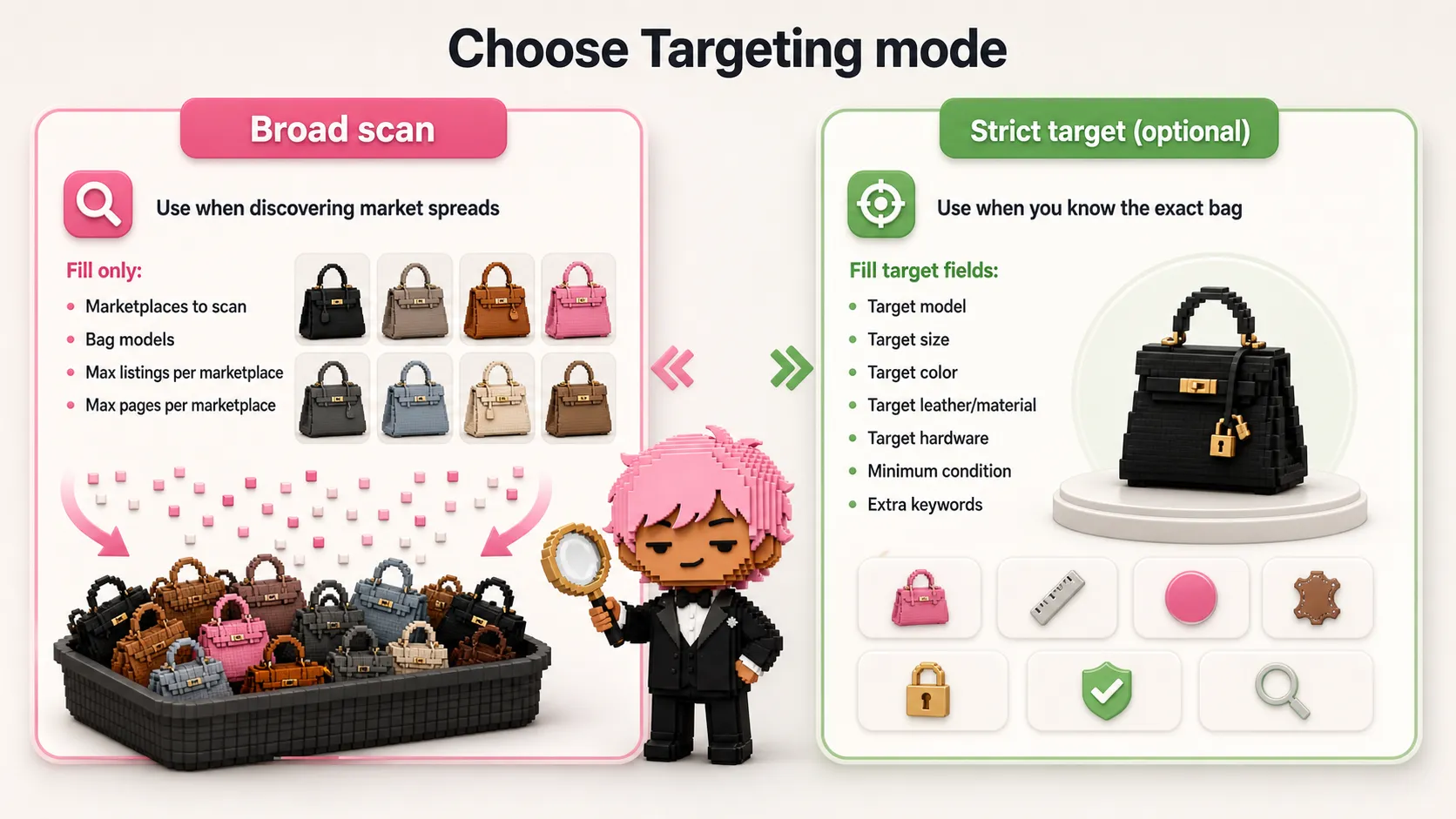
watchlistMode:broad_scanorstrict_target.watchlistModel: Birkin, Kelly, or Chanel Classic Flap.watchlistSize: examples:25,28,30,32,35,40,mini,small,medium,jumbo.watchlistColor: examples:black,noir,etoupe,gold,biscuit.watchlistMaterial: examples:togo,epsom,clemence,swift,lambskin,caviar,calfskin,exotic.watchlistHardware: examples:gold,GHW,palladium,PHW,rose gold,permabrass.watchlistConditionMin: minimum accepted condition bucket.watchlistKeywordsText: extra comma-separated keywords such assellier,retourne,special order,full set, orGHW.
API callers can still provide the legacy watchlist array for multiple strict
targets. It accepts at most 10 unique normalized targets; equivalent duplicate
targets and search queries are collapsed before collection. The per-marketplace
request budget remains capped at 60 requests (the broad-scan maximum), and a
budget-limited source is reported as partial so monitoring never treats it as a
clean absence.
3. Scan Limits
maxListingsPerPlatform: the maximum normalized listings kept from each marketplace. This is the main output-size cap.maxPagesPerPlatform: how deep the Actor paginates per marketplace and query. More pages can discover more listings, but also makes runs longer.
Watchlist fan-out shares the same 60-request per-marketplace guard as broad scans. If a legacy array would exceed that guard, collection stops deterministically and source health is marked partial.
Simple rule: increase pages when you want deeper discovery, increase listings when marketplaces return more valid rows than your current cap.
4. Monitoring (advanced)
monitoringEnabled: opt in to a persistent baseline and inter-run comparison. It isfalseby default.monitorId: optional non-sensitive lowercase slug. Reusing one ID with a different listing fingerprint fails instead of overwriting another monitor.outputMode: keepsnapshotfor complete output, or usenew_onlyafter enabling monitoring.minPriceDropPercent: minimum decrease before a listing is emitted asprice_drop; the default is1.
The first monitoring run establishes a private baseline and creates an empty
alert, rather than reporting the whole existing inventory as new. The baseline
keeps the complete same-currency monitoring inventory even when
includeUnmatchedListings=false; a later new listing, price drop, or
availability change can therefore be emitted by new_only without exposing
the unchanged baseline rows. Because bounded marketplace samples can rotate,
new_listing is fail-closed: it is emitted only when the marketplace supplies
a valid sourcePublishedAt later than this monitor's baseline. An older or
undated listing that appears later is stored silently instead of creating a
false alert. Price drops and availability changes remain detectable after the
listing enters state.
5. Deal Thresholds
The Actor uses two deal gates:
minSpreadPercent: price gap before costs.minNetRoiPercent: estimated profit after costs and sell-side fees.
Example gross spread:
Example estimated net ROI:
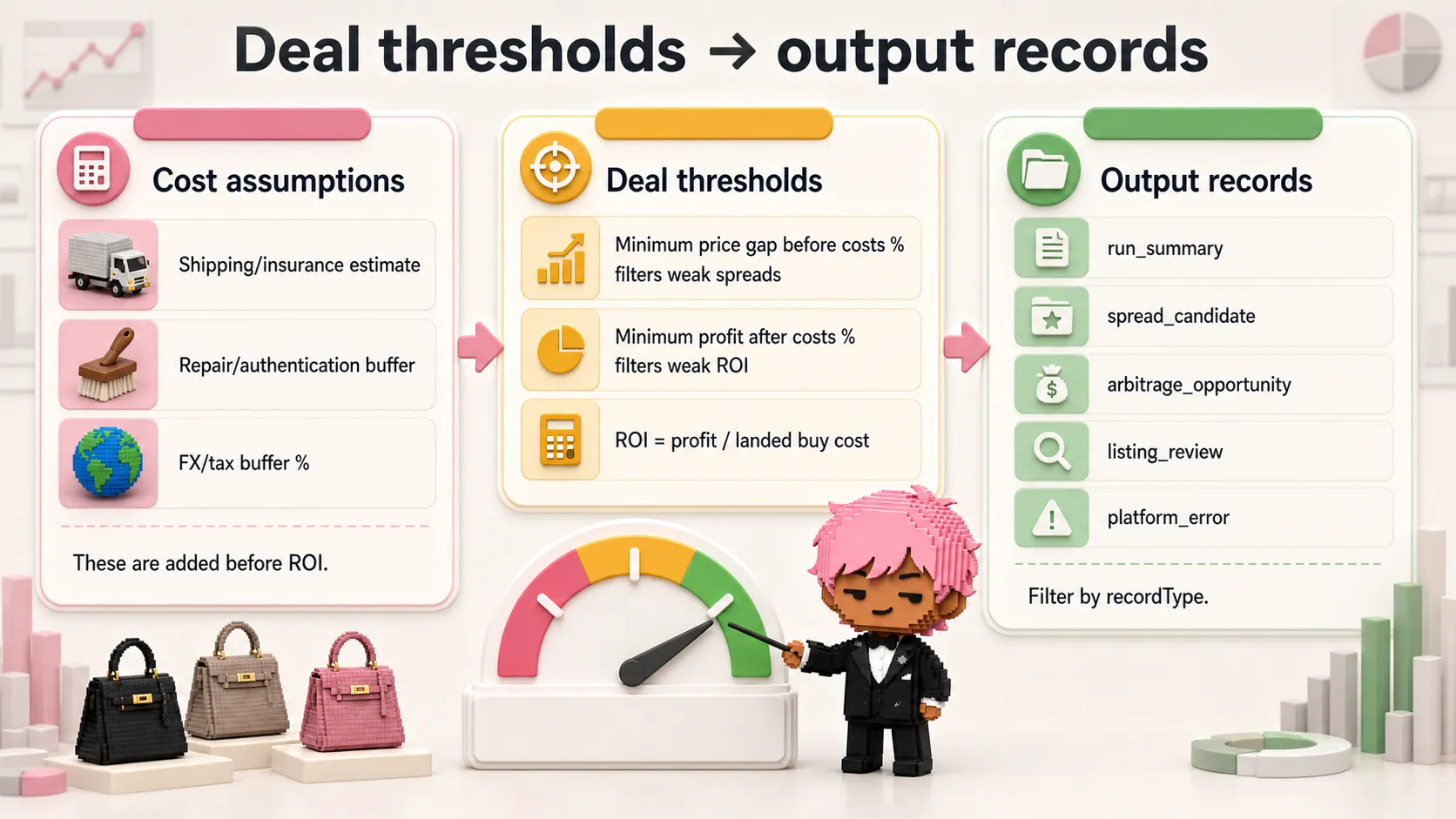
If a bag passes gross spread but fails net ROI, the Actor excludes it from
arbitrage_opportunity. This avoids surfacing deals that look good before fees
but weak after friction.
6. Cost Assumptions (optional)
shippingEstimate: fixed shipping, insurance, or handling cost added to the buy price.repairBuffer: fixed buffer for cleaning, repair, authentication, photography, or resale prep.fxBufferPercent: percentage buffer for FX slippage, taxes, duties, or other costs not already included.
These values are intentionally editable because luxury resale economics vary by country, payment method, shipping route, and risk tolerance.
7. Platform Fee Assumptions (optional)
Vestiaire and Fashionphile use built-in fee logic in the Actor. Rebag and 1stDibs need your estimated commission because public listing pages do not reveal your private seller economics.
| Sell platform | Fee model used by the Actor |
|---|---|
| Vestiaire Collective | US/USD seller fee tiers plus payment processing fee. |
| Fashionphile | Tiered consignment estimate: 30% on the first $3,000, then 15% above $3,000. |
| Rebag | Your rebagCommissionPercent assumption. |
| 1stDibs | Your firstDibsCommissionPercent assumption, plus optional plan cost in API-level assumptions. |
If you only use the Actor for buy-side sourcing, leave the defaults. If you intend to resell through Rebag or 1stDibs, replace the defaults with your own actual payout assumptions.
8. Output & Proxy
includeUnmatchedListings: keep listings that could not join a strict match group. Broad scans enable this by default so the first run returns reviewable market rows. A row whose required product-detail validation did not succeed is excluded from both the dataset and private monitor inventory; its failure remains visible in source health and is uncharged. For a strict scan, turn this off if you only want proven target rows and the summary.proxyConfiguration: Apify Proxy is enabled by default for Vestiaire's inventory API only because direct Apify cloud requests are blocked. Other marketplace and detail requests stay direct. Disable it only after proving direct Vestiaire requests work from your runtime. See Apify Proxy docs.
Output Records
The dataset contains mixed records. Filter by recordType.
| recordType | Meaning |
|---|---|
arbitrage_opportunity | Strict cross-platform match group that passed spread and net ROI thresholds. |
spread_candidate | Relaxed cross-platform spread that passed ROI filters but needs manual verification. |
normalized_listing | Clean listing row from one marketplace. |
watchlist_candidate | Listing that matches your strict target or watchlist logic. |
unmatched_listing | Listing excluded from strict arbitrage groups, with reasons when available. |
platform_error | Recoverable marketplace error. Other platforms can still succeed. |
run_summary | Final counts, source health, and grouped match-exclusion reasons. Also saved as RUN-SUMMARY. |
Every run_summary also contains a stable funnel object. Counts are integer
snapshots for this run; they are not conversion or retention claims.
Each platforms[].health entry is fail-closed. healthy and no_match can
advance bounded absence only when absenceEligible is true. Parser or detail
failures, incomplete extraction, fallback limits, mixed target currencies, and
locale degradation produce partial health with absenceEligible=false.
listingsRejected, inactiveListings, extractionFailures,
currencyMismatchCount, and localeDegraded explain why. An explicitly sold
or inactive marketplace row is counted separately from a malformed row, so a
valid availability signal does not masquerade as a parser failure.
| Funnel field | Denominator / meaning |
|---|---|
sourceNodesSeen, parserAcceptedListings, parserRejectedListings | Raw marketplace nodes and parser diagnostics before final projection. |
detailValidatedCollectedListings | Rows retained after required detail validation, before watchlist filtering. |
targetMatchedListings, targetFilteredOutListings | Watchlist filter results; targetFilterApplied is false for broad scans, where these counts are 0. |
perSourceDuplicateCount, crossSourceDuplicateCount | Duplicates removed within each source, then across the per-source collections. |
validatedUniqueListings | Unique rows after source dedupe and target filtering. |
currencyEligibleListings, currencyMismatchCount | Currency partition of the validated unique rows. |
comparableListings, comparableGroupCount | Listings and multi-marketplace groups that reach strict matching. |
unmatchedListings, watchlistCandidateCount, reviewCandidateCount, strictOpportunityCount | Matching and ROI outputs at each stage; these do not prove a user action. |
inventoryEligibleListings / monitorListingsCount | Currency-eligible inventory available to monitoring; monitorListingsCount is retained for compatibility. |
funnel.userActionCount, funnel.retentionD7, and funnel.retentionD30
remain null with measurementAvailability.* = false: a single Actor run
cannot observe downstream user actions or cohort retention. Monitoring runs add
funnel.monitoringSignals with newListingCount, priceDropCount, and
actionableChangeCount once the monitor diff has been evaluated.
Monitoring records add changeType, including baseline, new_listing,
price_drop, availability_changed, opportunity_new, and
review_candidate_new. The default key-value store always exposes
RUN-SUMMARY; monitoring runs also expose a compact, idempotent
ALERT-PAYLOAD.
new_listing and price_drop are emitted only for currently available
listings. Newly observed unavailable or unknown rows are stored silently so a
later transition to available can still produce an availability_changed
signal. A listing missing from a bounded marketplace sample is retained as
internal state only: scan absence never creates a user-facing removal alert.
Only consecutive, fully eligible source scans can advance an internal absence;
any blocked, partial, empty, parser-error, or currency-degraded scan resets that
consecutive-evidence chain.
Dataset views:
overview: compact mixed-record table.opportunity_details: deal candidate columns.spread_candidates: relaxed review candidate columns.listing_review: listing-level review columns.errors_and_summary: platform errors and final run summary.
Example Output
Simplified normalized_listing:
Simplified arbitrage_opportunity:
Simplified spread_candidate:
How Strict Matching Works
The Actor is conservative on purpose. It only creates an arbitrage_opportunity
when listings can be compared on core attributes such as model, size, color,
material, hardware, condition, and price.
This means:
- You get fewer opportunities.
- You get fewer bad comparisons.
- Missing hardware, vague leather, unknown condition, or weak title data can
move a listing into
watchlist_candidateorunmatched_listinginstead ofarbitrage_opportunity. - A
spread_candidaterequires at least two active, same-currency sell references. It may tolerate one unknown or generic field, but not conflicting known hardware, several specific materials, or widely dispersed prices. - Missing currency or availability is preserved as
unknownand is never silently promoted to USD or active inventory. - Exact observed colors such as Etain, Gris Asphalte, Gris Neve, Natural Sable, and Bleu de Prusse remain distinct instead of collapsing into one coarse grey, brown, or blue comparison.
For luxury resale, this is usually safer than fuzzy matching. A Birkin 25 black Togo gold hardware bag is not the same comp as a Birkin 30 black Epsom palladium hardware bag, and a Chanel Medium Classic Flap black caviar GHW is not the same comp as a Chanel Jumbo lambskin silver hardware bag.
Why You Might See 0 Opportunities
0 opportunities does not mean the Actor failed. It often means the strict deal
engine did its job.
Common reasons:
- The platforms returned listings, but not the same exact attributes.
- A listing was missing hardware, material, condition, or price.
- The gross spread passed, but estimated net ROI failed after fees and costs.
- Only one marketplace had a comparable listing for that exact match key.
- Your thresholds are too high for the current market.
- 1stDibs or another platform exposed limited structured condition data.
Check run_summary.classifiedUnmatchedCount and
run_summary.classificationExclusionCounts first. They remain available even
when includeUnmatchedListings is disabled, so a low-cost run still explains
whether color, material, hardware, condition, or single-platform coverage
blocked matching. Then inspect spread_candidate, watchlist_candidate, and
optional unmatched_listing rows.
Recommended Workflows
Broad Daily Scan
Use this when you want market coverage:
watchlistMode:broad_scanmodels: Birkin, Kelly, and Classic FlapmaxListingsPerPlatform:60maxPagesPerPlatform:4- Schedule: daily
- Review:
run_summary,spread_candidates,listing_review, thenopportunity_details
Strict Buyer Watchlist
Use this when a buyer or client wants a specific bag:
watchlistMode:strict_target- Fill model, size, color, material, hardware, and minimum condition.
- Add keywords like
full set,sellier,retourne,GHW,PHW. - Keep
includeUnmatchedListingson until your target wording is tuned.
Reseller ROI Check
Use this when you already know your selling route:
- Set
shippingEstimateto your average insured shipping cost. - Set
repairBufferto your usual authentication, cleaning, and prep buffer. - Set
fxBufferPercentfor taxes, duties, currency friction, and safety margin. - Replace Rebag and 1stDibs commission defaults with your own payout terms.
Detailed FAQ
Is this a Hermes Birkin scraper, Hermes Kelly scraper, or Chanel Classic Flap scraper?
All three. The Actor supports Hermes Birkin, Hermes Kelly, and Chanel Classic Flap scanning. It can run broad model searches or a strict target watchlist.
I do not know the exact bag yet. Which input should I use?
Start with Broad scan. Keep Targeting mode on Broad scan,
select all marketplaces, keep all three bag models, and run with
Max pages per marketplace = 1. Then inspect run_summary and
spread_candidate before narrowing into Strict target.
I know the exact buyer request. Which input should I use?
Use Strict target. Fill Target model,
Target size, Target color, Target leather/material, Target hardware, and
Minimum condition. Add Extra keywords only when the marketplace wording
matters, for example sellier, retourne, full set, GHW, or PHW.
Does this scrape sold prices?
No. It compares active public asking prices. Asking prices are useful for market screening, but they are not the same as sold comps or final payout.
Does this guarantee profitable arbitrage?
No. It estimates spread and ROI from public listings and user-provided cost assumptions. You must still verify authenticity, condition, seller terms, shipping, taxes, liquidity, return policy, and real resale route.
Does this authenticate Hermes or Chanel bags?
No. It extracts and normalizes marketplace listing data. It does not authenticate bags, inspect photos like a specialist, or verify certificates. Use it to build a shortlist, then do manual authentication and due diligence.
Why does condition matter so much?
Condition changes resale value, liquidity, repair costs, and buyer confidence.
The Actor normalizes public condition labels into buckets such as
new_or_never_worn, excellent, very_good, good, and fair when the source
exposes enough information.
Why are there Rebag and 1stDibs fee inputs?
Because your seller economics on those platforms can depend on private quote, seller plan, category, price, or relationship. The Actor cannot infer your real payout from public listing pages, so it lets you set your own assumptions.
What is the difference between Max listings and Max pages?
Max pages per marketplace controls how deep the Actor searches.
Max listings per marketplaceWhat thresholds should I start with?
Start with the defaults: 12% gross spread and 8% estimated net ROI. If you get
too many weak candidates, raise them. If you get no strict opportunities but
useful spread_candidate or watchlist rows, inspect those first before lowering
thresholds.
Can I use this for Rolex, jewelry, or other luxury items?
Not in this Actor. It is intentionally focused on Hermes Birkin, Hermes Kelly, and Chanel Classic Flap. A broader luxury resale arbitrage Actor would need separate normalization rules and fee assumptions.
Can I run this on a schedule?
Yes. Use Apify schedules for daily or weekly runs. Daily is the best cadence for high-demand Birkin/Kelly/Classic Flap inventory because attractive listings can move quickly. See Apify schedules.
Can I export the data to CSV, Excel, Google Sheets, or an API?
Yes. Apify datasets can be downloaded as JSON, CSV, Excel, XML, HTML, or read through the dataset API. Start with Output Records, then use the Apify dataset docs or the API Usage examples below.
Can I use this Actor as an API or MCP tool?
Yes. You can run it from Apify Console, Apify API, Apify CLI, schedules, webhooks, integrations, or MCP-compatible agent workflows. The dataset output can then feed spreadsheets, Slack alerts, email reports, internal dashboards, or pricing agents. See Apify API docs and Apify webhooks.
Is this an official Hermes, Vestiaire, Rebag, Fashionphile, or 1stDibs API?
No. This is an independent Apify Actor that reads public listing pages and turns them into a structured dataset. It is useful when you need a repeatable luxury handbag resale monitoring workflow, but it is not an official marketplace API.
Which output should I monitor first?
Start with run_summary, then inspect spread_candidate. In luxury resale,
strict opportunities can be rare because model, size, leather, color, hardware,
condition, and price all need to line up. spread_candidate is intentionally
more useful for human review because it keeps promising spreads visible when
exactly one marketplace attribute is unknown or generic.
Why is arbitrage_opportunity stricter than spread_candidate?
arbitrage_opportunity is reserved for stricter comparable groups that passed
both deal thresholds. spread_candidate keeps useful but imperfect spreads
visible only when uncertainty is bounded: at least two coherent sell references,
the same currency, active listings, and no contradiction between known fields.
For sourcing, review spread_candidate first, then manually verify exact
leather, hardware, photos, condition notes, authenticity, fees, and liquidity.
Why are some attributes unknown?
Marketplace search pages do not always expose complete structured data. The
Actor checks public detail pages for Rebag, Fashionphile, Vestiaire, and 1stDibs
where practical. Vestiaire stock flags and detail availability take precedence
over a bare sold: false; material, hardware, condition, and exact colors are
enriched only when exposed. A detail 404/410 is treated as unavailable. Strict
and review matching exclude weak comps instead of pretending they are active
exact matches. Detail reads are cached by canonical URL and bounded per
marketplace, so a listing left unverified after the budget is exhausted cannot
enter the dataset or private monitor inventory. Its source remains partial and
cannot drive removal alerts.
Is this legal?
This Actor reads public listing data and does not log into user accounts, buy items, reserve items, or message sellers. You are responsible for complying with marketplace terms, local laws, and your own resale obligations.
Troubleshooting
| Problem | What to check |
|---|---|
| No opportunities | Inspect run_summary, spread_candidate, watchlist_candidate, and unmatched_listing. Strict matching may be excluding weak comps. |
| Marketplace error | Check platform_error. Other marketplaces can still succeed. Retry later or reduce scan depth. |
| Too many rows | Lower maxListingsPerPlatform, lower maxPagesPerPlatform, or switch to strict target mode. |
| Too few rows | Increase maxPagesPerPlatform, increase maxListingsPerPlatform, or broaden target fields. |
| ROI looks too optimistic | Increase shippingEstimate, repairBuffer, fxBufferPercent, or commission assumptions. |
| Rebag/1stDibs ROI seems wrong | Replace default commission assumptions with your real seller payout terms. |
| Dataset feels mixed | Filter by recordType or use the dataset views. |
Task → Schedule → Alert
Use .actor/examples/daily-monitor-new-only.json as the saved input for one
stable monitor:
- In Apify Console, use Save as Task and keep one stable
monitorIdand listing-scope configuration. - Run that Task once to create its uncharged
new_onlybaseline and confirmALERT-PAYLOAD.hasChangesisfalse. - Add a daily Schedule to that saved Task.
- Create an
ACTOR.RUN.SUCCEEDEDwebhook for the Task. - In the webhook consumer, read
ALERT-PAYLOADfrom the completed run's default key-value store. Deduplicate deliveries with itsidempotencyKey.
The persistent comparison state lives in the named private key-value store
hermes-birkin-kelly-monitor-state-v2. The named Request Queue
hermes-birkin-kelly-emission-ledger-v3 is mutable coordination storage for
the monitor binding and emission claims; it is not an append-only audit log or
a promise of permanent billing records. An emission claim moves through
pending → charged → completed. The Actor persists its deliveryDatasetId
and a chargeAttemptedAt marker while the claim is pending, before calling
actor.charge. When chargedCount is 0, the pending claim is released and
deleted so a later run can retry; a charged claim is never charged again. If
charged-status persistence cannot be confirmed after its bounded retries, the
current call fails closed. A later retry whose queue entry is still pending
(whether or not the attempt marker was persisted) reports that manual
reconciliation is required instead of releasing or charging again.
Delivery has a secondary emission_delivery claim keyed by the same
emissionIdentity, with no time-based takeover. A charged retry uses the
original deliveryDatasetId; when the current run opened another dataset, it
reopens that original dataset and scans for the exact emissionIdentity before
writing. A pending delivery claim with no persisted row fails closed and
reports manual reconciliation; a later run never takes over that claim merely
because time has passed. A completed claim is accepted only when its row is
present, preventing concurrent or cross-time duplicate rows.
Run summaries expose recoveredChargedRecords separately from
chargesByEvent; manualReconciliationRequired marks a pending claim whose
charge attempt cannot be safely retried automatically.
Before the Actor reads or writes monitor state, it hashes the initiating Apify
user ID and Task ID into a private runtime scope. The
runtime scope + monitorId + input fingerprint binding can resume after a
crash, while a different fingerprint fails closed. Two users, or two Tasks
owned by one user, therefore cannot share monitor state or paid-emission
claims even when they choose the same monitorId. Direct API runs use a stable
per-user direct scope, but a saved Task is recommended for scheduling.
State store v2 and ledger v3 are a clean cutover from the earlier unscoped
canary storage. Legacy state is not attached to a user automatically. The
first new_only run creates an empty, uncharged baseline, so the cutover cannot
re-emit and re-bill an old snapshot. Do not delete either active v2/v3 storage:
deleting state creates a new empty baseline, while deleting the ledger removes
the monitor binding and cross-run duplicate-charge guards.
The automated contract tests use isolated local queues and prove that two
concurrent same-identity attempts create one claim, that users and Tasks receive
separate state and paid identities, that concurrent first runs cannot bind one
monitorId to two input fingerprints, and that a same-fingerprint run resumes
after a crash between binding and state access.
API Usage
You can run the Actor through Apify API, CLI, schedules, webhooks, integrations, or the Console UI. This is useful when you want a repeatable luxury handbag resale price monitor instead of a one-off manual search.
Example CLI call:
JavaScript client:
Python client:
Dataset API endpoint:
Common automation patterns:
- Daily scheduled run into Google Sheets or Airtable.
- Slack or email alert when
arbitrage_opportunityor high-ROIspread_candidaterows appear. - Webhook that sends the dataset to your own pricing dashboard.
- MCP or agent workflow that checks a strict target before a sourcing decision.
- API workflow that stores
run_summaryand tracks market movement over time.
Cost And Performance Tips
- Start with
maxPagesPerPlatform = 1andmaxListingsPerPlatform = 20. - Increase limits only after the output format matches your workflow.
- Keep
includeUnmatchedListings = truewhile tuning, then turn it off if you only want deal candidates and summaries. - Direct requests are the default. Enable proxy only when a marketplace blocks a run.
- Daily scheduled scans are usually more useful than very deep one-off scans.
Reliability Notes
This Actor is designed so one marketplace can fail without hiding results from
the others. If a source is temporarily blocked or changes its page layout, the
dataset can still contain successful listings plus a platform_error row for
the failed source.
For stable scheduled monitoring:
- Keep the default or starter input small enough to finish quickly.
- Review
run_summaryon every scheduled run. - Treat sudden drops in one marketplace as a source-health signal, not necessarily a market signal.
- Report broken selectors or wrong fields in the Actor Issues tab with a run ID.
Limitations
- Public listing prices are asking prices, not final sale prices.
- Marketplace fees, shipping, insurance, repairs, taxes, FX, import duties, and seller negotiation can change real economics.
- Strict matching intentionally produces fewer opportunities than broad fuzzy matching.
- The Actor does not authenticate goods, detect counterfeits, or inspect photos.
- The Actor does not buy items, reserve items, negotiate, or message sellers.
- Some marketplaces expose limited structured data, especially condition and hardware.
- This Actor does not provide investment, financial, legal, tax, or resale business advice.
Support
Use the Apify Issues tab if a marketplace breaks, a field looks wrong, or you need another output column. Include the run ID, input settings, and a short description of what looked wrong.
Custom extensions can be built from this Actor, for example:
- More resale marketplaces.
- Slack or email alerts for one strict watchlist.
- Google Sheets export with daily deltas.
- Sold-comps enrichment if a reliable source is available.
Related KazKN Actors
If you also source or monitor broader second-hand marketplaces, these KazKN Actors are the closest complements:
| Actor | Use it when |
|---|---|
| Vinted Smart Scraper | You need structured Vinted listing data for broader second-hand sourcing, resale monitoring, or market research. |
| Vinted Turbo Scraper | You want a faster Vinted-focused scan for high-volume marketplace discovery. |
| KazKN Apify profile | You want to see the full set of KazKN Actors and new scraper releases. |
Search Terms This Actor Covers
This Actor is built for users searching for a Hermes Birkin scraper, Hermes Kelly scraper, Chanel Classic Flap scraper, Birkin resale price monitor, Kelly resale price monitor, Chanel Classic Flap price monitor, Vestiaire Collective scraper, Rebag scraper, Fashionphile scraper, 1stDibs scraper, luxury handbag arbitrage tool, pre-owned Hermes price comparison dataset, Chanel resale dataset, designer handbag resale data, Hermes condition normalization, Chanel caviar lambskin normalization, Birkin price comparison API, Kelly price alert, luxury resale watchlist, Apify luxury scraper, or MCP luxury handbag price monitor.


