

IaC Security Misconfiguration Scanner API
Pricing
from $0.35 / completed iac policy scan
IaC Security Misconfiguration Scanner API
Scan Terraform, Kubernetes, Dockerfile, Helm, CloudFormation, and 15 more Infrastructure-as-Code formats for security misconfigurations. Submit a GitHub repository or ZIP and get normalized Checkov findings plus an automation-ready JSON summary. Start your first scan now. No runner to maintain.
Pricing
from $0.35 / completed iac policy scan
Rating
0.0
(0)
Developer

KazKN
Maintained by CommunityActor stats
1
Bookmarked
3
Total users
2
Monthly active users
3 months ago
Last modified
Categories
Security
Limited permissionsShare
One unsafe line in Infrastructure as Code (IaC), such as Terraform, Kubernetes, CloudFormation, Helm, Dockerfile, or CI configuration, can create public exposure, weaken IAM, disable encryption, open a network path, or remove logging. Paste a GitHub repository or upload a ZIP. This IaC-only Actor runs the pinned Checkov 3.3.8 policy scanner and reports the failed policy, file, affected resource, and line range when Checkov provides one.
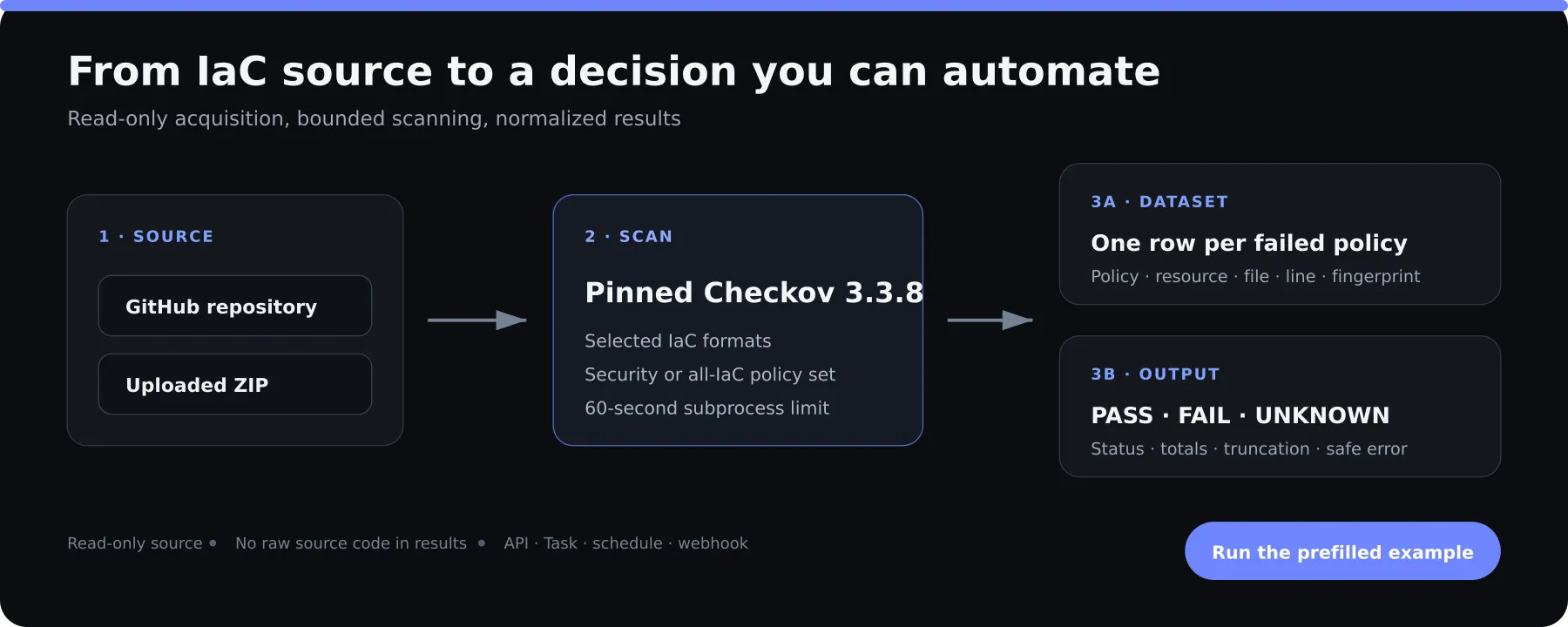
The result is ready for people and automation: one Dataset row per failed policy,
plus an OUTPUT JSON summary with a PASS, FAIL, or UNKNOWN policy gate. It is
built for platform engineers, DevSecOps teams, cloud security teams, and automation
builders who want a hosted scan without maintaining Checkov infrastructure.
Run the prefilled example or keep reading for a tested public GitHub example. The French owner guide explains IaC, every input, and every result in plain French.
Available on the Apify Store. The released cloud build was verified successfully on Apify.
🚀 Run your first scan
The public GitHub prefilled example is already complete. Do not change it for the first run.
- Open the prefilled Actor input.
- When the input page opens, click Start.
- Open the Dataset to see failed policies.
- Open
OUTPUTto see the scan status, totals, warnings, andgateDecision.
Click the preview to open the tested public Terraform Example on Apify:
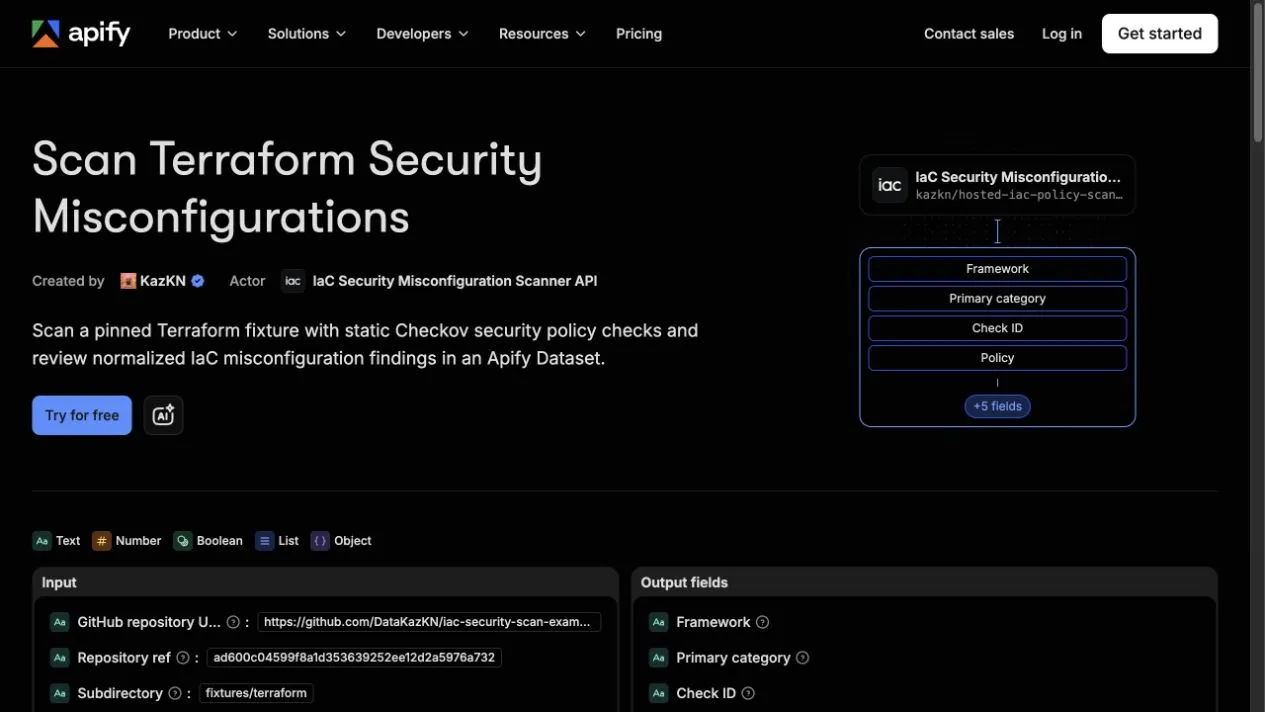
The published prefill scans a small Terraform fixture at an immutable Git commit:
COMPLETED_WITH_FINDINGS is a successful scan: Checkov completed and found policy
failures. FAILED means a validation, acquisition, scanner, persistence, billing, or
internal technical failure.
This is a policy-result gate. FAIL means at least one Checkov policy failed; it is not a severity, exploitability, or compliance verdict.
The 60-second setup is a quick-start target, not a runtime promise. The Checkov subprocess itself has a hard timeout of 60 seconds; acquisition, persistence, and Actor lifecycle work are separate.
📊 What you receive
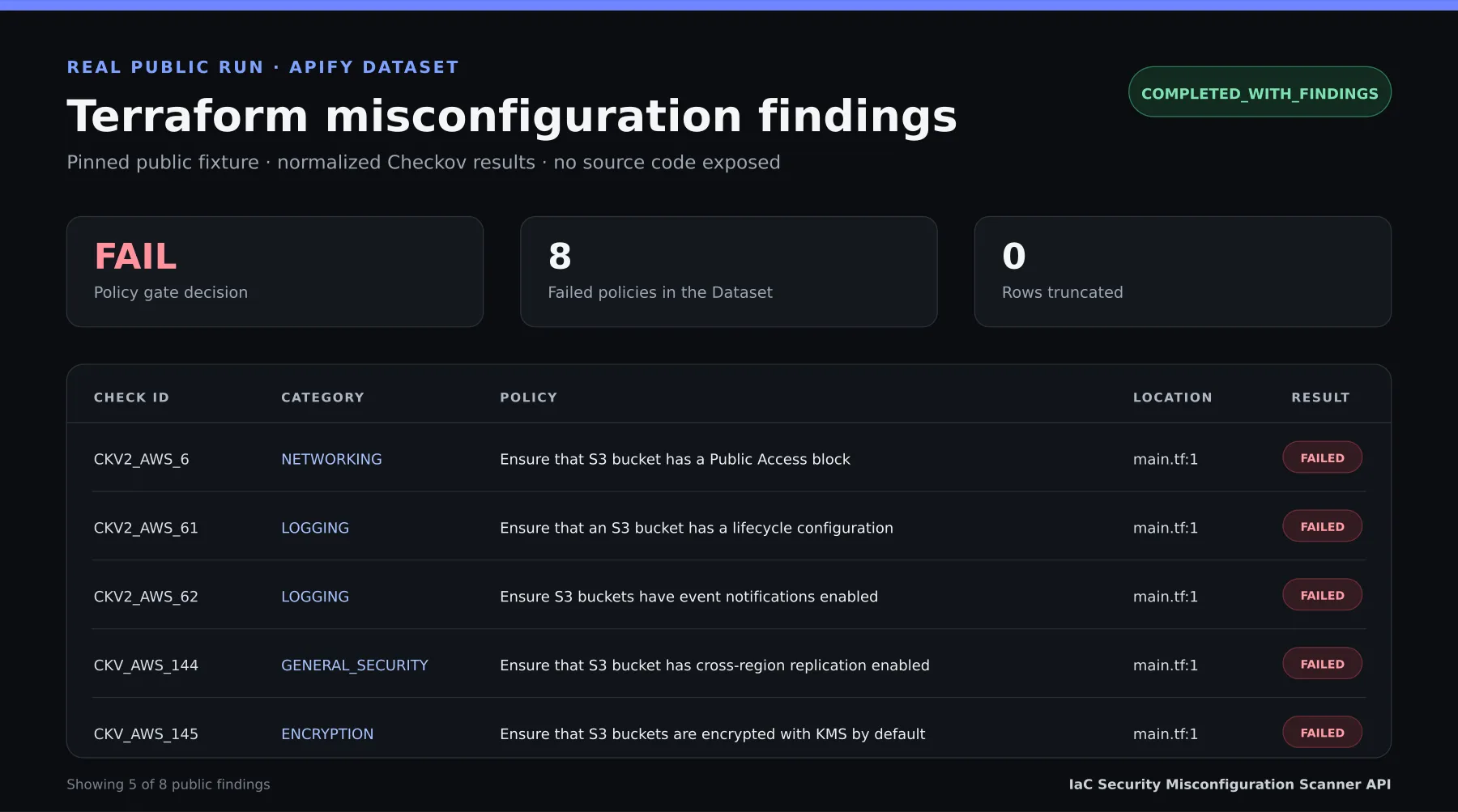
The Dataset is the fastest place to triage failures. Each row includes the Checkov policy, affected resource, file, line range, native category, and a stable fingerprint.
OUTPUT answers whether the scanner completed and whether an automated workflow
should continue:
| What you need to know | Where to find it |
|---|---|
| Which policy failed and where | Dataset: checkId, checkName, resource, filePath, lineStart, lineEnd |
| Whether the scan itself worked | status in OUTPUT |
| Whether an automated workflow should continue | gateDecision in OUTPUT |
| Whether some rows were omitted | findingCount, totalFindingCount, truncated, and truncationReasons |
| Which source was scanned | Pinned GitHub ref or ZIP statistics in source |
This preview is rendered from the eight normalized findings in the public Terraform Example Dataset. Click it to inspect the source JSON:
This Actor is useful for a one-off repository review, a scheduled drift check, a pre-deployment API gate, or a saved Apify Task. It does not replace a live cloud posture management tool, secrets scanner, dependency scanner, or human security review.
💳 Pricing: $0.25-$0.50 per completed scan
One completed scan costs $0.50 on Apify Free and less on higher subscription tiers. A valid scan with zero findings is still a completed scan. The number of findings does not change the custom event price.
| Apify subscription tier | completed-scan price |
|---|---|
| Free | $0.50 |
| Bronze | $0.45 |
| Silver | $0.40 |
| Gold | $0.35 |
| Platinum | $0.30 |
| Diamond | $0.25 |
Ten completed scans cost $5.00 in custom scan events on Free, or $3.50 on Gold,
plus the small Actor-start event and platform compute. A single completed scan uses
one completed-scan event, whether it returns one finding or 500.
Pricing: one successfully persisted
completed-scancosts $0.25-$0.50 according to the customer's Apify subscription tier, plus the configured Actor-start platform event.
🎯 Choose your source and scan scope
Scan a public GitHub repository
Public sources should use a full commit SHA for a reproducible snapshot. Branches and tags are accepted but can move between runs.
The committed copy is examples/input-public-github.json. The Actor downloads a
GitHub archive snapshot; it does not clone, run hooks, follow submodules, or modify
the repository.
Scan an uploaded ZIP
ZIP uploads in Console use the ZIP file picker. Apify stores the upload in a
Key-Value Store and supplies its canonical record URL. API clients must first upload
the ZIP to a Key-Value Store, then pass that Key-Value Store record URL as
archiveFile; generic URLs and local paths are rejected.
Only ZIP is supported. The Actor reads the parsed storage identifiers through the authenticated Apify storage client rather than fetching the pasted value as a general-purpose URL.
Ready-to-upload deterministic smoke ZIP
Download iac-public-s3-smoke.zip
from the public fixture repository and select it in the Console ZIP file picker.
Its SHA-256 is
a76ff04581fa24a8f8843500c38f22f6e64cd1a1e433d373b87ef17092199756.
Safety warning: this fixture is intentionally vulnerable and exists only to test the scanner. It defines a public S3 bucket. Treat it as test data and never deploy it to AWS or any other environment.
Use these exact Console parameters:
The file picker fills archiveFile with the authenticated Key-Value Store record.
Expected result with the pinned local contract: COMPLETED_WITH_FINDINGS,
gateDecision = FAIL, 0 passed, 1 failed, one Dataset row, native category
GENERAL_SECURITY, and check ID CKV_AWS_20. This is an intentionally failing
policy test and is not proof of cloud runtime or billing.
Scan a private GitHub repository
Use a fine-grained GitHub token with read-only Contents access to only the target repository. Do not grant write, administration, workflow, package, or organization permissions. The token is a secret input and is sent only to the GitHub API host; it is removed before an allowed archive-host redirect.
Never put the token in the repository URL, ref, ZIP, task name, webhook, or logs.
Supported frameworks and hard limits
Limits: ZIP uploads are capped at 20 MiB, scans retain up to 500 Dataset findings, and the Checkov subprocess has a 60-second timeout.
Choose one or more of these pinned V2 framework slugs:
| Framework | Console label |
|---|---|
ansible | Ansible |
argo_workflows | Argo Workflows |
arm | Azure Resource Manager (ARM) |
azure_pipelines | Azure Pipelines |
bicep | Bicep |
bitbucket_pipelines | Bitbucket Pipelines |
cdk | AWS CDK |
circleci_pipelines | CircleCI Pipelines |
cloudformation | AWS CloudFormation |
dockerfile | Dockerfile |
github_actions | GitHub Actions |
gitlab_ci | GitLab CI |
helm | Helm |
kubernetes | Kubernetes |
kustomize | Kustomize |
openapi | OpenAPI |
serverless | Serverless Framework |
terraform | Terraform |
terraform_json | Terraform JSON |
terraform_plan | Terraform Plan |
Hard runtime and archive bounds:
- 20 MiB compressed ZIP.
- 500 files maximum; every materialized entry must be a regular file (500 regular files).
- 100 MiB total uncompressed.
- 50 MiB per file.
- 100:1 expansion ratio, both aggregate and per file.
- 240 characters per path.
- 1,000 central-directory entries and a 1 MiB central directory before extraction.
- 32 MiB stdout and 1 MiB stderr from Checkov.
- 60 seconds from subprocess spawn through exit and pipe EOF.
- Up to 100 unique
checkIdsand 1–500 retained findings.
Only stored or deflated, unencrypted ZIP entries are allowed. Nested archives, absolute or traversing paths, symlinks, devices, path collisions, and unsupported compression are rejected before scanning.
🧪 Tested public Tasks
Each public Task below uses a credential-free input pinned to an immutable fixture commit. Its release verification run succeeded in the Apify cloud on 2026-07-22 and produced a non-empty Dataset of deliberate test findings.
Broad scans and automation
- Scan Terraform Security Misconfigurations
- Scan Kubernetes YAML Security Misconfigurations
- Scan Dockerfile Security Misconfigurations
- Scan AWS CloudFormation Security Misconfigurations
- Scan Helm Chart Security Misconfigurations
- Scan a GitHub IaC Repository for Misconfigurations
- Check Terraform Security Through an API
- Create an Automated IaC Security Gate
🤖 Automation
Start a run through the Apify API with your own Actor ID and token:
Use a run as a pre-deployment IaC security check: stop promotion when
gateDecision is FAIL, and treat UNKNOWN as a technical gate that needs review.
This is a policy-result gate. FAIL means at least one Checkov policy failed; it is not a severity, exploitability, or compliance verdict.
After a run finishes, use the returned Dataset and Key-Value Store IDs to read
findings and OUTPUT. For recurring drift checks: Create a saved Task from the
same validated input, manage it with Apify Tasks, attach it to schedules, and add
run-finished webhooks to your own workflow.
An MCP client can call the same Actor through a separately configured Apify MCP
integration.
Reusable public resources:
- Complete examples repository
- Shell API example
- GitHub Actions security gate
- Usage guide
- Troubleshooting guide
Click the workflow to open the prefilled Actor input:
🔒 Security, retention, and limitations
- Read-only source: the Actor does not modify your repository. It fetches a
GitHub archive or reads one authenticated Apify Key-Value Store record. It never
runs
git clone, repository hooks, custom checks, or user-provided commands. - Bounded output: Dataset and
OUTPUTexclude the raw scanner payload, raw source code, source excerpts, repository URL, GitHub token, evaluated variables, code blocks, raw definitions, credentials, stack traces, and arbitrary scanner metadata. - Ephemeral workspace: downloaded bytes, extracted files, trusted config, and temporary scanner state stay in one private workspace. The temporary source is cleaned before results are persisted and before charging. This is logical deletion, not secure physical erasure.
- Stored results: normalized Dataset rows and
OUTPUTremain after the run; retention is controlled by Apify storage. Review Apify storage retention and delete those records according to your own policy. A ZIP uploaded before the run is a caller-owned KVS record and is not deleted by this Actor. - Token handling: a private token is kept out of URLs, subprocess arguments, Checkov environment, output, and intentional logs. It is sent only to the GitHub API host and stripped before an allowed archive redirect.
- Scanner isolation: the Actor fixes Checkov arguments and environment, disables external modules/checks and recognized network-backed paths, and does not provide kernel-level egress isolation. The allowlist cannot guarantee that future unknown network behavior will be blocked.
- Filesystem boundary: private
0700workspaces, directory descriptors,O_NOFOLLOW,O_EXCL, and identity checks defend against hostile archive paths and ordinary races. The Actor isolates hostile ZIP content inside its private temporary workspace, but does not defend against a malicious process with the same OS identity concurrently modifying that workspace between POSIX syscalls.
Known limitations and false positives
- Checkov policies can produce false positives and false negatives. Review the resource, file, lines, policy name, native categories, and pinned source reference before remediation. A source reference is not a step-by-step remediation guide.
- Keep Checkov in CI when you need pull-request feedback, organization-specific policy configuration, baseline management, suppressions, or a release gate. This Actor is a bounded hosted batch scan, not a CI replacement.
- This IaC-only Actor does not scan secrets, dependencies/SCA, container images, running containers, cloud accounts, or live cloud posture/CSPM. It does not support custom Python checks, external checks, arbitrary Checkov configuration, or Terraform external-module downloads.
- Severity is deliberately
UNRATED: Checkov severity requires platform integration and an API key that this Actor does not accept. Do not treatUNRATEDas low risk. The Actor provides no exploitable severity ranking and no verified compliance mapping. - The Actor does not fix code, open pull requests, create webhooks, host a dashboard, or persist a repository connection.
- Helm and Kustomize use the pinned image tools and were verified in the released Apify cloud build. Continue to monitor their upstream tool compatibility.
- Checkov 3.3.8 currently locks vulnerable transitive dependency lines:
aiohttpcannot yet move to the required patched line, andecdsahas no upstream fixed release in this lock. These are monitored dependency limitations of the pinned scanner stack.
❓ FAQ and error reference
Does a policy failure mean the Actor failed?
No. A result with failed policies uses COMPLETED_WITH_FINDINGS and is a delivered,
successful scan. Inspect the Dataset, then triage each policy.
Why did I receive fewer Dataset rows than the total?
maxFindings limits retained rows. totalFindingCount, truncated, and
truncationReasons preserve the distinction.
Should I rerun after a billing error?
Use the action in the marked error table. The result may already have been saved and the charge outcome can be ambiguous.
| Error code | Likely cause | What to do |
|---|---|---|
INPUT_SOURCE_EXCLUSIVE | Source fields are missing, mixed, or inconsistent with sourceType. | Provide exactly one matching GitHub or ZIP source. |
ARCHIVE_TOO_LARGE | The compressed archive exceeds 20 MiB. | Create a smaller ZIP with only the IaC files to scan. |
ARCHIVE_UNSUPPORTED | The file is not a supported plain ZIP. | Re-create it as an unencrypted stored/deflated ZIP. |
ARCHIVE_UNSAFE_ENTRY | A path, link, special file, collision, encryption flag, or nested archive is unsafe. | Remove the unsafe entry and rebuild the ZIP. |
ARCHIVE_EXPANSION_LIMIT | Declared or actual expansion exceeds the byte or ratio bounds. | Reduce large or highly compressed files. |
FILE_LIMIT_EXCEEDED | The archive exceeds the regular-file or central-directory entry limit. | Keep only the source files needed for this scan. |
REPO_NOT_ALLOWED | The repository URL is not an exact supported GitHub URL. | Use https://github.com/{owner}/{repository} without credentials or query data. |
REF_INVALID | The branch, tag, or commit ref is syntactically unsafe. | Use a valid ref; prefer a full 40-character commit SHA. |
SOURCE_FILE_NOT_ALLOWED | The upload reference is not a canonical Apify KVS record. | Upload through Console or pass the exact KVS record URL. |
AUTH_FAILED | GitHub token rejected, or Apify KVS returned 401/403 for the uploaded record. | Inspect the token or KVS permissions and confirm that the record still exists and is accessible. |
FETCH_FAILED | GitHub or Apify storage acquisition did not complete safely. | Verify source availability and retry once. |
FRAMEWORK_UNSUPPORTED | A framework is unknown, excluded, or duplicated. | Select unique values from the supported framework list. |
CHECK_ID_INVALID | A check ID is malformed, unknown, duplicated, or outside the selected frameworks. | Correct the IDs or leave the list empty. |
SCAN_ABORTED | The Actor was aborted or migrated before delivery. | Start a new run when capacity is stable. |
SCAN_TIMEOUT | Checkov exceeded the 60-second subprocess limit. | Reduce the repository or scan fewer frameworks/checks. |
SCAN_RESOURCE_LIMIT | Checkov stdout or stderr exceeded its hard cap. | Narrow the scan scope and retry. |
CHECKOV_FAILED | A dependency tool, preflight, signal, or unsupported Checkov exit prevented a complete scan. | Check the selected frameworks and retry only after correcting the scope. |
CHECKOV_OUTPUT_INVALID | Checkov returned empty, malformed, unsafe, or structurally invalid JSON. | Record the run details and report a reproducible case. |
OUTPUT_PERSIST_FAILED | Dataset or OUTPUT could not be stored safely. | Check Apify storage status before a new run. |
BILLING_FAILED | The result was persisted but the billing call was ambiguous or invalid. | Inspect OUTPUT before rerunning; do not assume the result or charge is absent. |
INTERNAL_ERROR | An unexpected failure was sanitized. | Retry once; report a reproducible failure without sharing secrets. |
📄 Technical reference and verification
The default Dataset contains one normalized row per failed policy, up to
maxFindings. Passed and skipped policies appear only as counters in OUTPUT.
The normalizer builds every row from an allowlist; it does not copy arbitrary
scanner objects.
Dataset finding fields
| Field | Meaning |
|---|---|
schemaVersion | Contract version, currently 2. |
scanId | Run-scoped identifier shared with OUTPUT. |
findingType | Always IAC_MISCONFIGURATION. |
policyProfile | Applied profile: security or all_iac. |
framework | Checkov framework that produced the finding. |
checkId | Stable Checkov policy identifier. |
checkName | Human-readable policy name. |
resource | Normalized affected resource name. |
filePath | Relative POSIX path inside the snapshot. |
lineStart | First affected line, or null. |
lineEnd | Last affected line, or null. |
checkovCategories | Complete ordered native Checkov category list. |
primaryCategory | First native category, used once in summary totals. |
severity | UNRATED; no exploitable severity is invented. |
findingFingerprint | Stable SHA-256 excluding scan ID and line numbers. |
policyReference | Pinned Checkov source reference, not a remediation promise. |
result | Always FAILED for a Dataset row. |
scannerVersion | Pinned Checkov version, currently 3.3.8. |
OUTPUT fields
| Field | Meaning |
|---|---|
schemaVersion | Contract version, currently 2. |
scanId | Run-scoped scan identifier. |
status | COMPLETED, COMPLETED_WITH_FINDINGS, or FAILED. |
policyProfile | Applied profile: security or all_iac. |
gateDecision | PASS without findings, FAIL with findings, UNKNOWN on technical failure. |
scanner | Scanner name, Checkov. |
scannerVersion | Exact scanner version, 3.3.8. |
frameworks | Selected framework slugs. |
durationMs | Bounded scanner duration in milliseconds. |
source | Bounded source statistics described below. |
passedCount | Policies reported passed. |
failedCount | Policies reported failed. |
skippedCount | Policies reported skipped. |
findingCount | Dataset findings retained after maxFindings. |
totalFindingCount | Complete normalized failed-finding count. |
findingsByCategory | Full finding totals by deterministic primary category; sums to totalFindingCount. |
truncated | Whether findings were limited. |
truncationReasons | Stable reasons for truncation. |
warnings | Safe normalization warnings. |
error | Safe technical error on FAILED; omitted on success. |
Nested source fields
| Field | Meaning |
|---|---|
kind | github, zip_upload, or unknown on an early failure. |
compressedBytes | Bounded downloaded or uploaded archive bytes. |
fileCount | Bounded extracted regular-file count. |
uncompressedBytes | Bounded extracted bytes. |
Nested error fields
| Field | Meaning |
|---|---|
code | Stable public technical error code. |
message | Short safe user-facing message. |
hint | Optional safe corrective hint. |
Billing details
Failures before the custom billing call do not trigger completed-scan; the
configured Actor-start platform event can still apply. The active Pay-Per-Event configuration also lists Apify's recommended apify-actor-start at USD 0.00005 per
1 GB start event. apify-default-dataset-item is not configured. At the current
4 GB memory setting, the Actor-start total is USD 0.00020.
The Actor persists Dataset rows and OUTPUT, cleans the temporary source, then calls
the custom event once per process invocation. Use minimalMaxTotalChargeUsd = 0.51
and maxTotalChargeUsd = 0.51 for bounded runs. Apify resolves the customer's tier
into the effective event price supplied to a cloud run.
Apify SDK 4.0.0 can record synthetic default-Dataset-item events in its local
simulator, but local simulation does not prove the cloud-resolved tier or live
billing. The separately verified live configuration contains apify-actor-start
and completed-scan, with no configured apify-default-dataset-item price.
If the spending limit prevents the event, the Actor treats it as a billing failure
because charged_count must be exactly 1. The Dataset and OUTPUT were persisted
before the billing call and may still exist. If the billing call is ambiguous,
inspect OUTPUT before rerunning and do not assume the charge is absent. The Actor
fails instead of retrying a possibly charged event.
Verification anchors
The simplified Dataset and OUTPUT examples above come from a separate sanitized
Cyber V2 contract fixture. The complete field contract is defined by the marked
tables in this section.
Cyber V2 contract fixture (2026-07-21): Checkov 3.3.8 scanned the committed public-S3
Terraform fixture with only CKV_AWS_20: 0 passed, 1 failed, and 1/1 finding.
The native category is GENERAL_SECURITY; the stable fingerprint is
1affa58e43cf0f2e522ca5512be90f664891cf6be68020bcf9bca988860b9f4b.
Anchors: sanitized local artifacts for
OUTPUT and the
Dataset row, including source
SHA-256 provenance.
This sanitized local smoke fixture demonstrates the Cyber V2 Dataset-row and OUTPUT-summary
contract only. It does not prove Apify storage, runtime OUTPUT persistence, or billing.
Verified local apify run (2026-07-21): Using the committed
examples/input-public-github.json pinned public GitHub source and Checkov 3.3.8,
the local Apify flow reported 3 passed and 5 failed policies, persisted 5 Dataset rows,
and wrote OUTPUT with COMPLETED_WITH_FINDINGS, gateDecision = FAIL, and
category totals ENCRYPTION=1, GENERAL_SECURITY=2, IAM=1, LOGGING=1.
The run recorded exactly one manual/local completed-scan event. The simulator also
produced five synthetic apify-default-dataset-item events. This local simulator
trace does not prove cloud pricing.
The live Pay-Per-Event configuration was verified on 2026-07-24 to contain apify-actor-start and completed-scan.
Checkov attribution
This Actor wraps the upstream Checkov 3.3.8 command-line scanner. Checkov is licensed under Apache-2.0. IaC Security Misconfiguration Scanner API and KazKN are not affiliated with, endorsed by, or sponsored by the Checkov maintainers or Palo Alto Networks. See THIRD_PARTY_NOTICES.md for attribution and license details.


