

YouTube Channel Email Scraper — Emails, Phones & Socials
Pricing
from $10.00 / 1,000 channel results
YouTube Channel Email Scraper — Emails, Phones & Socials
Find YouTube creator emails in bulk: search a niche for hundreds of channels, filter by subscribers, country and activity, stop at N emails. Checks About, Linktree and websites, verifies emails. Pay only per email found. API and MCP ready.
Pricing
from $10.00 / 1,000 channel results
Rating
3.0
(1)
Developer

Khadin Akbar
Maintained by CommunityActor stats
2
Bookmarked
508
Total users
55
Monthly active users
a day ago
Last modified
Categories
Features
Share
Find public business emails, phones and social profiles of YouTube creators: by niche keyword, by channel URL, or by "find creators similar to this channel". Set Stop after this many emails and get a clean, checked contact list: one row per channel with email, email quality label, lead score and grade, a ready-to-use opening line, website, 12 social networks, subscribers, recent views and upload activity. You pay only for channels where a working public email is found, and each email only once.
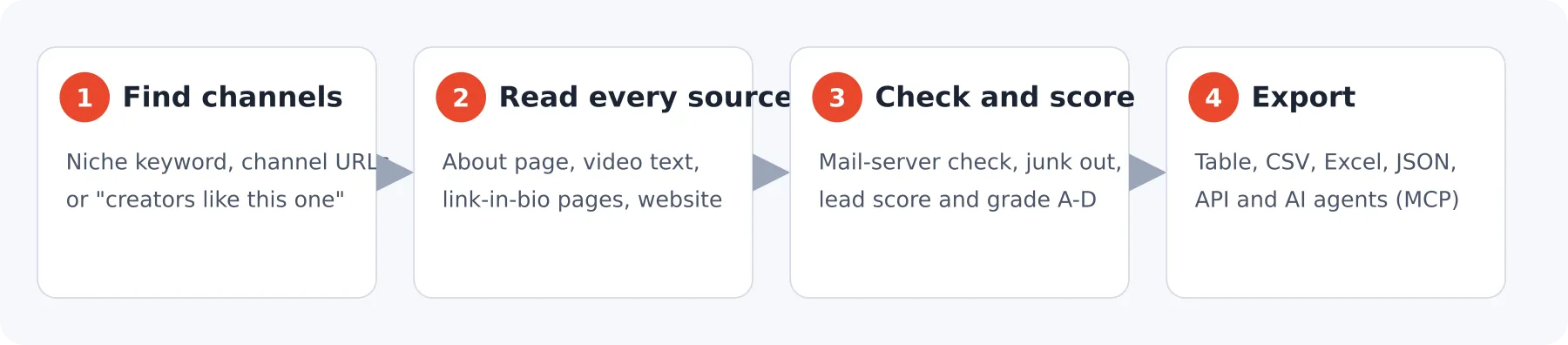
Why this Actor
| More emails | Reads the About description, the latest video descriptions, the creator's link-in-bio page (Linktree, Beacons, Stan, Carrd and others) and their website, including contact, about, legal and imprint pages and hidden "protected" emails. On a fixed test set of 200 channels this found an email for 35.5% of channels. |
| Checked emails | Every email domain is checked for a working mail server. Emails that cannot receive mail are dropped and not charged. Each email gets email_verified, email_domain_type (gmail-style or own domain) and email_is_role (info@, business@). |
| Fair billing | Pay per channel with a working email. Channels without one are free. The same email on several channels (one management team) is charged once. |
| Find hundreds of creators | One keyword pages through YouTube channel and video results, then related keywords. Or give channels you like and get lookalike creators. |
| Stop after N emails | maxEmails: 50 stops the run once 50 channels with an email are saved. The limit counts emails, not channels scanned. |
| Creator filters | Subscriber range, countries, active in the last N days, minimum average views, email domains to keep or drop. Skipped channels are free. |
| Best leads first | Every row gets a lead_score (0-100) and lead_grade (A-D) built from email quality, recent uploads, views per subscriber and other contact routes. Sort by it and start with the A rows. The formula is explained below. |
| Opening line included | outreach_opener is a ready-to-send first line that mentions the creator's latest video. Use your own template with outreachTemplate. |
| Pick a niche in one click | Choose from 24 ready-made niches (fitness, gaming, beauty, tech, finance and more) and the Actor searches 3 proven keywords for it. |
| A report on every run | The REPORT record explains in plain words how many channels were checked, how good the emails are and what to change next time. |
| Outreach signals | Last upload date and title, uploads in the last 30 days, average recent views, views per subscriber, verified badge, "View email address" button flag. |
| No repeats across runs | Name a list and later runs skip channels (and emails) you already have. |
| Fast and light | No browser for normal channels: about 30 channels in 10-25 seconds on 1 GB of memory. |
Quick start
- Type a niche in Search by niche or keyword, for example
fitness coach. Or put a channel you like in Find creators similar to these channels. - Set Stop after this many emails, for example
25. - Click Start. Export as CSV, Excel or JSON, or read it through the API.
The default example (one keyword, stop after 5 emails) finishes in well under a minute.
Input
| Field | What it does |
|---|---|
searchQueries | Niche keywords. Several keywords are mixed in turn. |
nichePreset | Pick a ready-made niche instead of typing keywords. Works together with searchQueries. |
similarToChannels | Channels you like (URL or @handle). Finds lookalike creators: channels YouTube recommends next to their latest videos on the same topic, plus a topic search. |
channelUrls | Specific channels: @handle, /@name, /channel/UC..., /c/, /user/, channel IDs, or video and Shorts URLs. |
searchCountry | Two-letter country for search results (default US). |
expandSearch | Continue with related keywords when a keyword runs out (default on). |
maxResults | Upper limit on channels checked. Empty: 10 x maxEmails, or 100. |
maxEmails | Stop after this many channels with an email are saved. Also a budget cap. |
onlyWithEmail | Save only channels that have an email. |
minSubscribers, maxSubscribers | Subscriber range. |
countries | Only channels whose About page lists one of these countries (names or codes like US, IN). |
activeWithinDays | Only channels that uploaded in the last N days (channels whose upload history cannot be loaded are skipped). |
minAvgViews | Only channels whose recent uploads average at least this many views. |
scrapeWebsite | Visit the creator's website and its contact pages when no email is found yet (default on). |
followLinkAggregators | Visit the creator's link-in-bio page (default on). |
scanVideoDescriptions | Look for the email under recent videos (default on). One-off sponsor emails are ignored. |
verifyEmails | Check that each email domain can receive mail (default on). |
emailDomainsOnly, excludeEmailDomains | Keep only, or drop, emails on these domains. |
dedupeEmails | Charge each email address once (default on). |
collectAllEmails | Keep visiting the website after an email is found, to collect every address (slower). |
includeRecentActivity | Add upload activity and view stats (default on). |
outreachTemplate | Your own opening line with {channel_name}, {last_video_title}, {handle}, {subscribers}. Empty uses the default line. |
skipChannelsFromList | A list name. Channels and emails saved under it in earlier runs are skipped; this run adds to it. |
proxyConfiguration | Leave empty. Datacenter proxies first, residential only when YouTube blocks. |
unlockBusinessInquiryEmail, youtubeSessionCookies, maxInquiryUnlocksPerRun | Optional unlock of YouTube's "View email address" button with your own cookies. See below. |
Example: 50 verified emails from active, mid-size US fitness creators
Example: creators similar to one you already work with
Example: weekly run that never returns the same creator twice
Output
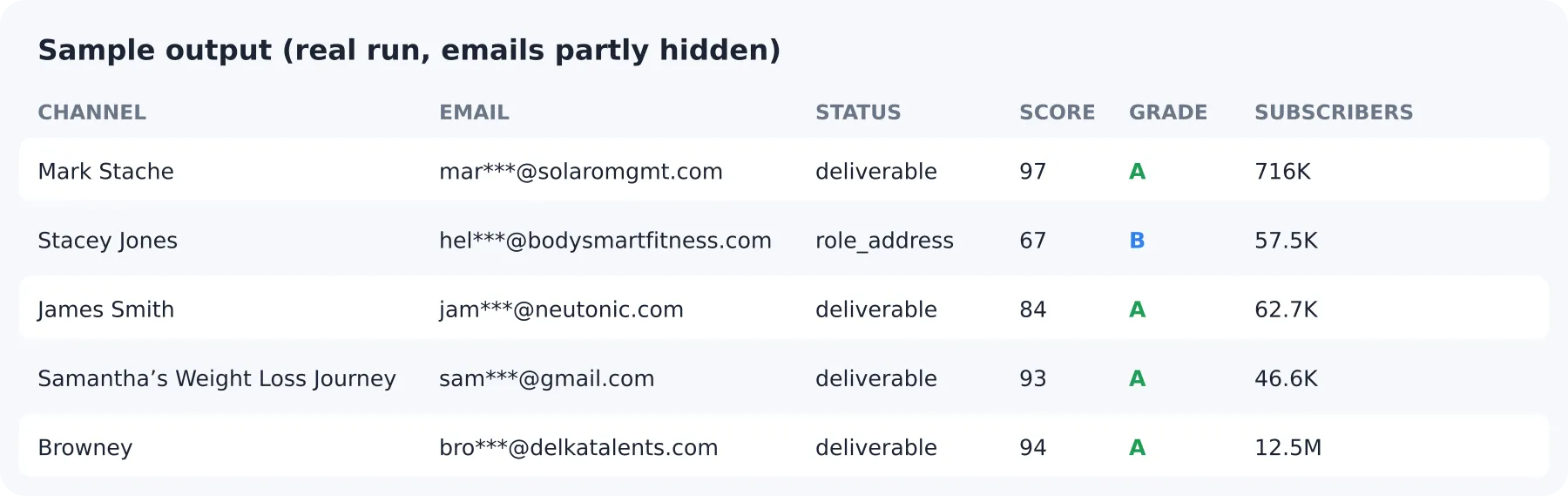
One row per channel. Rows without an email are saved too (free) unless onlyWithEmail is on.
| Field | Description |
|---|---|
channel_name, channel_handle, channel_url, channel_id | Who the channel is. channel_id never changes. |
email, all_emails | Primary email (own-domain and description emails first) and every email found. |
email_sources | Where it was found: youtube_about, video_description, link_aggregator, external_website, youtube_inquiry_unlock. |
email_verified | The email domain has a working mail server. |
email_domain_type | free_provider (gmail, outlook...) or custom_domain. |
email_is_role | Shared inbox such as info@, contact@, business@. |
email_status | deliverable (domain accepts mail, personal address), role_address (info@, support@) or unverified (mail check off or inconclusive). A domain-level check, not a mailbox guarantee. |
lead_score, lead_grade | 0-100 score and A (80+), B (60-79), C (40-59), D grade. See "How the lead score works". |
view_rate_pct | Average recent views as a percentage of subscribers. |
outreach_opener | Ready-to-use first line for your message. |
email_is_duplicate | Same email already saved for another channel; not charged again. |
has_business_email_button | YouTube shows a "View email address" button on this channel. |
phone, website | Public phone number and the creator's own website. |
social_instagram, social_tiktok, social_twitter, social_facebook, social_linkedin, social_telegram, social_whatsapp, social_discord, social_twitch, social_patreon, social_threads, social_snapchat | Social profiles from links and from "Instagram: @name" text. |
external_links | Every external link found. |
subscriber_count, subscriber_count_number, video_count, total_views, joined_date, country, description | Channel details. |
is_verified_channel | Verified badge (when known from search). |
last_video_date, last_video_title, last_video_url, videos_last_30_days, avg_recent_views, views_per_subscriber | Recent activity and engagement. |
search_query | The keyword or "similar to ..." source that found the channel. |
source_url, scraped_at | Source page and time of collection. |
Example row
Each run also writes a plain-language REPORT (markdown), plus OUTPUT and RUN_SUMMARY with the outcome (COMPLETE, PARTIAL, VALID_EMPTY, INVALID_INPUT, UPSTREAM_FAILED), channels checked, emails found, emails dropped by the checks, duplicates, skip-list counts and per-keyword search statistics.
How the lead score works
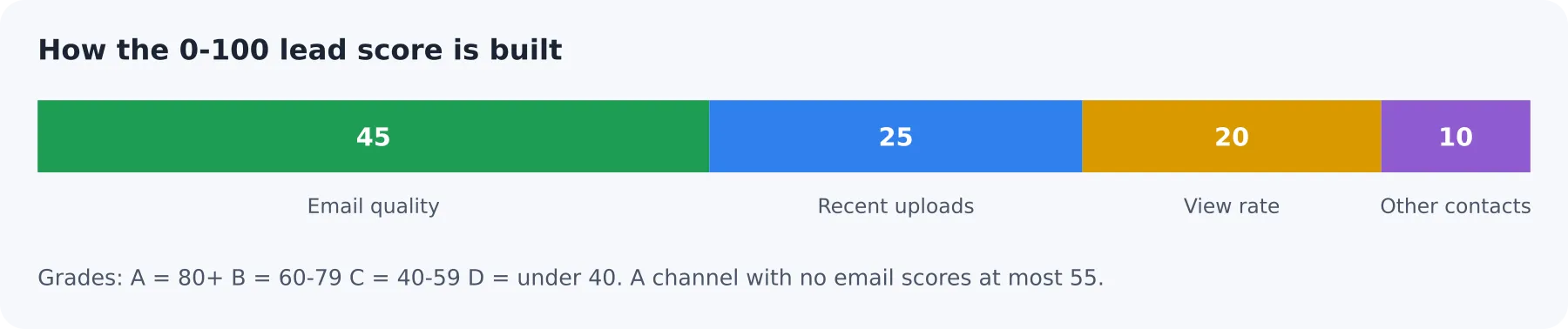
The score is out of 100 and is built only from what the Actor measured:
| Part | Points |
|---|---|
| Email quality | deliverable 45, unverified 30, role_address 25, no email 0 |
| Recent activity | last upload within 14 days 25, 30 days 20, 90 days 10, older or unknown 0 |
| View rate (average recent views as % of subscribers) | 10% or more 20, 5% 15, 2% 10, 0.5% 5, lower or unknown 0 |
| Other contact routes | website 4, phone 3, a second email or two or more social profiles 3 |
Grades: A 80 and above, B 60-79, C 40-59, D below 40. A channel without an email can score at most 55.
How emails are checked
Every address goes through these steps before it is saved or charged:
- Found on a public page only. About text, the latest video descriptions, the link-in-bio page or the creator's own website. Nothing is guessed or generated.
- Cleaned. Image file names, tracking and shortener domains, social platform addresses, placeholder text and glued-together words are removed.
- Address checks. Wrongly formed addresses (double dots, too long), throw-away inbox services and misspelt mail providers (for example gmial.com) are dropped and never charged.
- Mail-server check. The domain must have a working mail server (DNS). Domains that cannot receive mail are dropped and never charged. If the DNS lookup itself fails, the email is kept and marked
unverified. - Labelled.
email_statusisdeliverable(domain accepts mail),role_address(info@, support@) orunverified.
What the standard run does not check: whether one specific mailbox exists. Turn on the optional mailbox check (next section) for that. deliverable means the domain can receive mail, not that the person will read it.
Optional: check that the mailbox exists
The standard check proves the email's domain can receive mail. For a deeper check, turn on Check that the mailbox exists (verifyMailbox). The Actor then asks a mail-verification service whether each channel's main email address really exists:
Result in email_mailbox_check | Meaning | What happens |
|---|---|---|
valid | The mailbox exists | Kept and charged as normal |
catch_all | The domain accepts any address, so the mailbox cannot be confirmed | Kept and charged as normal |
unknown | The service could not decide | Kept and charged as normal |
| mailbox does not exist | The address would bounce | Dropped, never charged |
not_checked | Fair-use limit reached or the service was unavailable | Kept, unchecked |
It is off by default. It is free until 23 November 2026; from then it costs $0.015 per email that was actually checked (the mailbox-checked event below). Mailboxes that do not exist, and emails that were not checked, are never charged. It adds 1-3 seconds per email. A fair-use limit applies per run (maxMailboxChecks, default 100). If the checking service is ever unavailable, the run carries on without it and never drops emails because of an outage. The REPORT record shows how many mailboxes were checked and dropped.
Run it on a schedule and get only new creators
- Fill in your niche (or keywords) and set
maxEmails. - Set
skipChannelsFromListto a name, for examplefitness-weekly. - In Apify, open Schedules and run the Actor every week. Each run skips channels and emails you already have and adds to the list.
What this Actor does not do
- It does not reveal emails hidden behind YouTube's "View email address" button by itself. That needs a signed-in account; see the optional unlock below.
has_business_email_buttontells you which channels have one. - It does not guess or invent emails. Every email was found on a public page.
email_statuschecks that the domain accepts mail. It cannot prove that a specific mailbox exists.- It does not read TikTok, Instagram or other platforms. It collects the links creators publish for them.
Pricing
Pay per event. Apify platform usage is included: you pay only for the events below, never extra for compute or proxy traffic.
| Event | When it is charged | Price |
|---|---|---|
Channel Result (result-found) | A channel row is saved with a public email whose domain passed the check, and that email was not already charged in this run (or your skip list) | Free plan $0.02; Bronze $0.015; Silver $0.012; Gold and higher $0.01 |
Inquiry email unlocked (inquiry-email-unlocked) | Only with the optional unlock: the "View email address" email is revealed for a channel with no public email | $0.12 |
Mailbox check (mailbox-checked) | Optional add-on, from 23 November 2026: each delivered email that was checked (confirmed, catch-all or undecided). Off unless you turn on verifyMailbox | $0.015 |
| Actor start | Once per run, one unit per GB of memory (default 1 GB) | $0.00005 |
Channels without an email, filtered channels, undeliverable emails and duplicate emails are never charged. With maxEmails: 20 you pay at most 20 Channel Results.
| You ask for | Free plan | Gold and higher |
|---|---|---|
| 25 emails | $0.50 | $0.25 |
| 100 emails | $2.00 | $1.00 |
| 1,000 emails | $20 | $10 |
These are the most you can pay for that many emails. If fewer channels have an email, you pay for fewer. Add maxTotalChargeUsd (the run's spending limit) to cap a run at any amount.
How it works
- Find channels from keywords (channel and video results across many filters, then related keywords), from lookalikes of channels you name, or from your list of URLs.
- Read each channel's About panel and its latest uploads (one small request each).
- Find the email: About text, then repeated or "business"-labelled emails under recent videos, then the link-in-bio page, then the website and its contact pages.
- Check and dedupe: mail-server check, domain filters, one charge per email.
- Save and stop at your email target, your channel limit, or when YouTube has no more matching channels.
A browser is used only as a fallback for channels the fast route cannot read, and for the optional unlock.
Use with AI agents (MCP)
Actor: khadinakbar/youtube-channel-email-extractor. Works with Apify MCP in Claude, ChatGPT and other agents.
| User asks | Agent sets |
|---|---|
| "Find 30 emails of cooking YouTubers" | searchQueries: ["cooking"], maxEmails: 30 |
| "Creators like @MadFit" | similarToChannels: ["@MadFit"] |
| "US creators with 10k-100k subscribers who posted this month" | countries: ["US"], minSubscribers: 10000, maxSubscribers: 100000, activeWithinDays: 30 |
| "Get contact info for these channels" | channelUrls: [...] |
| "Test the Actor" | Use the example input. Leave unlock off. |
Read email, email_verified and email_sources for contacts, and OUTPUT.outcome for the run result. Never set unlockBusinessInquiryEmail unless the user supplies their own YouTube session cookies.
API example
Optional: unlock business inquiry email (BYOK)
Some creators show their email only behind YouTube's View email address button, which needs a signed-in account and often a CAPTCHA. has_business_email_button shows which channels have it.
To try it, set unlockBusinessInquiryEmail to true and paste your own signed-in YouTube cookies into youtubeSessionCookies. The unlock runs only for channels where no public email was found and the button exists, up to maxInquiryUnlocksPerRun. It is charged ($0.12) only when an email is revealed. CAPTCHA, expired cookies and YouTube's daily limits can still return no email; then nothing is charged and OUTPUT lists warnings such as cookies_expired. Using a signed-in session for automation may break YouTube's terms; that choice sits with the caller. Cookies are never written to the dataset or logs.
FAQ
What percentage of creators have a public email? On our 200-channel fixed test set 35.5% did. On a recent run of 80 channels from two niches, 49% did. It varies a lot by niche.
Why did a run stop before my target? Some niches have fewer public emails than the target. The REPORT record says why the run stopped and what to change (more keywords, wider subscriber range, fewer filters).
How fast is it? About 100 emails in under two minutes on a broad niche such as real estate, 5 emails in about 15 seconds. Narrow filters and small niches take longer because fewer channels qualify.
Can I connect it to my own tools? Yes: the Apify API, schedules, webhooks, Make, Zapier, n8n and AI agents through MCP. Each run also saves a plain-language REPORT.
Can I check that the mailbox really exists? Yes, turn on verifyMailbox. See "Optional: check that the mailbox exists" above. It is free until 23 November 2026, then $0.015 per checked email.
What does the lead score mean? See "How the lead score works" above. Sort the dataset by lead_score and contact the A and B rows first.
Can I write my own opening line? Yes. Set outreachTemplate, for example Hi {channel_name}, loved your video {last_video_title}.
How many emails will I get? It depends on the niche. On our 200-channel test set, 35.5% of channels had a public email; business niches such as real estate are higher, music and gaming lower. Set maxEmails and the run keeps going until it gets there or runs out of matching channels.
Are the emails real? Each email comes from the creator's own public pages, and its domain is checked for a working mail server. The mailbox itself is not contacted, so a valid domain does not prove the inbox is read.
Why are some channels saved without an email? They still give you socials, website and stats, for free. Turn on onlyWithEmail to hide them.
Why did a run stop before my email target? The channel limit (maxResults) was reached, or YouTube had no more matching channels. Add keywords or raise maxResults.
Does it return the email behind "View email address"? Only with the optional unlock and your own cookies.
Related Actors
- YouTube Channel Scraper for channel profiles and video lists.
- YouTube Channel Video Scraper for video metrics and Shorts.
Responsible use
This Actor collects contact details that creators publish for business inquiries. Use them in line with applicable law (for example GDPR and CAN-SPAM), YouTube's terms and the recipient's expectations. Keep lists to the contacts you need, honor opt-outs, and check email_sources before outreach.


