
LinkedIn Email Scraper
Pricing
from $17.00 / 1,000 results
LinkedIn Email Scraper
Scrape LinkedIn company profiles by name or URL and find business emails. Extracts description, industry, size, employee count, headquarters, founding year, specialties and followers, with optional employee contact enrichment (name, job title, email) for B2B lead generation. No login required.
Pricing
from $17.00 / 1,000 results
Rating
0.0
(0)
Developer

Parsedom Inc
Maintained by CommunityActor stats
0
Bookmarked
2
Total users
1
Monthly active users
25 days ago
Last modified
Categories
Share
LinkedIn Company Detail And Email Scraper
Scrape LinkedIn company profiles by company name or URL and optionally find business email addresses for each company. This LinkedIn company scraper extracts description, website, industry, company size, employee count, headquarters, founding year, company type, specialties, follower count, and full postal address - then enriches each company with publicly listed employee contacts including names, job titles, and email addresses.
Built for B2B lead generation, sales prospecting, and CRM enrichment. No LinkedIn login or cookies required. Export your results to JSON, CSV, or Excel in one click.
What you can do with it:
- LinkedIn company data scraping - full company profiles from a plain list of names
- LinkedIn email finder - business email addresses, job titles, and seniority for company contacts
- Bulk company lookup - hundreds of companies per run, no manual searching
- Lead list building - export ready-to-use B2B prospect lists
✨ Features
- Search by company name - type
MicrosoftorZalando SEand the Actor finds the right LinkedIn company page for you, no URL needed - Direct URLs too - paste a LinkedIn company URL and it is scraped as-is; country subdomains and
/jobs,/peoplesub-pages are all normalised to the same company - Full company profile - description, website, industry, size, employee count, HQ, founded, type, specialties, followers, and postal address
- Lead enrichment (optional) - attaches publicly listed employee contacts (name, role, email, seniority, confidence) to each company record
- Cross-run caching - set a project name and companies scraped in earlier runs are skipped, so scheduled runs only return new companies
- Proxy support - full Apify Proxy integration, with residential proxies enabled by default
🔧 Input Configuration
| Field | Type | Required | Default | Description |
|---|---|---|---|---|
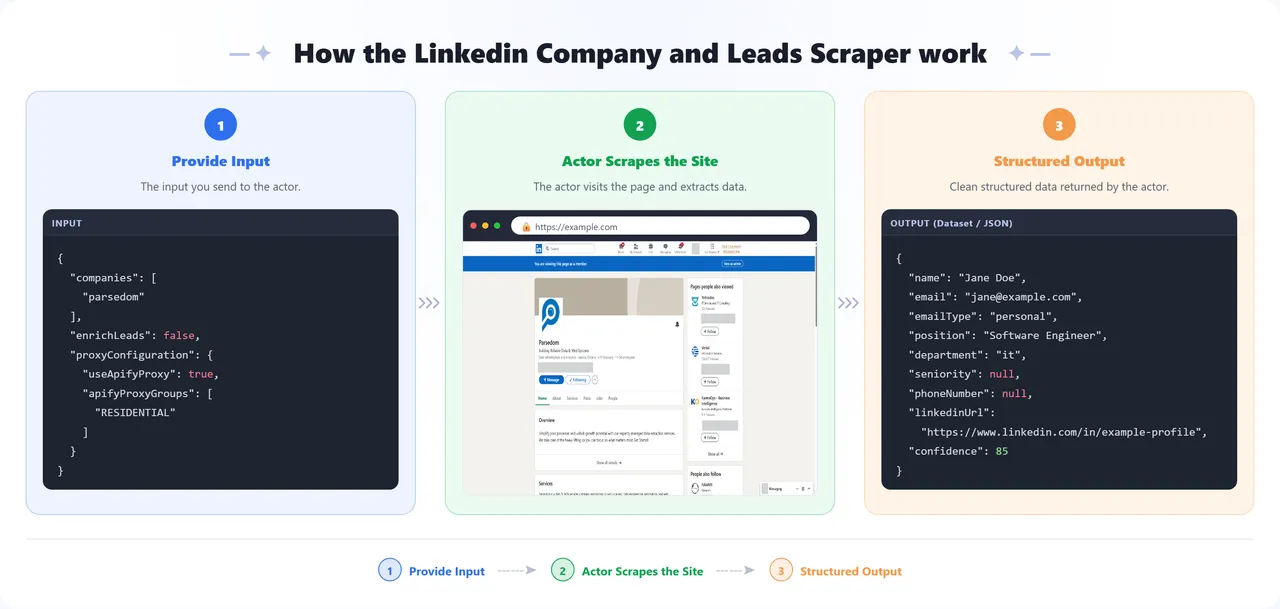
| Companies | array | Yes | parsedom, https://www.linkedin.com/company/parsedom/ | Company names to look up, or LinkedIn company URLs. Names are resolved to the matching company page automatically. |
| Enrich with employee contacts | boolean | - | false | Also look up publicly listed employee contacts for each company's website domain. Charged per company that returns at least one contact. |
| Project name (enables caching) | string | - | — | Set a project name to enable cross-run caching. Leave empty to scrape everything every time. |
| Proxy configuration | object | - | Apify Residential | Proxy settings used for all requests. |
Sample input:
📦 Output Data - LinkedIn Company Fields & Emails
The dataset has two views. Overview shows company name, industry, size, headquarters, website, followers, and the LinkedIn URL - one row per company. Leads shows one row per employee contact found, alongside the company it belongs to, which is the view to export when you want a plain contact list. Each record carries the full field set below; when enrichment is enabled and contacts are found, a leads array is nested on the company record.
Sample output:
Leads view - the same run exported from the Leads view, one row per contact:
| name | emailType | position | department | confidence | companyName | website | |
|---|---|---|---|---|---|---|---|
| Jane Doe | jane@example.com | personal | Software Engineer | it | 85 | Parsedom | https://parsedom.com/ |
| Support Contact | info@example.com | generic | - | support | 83 | Parsedom | https://parsedom.com/ |
| Support Contact | contact@example.com | generic | - | support | 77 | Parsedom | https://parsedom.com/ |
| John Smith | john@example.com | personal | - | - | 85 | Parsedom | https://parsedom.com/ |
Contact names and email addresses above are placeholders - real runs return the actual contacts found for the domain.
💡 Use Cases for LinkedIn Company Data
- B2B lead generation - build prospect lists with company data and business email addresses from a plain list of company names
- Sales prospecting - find decision-makers and their job titles at target accounts before you reach out
- Lead qualification - filter prospects by company size, industry, employee count, and headquarters location
- CRM enrichment - keep Salesforce, HubSpot, or Pipedrive company records current with size, website, and follower counts
- Market research & competitor analysis - profile a market segment or competitor set in bulk
- Account-based marketing (ABM) - feed territory planning and ABM campaigns with structured company data
- Recruitment sourcing - research companies by industry, size, and location for talent mapping
🚀 How to Scrape LinkedIn Company Data
- Sign up for a free Apify account - includes $5 monthly credit.
- Open the actor page and click Try for free.
- Enter company names or LinkedIn company URLs in the Companies field.
- Click Start and wait for the run to complete.
- Download results from the Output tab in JSON, CSV, or Excel format.
You can also run this actor via the Apify API or integrate it directly into your workflows using Zapier, Make, or n8n.
⚠️ Limitations & Known Issues
- Public company pages only - the Actor reads what LinkedIn shows a logged-out visitor. Personal profiles, employee lists, and anything behind the login are not accessible.
- Not every field is published - companies fill in their own profile, so
founded,specialties, orwebsitecan legitimately benullfor companies that never set them. - Name lookup can resolve to the closest match, not an exact one - an exact match on the company slug wins. When no candidate matches exactly, the Actor falls back to the closest suggestion from the search results (the shortest slug, usually the parent brand rather than a regional page) rather than returning nothing. For a company with no LinkedIn presence, or one with many similarly-named pages, that fallback can be a different company. Pass LinkedIn company URLs directly whenever you have them - it removes the ambiguity, and with enrichment enabled it avoids paying the per-company enrichment charge on a company you did not ask for.
- Proxies are required - LinkedIn redirects datacenter and unproxied traffic to its auth wall. Keep the default residential proxy setting enabled or the run will return no data.
- Rate limiting - LinkedIn throttles automated traffic. Requests are retried from a fresh IP automatically, so runs succeed but large ones take proportionally longer.
- Enrichment coverage varies - contacts are only found for companies with a discoverable website domain and publicly listed addresses. Companies with no findable contacts return no
leadsarray, and are not charged.
📝 Notes
- API integration - This actor can be called as an API from any automation platform (Zapier, Make, n8n, custom scripts).
- Enrichment is charged per result - the per-company charge applies only when at least one contact is actually returned. Failed or empty lookups are never charged.
❓ Frequently Asked Questions
Can I scrape LinkedIn company data without logging in?
Yes. This scraper only reads what LinkedIn shows a logged-out visitor, so you do not need a LinkedIn account, login credentials, or session cookies. Nothing behind the login is accessed.
Can this scraper find email addresses from LinkedIn?
It finds publicly listed business email addresses associated with each company's website domain, not addresses taken from LinkedIn profiles themselves. Turn on Enrich with employee contacts and each company record gains a leads array with names, job titles, departments, seniority, and email addresses where they are publicly available.
Do I need a LinkedIn account or cookies?
No. There is no login step and no cookie input.
How many companies can I scrape in one run?
There is no hard limit - the Actor scrapes every entry in Companies. Start small (3-5) to check the output, then scale up.
Can I scrape by company name instead of URL?
Yes, that is the main use case. Type Microsoft or Zalando SE and the Actor resolves it to the right LinkedIn company page. For exact results, pass LinkedIn company URLs directly - see the Limitations section below.
What output formats are supported?
JSON, CSV, Excel, XML, and HTML table - any format the Apify platform exports. The Leads view exports one row per contact, which is what you want for a plain contact list.
Is scraping LinkedIn company data legal?
This Actor collects only publicly visible company information. Whether your particular use is lawful depends on your jurisdiction, your purpose, and applicable data protection law such as the GDPR when results contain personal data. See the disclaimer below - you are responsible for your own compliance.
How much does it cost to run?
You pay for Apify platform usage plus a per-company charge when lead enrichment returns at least one contact. Companies with no contacts found are never charged. New Apify accounts include $5 in free monthly credit.
Why did a company name return the wrong company?
When no exact match is found, the Actor falls back to the closest search result rather than returning nothing. Pass the LinkedIn company URL directly to remove the ambiguity - and to avoid paying enrichment on a company you did not ask for.
🔗 Other Actors
| Category | Actor | What it does |
|---|---|---|
| 💼 Lead Generation | Gelbe Seiten Leads Scraper | Extracts structured business information from gelbeseiten.de (the German Yellow Pages) such as contact details, categories, ratings and geo coordinates. |
| 💼 Lead Generation | Branchenbuch Leads Scraper | Scrapes Branchenbuch, a business directory covering Berlin and the surrounding area - service providers, shops, government offices, real estate and more. Scrape companies directly or by category. |
| 💼 Lead Generation | Booksy Leads Scraper | Extracts business profiles from Booksy including names, addresses, phone numbers, emails, social media, and ratings. Built for lead generation in the beauty and wellness industries. |
| 🏢 Company Data & Leads | Kununu Company and Leads Scraper | Scrapes company profile data from kununu.com, including ratings, industry, headquarters location, and recommendation rate. |
| 💼 Lead Generation | Hipages Lead Scraper | Extracts business details from Hipages including names, contact information and ratings. Supports pagination and proxy configuration, for lead generation and market research. |
💬 Disclaimer & Support
This actor only collects data that LinkedIn shows a logged-out visitor - it does not log in, bypass the auth wall, or access private profiles or member data. Beyond LinkedIn it visits only a public search engine to resolve company names, and the lead-enrichment provider when that option is enabled.
By running this actor you accept sole responsibility and liability for how you use it and for the data you collect. That includes ensuring your use complies with LinkedIn's Terms of Service, with applicable law in your jurisdiction (including data protection law such as the GDPR where it applies to personal data in enrichment results), and with any other terms that bind you. If you do not accept this, please do not run the actor.
If extraction quality drops or you want a custom apify actor then you can:
- Email us at info@parsedom.com
- Visit parsedom.com
- Visit our profile on Fiverr: fiverr.com/s/rEmNqEb
- Apify public page: apify.com/kinaesthetic_millionaire
- You can also contact us if you want to build a custom actor.
Ready to scrape more listings? Add your URLs and start scraping! 🚀


