

SEEK Job Scraper
Pricing
Pay per usage
SEEK Job Scraper
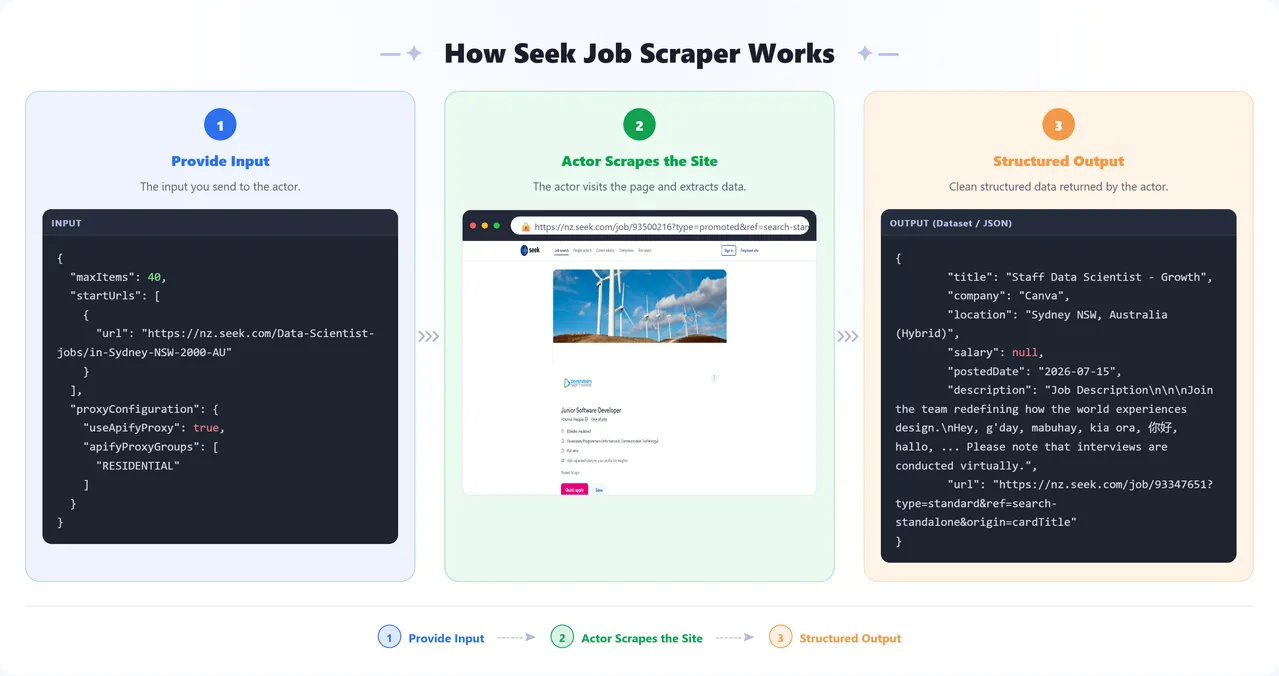
Scrapes job listings from SEEK, extracting job title, company, location, salary, posted date, and description.
Pricing
Pay per usage
Rating
0.0
(0)
Developer

Parsedom Inc
Maintained by CommunityActor stats
0
Bookmarked
2
Total users
0
Monthly active users
3 months ago
Last modified
Categories
Share
What does SEEK Job Scraper do?
SEEK Job Scraper extracts job listings from SEEK, one of the largest job boards in New Zealand and Australia. It works with any SEEK country site — seek.co.nz, seek.com.au, seek.com.sg, seek.co.th, seek.com.ph, seek.com.mx, seek.com.hk, and more. Give it one or more SEEK search or category URLs and it returns structured data for every listing — job title, company, location, salary, posted date, description, and the listing URL.
Because it runs on the Apify platform, you get automatic proxy rotation, scheduling, webhooks, and integrations with tools like Zapier, Make, and Google Sheets — no infrastructure to maintain.
Why use SEEK Job Scraper?
- Job market research — track hiring trends, in-demand roles, and salary ranges across industries and regions.
- Recruitment and sourcing — build a feed of new openings matching your criteria without manually browsing SEEK.
- Lead generation — identify companies that are actively hiring for staffing agencies or B2B outreach.
- Competitive intelligence — monitor how competitors are hiring and what they're paying.
How to use SEEK Job Scraper
- Click Try for free to open the Actor in Apify Console.
- Add one or more SEEK search URLs under Start URLs (e.g. a search results page or job category page) — from any SEEK country site.
- Set Max jobs per start URL to control how many listings to scrape from each URL.
- Click Start and wait for the run to finish.
- Download your results from the Dataset tab, or connect them to your workflow via webhook or integration.
Input
The Actor accepts the following input fields (see the Input tab for the full schema):
| Field | Type | Description |
|---|---|---|
startUrls | array | SEEK search or category URLs to scrape. |
maxItems | integer | Maximum number of job listings to scrape per start URL. 0 means unlimited. |
proxyConfiguration | object | Proxy settings. Uses Apify Proxy by default. |
What to put in each field
startUrls— Go to SEEK, search or filter for the jobs you want (by keyword, location, category, salary, etc.), then copy the resulting page URL and paste it here. This must be a search-results or category page, e.g.https://nz.seek.com/Software-Engineer-jobsorhttps://www.seek.com.au/data-scientist-jobs/in-Sydney-NSW-2000. Do not paste a link to a single job listing — the Actor discovers individual jobs itself from the search results. You can add multiple start URLs to scrape several searches (or SEEK country sites) in one run.maxItems— How many job listings you want, counted separately per start URL. For example,maxItems: 20with two start URLs returns up to 40 jobs total (up to 20 from each). Leave it at the default for a quick sample run, raise it for a full export, or set it to0to scrape every listing the search returns.proxyConfiguration— Leave this on the default setting (Apify Proxy, Residential group). SEEK blocks Apify's shared datacenter proxy pool, so Residential is required for reliable results.
Example input:
Output
Each scraped job listing is stored as a single item in the dataset. You can download the dataset in various formats such as JSON, HTML, CSV, or Excel.
Example output:
Data table
| Field | Description |
|---|---|
title | Job title |
company | Hiring company / advertiser name |
location | Job location |
salary | Salary or pay range, if disclosed |
postedDate | Date the job was posted, converted from SEEK's relative date text |
description | Full job description text |
url | Link to the job listing on SEEK |
How much does it cost to scrape SEEK data?
This Actor runs on Apify's pay-per-usage pricing based on compute time. A run scraping a few dozen listings typically finishes in a couple of minutes and costs a fraction of a compute unit. Apify's free tier includes monthly platform credits, so light usage can often run at no extra cost. Use Max jobs per start URL to control run size and cost.
Tips and advanced options
- Use narrower SEEK search URLs (e.g. filtered by keyword, location, or category) to scrape more targeted results and reduce run time.
- Lower Max jobs per start URL for quick daily monitoring runs; raise it for one-off bulk exports.
- Schedule the Actor on Apify to run daily or weekly and track new listings over time.
FAQ and disclaimers
This Actor only extracts publicly available job listing data from SEEK. Use it in accordance with SEEK's Terms of Service and applicable laws in your jurisdiction. Website structure changes may occasionally affect scraping — if you notice missing or incorrect data, please report it via the Issues tab.
🤝 Support
Need help or have questions?
- Email us at info@parsedom.com
- Or visit https://parsedom.com
- Visit our profile on Fiverr: https://www.fiverr.com/s/rEmNqEb
- Apify public page: https://apify.com/kinaesthetic_millionaire
- You can also contact us if you want to build a custom actor.
Ready to scrape more listings? Add your URLs and start scraping! 🚀


