

Website Tracker & Cookie Consent Auditor
Pricing
Pay per usage
Website Tracker & Cookie Consent Auditor
Finds every tracking pixel, analytics tag and session-replay tool a website runs - Meta, Google, TikTok, LinkedIn and 60+ more - with their IDs, and checks what fires before consent, after "Accept" and after "Reject". Flags GDPR consent violations, Google Consent Mode v2 gaps and dead tags.
Pricing
Pay per usage
Rating
0.0
(0)
Developer

Parsedom Inc
Maintained by CommunityActor stats
0
Bookmarked
2
Total users
2
Monthly active users
20 days ago
Last modified
Categories
Share
Website Tracker & Cookie Consent Auditor - GDPR Pixel, Analytics Tag & Consent Mode Scanner
Scan any website for tracking pixels, analytics tags and cookie-consent violations. This Actor opens each site in a real browser and finds every tracker it runs - Meta Pixel, Google Ads, GA4, TikTok, LinkedIn Insight, Pinterest, Hotjar and 60+ more - with their account IDs, then proves what fires before consent, after "Accept" and after "Reject". You get one structured record per website with a compliance grade, the ad platforms it advertises on, and a plain-English list of GDPR / ePrivacy issues, exportable as JSON, CSV or Excel. Optionally, paid plans can add a one-paragraph AI analysis of each audit.
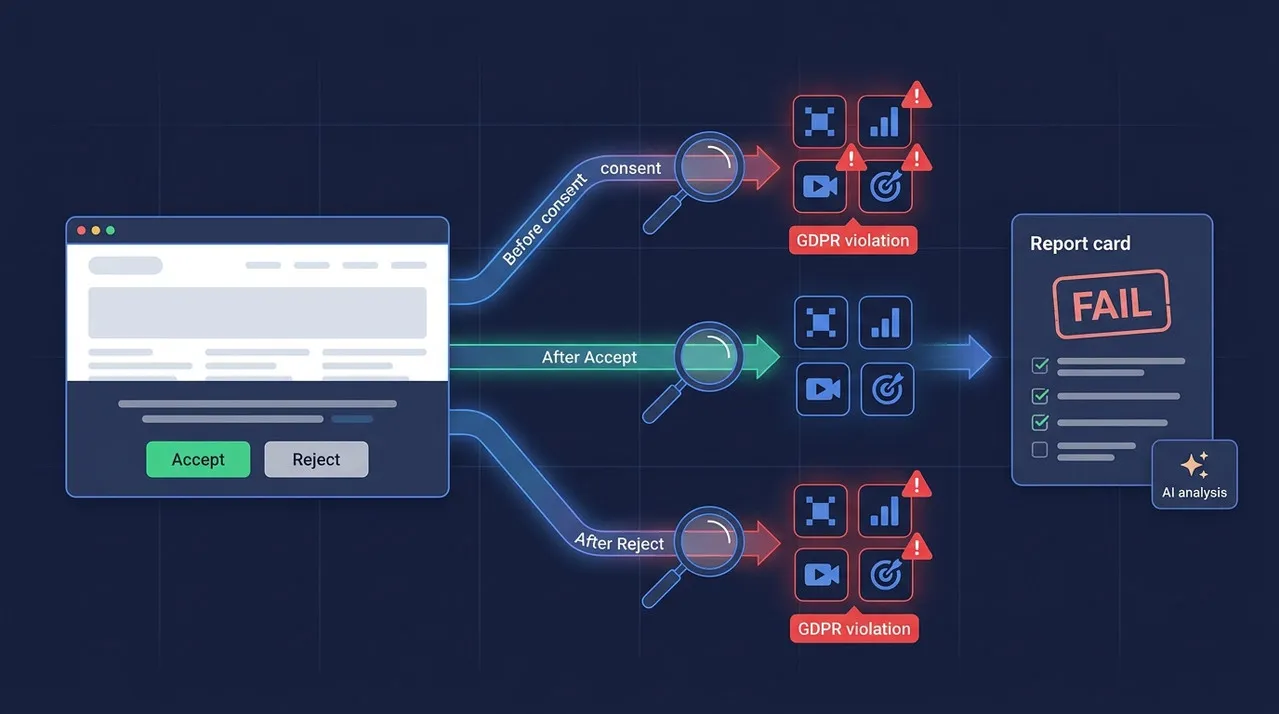
Unlike scanners that only read the page source, it records the requests trackers actually send, so it also catches tags loaded through Google Tag Manager and server-side tagging on first-party domains.
🤔 Why Tracker & Consent Auditing Matters
Almost every website loads third-party tracking code, and in the EU and UK the law (GDPR, ePrivacy Directive, CNIL, ICO, German TTDSG) says most of it may only run after the visitor agrees. In practice many sites get this wrong: pixels fire the moment the page loads, the "Reject" button does nothing, or consent is never passed to Google. The consequences are real:
- Fines and complaints - regulators and privacy groups routinely fine companies for trackers that ignore a refusal. A scan gives you timestamped evidence of what a visitor's browser really sent.
- Lost ad performance - Google requires Consent Mode v2 for EEA audiences. If it is missing or never switches to "granted", conversions disappear from Google Ads and remarketing lists shrink.
- Wasted budget and messy data - old agency pixels, duplicate IDs and tags that no longer fire inflate page weight and corrupt reporting.
- Hidden competitive intel - a site's pixels reveal which ad platforms a company pays to advertise on, and under which account IDs.
This Actor turns all of that into a spreadsheet you can sort, filter and act on - for one site or thousands.
✨ Features
- Tracker & pixel detection - 60+ trackers across advertising, analytics, session replay, tag managers, customer data platforms, marketing automation, chat and A/B testing, with their pixel/account IDs (
AW-…,G-…, Meta pixel ID, TikTok pixel code, LinkedIn partner ID, …) and the events they send (PageView,purchase, …) - Consent testing in two fresh visits - one visit clicks the banner's Accept button, the other clicks Reject, each starting with no cookies. Works with OneTrust, Cookiebot, Usercentrics, Didomi, Sourcepoint, TrustArc, Quantcast, CookieYes, iubenda, Osano and other consent platforms, plus a multilingual fallback for custom banners
- GDPR violation flags - trackers or tracking cookies active before any choice, trackers still sending data after Reject, banners with no reject option, and IAB TCF consent strings that still grant purposes after a reject
- Google Consent Mode v2 checks - detects Consent Mode, its version and default state, separates allowed cookieless pings from real tracking, and flags Consent Mode that is missing, v1-only, granted by default, or never updated after Accept (lost conversions)
- Dead tag detection - tags installed in the page that never send data, and pixel IDs in the code that never fire - typically leftovers from old agencies or campaigns
- "Where do they advertise?" - lists the ad platforms a site runs conversion tracking for, kept separate from the ad-serving scripts publishers use to sell ad space
- Cross-site summary - each run also saves the share of audited sites using each tracker, ad platform and issue type
- Proxy support - choose the country the visit comes from; cookie banners are usually shown only to EU/UK visitors
🔧 Input Configuration
| Field | Type | Required | Default | Description |
|---|---|---|---|---|
| Websites | array | ✅ | — | Websites to audit - homepages or any specific page. Bare domains like example.com work too. Each website produces one audit record. |
| Maximum websites | integer | — | 5 | Stop after auditing this many websites from the list. |
| Consent scenarios | array | — | accept, reject | Each scenario is a separate fresh visit with no cookies. Both record what fires before any consent choice; "Accept" then clicks the accept button and "Reject" clicks the reject button. |
| AI analysis (paid plans only) | boolean | — | false | Adds a one-paragraph AI analysis to each website's record (field aiAnalysis). Paid Apify plans only; charged per analysis generated. See AI analysis. |
| Wait before consent (seconds) | integer | — | 8 | How long to watch the page after it loads before clicking the banner. Everything that fires in this window fired without consent. |
| Wait after consent (seconds) | integer | — | 8 | How long to keep recording after the banner button is clicked. |
| Max concurrency | integer | — | 3 | How many browser pages to run in parallel. |
| Proxy configuration | object | — | No proxy | Cookie banners are usually shown only to visitors from the EU/UK. To audit GDPR behaviour, enable Apify Proxy and pick an EU country (for example Germany). |
Supported URL types: any public http/https page, or a bare domain such as example.com.
📦 Output
The dataset has 3 views:
- Overview - one row per website: grade, consent platform, ad platforms, tracker count, trackers firing before consent or after reject, tags not firing, and Google Consent Mode version.
- Issues - one row per issue found, with its severity (
high,medium,low,info), issue type, tracker and an explanation. - Trackers - one row per tracker per website, with its IDs, events, and whether it fired before consent, after accept and after reject.
The key-value store also holds SUMMARY (share of audited sites per tracker, ad platform and issue type) and, if any site could not be loaded, FAILED_SITES.
Compliance grade: fail if any high-severity issue was found, warning for medium, otherwise pass. The grade is an automated technical signal, not legal advice.
Sample output (arrays trimmed to 2 items):
💡 Uses of This Data (Real-World Examples)
- GDPR & ePrivacy compliance audits - privacy consultants, DPOs and legal teams can show exactly which trackers run before consent or after a reject, with the sample request as evidence, instead of guessing from a cookie list.
- Pre-launch and release checks - a marketing or dev team can scan staging and production after every site release to catch a pixel that slipped past the consent banner before a regulator or journalist does.
- Competitor ad research - see which platforms (Meta, TikTok, Google Ads, LinkedIn, Pinterest, Reddit, Microsoft, The Trade Desk) a competitor runs conversion tracking for, and their pixel IDs. A brand with a TikTok pixel is almost certainly buying TikTok ads.
- Agency onboarding & tracking clean-up - before taking over an account, find dead pixels, duplicate IDs and leftover tags from previous agencies, so you inherit clean measurement.
- Google Ads & GA4 measurement fixes - confirm Consent Mode v2 is installed and actually switches to "granted" after Accept, so EEA conversions are not silently lost.
- Sales prospecting for martech and consent vendors - build lead lists of companies that use (or lack) a given analytics, chat, session-replay or consent platform, plus sites with a broken banner that need your product.
- Vendor and supply-chain risk review - check which third parties receive data from the sites you operate or buy ad space on.
- Market research - audit hundreds of sites in one industry and use the
SUMMARYrecord for adoption statistics, such as the share of retailers using TikTok or a given CMP.
🤖 AI Analysis (Optional)
Turn on AI analysis to get a short written read-out of each audit in the aiAnalysis field - how compliant the site is, the most serious problems and the single most important fix. It is useful for sharing a result with a client or manager who will not read tracker tables.
- Paid Apify plans only. Each analysis costs real LLM usage, so on a free plan the option is skipped and the run log explains why; the full audit is still returned.
- Pay per event. You are charged one
ai-analysisevent per analysis generated. Failed or empty analyses are never charged. - Off by default - nothing extra is charged unless you enable it.
🚀 How to Use
- Sign up for a free Apify account — includes $5 monthly credit.
- Open the actor page and click Try for free.
- Fill in the Input fields (at least one website is required).
- Click Start and wait for the run to complete.
- Download results from the Output tab in JSON, CSV, or Excel format.
You can also run this actor via the Apify API or integrate it directly into your workflows using Zapier, Make, or n8n.
⚠️ Limitations & Known Issues
- Banners depend on visitor location - most sites show a cookie banner only to EU/UK visitors. Without an EU proxy the Actor sees the site as a non-EU visitor would, and reports
no_consent_bannerinstead of testing the banner. - Server-to-server tracking is invisible - data the website's own server sends (for example the Meta Conversions API) never passes through the browser, so it cannot be seen. Tracking routed through a first-party domain is detected for the common endpoints and marked
servedFromFirstParty. - First-layer buttons only - when "Reject" is hidden behind a settings screen, the site is reported with
no_reject_optionrather than navigating the settings. - One page per website - each URL is audited as given; conversion pixels that fire only on checkout or thank-you pages are not triggered.
- Bot protection - sites behind aggressive bot protection may refuse the browser; they are listed in
FAILED_SITESand produce no result.
📝 Notes
- Proxy recommended for large-scale scraping — For high-volume runs, enable the Apify Residential or Datacenter proxy to avoid blocks.
- API integration — This actor can be called as an API from any automation platform (Zapier, Make, n8n, custom scripts).
❓ FAQ
Is this legal advice? No. The grade is an automated technical signal; confirm findings with a qualified privacy professional.
Why does it say "no consent banner"? Most sites show a banner only to EU/UK visitors. Enable Apify Proxy with an EU country (for example Germany) to see what European visitors see.
Can it audit logged-in or checkout pages? No. It audits public pages as given, without logging in.
Does it detect Google Tag Manager tags? Yes - it records the requests that GTM-loaded tags send, not just the script tags in the HTML.
💬 Support & Contact
If extraction quality drops or you want a custom apify actor then you can:
- Email us at info@parsedom.com
- Visit parsedom.com
- Visit our profile on Fiverr: fiverr.com/s/rEmNqEb
- Apify public page: apify.com/kinaesthetic_millionaire
- You can also contact us if you want to build a custom actor.


