
JD Scraper: Prices, Stock & Barcodes, $0.99/1K
Pricing
from $0.64 / 1,000 products
JD Scraper: Prices, Stock & Barcodes, $0.99/1K
$0.99/1K JD.com (京东) products, $1.69 with the full product page, no start fee. 50 products with details in 9 s. No login. Keywords (Chinese or English), SKU links or shops: CNY and USD prices, stock by city, barcodes, variants, reviews, rank. Price-drop alerts, English, AI risk labels.
Pricing
from $0.64 / 1,000 products
Rating
5.0
(1)
Developer

Laptime
Maintained by CommunityActor stats
0
Bookmarked
2
Total users
0
Monthly active users
4 days ago
Last modified
Categories
Features
Share
JD Scraper turns JD.com (京东), China's largest retailer, into a spreadsheet of products: type a keyword in Chinese or English, paste product links or SKU ids, or give a shop, click Start, export to Excel. Real prices in yuan and US dollars, stock, barcodes, every variant, reviews and sales rank. No login.
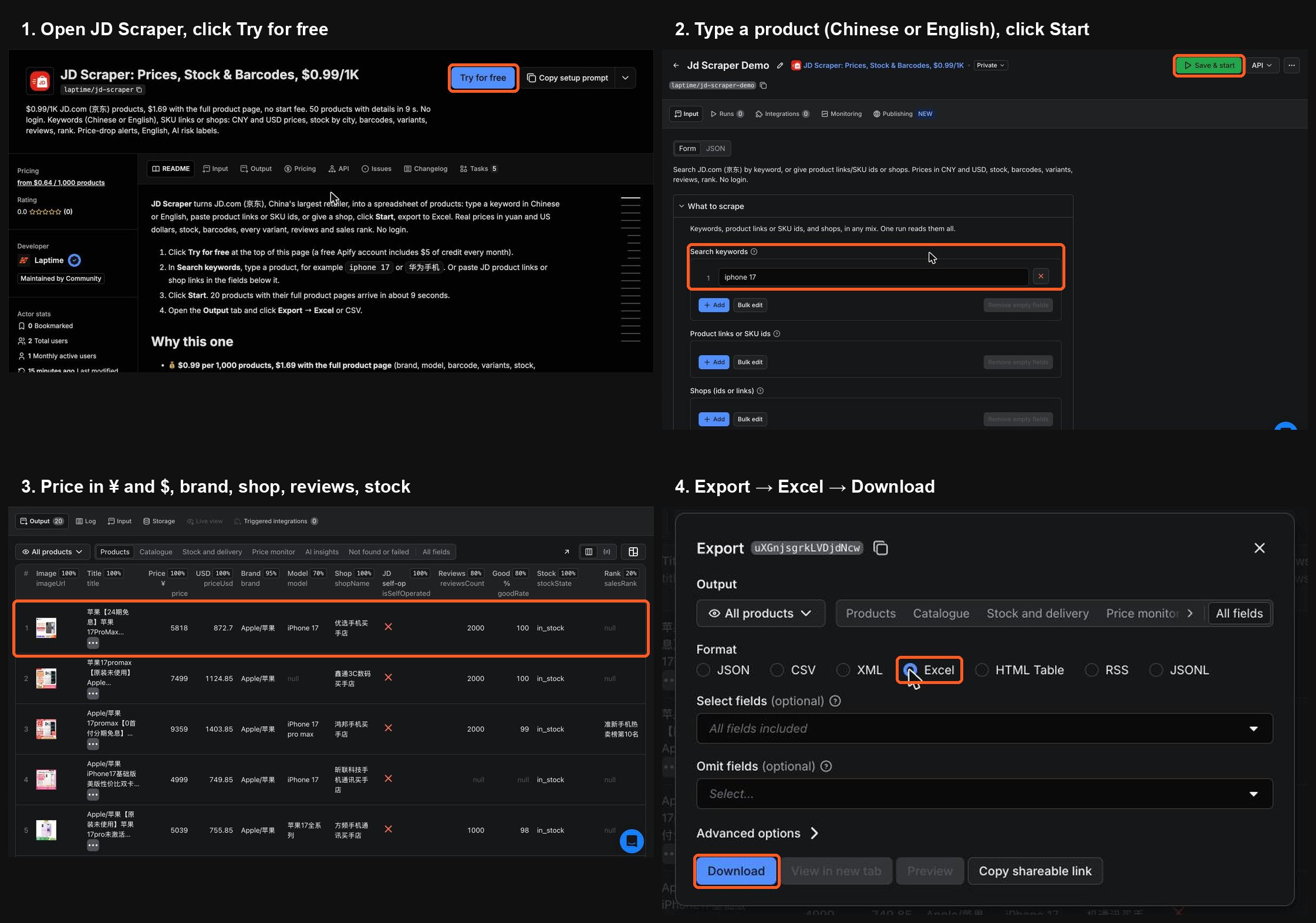
- Click Try for free at the top of this page (a free Apify account includes $5 of credit every month).
- In Search keywords, type a product, for example
iphone 17or华为手机. Or paste JD product links or shop links in the fields below it. - Click Start. 20 products with their full product pages arrive in about 9 seconds.
- Open the Output tab and click Export → Excel or CSV.
Why this one
- 💰 $0.99 per 1,000 products, $1.69 with the full product page (brand, model, barcode, variants, stock, delivery). No start fee; failed, filtered and unknown products are free. That is 23% under the $2.19 per 1,000 (+ start fee) of the most-used JD scraper.
- ⚡ Up to 3× faster than the times the most-used JD scraper publishes: 50 products with product pages in 9.4 s (theirs: 31–32 s), a JD shop's first 50 products in 30 s (41 s), 30 SKU ids in 12 s (23 s), 1,000 search results in 23 s (Apify, 19 November 2026; benchmarks).
- 🏙️ Stock by city: stock state, quantity and delivery promise in Shanghai, Guangzhou, Shenzhen, Chengdu and 8 more cities, not only JD's default Beijing.
- 🔔 Price-drop alerts: schedule it with a monitor name and every row shows its previous price and change; drops go to an
ALERTSrecord and to Slack, Discord or any webhook. Quiet days cost $0 with "only new" or "only price changes". - 🌍 No Chinese needed: US dollar prices on every row for free, plus optional English titles and variants and AI labels (quality risk, counterfeit risk, price vs similar products).

| Title | Price | Shop | Reviews | Stock | Rank |
|---|---|---|---|---|---|
| HUAWEI Mate 90 12GB+512GB 曜石黑 (obsidian black) | ¥6,999 ($1,049.85) | 华为京东自营旗舰店 (JD self-operated) | 2万+ (20,000+), 99% good | in stock, 905 units, delivery tomorrow | #14 手机热卖榜 |
Common mistakes
- You get only 20 products → raise Max products per keyword or shop (up to 5,000; 0 = all).
- A row has no
brand,upcorstockState→ Product page details is off. Turn it on (+$0.70 per 1,000). - A SKU id comes back with
status: "not_found"→ JD has no such product (removed or a typo). Status rows are free. - A search for
iphone 17also shows cases or used phones → they come last and are marked (isAccessory,isSecondHand). Turn on Only exact matches or Exclude second-hand to drop them for free. For a brand's official JD prices, add its 京东自营 shop in Shops, e.g.Apple产品京东自营旗舰店.
Questions or problems? Open an issue (we read every one and usually answer within a few hours). Need a custom version (extra fields, another Chinese marketplace, a private build)? Ask in an issue.
What is JD Scraper?
JD Scraper extracts products from JD.com (京东, Jingdong), China's largest retailer, the marketplace where JD sells its own stock (京东自营, "self-operated") next to brand flagship stores and resellers. Give it keywords (Chinese or English), product links or SKU ids, JD search links or shops (shop ids, mall.jd.com links or brand domains like huawei.jd.com), in any mix, and get one row per SKU with the real price in CNY and USD (JD masks it on product pages for signed-out visitors: 6??9), shop and seller type, review count, good rate and review tags, installment offers and subsidy badges. With product pages on (the default) every row also has brand, model, UPC/EAN barcode, colour and size, every variant SKU, stock state and quantity, delivery promise, shipping, return policy, warranty, service guarantees, JD sales rank, weight, size and all photos. No login, no cookies, no Chinese phone number.
- 🛡️ Brand protection and MAP monitoring: find every reseller of your brand on JD, their price, whether JD sells it itself, and which listings carry your real barcode.
- 📈 Price tracking and alerts: schedule keywords, SKU lists or competitor shops; every row says whether it is new, its previous price and the change.
- 🏬 Competitor and shop research: a shop's catalogue with prices, reviews, ranks and stock; compare two shops' ranges and prices.
- 🧾 Catalogue matching: join JD listings to your own product master by
upcandmodel; one SKU id is enough to discover every colour and size. - 🌏 Cross-border sourcing: USD prices, English titles, stock by city and AI risk labels for buyers who don't read Chinese.
✅ Verified working on 19 November 2026: the default input ran on Apify 3 times in a row on the final build and returned 20 products with full product pages in 8.1–11.3 s each (6.7–7.6 s of scraping).
🔁 Drop-in for other JD scrapers: their input names (
keywords,keyword,startUrls,productIds,skuIds,shopIds,shops,maxItems,maxResults,includeDetails,enrichWithDetails,scrapeDetails,minPrice,maxPrice) work as they are (switch guide).
Benchmarks
Measured on Apify on 19 November 2026 (total run time as Apify reports it, start-up included; tools/benchmarks/jd-scraper-bench.sh). The right column is the time the most-used JD Actor on the Store (silentflow/jd-products-scraper) publishes in its own README for the same kind of job (its test runs of 5–6 October 2026).
| Job | JD Scraper | Published by silentflow |
|---|---|---|
Keyword 华为手机, 50 products with product pages | 9.4 s | 31–32 s |
| A shop (华为京东自营旗舰店), first 50 products with product pages | 30 s | 41 s |
| 30 SKU ids, price check without product pages | 12.2 s | 23 s |
Keyword 茅台, 25 products, search fields only | 2.1 s | 5 s |
| Our job | Run time | Result |
|---|---|---|
Default input (iphone 17, 20 with product pages), 9 runs | 8.1–11.3 s (one 15.4 s) | 20/20 each |
蓝牙耳机, 200 with product pages | 28.2 s | 200/200 |
奶粉, 1,000 products, search fields only | 22.6 s | 1,000 unique (48 per second) |
| 20 products + English + AI insights + similar products | 22 s | 20/20 translated and labelled |
Monitor run 2 with "only new" (乐高, 30) | 4.7 s | 1 new product, 29 skipped and free |
What data can you extract from JD?
One row per SKU (one colour/size of a product). Every row has every field (null when JD shows nothing).
| Group | Fields |
|---|---|
| Identity | skuId, productId, url, mobileUrl, title, titleEn, shortTitle |
| Product | brand, brandId, model, upc, barcodes, categoryIds, categoryId, categoryName, color, size, spec, variantAttributes, variantCount, variants |
| Seller | shopId, venderId, shopName, shopNameEn, shopUrl, shopType, isSelfOperated, isFlagshipStore, isJdSupermarket |
| Price | price, priceUsd, currency, priceSource, installmentOffer, installmentMonths, isInterestFree, isLowestPrice, isBillionSubsidy, isPresale, promoTags, vatRatePercent |
| Reviews | reviewsCount, reviewsCountText, goodCount, goodRate, reviewTags |
| Stock and delivery | isOnSale, inStock, stockState, stockQuantity, maxOrderQuantity, purchaseLimit, deliveryPromise, deliveryRegion, shippingNote, isFreeShipping, returnPolicy, isSevenDayReturn, services, deliveryServices, warranty, regionalStock |
| Rank and badges | salesRank, salesRankPosition, ranks, isNewArrival, isSuperNewLaunch, isLiveStreaming, isCrossBorder, sellingPoints |
| Size and media | weightKg, lengthMm, widthMm, heightMm, origin, imageUrl, images, hasVideo |
| Reservations | reservedCount, reservationStartsAt, reservationEndsAt, listedAt |
| Market | similarProducts, similarMedianPrice, priceVsSimilarPct |
| Monitoring | isNewProduct, previousPrice, priceChange, priceChangePct, previousSeenAt, priceAlert |
| AI (optional) | aiStatus, aiQualityRisk, aiCounterfeitRisk, aiPriceFairness, aiCategoryEn, aiHighlightsEn, aiConcernsEn, aiSummaryEn, aiNote |
| Search match | matchesQuery (the title has every search word), isAccessory (made for another product: 适用/适配), isSecondHand (used, refurbished, activated-unused) |
| 中文 | sellerTypeZh (京东自营 / 第三方店铺), stockStateZh (有货, 无货, 预订, 在途, 可配货) |
| Context | source, searchQuery, position, detailsIncluded, status, statusReason, exchangeRateCnyUsd, exchangeRateDate, scrapedAt |
reviewsCountText is the count exactly as JD shows it (2000+, 5万+); reviewsCount is the same count as a number, read as its lower bound (2000+ → 2000).
The dataset has ten views: Products, 商品 (中文) (Chinese column names: 商品名称, 价格, 自营/第三方, 店铺, 品牌, 型号, 评价数, 好评率, 库存, 配送, 排行), Catalogue (brand, model, barcode, variants), Stock and delivery, Stock by city (with regions), Price vs similar (with includeSimilar), Price monitor, English (with translateToEnglish), AI insights and Not found or failed.
How to scrape JD.com
Search JD by keyword
Chinese keywords match the way JD shoppers search and give the most results; English works too (huawei, dyson, moutai), and so do typos and pinyin in many cases. A search link copied from JD (search.jd.com/Search?keyword=…) keeps its price range. Add minPrice/maxPrice (yuan), selfOperatedOnly, minGoodRate, minReviews or excludeKeywords to filter keywords and shops (SKU ids and product links always give their row); filtered products are free.
Best matches first. JD mixes accessories made for the product (a iphone 17 search also returns cases and chargers "适用 iPhone 17"), used phones and related products into its results. JD Scraper puts the products whose title has every search word first, then accessories, then the rest, and marks each row with matchesQuery, isAccessory and isSecondHand. In our test of 38 keywords on 20 November 2026, this lifted exact matches in the first 20 rows from 14.8 to 18.9 on average (dyson: 10 → 20, WH-1000XM5 cases and ear pads moved below the headphones). Turn on onlyExactMatches or excludeSecondHand to drop the rest, free of charge.
Products by link or SKU id
One row per SKU with its live price. Product links from item.jd.com, item.m.jd.com, JD International (npcitem.jd.hk) and WeChat (wqitem.jd.com) all work.
A whole JD shop
A shop's exact name works too: JD Scraper finds its id with a JD search. A brand's 京东自营 shop is the way to get its official JD prices (Apple's: Apple产品京东自营旗舰店, id 1000000127).
The shop's best-known products come first (from JD's search, with price, reviews and badges), then the rest of its catalogue in the shop's own order.
Stock in other cities
regionalStock lists stock state, quantity and the delivery promise per city (open the Stock by city view); it reads each city's product page, so keep Product page details on. Cities: Beijing (JD's default, free), Shanghai, Tianjin, Chongqing, Guangzhou, Shenzhen, Hangzhou, Nanjing, Wuhan, Chengdu, Xi'an, Zhengzhou.
中文使用说明
- 点击本页顶部的 Try for free(免费账户每月含 5 美元额度)。
- 在 Search keywords (关键词) 中输入商品,例如
华为手机、戴森吹风机;也可以在 Product links or SKU ids (商品链接/SKU) 粘贴京东商品链接或 SKU,或在 Shops (店铺) 填写店铺 ID、链接或店铺全名(如华为京东自营旗舰店)。 - 点击 Start,约 10 秒返回 20 个商品(含商品详情)。
- 在 Output 中打开 商品 (中文) 视图:商品名称、价格(元)、京东自营/第三方店铺、品牌、型号、评价数、好评率、库存、配送和排行榜,可导出 Excel/CSV。
- 标题保持京东原文(中文),不强制翻译;需要英文时再开启 English translation(另行计费)。
- 价格为未登录用户看到的京东价(元),不含结算时的优惠券。评价数按京东显示(
2000+、5万+),reviewsCount取下限数值。 - 搜索结果中,标题包含全部关键词的商品排在前面,配件(适用/适配)和二手、官翻、仅激活未使用的商品排在后面并做了标记;可开启 Only exact matches (精确匹配) 或 Exclude second-hand (排除二手/官翻),被过滤的商品不收费。
- 想要品牌官方价格:在 Shops (店铺) 中填写品牌的京东自营旗舰店,例如
Apple产品京东自营旗舰店。
Monitor JD prices every day (recipe)
- In Search keywords, Product links or SKU ids or Shops, add what you want to watch.
- Set Monitor name (any name, e.g.
dyson-resellers), and optionally Only new products and price changes and an Alert webhook URL (Slack or Discord incoming webhook, Zapier, Make, n8n). - Save it as a task and add a daily schedule. Each run adds
previousPrice,priceChange,priceChangePctandpriceAlert(a drop of at least Price-drop alert threshold, default 5%) to every row, and writes the drops and new products to theALERTSrecord.
Monthly cost example: 100 products of a brand checked daily with product pages ≈ 3,000 rows a month ≈ $5.07/month at the free-plan price. With "only price changes" on, you pay only for rows whose price changed.
How much does it cost to scrape JD?
Pay per event, with Apify platform usage included and lower prices on paid Apify plans:
| Event | Free plan | Lowest (Gold+) | When |
|---|---|---|---|
| Product | $0.99 / 1,000 | $0.64 / 1,000 | every product row delivered |
| Product page details | $0.70 / 1,000 | $0.46 / 1,000 | rows with the product page (on by default) |
| Stock in another city | $1.00 / 1,000 | $0.65 / 1,000 | per extra city per product (Beijing is free) |
| English translation | $0.50 / 1,000 | $0.33 / 1,000 | rows translated (translateToEnglish) |
| AI insights | $0.50 / 1,000 | $0.33 / 1,000 | rows labelled (aiAnalysis; never with your own key) |
Free: the start, not-found and failed status rows, filtered-out products, products skipped by "only new", similar products and US dollar prices. Examples: 1,000 products with product pages ≈ $1.69; 1,000 search rows ≈ $0.99; the free plan's $5 covers about 2,900 full rows a month. Cap any run with Maximum cost per run in the run options: the run stops cleanly before going over.
Input
Accepted inputs, freely mixed: keywords, JD search links, product links, SKU ids (also typed in the keyword box), shop ids, shop links and brand domains. If you leave out maxItems (for example via the API), 20 products are returned per keyword or shop.
| Field | Default | What it does |
|---|---|---|
keywords | — | Words to search, Chinese or English; search links and SKU ids work too |
productIds | — | SKU ids or product links |
shopIds | — | Shop ids, shop links, brand domains or exact shop names |
startUrls | — | Any JD links (sorted automatically) |
maxItems | 20 | Products per keyword or shop (0 = all, up to 5,000) |
includeDetails | true | Product page: brand, model, barcode, variants, stock, delivery, rank, size, photos |
minPrice / maxPrice | — | Price range in yuan |
selfOperatedOnly | false | Only JD self-operated (京东自营) |
onlyExactMatches | false | Only titles with every search word, without accessories made for them |
excludeSecondHand | false | Drop used, refurbished and activated-unused listings |
minGoodRate / minReviews | — | Rating and review-count floors |
excludeKeywords | — | Drop titles containing these words |
regions | — | Extra cities for stock and delivery |
includeSimilar | false | Similar products and price vs their median |
monitorName, onlyNew, onlyPriceChanges, priceDropAlertPct, alertWebhookUrl | — | Price tracking and alerts |
translateToEnglish, aiAnalysis | false | English copies; AI labels (aiApiKey, aiModel, aiBaseUrl for your own key) |
Output
Real output (shortened) for iphone 17, 19 November 2026:
status is ok, not_found (JD has no such SKU, free) or failed (JD did not answer, free). stockState is in_stock, available_to_order (ships in a few days), in_transit, pre_order, out_of_stock or unknown. priceSource says where the price comes from: search (JD's search card for this SKU), price_page (JD's price page) or search_variant (the search card of another colour/size of the same product). Run statistics are in the RUN_STATS record, alerts in ALERTS.
Use from Claude, Cursor or any MCP client
Add https://mcp.apify.com?tools=laptime/jd-scraper as a remote MCP server and sign in to Apify (Claude: Settings → Connectors → Add custom connector). Claude Code:
Then ask, for example: "Find the 50 cheapest JD self-operated listings for 'dyson v15' and their stock in Shanghai" or "Export Huawei's JD flagship store with barcodes to a table".
JD.com API: products in, JSON out
- Big batches: for thousands of products start the run with
POST /v2/acts/laptime~jd-scraper/runsand a webhook, then read the dataset. - Stable output: field names don't change between runs; every row has
status, and status rows are free. - Why not an official API: JD's open platform (JOS) is for JD's own sellers and partners and needs an approved app; this Actor reads what any signed-out shopper sees.
Ready-made examples
- Watch a brand's JD resellers and price drops every day
- Export a JD.com shop's catalogue with prices and barcodes
- Track the price and stock of your JD.com SKUs
- JD.com stock and delivery by city
- Research a JD.com category in English with AI risk labels
Switch from another JD scraper
Your old input works as it is:
| Their input | Here |
|---|---|
keywords, keyword, queries, searchTerms | keywords |
startUrls (product, search and shop pages) | startUrls (sorted automatically) |
productIds, skuIds, skus, productUrls, urls | productIds |
shopIds, shops, shopUrls | shopIds |
maxItems, maxResults, maxProducts, maxItemsPerKeyword (0 = all) | maxItems |
includeDetails, enrichWithDetails, scrapeDetails | includeDetails |
minPrice, maxPrice, priceMin, priceMax | minPrice, maxPrice |
The run log lists the input names it understood. Output field names follow the most common ones (price, upc, shopName, isSelfOperated, reviewsCount, goodRate, stockState, deliveryPromise), so most downstream sheets keep working.
FAQ
Is it legal to scrape JD.com? This Actor reads only what JD shows any signed-out visitor: product, price, shop and stock information. It doesn't log in, doesn't collect personal data of shoppers and doesn't solve captchas. Check JD's terms and the laws that apply to you (for personal data, the GDPR in Europe and PIPL in China) before you use the data, and consult a lawyer for your use case.
Do I need a JD account or a Chinese phone number? No. No login, no cookies, no API key.
Is the price real? JD shows 6??9 on the product page.
Yes. JD masks prices on product pages for signed-out visitors, so the price comes from JD's own search, where it is shown in full, or from JD's price page. priceSource says which. Coupons applied at checkout and PLUS member prices are not included (JD shows those to signed-in members only).
Can I get the text of individual reviews? JD shows review texts to signed-in shoppers only, and this Actor runs without an account. Every row has what JD shows everyone: the review count, good count, good rate and the review tags buyers pick most. With AI insights on, those become English buyer highlights and concerns.
Why does a shop or SKU row sometimes have no price?
When neither JD's search nor its price page lists that exact SKU, the row comes from the product page without a price (price: null), or with the price of another colour/size of the same product (priceSource: "search_variant"). In our tests 47 of 50 shop and SKU rows had a price.
Can I search in English?
Yes. JD matches English words against its titles (iphone 17, lego, dyson). Chinese keywords match how JD shoppers search and usually give more results. Turn on English translation for English titles, shop names and variants.
How many products can one keyword return?
JD shows a count for each search (7,669 for 华为手机). The Actor reads JD's result pages, then JD's price bands, until your cap or until JD repeats itself: a broad keyword gives several hundred to about a thousand unique products.
What do isSelfOperated, isBillionSubsidy and isFlagshipStore mean?
isSelfOperated is true when JD itself sells and ships the product (京东自营). isBillionSubsidy marks JD's 百亿补贴 discount programme. isFlagshipStore marks shops whose name says 旗舰店 (flagship store).
How fresh is the data? Live: every run reads JD at that moment. Prices move during JD's 618 and Double 11 sales, so schedule runs as often as you need.
Anonymous error reports. When a run hits an error, the Actor sends us a small anonymous report (the error type, which step failed, the HTTP status and a few counts) so we can fix breakages before you notice them. It never includes your input, your results, URLs, your Apify account or your IP address. To turn it off, untick Anonymous error reports in the input (or set "telemetry": false).
More Laptime scrapers
- 1688 Scraper: Chinese wholesale offers by keyword, link or photo, every SKU and its stock, in USD.
- 1688 Image Search Scraper: find the 1688 factories behind a product photo.
- Weibo Scraper and Bilibili Scraper: Chinese social posts and videos.
- Amazon Reviews Scraper: Amazon product reviews with AI labels.
- Trustpilot Reviews Scraper: reviews and ratings of any company.
- Every Laptime Actor: apify.com/laptime.
Feedback and support
Found a bug or need a field? Open an issue: we read every one. If JD Scraper saved you time, a short review on this page helps other buyers find it.


