

Video Transcript Scraper: YouTube, TikTok & Reels, $1.99/1K
Pricing
from $1.39 / 1,000 transcripts
Video Transcript Scraper: YouTube, TikTok & Reels, $1.99/1K
From $1.99/1K transcripts, no start fee, failures free. Up to 36x faster than the transcript Actors we timed. No login. YouTube, TikTok, Instagram Reels, Facebook and X: video URLs, channels, playlists or keywords. Speech-to-text when there are no captions. Timestamps, SRT/VTT.
Pricing
from $1.39 / 1,000 transcripts
Rating
0.0
(0)
Developer

Laptime
Maintained by CommunityActor stats
0
Bookmarked
2
Total users
0
Monthly active users
a day ago
Last modified
Categories
Features
Share
Video Transcript Scraper turns YouTube, TikTok, Instagram Reels, Facebook and X videos into text: the full transcript with timestamps, chapters, SRT/VTT subtitles and the opening hook. No login, no API key.
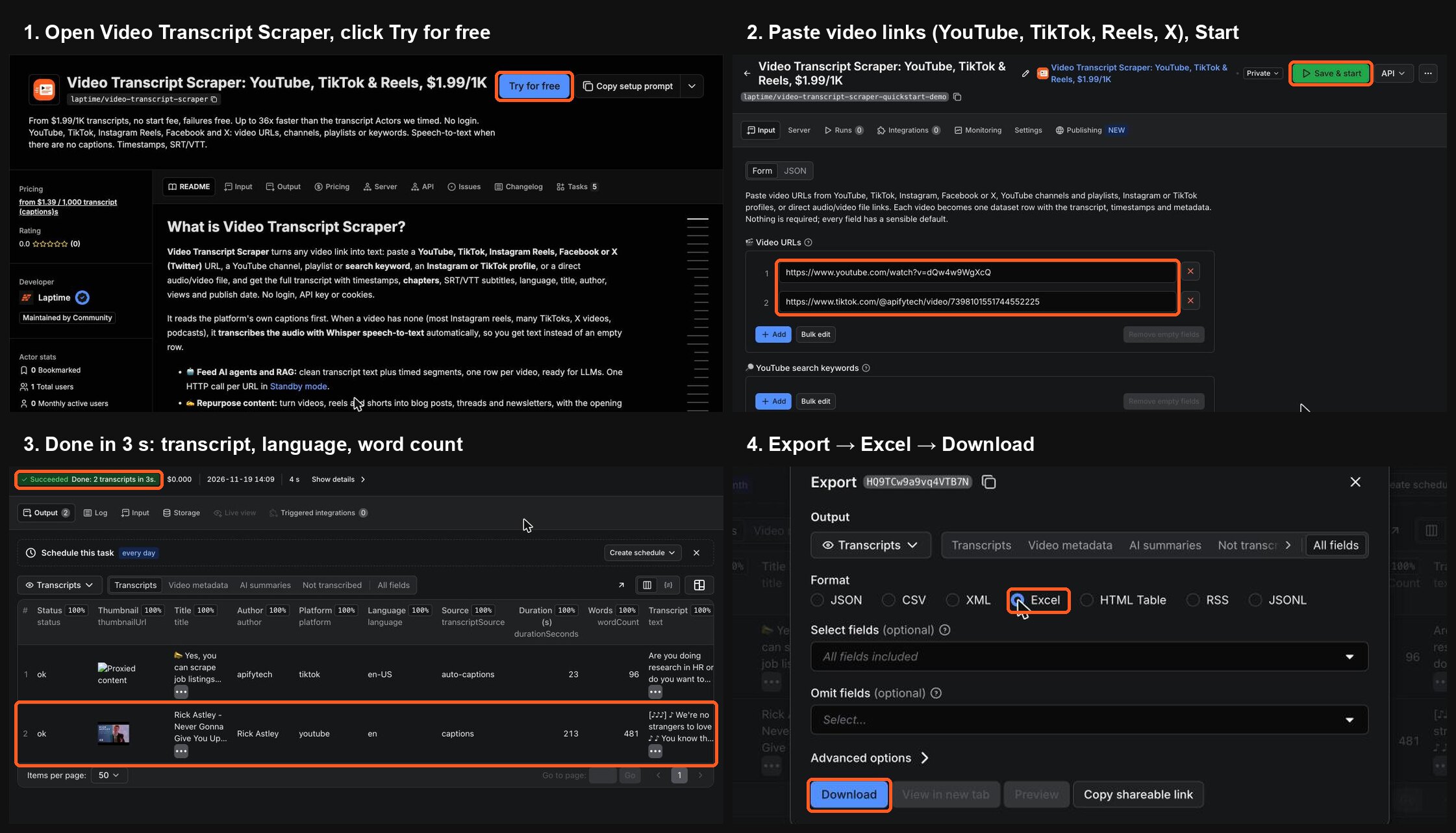
No coding: click Try for free, keep the example input, click Start, export to Excel.
Why this one
- 💰 $1.99 per 1,000 transcripts, any platform: 100 YouTube videos ≈ $0.20. No start fee; failed, private or silent videos are free.
- ⚡ One of the fastest: a YouTube transcript in 2.1 s, two Instagram reels from audio in 3.2 s, up to 36× faster than the others we timed (compare).
- 🎙️ Speech-to-text built in: no captions? Whisper transcribes the audio, from $0.002 a minute, 24× cheaper than the $0.048/min add-ons.
- 🌐 Five platforms in one Actor: plus YouTube channels, playlists and keyword search, and Instagram and TikTok profiles.
- 🤖 Built for AI agents: clean text plus timed segments, and one API call per video (run-sync API).
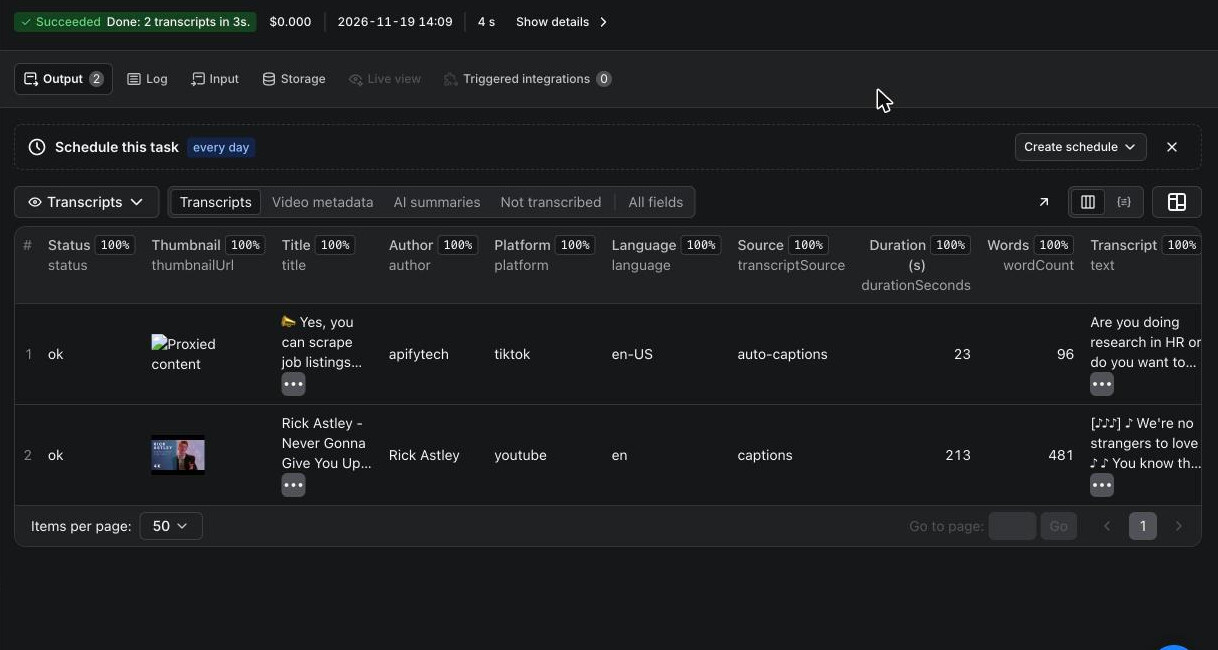
A real run of the default input: a TikTok and a YouTube video transcribed in 3 s, one row per video with language, caption source, word count and the transcript.
What is Video Transcript Scraper?
Video Transcript Scraper turns any video link into text: paste a YouTube, TikTok, Instagram Reels, Facebook or X (Twitter) URL, a YouTube channel, playlist or search keyword, an Instagram or TikTok profile, or a direct audio/video file, and get the full transcript with timestamps, chapters, SRT/VTT subtitles, language, title, author, views and publish date. No login, API key or cookies.
It reads the platform's own captions first. When a video has none (most Instagram reels, many TikToks, X videos, podcasts), it transcribes the audio with Whisper speech-to-text automatically, so you get text instead of an empty row.
- 🤖 Feed AI agents and RAG: clean transcript text plus timed segments, one row per video, ready for LLMs. One API call per video (run-sync API).
- ✍️ Repurpose content: turn videos, reels and shorts into blog posts, threads and newsletters, with the opening hook of every video.
- 🔍 Research creators, competitors and topics: what a channel says across its last 50 videos, or what the top 50 YouTube videos for a keyword say, searchable as text with views, likes, dates and chapters.
- 🎬 Make subtitles: SRT and WebVTT files for any public video, in the original language or any caption language the video has.
✅ Verified working on 18 November 2026: the default input (one YouTube video, one TikTok) returned 2 transcripts in 2.3–4.3 s total run time (1.2–1.5 s of work), 6 runs out of 6. We re-run the benchmarks every month and update this date.
How does it compare?
Speed, measured head to head on Apify on 18 Nov 2026: the same input on each Actor, total run time as Apify reports it, start-up included.
| Task | Laptime | Others |
|---|---|---|
| 1 YouTube video transcript | 2.1 s | starvibe 3.7 s, pintostudio 4.7 s, dami_studio 9.4 s, seemuapps 76 s |
| 2 Instagram reels, speech-to-text | 3.2 s | steadyfetch 7.6 s |
Price at each Actor's Free-plan list price (18 Nov 2026):
| Job | Laptime | Others |
|---|---|---|
| 1,000 YouTube transcripts (captions) | $1.99 | johnvc $2.75, starvibe $5, pintostudio $10 |
| 1,000 Instagram reels of 1 min (speech-to-text) | $3.99 | tubetext $6, steadyfetch $15, Apify reel scraper + transcript $50.60 |
| 1,000 TikToks of 1 min without captions | $3.99 | clockworks transcript extractor $51.70 ($3.70 + $0.048/min) |
| 1,000 Facebook reels | $1.99–3.99 | sian.agency $25 + $0.005 per run |
| One 60-minute video without captions | $0.12 | Apify add-ons $2.88, codepoetry $0.72 |
| 1,000 AI-agent calls, one video per run | $1.99 (no start fee) | codepoetry $3.50 ($1 + $0.0025 per run), dz_omar $18, topaz_sharingan $20 |
It is also the only transcript Actor we found that covers all five platforms, YouTube channels, playlists and keyword search, captions and speech-to-text, chapters, SRT/VTT and an AI summary in one place.
What data do you get?
One row per video, 41 documented fields:
| 📝 Full transcript text | ⏱️ Timed segments (start, end, text) | 🎬 SRT and WebVTT subtitles |
| 🌍 Language and caption source (creator, auto, speech-to-text) | 🗣️ Available caption languages | 🔤 Pick the language: languages in order of preference |
| 🏷️ Title, description, tags, category | 👤 Channel or creator, ID and link | 📅 Publish date |
| 👁️ Views, likes, comments | ⏳ Duration | 🪝 The hook: what is said in the first 3 seconds |
| 🔢 Word and segment counts | 🤖 Optional AI summary and key points | ✅ Status and reason on every row |
| 📑 YouTube chapters (start, end, title) | 🕒 Optional [mm:ss] text for quoting in LLM prompts | 🔎 The search or channel each video came from |
How to get a video transcript
- Paste one or more video URLs in Video URLs (or a YouTube channel or playlist, or an Instagram or TikTok profile).
- Optional: set Preferred caption languages, turn on SRT or VTT, or the AI summary.
- Click Start. Most videos take 1–3 seconds.
- Download the transcripts as JSON, CSV, Excel or HTML, or get them via the API.
Which links work?
| Platform | Links | Transcript from |
|---|---|---|
| ▶️ YouTube | videos, Shorts, live replays, youtu.be, bare video IDs, channels (@handle, /channel/UC…, /shorts, /streams), playlists, search keywords and search URLs | captions (creator-made or auto); speech-to-text when there are none |
| 🎵 TikTok | video links, vm.tiktok.com short links, profiles (tiktok.com/@name: the latest ~10 videos) | TikTok's captions; speech-to-text when there are none |
reels and video posts (/reel/, /p/, /tv/), profiles (instagram.com/name: the latest reels, paged) | speech-to-text (Instagram has no caption files) | |
reels, videos, watch?v=, fb.watch | Facebook's captions; speech-to-text when there are none | |
| ✖️ X / Twitter | posts with a video | speech-to-text |
| 🎧 Any file | direct .mp3, .mp4, .m4a, .wav, .webm links (podcasts, recordings) | speech-to-text |
Private, age-restricted and deleted videos come back as an uncharged row whose status says why.
Free language check: "listOnly": true returns each video's caption tracks (availableLanguages, captionTracks) and metadata without a transcript, and charges nothing.
YouTube chapters, even without timestamps in the description: when a video of 2+ minutes has no chapters in its description, the row gets YouTube's automatic chapters ("key moments"); chaptersSource says which (description or auto).
How much does it cost?
Pay per event, no subscription, no start fee:
| Event | Price | When |
|---|---|---|
transcript | $1.99 / 1,000 | a transcript from the platform's captions |
speech-transcript | $3.99 / 1,000 | a transcript made by our speech-to-text (first 3 minutes of audio included) |
speech-minute | $0.002 | each started minute of speech-to-text after the first 3 |
ai-summary | $0.005 | an AI summary, only when you turn it on |
Never charged: videos without captions or speech, private, removed or blocked videos, bad links, and a monitoring run with nothing new. Set a maximum cost per run in the run options and the Actor stops there.
Worked example: 1,000 YouTube videos with captions plus 200 Instagram reels of about a minute = 1,000 × $0.00199 + 200 × $0.00399 = $2.79.
Works on the Apify free plan: the $5 of monthly platform credit covers about 2,500 transcripts with this Actor, no card needed.
Use cases with copy-paste inputs
Transcribe a creator's latest YouTube videos
Transcribe the top YouTube videos for a keyword
YouTube's own ranking, Shorts included. Paste a YouTube search URL into startUrls to keep its filters (upload date, duration, sort).
Watch a channel and get only new uploads every day
Save as a task and schedule it daily. Videos earlier runs delivered are skipped, and a day with nothing new costs $0.
Instagram reels and TikToks to text, with the hook
The latest videos of a TikTok and an Instagram profile
Spanish subtitles, English when there are none
Transcribe a podcast episode file
One API call per video
For AI agents and apps: run the Actor synchronously and get the rows back in the same request (no polling):
Need an always-on endpoint for YouTube only? YouTube Transcript Scraper also runs in Standby mode: one HTTP request, one transcript.
Use it from Python, JavaScript and AI agents
Python
JavaScript / Node.js
Claude, ChatGPT, Cursor and other MCP clients
Add the Apify MCP server with this Actor pinned: https://mcp.apify.com?tools=laptime/video-transcript-scraper. Then ask: "Get the transcript of this video and summarize it: . The Actor runs with limited permissions, so it works with Apify's MCP server and AI tools.
n8n, Make, Zapier, Google Sheets, Slack
Use the Apify integration in n8n, Make or Zapier ("Run Actor" + "Get dataset items"), or an Apify webhook on "run succeeded", to send each new transcript to a sheet, a Notion page or your LLM step.
Input
Add Video URLs (startUrls), YouTube search keywords (searchKeywords), or both. Every field is explained in the Input tab. The main ones:
| Field | Default | What it does |
|---|---|---|
startUrls | – | Video, channel, playlist or file links (strings or { "url": … }) |
languages | video's own language | Preferred caption languages in order, e.g. ["en", "es"] |
speechToText | auto | auto (when no captions), always, never |
searchKeywords | – | YouTube searches; the top results are transcribed |
maxVideosPerChannel / maxVideosPerSearch | 10 / 10 | Videos per channel or playlist (newest first) and per search |
includeSegments / includeTimestampedText / includeSrt / includeVtt | on / off / off / off | Output formats |
onlyNew + monitorName | off | Skip videos earlier runs delivered |
aiSummary | off | AI summary and key points ($0.005 each) |
Output
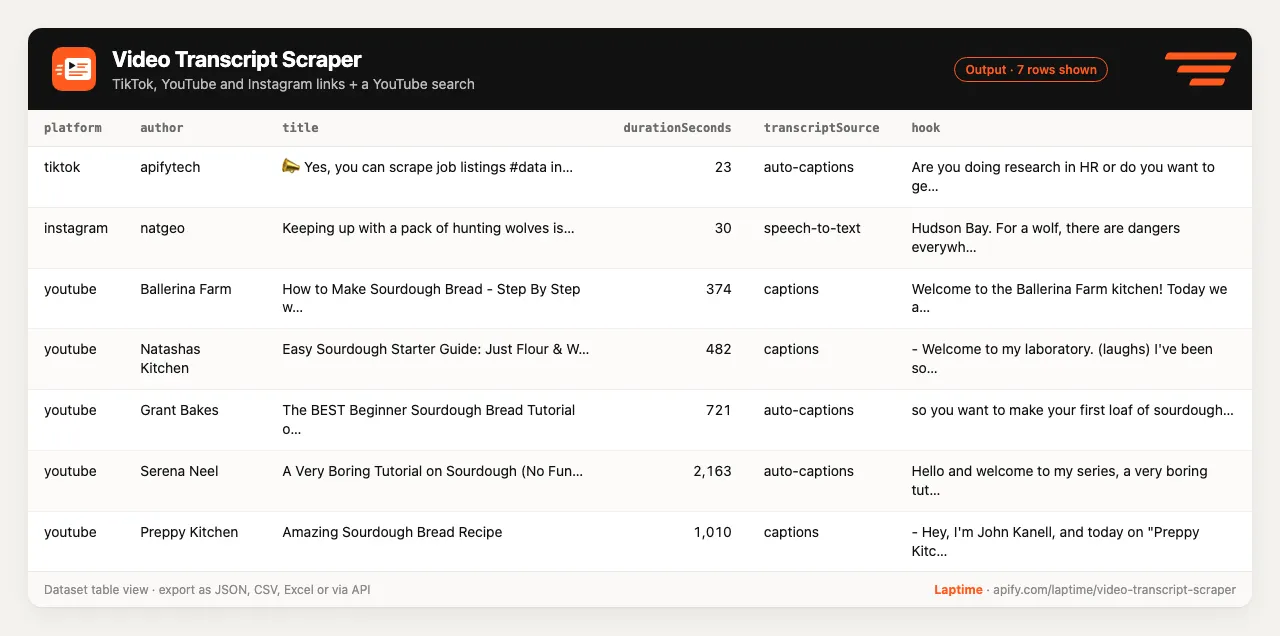
Real row from a run on 18 Nov 2026 (text and segments shortened):
Every row has every field (null when unknown). Rows without a transcript have a status (no_captions, no_speech, private_or_removed, age_restricted, live, too_long, unsupported_url, not_a_video, blocked) and a plain-words statusReason, and are not charged. The Not transcribed view lists them. RUN_STATS in the key-value store has counts, timings and sources.
Benchmarks
Measured on Apify on 18 Nov 2026 (1 GB memory, default settings, total run time including start-up):
| Job | Time | Result |
|---|---|---|
| Default input (1 YouTube + 1 TikTok), 6 runs | 2.3–4.3 s | 2/2 transcripts each |
| 12 videos on 5 platforms (YouTube, TikTok, Instagram, Facebook, X) | 4.5 s | 11 transcripts + 1 music-only video (uncharged) |
| YouTube channel, 50 newest videos | 14 s | 50/50 |
| 20 YouTube Shorts, speech-to-text only | 12 s | 15 transcripts; 2 music-only, 3 with protected audio (uncharged) |
| YouTube channel, 200 videos | 91 s | 198/200 (2 without captions or downloadable audio) |
| YouTube search, top 20 for "how to make sourdough bread" | 11 s | 20/20, 9 with chapters |
| 2 videos with AI summary (YouTube + Instagram speech-to-text) | 5.8 s | 2/2 summaries |
Switch from another transcript Actor
The Actor also reads the field names of popular transcript Actors, so your old input usually works as is:
- johnvc/YoutubeTranscripts:
youtube_url(one or many),languages. Theirnon_timestampedis ourtext;timestampedis oursegments. - pintostudio/youtube-transcript-scraper:
videoUrlandtargetLanguage. Theirdata[](start, dur, text) is oursegments[](start, duration, text). - starvibe/youtube-video-transcript:
youtube_url,language,channel_url,max_videos. Theirtranscript[]is oursegments[]. - steadyfetch/instagram-reel-transcript-scraper:
reelUrls, and profiles as links or bare names (instagramUsernames). Theirtranscript,hook3s,segmentsare ourtext,hook,segments. - johnvc's
list_onlyworks as our freelistOnly. TikTok and Instagram handles:tiktokUsernames,instagramUsernames,profileUrls. - supreme_coder/youtube-transcript-scraper:
urlsandsearchKeywords(alsosearchQueries). johnvc'smax_videosandtranscript_type("manual"/"generated"), dami_studio'smaxVideosPerSourceandsubtitleFormat, andoutput_formats: ["srt", "vtt"]work too.
FAQ
Do I need an API key or login?
No. It reads what any logged-out visitor can see. You only need an Apify account.
What if a video has no captions?
With speechToText: "auto" (default) the Actor downloads only the audio track and transcribes it with Whisper Large V3 Turbo. That row is charged as speech-transcript. Music-only or silent videos return no_speech and are not charged.
Which language do I get?
By default the language spoken in the video, preferring creator-made captions over auto-generated ones. Set languages to ask for others, in order of preference (e.g. ["es", "en"]); availableLanguages lists what the video has, and "List caption languages only" (listOnly) shows it for free before you run.
Can it transcribe long videos and podcasts?
Yes: speech-to-text handles up to maxSpeechMinutes (default 60, max 240) per video. YouTube videos almost always have captions, which cost the flat $1.99/1,000 whatever the length.
Why did a video come back without a transcript?
The row's status and statusReason say why: private or removed, age-restricted, a live stream still running, a photo post, no speech, or a protected audio stream. None of these are charged.
Is it reliable?
A daily automated check runs the default input and alerts us when it returns nothing or a key field goes empty. On 19 November 2026 the default input took 1.0–3.0 s of work per run. Blocked videos are retried on fresh IPs, from datacenter to residential; every video without a transcript gets a row with the reason and is not charged; a run with no transcript at all fails loudly.
Is it legal to scrape video transcripts?
The Actor only reads public videos, the same way a logged-out viewer does, and collects no personal data beyond what the creator published. Transcripts may be copyrighted by their creators: use them for analysis, research and accessibility, and check the platform's terms and your local law before republishing. If in doubt, ask a lawyer.
Related Actors
The same engine, with a form made for one job:
- YouTube Transcript Scraper: YouTube subtitles with timestamps, chapters and SRT, from $1.99/1K.
- TikTok Transcript Scraper: TikTok captions or speech-to-text from links or profiles, from $1.99/1K.
- Instagram Reels Transcript Scraper: reels to text with timestamps and the hook, $3.99/1K.
Other Laptime scrapers that pair well with this one, all with no start fee:
- Instagram Reels Scraper: a profile's reels with views, dates and video links, $1.20/1K.
- Facebook Reels Scraper: reels and videos with exact views and reactions, $1.99/1K.
- Bilibili Transcript Scraper: speech-to-text transcripts of videos, $2/1K minutes.
Changelog
See the Changelog tab. Latest: 0.2 (19 Nov 2026): Instagram and TikTok profiles, a free listOnly mode, YouTube automatic chapters.
Feedback and support
Found a link that doesn't work, or need a field? Open an issue on the Issues tab: we answer within a day. YouTube only? See YouTube Transcript Scraper.
If Video Transcript Scraper saved you time, a short review on the Reviews tab helps other people find it. We read every one, thank you!


