
Google Ads Transparency Scraper
Pricing
from $1.00 / 1,000 ad with full details
Google Ads Transparency Scraper
Scrape the Google Ads Transparency Center (Google's ad library) by brand name, domain or advertiser ID. Get competitors' Search, YouTube, Shopping and image ads with text, landing pages and EU impressions. Monitor new ads daily. Export to CSV, Excel or JSON. Pay per ad, no monthly fee.
Pricing
from $1.00 / 1,000 ad with full details
Rating
0.0
(0)
Developer

Lazy Bloom Data
Maintained by CommunityActor stats
0
Bookmarked
2
Total users
1
Monthly active users
17 hours ago
Last modified
Share
Google Ads Transparency Scraper: competitor ads by brand name
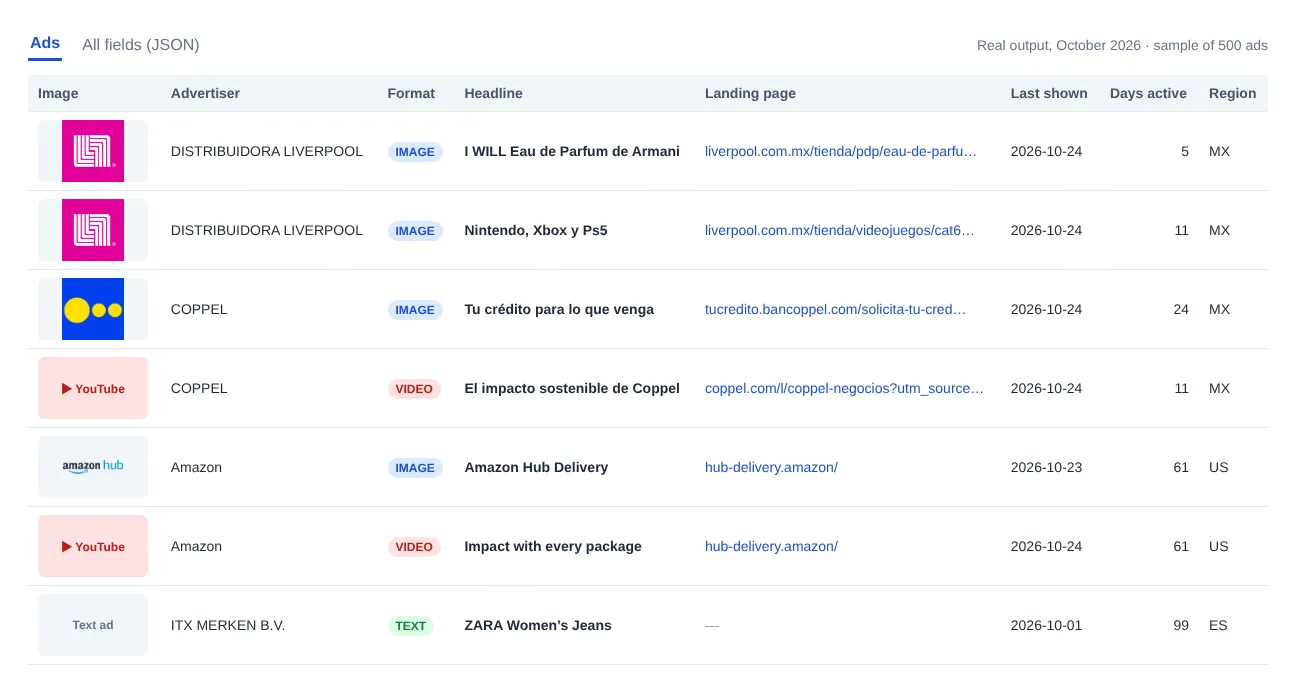
Get the ads a company runs on Google (Search, YouTube, Shopping, Maps and Play) straight from the Google Ads Transparency Center, the public Google Ads Library. Type a brand name like Nike or El Corte Inglés, a domain like nike.com, an advertiser ID or a Transparency Center URL, and get a clean dataset with ad text, images, YouTube videos, landing pages, dates and, in the EU, impressions per country and platform.
No login, no Google account, no coding. Export to JSON, CSV, Excel or Google Sheets, or connect it to Make, Zapier, n8n or your own code through the Apify API, as a simple Google Ads Transparency Center API.
Why this scraper
- Search by brand name. Many scrapers need an advertiser URL. Here you type
Nikeand it finds the real Nike, Inc. account, not a look-alike. - The full ad in one run: headline, description, YouTube link, call to action and landing page, plus images and dates.
- EU impressions by country and platform, as Google publishes them.
- Alerts for competitors' new ads: turn on Only new ads and schedule it to get just what changed since the last run.
- Pay only for what you get. No start fee, no monthly fee. If Google refuses an ad's details, you pay the basic price.
What you can use it for
- Competitor research: see which messages, offers and creatives your competitors are running right now, and for how long. A Google ad spy tool built on Google's own public data.
- Agency pitches and audits: pull a brand's Google ad library in minutes before a meeting.
- Creative inspiration: collect headlines, descriptions and YouTube ads that have been running for months (a strong hint that they work). It also works as a YouTube ads scraper for any advertiser.
- Market and media research: compare impressions by country and by Google platform (EU data).
- Compliance and brand protection: check what is being advertised under a brand or a domain.
What data you get
| Field | What it is |
|---|---|
advertiserName, advertiserId | The verified advertiser behind the ad |
creativeId, adUrl | The ad's ID and its page in the Transparency Center |
format | TEXT, IMAGE or VIDEO |
headline, description, displayDomain | The ad text (search ads and many video/Shopping ads) |
imageUrl, previewUrl | Ad image or screenshot |
videoUrl | Direct YouTube link for video ads |
callToAction, landingUrl | Button (e.g. VISIT_SITE) and destination page, when Google provides them (mostly video ads) |
firstShown, lastShown, daysActive | When the ad ran |
platforms | Where it was shown: SEARCH, YOUTUBE, SHOPPING, MAPS, PLAY |
regionsShown[] | Every country where it ran, with first/last date and, in the EU, impressions range per country and per platform |
detailsIncluded | true when the full ad details were fetched |
source, regionFilter, scrapedAt | What you searched for and when |
Google only publishes impressions and platform breakdowns for countries with transparency obligations (the European Union). For other countries you get the dates. Fields Google does not provide are returned as null, never as placeholders.
Example output (real ad, shortened)
A search ad from the same run:
How to use it
- Click Try for free.
- Enter one or more brand names (for example
Nike), domains, advertiser IDs or Transparency Center URLs. - Optionally choose a country (
US,ES,MX…), an ad format and a date range. - Set Max ads per advertiser and click Start.
- Download the results or send them to Google Sheets, Make, Zapier or n8n.
Searching by brand name
Google often lists small look-alike accounts first (searching "Nike" returns a one-ad account before Nike, Inc.). This scraper picks the matching advertiser with the most ads, and when you choose a country it prefers advertisers registered there. Use Advertisers per name search to include several (e.g. a brand and its travel or retail subsidiaries).
Some big brands are not among Google's name suggestions at all (Zara is registered as Industria de Diseño Textil). When only small accounts match, the scraper searches the brand's own domain instead (zara.com, or liverpool.com.mx when the country is Mexico), and the log tells you which advertiser or domain it used. If you still get the wrong company, enter its domain directly.
Input example
Recipe: weekly competitor ad report in Google Sheets
- Enter your competitors' brand names and turn on Only new ads (monitoring).
- Create an Apify Schedule for this Actor, for example every Monday at 8:00.
- Add the Google Sheets integration to the Actor so each run appends its results to your sheet.
The first run saves the competitors' current ads as a starting point. From then on, each run returns only the ads that are new since the previous one, so your sheet becomes a running log of every new campaign. Runs with no new ads return nothing and you pay nothing for results.
Use it from code
Call the Actor from Python with the Apify client (pip install apify-client):
Pricing
You pay per ad, with no monthly fee:
- Full ad (text, media, regions, impressions, platforms): $1.00 per 1,000 ads.
- Basic ad (list only, with
includeDetailsoff): $0.40 per 1,000 ads.
Examples: 200 ads from one brand cost about $0.20. Ten competitors with 500 ads each cost about $5. No start fee and no monthly fee.
If Google refuses the details of an ad, that ad is charged at the basic price, so you never pay full price for partial data. Apify's free plan includes monthly credit, enough to try it on a few thousand ads.
Reliability and speed
Google limits how fast its Transparency Center can be read. The scraper fetches ads in parallel, slows down automatically when Google pushes back, retries, and switches connection if the proxy is blocked, so a run finishes with your data instead of failing halfway. A typical run returns around 100 complete ads per one to two minutes. Turn off Include ad details for a much faster list.
What Google does not publish
The Transparency Center does not show ad spend, clicks, CTR, keywords or detailed audience targeting, so no scraper can return them. Impressions and platform breakdowns exist only for EU countries. Some ads only have a screenshot (no text), and Google only exposes a YouTube link for part of video ads. Missing fields come back as null.
FAQ
Do I need a Google account or API key? No.
Why are some headlines empty? For some ads Google only stores a screenshot, which you get in previewUrl/imageUrl. Text that Google fills in at serving time (ad customizers) is returned as null rather than as a template.
Why are impressions missing for my country? Google only publishes impression ranges for EU countries.
Is this legal? The scraper reads only public information that Google publishes for transparency. It does not log in. Advertisers are businesses or individuals verified by Google; when an advertiser is a person, their name may be personal data under GDPR, so use it accordingly. You are responsible for how you use the data. This tool is not affiliated with or endorsed by Google.
Something broke or a field is missing? Open an issue in the Issues tab. We usually reply within 24 hours.


