

Automate WhatsApp in One API
Pricing
from $1.00 / 1,000 message-results
Automate WhatsApp in One API
Unlock WhatsApp automation in minutes: connect once via QR, then run messaging, media sends, number verification, chat exports, backups, and job tracking from one production-ready Control Center + API. Built for CRM, support, sales, and ops teams that need speed, reliability, and scale.
Pricing
from $1.00 / 1,000 message-results
Rating
5.0
(3)
Developer

Alexandre Manguis
Maintained by CommunityActor stats
6
Bookmarked
179
Total users
14
Monthly active users
69 days
Issues response
5 months ago
Last modified
Categories
Share
Run WhatsApp operations from one actor: connect once, keep session alive, and execute export/send/verify/backup workflows from a modern UI or a clean HTTP API.
Why This Actor
- One QR onboarding flow, then persistent session reuse
- Real operational dashboard (
/ui) for non-technical users - API-first automation for scripts, CRMs, and backend services
- Built-in command jobs for async tasks and polling
- Designed for production reliability (timeouts, fallbacks, resilient responses)
Product Snapshot
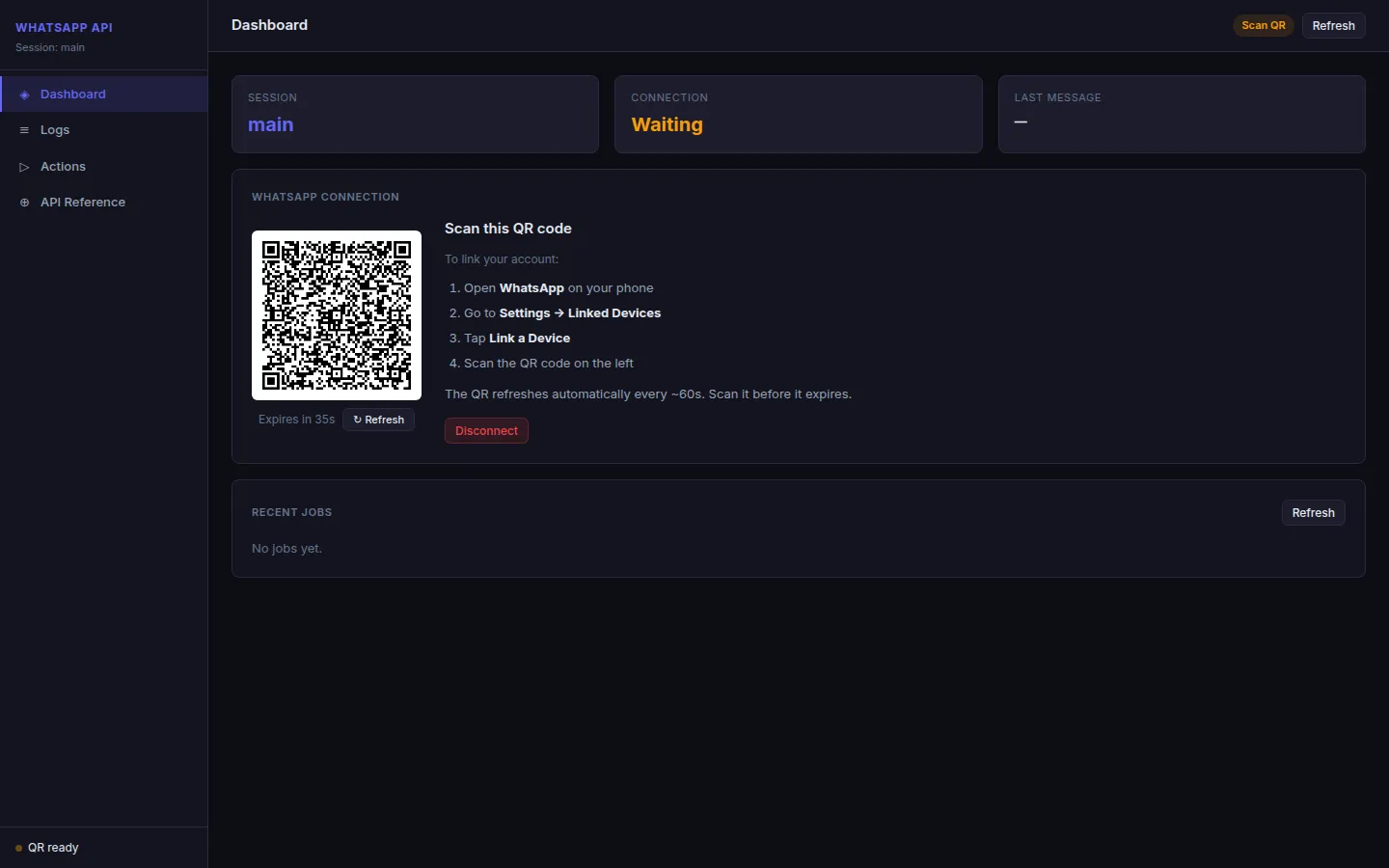
End-to-End Process
1. Start actor
Launch the actor. It initializes the Control Center and prints:
- UI URL
- Access token location (
CONTROL_ACCESS.txt) - QR status updates
2. Link WhatsApp account
Scan the QR from logs or UI:
- WhatsApp on phone
- Settings -> Linked Devices
- Link a Device
- Scan QR
3. Session persistence
After successful link, session state is saved. Next runs restore automatically in most cases.
4. Operate from UI or API
- UI for interactive operations
- REST API for automation
- Jobs API for command tracking
Core Endpoints
| Endpoint | Method | Purpose |
|---|---|---|
/ui | GET | Control Center dashboard |
/status | GET | Session and connection status |
/qr | GET | Current QR as PNG |
/start | POST | Start/restart session bootstrap |
/chats | GET | List chats (limit supported) |
/messages | POST | Export messages |
/send | POST | Send messages/media |
/numbers | POST | Verify phone numbers |
/contacts | POST | Save/sync contacts |
/backup | POST | Build backup artifacts |
/jobs | GET | List jobs |
/jobs/:id | GET | Poll job status/result |
/logout | POST | Disconnect + clear session |
Quick Start API
Status
Two most recent chats
Send message
Verify number
Reliability Highlights
- Dashboard QR recovery via SSE + status polling fallback
- Connected-state QR lock to avoid QR/check flicker
/chats?limit=Nreturns latestNchats (most recent first)- Non-blocking KV strategy for chat listing responses
- Per-chat timeout guards to avoid single-chat full-response stalls
Backup ZIP Download Behavior
- Backup ZIP files are served through a direct download link returned in
job.progress.downloadPathand in the final job result. - Use the link shown in the UI result panel (
Download result) for both conversation backup and full account backup. - Backup ZIP links are session-scoped to the running Control Center process, so download the file during the active session.
- JSON artifacts (for example manifest/summary) remain available through
/download/{key}.
Security and Compliance
- Access token required on every request
- Consent confirmation supported for send/verify workflows
- Session token and QR should be treated as sensitive credentials
- Use only authorized accounts and compliant recipient lists
Billing
This actor uses Apify pay-per-event billing through Actor.charge, so the price is defined by the event grid below. There is no hidden per-message compute tariff in the actor pricing itself: the run is billed when the code emits an event.
Event pricing
| Cost driver | What it means | Billing impact |
|---|---|---|
message-result | 1 per exported message | $0.001 / message |
live-message-result | 3 per live message saved or forwarded | $0.003 / message |
media-mb | 25 per rounded-up MB | $0.025 / MB |
send-action | 3 per text or media send | $0.003 / send |
number-check | 2 per WhatsApp number | $0.002 / number |
contact-action | 4 per contact save/edit | $0.004 / contact |
profile-result | 2 per exported profile/contact | $0.002 / profile |
backup-package | 500 per backup ZIP | $0.50 / ZIP |
live-minute | 10 per started minute | $0.01 / minute |
command-action | 5 per paid direct command | $0.005 / command |
list-chats-action | 1 per list chats request | $0.001 / request |
Cost impact by action
| Action | What is billed | Typical cost pressure |
|---|---|---|
| Export messages | message-result events | $0.001 per exported message |
| Save or forward live messages | live-message-result events | $0.003 per live message |
| Send text | send-action events | $0.003 per message sent |
| Send media or file | send-action + media-mb events | $0.003 + $0.025 per rounded-up MB |
| Verify numbers | number-check events | $0.002 per number |
| Save or edit contacts | contact-action events | $0.004 per contact |
| Export profiles / contacts | profile-result events | $0.002 per profile |
| Build a backup ZIP | backup-package plus normal message/media/profile events inside the backup | $0.50 per ZIP plus variable event cost |
| List chats | list-chats-action events | $0.001 per request |
| Keep a live session open | live-minute events | $0.01 per started minute |
| Run a paid direct command | command-action events | $0.005 per command |
Practical rule of thumb
- The actor is not priced by generic runtime/memory in the product grid above.
- The bill comes from the specific events the code emits.
- A bigger file costs more because
media-mbrounds up to the next MB. - A live session costs more because
live-minuteis charged per started minute. - A backup can cost multiple events because the ZIP has its own base fee and the included messages/media/profiles are still billed normally.
How to estimate cost
- Count the expected number of exported messages, live messages, sent messages, number checks, contact actions, profile exports, backup ZIPs, live minutes, and direct commands.
- Multiply each count by its unit price.
- Add
media-mbfor every rounded-up MB of media that is downloaded or uploaded. - For backups, add the ZIP base price plus the underlying message/media/profile events.
- Use the Apify console usage and billing pages to verify the exact spend for your account.
Important notes
- WhatsApp itself is not billed by Apify inside this actor.
- Any proxy provider, external API, or downstream automation tool may add its own charges.
- The actor code already exposes the event grid above, so exact per-action pricing is known and should be kept in sync with
PRICING_EVENTS.jsonandsrc/main.js.
Suggested Use Cases
- Sales outreach operations
- Customer support workflows
- Lead qualification and enrichment
- Notification pipelines
- WhatsApp data export and archival
- Business continuity backup workflows
Keywords
whatsapp api, whatsapp automation, whatsapp web, whatsapp session api, whatsapp session manager, whatsapp control center, whatsapp dashboard, qr login, linked devices, session persistence, whatsapp chats export, whatsapp messages export, whatsapp backup, whatsapp media export, whatsapp send api, whatsapp number verification, whatsapp contacts sync, whatsapp jobs api, apify actor, apify whatsapp, crm integration, webhook integration, live events, sse events, production ready, business messaging, lead generation, sales ops, support ops, outreach automation, contact validation, consent aware messaging, all in one whatsapp, whatsapp backend service
Summary
This actor is an all-in-one WhatsApp operations layer for teams that need both UI control and API automation with production-focused behavior.


