
Qr Code Generator
Pricing
from $1.00 / 1,000 results
Qr Code Generator
Generate your Custom QR Code From 1$/1000. PNG & SVG output, 9 style presets (rounded, dots, neon, elegant…), custom label & logo overlay, Wi-Fi/vCard/URL payloads. Batch mode, ZIP download, REST API & Standby. No watermark.
Pricing
from $1.00 / 1,000 results
Rating
5.0
(1)
Developer

Alexandre Manguis
Maintained by CommunityActor stats
1
Bookmarked
4
Total users
0
Monthly active users
5 months ago
Last modified
Categories
Share
QR Code Studio
Generate stylish, branded QR codes from URLs, WiFi credentials, vCards, emails, SMS, phone numbers, geo links, and calendar events. Export as PNG, SVG, or a ready-to-use ZIP archive. Run as a standard Actor run or as a persistent Standby HTTP API.
Style presets
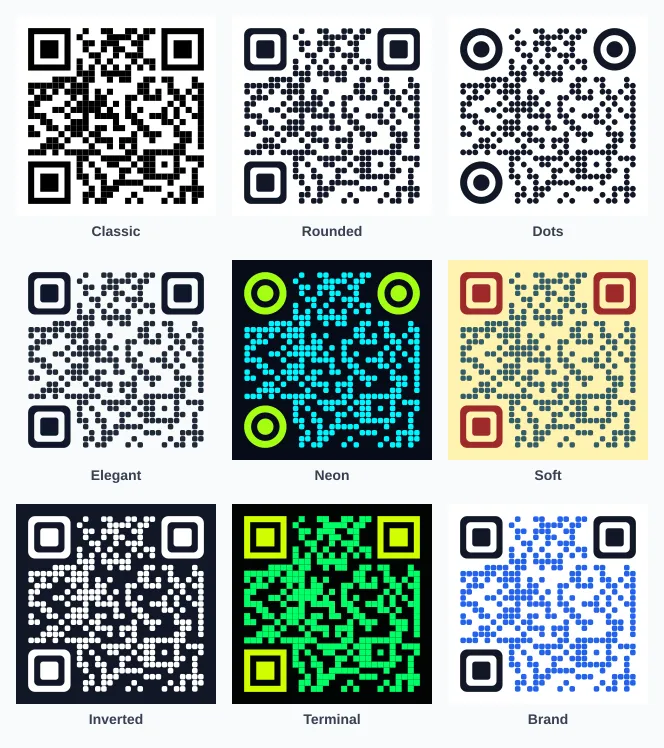
9 ready-to-use visual styles — no design skills required.
| Preset | Look |
|---|---|
classic | Black and white, square modules |
rounded | Dark, soft rounded corners |
dots | Circular dots with circular eyes |
elegant | Subtle rounded modules on a light grey background |
neon | Cyan on dark navy, green eyes |
soft | Warm yellow background, teal modules, red eyes |
inverted | White modules on a dark background |
terminal | Green on black, monospace feel |
brand | Blue modules on white, brand-ready |
Payload types
| Type | What it encodes |
|---|---|
raw | Any plain text or URL as-is |
url | URL with optional https:// normalization |
wifi | WiFi network credentials (SSID, password, encryption) |
vcard | Contact card (name, phone, email, website, company) |
email | Pre-filled email with recipient, subject, and body |
sms | Pre-filled SMS with phone number and message |
phone | Direct phone dial link |
geo | GPS coordinates and optional altitude |
event | iCalendar event (title, start, end, location, description) |
Quick start
Single QR code — URL
With a logo and label
WiFi credentials
vCard contact
Batch — multiple QR codes in one run
Input fields
| Field | Type | Default | Description |
|---|---|---|---|
content | string | — | Text or URL to encode. |
requests | array | — | Batch mode — one QR code per item; each item can override any field. |
payloadType | string | raw | raw, url, wifi, vcard, email, sms, phone, geo, or event. |
payload | object | — | Structured payload for non-raw types. |
format | string | png | png, svg, both, dataUrl, or json. |
size | integer | 512 | Output size in pixels (width and height). |
margin | integer | 4 | Quiet zone width. Keep 4 for best scanner compatibility. |
errorCorrectionLevel | string | H | L, M, Q, or H. Use H with a logo. |
stylePreset | string | rounded | One of the 9 style presets listed above. |
foregroundColor | string | preset | Module color. Hex recommended. |
backgroundColor | string | preset | Background color. |
transparentBackground | boolean | false | Transparent background (PNG/SVG). |
moduleStyle | string | preset | square, rounded, or dots. |
eyeStyle | string | preset | square, rounded, or circle. |
logoUrl | string | — | Public image URL for a center logo. |
logoBase64 | string | — | Base64 or data URL logo. |
logoSizeRatio | number | 0.2 | Logo size relative to QR size (0.08–0.32). |
logoBackgroundColor | string | — | Color behind the logo (improves contrast). |
label | string | — | Short text above or below the QR code. |
labelPosition | string | bottom | top or bottom. |
labelFontSize | integer | auto | Font size for the label in pixels. |
storeFiles | boolean | true | Save PNG/SVG files to the key-value store. |
includeBase64 | boolean | false | Embed data URLs directly in dataset rows. |
zipOutput | boolean | true | Bundle all files into a QR_CODES_ZIP archive. |
zipFilename | string | auto | Custom ZIP archive filename. |
filenamePrefix | string | qr | Prefix for all generated filenames. |
normalizeUrl | boolean | true | Auto-add https:// to bare domains. |
failOnError | boolean | false | Stop the run on the first error (default: log and continue). |
Output
Dataset item (one row per QR code)
Key-value store records
| Key | Content |
|---|---|
QR_0001_... | Individual PNG or SVG file |
OUTPUT | JSON summary with total count and per-item status |
QR_CODES_ZIP | ZIP archive with all generated files (when enabled) |
Standby HTTP API
When run in Standby mode, the Actor exposes a persistent HTTP endpoint. Useful for integrations that need on-demand QR codes without running a full Actor job.
Get an image directly
Get a JSON response
Batch endpoint
Client examples
JavaScript
Python
Production tips
- Use
errorCorrectionLevel: "H"whenever you embed a logo — it allows the QR to remain scannable even with the logo covering part of the data. - Keep
marginat4unless your design guarantees enough quiet zone around the code. - Always test transparent and custom-color QR codes with multiple phone cameras before printing.
- For bulk runs, use
storeFiles: trueandzipOutput: trueto download all files in one archive. - In batch mode, set
nameon each request for readable filenames and dataset rows.
Keywords
qr code generator, qr code apify, bulk qr codes, batch qr code, branded qr code, stylish qr code, qr code with logo, qr code png, qr code svg, qr code wifi, qr code vcard, qr code contact, qr code email, qr code sms, qr code geo, qr code calendar, qr code api, standby api, qr code zip, qr code dataset, qr code automation, qr code no-code, apify actor


