

TikTok Influencer Scraper — Profiles, Engagement & Emails
Pricing
from $1.19 / 1,000 profiles
TikTok Influencer Scraper — Profiles, Engagement & Emails
TikTok Profile Scraper for influencer research: followers, likes, videos, engagement rate, average views of the latest videos, bio, link, e-mail in bio, business category, verified. Filter by follower range — filtered and missing profiles are free. $0.85/1K, $1.70/1K from Nov 6; no run fee.
Pricing
from $1.19 / 1,000 profiles
Rating
5.0
(1)
Developer

Matvey
Maintained by CommunityActor stats
0
Bookmarked
39
Total users
19
Monthly active users
2 days ago
Last modified
Categories
Features
Share
TikTok Influencer Scraper is a TikTok profile scraper that turns a list of TikTok usernames into a creator table: followers, total likes, video count, engagement rate, average views of the latest videos, bio, link in bio, e-mail in bio, verified badge, business category and account age — one row per profile. Filter by follower range so a micro-influencer list costs only for the creators that fit.
$0.85 per 1,000 profiles ($0.00085 each) until 5 November 2026, $1.70 per 1,000 ($0.0017 each) from 6 November 2026. No start fee, no login, no browser. Profiles that do not exist or are filtered out are never billed.
Tested head-to-head — 9 October 2026
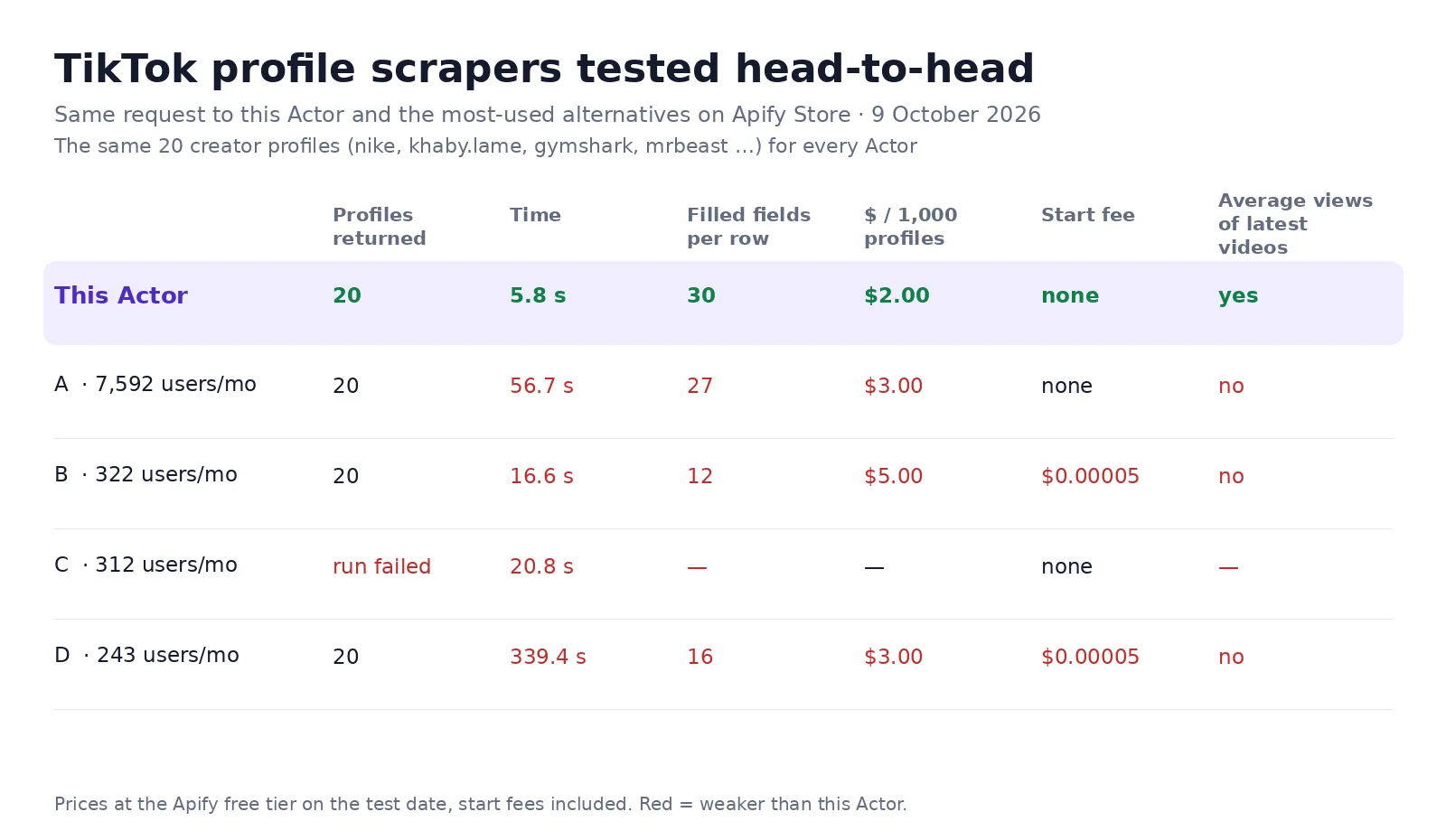
Same request for every Actor — the same 20 creator profiles (nike, khaby.lame, gymshark, mrbeast and 16 more) — run against the four most-used TikTok profile scrapers on the Apify Store, from an ordinary Apify account.
| This Actor | The four others | |
|---|---|---|
| All 20 profiles returned | Yes, in 5.8 s | 3 of 4 (one run failed), in 16.6–339.4 s |
| Price per 1,000 profiles | $2.00 on the test day — $0.85 since 22 October 2026, $1.70 from 6 November 2026, no start fee | $3.00–$5.00 |
| Average views of the latest videos in the row | Yes | 0 of 4 |
| Filled fields per row | 30 | 12–27 |
The image shows the price on the test day. Since 22 October 2026 the price is $0.85 per 1,000 profiles; from 6 November 2026 it is $1.70.
What is TikTok Influencer Scraper?
A TikTok profile scraper built for influencer discovery and vetting, which you can run in bulk from the Apify console, the API, a spreadsheet, n8n, Make or an AI agent. Paste usernames or profile URLs — from a hashtag export, a competitor's following list, an agency's spreadsheet — and get back the numbers a brand needs before it writes to a creator: how big the audience is, how engaged it is, and whether the latest videos still get watched.
Typical uses: building an outreach list of micro-influencers in a niche, checking an agency's proposed creators against their real numbers, tracking a roster of creators weekly, and enriching a CRM with TikTok reach.
What is in every row
| Field | Meaning |
|---|---|
followers, following, likes, videos | The profile counters, exact (not the rounded "1.2M") |
engagementRate | Average likes per video as a percentage of followers |
avgViewsRecent, viewsToFollowersRatio | Average play count of the latest videos (up to 10) and how it compares to the follower count — the fastest way to spot a bought audience |
recentVideos | The latest videos with id, URL, description, play count and cover |
bio, bioLink, emails | The bio text, the link in bio, and any e-mail the creator put in the bio |
verified, isBusinessAccount, businessCategory, isOrganization, isSeller | Account type flags and TikTok's own business category |
createdAt, language, nickname, avatarUrl, userId, secUid | Identity and account age |
Two table views come with the dataset: Profiles (the numbers) and Contacts (bio, link, e-mail).
How much does it cost?
$0.85 per 1,000 profiles ($0.00085 each) until 5 November 2026, then $1.70 per 1,000 ($0.0017 each) — one row, one charge, no start fee. A thousand creators is 85 cents now and $1.70 from 6 November.
- Profiles that do not exist or cannot be read: $0.
- Profiles removed by the follower filter: $0.
- Latest videos, average views and contacts: included, not an add-on.
- Higher Apify plans pay less: Bronze $0.77, Silver $0.68, Gold and above $0.59 per 1,000 profiles.
- The $5 of free platform credit on Apify's free plan covers about 5,800 profiles.
Bulk export: what 50,000 rows actually cost
This Actor is built for bulk jobs — put thousands of usernames into one run, or call it from the API on a schedule. There is no fee per run, no fee per page and no proxy charge: you pay for the profile rows you keep, and error rows are free. That is what decides the bill once you vet a whole niche rather than a handful of creators.
| Job | This Actor | Most-used Actor in this category |
|---|---|---|
| 50,000 rows across 100 runs | $42.50 | $150 |
Checked on the Apify Store on 23 September 2026 against the Actor with the most monthly users in this category ($0.003 per row). Some Actors here ask less per row — this table compares against the one buyers actually use most.
How to use it in three steps
- Paste usernames or profile URLs into 👤 Profiles —
nike,@khaby.lame,https://www.tiktok.com/@gymshark— or a list of ten thousand from a sheet. - Set 📉 Minimum followers and 📈 Maximum followers if you are building a list (10 000 – 100 000 for micro-influencers). Filtered-out profiles are free.
- Press Start, then download JSON, CSV or Excel — or call the run from the API, n8n, Make, Zapier or an AI agent.
⬇️ Input
⬆️ Output
Drop-in replacement for clockworks TikTok Profile Scraper
Already calling clockworks/tiktok-profile-scraper (or a copy of it) from your code? Send the same JSON
here and you get rows with the same field names and types — one row per post, the author nested in
authorMeta — so the code that reads them does not change. Only the Actor ID in your API call does.
Same input, both Actors:
When the input uses clockworks field names (resultsPerPage, profileSorting, profileScrapeSections,
oldestPostDateUnified, newestPostDate) and has no outputFormat, the run switches to the clockworks format
by itself. To choose explicitly, set "outputFormat": "clockworks-compatible" or "outputFormat": "default".
One post row (from a test run on 22 October 2026, shortened):
The Posts (clockworks-compatible) table view shows these rows in the console.
Price in this mode
Each post row is billed as one row: $0.85 per 1,000 post rows ($0.00085 each; $1.70 per 1,000 from 6 November 2026), the same row price as a profile row, no start fee, no add-on fee for the date filter. Profiles that do not exist, profiles outside your follower range, posts outside your date window and posts whose page could not be read are free.
What is the same, what is not
| clockworks input | Here |
|---|---|
profiles | Same — usernames or profile URLs (numeric user IDs are not looked up) |
resultsPerPage | Same meaning, but a profile gives at most its pinned posts plus about 10 latest posts — what TikTok shows publicly without login |
profileSorting | latest only; popular and oldest are not available and fall back to profile order (pinned first, then newest) |
oldestPostDateUnified / oldestPostDate, newestPostDate | Same — a date (2026-10-01) or a relative age (7 days), within those latest posts |
excludePinnedPosts | Same |
profileScrapeSections | videos only; reposts and stories are skipped |
mostDiggs, leastDiggs, followers / following lists, comments, video / cover / avatar / slideshow downloads, subtitles | Not available — ignored with a warning in the log |
Fields that are null in this mode (TikTok does not show them on public pages without login):
textLanguage, collectCount, repostCount, effectStickers, isSponsored, shortDramaSeriesInfo,
musicMeta.musicAlbum, videoMeta.subtitleLinks, videoMeta.transcriptionLink, videoMeta.aiVideoDescription,
videoMeta.aiVideoSummary, authorMeta.hasActiveStory, authorMeta.followDatasetUrl, commentsDatasetUrl,
and detailedMentions[].nickName. mediaUrls is always an empty list (nothing is downloaded) and isStory is
always false. locationMeta (the tagged place) and hasTikTokShopProduct are not in the row; locationCreated
(the country code) is.
Small differences from clockworks rows: authorMeta.fans, heart, video are exact counts from the profile
page (clockworks rounds some of them, e.g. 9300000); line breaks in text come as spaces; rows of different
profiles can be interleaved (group them by input or authorMeta.name). isPinned is read from the order of
the profile: a pinned post that is also the newest post is reported as not pinned.
A profile that cannot be read gives a free row { "input", "url", "error" }, like clockworks' own error rows.
The free "Run summary" row is not added in this mode; the run's numbers stay in the SUMMARY record of the
key-value store.
Use cases
Micro-influencer outreach lists
Export a hashtag or a competitor's tagged creators, run them through with a follower window, keep the ones with an e-mail in the bio. The Contacts view is the outreach sheet.
Vetting an agency's proposal
Followers are easy to buy; views are not. viewsToFollowersRatio under 0.01 on a 500k account is a question to ask before signing.
Weekly creator tracking
Schedule the same list every Monday and chart followers, likes and average views per creator over time.
AI agents
Connect through the Apify MCP server and ask "how big is @gymshark on TikTok and how are their recent videos doing?" — the agent gets a row, not a screenshot.
Integrations
Every run is available through the Apify API, and the Actor works out of the box with n8n, Make, Zapier, Google Sheets, LangChain and the Apify MCP server. Schedule it, webhook it, or export straight to CSV.
FAQ
Does it collect followers or comments? No — this Actor is about the creator, not the audience: one row per profile with the numbers and contacts a brand needs. It reads only what the profile shows publicly.
Why is avgViewsRecent empty for some profiles? Private accounts and accounts with no public videos have nothing to average; the row still carries the counters and bio.
Can I search by hashtag or keyword? Not in this Actor — it takes usernames or profile URLs. Pair it with a hashtag or search scraper and feed the usernames in.
Do I need a proxy? Usually not. Profile pages answer direct requests; a challenged request is retried through a proxy automatically.
Is this legal? The Actor reads public profile pages, the same thing a browser shows without logging in. Contact data is limited to what a creator put in their own bio; use it in line with GDPR, CCPA and TikTok's terms.


