
TikTok Shop Sales Tracker
Pricing
from $1.92 / 1,000 products
TikTok Shop Sales Tracker
Track TikTok Shop sales: units sold and revenue for the last 7 and 30 days, a day-by-day sales history and lifetime units sold for best sellers, keywords, categories, stores or product links. Sorted by 7-day sales. No login.
Pricing
from $1.92 / 1,000 products
Rating
0.0
(0)
Developer

Matvey
Maintained by CommunityActor stats
0
Bookmarked
28
Total users
16
Monthly active users
12 hours ago
Last modified
Categories
Features
Share
TikTok Shop Sales Tracker is the only one of our TikTok Shop Actors that measures how fast a product is selling, day by day — because the numbers are ours, not bought from an analytics vendor.
What only this Actor gives you
| Day-by-day sales history | units sold on each tracked day, as a list you can chart |
| 7-day and 30-day pace | units sold and revenue over those windows, not a lifetime total |
| Sold since we started tracking | the honest growth figure for a product we have watched |
| Sorted by 7-day sales out of the box | what is taking off right now is on top, no setup |
Where those numbers come from: we read the public sold counter of US and UK products every day and keep the history ourselves. So most products already have 7- and 30-day figures in your very first run — no waiting period, no analytics subscription, and no paid data source in the price.
That is also why it is the cheapest door into the same engine: $3.20 per 1,000 products ($0.0032 a row, down to $0.00192 on higher Apify plans) — 20% below TikTok Shop Scraper, because this Actor never calls a paid analytics vendor. No start fee, no login, no proxy setup.
Everything else is here too. Same engine as TikTok Shop Scraper: keyword search, categories, the best-seller ranking, store and product links; variants with stock, shipping, category path, shop stats; creators promoting each product with follower counts; buyer reviews with stars, text and photos. Only the defaults differ — they are tuned for tracking sales. See Input.
Pick a different door when: you need the vendor's revenue split between videos, lives and the shop window, or the affiliate commission rate — those are estimates bought from an analytics provider, and they live in TikTok Shop Top Products and TikTok Shop Product API.
Tested head-to-head — 16 October 2026
Same request for every Actor: keyword "air fryer", TikTok Shop US, 20 products, the five most-used TikTok Shop scrapers in the Store plus a dedicated sales scraper.
| This Actor | Other TikTok Shop scrapers | |
|---|---|---|
| Products returned of 20 asked | 20 | 5 to 20 (four of six stopped at 5 or 10) |
| Units sold in the last 7 days | 20 of 20 products | only one, through a paid analytics API, at $15 per 1,000 |
| Day-by-day sales history | yes | no |
| Price per 1,000 products (free plan) | $3.20, product page included | $2 to $15; the full product page costs $3 to $5 more where offered |
| Stock per variant, shipping, shop stats | yes | stock per variant in one of six |
Our 7-day figure for the top air fryer was 462 units; the analytics-based scraper reported 447 for the same product.
What does it track?
| Field | What it means |
|---|---|
sold7d, sold30d | Units sold in the last 7 and 30 days |
revenue7d, revenue30d | Those units × the current price |
salesHistory | Units sold since listing, one point per day, up to 30 days |
trackedSince, soldSinceTracked | When our history first saw the product, and units sold since then |
soldCount, estimatedRevenue | Units sold since listing and lifetime revenue estimate |
soldSinceLastCheck, dailySalesEstimate | Units sold since your previous run of the same input (with 📈 Track sales between runs on) |
price, discountPercent, rating, reviewCount, shopName, categories | The product itself |
Where do the 7- and 30-day numbers come from?
Every day our own collector records units sold for the US best-seller ranking, the TikTok Shop US category tree (three levels deep, about 2,000 categories), a keyword search for every category name, and the UK top categories, about 110,000 products a day. Any product in that history gets sold7d, sold30d, revenue7d, revenue30d and salesHistory in your first run, at no extra cost.
The history started on 7 October 2026: 7-day figures fill from 14 October 2026, 30-day figures from 6 November 2026. Until a product has enough days, those fields are null and the list is ordered by units sold since listing. Products our collector has not seen yet also show null; for them, schedule the same input once a day and soldSinceLastCheck / dailySalesEstimate fill from your second run.
How to track TikTok Shop sales
- Keep 🏆 Best sellers ticked, or type keywords into 🔍 Search keywords, or paste category, store or product links into 🔗 Start URLs.
- Leave ↕️ Sort products by on Units sold, last 7 days (or pick 30 days, revenue, lifetime units sold).
- Set 💯 Max products per source and press Start. Download JSON, CSV or Excel, or call it from the API, n8n, Make, Zapier or an AI agent.
- For a daily report, add a schedule in Apify: every run shows the fresh 7-day numbers.
How much does it cost?
Pay per event, no start fee:
| Event | Free plan | Bronze | Silver | Gold and up |
|---|---|---|---|---|
| Product row | $0.0032 | $0.00256 | $0.00224 | $0.00192 |
| Creator row (only with creators on) | $0.0032 | $0.00256 | $0.00224 | $0.00192 |
| Review row (only with full reviews on) | $0.0015 | $0.00135 | $0.0012 | $0.00105 |
- 1,000 products with full product-page details and 7/30-day sales: $3.20 on the free plan. On $1 you get 312 products.
- 1,000 reviews: $1.50 on the free plan, $1.05 on Gold and above. A product with 3,000 reviews costs $0.0032 + $4.50.
- Product-page details, sales tracking, creator profile stats: included, no add-on fee.
- Products removed by filters, duplicates across inputs, notices and errors: $0.
- Set Max cost per run in the run options and the run stops by itself at that amount, with every delivered row paid for.
- Free Apify plan: US and UK shops work as usual; Thailand, Malaysia, Singapore, the Philippines and Vietnam open only through a paid unblocking service and need a paid Apify plan.
⬇️ Input
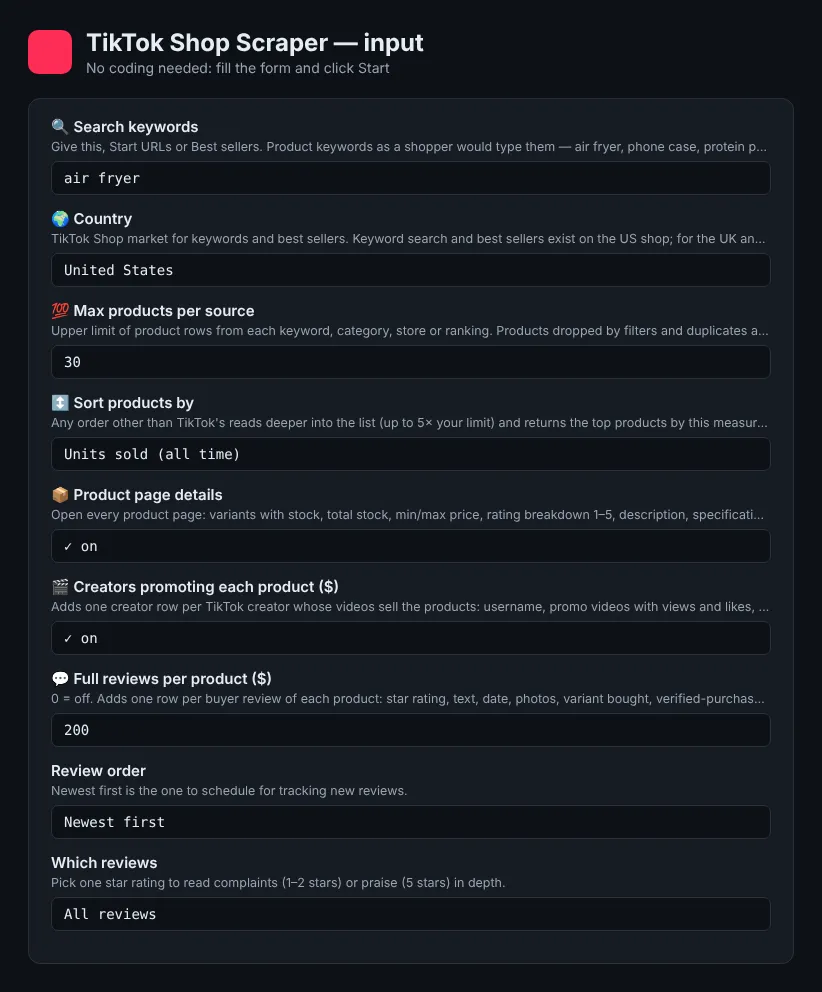
Accepted links: product (/pdp/…), store (/store/…), category (/c/…), search (/s?q=…), best sellers (/events/ranking-list) and keyword pages (/k/…), on shop.tiktok.com/<country>/… or www.tiktok.com/shop/….
Markets. The US shop is fully supported: search, best sellers, categories, stores and products. The UK, Thailand, Malaysia, Singapore, the Philippines and Vietnam work through category, store and product links, with prices in the local currency. TikTok publishes keyword search and the best-seller ranking for the US only, so a search in another market becomes a free notice row that explains this. Creator rows and full reviews are available for the US and UK (TikTok's Southeast Asian web shops show no creator videos). Other countries have no public web shop yet and redirect to the TikTok app.
Search depth. If a keyword runs out before your limit, the run widens to TikTok's own related searches and then to the related category. foundVia shows how each product was reached.
⬆️ Output
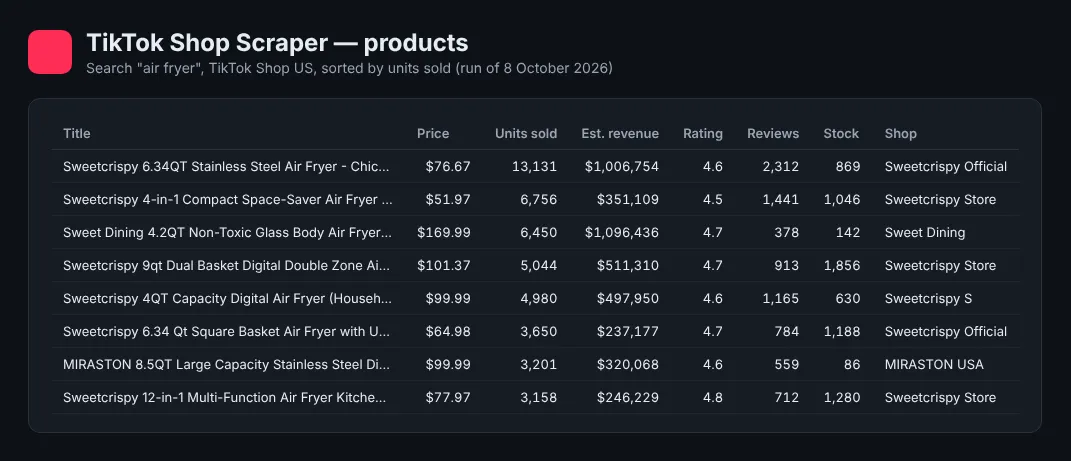
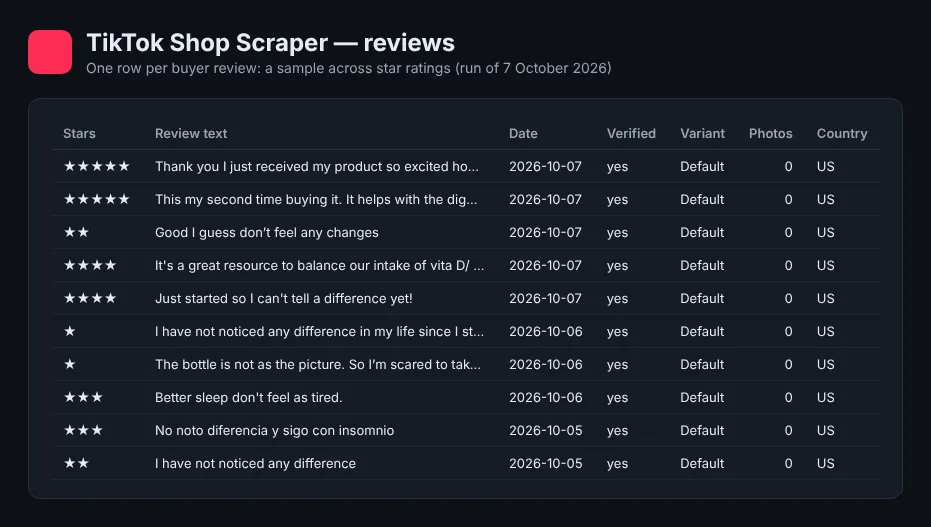
A product row (from a real run on 16 October 2026, long lists shortened):
sold30d stays null until a product has 30 days of history (from 6 November 2026). soldSinceLastCheck fills from your second run of the same product.
A creator row:
Integrations
Run it from the Apify API (POST /v2/acts/lergassy~tiktok-shop-sales-tracker/run-sync-get-dataset-items), the Python and JavaScript clients, n8n, Make, Zapier, Google Sheets, or as a tool for AI agents through the Apify MCP server. Schedules and webhooks are available in the console.
Troubleshooting
- A notice row "Keyword search is published on TikTok Shop US only": use category, store or product links for the UK.
- Fewer products than the limit: the store or category has fewer products, or your filters removed the rest. Removed products are counted in the run's
STATSrecord and are not billed. - Creator fields like
followersare empty: turn on 👤 Creator profile stats (on by default). - No review rows: full reviews are for TikTok Shop US and UK products, and a product with no reviews (or none matching the chosen star filter) gives none. The product row's
ratingBreakdownshows how many reviews each star rating has. soldSinceLastCheckis empty: the product is seen for the first time in your account. It fills from the next run.
❓ FAQ
Is it legal to scrape TikTok Shop?
The Actor reads only public product, shop and video pages that anyone can open without logging in, and it does not collect private data. Creator rows contain only what creators publish on their public profiles. Check that your use complies with TikTok's terms and with data-protection law in your country (GDPR, CCPA), especially before contacting creators.
Does it need a TikTok account or cookies?
No. Nothing to log in to, no API key, no cookies — reviews included.
How accurate is "units sold"?
It is the number TikTok Shop shows on the product page ("items sold globally since this item was listed"). estimatedRevenue multiplies it by the current price, so it is an estimate: past prices and discounts were different.
How do I get daily sales like analytics tools show?
Products in our shared daily history come with sold7d, sold30d and salesHistory in your first run. For anything else, keep 📈 Track sales between runs on and schedule the same input once a day: the Actor remembers each product's units sold in your own Apify account (key-value store tiktok-shop-sales-history, or tiktok-shop-sales-tracker-history if TikTok Shop Scraper already made the first one) and reports the difference.
Which countries are supported?
The US fully; the UK, Thailand, Malaysia, Singapore, the Philippines and Vietnam through category, store and product links. See Markets above.
Your feedback
Something missing or wrong? Open an issue on the Issues tab: we read every one.
You might also like
- TikTok Shop Scraper: the full product scraper with creators and reviews
- TikTok Shop Top Products Scraper
- TikTok Shop Reviews Scraper


