

Speech to Text — YouTube, TikTok & Media URLs
Pricing
from $6.30 / 1,000 minute transcribeds
Speech to Text — YouTube, TikTok & Media URLs
Transcribe speech to text from a YouTube, TikTok, Instagram, X, Vimeo or SoundCloud link, or any audio and video file: transcript, timecodes, timed segments, language, SRT and WebVTT in 90+ languages. Export data, run via API, schedule runs, or integrate with AI workflows.
Pricing
from $6.30 / 1,000 minute transcribeds
Rating
5.0
(2)
Developer

Matvey
Maintained by CommunityActor stats
0
Bookmarked
41
Total users
28
Monthly active users
6 hours ago
Last modified
Categories
Share
Turn audio and video into text with timecodes, in 90+ languages. Feed it MP3, M4A, WAV, FLAC, OGG, MP4, MOV or WEBM — anything with sound — and get back a clean transcript, timed passages, ready-made SRT or WebVTT subtitles, and retrieval chunks that keep the moment each passage was spoken. No API key to set up, no model to choose, no file preparation on your side.
Tested head-to-head — 24 September 2026
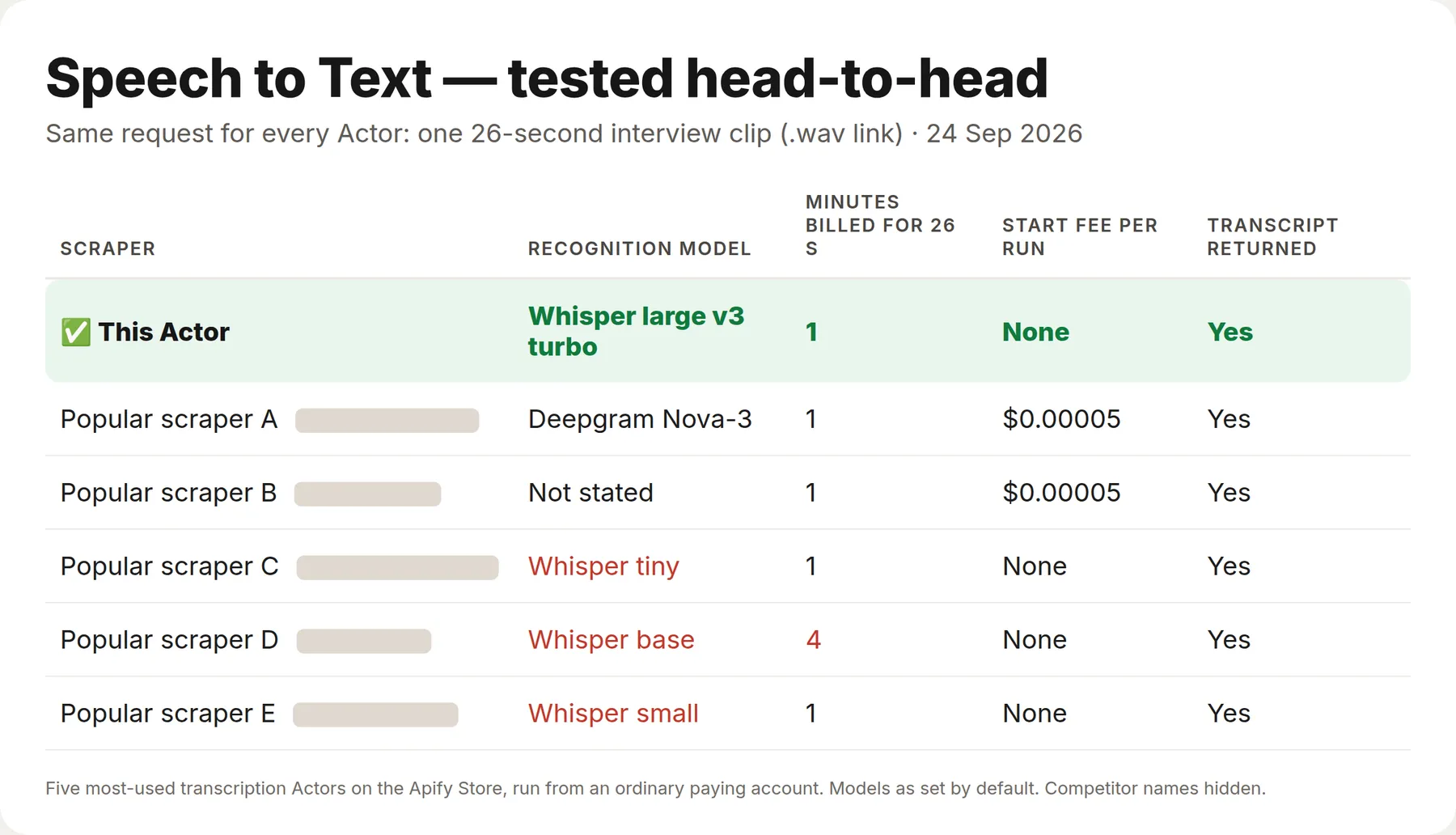
Same request for every Actor — one 26-second interview clip (a direct .wav link) — run against the five most-used transcription Actors on the Apify Store, from an ordinary paying account. All six returned the transcript.
| This Actor | The five others | |
|---|---|---|
| Recognition model | Whisper large v3 turbo | tiny, base or small on the three other Whisper Actors |
| Minutes billed for this 26-second clip | 1 | 1–4 |
| Start fee per run | None | 2 of 5 charge one |
What is Speech to Text?
Speech to Text is a transcription API built on Whisper large v3. It downloads your media, strips the audio out of video, prepares it for recognition, splits files of any length into parts, transcribes them and stitches the timings back together — so a three-hour recording is one input and one row of output.
The recognition key is built in. There is nothing to sign up for, and nothing to paste. If you already pay for a Groq key, supply it and the per-minute price drops by 60%.
| What you give it | What you get back |
|---|---|
| An MP3 or WAV link | Transcript with timed passages |
| A video file | The same — the video track is discarded |
| A three-hour podcast | One transcript, timings continuous across parts |
| A recording in any language | Text in that language, or translated to English |
chunkForRag: true | Chunks with timecodes, ready to embed |
What data can Speech to Text extract?
| Field | Type | Example |
|---|---|---|
source | string | https://example.com/episode-12.mp3 |
fileName | string | episode-12.mp3 |
durationSeconds / durationMinutes | number | 461.05 / 7.68 |
language | string | English |
model | string | fast or accurate |
translatedToEnglish | boolean | false |
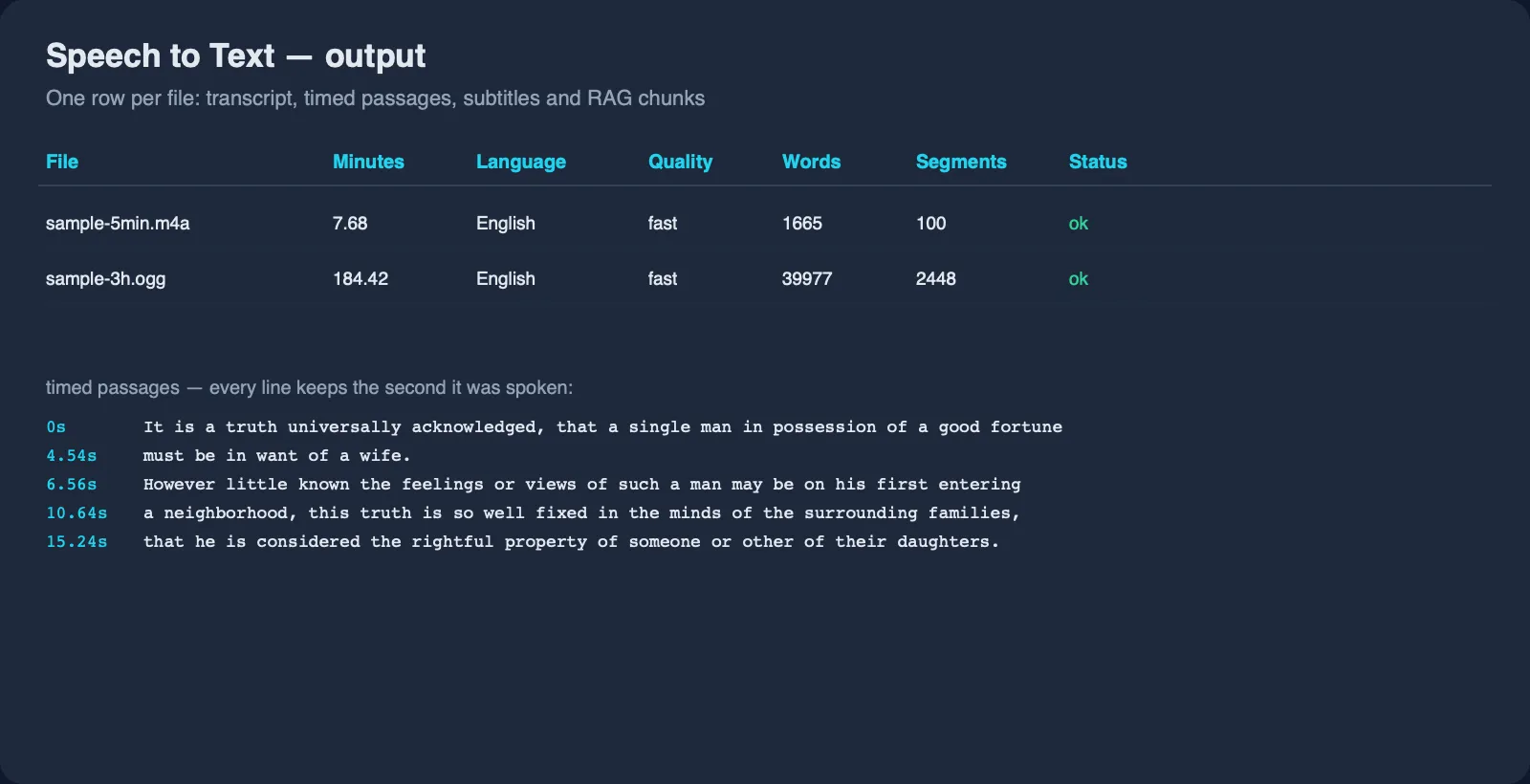
transcript | string | It is a truth universally acknowledged… |
wordCount / charCount | integer | 1665 / 9218 |
segmentCount | integer | 101 |
speakerCount | integer | 3 (only when speaker labels are on) |
speakers | array | ["Speaker 1", "Speaker 2", "Speaker 3"] |
segments | array | [{"start": 0, "duration": 4.56, "text": "It is a truth universally acknowledged…", "speaker": "Speaker 1"}] |
chunks | array | [{"index": 0, "start": 0, "startTimecode": "00:00:00", "text": "…", "charCount": 1180}] |
subtitles | string | A complete SRT or WebVTT file |
status / errorCode / errorMessage | string | ok, or why a file failed |
transcribedAt | string | 2026-09-05T11:42:07+00:00 |
How much does transcription cost?
| Event | Price | When it is charged |
|---|---|---|
| Minute transcribed | $0.009 | Per started minute, using the built-in key |
| Minute with your own key | $0.004 | Per started minute when you supply a Groq key |
| Add-on: Speaker labels | $0.006 | Per started minute, only when Speaker labels is on |
| File processed | $0.002 | Per file downloaded and prepared |
| Video link resolved | $0.09 | Per YouTube, TikTok, Instagram, X, Vimeo or other video page whose audio has to be pulled through a residential exit node. Direct file links never pay it |
Minutes are counted per started minute with the last second free, so a recording that a container format reports as 10:00.01 is charged as ten minutes, not eleven.
Files that fail are never charged. A dead link, a file above the size limit, a video with no audio track or a recording with no speech in it comes back as an error row at no cost.
| Job | Cost |
|---|---|
| A 45-minute podcast episode | $0.41 |
| The same episode with speaker labels | $0.68 |
| 10 hours of interviews | $5.42 |
| 100 one-minute voice notes | $1.10 |
| A 45-minute episode with your own Groq key | $0.18 |
The most-used transcription Actors charge $8 to $42 per 1,000 minutes (checked 24 September 2026); this one is $9, or $4 with your own key. The Apify Free plan includes $5 of monthly usage, which is about 550 minutes of audio before you pay anything.
Bulk export: what 1,000 hours of audio actually cost
This Actor is built for bulk jobs — put hundreds of files into one run, or call it from the API on a schedule. There is no fee per run and no proxy charge for direct file links: you pay for the minutes recognised, and failed files are free.
| Job | This Actor | Most-used Actor in this category |
|---|---|---|
| 1,000 one-hour files | $542 | $600 |
Checked on the Apify Store on 24 September 2026 against the transcription Actor with the most monthly users ($0.01 per minute). For many short clips the per-file fee matters more: 50,000 one-minute voice notes cost $550 here against $500 there.
How to transcribe an audio file
- Click Try for free and sign in to Apify.
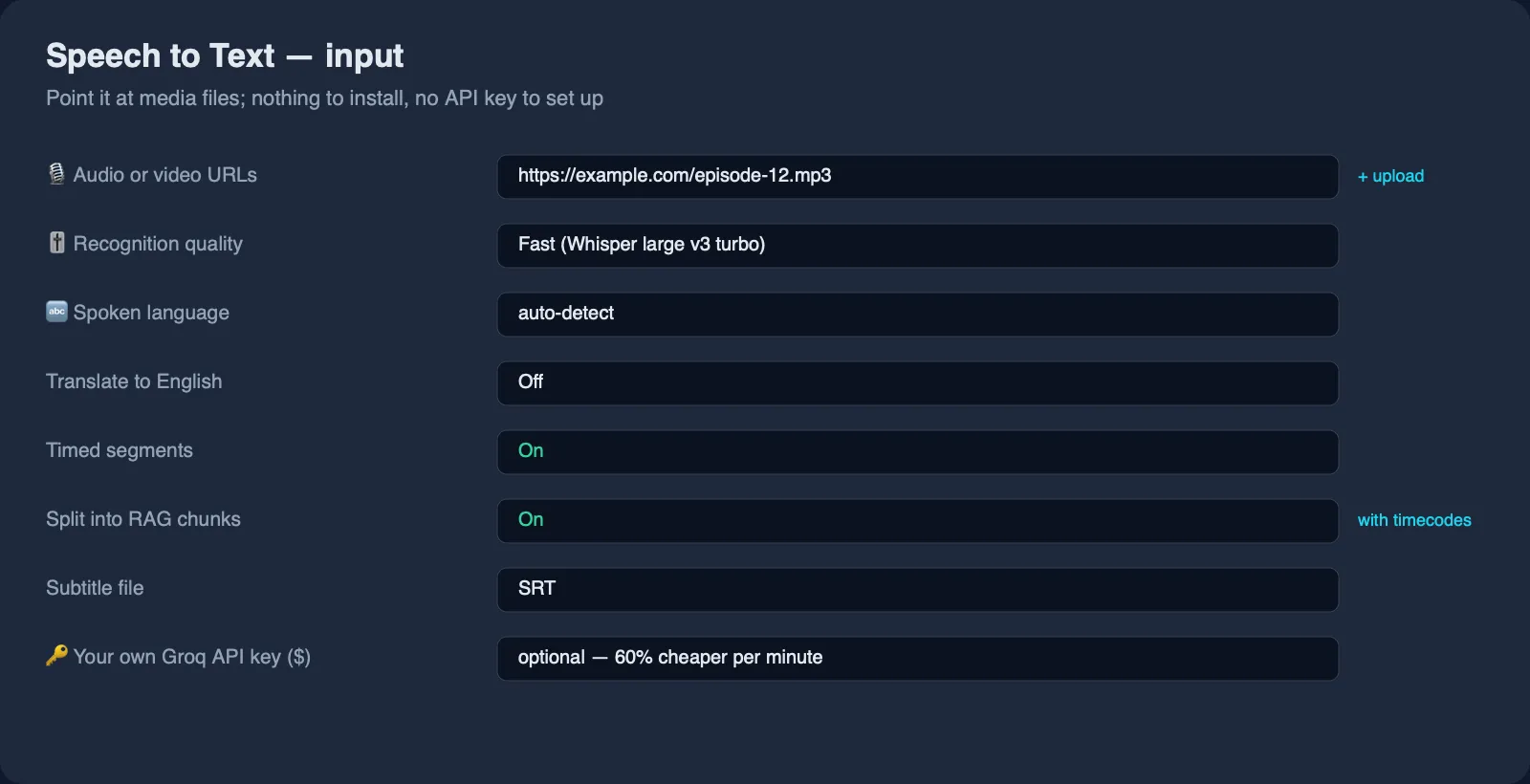
- Paste media links into Audio or video URLs, or use Upload a file.
- Leave quality on Fast unless the recording is noisy or heavily accented.
- Optionally set the spoken language, or leave it empty to detect it automatically.
- Press Start, then read the Output tab or export as JSON, CSV or Excel.
⬇️ Input
Quality
Fast uses Whisper large v3 turbo and handles clean speech at about 5% word error. Accurate uses the full Whisper large v3 — around 3% on the same audio, better on accents, background noise and technical vocabulary. Both cost the same here; the difference is time.
Language and translation
Leave language empty and the language is detected from the audio. Set a two-letter code when you already know it — that is faster and avoids mistakes on short clips. translateToEnglish returns English text whatever the speaker used.
Vocabulary hint
vocabularyHint takes names, product terms or spellings that appear in the recording. It nudges the engine toward the right proper nouns, which is the usual source of embarrassing transcripts.
Speaker labels
Switch on 🗣️ Speaker labels ($) and every segment says who is talking. The transcript is laid out as a conversation, one paragraph per turn, and SRT and WebVTT subtitles carry the name in front of each line:
Leave Number of speakers empty and the Actor works out how many voices are in the recording. Set it when you already know — two people in an interview, four in a panel — and the result is steadier, especially on noisy audio.
Speakers are found from the audio itself, inside the Actor, with no second service and no extra key. Voices that talk over each other are given to whoever holds most of the segment, so a heated cross-talk moment can be labelled with one name instead of two.
Long files
There is no length limit. Files are converted to compact mono audio and, when still too large for one request, split into parts and reassembled — timings stay continuous across the joins, so a segment at 02:41:15 really is at 02:41:15.
Bring your own key
Supply a Groq API key in Your own Groq API key and the price per minute drops from $0.009 to $0.004. You then pay Groq directly for the recognition, which at their rates is a fraction of a cent per minute.
⬆️ Output
Error rows
errorCode | Meaning |
|---|---|
network-error / http-error / not-found | The file could not be downloaded |
too-large | The file is above the size limit you set |
unreadable-media | The file has no audio track, or is not media at all |
no-speech | Nothing was recognised — silence, or music with no words |
invalid-api-key | The Groq key you supplied was rejected |
rate-limited | The recognition service throttled the run after retries |
budget-reached | The run hit its maximum total charge; raise it and run the rest again |
Use cases
Podcasts and interviews
Turn episodes into searchable text, show notes and quotes. Timed segments make it easy to find the moment a topic came up.
Meetings and calls
Transcribe recordings for minutes and follow-ups. Add participant names as a vocabulary hint so they are spelled right.
Subtitles
Get an SRT or WebVTT file back and attach it to the video, or translate it first. Captions follow the usual reading norm: at most two lines of 42 characters each, split at commas and sentence ends.
Voice notes and support calls
Feed short recordings in bulk and run analysis over the text — one row per file, one prompt for all of them.
Feeding audio into a RAG pipeline
Chunks carry the timecode where they start, so an answer built on hours of recordings can cite the exact moment instead of the whole file.
Integrations
- API:
POST https://api.apify.com/v2/acts/lergassy~speech-to-text/runs - Python:
ApifyClient(token).actor('lergassy/speech-to-text').call(run_input={'urls': [...]}) - JavaScript:
await client.actor('lergassy/speech-to-text').call({ urls: [...] }) - n8n, Make, Zapier, Google Sheets, Airtable: run the Actor and map the dataset onward.
- MCP: available through the Apify MCP server as a callable tool.
- Webhooks: fire a webhook when a run finishes.
🤖 For AI agents and LLM apps
- One row per file;
statusisokorerror, so a failed file needs no log parsing. transcriptis the field to summarise;chunksis the field to embed.- Every chunk carries
startTimecode, so an answer can cite the moment it came from. languagereports what was actually detected, which is worth checking before acting on the text.- Failed files are never charged, so agent retries stay cheap.
❓ FAQ
Do I need an API key?
No. Recognition works out of the box. Supplying your own Groq key is optional and lowers the per-minute price.
How long can a file be?
There is no fixed limit. Long recordings are split and stitched back together automatically; a three-hour file is a normal input.
Which languages are supported?
Whisper covers 90+ languages, including English, Russian, Spanish, German, French, Portuguese, Indonesian, Arabic, Hindi, Chinese, Japanese and Korean. Detection is automatic unless you set the language yourself.
Can it separate speakers?
Yes. Switch on Speaker labels and each segment carries Speaker 1, Speaker 2 and so
on, the transcript reads as a conversation and subtitles show the name on every line. It
costs $0.006 per minute on top of the transcription. Tell the Actor how many people are in
the recording if you know — it makes the result steadier.
Does speaker labelling name the people?
No. It tells the voices apart and numbers them in the order they first speak; it cannot know that Speaker 2 is Maria. Renaming them afterwards is a find-and-replace on the transcript.
What about videos?
Any video ffmpeg can read works — the audio track is extracted and the video is discarded, so you are not charged for pixels.
What is the difference from YouTube Transcript Scraper?
YouTube Transcript Scraper reads captions that already exist on YouTube, which is far cheaper. This Actor listens to the audio, so it works on any file and on videos that have no captions at all.
Can I use it with the Apify API or an MCP server?
Yes to both, like any Apify Actor.
Your feedback
Missing a language, a format or a field? Open an issue on the Issues tab — issues are answered quickly.
You might also like
| Actor | What it does |
|---|---|
| YouTube Transcript Scraper | Existing YouTube captions with timecodes and chapters |
| Document Text Extractor | PDF, Word, Excel and PowerPoint to Markdown and RAG chunks |
| OCR Text Extractor | Images and scanned PDFs to text with confidence scores |
| Trustpilot Reviews API | Trustpilot reviews, ratings and company replies |
| Instagram Reels Transcript Scraper | Instagram Reels, TikTok and Shorts to text with the 3-second hook |


