

Tech Stack Detector — BuiltWith Alternative
Pricing
from $35.00 / 1,000 websites
Tech Stack Detector — BuiltWith Alternative
Find out what any website runs on: CMS, e-commerce platform, framework, analytics, ad pixels, payments, hosting, CRM and chat — 220 signatures — plus the e-mails, phones and social profiles from the same page, in one row per website.
Pricing
from $35.00 / 1,000 websites
Rating
5.0
(1)
Developer

Matvey
Maintained by CommunityActor stats
0
Bookmarked
37
Total users
18
Monthly active users
5 days ago
Last modified
Categories
Share
Tech Stack Detector tells you what a website is built on — CMS, e-commerce platform, front-end framework, analytics, advertising pixels, payments, hosting and CDN, CRM and e-mail tools, live chat, cookie consent, reviews, A/B testing — 209 signatures across 32 categories. Paste one domain or ten thousand; every website comes back as one flat row.
And because the home page is already fetched, the same row carries the e-mails, phone numbers and social profiles found on it. One run gives you the technology list and the way to contact whoever runs it — which is what a prospect list actually needs.
No API key, no browser, no subscription. Sites that refuse to answer are reported as such and are never billed.
Tested head-to-head — 26 September 2026
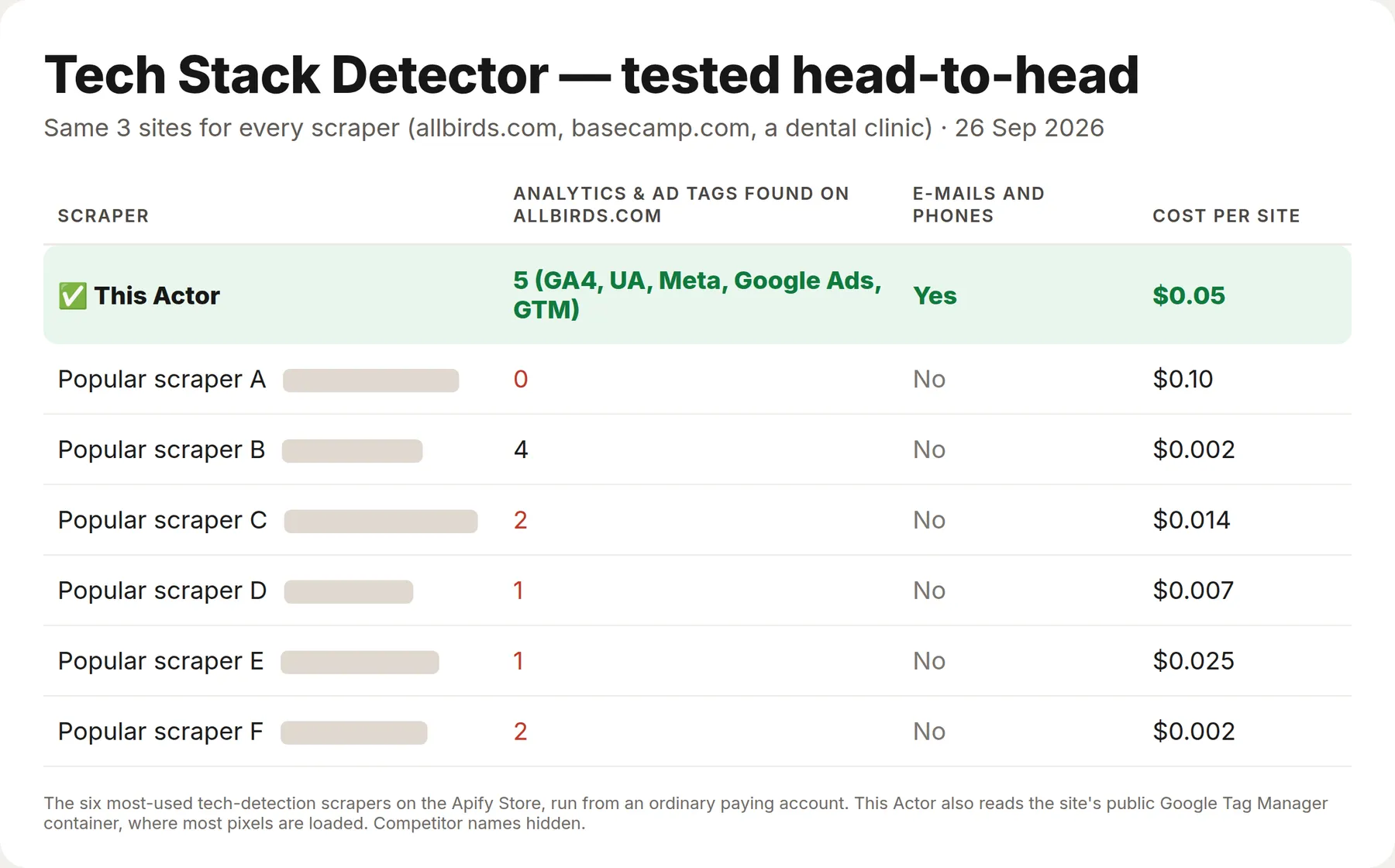
The same three sites went to this Actor and to the six most-used tech-detection Actors on the Apify Store, from an ordinary paying account. Most analytics and ad pixels are not in a site's HTML: they are loaded by Google Tag Manager after the page opens. This Actor reads the site's public Tag Manager container too, so it reports them.
| This Actor | The six others | |
|---|---|---|
| Analytics & ad tags found on allbirds.com | 5 — GA4, Universal Analytics, Meta Pixel, Google Ads, Tag Manager | 0–4 |
| E-mails and phone numbers from the site | Yes | None of the six |
| Cost per site | $0.05 | $0.002–0.10 |
Several scrapers cost less per site; this Actor is for when you need the marketing tags and a contact in the same row.
What is Tech Stack Detector?
It is a Wappalyzer and BuiltWith alternative you can call from an API, a spreadsheet or an AI agent. Give it a list of websites; get back, per website: what they run, in which category, whether the evidence came from the page, a response header or the site's public Google Tag Manager container, and how to reach them.
Typical uses: building prospect lists ("Shopify stores that do not use Klaviyo yet"), qualifying inbound leads before a sales call, competitive research on a market segment, auditing a portfolio of client sites, and enriching a CRM with firmographic signals.
What it detects
| Category | Examples |
|---|---|
| E-commerce | Shopify, WooCommerce, Magento, BigCommerce, PrestaShop, Ecwid |
| CMS and builders | WordPress, Wix, Squarespace, Webflow, Drupal, Joomla, Tilda, HubSpot CMS |
| Front-end | Next.js, Nuxt, React, Vue, Angular, Svelte, Gatsby, Astro, jQuery, Bootstrap, Tailwind |
| Analytics | GA4, Universal Analytics, Matomo, Plausible, Hotjar, Clarity, Mixpanel, Amplitude, Heap |
| Ad pixels | Meta, Google Ads, TikTok, LinkedIn, X, Pinterest, Snapchat, Reddit, Criteo, Taboola |
| Marketing and CRM | HubSpot, Marketo, Klaviyo, Mailchimp, ActiveCampaign, Omnisend, Segment, Tealium, Braze |
| Payments | Stripe, PayPal, Square, Klarna, Afterpay, Zip, Apple Pay |
| Hosting, CDN, server | Cloudflare, Vercel, Netlify, Akamai, Fastly, CloudFront, nginx, Apache, LiteSpeed, IIS |
| Consent and security | OneTrust, Cookiebot, CookieYes, Usercentrics, reCAPTCHA, hCaptcha, Turnstile |
| Chat, booking, reviews | Intercom, Zendesk, Tawk, Crisp, Calendly, Acuity, Mindbody, Yotpo, Judge.me, Trustpilot |
| A/B, search, video, monitoring | Optimizely, VWO, Adobe Target, Algolia, Vimeo, Wistia, Sentry, New Relic, Datadog |
What the numbers actually are
Measured on 16 September 2026 against 97 real websites — a mix of small businesses taken from social-profile links and well-known brands across retail, media, SaaS and local services, in several countries:
| Websites that answered | 88% directly, 92% when blocked ones are retried through a proxy |
| Technologies found per website | 4 on average, median 4, best 12 |
| Websites with at least one technology | 95% of those that answered (81 of 85) |
| Social profiles found | 78% of websites |
| E-mail on the home page | 28% of websites |
| Median time per website | about 1.5 seconds |
The 8% that refuse everything are heavy retail and media sites behind enterprise bot protection. They come back as an error row with the reason, not as an empty result pretending to be one, and they cost nothing.
How much does it cost?
$0.05 per website — one row, one charge, no start fee.
- Sites that refuse every attempt: $0.
- Sites removed by your own filters: $0.
- Contacts, categories, titles and headers: included, not an add-on.
A thousand domains is $50. The API this replaces starts at several hundred dollars a month for a fixed quota.
Bulk export: what 50,000 rows actually cost
This Actor is built for bulk jobs — put hundreds of inputs into one run, or call it from the API on a schedule. There is no fee per run, no fee per page and no proxy charge: you pay for the rows you keep, and error rows are free. That is what decides the bill once you pull a whole market rather than a single source.
| Job | This Actor | Most-used Actor in this category |
|---|---|---|
| 50,000 rows across 100 runs | $2,500 | $5,000 |
Checked on the Apify Store on 24 September 2026 against the Actor with the most monthly users in this category; its per-run fee is counted in, as ours would be if we charged one. Some Actors here ask less per row — this table compares against the one buyers actually use most.
How to use it in three steps
- Paste domains into 🌐 Websites —
shopify.com,gymshark.com, or a list of ten thousand from a sheet. - If you are building a prospect list, fill in ✅ Keep only sites that use and 🚫 Drop sites that use. Filtered-out sites are not billed.
- Press Start, then download JSON, CSV or Excel — or call the run from the API, n8n, Make, Zapier or an AI agent.
⬇️ Input
That input answers a real sales question: Shopify stores that have not bought Klaviyo yet — with the e-mail address to write to, in the same row.
Filters
✅ Keep only sites that use requires every named technology; 🚫 Drop sites that use removes a site if any of them is present. Names are matched loosely, so shopify matches both Shopify and Shopify Plus. 🗂️ Only these categories narrows what appears in the row when you only care about, say, payments.
⬆️ Output
technologiesDetailed adds, per technology, its category and where the evidence was: in the page, in a response header, or in the site's public Google Tag Manager container (tag-manager) — most analytics and ad pixels are loaded from there and never appear in the HTML. tagManagerContainers lists the containers read. Two table views come with the dataset: Tech stack and Contacts.
Use cases
Prospect lists for anyone selling to online stores
Filter by platform, exclude the competitor's tool, keep the e-mail. That is the whole workflow, in one actor.
Qualifying inbound leads
Before the call, know whether they are on Shopify or Magento, whether they already run a consent platform, and which analytics they trust.
Competitive and market research
Scan a market segment and count platforms, pixels and payment providers. The category fields make the aggregation a one-liner.
Agencies auditing client sites
Check a portfolio for missing pixels, missing consent banners or duplicate analytics, on a schedule.
AI agents
Flat row, no required fields, 209 named signatures — callable from the Apify API or the Apify MCP server without reading this page.
Integrations
Works the same from n8n, Make, Zapier, Google Sheets, a webhook, or the Apify MCP server.
❓ FAQ
Is this legal?
It reads the public home page of a website, exactly as a browser would, and stores no personal data beyond the contact details the site publishes itself. That is generally lawful, but what you do with contact data is regulated — check GDPR, the Australian Privacy Act or your local equivalent before you e-mail anyone.
How is it different from Wappalyzer or BuiltWith?
Same job, no subscription and no quota: you pay $0.05 for each website you actually look up. This one also returns the contacts in the same row, which those two sell separately.
Why does a site come back with no technologies?
Either it genuinely runs nothing detectable from the home page, or everything is loaded later by JavaScript. Signatures are matched against resource URLs, script bodies and response headers rather than page text, so the word "Shopify" in a blog post is not counted as an installation.
What about sites that block scrapers?
Blocked sites are retried from residential addresses when that option is on. About 8% of the web's most heavily defended sites still refuse everyone; you get an error row with the reason and no charge.
Can I use it with the API or an MCP server?
Yes to both, and there are no required input fields, so an agent can call it correctly on the first try.
Your feedback
A technology missing from the signature list? Open an issue on the Issues tab and it gets added — that list is the product.
You might also like
| Actor | What it does |
|---|---|
| Website Tech Gap Scanner | The same detection turned into a sales report: what a site is missing and what to pitch |
| Website Contacts API | Contacts in depth: crawls beyond the home page for e-mails and phones |
| Email Finder API | A name and a domain in, the likely work e-mail out |
| Email & Phone Verifier | Checks the addresses and numbers before you use them |


