

Own-Site SEO Audit: Catch Broken Links, Hreflang & Canonicals
Under maintenancePricing
$10.00 / 1,000 page auditeds
Own-Site SEO Audit: Catch Broken Links, Hreflang & Canonicals
Under maintenanceCrawl your own site and get one JSON row per page: titles, canonicals, hreflang, alt text, broken links, with issue codes. Pay per audited page.
Pricing
$10.00 / 1,000 page auditeds
Rating
0.0
(0)
Developer

licensed pipe
Maintained by CommunityActor stats
0
Bookmarked
2
Total users
1
Monthly active users
4 days ago
Last modified
Categories
Security
Limited permissionsShare
Own-Site SEO Audit: catch broken links, hreflang and canonical bugs before they ship
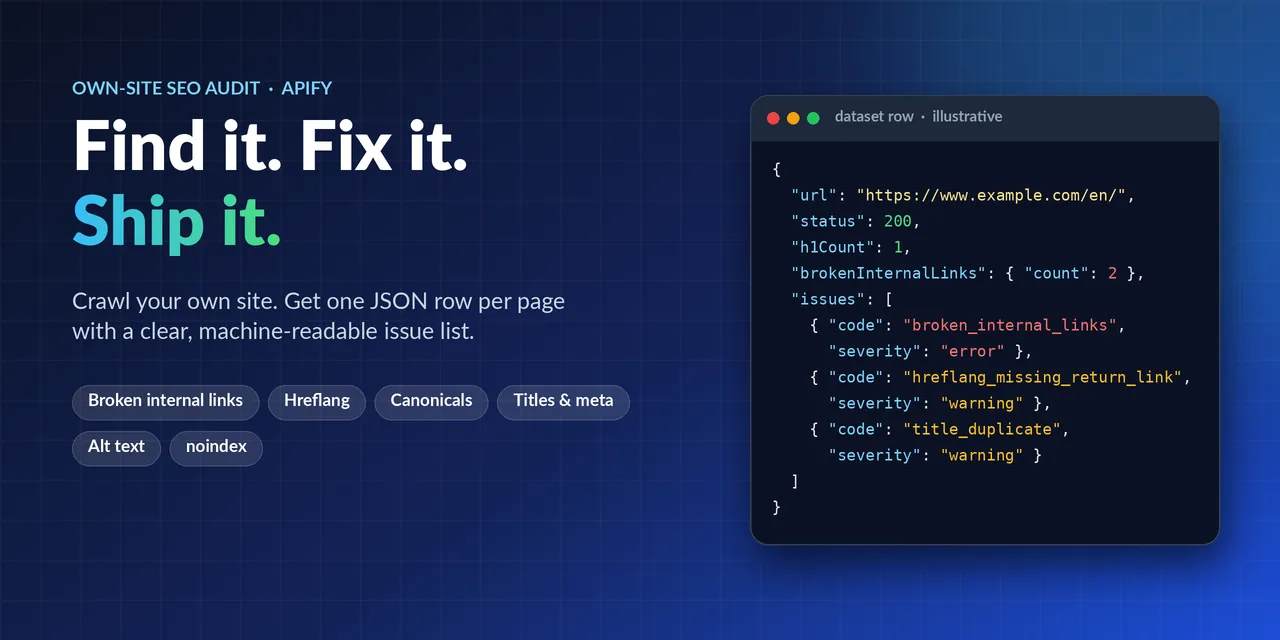
Crawl your own website and get one clean JSON row per page, with a machine-readable list of what is wrong. Run it before a release, after a migration, or on a schedule, and see missing titles, broken internal links, wrong canonicals, invalid hreflang and more in one dataset.
Publisher: Licensed Pipe - contact through the Apify actor page / issues tab.
Not an official SEO score and not a complete audit. Static HTML checks only: no JavaScript rendering, no Core Web Vitals, no rankings, no backlinks, no content-quality judgement. Rules such as "title over 60 characters" are common rules of thumb, not search-engine requirements. Pages that build their content only in the browser may look emptier than they are.
Who it is for
- Developers and technical teams - check every release before it goes live. Point the actor at a publicly reachable staging or production host you are allowed to audit and get a list of issues per URL.
- Agencies and freelancers - audit your clients' sites with their written permission and hand over structured data instead of screenshots.
- E-commerce and content sites - find duplicate titles, duplicate meta descriptions, missing canonicals,
noindexmistakes and broken internal links across hundreds of pages. - Multilingual sites - validate hreflang codes, self-references,
x-defaultand return links between language versions (return links are checked only among the pages crawled in the same run).
What you get
One flat dataset row per URL, plus a RUN_SUMMARY record with the limits applied and the reason if a run stopped early. Every row has an issues[] list with a code and a severity (error / warning / info) that scripts and dashboards can filter on.
Checks per page: HTTP status and redirect chain, title and meta-description length and duplicates, H1 and heading structure, canonical, noindex (meta tag and X-Robots-Tag), hreflang validity and return links (among pages crawled in the same run), lang, viewport, Open Graph / Twitter card presence, JSON-LD syntax (blocks and @type names only), image alt coverage, mixed content, thin content (word count only) and broken internal links (verified against the pages crawled in the same run).
Example issue codes: title_missing, title_duplicate, meta_description_missing, h1_missing, canonical_missing, canonical_other_host, noindex, hreflang_invalid_code, hreflang_missing_self_reference, hreflang_missing_return_link, images_missing_alt_some, mixed_content, json_ld_invalid_syntax, redirect_chain_3_hops, broken_internal_links, thin_content_under_150_words.
Illustrative example row (shortened, made-up values for example.com to show the shape - not output of a real run):
Quick start (3 steps)
- Enter your start URLs - e.g.
https://www.example.com/. Use the exact host (wwwand non-wwware different hosts). - Tick the ownership confirmation - you state that you own the site or have written permission to audit it. The actor will not run without it.
- Set the page limit and press Start - default 50 pages, maximum 500 per run. Open the dataset table view or export JSON, CSV or Excel.
Run it from code, on a schedule, or from your pipeline
The actor runs on the Apify platform, so the platform's standard features apply (see the Apify documentation; availability depends on your Apify plan):
- API - start runs and fetch dataset items over the Apify REST API: https://docs.apify.com/api/v2 (JavaScript client library: https://docs.apify.com/api/client/js).
- Schedules - run the audit at times you choose with cron expressions: https://docs.apify.com/platform/schedules
- Webhooks and integrations - react when a run succeeds or fails: https://docs.apify.com/platform/integrations
Use these to check a site after each deployment or every week, and fail your own pipeline if the dataset contains
errorseverity issues. Wiring this into a CI system is up to you; the actor itself only crawls and reports.
Pricing
Pay per event: one page-audited event per returned row (per audited page). The current price is always shown on the Pricing tab of this page. Runs that stop before returning any row (blocked, WAF, robots.txt unreachable) are not charged. maxPages caps what a run can return, so you control the maximum.
Apify platform usage (compute) is billed according to your Apify plan; this actor is slow rather than heavy because it waits at least 1 s between requests.
FAQ
Can I audit a site that is not mine, such as a client's? Only sites you own or have written permission to audit. You confirm this in the input and remain responsible for it. Does it render JavaScript or measure speed? No. It reads the static HTML the server returns. It does not measure Core Web Vitals, rankings or backlinks. Is the result an SEO score or a complete audit? No. It lists specific technical findings from a fixed set of checks. Some rules are rules of thumb, not requirements. Why is it slow on large sites? It sends one request at a time with at least 1 s between request starts per host, obeys robots.txt and Crawl-delay, and stops on repeated blocks. At 1 request per second, 500 pages take about 9 minutes or longer. Will it stop if my server blocks it? Yes: 3 consecutive 403/429 responses, WAF or bot challenges, repeated 5xx/network failures or an excessive Retry-After stop the run. It does not try to get around them. Does it store my page text or personal data? No page text is stored by default; see "Personal data" below. Can it audit pages behind a login, or localhost? No. It never logs in, and private, loopback, link-local and cloud-metadata addresses are refused. A staging site must be publicly reachable. Where do I report a problem? In the Issues tab of the actor page.
Responsible use - your responsibility
- Only audit sites you own or have written permission to audit. By ticking the confirmation box in the input you state that this applies. The actor sends real HTTP requests to the web servers you name; you are responsible for any terms of service, contract or law that applies to that.
- The actor fetches only the start URLs you supply and the same-host pages they link to (up to the page limit). It never follows links to other hosts, never logs in, never submits forms, never uses cookies, proxies or stealth techniques.
- Private, loopback, link-local and cloud-metadata addresses (for example
localhost,10.x,192.168.x,169.254.169.254) are refused.
Politeness and hard limits (enforced in code, not configurable above these values)
| rule | value |
|---|---|
| robots.txt | fetched once per host and obeyed (group for this actor's name, else *); Crawl-delay is honoured (delays above 30 s skip the host); robots.txt unreachable (5xx / network) or access denied (401/403) = treated as "disallow all" and reported; URLs disallowed by robots.txt are not requested and are reported as such |
| request rate | requests run one at a time, >= 1 s between request starts per host (more if robots.txt asks) |
| size | 50 pages by default, hard cap 500 pages per run; 20 start URLs, 3 hosts; response bodies capped at 2 MB |
| retries | max 3 per URL (network errors, 5xx, 408; 429/503 only after waiting), exponential backoff with jitter |
| Retry-After | honoured; if a server asks for more than 60 s the run stops instead of waiting |
| 403 / 429 | 3 consecutive 403/429 responses stop the run; a 403 is never retried |
| WAF / bot challenge | Cloudflare/Akamai/etc. challenge pages, cf-mitigated: challenge, empty HTTP 202 and CAPTCHA pages stop the run immediately - the actor does not try to get around them |
| total requests | hard ceiling per run (about 3x the page limit plus 40); max run time 15 min by default (1 h max) |
| identification | User-Agent contains the actor name, publisher, a contact pointer and the run id: <actor>/0.1 (Apify actor by Licensed Pipe; ...; contact ...; run <id>) |
| adaptive back-off / stop | after any 429/503 the gap grows (2 s, 4 s ... up to 10 s) for the rest of the run; 6 consecutive 5xx/network failures stop the run |
| Please do not start many runs against the same site at the same time. |
Personal data
- Page bodies are parsed in memory and discarded; no page text, e-mail addresses, phone numbers, names, cookies or form values are stored.
mailto:andtel:links are ignored. - The only free text kept are fields documented below, shortened, with anything that looks like an e-mail address or phone number masked. URLs are stored without their query string (replaced by a salted marker like
?q~1a2b3c4d; the real URL is still requested). SetkeepQueryStringsto keep them - only if they contain no personal data. - If your own pages contain personal data in titles or URLs, the dataset you create contains it too; you are the data controller of that dataset.
Input (see .actor/input_schema.json)
| field | meaning |
|---|---|
| startUrls | your pages, e.g. https://www.example.com/ (use the exact host - www and non-www are different hosts) |
| confirmOwnership | must be ticked |
| crawlInternalLinks / maxDepth | follow same-host links breadth-first (default on, depth 3) |
| maxPages | default 50, max 500 (each returned row is billed) |
| includeTitleAndDescriptionText | return title/description text (masked) - off by default; then only lengths and duplicate flags |
| keepQueryStrings | keep query strings in output URLs (off by default) |
| maxRuntimeSeconds | default 900, max 3600 |
Output
One dataset row per URL (url, finalUrl, status, redirects[], responseMs, title{length,text}, metaDescription{length,text}, h1Count, noindex, canonical, lang, hreflang[], openGraph, jsonLd, images, links, wordCount, brokenInternalLinks{count,examples,notChecked,redirecting}, issues[], auditedAt). URLs blocked by robots.txt appear as a row with the issue blocked_by_robots_not_fetched and no request was made. The key-value record RUN_SUMMARY lists the limits applied, robots.txt status per host, request/retry counts and, if the run stopped early, the reason.
Links to URLs that were not fetched because the page limit was reached are counted as notChecked, not as broken.
Legal notes, disclaimers and trademarks
- Ownership is your declaration, not something the actor can check. The actor cannot verify that you own or may audit a site. The confirmation box is your binding statement; you alone are responsible for having the right to send these requests (site terms, contract, applicable law such as the EU/Finnish rules on unauthorised access to information systems) and for complying with the Apify Terms of Service / Acceptable Use Policy. Do not use this actor against sites you do not control and have no permission for. The publisher may block abuse.
- Load protection is built in, but it does not replace permission. Sequential requests, at least 1 s apart (slower after any 429/503), robots.txt and Crawl-delay obeyed (401/403 on robots.txt counts as "disallow"), hard page and request ceilings, run-time limit, retries capped at 3, and the run stops on repeated 403/429, WAF challenges, repeated 5xx/network failures or an excessive Retry-After. Do not start several runs against the same site at the same time.
- Network safety. Only http(s) URLs on the hosts you supplied; private, loopback, link-local, metadata and other reserved addresses are refused at connection time (also against DNS rebinding); redirects leaving your hosts are reported, never followed; no cookies, logins or forms.
- Personal data (GDPR). By default the actor stores no page text. Query strings are replaced by a salted marker in all stored URLs (
keepQueryStringsis off by default). E-mail addresses, phone numbers, IBAN-like and Finnish personal-identity-code patterns are masked in any text it keeps. Names cannot be detected automatically, so URL paths and (if you enable title/description text) title and description may still contain personal data; if they do, you are the controller of the dataset you create and are responsible for its lawful use, retention and deletion. Requests sent to your server appear in its access logs (IP address of the Apify run, the User-Agent below). - Identification. The User-Agent names the actor, the publisher and the run id, and points to the Apify actor page for contact, so site operators can recognise and report the traffic.
- Not affiliated. This is an independent, unofficial tool. "Google", "WCAG" and "W3C" and other names are trademarks or marks of their respective owners; they are used only to describe what is checked and do not imply endorsement or affiliation. Findings are informational, not legal, compliance or professional advice and no guarantee of search ranking or conformance.
Limitations / disclaimer
Results are a snapshot of what the server returned to this actor's User-Agent at that time. The actor makes no guarantee about search-engine behaviour. Not legal or professional advice.


