

ATS Jobs Scraper
Pricing
from $1.10 / 1,000 job postings
ATS Jobs Scraper
Scrape open jobs from company career pages across Greenhouse, Lever, Ashby, Workday, SmartRecruiters, Recruitee and Personio. Name the companies, get 27 fields per role, and a monitoring mode that returns only what is new since your last run.
Pricing
from $1.10 / 1,000 job postings
Rating
0.0
(0)
Developer

Stable
Maintained by CommunityActor stats
0
Bookmarked
2
Total users
1
Monthly active users
a month ago
Last modified
Categories
Share
Name the companies you care about. Every open role on their career pages comes back as one table, fetched at the moment you press run — not served from an index built hours ago.
27 fields per role, identical columns across Greenhouse, Lever, Ashby and Workday, so a thousand companies sort in one spreadsheet. Nothing is inferred: a field the employer did not publish comes back empty rather than guessed.
Unofficial. This Actor is not affiliated with, endorsed by or sponsored by Greenhouse, Lever, Ashby or Workday. It reads only publicly available pages, does not log in and does not bypass any access control. All product names and trademarks belong to their respective owners.
You do not need to know which system a company uses
Type the company name. It is looked up on each system until a board answers.
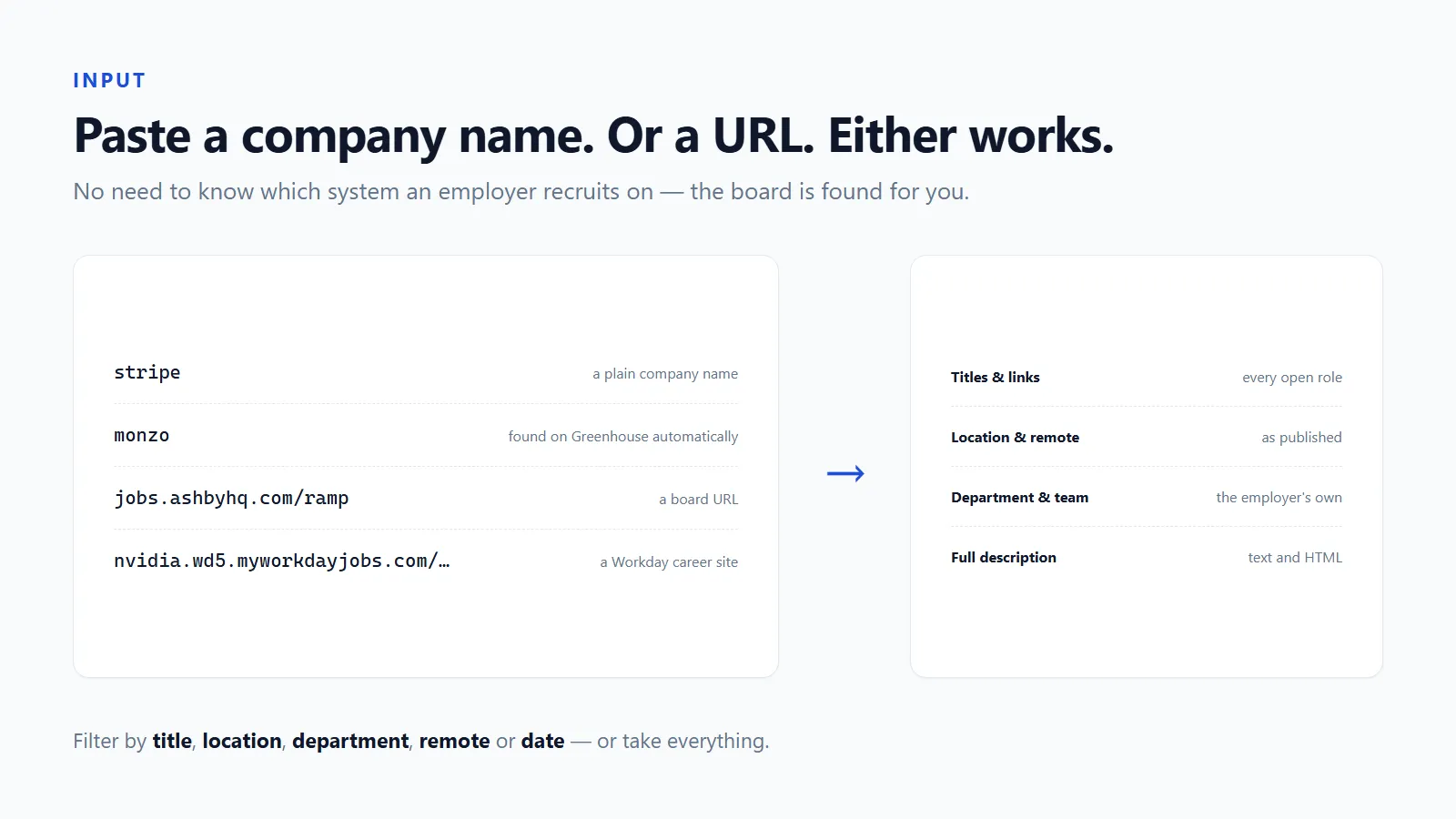
Names and URLs can be mixed freely. The run summary tells you which system each company turned out to be on — often the most useful thing in the output.
One exception, stated plainly: a Workday board is a host plus a tenant plus a site rather than a single name, so Workday needs the career-site URL. A bare name is looked up on the other three.
What one row looks like
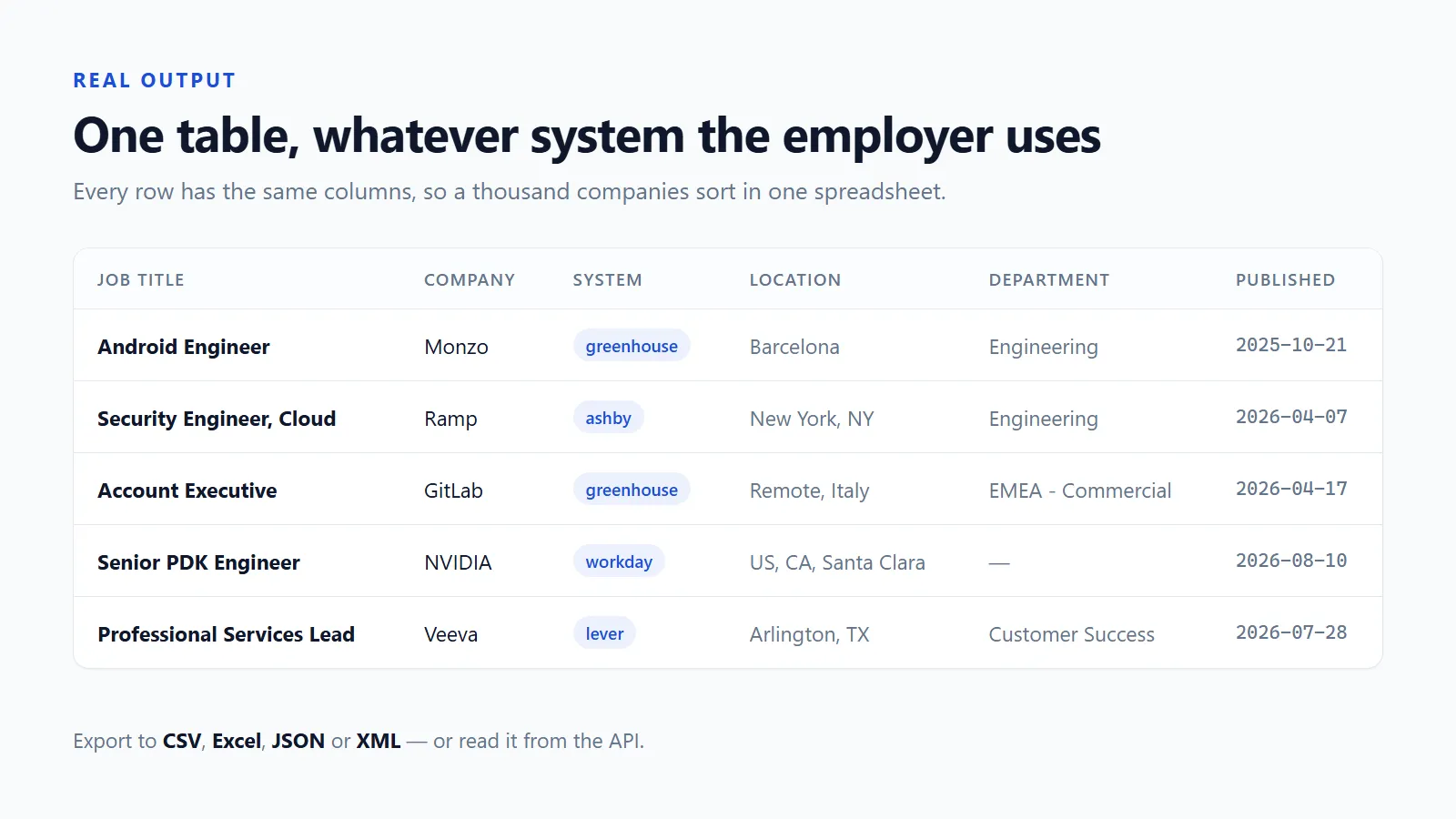
Rows are flat — no nested objects — so CSV and Excel exports open correctly with no post-processing.
Fields
All 27, and every one of them comes from the employer's own board.
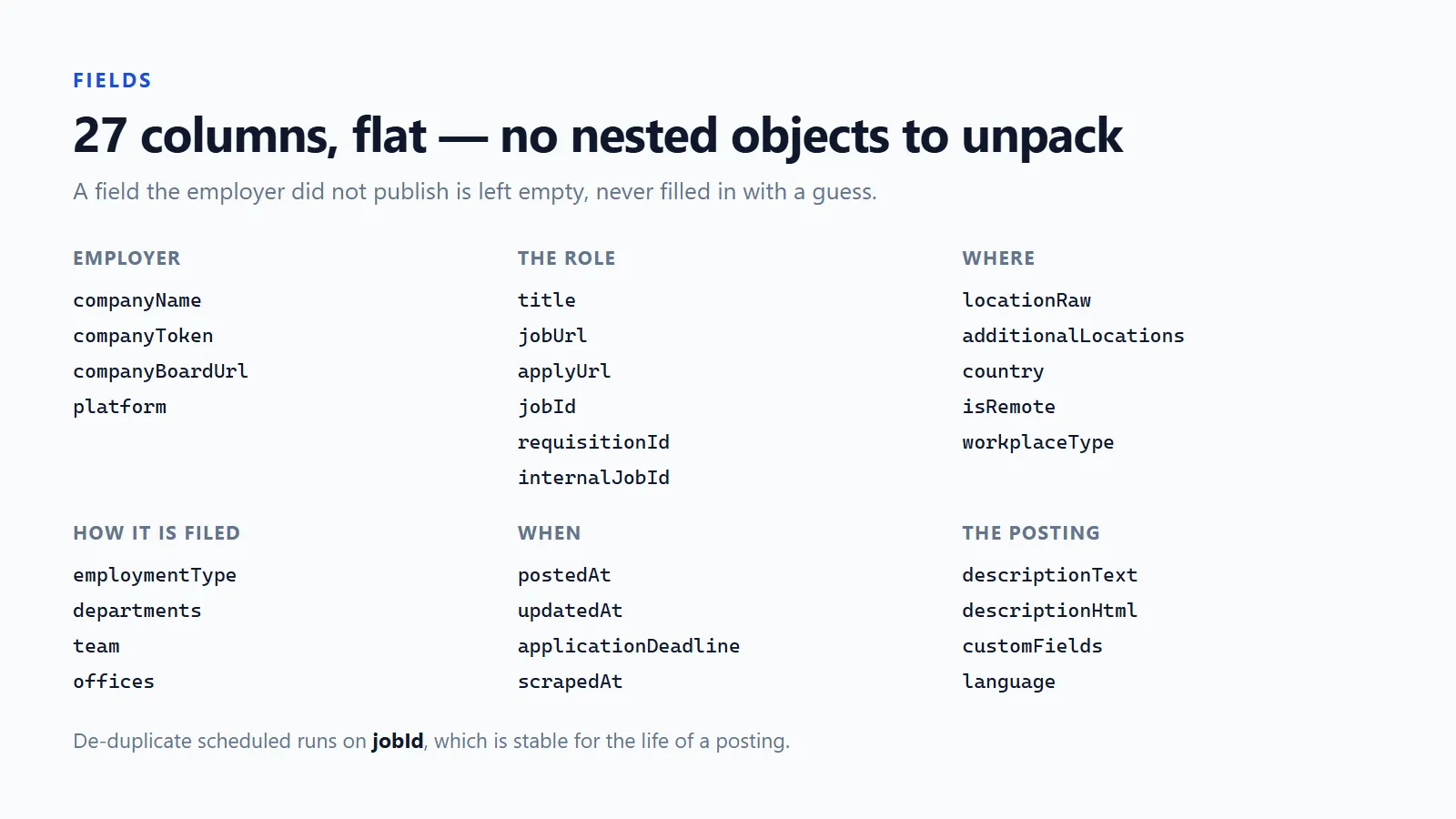
| Field | What it is |
|---|---|
platform | Which system the row came from |
companyToken, companyName, companyBoardUrl | The employer and their board |
title, jobUrl, applyUrl | The role, its page, and where the form is |
jobId, internalJobId, requisitionId | Identifiers, for de-duplicating across runs |
locationRaw, additionalLocations, country | Location as posted, plus any secondary ones |
isRemote, workplaceType | Remote status, and the employer's own term for it |
employmentType | Full time, contract, and so on, in the employer's wording |
departments, team, offices | How the employer files the role internally |
postedAt, updatedAt, applicationDeadline | Dates as published |
descriptionHtml, descriptionText | Full posting, as markup and as readable prose |
customFields | Fields this employer invented — pay band, travel, clearance. JSON |
language, scrapedAt | Posting language, and when the row was collected |
Not every system publishes every field. Greenhouse gives offices and an edit date; Ashby gives employment type and a real remote flag; Lever gives team and commitment; Workday gives country and a posting date. A field the system does not publish is left empty rather than filled in with a guess.
On isRemote: it is set when the posting says so — from the system's own
flag where there is one, otherwise from what the posting states. A job that never
mentions it comes back with the field missing rather than false. Guessing would
quietly mislabel a large part of any dataset.
Filters
Leave them all empty and you get everything. Set several and a job has to satisfy all of them.
- Job title contains / does not contain — keep
engineer, dropintern - Location contains — matched against the posting's location and the offices
- Department contains — Greenhouse, Lever and Ashby publish departments
- Remote only — keeps jobs that say they are remote
- First published after / Last updated after — for scheduled runs that collect only what changed
- Workday keyword — searches at the source, which is far quicker than pulling a two-thousand-role site and filtering afterwards
Plus maximum jobs in total and maximum jobs per company, so one large employer cannot fill the entire result.
Use cases
Track a list of target employers. Paste your companies, set Last updated after to yesterday, schedule it daily.
Find out which system a competitor recruits on. Run one company and read the
platform column in the run summary.
Build a hiring dataset for a market. A few hundred companies, filtered by location keyword, exported to CSV.
Watch one team. One company, Department contains Engineering, Job title
contains backend.
What to expect from a run
One board returns anywhere from a handful of roles to several hundred — on real companies we have measured 77 open roles at one employer and 556 at another. A run over a list of companies is the sum of their boards, so set maximum jobs in total while you are exploring rather than harvesting.
Three of the four systems hand over a whole board in a single request. Workday is the exception: its search results carry no descriptions and no real dates, so each role costs one extra request. A Workday-heavy list with descriptions switched on is the slow case, and the only one worth planning around.
Every run writes a summary to the key-value store: jobs found per system, which companies came back empty, and which lookups failed. So a partial result stays legible — you can always tell "this employer has no open roles" apart from "this employer could not be found".
How much does it cost?
You pay per job returned, at one flat rate — whatever the row turned out to contain and whichever system it came from.
A company whose board returns nothing costs nothing — including the lookups that had to fail before the right system was found — and the run stops the moment it reaches whatever spending cap you set on it.
The first run defaults to 100 jobs, which is deliberately small: enough to see whether the fields suit you before committing to a long company list.
Apify's free plan includes $5 of platform credit each month, so you can evaluate this without entering a card.
Every run writes a summary listing how many rows were billed.
Limits
- Only public boards are readable. Internal or unlisted postings are not — on Ashby, roles the company took off its own board are skipped.
- Workday is the slow one: its search results carry only a title, a location and relative text like "Posted Today", so descriptions and real dates need one extra request per role. With descriptions off, Workday rows have no posting date, and the field is left empty rather than invented.
- A company that has moved systems, or never used one of these four, is reported as a failed lookup in the run summary rather than silently returning nothing.
companyNameis only present where the system publishes it — Greenhouse and Workday do, Lever and Ashby do not.
Output
The Output tab has three views: Overview (title, company, system, location, dates, link), Descriptions (with the full text), and All fields. Export any of them to CSV, Excel, JSON or XML, or read them from the API.
The run summary in the key-value store lists jobs found per system, which companies were empty and which failed — so a partial result is always legible.
FAQ
How do I find a company's board? Open their careers page and paste the URL. If it is Greenhouse, Lever or Ashby you can also just type the company name.
What if a company is not on any of the four? It is listed as a failed lookup in the run summary and the rest of the run continues. Nothing is charged for a lookup that returned nothing.
Why is Workday slower than the rest? Its search results do not include descriptions or real dates, so each role needs a second request. The other three hand over a whole board at once.
Can I get salary data?
Only what the employer published. It appears in descriptionText when the
company wrote it there, and in customFields when they made it a field.
How do I avoid duplicates across scheduled runs?
De-duplicate on jobId, which is stable for the life of a posting.
How fresh is the data? It is fetched while your run is executing. There is no cached index in between, so a role published minutes ago appears in the next run, and one that was taken down stops appearing. That is the whole reason this reads boards directly.
Is it legal to collect job postings this way? These are public career pages that employers publish deliberately and want distributed as widely as possible — no login, no paywall and no personal data is involved. Only publicly visible postings are read, at a polite request rate. Check your own jurisdiction and the employer's terms if you plan to republish the descriptions, which remain the employer's copyright.
Does it work on the free plan? Yes. Apify's free plan includes $5 of monthly platform credit, and the default 100-job cap is sized so a first run fits inside it comfortably. Nothing degrades silently: when a spending cap is reached the run stops and says so in the summary.
Other scrapers we maintain
Same engine, same pricing model, same promise: flat rows, stated limits, and no charge for a row that came back empty.
| Google Maps Contact Scraper | Local businesses by category and city — phone, website, split address and opening hours. |
| Local Business Phone Scraper | The same job from directory sources, with Better Business Bureau accreditation on the row. |
| YouTube Influencer Scraper | Creators by niche, with the website and socials they publish and a subscriber filter. |
| Telegram Channel Messages Scraper | Posts from public channels — text, views, reactions and media links, no account needed. |
| Threads Hashtag Scraper | Threads posts by hashtag or keyword, with author, engagement and links. |
| RedNote Xiaohongshu Profile Scraper | Public RedNote creator profiles in bulk — followers, bio, IP location and their notes. |


