

Website Tech Stack Checker (Email Provider, DNS, SSL)
Pricing
from $0.55 / 1,000 domains
Website Tech Stack Checker (Email Provider, DNS, SSL)
Look up any list of domains in bulk: website tech stack (3,000+ technologies, with versions), email provider, SPF and DMARC policy, DNS provider, hosting, CDN, SSL days to expiry and registrar dates. Public DNS, RDAP and homepage data only. Invalid lines are free. $1 per 1,000 domains.
Pricing
from $0.55 / 1,000 domains
Rating
0.0
(0)
Developer

locaihost data
Maintained by CommunityActor stats
0
Bookmarked
2
Total users
1
Monthly active users
13 days ago
Last modified
Categories
Share
Paste a list of up to 5,000 domains and get one flat row per domain: the website's tech stack, email provider and email set-up (SPF, DMARC), DNS provider, hosting and CDN, SSL expiry and registrar dates, all from public DNS, registry and homepage data. No login, no API key.
- Segment accounts by technology: every Shopify store in your list, every company on Microsoft 365, every site on WordPress.
- Find a reason to get in touch: sites with no DMARC policy, no HTTPS redirect, or an SSL certificate expiring this month.
- Check a domain portfolio: SPF strictness (
-allvs~all), DMARC policy, certificate expiry and domain expiry across your brands or suppliers. - Measure market share: hosting, CMS and email-provider share across any list of companies.
- Enrich a CRM: add email provider, CMS and hosting columns to every account at once.
Quick start
Paste this into the JSON tab of the input and click Start:
You get 5 rows, usually in about 10 seconds. Bare domains, URLs (https://www.shopify.com/pricing) and email addresses (info@acme.com) all work: each becomes its registrable domain and duplicates are merged.
What data can I get?
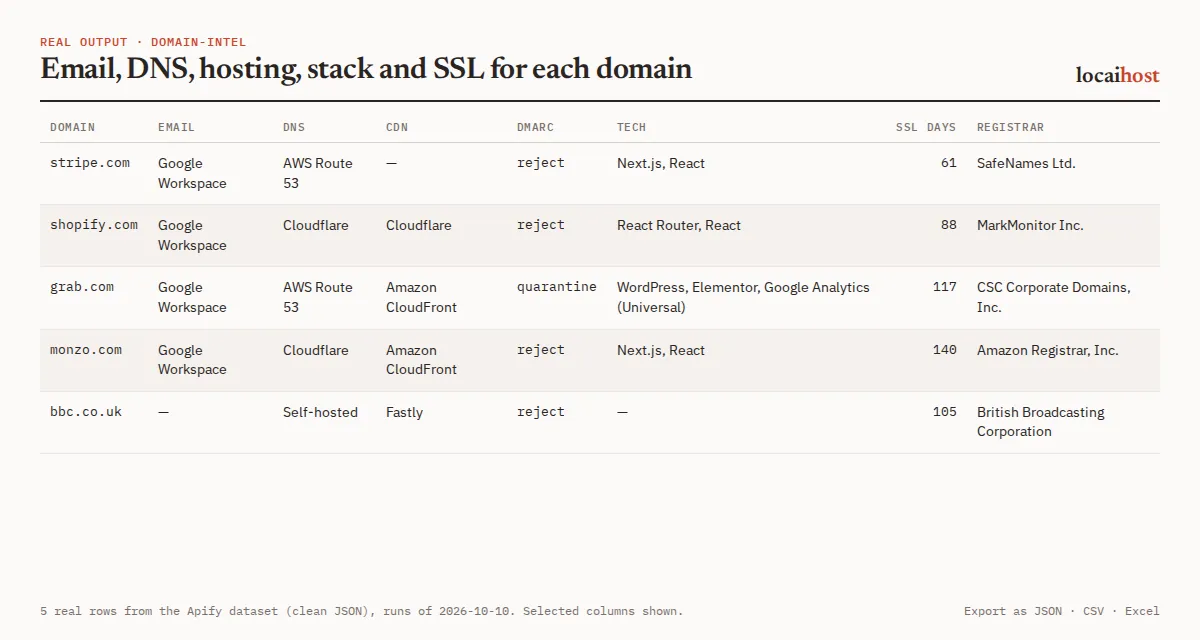
Detects 3,111 technologies in 100+ categories, including CMS, e-commerce platforms, analytics, ad pixels, JavaScript frameworks, web servers, hosting, CDNs, chat widgets and payments, with versions where the page shows them.
| Group | Fields |
|---|---|
| Domain | domain, input, registered, resolves, ipv4, ipv6, nameservers, dnsProvider |
| Email set-up | emailProvider, emailSecurityGateway (an inbound mail filter, if any), mxRecords, hasSpf, spfRecord, spfAll, hasDmarc, dmarcRecord, dmarcPolicy, dmarcSubdomainPolicy, dmarcPct, dmarcReportDomains, hasBimi, hasMtaSts, caaIssuers |
| Website | robotsAllowsHomepage, httpStatus, finalUrl, redirectCount, https, hsts, server, title, responseTimeMs, cdn, hosting |
| Tech stack | techStack (each with name, categories, version, confidence), techCategories, technologies, and quick columns cms, ecommerce, analytics, frameworks, chatWidgets, payments, marketing |
| SSL | sslIssuer, sslValidFrom, sslValidTo, sslDaysToExpiry, sslValid, sslError, tlsVersion |
| Registration | registrar, registrarIanaId, registeredAt, expiresAt, updatedAt, daysToDomainExpiry, domainStatus, dnssec (registrar only, never the owner's contact details) |
| Flags | errors (why a section couldn't be checked), checkedAt |
One real row (run on 2026-10-18 with the quick-start input, shortened; the DMARC report mailbox is masked by the Actor):
The dataset has three views (Overview, Email set-up, Tech stack) and exports to JSON, CSV, Excel or HTML. The run's SUMMARY record counts email providers, site platforms and hosting, domains without DMARC, SSL expiring within 30 days, and any skipped inputs or domains not reached.
How the fields are read
emailProvideris where the mailboxes live (Google Workspace, Microsoft 365, Zoho, Proton and others). When the MX record points at an inbound mail filter instead (Proofpoint, Mimecast, Cisco, Cloudflare, Barracuda, Broadcom and others), that goes inemailSecurityGateway, and the mailbox provider is filled in only if SPF reveals it (for examplespf.protection.outlook.com).dnsProvidercomes from the name servers (Cloudflare, AWS Route 53, Azure DNS, Google Cloud DNS, GoDaddy, Namecheap, NS1 and others, orSelf-hosted).cdnandhostingcome from headers, CNAME, reverse DNS and IP ranges, and arenullwhen not identifiable.techStackreads only what one homepage request returns: the HTML, script and stylesheet addresses, meta tags, response headers, cookie names (never their values), plus DNS records and the certificate issuer. Signals are product-specific (the vendor's script host, a header it sets, its markup); plain words in the page text never count, so a blog that writes about Shopify isn't tagged as a Shopify store.versionappears only when the page shows it, andconfidenceis 0-100 (100 = a signal only that product emits). The fingerprints come from an open-licence (MIT) technology set plus our own hand-checked rules.resolvesisnullonly if the address lookups themselves failed. A failed lookup givesnulland a reason inerrors, never a false "no DMARC".
How much does it cost?
You pay per domain row returned, however much was found for it. There is no charge for Apify platform usage on top.
| Row | Free and Starter | Scale | Business |
|---|---|---|---|
| Domain | $1.00 per 1,000 | $0.75 per 1,000 | $0.55 per 1,000 |
Plus $0.00005 per run start. Apify's free $5 monthly credit covers about 5,000 domains. Free-plan runs stop at 100 domains each; any paid Apify plan removes the cap.
What's free: invalid lines (IPs, internal names, bare suffixes like co.uk, junk), duplicates, domains whose analysis failed outright (listed in SUMMARY, no row), and domains not reached before the run's time limit. Domains that don't exist still return a row, so your list stays complete, and are charged. Turning sections off doesn't change the price. Set maxResults to stop after a number of domains, or Maximum cost per run in the run options to cap a run's spend.
Limits, stated up front
- Up to 5,000 unique domains per run; extra domains are skipped with a log warning, so split bigger lists.
- About 20 domains are checked in parallel (fewer on small memory settings), so 1,000 domains take minutes rather than seconds. A DNS-only run (website, SSL and registration off) is much faster. If the run's time limit comes first, it stops cleanly, keeps every row already checked and lists the rest in
SUMMARYasnotReached. - Homepage only. Tools injected later by JavaScript can't be seen, so an empty tech list means "nothing visible on the homepage".
- Some sites answer automated requests with a firewall page (Cloudflare "Just a moment…", Imperva, Sucuri and others) or a
403.errors.websitethen says so and the homepage-based tech fields stay empty rather than describing the firewall page. Such a site is usually fine in a browser. - Polite by design: each website gets one
robots.txtrequest, one homepage GET and one TLS handshake, one after another. Ifrobots.txtdisallows the homepage for our crawler (locaihost-domain-intel), the website and tech checks are skipped anderrors.websitesays so; DNS, email, SSL and registration still come back. - Some country domains (
.io,.de,.coand others) have no public RDAP service;errors.registrationsays so. - Subdomains are checked at the registrable domain (
shop.acme.co.ukbecomesacme.co.uk), using the full Public Suffix List, sowww.turkiye.gov.trstaysturkiye.gov.tr(fixed 18 Oct 2026; earlier builds cut some country suffixes togov.tr). Customer sites on platforms such as*.myshopify.comor*.github.ioare kept as they are.
Schedules
Every lookup is live at run time; nothing comes from a cached database. Save a portfolio as a task and add a monthly schedule under Schedules in Apify Console to watch SSL and domain expiry, or to catch accounts that switch email provider or CMS.
Integrations: API, n8n, Make and AI agents
API. Run it and get the rows back in one call (synchronous calls wait up to 5 minutes; use the asynchronous run endpoint for long lists):
Python, with pip install apify-client:
n8n, Make, Zapier, Google Sheets, Slack, webhooks. Apify's built-in integrations send each run's dataset wherever you need it, and from there into your CRM.
AI agents (MCP). Add this Actor to Claude, Cursor or any MCP client with https://mcp.apify.com/?tools=locaihost/domain-intel, then ask something like "Which of these companies use Google Workspace or Microsoft 365, and which have no DMARC policy? stripe.com, shopify.com, grab.com, monzo.com". For an email-only question, send "checkWebsite": false, "checkSsl": false, "checkRegistration": false: the run is faster and the price per domain is the same.
FAQ
How much does it cost to check a website's tech stack?
$1.00 per 1,000 domains on the Free and Starter plans, less on Scale and Business, whatever sections you turn on. A 1,000-account list costs $1.00 on Starter, plus the $0.00005 start fee. Apify's free $5 monthly credit covers about 5,000 domains.
Can I use it through the API or from Python?
Yes. Use the run-sync-get-dataset-items call or the Python example above, or Apify's JavaScript client. Every run's data is also available as JSON, CSV or Excel from its dataset.
Can I use it from an AI agent?
Yes. Through the Apify MCP server (https://mcp.apify.com/?tools=locaihost/domain-intel) any MCP client can pass a list of domains and read the rows back.
Is it legal to look up domains like this?
These are the same public lookups any mail server or browser makes: public DNS, one homepage request, the public certificate on port 443 and each registry's RDAP service (the modern replacement for WHOIS). The Actor respects robots.txt and never logs in. It never collects personal data: from RDAP it reads the registrar only, never registrant, admin, tech or abuse contacts; the mailbox part of DMARC report addresses is masked (mailto:***@vendor.com); and an email address you paste is reduced to its domain. You are responsible for how you use the results.
Why are the tech stack or registration fields empty?
The homepage may load its tools with JavaScript, or answer automated requests with a firewall page; errors.website says which. techStack can still list services seen in DNS records or the certificate. Some country domains have no public RDAP service, which errors.registration states.
What do the run messages mean?
| Message | Meaning |
|---|---|
errors.dns: "Domain does not exist in DNS (NXDOMAIN)" | A typo or dead domain. The row is still returned |
errors.website: "Homepage answered with a bot-protection page (Cloudflare) …" | The site's firewall served a challenge instead of the homepage. The site is probably up; tech and title are left empty |
errors.website: "Homepage answered HTTP 403 to our crawler …" | A firewall or rate limit refused the request. A browser may see the site normally |
errors.website: "Homepage not fetched: robots.txt answered HTTP 503 …" | robots.txt kept failing (often temporary rate limiting), so per RFC 9309 the homepage wasn't fetched. Try again later |
Done: 98 domains analysed, 2 invalid inputs skipped | Two lines weren't public domains. They're listed in SUMMARY and free |
No valid public domains in the input … | Nothing was a domain. The run succeeds and nothing is charged |
Only the first 5000 domains are processed per run | Split the list across runs |
(free-plan cap of 100 reached) | The free plan's per-run cap. Any paid plan removes it |
Stopped early to finish within the run's time limit: N domains were not checked and not charged … | Rows already checked are kept; raise the timeout or split the list |
More from locaihost data
- Website Traffic Checker: Similarweb traffic estimates for the same domains, with these email and website columns included.
- Company Enrichment by Domain: company name, description, logo, socials and role contact addresses from each site.
- SEO Site Audit: page-level SEO and AI-crawler checks for the sites that matter.
- Google Maps Leads Scraper: find local businesses, then check their websites and email set-up.
Did it help?
If this saved you time, a quick rating on the Store helps other people find it.
Support
Something not working, or a technology you need detected? Open an issue on the Issues tab: we answer issues within 24 hours.


