

SEO Site Audit (0-100 Score and Fix List)
Pricing
from $2.75 / 1,000 pages
SEO Site Audit (0-100 Score and Fix List)
Audit any website for SEO: a 0-100 score per page and per site, a ranked fix list with why and how, and page checks for title, meta description, h1, canonical, schema.org and alt text. Also AI crawler access (GPTBot, ClaudeBot), llms.txt and optional Core Web Vitals. $5 per 1,000 pages.
Pricing
from $2.75 / 1,000 pages
Rating
0.0
(0)
Developer

locaihost data
Maintained by CommunityActor stats
0
Bookmarked
2
Total users
1
Monthly active users
14 days ago
Last modified
Categories
Share
Audit any list of websites for SEO and website health: a 0-100 score for every site and page, a prioritised fix list in plain words (what's wrong, why it matters, how to fix it), on-page checks, which search and AI crawlers robots.txt allows, and optional Core Web Vitals, as JSON or CSV rows. No login; you only enter the sites.
- Agencies: monthly client reports. Run every client site on a schedule and send the site score and
topFixes(with why and how) as the to-do list. - Site owners: are we visible to AI search? See bot by bot whether robots.txt blocks OAI-SearchBot, PerplexityBot, Claude-SearchBot or ChatGPT-User, and whether the site has an
llms.txt. - Developers: catch a bad deploy. A weekly run flags an accidental
noindex, a missing<title>or a page that now returns 404. - Content teams: fix pages in priority order. Page scores and each page's
fixesshow thin pages, missing meta descriptions, multiple<h1>s and images without alt text. - Speed checks: add Core Web Vitals from Google's real-visitor data for each homepage, at no extra charge.
Quick start
Paste this into the JSON tab of the input and click Start:
You get up to 5 page rows per site plus one free summary row per site: 8 rows in about 10 seconds. Enter domains (example.com) or start URLs (https://example.com/blog); each site is crawled breadth-first from there through same-site links.
With Core Web Vitals for each homepage:
What data can I get?
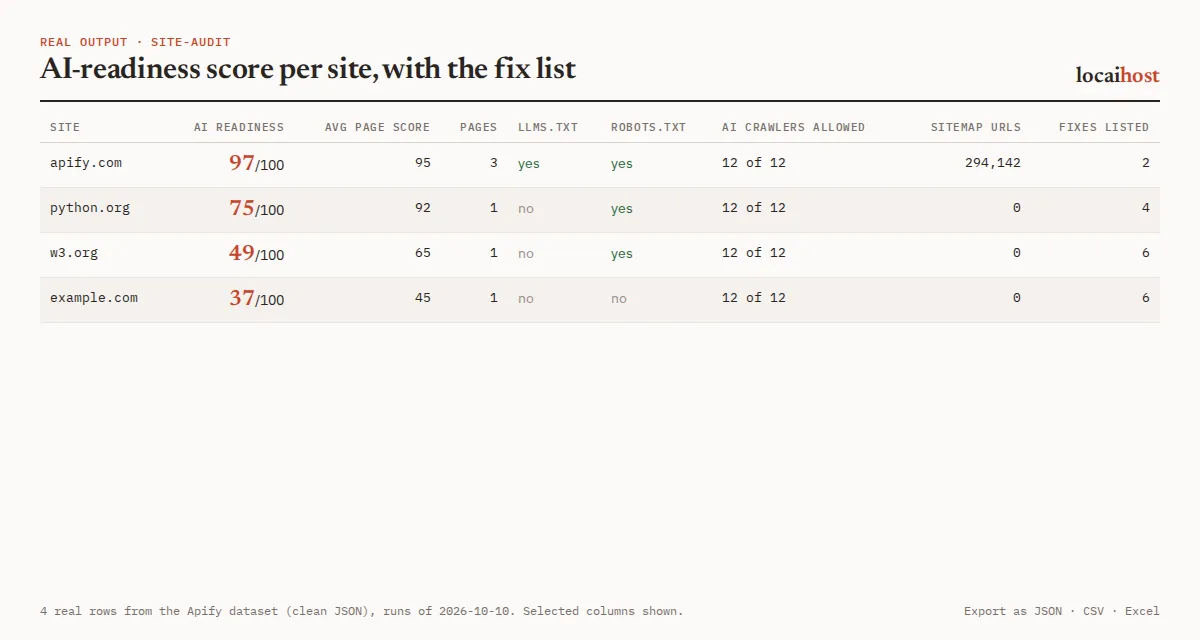
Two row types in one dataset: one site summary per site and one page row per page audited.
| Group | Fields |
|---|---|
| Site score | siteScore, siteScoreBand, averagePageScore, topFixes (priority, issue, why, how, pages), topIssues, recommendations |
| Site status | site, input, auditedSite, status, pagesAudited, pagesFailed, pagesBlockedByRobotsTxt, pagesTried, stoppedEarly, https |
| Crawlers and files | robotsTxtFound, aiCrawlers, aiCrawlersBlocked, aiReadinessScore, llmsTxt, sitemap, sitemapUrlCount, checkErrors |
| Page score | score, scoreBand, fixes, issues, charged, error |
| On-page SEO | title, titleLength, metaDescription, metaDescriptionLength, h1, h1Count, canonical, lang, openGraph, schemaTypes |
| Content | wordCount, imageCount, imagesWithoutAlt, internalLinkCount, externalLinkCount |
| Fetch | url, status, indexable, redirected, requestedUrl, responseTimeMs |
| Core Web Vitals | webVitals (only when Measure Core Web Vitals is on; see below) |
What the less obvious fields mean:
statuson a site row:audited,unreachable,http-error,blocked-by-robots,blocked-by-bot-protection(the site served a bot-protection page such as Cloudflare's "Just a moment" instead of its content),not-started-time-limit(free),incomplete-time-limit(its pages are in the dataset) oraudit-error(an error on our side; free).aiCrawlers:allowed,blockedorunknownfor 12 bots: GPTBot, OAI-SearchBot, ChatGPT-User, ClaudeBot, Claude-SearchBot, PerplexityBot, Google-Extended, Applebot-Extended, meta-externalagent, Amazonbot, CCBot and Bytespider (checked for/).unknownwhen robots.txt couldn't be read; it never guessesallowed.auditedSite: present when your start URL redirected to another host. Within the same site (python.orgtohttps://www.python.org) the audit continues there. A move to a different domain gets only its landing page audited.llmsTxt:true,false, ornullif the request failed.sitemapcomes from robots.txt or/sitemap.xmland/sitemap_index.xml;sitemapUrlCountincludes up to 10 child sitemaps of an index.checkErrors: which of robots.txt, llms.txt or the sitemap couldn't be checked, and why. Unknowns earn no points and are never reported as missing.indexableis false on a meta robots orX-Robots-Tagnoindex. Page text is stored as a reader sees it: line breaks and repeated spaces collapsed.
One real site row and one real page row (run on 2026-10-18; aiCrawlers trimmed to 4 of 12 bots, topFixes and fixes to 1):
The dataset has four views (Scores and fixes, Site summaries, Page audits, Everything) and exports to JSON, CSV, Excel or HTML.
How the scores work
Every score comes from the checks below with fixed weights, so the same pages always get the same score.
Page score (score) starts at 100 and loses points for each failed check. A page that answers an HTTP error scores 0.
| Check | Points lost | Fix priority |
|---|---|---|
| Page is set to noindex | 20 | 1 |
No <title> | 25 | 1 |
| Title shorter than 10 or longer than 65 characters | 5 | 3 |
| No meta description | 15 | 2 |
| Meta description shorter than 50 or longer than 170 characters | 5 | 3 |
No <h1> | 10 | 2 |
More than one <h1> | 3 | 3 |
| No canonical link | 5 | 3 |
| No schema.org structured data | 10 | 2 |
No lang on <html> | 5 | 3 |
| No Open Graph tags | 5 | 3 |
| Images without alt text | 2 per image, up to 10 | 3 |
| Under 150 words of text | 10 | 2 |
Site score (siteScore) adds up to 100:
| Part | Points |
|---|---|
| Average page score of the audited pages | 70 × average ÷ 100 |
| Pages that load without an HTTP error | 10 × share of pages that loaded |
| Served over HTTPS | 5 |
| robots.txt loads (with rules, or a plain 404) | 5 |
| XML sitemap found | 5 |
| AI answer engines allowed (OAI-SearchBot, ChatGPT-User, Claude-SearchBot, PerplexityBot) | 5 × share allowed |
Bands use Google Lighthouse's cut-offs: good 90-100, needs-work 50-89, poor 0-49.
Fix order. Priority 1 means the page or site can't be found or used (an error page, noindex, no title, a robots.txt that errors, no HTTPS). Priority 2 means it's found but shows or ranks worse than it could. Priority 3 is polish. Within a priority, fixes that cost more points (on more pages, for topFixes) come first. Core Web Vitals never change siteScore or score, but a homepage with slow Core Web Vitals adds a fix to topFixes.
AI-readiness score (aiReadinessScore): 60% of the average page score, plus 10 points each for an llms.txt, an XML sitemap and schema.org data on the start page, plus up to 10 points (2.5 per bot) for allowing the AI answer engines OAI-SearchBot, ChatGPT-User, Claude-SearchBot and PerplexityBot. Blocking training crawlers such as GPTBot or CCBot doesn't cost points; it's reported so you can see what you're blocking.
Core Web Vitals (optional)
Turn on Measure Core Web Vitals and the start page of each site (or up to 10 pages, with Pages to measure per site) gets a webVitals object from Google's PageSpeed Insights, tested as a mobile phone:
| Field | What it means |
|---|---|
assessment | Google's verdict for real visitors: the worst rating of LCP, INP and CLS (good, needs-improvement, poor). null when Chrome has too little data for the site |
lcpMs/lcpRating, inpMs/inpRating, cls/clsRating | Largest Contentful Paint, Interaction to Next Paint and Cumulative Layout Shift for real Chrome visitors over the last 28 days (75th percentile), with Google's rating for each |
fieldData | page = data for that exact page; origin = data for the whole site, used when the page has too few visits; none = not enough Chrome traffic for either |
performanceScore, labLcpMs, labCls, labTbtMs | Google's lab test: the Lighthouse performance score (0-100) and its measurements on a simulated mid-range phone |
speedFixes | Up to 3 of Lighthouse's biggest speed improvements, with the estimated time saved |
status, error | measured, failed (with the reason) or skipped (not tried, with the reason) |
The site summary's webVitals is the start page's. Google API key: add your own free key in Google API key (Google Cloud Console, APIs & Services, Credentials, then enable "PageSpeed Insights API"; about 2 minutes). Google currently refuses almost every request without a key; the run still finishes normally and each webVitals says why it wasn't measured. The key is stored encrypted, sent only to Google, and never written to the output or the log.
How much does it cost?
You pay per page audited. There is no charge for Apify platform usage on top.
| Row | Free and Starter | Scale | Business |
|---|---|---|---|
| Page audited | $5 per 1,000 | $3.75 per 1,000 | $2.75 per 1,000 |
Plus $0.00005 per run start. Apify's free $5 monthly credit covers about 1,000 pages. Free-plan runs stop at 50 charged pages each; any paid Apify plan removes the cap.
What's free: site summary rows; Core Web Vitals measurements; robots.txt, llms.txt and sitemap checks; pages that fail (timeout, DNS error, HTTP 3xx/4xx/5xx), which still appear with charged: false; bot-protection pages served instead of the real page; sites that can't be audited; and skipped inputs. Only real pages that answered 2xx are charged. To cap a run's spend, set Maximum cost per run in the run options, or Max pages in total in the input.
Example: an agency audits 20 client sites at 10 pages each in one run: 200 pages = $1.00 on Starter ($0.75 on Scale, $0.55 on Business).
Limits, stated up front
- Up to 500 pages per site (
maxPagesPerSite), crawled breadth-first through same-site links. PDFs, images, documents and media files are skipped. - No JavaScript rendering. Pages are analysed as the server sends them, which is also what most AI crawlers see. The optional Core Web Vitals lab test is the exception: Google loads the page in its own browser.
- It respects robots.txt for its own user agent (
locaihost-site-audit, following RFC 9309: a robots.txt that answers a server error means "crawl nothing"), fetches one page at a time per site, and never logs in. - Sites behind bot protection (Cloudflare, Imperva, Sucuri, DataDome) often can't be audited: the site row says
blocked-by-bot-protectionand nothing is charged. - Up to 4 sites are audited at once. A run that would outlast its timeout stops itself shortly before, keeps every page audited so far and still writes each site's summary.
- Each Core Web Vitals measurement takes about 15-40 seconds on Google's side; the crawl carries on meanwhile. With a key, up to 4 pages are measured at once; without one, one at a time. A missing or rejected key, or a used-up daily quota, stops further measurements for that run.
- Inputs that are IP addresses,
localhost, private or reserved names, or not http(s) are skipped (free), and listed in the run'sSUMMARYrecord.
Schedules
Save your site list as a task and add a weekly or monthly schedule under Schedules in Apify Console. Every run fetches robots.txt, llms.txt, the sitemap and the pages live, so it catches a new noindex, a newly blocked bot or a broken page soon after a deploy.
Integrations: API, n8n, Make and AI agents
API. Run it and get every row back in one call (synchronous runs time out after 5 minutes, so use the async run endpoint for many sites):
Python, with pip install apify-client:
n8n, Make, Zapier, Google Sheets, Slack, webhooks. Apify's built-in integrations send each run's dataset wherever you need it, for example each client's topFixes into a Google Sheet.
AI agents (MCP). Add this Actor to Claude, Cursor or any MCP client with https://mcp.apify.com/?tools=locaihost/site-audit, then ask something like "Can ChatGPT search and Perplexity crawl acme.com? Audit 10 pages and give me the site score and the top fixes." The site row holds siteScore, topFixes, the AI-readiness score and the bot-by-bot aiCrawlers map, so the agent can answer from that one row.
FAQ
How much does an SEO site audit cost?
$5 per 1,000 pages audited on the Free and Starter plans, less on Scale and Business. Site summaries, Core Web Vitals and failed pages are free. Apify's free $5 monthly credit covers about 1,000 pages.
Can I use it through the API or from Python?
Yes. Use the run-sync-get-dataset-items call or the Python example above, or Apify's JavaScript client. Every run's data is also available as JSON, CSV or Excel from its dataset.
Can I use it from an AI agent?
Yes. Through the Apify MCP server (https://mcp.apify.com/?tools=locaihost/site-audit) any MCP client can call it with {"urls": ["acme.com"], "maxPagesPerSite": 10} and read the site row back.
Is it legal to audit a website with this?
It reads only public pages, respects robots.txt for its own user agent, fetches one page at a time per site, and never logs in. It's meant for sites you own or manage, and your clients' sites. It records technical facts about pages (status codes, tags, counts and scores); the only page text it stores is the title, meta description and first <h1>, and it never extracts emails, phone numbers, names or form contents. You are responsible for how you use it.
Does blocking GPTBot lower my scores?
No. Only the AI answer engines (OAI-SearchBot, ChatGPT-User, Claude-SearchBot, PerplexityBot) count towards siteScore and aiReadinessScore. Blocking training crawlers is reported in aiCrawlersBlocked but costs no points.
Why are some fields empty?
A failed page has a null score and band, with the reason in error. A site that couldn't be audited has a null siteScore and aiReadinessScore (see status). aiCrawlers values are unknown when robots.txt answered with an error or a bot-protection page; checkErrors.robotsTxt says what happened. webVitals appears only when Core Web Vitals is on.
Why were fewer pages audited than I asked for?
The site has fewer same-site HTML links reachable from the start URL, robots.txt disallows the rest (pagesBlockedByRobotsTxt), or the run's time limit was reached (stoppedEarly: true). On the free plan, runs stop at 50 charged pages.
More from locaihost data
- Tech stack and email set-up lookup: DNS, email provider, SPF and DMARC, CDN and tech stack for the same domains.
- Website traffic checker: monthly visits and traffic sources for each site you audit.
- People Also Ask questions: the questions Google shows for your keywords, to plan content after the fixes.
- Website screenshots: a picture of each page for your client report.
Did it help?
If this saved you time, a quick rating on the Store helps other people find it.
Support
Something not working, or another check you need (hreflang, broken-link checking)? Open an issue on the Issues tab: we answer issues within 24 hours.


