

LinkedIn Ads Scraper No Cookies
Pricing
from $2.99 / 1,000 results
LinkedIn Ads Scraper No Cookies
The LinkedIn Ads Scraper extracts ads from the public LinkedIn Ad Library at scale, no login or cookies required. Search by keyword or advertiser, you get data for every matching ad: creative variants, images, the advertiser and paying entity, run dates, estimated impressions and audience targeting.
Pricing
from $2.99 / 1,000 results
Rating
5.0
(2)
Developer

Goldmine
Maintained by CommunityActor stats
0
Bookmarked
15
Total users
7
Monthly active users
5 days ago
Last modified
Categories
Share
LinkedIn Ads Scraper
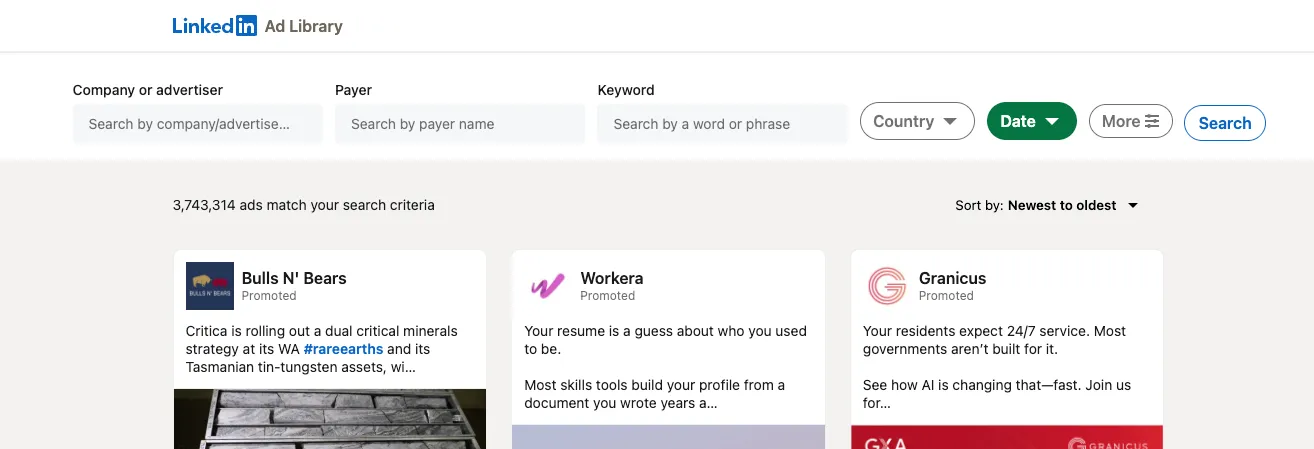
The LinkedIn Ads Scraper extracts ads from the LinkedIn Ad Library at scale. Search by keyword or advertiser and collect structured data for every matching ad: ad copy, creative variants, images, the advertiser and paying entity, run dates, estimated impressions and audience targeting. It is perfect for competitor research, ad creative inspiration, market analysis, brand monitoring and lead generation.
Features
- Search by Keyword or Advertiser: Find ads by a search term (e.g.
marketing) or by an advertiser / company name (e.g.Zalando). - Full Ad Details: Capture the complete ad copy, every creative variant, the advertiser, the paying entity, run dates, estimated impressions and targeting.
- Transparency Data: For regulated (e.g. EU) ads, collect total impressions, per-country impression breakdowns and the top targeting parameters selected by the advertiser.
- Creative Variants: Capture each variant of an ad with its body text, headline, call-to-action and image.
- Flexible Input: Provide ready-made LinkedIn Ad Library URLs or simply set a keyword / advertiser name and filters.
- Keeps Every Ad It Finds: If an ad's detail page cannot be loaded, the ad is still returned with its search-card data (advertiser, format, headline, body text, image) instead of being dropped.
Inputs
| Field | Type | Description | Default |
|---|---|---|---|
startUrls | Array | LinkedIn Ad Library search URLs (e.g. https://www.linkedin.com/ad-library/search?keyword=nike). | Optional |
keyword | String | Keyword to search ads for (e.g. marketing). | Optional |
advertiserName | String | Advertiser / company name to search ads for (e.g. Zalando). | Optional |
countries | Array | ISO country codes to filter ads by audience country (e.g. US, GB, DE). | Optional |
dateOption | Select | Last 30 days, current month, last year or current year. | last-30-days |
scrapeAdDetails | Boolean | Collect full data for each ad (variants, dates, impressions, targeting). | true |
maxItems | Integer | Maximum number of ads to scrape per search. | 5 |
proxyConfiguration | Object | Proxy settings. Datacenter proxies are the default and load this source more reliably than residential ones. | Apify Proxy (datacenter) |
Provide either
startUrlsor akeyword/advertiserName.
Example input:
Outputs
The scraper returns a dataset where each item is a single ad:
- Advertiser: Name, profile URL, logo and the paying entity.
- Creative: Ad format, headline, body text, image and every creative variant.
- Availability: The duration the ad ran, with parsed start and end dates.
- Performance: Estimated total impressions and a per-country impression breakdown (where available).
- Targeting: The top targeting parameters selected by the advertiser (where available).
- Context: The ad's Ad Library URL and the originating search URL.
Example Output:
How to Use
- Enter a keyword or advertiser name (or paste Ad Library search URLs).
- Choose your filters and how many ads to collect.
- Run the Actor and export the results as JSON, CSV or Excel.
Frequently Asked Questions (FAQ)
What is the LinkedIn Ad Library?
It is LinkedIn's public, free database of ads that have run on the platform. The LinkedIn Ads Scraper turns it into structured data you can export and analyze in bulk.
Do I need a LinkedIn account or login?
No. The scraper collects ads that are publicly available — no account, password or session is required.
How do I scrape all ads from a specific company?
Set the advertiserName input to the company's name (e.g. Zalando), or paste an Ad Library URL that targets that advertiser into startUrls.
How do I search ads by keyword?
Set the keyword input (e.g. marketing), or paste a keyword Ad Library URL into startUrls.
Why are some fields like impressions, run dates or targeting empty?
LinkedIn only publishes total impressions, per-country breakdowns and targeting for regulated ads (for example ads served in the EU). For other ads these fields are simply not available from the source, so they are returned as null or empty arrays.
Why are impressions returned as ranges instead of exact numbers?
LinkedIn publishes impressions as buckets (e.g. 5k-10k) rather than exact counts, so the scraper returns the range exactly as shown.
Does maxItems apply per search or globally?
Per search. If you pass three searches with maxItems: 50, you can collect up to 150 ads in total.
Can I filter by country or date range?
Yes. Use the countries input (ISO codes such as US, GB, DE) and the dateOption input (last 30 days, current month, last year or current year).
Do I need a proxy?
Yes. Apify datacenter proxies are enabled by default. LinkedIn blocks a share of proxy IPs on the Ad Library, and which kind it blocks changes from day to day, so the scraper also tries Apify residential proxies and uses whichever loads the pages. Keep the default unless you have a reason to change it. LinkedIn limits how often the Ad Library can be loaded, so the scraper spaces out its requests and a run can take a few minutes.
Why do some ads have no run dates, impressions or targeting?
Either LinkedIn does not publish those fields for the ad, or its detail page could not be loaded during the run. In the second case the ad is still returned with its search-card data, and the run log reports how many ads this happened to.
In what formats can I export the data?
Results can be exported as JSON, CSV, Excel, or accessed via the Apify API.
🧩 Part of the LinkedIn Scraper Suite
Scrapers for public LinkedIn data, from ads to jobs to company pages. Also try:
- LinkedIn Jobs Scraper: public LinkedIn job postings.
- LinkedIn Company Scraper Bulk: company pages in bulk, without cookies.
- LinkedIn Company Posts Scraper — recent posts of LinkedIn company pages with reactions, comments and media, without logging in
📬 Contact & Support
- Issues & feature requests: use the Issues tab on this Actor's page.
- Email:
coredev.dan@gmail.com - If this Actor saved you time, please leave a ⭐ rating on the Apify Store. It helps us keep it maintained.
Image Credit
Image credit: linkedin.com


