
LinkedIn Ads Library Scraper - No Cookies
Pricing
from $0.70 / 1,000 ad with its own page reads
LinkedIn Ads Library Scraper - No Cookies
Search the LinkedIn Ad Library by keyword or by advertiser and export every single ad with its headline, body copy, format, media and destination link. See exactly which campaigns your competitors are running now, and build creative swipe files for your paid social team, with no login needed.
Pricing
from $0.70 / 1,000 ad with its own page reads
Rating
0.0
(0)
Developer

SilentFlow
Maintained by CommunityActor stats
1
Bookmarked
19
Total users
1
Monthly active users
10 days ago
Last modified
Categories
Share
LinkedIn Ads Library Scraper
Turn LinkedIn's public Ad Library into structured data. Hundreds of ads per run, every ad format, no login required.
How it works
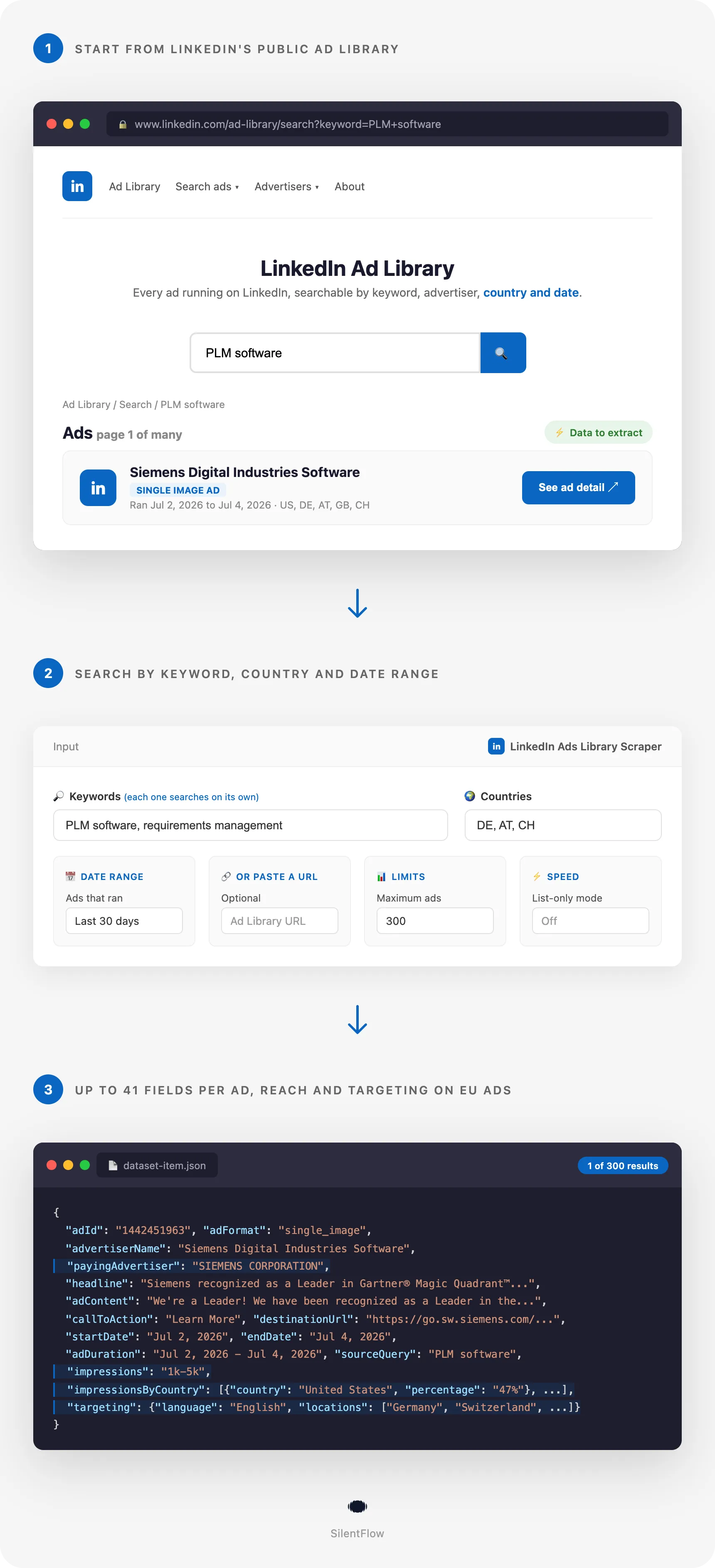
Give the scraper a keyword, a company, or a LinkedIn Ad Library URL. It reads LinkedIn's public Ad Library, keeps paginating well past the first page of results, and returns clean, structured records up to the number of ads you ask for. Every row carries the ad's own link, its format, the advertiser name and the keyword or company it came from, in list mode as in full mode. The body text comes with every ad that has one, and an ad built on a headline and an image alone has none to give. The headline, the button label and the landing link come with the ads LinkedIn shows them on, and the run dates, estimated impressions, per-country reach and audience targeting come with the ads that ran in the European Union. No account, no login, no API key.
One thing to know before you run it. LinkedIn publishes the run dates, the impressions and the audience only for ads that ran in the European Union. That is LinkedIn's own transparency rule, not a limit of this scraper: an ad aimed only at the US, Mexico or India comes back with its advertiser, its creative and, when LinkedIn shows it, its landing link, but no reach and no targeting, whichever tool you use. Billing follows what lands in your dataset: a row is charged the detail rate only when it actually carries something from the ad's own page (the dates, the impressions, the audience, the landing link, or the button text), and rows that come back with search-list data only are charged at the lower rate.
✨ Why teams choose this over other LinkedIn Ads scrapers
Spending hours scrolling the Ad Library and copy-pasting creatives into a spreadsheet? Running scrapers that stop at the first 24 results? Getting back rows that only have a name and a link?
- 📜 Go past the first page. Most scrapers stop at the two dozen ads LinkedIn shows before you scroll. This one keeps paginating past that wall, so one keyword can bring back hundreds of ads, up to the cap you set.
- 🎨 Every ad format, fully parsed. Single image, video, carousel, document, message, spotlight, thought-leader, and event ads each come back with the fields LinkedIn shows for that format: carousel slides, the video file link, the document manifest, the message sender, the featured member of a thought-leader ad.
- 🌍 Real reach and targeting data, and a clear line about which ads have it. For ads that ran in the European Union you get the estimated impressions, the breakdown by country, the paying advertiser, and the audience targeting (language and locations), straight from LinkedIn's transparency data. For every other ad LinkedIn publishes none of that, so those columns come back empty whichever tool you use, and this page tells you before your first run instead of after it.
- 🔗 Feed it whatever you have. Search by keyword, paste an advertiser's company URL, drop in a direct ad link, or paste a filtered Ad Library URL from your browser with countries and dates already set. All of them work in the same run.
- ⚡ Fast list mode when you need volume. Flip on the list-only option to skim a large batch quickly with the essentials, then run the full extraction on the ones that matter.
- 🔓 No login, no account risk. The scraper reads the public Ad Library only. You never connect a LinkedIn account and never share cookies.
🎯 What you can do with LinkedIn Ads data
| Team | What they build |
|---|---|
| Competitive intelligence | Track the ads a competitor is running, how their messaging shifts week to week, and which creatives they keep alive the longest |
| Performance marketing | Build a swipe file of headlines, hooks, and CTAs from the top advertisers in your category before launching your own campaigns |
| Demand generation | Find companies actively spending on LinkedIn ads and route them to sales as warm, growth-stage accounts |
| Brand and comms | Monitor how your brand, product names, and executives appear in paid LinkedIn content, including unauthorized use |
| Market research | Measure advertising intensity and targeting patterns across an industry using impressions and per-country reach |
| Agencies | Deliver competitor ad audits and creative benchmarks to clients without manually screenshotting the Ad Library |
📥 Input parameters
| Parameter | Type | Description |
|---|---|---|
keywords | array | Keywords to search. Each one paginates on its own, and they share the maxItems cap. |
startUrls | array | Paste any Ad Library URL: a filtered search, an ad detail page, or a company page. Filters in the URL are kept. |
advertiserUrls | array | Company URLs (e.g. https://www.linkedin.com/company/nvidia) to pull the company's ads from. |
adUrls | array | Direct ad URLs (https://www.linkedin.com/ad-library/detail/123456789). |
countries | array | ISO country codes to filter by, e.g. ["US", "GB", "DE"]. |
dateRange | string | last-30-days, this-month, this-year, last-year, or all-time. |
skipDetails | boolean | List-only mode for searches: faster and lighter, returns the essentials without opening each ad's own page. adUrls is the exception, a direct ad link has no search list to read, so its own page is always opened. |
maxItems | integer | Cap on the number of ads returned across all sources. |
proxy | object | Proxy settings. Residential recommended. |
Date range options
last-30-daysruns from the last 30 daysthis-month,this-year,last-yearfor calendar windowsall-timefor everything since the Ad Library launched in June 2023
📊 Output data
A single-image ad shown in the EU (full detail):
A video ad:
A document ad returns the document manifest in documentUrl and each page image in imageUrls. A carousel returns slides (headline plus image per slide). A message ad returns senderImageUrl. A thought-leader ad returns the featured member in thoughtLeaderName, thoughtLeaderUrl, and thoughtLeaderImageUrl.
🗂️ Data fields
Advertiser
| Field | Description |
|---|---|
advertiserName | Company or person running the ad |
advertiserId | LinkedIn company or profile id |
advertiserUrl | Advertiser's LinkedIn page |
advertiserLogo | Advertiser logo image |
advertiserTitle | Advertiser role or title where shown |
payingAdvertiser | Legal entity paying for the ad (EU transparency) |
Creative
| Field | Description |
|---|---|
adFormat | single_image, video, carousel, document, message, thought_leader, spotlight, event, text, follow_company |
adContent | Ad body text |
headline | Ad headline |
callToAction / ctas | CTA button label(s) |
destinationUrl | Landing page the ad links to |
mediaUrl / mediaType | Primary image or video cover, and its type |
videoUrl | Video file link (video ads) |
documentUrl / imageUrls | Document manifest and page images (document ads) |
slides | Headline and image per carousel slide |
senderImageUrl | Sender photo (message ads) |
thoughtLeaderName / thoughtLeaderJobTitle / thoughtLeaderUrl / thoughtLeaderImageUrl | Featured member (thought-leader ads) |
eventTime | Event date (event ads) |
Timing and reach
| Field | Description |
|---|---|
startDate / endDate / adDuration | When the ad ran |
countries | Target country codes |
impressions | Estimated impression range (EU) |
impressionsMin / impressionsMax | The same range as numbers, ready for spreadsheets and SQL |
impressionsByCountry | Reach breakdown by country (EU) |
targeting | Language and locations (EU) |
sourceQuery | The keyword or URL that produced this ad |
scrapedAt | Timestamp of the scrape |
🚀 Examples
Pull every AI ad from the last 30 days
Track a competitor's ad program
Skim a wide batch fast, then go deep later
Scrape a filtered Ad Library URL from your browser
Grab specific ads you already found
🤖 Copy to your AI assistant
Paste this block into Claude, ChatGPT, or Cursor to give it full context about this scraper:
💻 Integrations
Build a competitor ad-monitoring pipeline (Python)
Build a creative swipe file (JavaScript)
Export straight to CSV
📈 Performance
| Metric | Value |
|---|---|
| Ads per keyword | Hundreds, paginated well past the first page, capped by maxItems |
| Formats covered | 10 (image, video, carousel, document, message, thought-leader, spotlight, event, text, follow) |
| Login required | None |
| List-only mode | Yes, for high-volume skimming |
| Detail enrichment | Media, button label and landing link on the ads LinkedIn shows them on, plus reach and targeting on the ads that ran in the European Union |
| End of run | The run states how many ads landed in your dataset. When ad pages were opened it also states how many of those rows came back with more than the search list shows, and it counts the thinner rows under the reason that applies to each of them: the page was opened and LinkedIn showed nothing more, the page did not answer, or the run went out of time before reaching them; a run where no ad page was opened says so and states the total alone |
💾 Data export
Every run writes to an Apify dataset you can export as JSON, CSV, Excel, or XML from the dataset tab, or pull programmatically:
💡 Tips for best results
- Use several keywords for wide coverage. Each keyword paginates independently, so three related terms cover far more of a category than one.
- Paste browser URLs to keep your filters. If you built a filtered view in the Ad Library, paste that URL into
startUrlsand the countries and dates carry over. - Turn on list mode for discovery, off for depth. Skim with
skipDetailson to find what matters, then rerun the winners with it off to pick up the ad-page fields, reach and targeting included on EU ads. - Mix your sources in one run. Keywords, company URLs, pasted Ad Library URLs and direct ad links all run in the same job and the results are deduplicated by ad, so a competitor sweep and a category sweep can share a single run.
- If the run says it went out of time on some rows, ask for less. Each search gets a fixed slice of the run to read its ads, and the ads it did not reach arrive with their search-list data. Lower
maxItems, or split your keywords across two runs, and those same ads come back with their dates, reach and targeting. - Remember the European Union rule. Impressions, per-country reach, run dates, and targeting exist because of European transparency rules, so they appear on ads that ran in the European Union and on no others. If your research needs those numbers, search with European countries in the
countriesfilter and you will hit a far higher share of ads that carry them.
❓ FAQ
What does this scraper extract? Public ads from the LinkedIn Ad Library that match your input, up to the number you ask for: advertiser, creative, headline, body, CTA, destination, media, run dates, and, for EU ads, impressions and targeting.
Do I need a LinkedIn account? No. It reads the public Ad Library only. No login, no cookies, no API key.
How do I search? By keyword, by advertiser company URL, by direct ad URL, or by pasting a filtered Ad Library URL. You can mix all of these in one run.
How many ads can I get per keyword? It keeps paginating well past the first page, so a broad keyword can bring back hundreds of ads. maxItems caps the total. Each search also gets a fixed slice of the run to read its ads, so a very large ask is better split across two runs than crammed into one.
How fresh is the data? It reads the Ad Library live at run time, so results reflect what LinkedIn is showing right then.
Why are impressions and targeting missing on some ads? Two different things can leave those columns empty, and the run tells you which one applies to how many rows. Most often the ad's own page was opened and LinkedIn published nothing more: it only publishes the run dates, impressions, per-country reach, and targeting for ads that ran in the European Union, and on any other ad its own page shows the advertiser, the creative, the paying entity and sometimes the landing link, from any country you view it from, so no tool can return the missing fields. The other case is a run that went out of time on a search before reaching those ads, and the run says how many rows that was: ask for fewer ads, or give fewer searches in one run, and those rows come back filled in.
How do I know what a run delivered? The run says so when it ends: how many ads it collected and, when ad pages were opened, how many of those rows came back with something only the ad's own page shows, such as when it ran, how many people saw it, who it was aimed at, the button it showed, or the link it pointed to. The thinner rows are counted under the reason that is true of them, so you know whether to look elsewhere or to run again smaller. A pure list mode run opened no ad page, so it states the total alone. While it works, it shows how many ads have already landed in your dataset, so you can check the figure on screen against the results at any moment.
Can I scrape multiple companies or keywords at once? Yes. Pass several keywords, company URLs, or start URLs and they run in the same job, deduplicated by ad.
What is the difference between list mode and full mode? List mode (skipDetails) reads the search results only, which is faster and lighter. Full mode opens each ad's own page to add the full body and the media links, plus per-country reach and targeting on the ads that ran in the European Union. One exception in both modes: a direct ad link you paste into adUrls has no search result to read, so its own page is always opened.
How far back does the data go? The Ad Library holds ads that ran after June 2023, and ads stay visible for a year after their last impression.
Which ad formats are supported? All of them: single image, video, carousel, document, message, thought-leader, spotlight, event, text, and follow-company ads, each with its format-specific fields.
⚖️ Legal
This Actor extracts publicly available data from the LinkedIn Ad Library, which LinkedIn publishes for ad transparency. It does not bypass any login, paywall, or CAPTCHA. Users are responsible for complying with LinkedIn's terms of service and applicable data protection laws (GDPR, CCPA, and PIPL where relevant). When the output contains personal data, such as the name or photo of a person running or featured in an ad, users must handle it accordingly. The data returned is informational; verify accuracy for regulated use cases.
🔗 Related scrapers
- LinkedIn Jobs Scraper
- LinkedIn Profile Scraper
- LinkedIn Posts Scraper
- LinkedIn Sales Navigator Scraper
- LinkedIn Events Scraper
📬 Support
Need something this scraper doesn't do yet? We ship features fast.
- Feature requests go straight to our backlog
- Enterprise needs? We do custom integrations and high-volume plans
- Pricing questions? Check the Monetization tab on the actor page
Response time: usually under 24 hours.
Check out our other scrapers: silentflow on Apify


![Linkedin Ads Scraper [PPR] avatar](https://images.apifyusercontent.com/RYKqNsdIhGQi3kCkdRrFCrM3dQJ48T0mOJlrjc5vkgQ/rs:fill:76:76/cb:1/aHR0cHM6Ly9hcGlmeS1pbWFnZS11cGxvYWRzLXByb2QuczMudXMtZWFzdC0xLmFtYXpvbmF3cy5jb20vclJwVHlkc3FrSjl3aG1GYTItYWN0b3ItYU42dDhoT05QbkUxUmVtd0MtOE1OMFJPMjVYTC1saW5rZWRpbi5qcGc.webp)
