

Airbnb Market Data Scraper: Stay Prices & Geo
Pricing
from $0.70 / 1,000 unique market listings
Airbnb Market Data Scraper: Stay Prices & Geo
Export deduplicated Airbnb listings with stay-specific price snapshots, normalized property types, market summaries, and transparent coverage. Supported Tivat searches also include municipality, settlement, and coast-distance context.
Pricing
from $0.70 / 1,000 unique market listings
Rating
0.0
(0)
Developer

Luka
Maintained by CommunityActor stats
0
Bookmarked
2
Total users
1
Monthly active users
11 days ago
Last modified
Categories
Share
Use this Airbnb market data scraper to turn a destination and stay period into a deduplicated market dataset with comparable prices, normalized property types, free coverage evidence, and ready-to-use summaries. Tivat searches can also add municipality scope, settlement, and approximate coast-distance bands from the bundled geo layer.
Use this Actor as an Airbnb price scraper for short-term-rental market research, supply comparisons, pricing snapshots, location segmentation, and repeatable exports. Prices are search snapshots for the requested dates: every row keeps its price basis and whether the quote was verified. The Actor does not silently present a capped or filtered search as the complete market.
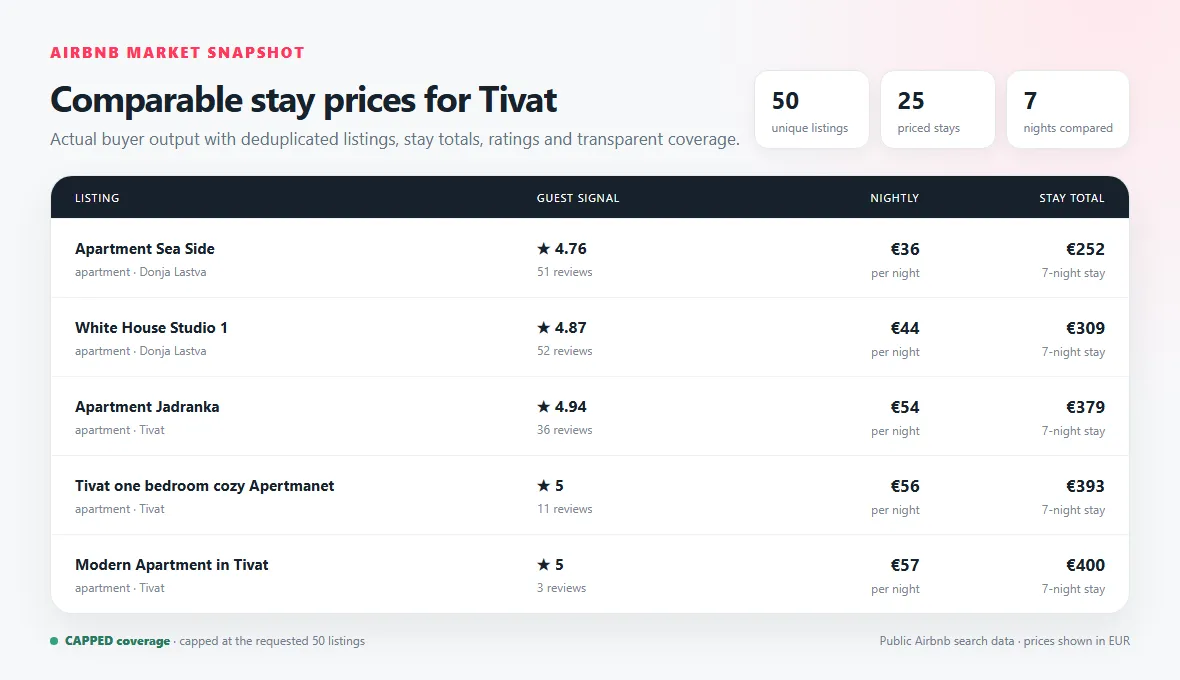
Actual Store-default output: 50 deduplicated Tivat listings, 25 priced seven-night stays, and explicit capped coverage.
🚀 Start in 60 seconds
Start with one destination, one result page, and ten listings:
With both exact dates blank, the Actor automatically checks a seven-night stay starting 30 days after the run date. The chosen dates are written to every listing row and to OUTPUT, so scheduled runs remain useful and transparent. Set both checkIn and checkOut when you need specific dates.
Run the Actor, then open the default dataset:
- Market shows one deduplicated listing per paid row.
- Market summaries & coverage shows free run evidence and aggregate rows.
OUTPUTin the default key-value store contains the machine-readable run report.
For a deeper search, raise maxPagesPerDateWindow before raising maxListings. The default of three pages is the balanced setting; one page keeps a quick scan's source work low.
🎯 Choose the right workflow
Exact stay — one comparable date window
Use dateMode: "exact_stay". Set both checkIn and checkOut for a specific trip, or leave both blank for the documented rolling seven-night default 30 days ahead. Every listing row keeps the effective dates, stay length, displayed stay total, derived nightly price, currency, and price basis.
This is the simplest choice when you need a market snapshot for a specific trip.
Sampled period — explore flexible dates cheaply
Use dateMode: "period_scan" with periodStart, periodEnd, and stayLengthNights, then keep periodCoverage: "sampled". The Actor checks selected eligible check-ins at the sampleEveryDays interval and always includes the first and last eligible check-in.
The result is the lowest observed price among sampled windows, not a claim that every possible date was checked.
Exhaustive period — compare every eligible check-in
Choose periodCoverage: "exhaustive" to generate every eligible check-in for the requested stay length. This can multiply the number of searches quickly. The complete destination × date-window × page plan must fit maxRequests before source work starts; the Actor fails clearly instead of silently dropping requested windows.
Tivat market segmentation
Keep marketBoundaryMode: "strict_supported_boundary" to exclude source spillover outside the supported Tivat municipality boundary before summaries. Choose source_search_results when you want to retain all source results; outside-market rows remain visible with their scope status and without invented Tivat geo fields.
Settlement and coast-distance filters apply only where the versioned geo package can make a supported assignment. Source coordinates may be approximate, so distance bands are analysis signals rather than exact addresses or walking routes.
📦 What you get
The default dataset contains three record types.
| Record | What it contains | Charge |
|---|---|---|
listing | Stable listing identity, URL, source and normalized types, capacity, rating, host signals, requested-stay prices, geo context, and provenance | listing_result |
coverage | Pages, caps, duplicates, filters, supported-market counts, geo assignment rates, warnings, and billing counts | Free |
summary | Price and supply aggregates for the delivered rows, segmented by supported dimensions | Free |
A representative listing row looks like this:
Missing source values remain null; they are not converted to zero or guessed. Listing rows are deduplicated by canonical listing identity before delivery and charging.
🎛️ Input guide
Search, dates, and guests
| Input | Use it when | Work and result impact |
|---|---|---|
locations | You need one or more destination searches | Each destination adds date-window and page work |
dateMode | You are choosing exact dates or a flexible period | Period scans can create many more source searches |
checkIn, checkOut | You need specific exact-stay dates | Set both together; if both are blank, the Actor uses a seven-night stay 30 days ahead |
periodStart, periodEnd, stayLengthNights | You need flexible-date comparison | All three define the generated stay windows |
periodCoverage, sampleEveryDays | You need sampled or exhaustive coverage | Exhaustive checks every eligible check-in and costs more work |
adults, children, infants, pets | Availability must match the party | Sent with every generated search window |
Filters and geo controls
Price, beds, bedrooms, bathrooms, Superhost, and Instant Book controls narrow the source result where supported. Keyword, amenity, normalized-class, rating, and review-count controls are deterministic post-filters; the free coverage row reports their effect.
keywordsAny needs one matching phrase, keywordsAll needs every phrase, and excludeKeywords removes matches. keywordFields controls which extracted fields are searched.
For Tivat, settlements and coastDistanceBands use the supported geo package. Unsupported destinations remain searchable but do not receive a silent Tivat assignment.
Limits and coverage
maxListingscaps unique paid listing rows across the whole run.maxPagesPerDateWindowcontrols search depth for each destination and date window.pageConcurrencyparallelizes later cursor pages while preserving deterministic output order.maxRequests,maxRuntimeSecs, andmaxSourceBytesstop new work before a configured buyer-visible safety ceiling is exceeded.requestTimeoutSecsbounds one live request. A timeout becomes explicit partial or failed coverage, not a confirmed empty market.
💰 Pricing
This Actor uses pay per event. The prices below are the current configured Store prices.
| Apify plan | Per delivered listing | Per 1,000 delivered listings |
|---|---|---|
| Free | $0.00190 | $1.90 |
| Bronze | $0.00150 | $1.50 |
| Silver | $0.00110 | $1.10 |
| Gold | $0.00070 | $0.70 |
| Platinum | $0.00050 | $0.50 |
| Diamond | $0.00022 | $0.22 |
Free example: 50 delivered listings cost $0.005 + (50 × $0.00190) = $0.1000.
Gold example: the same 50 listings cost $0.005 + (50 × $0.00070) = $0.0400.
Gold reduces the listing event by exactly $0.00120 per row, or $1.20 per 1,000, compared with Free. That is a 63.16% unit discount. At 50 delivered listings, the fixed start makes the complete-run saving $0.0600, or 60.00%.
Coverage rows, summary rows, duplicates, filtered-out rows, and suppressed rows are free. A listing is charged only when the unique useful row is accepted and written to the default dataset. The one-time start is charged only after the Actor receives usable source listings or positively proves an exhausted empty result. A blocked, failed, challenged, or unverified no-source run does not charge the start. Your Apify run-level maximum charge can still stop work or delivery earlier; coverage records the resulting cap.
✅ Coverage you can trust
Coverage describes the result that was actually observed:
search_pages_exhaustedmeans the Actor reached the end advertised by the source for this exact query snapshot. It does not claim every listing in the wider geographic market was exposed.capped_by_page_limitmeans another page was available when the configured page limit stopped the search.capped_by_delivery_limitmeansmaxListingsstopped delivery.capped_by_charge_limitmeans the buyer run-charge ceiling stopped more paid rows; no uncharged listing row is delivered.partial_source_errormeans at least part of the requested source work could not be verified.
The coverage record also reports duplicates removed, rows rejected by filters, date partitions, geo assignment rates, supported-market spillover, and intended versus charged PPE events. A cap, block, timeout, or source error is never relabeled as verified empty inventory.
🔌 API and automation
Use the same input through the Apify API. Store your Actor ID and token as environment variables rather than hard-coding them:
After the run finishes, read defaultDatasetId from the run and fetch:
For scheduled market tracking, keep destination, date logic, filters, currency, locale, and geo settings stable so snapshots remain comparable. The Actor itself does not create schedules.
❓ FAQ and support
Are the prices checkout-verified totals?
No. They are source-search snapshots for the requested stay. Output preserves priceBasis, quoteVerified, dates, stay total, nights, and currency so downstream users can apply the correct interpretation.
Why did I receive fewer listings than requested?
Open the free coverage row. The source may have ended, a page or delivery cap may have been reached, geo or text filters may have removed rows, duplicates may have collapsed, or a request may have failed.
Does every destination get settlement and coast-distance data?
No. The current versioned municipality, settlement, and coast package is for the supported Tivat market. Other destinations still return market rows without invented local geo assignments.
What should I include in a support report?
Include the Apify run ID, input with tokens or secrets removed, the expected result, the observed result, and the relevant coverage row or OUTPUT report. That is enough to reproduce most problems without sharing private credentials.


