

Booking.com Hotel Scraper: Search & Stay Prices
Pricing
from $1.24 / 1,000 fast property results
Booking.com Hotel Scraper: Search & Stay Prices
Export deduplicated Booking.com search-card properties with stay totals, derived nightly prices, ratings, availability, stable IDs, and transparent coverage.

Use this Booking.com hotel scraper to search by destination or public URL and export deduplicated property rows with stay-price context, ratings, availability, and transparent coverage. The active contract is a fast search-card export: it is designed for market scans and property shortlists without silently charging for a hidden detail-page stage.
Use this Booking scraper for hotel and accommodation research, price snapshots, destination supply analysis, lead lists, and repeatable search exports. Each property row preserves the requested stay and the exact price basis exposed by the search result. Search-card prices are not presented as checkout-verified quotes.
🚀 Start in 60 seconds
Run a small destination search first:
After the run finishes, open:
- Property overview for the core property, rating, availability, and stay-price fields.
- Full export for every schema-backed search-card field and provenance value.
- Coverage & run summary for the free run-level and per-target evidence.
OUTPUTin the default key-value store for the machine-readable run report.
The first target can take longer than later pages in the same run. Keep the first test to one destination and one page before increasing pages, flexible dates, or result limits.
🎯 Choose the right workflow
Destination search
Use destination for a city, region, country, landmark, or property-name query. Add both checkIn and checkOut when the result must include stay-specific price and availability context.
This is the simplest workflow for market research and destination supply scans.
Search-result or property URLs
Use startUrls when you already have a public Booking.com search-result or property URL. URLs take precedence over destination. Explicit date and guest fields in the Actor input take precedence over matching query parameters already present in a URL.
Duplicate properties found across localized URLs or date windows collapse to stable canonical property rows before delivery and charging. stablePropertyKey is derived from the locale-neutral canonical Booking path, with a numeric-ID fallback only when no canonical URL is exposed.
Flexible stay comparison
Set flexibleDays to create shifted stay searches around the exact dates. Each output row keeps the date window that produced it. The workload grows quickly: ±7 days can create up to 15 targets for one base search, before pagination.
Raise maxRequests only after calculating enough room for URLs or destinations × date targets × pages, plus bounded retries.
One active extraction mode
The current product contract exposes only fast, which returns proven search-card property data. The compatibility key remains accepted by the runtime but is hidden in the UI because there is no buyer-facing mode choice. Full export is a dataset view with all available columns; it is not a separate detail-page scraping mode.
📦 What you get
The default dataset contains two record types.
| Record | What it contains | Charge |
|---|---|---|
property | Stable identity, canonical URL, name, location, stars, guest score, availability, displayed stay price, price basis, selected room text when exposed, search context, and warnings | fast_property_result |
coverage | Per-target outcome, source observations, duplicates, pages, caps, requests, retries, runtime, warnings, and PPE counts | Free |
A representative property row:
Missing source values remain null. The Actor does not invent coordinates, amenities, taxes, policies, room details, or checkout verification when they are absent from the active search-card source.
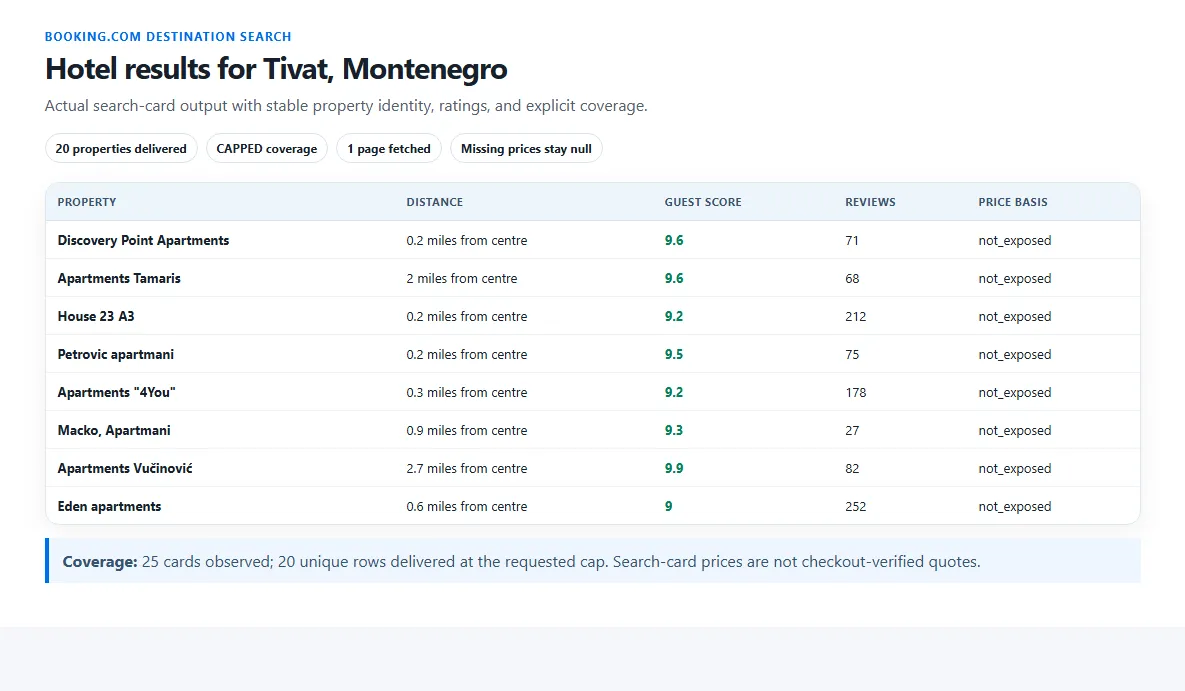
The screenshot shows real rows from a successful verified run. It is an output example, not a completeness or live-price guarantee.
🎛️ Input guide
Search target and delivery
| Input | Use it when | Work and result impact |
|---|---|---|
destination | You need a text search | Ignored when startUrls is not empty |
startUrls | You have up to ten public Booking.com URLs | Each URL can add date targets and pages |
maxProperties | You want a bounded export size | Global limit across all targets and flexible windows |
Dates and guests
checkIn and checkOut are optional but must be supplied together. adults and rooms default to two and one. When children is greater than zero, childrenAges must contain exactly one age from 0 to 17 for each child, for example [4, 9] for two children.
flexibleDays multiplies the number of explicit stay searches. Keep exact dates when you want the lowest-work run.
Property filters
Property type, official stars, guest score, displayed price, and sort order are sent as supported Booking.com search filters. Empty optional filters keep the wider result set. The selected currency and locale control source display context, while each row preserves the values actually returned.
Limits and coverage
maxPagesPerTargetcaps search depth for every destination, URL, and date target.maxRequestsincludes search pages and bounded retries.maxRuntimeSecsstops new work at the wall-clock ceiling.requestTimeoutSecsbounds one request; a timeout becomes partial or failed coverage.maxRetriesapplies only to retryable temporary source and network failures. Every retry counts againstmaxRequests.
💰 Pricing
This Actor uses pay per event. The prices below are the current configured Store prices.
actor_start is a flat $0.02 once per run, charged only after the source produced a usable collection or positively verified an exhausted empty search. A blocked, failed, or unverified empty source attempt does not charge the start event.
| Apify tier | Per delivered property | Per 1,000 properties | Total for 1,000 properties |
|---|---|---|---|
| Free | $0.00139 | $1.390 | $1.410 |
| Bronze | $0.00134 | $1.340 | $1.360 |
| Silver | $0.00129 | $1.290 | $1.310 |
| Gold | $0.00124 | $1.240 | $1.260 |
| Platinum | $0.00119 | $1.190 | $1.210 |
| Diamond | $0.00114 | $1.140 | $1.160 |
Example on the Free tier: 20 delivered property rows cost $0.02 + (20 × $0.00139) = $0.0478.
At 1,000 delivered properties, Gold lowers the property-row price by 10.8% and the complete event charge from $1.410 to $1.260, a 10.6% total reduction after the flat start. Diamond lowers the row price by 18.0% and the complete event charge by 17.7% at the same volume.
Coverage rows, duplicate observations, filtered rows, failed targets, and suppressed rows are free. A property is charged only when the unique useful row is accepted and written to the default dataset. Raising page or request limits can increase platform work even when deduplication keeps the delivered row count unchanged.
✅ Coverage you can trust
The free coverage row separates delivery size from source completeness.
COMPLETErequires positive evidence that every advertised page for the requested target was exhausted.CAPPEDmeans a delivery, page, request, runtime, cost, or buyer-charge ceiling stopped the requested work.PARTIALmeans some target work succeeded but at least one requested part could not be verified.BLOCKEDorFAILEDremains explicit and is never relabeled as a successful empty search.EMPTY_CONFIRMEDrequires positive evidence that the requested source search returned no matching property.
Per-target evidence reports target precedence, pages fetched, raw observations, unique properties, duplicates removed, requests, retries, delivery cap, warnings, and billing counts. A search-card result can report availability and a displayed price without claiming checkout verification.
🔌 API and automation
Use the same input through the Apify API. Keep the Actor ID and token in environment variables:
After completion, read defaultDatasetId from the run and fetch:
For recurring market snapshots, keep destination or URLs, stay dates, guests, filters, currency, and locale stable. The Actor does not create schedules itself.
⚠️ Not yet supported
- Checkout-verified final prices
- Full property-detail pages and policy/room extraction
- CAPTCHA solving or login-only data
❓ FAQ and support
Does Full export scrape full property detail pages?
No. Full export means all columns available from the active fast search-card contract. It does not activate a hidden detail-page mode.
Are prices checkout-verified?
No. The row keeps priceBasis, stay dates, nights, displayed total, derived nightly amount, currency, and checkoutVerified so downstream users can interpret the snapshot correctly.
Why did I receive fewer properties than maxProperties?
Open Coverage & run summary. The source may have ended, filters or deduplication may have reduced rows, a page or safety ceiling may have stopped work, or a target may have failed.
What should I include in a support report?
Include the Apify run ID, input with tokens or secrets removed, the expected and observed result, and the relevant coverage row or OUTPUT report. Never send an API token in a support message.


