

Workable Jobs Scraper & Change Monitor
Pricing
from $0.81 / 1,000 job records
Workable Jobs Scraper & Change Monitor
Find public Workable jobs by role and location, export complete job details, and track changes across repeat searches and company watch lists.

Turn Workable searches and company job pages into a useful job catalogue, then keep it current with repeat checks.
- Find jobs: search by role, location, posting date and work arrangement.
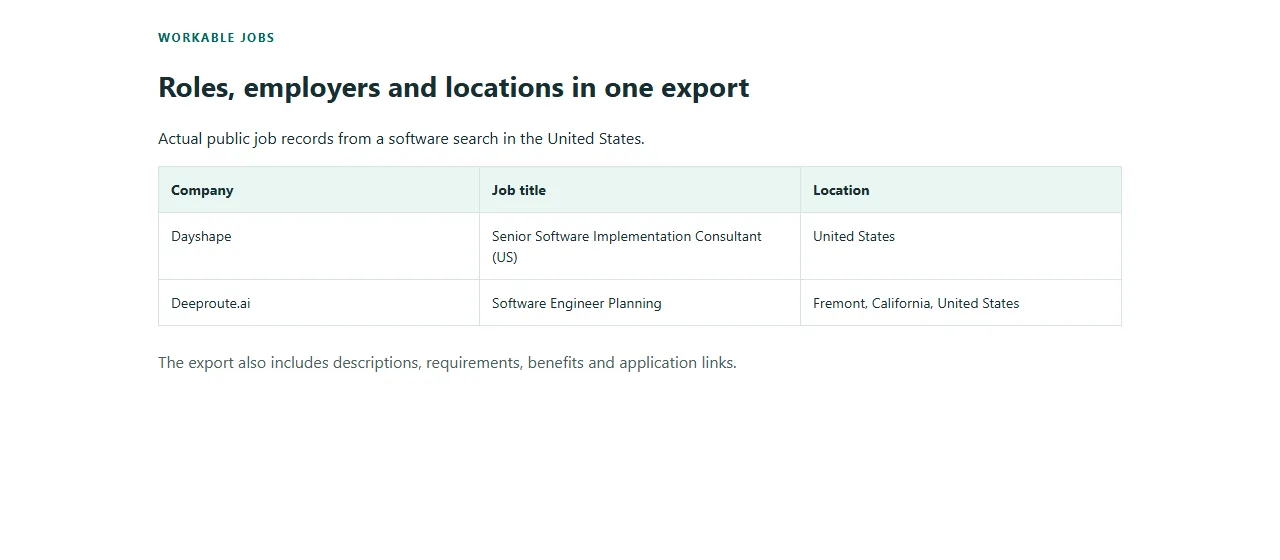
- Export the details: employer, locations, description, requirements, benefits and application link.
- See what changed: stable job IDs and separate new, updated and verified absence records.
You receive job, change and coverage rows. A job identifies the role and employer; a coverage row tells you how much of the requested source was checked.
🚀 Start in 60 seconds
- Keep Get current jobs, or enter a role and location.
- Leave Maximum current jobs at 20 for a small first export.
- Start the Actor, then open Jobs, changes and coverage.
A successful 20-job collection costs $0.0225: $0.0045 for the verified collection plus $0.0009 for each current job. The same prices apply across plans. Export as JSON, CSV, Excel or XML.
🎯 Choose the right workflow
| Goal | Workflow | Input |
|---|---|---|
| Find current roles | Get current jobs | Role and location, or public Workable search/company URLs |
| Inspect specific roles | Get job details | Individual https://jobs.workable.com/view/... URLs |
| Compare repeat checks | Track changes | The same searches or company URLs and watch name, run sequentially |
Pasted URLs take priority over the default keyword search. Search filters apply to searches; explicit company pages retain the company's complete public job scope. The Actor supports jobs.workable.com search, company and job pages. A company watch list is supplied by you; the Actor does not discover every employer using Workable.
📦 What you get
Current job rows include stableId, jobId, title, company, employer URLs, location components, work arrangement, employment type, posting/update dates, source publication state, full HTML/plain text content, requirements, benefits and application URL. Optional fields are null when not published.
Change rows add changeId, changeKind and the previous content fingerprint. NEW means first observed in this watch, not necessarily first published today. UPDATED means a source-published job field changed. NO_LONGER_LISTED means a saved job left a completely checked company listing. LEFT_SEARCH_RESULTS means it left a fully checked search scope; neither event claims that someone was hired. An inaccessible source or a cap cannot produce an absence event.
Coverage rows show sourceJobs, matchedJobs, deliveredJobs and coverageStatus for each target. Keep these rows when assessing completeness. Filter recordType=job in downstream tools when you only need current jobs.
🎛️ Input guide
| Setting | Use |
|---|---|
| Role or keywords | Workable's public content search; matches can occur in the description |
| Location | Country, region or city; remote selects remote roles |
| Workable URLs | Up to 50 public search, company or job URLs; overrides the default search |
| Posting date / Work arrangement / Employment type | Narrow search results |
| Include full text | Controls export size; it does not change the per-job price |
| Watch name | Keeps independent repeat-monitoring baselines separate |
| First monitoring run | Save a starting list, or also emit current jobs as NEW |
| Maximum current jobs | 1–10,000 unique current jobs across the run |
| Collection time limit | 10–210 seconds; allow at least 60 more seconds for final delivery |
| Maximum buyer charge | Guard for the requested workload; also respect the platform spending limit |
For monitoring, repeat runs sequentially with the same watch name, URLs, filters and full-text setting. A new scope starts a new baseline. The saved state supports up to 10,000 jobs. Current rows are still returned and charged on unchanged checks; the change rows make comparison easier. An interrupted delivery must be recovered in its original run before the watch continues.
💰 Pricing
| Event | Price |
|---|---|
| Verified collection, once per run | $0.0045 |
| Each verified current job | $0.0009 |
| Each verified saved absence | $0.0009 |
| NEW and UPDATED change rows, coverage rows | Included |
Examples: 1 job $0.0054; 20 jobs $0.0225; 100 jobs $0.0945; 1,000 jobs $0.9045. A trustworthy empty collection costs $0.0045. A source failure with no verified result is free. If other targets succeed, their verified jobs and the one collection fee apply. Platform usage pass-through is off; no additional source or platform usage charge is added by this Actor.
Monitoring can return current jobs plus saved absences, so set the spending cap for both. At the maximum, 10,000 current jobs plus 10,000 distinct absences cost $18.0045. This is an upper bound, not an expected run. Optional description fields do not add an event.
✅ Coverage you can trust
COMPLETE means the requested target was exhausted and its records verified. EMPTY_CONFIRMED means a valid source returned no matching jobs. CAPPED means a result, time or output-size limit stopped collection. PARTIAL combines trusted results with unsuccessful targets. FAILED means that target could not be verified; NOT_VISITED means an earlier run limit prevented its check.
The export has a 30 MB data limit and a 256 KB limit per normalized job. Large descriptions may reach a limit before the job-count maximum. A collection may change while it is being read; inconsistent totals keep absence reporting disabled. No query is silently broadened when it returns zero jobs.
🔌 API and automation
Use the Actor's API tab to run luminar/workable-jobs-change-monitor and read its Dataset. A small input is:
For sequential monitoring:
Use stableId to update a current-job table and changeId to deduplicate change observations. Keep coverage separate from job records in your destination. Apify integrations can connect the Dataset to your own workflow; no preconfigured destination or public template is included.
⚠️ Not yet supported
- Private hiring pipelines, applicant information, application submission or account data.
apply.workable.comcareer pages, employer subdomains, or other applicant-tracking systems. Use the corresponding publicjobs.workable.comcompany/job page.- Guaranteed collection of the entire Workable catalogue, inference of hires or salaries, or absence claims from incomplete searches.
- Simultaneous runs sharing one watch. Use sequential checks and inspect coverage before relying on changes.
❓ FAQ and support
Why do I see a matching job without the keyword in its title? Workable searches job content too. Review the description and source link.
Are unchanged jobs free? Current verified job observations are charged on every run. NEW/UPDATED change rows are included, and saved absences have their own small result charge.
Why is an optional field empty? Employers do not publish every field. Empty secondary metadata stays null; the Actor does not invent it.
Can a missing job prove a hire? No. Source absence is a listing observation, not evidence of a hire.
For support, share the run ID and expected public job/search URL through the Actor's Issues tab. Do not include credentials or applicant information.


