
Lazada Product Search Scraper: 6 Countries, USD & English
Pricing
from $1.05 / 1,000 product rows
Lazada Product Search Scraper: 6 Countries, USD & English
Scrape Lazada search and category pages in Singapore, Malaysia, Thailand, the Philippines, Indonesia and Vietnam without login or your own proxy. Price, discount, rating, units sold, seller, prices in USD, optional English titles, and watch lists for price changes. Pay per result.
Pricing
from $1.05 / 1,000 product rows
Rating
0.0
(0)
Developer

Maksim Lazouski
Maintained by CommunityActor stats
0
Bookmarked
2
Total users
1
Monthly active users
6 days ago
Last modified
Categories
Features
Share
What does Lazada Product Search Scraper do?
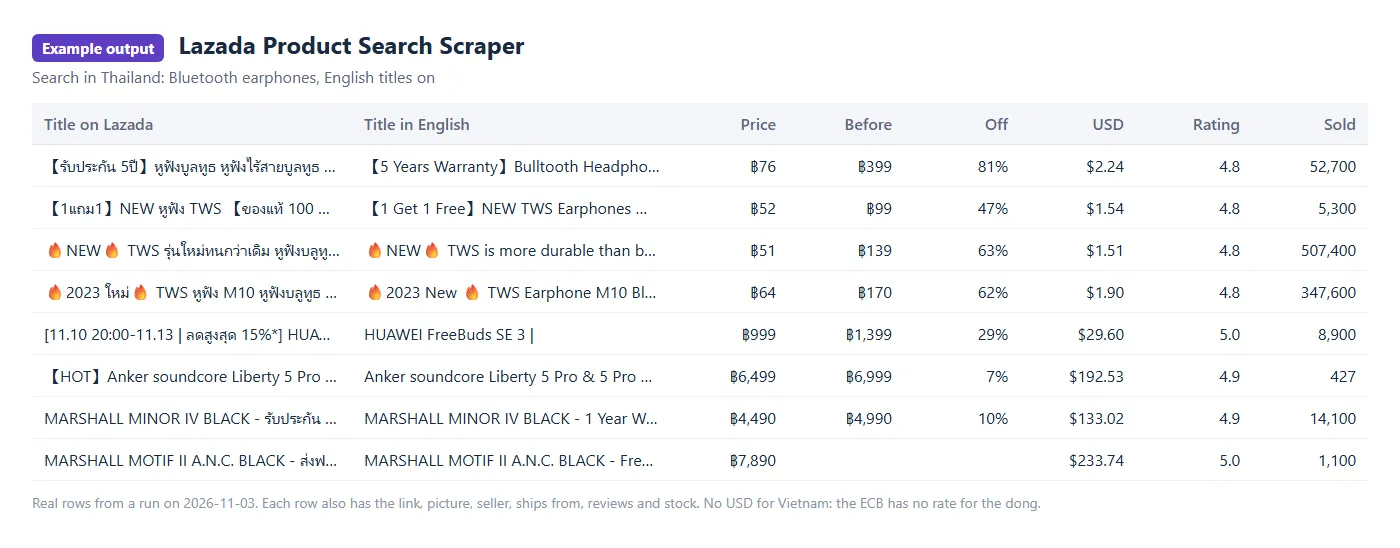
Lazada Product Search Scraper reads search results and category pages from Lazada, the largest online marketplace of Southeast Asia, in six countries: Singapore, Malaysia, Thailand, the Philippines, Indonesia and Vietnam. Give it keywords or links of search and category pages and it returns one clean row per product: price and original price, discount, rating, number of reviews, units sold, seller, where it ships from, stock and picture.
- No Lazada account, no cookies, no proxy of your own. Type a keyword, pick a country, press Start. Each search is read from an address in its own country.
- Search like on the site. Paste the link of a search or category page with its filters, or use the country, order and price fields.
- Prices in local money and US dollars, at the European Central Bank's rate of the day.
- English titles as an add-on for Thai, Vietnamese, Indonesian and Malay listings; titles already in English are left alone and not charged.
- Watch lists for runs on a schedule: get only new products, price changes and products that went out of stock since the last run.
- You pay per row that was read and stored, plus $0.005 when a run starts.
It runs on the Apify platform, so you also get scheduling, an API, webhooks, integrations, and export of the results to JSON, CSV, Excel or HTML.
What data can you extract from Lazada?
| Group | Fields |
|---|---|
| Product | id, SKU id, link, title, brand, category ids, picture, sponsored or not |
| Price | price, price before discount, discount in %, the money (SGD, MYR, THB, PHP, IDR, VND), the price as the page shows it, both prices in USD |
| Popularity | rating, number of reviews, units sold as a number and as the page shows it |
| Seller | seller id and name, where the product ships from |
| Stock | in stock or not |
| Search | the search it came from, its place in the results, the country |
| Add-on | title_en: the title in English |
How to scrape Lazada
- Open the actor and go to the Input tab.
- Type a search: a keyword such as
phone case,เคสโทรศัพท์orốp lưng, or paste the link of a Lazada search or category page. One search per line. - Pick the country for keywords, and the order and price range if you want them. A pasted link keeps its own country and filters.
- Choose how many products per search to return (40 a page, up to 2,000).
- Turn on English titles if you need them.
- Press Start, then open the Output tab or export the dataset.
Ready-made tasks
Start from a task that is already set up, then change the keyword and the country to your market:
- Compare phone case prices on Lazada Singapore
- Lazada Thailand Bluetooth earphones in English
- Cheapest air fryers on Lazada Malaysia
- Power bank prices and sales on Lazada Philippines
- Skincare products and prices on Lazada Indonesia
- Lazada Vietnam Bluetooth earphones in English
- Get Lazada price changes for a search
Watch a search for changes
Put a name in Watch list name and run the actor on a schedule, for example every day. The first run returns everything, marked "change": "new". Every later run with the same name returns only:
- what is new: a product that came into your search;
- what changed since the last run: price, price before discount, title or stock (
"change": "changed", withchanged_fieldsand the old values inprevious); - what is gone: a product that left a search that was read to its end (
"change": "removed"). Rows for what is gone are free.
Rows that did not change are not stored and not charged, so a daily check of a market costs only what changed. The Changes view of the output shows these rows. A search cut by Products per search says nothing about what went beyond the cut. The actor keeps the watch list in a key-value store of your account named watch-lazada-...; use one name per list, and one run of it at a time.
How much does it cost to scrape Lazada?
You pay for the rows the actor stores. The price per 1,000 rows depends on your Apify plan:
| What | Free | Starter | Scale | Business |
|---|---|---|---|---|
| A product row | $1.50 | $1.35 | $1.20 | $1.05 |
| English title (add-on, per row that gets one) | $1.00 | $0.90 | $0.80 | $0.70 |
A run also costs $0.005 to start, on every plan. Apify counts the start once per GB of the run's memory: one start at the default 1 GB, four ($0.02) at 4 GB.
The examples below are at the Free plan price, rows only; add $0.005 per run.
- A search of 120 products costs $0.18; with English titles for a Thai search, $0.30.
- 10,000 products cost $15.
You do not pay for searches the actor could not read, for rows of what is gone, or for unchanged rows of a watch list. Apify's free plan comes with $5 of usage a month, which is enough for about 3,300 products.
Input
| Field | What it does |
|---|---|
searches | Keywords or links of Lazada search, category or brand pages, one per line. |
country | For keywords: sg (default), my, th, ph, id or vn. |
sort | For keywords: relevance (default), price_low, price_high. |
priceMin, priceMax | For keywords: a price range in the country's money. |
maxItemsPerSearch | How many products of each search to return: up to 2,000, 120 by default. |
translateTitles | Adds title_en to products whose title is not in English. |
maxItems | Stop after this many rows. |
maxConcurrency | How many searches are read at the same time. 5 by default. |
watchName | A watch list's name: each run stores only what is new, changed or gone since the last run with the same name. |
One keyword in three countries, cheapest first:
Output
Every row is one product of one search.
Limits you should know
- Search and category pages only. The actor returns what Lazada shows in its lists of products; it does not open product pages, so there is no full description, variant list or review text.
- Up to 2,000 products per search (50 pages of 40), in the order Lazada shows them. How many results a search has is in the run's
SUMMARY(search_results_found). - Units sold come rounded as Lazada shows them: "6.1K sold" is returned as 6100, with the page's own text beside it.
- No USD for Vietnam: the ECB publishes no rate for the dong, so rows from Vietnam keep VND only.
- English titles are machine translation. Brand and model names may come out odd; the original title is always there.
- Sponsored products are in the results where Lazada puts them, marked
"sponsored": true.
FAQ
Do I need a Lazada account, cookies or a proxy?
No. The actor reads what Lazada shows to a visitor who is not logged in, and brings its own connections in each country.
What happens when a search could not be read?
A search that breaks off is read on from the page where it stopped, up to three times in a row. What still fails is listed in the FAILED record of the run's key-value store, with the reason; the rows already stored are kept. If Lazada starts showing its check, or the connection is lost, the run does not press on: it waits and tries again with one visitor at a time. If that does not help within a few minutes, the run stops and keeps what it stored; it is marked as failed only when it stored nothing. Start it again with Resurrect and it goes on from where it stopped. A row is never stored twice.
Can I run it on a schedule or call it from my code?
Yes. Use Apify's schedules with a watch list to follow prices and new products in a market, and the Apify API or its clients for Python and JavaScript to start runs and read results. The maxItems field and the run's spending limit keep a run within a budget.
Is it legal to scrape Lazada?
The actor reads only what Lazada shows publicly, without logging in: product listings of shops. You are responsible for how you use the data and for following the rules that apply to you; if you are not sure, ask a lawyer.
Something is wrong or a field is missing
Open an issue on the actor's Issues tab with the search or the link.
Lazada is a trademark of its owner. This actor is not affiliated with or endorsed by Lazada or Alibaba Group.


