

Adobe Stock Scraper — Photos, Keywords & Contributor Data
Pricing
from $0.80 / 1,000 assets
Adobe Stock Scraper — Photos, Keywords & Contributor Data
Adobe Stock keyword research and scraping for microstock contributors and marketers: search results, full per-asset keyword lists, contributor portfolios and a keyword report that shows how crowded each term is. Photos, vectors, videos. No login, no API key — pay per row.
Pricing
from $0.80 / 1,000 assets
Rating
0.0
(0)
Developer

Muhamed Didovic
Maintained by CommunityActor stats
0
Bookmarked
1
Total users
1
Monthly active users
2 days ago
Last modified
Categories
Features
Share
Adobe Stock Scraper: Photos, Vectors, Videos, Keywords & Contributor Portfolios
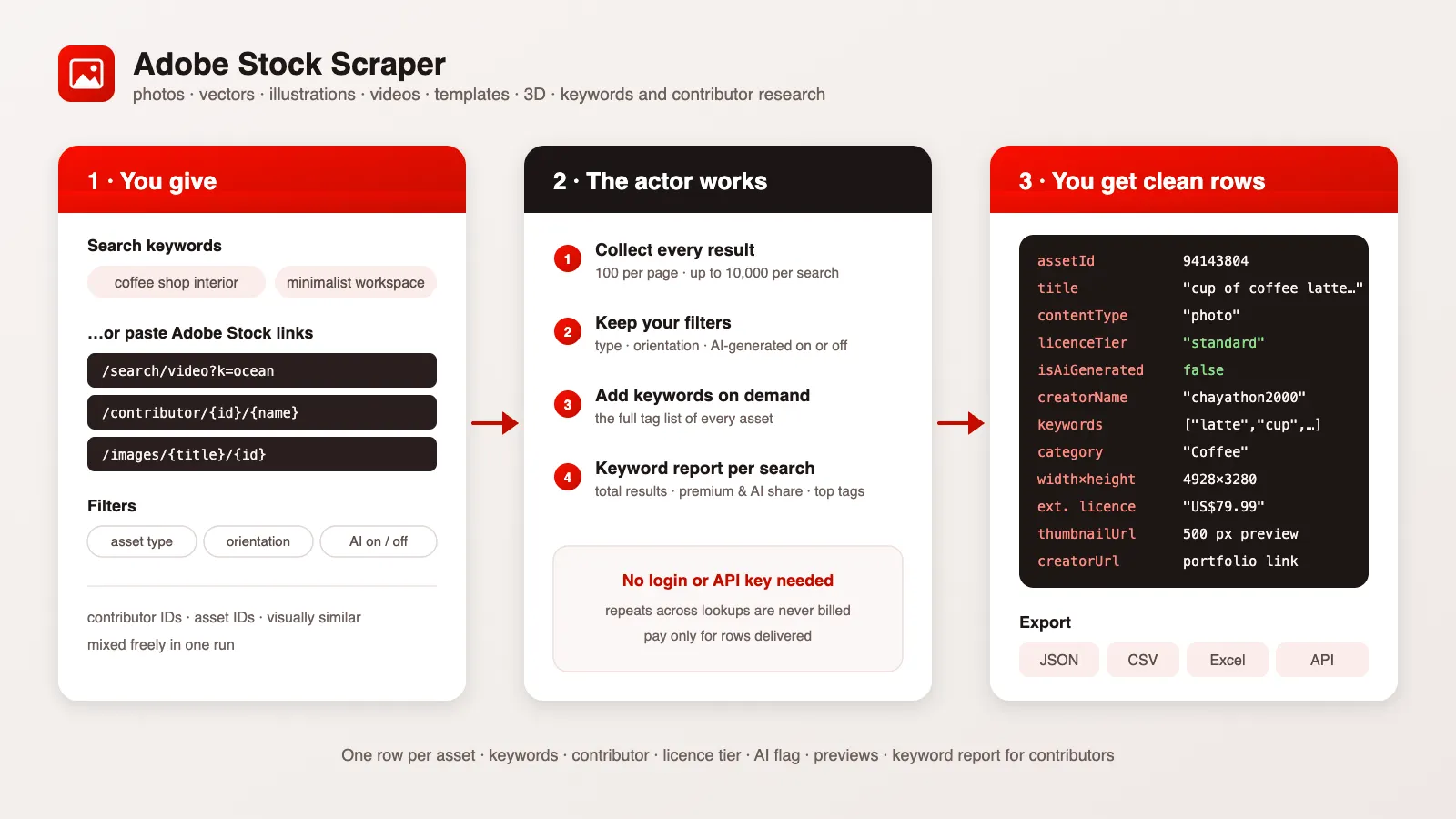
Search Adobe Stock by keyword, contributor, asset ID or visual similarity and get every result as a clean row: title, asset link, type, licence tier, AI flag, contributor and portfolio link, category, size, previews and the extended-licence price. Turn on Include keywords to add each asset's full keyword list, or Keyword report to get one summary row per keyword that shows how crowded it is and which keywords its top results share.
How it works
✨ Why use this scraper?
- Every way in. Keywords, Adobe Stock search links (with their filters), single asset links or IDs, contributor portfolios and "visually similar" lookups, mixed freely in one run.
- Keyword research for contributors. The keyword report gives total results on Adobe Stock, premium and AI share, the top contributors and the keywords the best results share, so you can see what to shoot or upload next and how to tag it.
- Full keyword lists on demand. Up to 49 keywords per asset, exactly as the contributor tagged it.
- AI on or off. Keep, exclude or return only assets made with generative AI.
- No login, no API key. Paste a keyword and run. JSON, CSV or Excel out.
- Pay only for rows delivered. Repeats across your lookups are left out and never billed.
📋 Overview
| What you give | What you get |
|---|---|
coffee shop interior | Up to 10,000 results for that search, in Adobe Stock's own order |
https://stock.adobe.com/search/video?k=ocean | That search with its type and filters kept |
https://stock.adobe.com/contributor/203434592/chayathon2000 | The contributor's portfolio |
94143804 or an asset link | That asset, with its keywords |
Similar to 94143804 | Assets that look like it |
📥 Supported inputs
- Search keywords: one search per line.
- Adobe Stock links: search pages (any language, any asset-type tab, with
filters[...]), asset pages, contributor pages. - Contributors: numeric contributor IDs or portfolio links.
- Asset IDs or links: one row per asset, keywords included.
- Visually similar to: asset IDs or links.
🎯 Use cases
- Microstock contributors: research keywords before a shoot, see the competition for a niche and copy the tagging of top results.
- Designers and agencies: build mood boards and shortlists across thousands of results with previews and links.
- Market research: measure how much of a niche is AI-generated or premium, and which contributors dominate it.
- Contributor tracking: watch a competitor's portfolio grow and see what they publish.
- Content teams: find reusable assets by type, orientation and AI status, with the licence tier visible before you open Adobe Stock.
🔄 How it works
- Each keyword, link, contributor and similar-to entry becomes one lookup; asset IDs become single-asset lookups.
- Results are collected page by page (100 per page) until Max results is reached or the search runs out. Adobe Stock shows at most 10,000 results for one search.
- Asset type, orientation and panoramic are applied by Adobe Stock. The Generative AI setting is applied to the results, so a lookup may read further to fill Max results.
- With Include keywords on, each asset's page is read for its keyword list.
- With Keyword report on, every keyword search adds one summary row; its keyword part comes from the top 30 results.
⚙️ Input configuration
| Field | Type | Default | What it does |
|---|---|---|---|
searchQueries | array | example search | Keywords, one search per line |
startUrls | array | — | Adobe Stock search, asset or contributor links |
contributorIds | array | — | Contributor IDs or portfolio links |
assetIds | array | — | Asset IDs or links |
similarTo | array | — | Asset IDs or links to find look-alikes of |
maxItems | integer | 100 | Results per lookup (max 10,000 per search) |
contentTypes | array | all | photo, illustration, vector, video, template, 3d |
orientation | string | all | horizontal, vertical, square |
panoramicOnly | boolean | false | Only very wide images |
aiGenerated | string | all | exclude or only |
includeKeywords | boolean | false | Adds each asset's keyword list (separate keyword event per asset) |
keywordReport | boolean | false | Adds one summary row per keyword search (one report event per row) |
Example:
📊 Output overview
Two kinds of rows, told apart by rowType: asset (one per asset) and keywordReport (one per keyword search when the report is on). The Assets and Keyword reports views in the Output tab show each kind as a table.
📦 Output samples
Asset row:
Keyword report row:
🗂 Key output fields
| Field | Meaning |
|---|---|
assetId, url | Adobe Stock asset ID and page |
contentType | photo, illustration, vector, video, template, 3d or audio |
licenceTier | standard, premium or free |
isAiGenerated | Made with generative AI |
creatorName, creatorId, creatorUrl | Contributor and portfolio link |
keywords | Full keyword list (Include keywords, or assets looked up by ID) |
category | Adobe Stock category id and name |
width, height, megapixels, orientation | Size and shape |
extendedLicencePrice | Extended-licence price as shown on Adobe Stock |
thumbnailUrl, largePreviewUrl, watermarkedCompUrl | Previews (watermarked) |
source, sourceInput, position | Which lookup the row came from and its rank there |
❓ FAQ
Can I sort by downloads or newest? No. Results come in Adobe Stock's own relevance order. Adobe Stock does not show download counts or upload dates publicly, so they are not in the output.
Why does the keyword report sample only 30 results for keywords? Reading keywords means opening each asset's page. Thirty top results give a stable picture of a niche's tagging at a fraction of the cost. Turn on Include keywords to get every asset's list.
Can I get the full-resolution file? No. The actor returns watermarked previews and links. Licensing is done on Adobe Stock.
What does the free plan include? Up to 100 results per lookup.
How many results can one search return? Adobe Stock shows at most 10,000 results for one search. Split broad topics into several keywords to go further.
💬 Support
Found an issue or need a field this actor doesn't return yet? Open an issue on the actor's Issues tab in Apify Console. Issues are usually answered within a day.
🛠 Additional services
Need a custom pipeline, other stock sites (Shutterstock, Freepik, Getty, Pond5) or this data delivered to your warehouse on a schedule? Get in touch through the Issues tab.
🔎 Explore more scrapers
More scrapers by the same author are on the memo23 Apify profile: business directories, real-estate portals, job boards, social media and lead-generation sources.
🤖 For AI Agents & LLM Apps
Compact reference for AI agents calling this actor through the Apify MCP server or the Apify API (actor: memo23/adobe-stock-scraper).
Purpose: Search Adobe Stock and return one row per asset (photo, illustration, vector, video, template, 3D), with optional full keyword lists and a per-keyword competition report for stock contributors.
Minimal input:
Other modes: { "contributorIds": ["203434592"] }, { "assetIds": ["94143804"] }, { "similarTo": ["94143804"] }, or { "startUrls": ["https://stock.adobe.com/search?k=coffee"] }.
Output: rows with rowType asset (fields assetId, title, url, contentType, licenceTier, isAiGenerated, isFree, extendedLicencePrice, creatorName, creatorId, creatorUrl, keywords, category, width, height, megapixels, orientation, thumbnailUrl, largePreviewUrl, source, sourceInput, position) or keywordReport (query, totalResults, premiumSharePct, aiGeneratedSharePct, distinctContributors, topContributors, contentTypeMix, topKeywords).
Behaviors an agent should know:
maxItemsapplies per lookup; one search returns at most 10,000 results.- Results are in Adobe Stock relevance order; there is no sort option and no download or date field.
keywordsis null unlessincludeKeywordsis true, except for assets looked up by ID.aiGenerated(exclude/only) is applied to the results, so a lookup may read more pages to fillmaxItems.- Pay-per-event billing: see the Pricing tab on the actor page.
⚠️ Disclaimer
This Actor is an independent tool and is not affiliated with, endorsed by, or sponsored by Adobe Inc. Adobe and Adobe Stock are trademarks of Adobe Inc. All other trademarks are the property of their respective owners.
The scraper reads only publicly visible Adobe Stock search results and asset pages. It does not log in, does not download licensed or full-resolution files, and does not bypass any paywall. Users are responsible for making sure their use complies with Adobe's Terms of Use, copyright and licensing rules, and applicable data-protection law.
SEO Keywords
adobe stock scraper, adobe stock api, scrape adobe stock, adobe stock keywords, adobe stock keyword tool, adobe stock keyword research, microstock keyword research, stock photo keywords, adobe stock contributor, adobe stock portfolio scraper, adobe stock search, stock photo scraper, stock image data, adobe stock ai generated, adobe stock similar images, adobe stock video scraper, adobe stock vectors, apify adobe stock, stock photography research, shutterstock alternative data


