

Adobe Stock Scraper & Analyzer: Downloads, Views, Keywords
Pricing
from $0.69 / 1,000 assets
Adobe Stock Scraper & Analyzer: Downloads, Views, Keywords
Adobe Stock scraper and microstock analyzer: downloads, views, keywords, creator, license prices and AI flags for photos, videos, vectors, templates, 3D and audio. Track contributor portfolios over time, rank best-selling keywords, look up assets by ID or link, search past 10,000 results. No login.
Pricing
from $0.69 / 1,000 assets
Rating
0.0
(0)
Developer

ClearPath
Maintained by CommunityActor stats
0
Bookmarked
777
Total users
280
Monthly active users
2 days ago
Last modified
Categories
Features
Share
From Clearpath, creators of Reddit Search Scraper and Reddit Post Comments Scraper. 175,000+ combined lifetime runs across these content-research scrapers.
Every result an Adobe Stock search holds
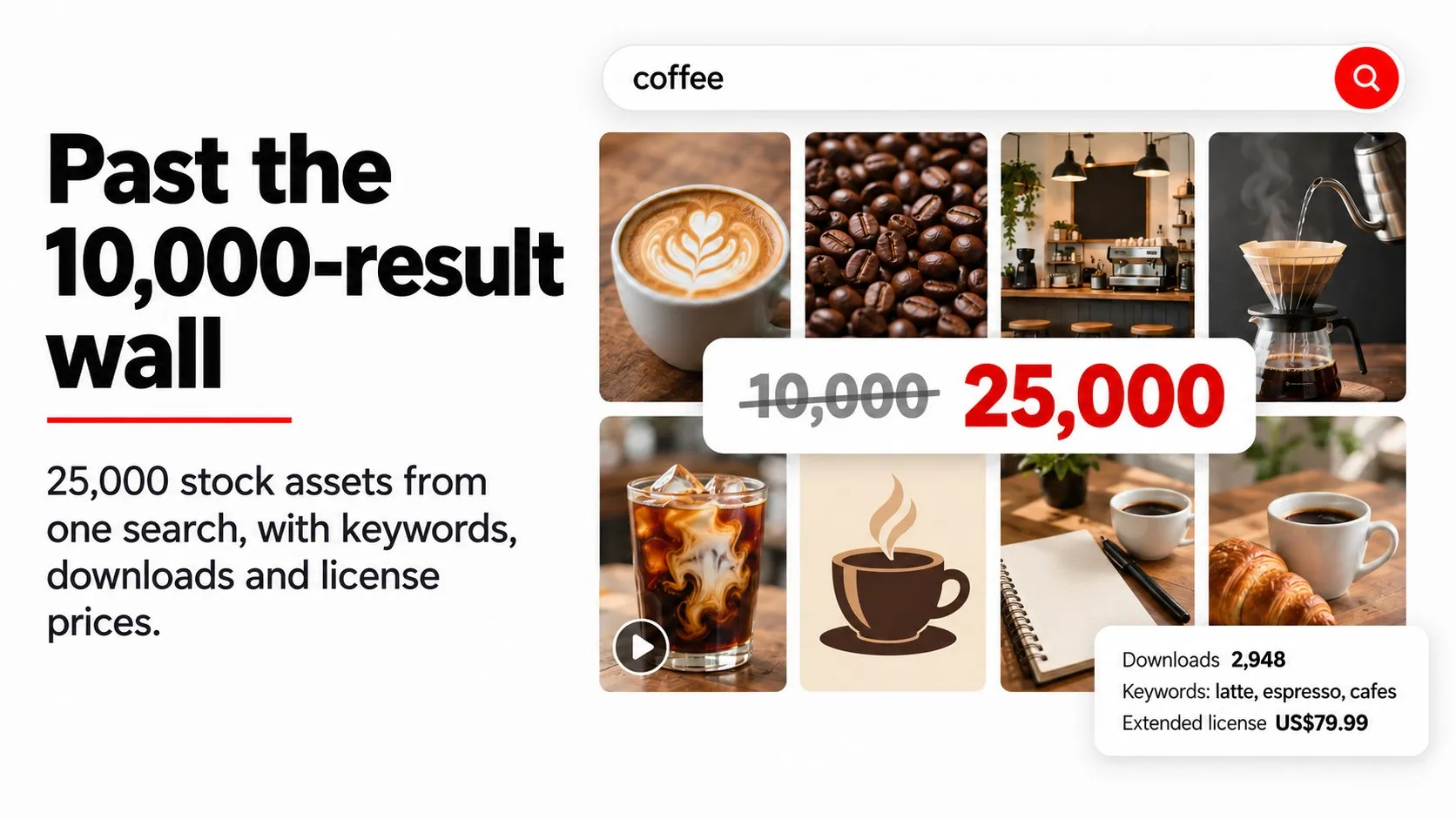
Past the 10,000-result wall. Adobe Stock shows at most 10,000 results for any one search. This actor keeps going: a recorded run saved 25,000 unique assets for the single search coffee in about 6 minutes, each one once, numbered in order.
Track any contributor portfolio. Paste a contributor link or asset IDs and get downloads, views and keywords for every file, plus portfolio totals, the 10 best sellers and the most downloaded keywords per contributor. Turn on Compare with the previous run and schedule it: each asset then shows the downloads and views it gained since the last check. Microstock contributors use it to follow their own sales and study competing portfolios.
Research what sells. Every asset comes with its downloads, views, keywords, category, creator and country, upload date, and AI and Firefly flags. Sort by most downloaded to find best sellers for any keyword, then read the keywords those best sellers use, ranked by downloads.
License prices and every preview. See each asset's license options with prices, the extended license price, all thumbnail sizes, watermarked previews, video previews with duration and frame rate, plus details for templates, 3D models and audio tracks.

Quick input
Try the 100 most downloaded coffee assets:
Check a contributor portfolio, with change since your last check:
Open actor input to enter your own search terms or contributors. Set maxItems to 0 to collect everything a search holds, including past 10,000 results, and set a spending limit. The 100-asset trial does not reproduce the 25,000-asset run.
 Clearpath · Stock Media

Copy to your AI assistant
What can you search?
| Input | What you get |
|---|---|
Search terms (searchQueries) | Every asset matching each term, in Adobe Stock's order. |
Contributor IDs or profile links (creatorIds) | A contributor's whole portfolio with downloads and views per asset and portfolio totals, or a search inside it when combined with search terms. |
Adobe Stock links (startUrls) | Paste any stock.adobe.com search with the filters you set on the site (people, ethnicity, local artists, aspect ratio, audio and more), a contributor profile or an asset page. |
Asset IDs or links (assetIds) | Downloads, views, keywords and full details for specific assets, by ID or any asset link, in the order given. Up to 100,000 per run. |
Visually similar to (similarTo) | Assets that look like a given Adobe Stock asset or any public image URL. |
Each entry is its own search, run in parallel, and maxItems applies to each search, defaulting to 100. Use 0 for everything a search holds. Audio runs as a separate search and requires contentTypes to include audio.
Filters (optional, each narrows the results): asset types (photos, illustrations, vectors, videos, templates, 3D, audio), sort order (relevance, newest, most downloaded, featured, undiscovered), Standard or Premium price tier, generative AI include, exclude or only, orientation including panoramic, model or property releases, isolated subjects, transparent backgrounds, copy space, icons, minimum width and height, megapixels, colors, video length, loops, template apps, 3D kinds, category and sensitive content. Set language for titles, keywords and category names in 21 languages.
Find the best-selling AI-free vectors for a theme:
Export a contributor's newest uploads:
Track an Adobe Stock contributor portfolio
Put one or more contributor links in creatorIds, or your own asset IDs in assetIds, and set maxItems to 0 to cover the whole portfolio. Besides one row per asset, every run writes two records you can open from the run's Output tab:
PORTFOLIOS: per contributor, the assets saved, total and average downloads and views, how many assets have sold at least once, the 10 best sellers, first and latest upload, the mix of asset types, the portfolio size (the contributor's assets that match your filters) and whether all of them were saved, and for contributors you named, their 25 most downloaded keywords. A search that spans many contributors keeps every contributor you named plus the 1,000 most downloaded others, with 3 best sellers each.KEYWORDS: every keyword of the saved assets (top 2,000) with how many assets use it, their share, and their total and average downloads and views. Run a search sorted by most downloaded and this record shows which keywords the best sellers use.
A real PORTFOLIOS entry (best sellers and keywords shortened to 2):
This run saved the 300 most downloaded of 14,817 assets, so wholePortfolio is false; with maxItems 0 it covers all of them.
Follow downloads and views over time. Turn on trackChanges (Compare with the previous run) and schedule the same input daily or weekly. Each asset then also carries previousDownloads, previousViews, previousCheckedAt, downloadsGained and viewsGained, measured against the last run that had the option on, and the dataset's Downloads and views over time view shows them side by side. The values are kept in a key-value store named adobe-stock-scraper-tracking in your own Apify account; the first run fills it, so its comparison fields are empty. Tracking adds no charge.
What data do you get from Adobe Stock?
- Asset: ID, Adobe Stock code, title, page link, media type, file format, size in pixels and bytes, upload date
- Research: downloads, views, keywords, category and full category path, creator name, ID, country and profile link
- Licensing: every license option with its price, the extended license price, price tier (core, free, premium levels), purchasable and plan flags
- Content flags: generative AI, Adobe Firefly, transparent, panoramic, model or property releases, editorial, loop, sensitive content level
- Previews: thumbnails at 110, 160, 220, 240, 360 (with WebP), 500 and 1000 px, watermarked full previews, HD and 4K video previews, video duration and frame rate
- Templates, 3D and audio: template app and type, 3D mesh, polygon, material and texture details with real-world size, and for audio the album, moods, genres, tempo, instrumental flag, codec, preview and waveform links
- Search context: rank within the search and which search returned it
A real photo row (keywords shortened to 8 of 9):
Video rows also carry videoPreviewUrl, videoSmallPreviewUrl with their sizes, durationSeconds, frameRate and HD and 4K previews. Audio rows carry an audio object (real example below, waveform links included); 3D rows carry model3d. Fields Adobe Stock leaves empty for an asset stay null, for example the category of most 3D assets.
Every run also writes the PORTFOLIOS and KEYWORDS records described above. The key-value store record SEARCHES lists every search with its total, how many assets were saved, whether it ran to its end, and Adobe Stock's own breakdown of its search terms by type, orientation, people, AI, price tier, contributor country and more. Export JSON to keep nested fields; CSV and Excel flatten them into columns.
Integrations and scheduling
Run the Adobe Stock scraper on a schedule in Apify Console, daily for portfolio tracking with trackChanges or trend monitoring, weekly for catalogue snapshots. Each completed run can trigger a webhook for n8n, Make or Zapier workflows.
Pricing
You pay per asset saved: $0.99 per 1,000 assets on the Free plan. Bronze pays $0.89, Silver $0.79, Gold and above $0.69 per 1,000. A 100-asset test costs about $0.10 on the Free plan. Searches that return nothing add no asset charges. A small Actor start fee also applies.
FAQ
Do I need an Adobe account, developer key or login? No. Enter a search and run it; no Adobe account, developer registration, key or cookie is involved.
How do I check the downloads and views of an Adobe Stock portfolio?
Put the contributor link in creatorIds (or the asset IDs in assetIds), set maxItems to 0 and run. Every asset carries its downloads and views, and the PORTFOLIOS record adds the totals, best sellers and top keywords. Turn on trackChanges and schedule the run to see what each asset gained since the last check. Adobe Stock reports views for fewer assets than downloads; many assets show 0 views.
How do I find Adobe Stock best sellers?
Set sortBy to downloads. Every row also carries its download and view counts, so you can rank any export yourself, by keyword, category or contributor, and the KEYWORDS record ranks the keywords of the results by downloads.
Can I get more than 10,000 results?
Yes, for search terms, creators and similar-to searches. Adobe Stock shows at most 10,000 results per search; with maxItems above that (or 0), the actor keeps collecting and saves each asset once. A recorded coffee run saved 25,000 unique assets in about 6 minutes. Pasted links and audio searches stop at Adobe Stock's 10,000.
Can I see which assets are AI-generated?
Every row has isGenerativeAi and isFireflyGenerated. Use aiGenerated to exclude AI content or return only AI content.
Does it cover videos, vectors, templates, 3D and audio? Yes. Leave asset types empty for photos, illustrations, vectors, videos, templates and 3D together; select Audio to include music tracks.
Why does a Premium search include videos? Adobe prices every video in its premium tier, so Adobe's Premium filter returns premium images plus all videos, and Standard returns no videos.
Can I use the filters from the Adobe Stock website?
Yes. Set them on stock.adobe.com and paste the search link into startUrls. The actor follows that search, including filters it has no separate input for.
How fresh is the data?
Every run reads Adobe Stock live. Schedule the actor to track new uploads, or turn on trackChanges to get the downloads and views each asset gained since the previous run.
Can I download the full-resolution files? No. Rows carry thumbnails, watermarked previews and links; licensing the files happens on Adobe Stock.
Support
Questions, missing fields or a search that did not work as expected: open an issue in the Issues tab or email max@mapa.slmail.me. Adobe Stock is a trademark of Adobe Inc. This actor is independent and is not affiliated with or endorsed by Adobe.


