
![Linkedin Search Jobs Scraper [Bypass 1K limit][Without Cookies] avatar](https://images.apifyusercontent.com/3hQYf3cfVpCMRucp6j3hc576qu74yL5_gZuACc8jLgI/rs:fill:250:250/cb:1/aHR0cHM6Ly9hcGlmeS1pbWFnZS11cGxvYWRzLXByb2QuczMudXMtZWFzdC0xLmFtYXpvbmF3cy5jb20vMGlpckJJNUNkSTFIbkJxVnQvS0ZxbEVUOFFKSm1xbk8xUjgtbGlua2VkaW4ucG5n.webp)
Linkedin Search Jobs Scraper [Bypass 1K limit][Without Cookies]
Pricing
$15.00/month + usage
Linkedin Search Jobs Scraper [Bypass 1K limit][Without Cookies]
LinkedIn Jobs scraper — no account, no cookies, no login required. Mix search URLs, single-job URLs and filter mode in one run. Bypass the 1,000-result limit. Pull recruiter contacts, company LinkedIn, salary, apply URL, workplace type and job criteria. JSON, CSV or Excel out.
Pricing
$15.00/month + usage
Rating
5.0
(3)
Developer

Muhamed Didovic
Maintained by CommunityActor stats
17
Bookmarked
455
Total users
11
Monthly active users
20 hours
Issues response
9 days ago
Last modified
Share
LinkedIn Jobs Scraper
The fastest way to turn LinkedIn Jobs into structured, spreadsheet-ready data — without a LinkedIn account, cookies, or login. Start from a search URL, a keyword + location, a single job URL, or a plain list of job IDs, and get clean job rows with title, company, salary, full description, apply URL, and recruiter contacts (best-effort) — as JSON or CSV.
From $0.25 per 1,000 jobs on higher plans ($0.69/1k on the free plan) — pay only for the jobs that land in your dataset. Filtered, duplicate, and previously-seen jobs cost nothing.
Why Use This Scraper?
- ✅ No login, no cookies, no account risk — reads only LinkedIn's public Jobs surface
- ✅ Cheapest per-job price in its class — $0.69/1k free plan → $0.25/1k Gold and above
- ✅ Recruiter & hiring-team contacts (best-effort) — name, title, profile URL of the job poster
- ✅ Bypass LinkedIn's ~1,000-results-per-search cap — split by city or experience level automatically
- ✅ Job monitoring built in — paste job IDs, get back
isExpired/verifiedAt/verificationStatusper listing - ✅ Free result filters — title include/exclude, employer blocklist, and salary-required run before billing
- ✅ Recruiter-grade search filters — under-10-applicants only, Easy Apply only, minimum salary ($40K–$200K+)
- ✅ 🎯 Profile Match — score every job 0–100 against your CV skills (
resumeKeywords) and sort by fit - ✅ Cross-run dedup —
onlyNewJobsremoves duplicate jobs across runs; you only ever pay for NEW jobs - ✅ Optional company firmographics — website, size, employees, HQ, industry, follower count
Overview
The LinkedIn Jobs Scraper is built for recruiters, lead-gen teams, job-market analysts, and job-board builders who need structured job-posting data from LinkedIn without maintaining a logged-in session.
The output is always job-shaped rows. Whether you start from a search URL, keyword filters, a single job URL, or a list of job IDs, every dataset item is one job posting with the same ~40-field schema — so your downstream pipeline never has to branch on input type.
Cookie-based LinkedIn scrapers require you to hand over a logged-in session (which gets accounts flagged) or buy session cookies from third parties. This actor reads the same public Jobs pages any anonymous browser can see, so no account is required and none is at risk. The trade-off is honest: a few fields LinkedIn reserves for logged-in viewers (some recruiter cards, some salary ranges) are best-effort.
Supported Inputs
URL types
| URL type | Pattern | What it returns |
|---|---|---|
| Search URL | linkedin.com/jobs/search?keywords=…&location=… | Paginated job listings, filters read from the URL |
| Single-job URL | linkedin.com/jobs/view/4410745146/ | One enriched row per URL, no search phase |
| Slug job URL | linkedin.com/jobs/view/data-engineer-at-netflix-4350364210 | Same as above |
Copy-pasteable startUrls
Job IDs mode — scrape or re-verify exact listings
Paste raw job IDs, view URLs, or any LinkedIn URL carrying currentJobId= into the jobIds field. Each entry goes straight to the job detail page. Re-run the same list on a schedule to monitor listings — every row includes isExpired, verifiedAt, and verificationStatus (active / closed / removed), so dead listings are flagged instead of silently missing.
Keyword / filter mode
Leave URLs empty and let the actor build the search: keywords × locations × time range × workplace type × experience level × contract type × company names.
Unsupported inputs
- ❌ URLs behind the LinkedIn login wall (Sales Navigator, Recruiter seats, private postings)
- ❌ LinkedIn profile / company-page URLs (see the dedicated actors in Explore More Scrapers)
- ❌ Shortened or redirect URLs (
lnkd.in/…)
Use Cases
| Audience | Use case |
|---|---|
| Recruiters & sourcing teams | Pull hiring-manager contacts from open roles and reach out before the inbox floods |
| B2B lead-gen / HR-tech vendors | Companies actively hiring for X are in-market for your product — build the list daily |
| Job boards & aggregators | Backfill listings at $0.25–0.69/1k with cross-run dedup so you only ingest new postings |
| Market & salary analysts | Track demand by title, region, seniority, and published salary bands |
| Sales intelligence teams | A competitor's job posts reveal their stack, roadmap, and the decision-makers to pitch |
| Agencies | Deliver client-ready hiring datasets on a schedule without writing scrapers |
How It Works
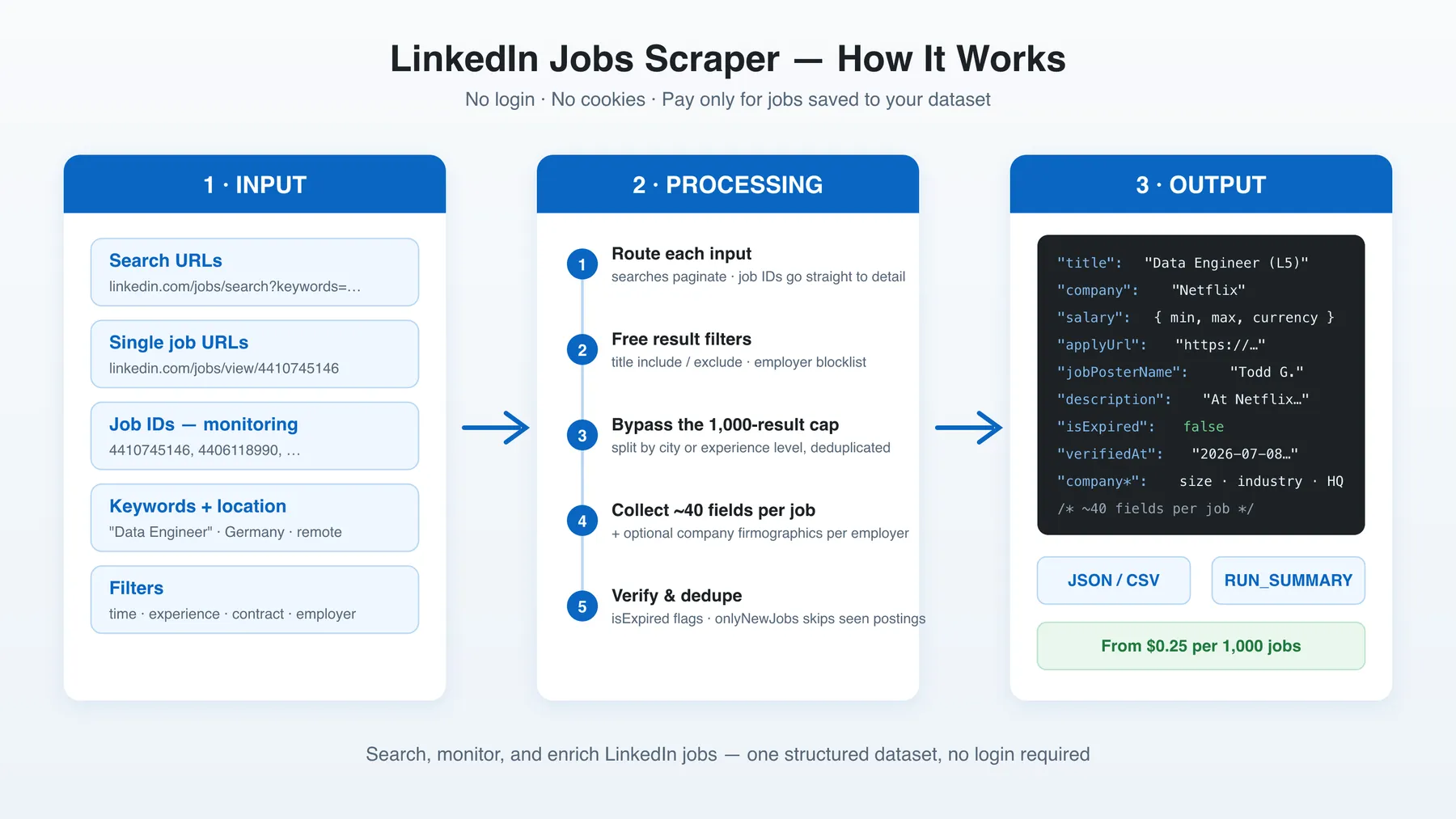
- Input — paste search URLs, job URLs, job IDs, or set keyword + location filters
- Route — search inputs paginate the public Jobs listing; job IDs and view URLs skip straight to the detail page
- Filter (free) — title include/exclude and employer blocklist drop unwanted jobs before they're collected or billed
- Collect & enrich — every kept job gets the full ~40-field row; optional company firmographics per unique employer
- Output — JSON or CSV dataset, plus a
RUN_SUMMARYrecord explaining exactly how the run ended
Input Configuration
Input fields
| Field | Type | Required | Notes |
|---|---|---|---|
startUrls | array<{url}> | one input mode | Mix of search URLs and single-job view URLs |
jobIds | array<string> | one input mode | Raw IDs, view URLs, or currentJobId= URLs — direct to detail page |
keywords | array<string> | one input mode | Used when no URLs are given |
location / locations | string / array | optional | Broad location, or several locations searched in one run |
geoId, placeIds | string, array | optional | LinkedIn geo precision (geoId, f_PP city-level filters) |
timeRange | enum | optional | any time, last 24h (r86400), week (r604800), month (r2592000) |
remote / jobTypes | array enum | optional | On-site 1 / Remote 2 / Hybrid 3 |
experienceLevels | array enum | optional | 1 intern → 6 director |
contractType | array enum | optional | F/P/C/T/I/V/O |
companyNames | array<string> | optional | Only include these employers (query-injected + name-matched) |
filterUnder10Applicants | boolean | optional | LinkedIn's own "early applicant" filter — jobs with <10 applicants |
filterEasyApply | boolean | optional | Only jobs that support Easy Apply (apply without leaving LinkedIn) |
salaryBase | enum 1–9 | optional | LinkedIn's minimum-salary filter, $40K+ → $200K+ (mostly US) |
distance | enum (miles) | optional | Search radius around the location (LinkedIn's own distance filter) |
titleMustInclude | array<string> | optional | Keep only titles containing at least one term — free, pre-billing |
titleExclude | array<string> | optional | Drop titles containing any term — free, pre-billing |
excludeCompanies | array<string> | optional | Drop these employers — free, pre-billing |
subLocationExclude | array<string> | optional | Drop jobs whose location contains any term (e.g. a city) — free, pre-billing |
requireSalaryInfo | boolean | optional | Drop jobs without a published salary — free, pre-billing |
resumeKeywords | array | optional | 🎯 Profile Match: score each job 0–100 vs your CV skills (never filters) |
scrapeCompanyDetails | boolean | optional | Company firmographics; billed per unique company |
onlyNewJobs | boolean | optional | Cross-run dedup — only jobs not returned in previous runs |
autoSplit | boolean | optional | Bypass ~1K cap by splitting the search across experience levels |
splitByLocation + splitCountry | boolean + enum | optional | Bypass ~1K cap by fanning out across a country's major cities |
maxItems | integer | optional | Hard cap on charged dataset rows |
minDelay/maxDelay, minConcurrency/maxConcurrency, maxRequestRetries | integer | optional | Crawl pacing |
proxy | object | optional | Residential recommended |
🔎 Dynamic filters
Unlike the free filters above (which drop jobs before you pay), dynamic filters are evaluated after each job — and, for the company-based ones, its company page — is fetched. So every job is still saved and charged; non-matching jobs are stamped dynamicFilterMatch: false so you can discard them downstream (e.g. keep only dynamicFilterMatch == true in your N8N/Make flow). Per dimension, an *Include list takes priority over its *Exclude sibling. Company-based filters auto-enable company enrichment; companies missing a value always pass.
| Field | Type | Notes |
|---|---|---|
jobFunctionInclude / jobFunctionExclude | array enum | Keep / flag by LinkedIn job function |
jobIndustryInclude / jobIndustryExclude | array<string> | Keep / flag by industry name (e.g. Staffing and Recruiting) |
excludeRecruitingAgencies | boolean | Flag staffing / recruiting-agency postings |
companySizeMin / companySizeMax | integer | Flag by company employee count |
companyOrganizationTypeInclude / …Exclude | array enum | Flag by company type (Public Company, Non Profit, Privately Held, …) |
companyFoundedDateMin / companyFoundedDateMax | integer (year) | Flag by company founding year |
companyFollowersCountMin / companyFollowersCountMax | integer | Flag by LinkedIn follower count |
requireRecruiterProfile | boolean | Flag postings that expose no recruiter / hiring-team profile |
Common scenarios
1. Daily new-jobs monitor (schedule this)
2. Re-verify a list of tracked listings
3. Break the 1,000-result cap for a whole country
Output Overview
Each dataset item is one job posting containing:
- Core fields —
id,title,company,location,postedAt,jobUrl, fulldescription(+descriptionHtml) - Compensation & criteria — parsed
salary(minAmount/maxAmount/currency/period),seniorityLevel,employmentType,jobFunction,industries,benefits - Application —
applyUrl(external careers site when exposed),easyApply,numberOfApplicants/applicantsCount - People —
hiringTeam[]and flatjobPosterName/jobPosterTitle/jobPosterProfileUrl(best-effort; empty means LinkedIn hid it from anonymous viewers) - Company —
companyLinkedinUrlalways; withscrapeCompanyDetailsalso website, industry, size, employee count, HQ, logo, follower count, organization type, founded year, specialties, office locations - Targeting —
yearsOfExperience[]parsed from the description, anddynamicFilterMatch(the 🔎 dynamic-filter verdict) on every row - Verification —
isExpired,verifiedAt,verificationStatus(active/closed/removed) on every row - Provenance —
scrapedFrom(search-results/job-view-url/job-id-input),sourceUrl
Every run also writes a RUN_SUMMARY record to the key-value store: requested vs saved counts, pages parsed, jobs dropped per filter, expired jobs found, and a stopReason — so "why did I get 400 instead of 1000?" is answered by the run itself.
Output Samples
Search start (trimmed real row)
Job-ID start — removed listing (monitoring)
Key Output Fields
Job core
id,title,company,location,postedAt,postedTimeAgo,jobUrl,sourceUrl
Description & criteria
description,descriptionHtml,criteria[],seniorityLevel,employmentType,jobFunction,industries[],benefits[],workplaceTypeyearsOfExperience[]— structured experience requirements parsed from the description ({ years: "5+" | "2-5" | "3", context, lang }); empty when none founddynamicFilterMatch—truewhen the job passed every active 🔎 dynamic filter (or none were set);falseflags a non-match (the row is still returned)
Compensation & application
salary.raw,salary.minAmount,salary.maxAmount,salary.currency,salary.periodapplyUrl,easyApply,numberOfApplicants,applicantsCount
Recruiter / hiring team (best-effort)
hiringTeam[].name,hiringTeam[].title,hiringTeam[].linkedinUrl,hiringTeam[].photojobPosterName,jobPosterTitle,jobPosterProfileUrl,jobPosterPhoto
Company (flat fields filled by scrapeCompanyDetails)
companyLinkedinUrl,companyLinkedinSlug,companyWebsite,companyIndustry,companySize,companyEmployeesCount,companyHeadquarters,companyFollowerCount,companyLogo,companyDetailscompanyOrganizationType,companyFoundedDate,companySpecialties[],companyOfficeLocations[](best-effort from the public company page)
Profile Match (with resumeKeywords)
profileMatchScore(0–100 = % of your skills found in title + description)profileMatch.matchedKeywords[],profileMatch.missingKeywords[],profileMatch.matchCount,profileMatch.totalKeywords
Verification & provenance
isExpired,verifiedAt,verificationStatus,scrapedFrom
FAQ
Do I need a LinkedIn account or cookies?
No. The actor reads only the public Jobs surface that any anonymous browser can access. No login, no cookies, no account at risk.
Why did I get fewer jobs than maxItems?
Check the RUN_SUMMARY record in the run's key-value store — it reports pages parsed, candidates seen, how many jobs each filter dropped, and the stopReason. The most common causes: the search genuinely has fewer results, LinkedIn's ~1,000-per-search ceiling (enable autoSplit or splitByLocation), or your title/company filters doing their job.
Are the title and company filters really free?
Yes. titleMustInclude, titleExclude, and excludeCompanies run before a job is collected, so filtered jobs are never charged and never consume detail-page requests.
Are recruiter contacts always available?
No — best-effort. LinkedIn shows the hiring-team card to anonymous viewers on some jobs and hides it on others. hiringTeam: [] means LinkedIn hid it, not that the parser failed. Same honesty applies to salary and applyUrl: they're populated when the employer published them.
How do I monitor jobs for expiry?
Put the job IDs (or view URLs) in jobIds and run on a schedule. Live listings return full rows with verificationStatus: "active"; closed listings are flagged "closed"; listings deleted from LinkedIn come back as sparse rows with "removed" and isExpired: true.
How do I get more than 1,000 jobs per search?
LinkedIn caps every guest search at ~1,000 results. Enable splitByLocation (fans the search out across a country's major cities) or autoSplit (splits across the six experience levels). Results are deduplicated automatically.
How do I find jobs with the best odds of a reply?
Turn on filterUnder10Applicants — LinkedIn's own "early applicant" filter — so every returned job has fewer than 10 applicants. Combine with timeRange: "r86400" (last 24h) and a scheduled daily run with onlyNewJobs for a fully automated early-bird pipeline.
How does Profile Match (resumeKeywords) work?
Add your skills as plain strings or { "keyword": "JavaScript", "aliases": ["JS"] } objects. Every job is scored — profileMatchScore is the % of your skills found in its title + description, and profileMatch lists exactly which matched and which are missing. It never drops jobs; sort the dataset by profileMatchScore descending, or have your N8N/Make workflow act only on scores above a threshold.
What does onlyNewJobs do?
It remembers the job IDs from your previous runs and skips them, so a scheduled run only returns postings it has never sent you before.
Can I scrape private or logged-in-only postings?
No. Anything behind the LinkedIn login wall (Sales Navigator, Recruiter, private postings) is out of scope.
Support
Found a bug or have a feature request? Open an issue on the actor's Issues tab or email me at muhameddidovic@gmail.com.
Additional Services
Need a custom export shape, an extra field, or a managed daily feed delivered to your database? I do tailored work — drop me a line at muhameddidovic@gmail.com.
Explore More Scrapers
If you found this useful, you might also like:
- LinkedIn Posts Scraper — posts from profiles and company pages, no cookies
- LinkedIn Company Employees Scraper — people behind any company page
- LinkedIn Ads Scraper — ad library search and details
- LinkedIn Profile Scraper — public profile data at $1/1k
Full list at apify.com/memo23.
⚠️ Disclaimer
This Actor is an independent tool and is not affiliated with, endorsed by, or sponsored by LinkedIn Corporation or any of its subsidiaries. All trademarks mentioned are the property of their respective owners.
The scraper accesses only publicly available LinkedIn Jobs pages — no authenticated endpoints, paid features, or content behind the linkedin.com login wall. Users are responsible for ensuring their use complies with LinkedIn's Terms of Service, applicable data-protection law (GDPR, CCPA, etc.), and any contractual obligations of their own organization.
SEO Keywords
linkedin jobs scraper, scrape linkedin jobs, linkedin job scraper, linkedin jobs API, linkedin job postings scraper, Apify linkedin jobs, job listings scraper, job board scraper, hiring data scraper, recruiter contact scraper, job monitoring tool, job posting verification, linkedin jobs without login, no-cookie linkedin scraper, job market analysis data, salary benchmark data, recruitment lead generation, hiring manager contacts, employment data extraction, HR tech data, talent sourcing data


