

LinkedIn Jobs Scraper — No 1K Cap · No Minimum · No Login
Pricing
from $0.25 / 1,000 job results
LinkedIn Jobs Scraper — No 1K Cap · No Minimum · No Login
LinkedIn Jobs scraper, no login or cookies, fetched live. Works with existing n8n/Make workflows: other actors' input and field names are accepted. No 1K cap, no per-run minimum, free company data, cross-run dedup, CV match score. Salary, description, apply URL. From $0.25/1k.
Pricing
from $0.25 / 1,000 job results
Rating
5.0
(1)
Developer

Muhamed Didovic
Maintained by CommunityActor stats
1
Bookmarked
226
Total users
93
Monthly active users
4 days ago
Last modified
Share
LinkedIn Jobs Scraper
The fastest way to turn LinkedIn Jobs into structured, spreadsheet-ready data — without a LinkedIn account, cookies, or login. Start from a search URL, a keyword + location, a single job URL, or a plain list of job IDs, and get clean job rows with title, company, salary, full description, apply URL, and recruiter contacts (best-effort) — as JSON or CSV.
From $0.25 per 1,000 jobs on higher plans ($0.69/1k on the free plan) — pay only for the jobs that land in your dataset. Filtered, duplicate, and previously-seen jobs cost nothing. No minimum per run: set maxItems to 10 and you are billed for at most 10 jobs.
Switching from another LinkedIn jobs actor? Keep your input JSON and your n8n / Make / Zapier workflow as they are and change only the actor ID. See Switching from another LinkedIn jobs actor.
Every job is fetched live from LinkedIn at run time — not served from a pre-indexed job database — so you never pay for stale or already-closed postings, and coverage isn't limited to what a database indexed last week.
Why Use This Scraper?
- ✅ No login, no cookies, no account risk — reads only LinkedIn's public Jobs surface
- ✅ $0.25/1k on Gold and above ($0.69/1k on the free plan) — you pay per job that lands in the dataset, and filtered, duplicate or already-seen jobs cost nothing
- ✅ Recruiter & hiring-team contacts (best-effort) — name, title, profile URL of the job poster
- ✅ Bypass LinkedIn's ~1,000-results-per-search cap — split by city or experience level automatically
- ✅ Job monitoring built in — paste job IDs, get back
isExpired/verifiedAt/verificationStatusper listing - ✅ Free result filters — title include/exclude, employer blocklist, and salary-required run before billing
- ✅ Recruiter-grade search filters — under-10-applicants only, Easy Apply only, minimum salary ($40K–$200K+)
- ✅ 🎯 Profile Match — score every job 0–100 against your CV skills (
resumeKeywords) and sort by fit - ✅ Cross-run dedup —
onlyNewJobsremoves duplicate jobs across runs; you only ever pay for NEW jobs - ✅ No minimum per run —
maxItemscan be any number; a daily alert capped at 20 jobs bills at most 20 - ✅ Drop-in for existing workflows — input and output field names used by other LinkedIn job actors are accepted, so an n8n/Make flow keeps working after you swap the actor ID
- ✅ Company firmographics at no extra charge — website, size, employees, HQ, industry, follower count (
scrapeCompanyDetails)
Overview
The LinkedIn Jobs Scraper is built for recruiters, lead-gen teams, job-market analysts, and job-board builders who need structured job-posting data from LinkedIn without maintaining a logged-in session.
The output is always job-shaped rows. Whether you start from a search URL, keyword filters, a single job URL, or a list of job IDs, every dataset item is one job posting with the same ~40-field schema — so your downstream pipeline never has to branch on input type.
Cookie-based LinkedIn scrapers require you to hand over a logged-in session (which gets accounts flagged) or buy session cookies from third parties. This actor reads the same public Jobs pages any anonymous browser can see, so no account is required and none is at risk. The trade-off is honest: a few fields LinkedIn reserves for logged-in viewers (some recruiter cards, some salary ranges) are best-effort.
Supported Inputs
URL types
| URL type | Pattern | What it returns |
|---|---|---|
| Search URL | linkedin.com/jobs/search?keywords=…&location=… | Paginated job listings, filters read from the URL |
| Single-job URL | linkedin.com/jobs/view/4410745146/ | One enriched row per URL, no search phase |
| Slug job URL | linkedin.com/jobs/view/data-engineer-at-netflix-4350364210 | Same as above |
Copy-pasteable startUrls
Job IDs mode — scrape or re-verify exact listings
Paste raw job IDs, view URLs, or any LinkedIn URL carrying currentJobId= into the jobIds field. Each entry goes straight to the job detail page. Re-run the same list on a schedule to monitor listings — every row includes isExpired, verifiedAt, and verificationStatus (active / closed / removed), so dead listings are flagged instead of silently missing.
Keyword / filter mode
Leave URLs empty and let the actor build the search: keywords × locations × time range × workplace type × experience level × contract type × company names.
Unsupported inputs
- ❌ URLs behind the LinkedIn login wall (Sales Navigator, Recruiter seats, private postings)
- ❌ LinkedIn profile / company-page URLs (see the dedicated actors in Explore More Scrapers)
- ❌ Shortened or redirect URLs (
lnkd.in/…)
Switching from another LinkedIn jobs actor
Most LinkedIn job workflows are wired to one actor's field names. This actor reads those names too, so switching takes one change.
- In your n8n HTTP node, Make module, Zapier step, or API script, replace the actor ID with
memo23~linkedin-jobs-scraper. - Keep the same input JSON. Fields like
keyword,workType,jobType,publishedAt,companyInclude,jobTitleExclude, text experience levels ("entry-level") and raw salary amounts ("80000") are translated to this actor's filters. The run log prints a[COMPAT] input mapped:line showing each translation. - Downstream nodes keep working. When the input uses those field names, every job row also carries the field names your workflow already reads, next to this actor's own fields. To get them with a native input, set
compatibleOutput: true.
Input fields that are translated
| Field in your existing input | Read here as |
|---|---|
keyword | keywords |
publishedAt (r86400, r604800, r2592000) | timeRange |
jobType (full-time, contract…) | contractType |
workType (on-site, remote, hybrid) | remote |
experienceLevel (internship … executive) | LinkedIn experience codes 1–6 |
salaryBase ("40000" … "120000") | LinkedIn salary buckets ($40K+ … $120K+) |
distance ("15") | nearest supported radius, rounded up ("25") |
companyInclude / companyExclude / jobTitleExclude | companyNames / excludeCompanies / titleExclude |
saveOnlyUniqueItems | always on here (duplicates within a run are never saved) |
enrichCompanyData | scrapeCompanyDetails (no extra charge) |
Fields with the same name and format (startUrls, location, locations, maxItems, filterUnder10Applicants, filterEasyApply, requireSalaryInfo, resumeKeywords, the company and job-function filters) are used as they are.
Output fields added for existing workflows
jobId, jobTitle, companyName, companyUrl, salaryInfo (e.g. ["$69100.00", "$129200.00"]), postedTime, publishedAt (ISO), searchString, jobDescription, applicationsCount (e.g. "Over 200 applicants"), contractType, experienceLevel, workType, sector, applyType (EASY_APPLY / EXTERNAL), posterFullName, posterProfileUrl, and with resumeKeywords: matchedKeywords, unmatchedKeywords, keywordMatchScorePercentage. Shared names (location, jobUrl, applyUrl, companyLogo, yearsOfExperience, dynamicFilterMatch, company fields) already match.
Coming from another LinkedIn jobs scraper?
These are the complaints that show up on the largest public guest scraper. This actor's answer:
| Their issue | Here |
|---|---|
| Germany search returned US jobs | location / geoId from your input or pasted URL is what we send. Country names have fixed LinkedIn geoIds (Germany is 101282230). City split does not overwrite a pasted URL. |
| City split used Warsaw, Indiana for Poland | Split cities go out as Warsaw, Poland. Typeahead picks the hit whose country matches. |
f_JT=C still returned mostly Full-time | After AI search, Contract/Full-time/Remote are enforced on the job row. Mismatches are dropped and never charged. |
sortBy=DD was not chronological | We do not claim LinkedIn rank. postedAt is the listing's ISO datetime so you sort the dataset yourself. Converted sort by: most recent is a keyword, not a sort. |
Need an exact postedAt | postedAt comes from <time datetime> on the card and the detail page (ISO). postedTimeAgo is the relative string next to it. |
| Actor unusually slow | Company scrape and full details are off unless you turn them on. City split multiplies searches on purpose — raise maxItems if you want the extra cities. |
| Stopped at 1000 / Florida | LinkedIn's per-search ceiling. splitByLocation is country-wide (every major city), not one state. autoSplit is the experience-level alternative. |
| Jobs that require Japanese | Put Japanese (or Nihongo) in descriptionExclude. |
Differences to know about
- No minimum per run.
maxItemsaccepts any number. - Duplicates across runs: turn on
onlyNewJobsand each scheduled run returns, and bills, only jobs it has not returned before. No dedup step needed in your workflow. - More than 1,000 jobs per search:
splitByLocationorautoSplitfan the search out automatically. - Company enrichment has no extra charge.
enrichCompanyData: trueand the company-size / founded / followers / organization-type filters turn it on; each unique company page is fetched once per run, so runs take a little longer. maxItemsdefaults to 1,000. If your old input left it empty to mean "no limit", set a number explicitly.
Use Cases
| Audience | Use case |
|---|---|
| Recruiters & sourcing teams | Pull hiring-manager contacts from open roles and reach out before the inbox floods |
| B2B lead-gen / HR-tech vendors | Companies actively hiring for X are in-market for your product — build the list daily |
| Job boards & aggregators | Backfill listings at $0.25–0.69/1k with cross-run dedup so you only ingest new postings |
| Market & salary analysts | Track demand by title, region, seniority, and published salary bands |
| Sales intelligence teams | A competitor's job posts reveal their stack, roadmap, and the decision-makers to pitch |
| Agencies | Deliver client-ready hiring datasets on a schedule without writing scrapers |
How It Works
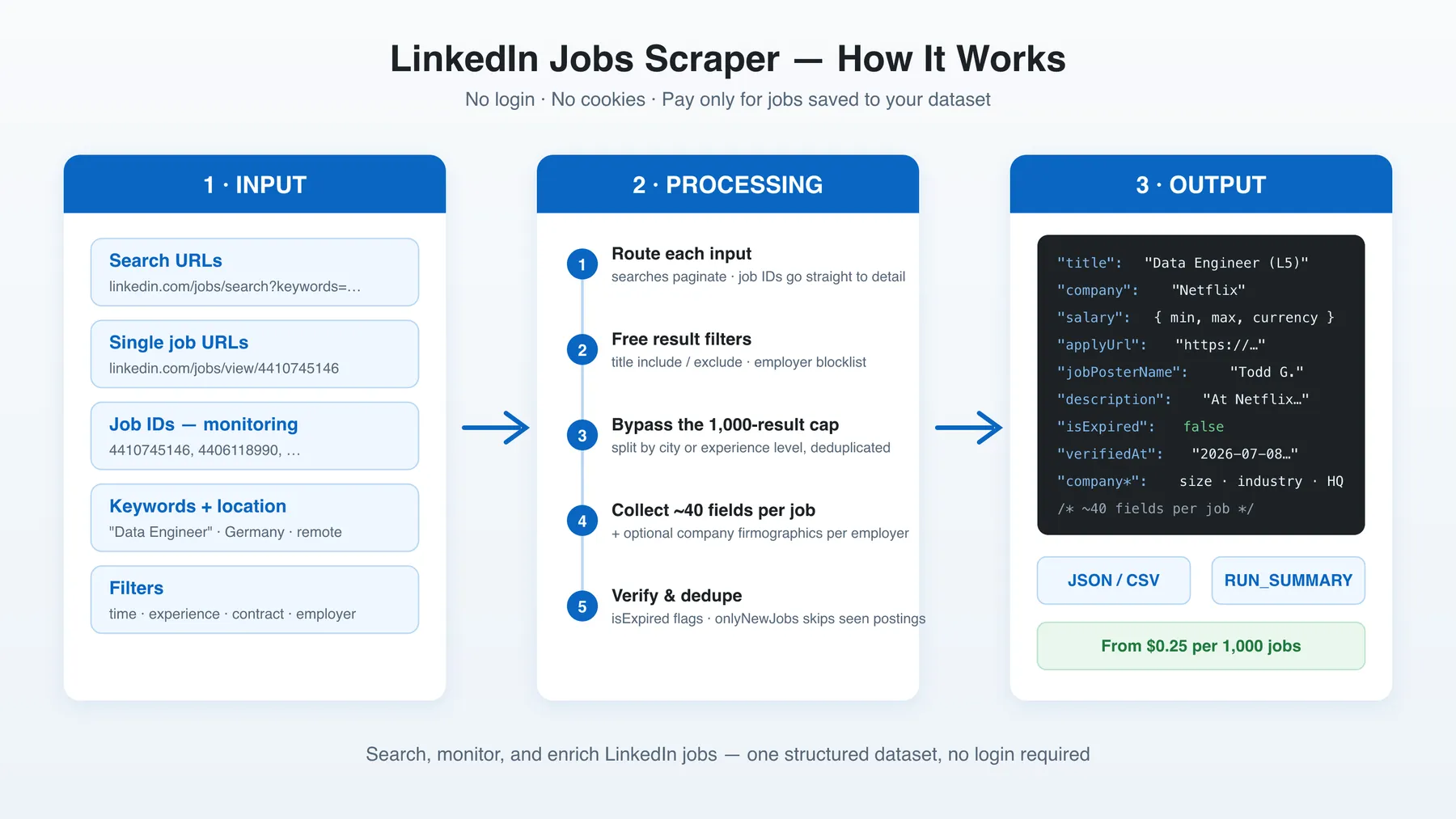
- Input — paste search URLs, job URLs, job IDs, or set keyword + location filters
- Route — search inputs paginate the public Jobs listing; job IDs and view URLs skip straight to the detail page
- Filter (free) — title include/exclude and employer blocklist drop unwanted jobs before they're collected or billed
- Collect & enrich — every kept job gets the full ~40-field row; optional company firmographics per unique employer
- Output — JSON or CSV dataset, plus a
RUN_SUMMARYrecord explaining exactly how the run ended
Input Configuration
Input fields
| Field | Type | Required | Notes |
|---|---|---|---|
naturalLanguageQuery | string | optional | 🤖 Plain-English brief (e.g. remote senior backend engineers in Germany posted this week) — one AI call maps it to keywords/location/remote/experience/contract/date at run start, filling only the fields you leave blank |
startUrls | array<{url}> | one input mode | Mix of search URLs and single-job view URLs |
autoConvertToAiSearch | boolean | optional | Default on. LinkedIn AI search dropped classic URL filters (experience, job type, workplace, salary, sort); those are rewritten into keywords. Date posted, company, Easy Apply, and under-10 stay as URL filters. Turn off to send the original f_* params |
jobIds | array<string> | one input mode | Raw IDs, view URLs, or currentJobId= URLs — direct to detail page |
skipJobId | array<string> | optional | Skip these listings (IDs or view URLs) so a rerun does not rebill jobs you already have — free, never charged |
keywords | array<string> | one input mode | Used when no URLs are given |
location / locations | string / array | optional | City, region, or country in plain words. Each name is looked up to a LinkedIn geoId (United States / UK / Germany / … are known without a fetch). Remote is left as text — use the workplace filter for remote jobs |
geoId | string | optional | Override for a single location. Leave empty to auto-resolve. Ignored when searching several locations or splitting by city |
placeIds | array | optional | Extra LinkedIn place filters (f_PP) on top of the resolved geo |
timeRange | enum | optional | any time, last 24h (r86400), week (r604800), month (r2592000) |
postedWithinHours | integer | optional | Custom freshness in hours (e.g. 1, 72) — overrides Time range. LinkedIn's dropdown only offers day/week/month |
postedAfter | string | optional | Drop jobs whose exact postedAt calendar date is before this day (YYYY-MM-DD) — free, never charged |
remote / jobTypes | array enum | optional | On-site 1 / Remote 2 / Hybrid 3 |
experienceLevels | array enum | optional | 1 intern, 2 entry, 3 associate, 4 mid-senior, 5 director, 6 executive (text values like "entry-level" are accepted too) |
contractType | array enum | optional | F/P/C/T/I/V/O |
companyNames | array<string> | optional | Only include these employers (resolved to a LinkedIn company ID, filtered server-side) |
companyIds | array<string> | optional | Same, but by raw LinkedIn company ID (f_C, e.g. 1035) — used verbatim, skips the name→ID lookup |
filterUnder10Applicants | boolean | optional | LinkedIn's own "early applicant" filter — jobs with <10 applicants |
filterEasyApply | boolean | optional | Only jobs that support Easy Apply (apply without leaving LinkedIn) |
excludeEasyApply | boolean | optional | Drop Easy Apply jobs and keep employer-site apply links — free, never charged. Ignored when Easy Apply only is on |
salaryBase | enum 1–9 | optional | LinkedIn's minimum-salary filter, $40K+ → $200K+ (mostly US) |
distance | enum (miles) | optional | Search radius around the location (LinkedIn's own distance filter). 0 = exact location only |
titleMustInclude | array<string> | optional | Keep only titles containing at least one term — free, pre-billing |
titleExclude | array<string> | optional | Drop titles containing any term — free, pre-billing |
excludeCompanies | array<string> | optional | Drop these employers — free, pre-billing |
subLocationExclude | array<string> | optional | Drop jobs whose location contains any term (e.g. a city) — free, pre-billing |
descriptionInclude | array<string> | optional | Keep only jobs whose description body contains at least one term — dropped jobs never charged |
descriptionExclude | array<string> | optional | Drop jobs whose description body contains any term (e.g. security clearance) — never charged |
requireSalaryInfo | boolean | optional | Drop jobs without a published salary — free, pre-billing |
requirePoster | boolean | optional | Drop jobs that do not name a recruiter — free, never charged (unlike requireRecruiterProfile, which only flags the row) |
resumeKeywords | array | optional | 🎯 Profile Match: score each job 0–100 vs your CV skills (never filters) |
scrapeCompanyDetails | boolean | optional | Company firmographics, fetched once per unique company; no extra charge |
scrapeJobDetails | boolean | optional | Off: search-card fields only (title/company/location/URL/date) — faster monitoring. On (default): full description, salary, recruiter |
includeDescriptionHtml | boolean | optional | Off omits descriptionHtml to shrink the dataset. On by default |
compatibleOutput | boolean | optional | Add the output field names other LinkedIn job actors use (jobTitle, companyName, salaryInfo…) next to ours. On automatically when the input uses those actors' field names |
aiEnrich | boolean | optional | 🤖 AI-normalize each job into an aiEnrichment block (visa / category / language / seniority / remote type); billed per job (one AI call each) |
onlyNewJobs | boolean | optional | Cross-run dedup — only jobs not returned in previous runs |
autoSplit | boolean | optional | Bypass ~1K cap by splitting the search across experience levels |
splitByLocation + splitCountry | boolean + enum | optional | Bypass ~1K cap by fanning out across a country's major cities |
maxItems | integer | optional | Hard cap on charged dataset rows |
maxItemsPerSearch | integer | optional | Cap each keyword × location query so one broad search cannot consume maxItems |
minDelay/maxDelay, minConcurrency/maxConcurrency, maxRequestRetries | integer | optional | Crawl pacing |
proxy | object | optional | Residential recommended |
🔎 Dynamic filters
Unlike the free filters above (which drop jobs before you pay), dynamic filters are evaluated after each job — and, for the company-based ones, its company page — is fetched. So every job is still saved and charged; non-matching jobs are stamped dynamicFilterMatch: false so you can discard them downstream (e.g. keep only dynamicFilterMatch == true in your N8N/Make flow). Per dimension, an *Include list takes priority over its *Exclude sibling. Company-based filters auto-enable company enrichment; companies missing a value always pass.
| Field | Type | Notes |
|---|---|---|
jobFunctionInclude / jobFunctionExclude | array enum | Keep / flag by LinkedIn job function |
jobIndustryInclude / jobIndustryExclude | array<string> | Keep / flag by industry name (e.g. Staffing and Recruiting) |
excludeRecruitingAgencies | boolean | Flag staffing / recruiting-agency postings |
companySizeMin / companySizeMax | integer | Flag by company employee count |
companyOrganizationTypeInclude / …Exclude | array enum | Flag by company type (Public Company, Non Profit, Privately Held, …) |
companyFoundedDateMin / companyFoundedDateMax | integer (year) | Flag by company founding year |
companyFollowersCountMin / companyFollowersCountMax | integer | Flag by LinkedIn follower count |
requireRecruiterProfile | boolean | Flag postings that expose no recruiter / hiring-team profile |
Common scenarios
1. Daily new-jobs monitor (schedule this)
2. Re-verify a list of tracked listings
3. Break the 1,000-result cap for a whole country
Output Overview
Each dataset item is one job posting containing:
- Core fields —
id,title,company,location,postedAt,jobUrl, fulldescription(+descriptionHtml) - Compensation & criteria — parsed
salary(minAmount/maxAmount/currency/period),seniorityLevel,employmentType,jobFunction,industries,benefits - Application —
applyUrl(external careers site when exposed),easyApply,contactEmails[](addresses found in the description),numberOfApplicants/applicantsCount - People —
hiringTeam[]and flatjobPosterName/jobPosterTitle/jobPosterProfileUrl(best-effort; empty means LinkedIn hid it from anonymous viewers) - Company —
companyLinkedinUrlalways; withscrapeCompanyDetailsalso website, industry, size, employee count, HQ, logo, follower count, organization type, founded year, specialties, office locations - Targeting —
yearsOfExperience[]parsed from the description,visaSponsorship(sponsored/not_sponsored/unknown, inferred from the description — free), anddynamicFilterMatch(the 🔎 dynamic-filter verdict) on every row - Verification —
isExpired,verifiedAt,verificationStatus(active/closed/removed) on every row - Provenance —
scrapedFrom(search-results/job-view-url/job-id-input),sourceUrl
Every run also writes a RUN_SUMMARY record to the key-value store: requested vs saved counts, pages parsed, jobs dropped per filter, expired jobs found, pagingLimitHit when a query hit LinkedIn's ~1,000-result wall, and a stopReason — so "why did I get 400 instead of 1000?" is answered by the run itself.
Output Samples
Search start (trimmed real row)
Job-ID start — removed listing (monitoring)
Key Output Fields
Job core
id,title,company,location,postedAt,postedTimeAgo,jobUrl,sourceUrlfoundBy[],search— which keyword × location query produced the rowdetailScraped—falseon card-only runs (scrapeJobDetails: false)
Description & criteria
description,descriptionHtml,criteria[],seniorityLevel,employmentType,jobFunction,industries[],benefits[]workplaceType—Remote/Hybrid/On-site. LinkedIn's own label when the page shows one (workplaceTypeSource: "labeled"); otherwise read from the title, location line, and description ("inferred").nullwhen the posting never states an arrangement — we do not invent On-site from a headquarters mentionyearsOfExperience[]— structured experience requirements parsed from the description ({ years: "5+" | "2-5" | "3", context, lang }); empty when none foundvisaSponsorship—sponsored/not_sponsored/unknown, inferred from the description text (deterministic, free on every row);unknownwhen the description says nothing either wayaiEnrichment— present only withaiEnrich; an AI-normalized block{ visaSponsorship, jobCategory, language, seniority, remoteType }read from the posting (billed per job). The free rule-based top-levelvisaSponsorshipis always there regardlessdynamicFilterMatch—truewhen the job passed every active 🔎 dynamic filter (or none were set);falseflags a non-match (the row is still returned)
Compensation & application
salary.raw,salary.minAmount,salary.maxAmount,salary.currency,salary.periodapplyUrl,easyApply,contactEmails,numberOfApplicants,applicantsCount
Recruiter / hiring team (best-effort)
hiringTeam[].name,hiringTeam[].title,hiringTeam[].linkedinUrl,hiringTeam[].photojobPosterName,jobPosterTitle,jobPosterProfileUrl,jobPosterPhoto
Company (flat fields filled by scrapeCompanyDetails)
companyLinkedinUrl,companyLinkedinSlug,companyWebsite,companyIndustry,companySize,companyEmployeesCount,companyHeadquarters,companyFollowerCount,companyLogo,companyDetailscompanyOrganizationType,companyFoundedDate,companySpecialties[],companyOfficeLocations[](best-effort from the public company page)
Profile Match (with resumeKeywords)
profileMatchScore(0–100 = % of your skills found in title + description)profileMatch.matchedKeywords[],profileMatch.missingKeywords[],profileMatch.matchCount,profileMatch.totalKeywords
Verification & provenance
isExpired,verifiedAt,verificationStatus,scrapedFrom
FAQ
Do I need a LinkedIn account or cookies?
No. The actor reads only the public Jobs surface that any anonymous browser can access. No login, no cookies, no account at risk.
Why did I get fewer jobs than maxItems?
Check the RUN_SUMMARY record in the run's key-value store — it reports pages parsed, candidates seen, how many jobs each filter dropped, and the stopReason. The most common causes: the search genuinely has fewer results, LinkedIn's ~1,000-per-search ceiling (pagingLimitHit: true — enable autoSplit or splitByLocation), maxItemsPerSearch capping one query, or your title/company filters doing their job.
Are the title and company filters really free?
Yes. titleMustInclude, titleExclude, and excludeCompanies run before a job is collected, so filtered jobs are never charged and never consume detail-page requests.
Are recruiter contacts always available?
No — best-effort. LinkedIn shows the hiring-team card to anonymous viewers on some jobs and hides it on others. hiringTeam: [] means LinkedIn hid it, not that the parser failed. Same honesty applies to salary and applyUrl: they're populated when the employer published them.
How do I monitor jobs for expiry?
Put the job IDs (or view URLs) in jobIds and run on a schedule. Live listings return full rows with verificationStatus: "active"; closed listings are flagged "closed"; listings deleted from LinkedIn come back as sparse rows with "removed" and isExpired: true.
How do I get more than 1,000 jobs per search?
LinkedIn caps every guest search at ~1,000 results. Enable splitByLocation (fans the search out across a country's major cities) or autoSplit (splits across the six experience levels). Results are deduplicated automatically.
How do I find jobs with the best odds of a reply?
Turn on filterUnder10Applicants — LinkedIn's own "early applicant" filter — so every returned job has fewer than 10 applicants. Combine with timeRange: "r86400" (last 24h) and a scheduled daily run with onlyNewJobs for a fully automated early-bird pipeline.
How does Profile Match (resumeKeywords) work?
Add your skills as plain strings or { "keyword": "JavaScript", "aliases": ["JS"] } objects. Every job is scored — profileMatchScore is the % of your skills found in its title + description, and profileMatch lists exactly which matched and which are missing. It never drops jobs; sort the dataset by profileMatchScore descending, or have your N8N/Make workflow act only on scores above a threshold.
Is the dataset in LinkedIn order?
No. Guest search order is not a stable rank, and sortBy on a pasted URL is turned into a keyword (sort by: most recent) when AI conversion is on. Sort the dataset by postedAt (ISO datetime from the listing) if you need newest first.
Why did my experience / job-type / workplace URL filters disappear?
LinkedIn's AI job search (August 2026) stopped honoring those URL facets. With autoConvertToAiSearch on (the default), the actor turns them into keywords (Mid-Senior level, Full-time, Remote, $100,000+, sort by: most recent) and leaves date, company, Easy Apply, and under-10 as real URL filters. Turn the option off if you want the original f_* params sent unchanged.
Can I reuse the input from another LinkedIn jobs actor?
Yes. Paste it unchanged and replace only the actor ID. Alternative field names and value formats are translated (the run log lists each one under [COMPAT]), and the output also carries the field names your workflow already reads. Details in Switching from another LinkedIn jobs actor.
Is there a minimum number of results per run?
No. maxItems: 10 returns and bills at most 10 jobs.
What does onlyNewJobs do?
It remembers the job IDs from your previous runs and skips them, so a scheduled run only returns postings it has never sent you before.
How is skipJobId different from onlyNewJobs?
onlyNewJobs remembers every ID this actor has already returned. skipJobId is an explicit list you pass in (IDs or view URLs) — useful when the previous dataset lived somewhere else. Direct jobIds / view URLs are never skipped.
How do I keep only employer-site apply links?
Turn on excludeEasyApply. Jobs that apply on LinkedIn are dropped and never charged. filterEasyApply does the opposite (Easy Apply only).
Can I scrape private or logged-in-only postings?
No. Anything behind the LinkedIn login wall (Sales Navigator, Recruiter, private postings) is out of scope.
Support
Found a bug or have a feature request? Open an issue on the actor's Issues tab or email me at muhameddidovic@gmail.com.
Additional Services
Need a custom export shape, an extra field, or a managed daily feed delivered to your database? I do tailored work — drop me a line at muhameddidovic@gmail.com.
Explore More Scrapers
If you found this useful, you might also like:
- LinkedIn Posts Scraper — posts from profiles and company pages, no cookies
- LinkedIn Company Employees Scraper — people behind any company page
- LinkedIn Ads Scraper — ad library search and details
- LinkedIn Profile Scraper — public profile data at $1/1k
Full list at apify.com/memo23.
🤖 For AI Agents & LLM Apps
Compact reference for AI agents calling this actor via the Apify MCP server or the Apify API (actor: memo23/linkedin-jobs-scraper).
Purpose: Turn LinkedIn Jobs into structured rows (title, company, salary, full description, apply URL, recruiter contacts) with no login or cookies; every input mode yields the same ~40-field job schema.
Minimal input:
URL mode instead: "startUrls": [{ "url": "https://www.linkedin.com/jobs/search?keywords=Software%20Engineer&location=United%20States" }]. Monitoring mode: "jobIds": ["4410745146"] (each row carries isExpired / verifiedAt / verificationStatus).
Output: one row per job — id, title, company, location, postedAt, jobUrl, description, descriptionHtml, seniorityLevel, employmentType, jobFunction, industries, benefits, salary {raw, minAmount, maxAmount, currency, period}, applyUrl, easyApply, contactEmails[], numberOfApplicants, applicantsCount, hiringTeam[] {name, title, linkedinUrl, photo}, jobPosterName, jobPosterTitle, jobPosterProfileUrl, companyLinkedinUrl, yearsOfExperience[], visaSponsorship, dynamicFilterMatch, isExpired, verifiedAt, verificationStatus, scrapedFrom, sourceUrl; company* firmographics only with scrapeCompanyDetails; profileMatchScore + profileMatch only with resumeKeywords.
Behaviors an agent should know:
maxItemsdefaults to 1000 — always set it; a search can approach LinkedIn's ~1000-result ceiling.- A pasted search URL in
startUrlsruns as pasted — keyword/result/dynamic filters are ignored (only onlyNewJobs, skipJobId, resumeKeywords, scrapeCompanyDetails still apply). WithautoConvertToAiSearch(default on), classicf_E/f_JT/f_WT/ salary / sort params are appended to keywords because LinkedIn AI search dropped those facets. - Free result filters (titleMustInclude, titleExclude, excludeCompanies, subLocationExclude, requireSalaryInfo, skipJobId, excludeEasyApply) drop jobs before billing; 🔎 dynamic filters only flag
dynamicFilterMatch: false(the job is still fetched and charged). - Break the ~1000 cap with
autoSplit(by experience) orsplitByLocation+splitCountry(by city);onlyNewJobsdedups across runs via the key-value store. - Billing is per job delivered ($0.69/1k free plan, down to $0.25/1k on higher plans); filtered, duplicate, and previously-seen jobs cost nothing;
scrapeCompanyDetails(company firmographics) has no extra charge. - Login-gated data (Sales Navigator, Recruiter, private postings) is out of scope; recruiter cards, salary, and applyUrl are best-effort (empty when LinkedIn hides them from anonymous viewers).
⚠️ Disclaimer
This Actor is an independent tool and is not affiliated with, endorsed by, or sponsored by LinkedIn Corporation or any of its subsidiaries. All trademarks mentioned are the property of their respective owners.
The scraper accesses only publicly available LinkedIn Jobs pages — no authenticated endpoints, paid features, or content behind the linkedin.com login wall. Users are responsible for ensuring their use complies with LinkedIn's Terms of Service, applicable data-protection law (GDPR, CCPA, etc.), and any contractual obligations of their own organization.
SEO Keywords
linkedin jobs scraper, scrape linkedin jobs, linkedin job scraper, linkedin jobs API, linkedin job postings scraper, Apify linkedin jobs, job listings scraper, job board scraper, hiring data scraper, recruiter contact scraper, job monitoring tool, job posting verification, linkedin jobs without login, no-cookie linkedin scraper, job market analysis data, salary benchmark data, recruitment lead generation, hiring manager contacts, employment data extraction, HR tech data, talent sourcing data


![ForRentUniversity.com [$1.25💰] Scraper · Emails avatar](https://images.apifyusercontent.com/knob38rf08RjbTFOtyPTLKbUpJqNv69gLvD9GZvNHdY/rs:fill:76:76/cb:1/aHR0cHM6Ly9hcGlmeS1pbWFnZS11cGxvYWRzLXByb2QuczMudXMtZWFzdC0xLmFtYXpvbmF3cy5jb20vbmduOHZSRVNUa3NleVdFNnAtYWN0b3Itb2ZkQkJZZ0QzMndpZHZSemotT25mdk55NHJTQS1mcnUuanBlZw.webp)
![Collecting Cars [$3💰] | 33k SOLD prices + live bids avatar](https://images.apifyusercontent.com/Hbn_LDWbVTHAyPL8k_edq8GAZOEin7g5i4_bFf2WimM/rs:fill:76:76/cb:1/aHR0cHM6Ly9hcGlmeS1pbWFnZS11cGxvYWRzLXByb2QuczMudXMtZWFzdC0xLmFtYXpvbmF3cy5jb20vbmduOHZSRVNUa3NleVdFNnAtYWN0b3ItRm1EYVRESkEyWGNYU0s4N24tVkJhU3V5RENuYi1Db2xsZWN0aW5nX0NhcnMud2VicA.webp)
![Autotrader.com.au [$1💰] Australia Search & Details Scraper🇦🇺 avatar](https://images.apifyusercontent.com/pCkelbtHnioCVauMT6DM9tGYD81m-FmuhD-rXFDHMC4/rs:fill:76:76/cb:1/aHR0cHM6Ly9hcGlmeS1pbWFnZS11cGxvYWRzLXByb2QuczMudXMtZWFzdC0xLmFtYXpvbmF3cy5jb20vbmduOHZSRVNUa3NleVdFNnAtYWN0b3ItYWFINGlJOWIwc2dNNkNWeVMtanhmc2ZZeEVBWi1hdXRvdHJhZGVyLWF1cy5wbmc.webp)


![Zillow Open Houses [From $1.4💰] Exact Dates & Times | Any City avatar](https://images.apifyusercontent.com/zoKu3LMKeaXS71TCH3tW4OQ56H88owGwqrAw9I8FH5w/rs:fill:76:76/cb:1/aHR0cHM6Ly9hcGlmeS1pbWFnZS11cGxvYWRzLXByb2QuczMudXMtZWFzdC0xLmFtYXpvbmF3cy5jb20vbmduOHZSRVNUa3NleVdFNnAtYWN0b3ItdGM4YVJlN2E5N3RrWjBNWVItSnVITWQ1RlFFbS16aWxsb3ctbG9nby5wbmc.webp)

