
![LinkedIn Posts Scraper [$0.99💰 No Cookies] Profile + Companies avatar](https://images.apifyusercontent.com/y36l3eR31oXyAo2jp9wue9kM5d_EaKzeaZqdZAzSitE/rs:fill:250:250/cb:1/aHR0cHM6Ly9hcGlmeS1pbWFnZS11cGxvYWRzLXByb2QuczMudXMtZWFzdC0xLmFtYXpvbmF3cy5jb20vbmduOHZSRVNUa3NleVdFNnAtYWN0b3Itc0lCSWFpOWZMU2xjUGFmdm4tdUJOMlFocXF0Yy1saW5rZWRpbi53ZWJw.webp)
LinkedIn Posts Scraper [$0.99💰 No Cookies] Profile + Companies
Pricing
from $0.99 / 1,000 results
LinkedIn Posts Scraper [$0.99💰 No Cookies] Profile + Companies
[Only $0.99💰] Track any LinkedIn creator or company's posts — no login, no cookies. Get text, author, reactions with types, comment counts and media, plus a unique 0–100 engagement-quality score and a monitoring mode that returns only new posts on a schedule. Profiles, companies, post URLs
Pricing
from $0.99 / 1,000 results
Rating
5.0
(2)
Developer

Muhamed Didovic
Maintained by CommunityActor stats
13
Bookmarked
213
Total users
72
Monthly active users
19 hours
Issues response
an hour ago
Last modified
Categories
Share
LinkedIn Posts Scraper (No Cookies)
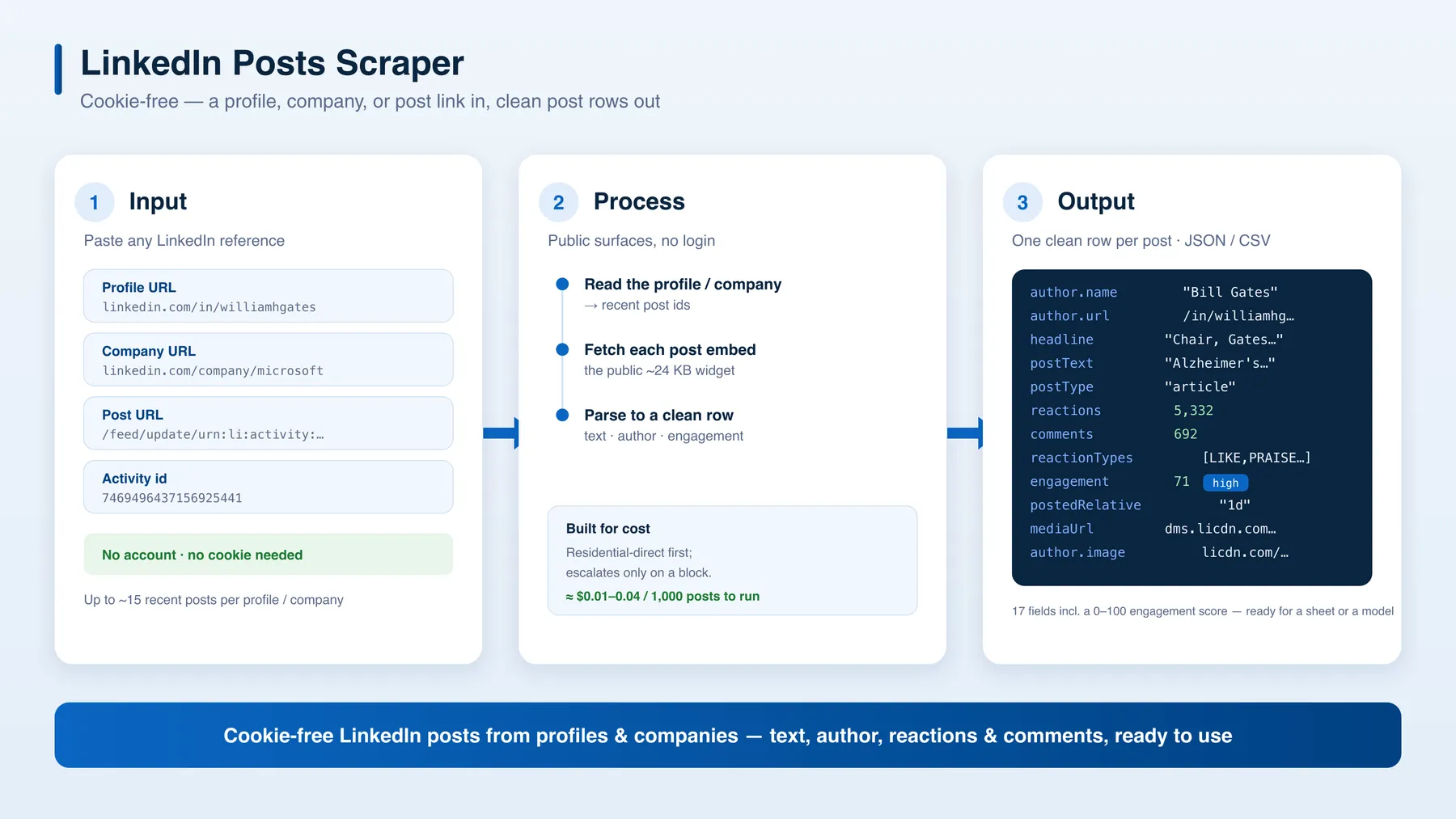
Turn any LinkedIn profile URL, company URL, post URL, or activity id into clean, structured post rows — no LinkedIn account, no cookie, no login. Each post comes back as one tidy row: post text, author (name + profile + headline + photo), reactions (with types), comment counts, media, post type — plus an exact post date you can filter by range and a 0–100 engagement-quality score nobody else surfaces. Add monitoring mode to get only-new posts on a schedule. JSON or CSV out.
Why Use This Scraper?
- ✅ Cookie-free — no LinkedIn login, no account, nothing to paste
- ✅ Only posts that contain your words —
postMustContaindrops every post whose text lacks your keywords before it reaches the dataset, so a keyword search returns posts about your topic, not posts that merely ranked for it. Dropped posts are not billed - ✅ Empty runs cost half a cent — $0.005 per run start, nothing per post that is not delivered. A scheduled monitor that finds nothing new that day costs $0.005, not a minimum charge
- ✅ Clean structured rows — 18 fields per post, ready for a spreadsheet or a model
- ✅ Author included — name, profile URL, headline, and photo on every post
- ✅ Engagement — reaction count, reaction types (LIKE/EMPATHY/PRAISE/…), and comment count
- ✅ Engagement-quality score — a 0–100 score + tier (viral / high / solid / low / quiet) computed from reactions, comment ratio, and reaction depth — rank posts at a glance
- ✅ Date-range filter —
dateFrom/dateTokeep only posts published in a window; dates are derived from the post id, so out-of-range posts are skipped before fetching (you don't pay for them) - ✅ Monitoring mode — schedule it and get only new posts each run (de-dupes against what it already returned)
- ✅ Company posts too — paste a company URL or just the name (
Microsoft) - ✅ Flexible input — keywords, profile URLs, company URLs or names, post URLs, or raw activity ids
- ✅ Post-type filter — images, videos, articles, or documents
- ✅ Richer post fields — shares, reaction breakdown, hashtags, reshare flag, edited flag
- ✅ Cheap to run — built to use the lightest egress tier first
Overview
The LinkedIn Posts Scraper is built for marketers, founders, researchers, and analysts who need a quick, structured pull of someone's recent LinkedIn posts without managing logins or accounts.
The output is post-shaped rows — one row per post.
- Paste a post URL or activity id → you get that post. Works for any public post.
- Paste a profile URL → you get that person's recent public posts — but only for profiles that expose their activity publicly (creators, influencers, and active public posters). Many regular profiles keep their post feed behind login; cookie-free, those return no posts, and you'd pass the individual post URLs instead.
- Paste a company URL → you get that company's ~12–15 most recent posts (a small share of company posts are partially login-gated and may come back with engagement but truncated text).
The author (name, profile, headline, photo) and engagement counts ride along on every row.
This is the lightweight, cookie-free option. It reads only LinkedIn's public surfaces, so it's honest about its limits (below) rather than pretending to do everything. Unlimited post history, full comment threads, and named reactors still need a logged-in session — out of scope here.
Supported Inputs
| Input type | Pattern | Example |
|---|---|---|
| Keyword / phrase | any topic, brand or competitor | SaaS pricing strategy |
| Profile URL | https://www.linkedin.com/in/{slug} | https://www.linkedin.com/in/williamhgates |
| Company URL | https://www.linkedin.com/company/{slug} | https://www.linkedin.com/company/microsoft |
| Company name | any public company | Microsoft |
| Post URL | .../feed/update/urn:li:activity:{id} or .../posts/...-activity-{id}-{hash} | https://www.linkedin.com/feed/update/urn:li:activity:7469496437156925441 |
| Activity id / URN | {id} or urn:li:activity:{id} | 7469496437156925441 |
Copy-pasteable startUrls
Unsupported inputs
- ❌ Person search or connection data
- ❌ Full comment threads, named reactors, or reposters — the public embed rarely includes them
- ❌ Any host outside
linkedin.com
Use Cases
| Audience | Use case |
|---|---|
| Marketers / ghostwriters | Pull a creator's recent posts to study format, hooks, and engagement |
| Founders / sales | Watch a prospect's or competitor's recent posts for timely outreach angles |
| Researchers / analysts | Bulk-export public posts from a list of profiles for content analysis |
| Social teams | Track a roster of voices and benchmark reactions/comments over time |
How It Works
- Input — give keywords, LinkedIn profile URLs, post URLs, or activity ids
- Search (keywords) — each keyword runs as
site:linkedin.com/posts "your keyword"against Google's index of public posts, which returns post ids. LinkedIn is never contacted during this step, so there is no session to flag - List posts (profiles) — for a profile, the actor reads its public page and collects up to ~15 recent post ids
- Fetch each post — it pulls each post's public embed widget (a small ~24 KB page), cookie-free
- Structure — author, text, engagement counts, media, and type are parsed into one clean row
- Output — export as JSON or CSV
Input Configuration
| Field | Type | Required | Notes |
|---|---|---|---|
searchQueries | array<string> | one of | Keywords or phrases to find posts by, e.g. SaaS pricing strategy. Each is quoted and site-scoped for you; a query that already contains site: or a quote is passed to the search engine verbatim so you can use its operators |
maxPostsPerQuery | integer | optional | Cap on posts discovered per keyword. Default 50 |
startUrls | array<string> | one of | Profile URLs, post URLs, or activity ids/URNs. Scraped in addition to any keyword results |
maxPostsPerProfile | integer | optional | Posts to pull per profile. LinkedIn's cookie-free limit is 15, so higher values are capped. Default 15 |
maxItems | integer | optional | Hard cap on total post rows. Default 1000 |
maxConcurrency | integer | optional | Parallel requests. Default 3 |
maxRequestRetries | integer | optional | Retries per request before giving up. Default 2 |
dateFrom | string | optional | Keep only posts published on/after this date (YYYY-MM-DD). Derived from the post id, so filtering happens before fetch. |
dateTo | string | optional | Keep only posts published on/before this date (YYYY-MM-DD, inclusive). |
onlyNewPosts | boolean | optional | Monitoring mode. Remembers the posts it has already returned and, on each re-run, emits only posts it hasn't seen before — so a schedule pays only for genuinely new content. Default false |
dedupeStoreName | string | optional | Monitoring only: the named storage holding the "already-seen" ids. Give each independent monitor its own name (e.g. seen-microsoft). Default linkedin-posts-seen |
sdoKey | string (secret) | optional | Leave blank — built-in egress is used by default. Advanced: paste your own scrape.do token to bill unblocker usage to your own account |
Example input
Search by keyword:
Or scrape specific profiles:
Output Overview
Each dataset item is one post:
- Identity —
urn,activityId,postUrl - Content —
postText,postType(article / video / image / text),mediaUrl,articleUrl(for published LinkedIn articles) - Author —
author.name,author.profileUrl,author.headline,author.image,author.isInfluencer - Engagement —
reactions,comments(counts),reactionTypes,reactionBreakdown,shares - Flags —
isEdited,isRepost,originalAuthor,hashtags[],videoDuration,documentPages - Engagement score —
engagement.score(0–100),engagement.tier(viral/high/solid/low/quiet),engagement.total,engagement.commentRatio,engagement.reactionDepth - Meta —
postedAt(exact ISO date, derived from the activity id),postedRelative(e.g. "1d", "3w"),sourceProfile,scrapedAt
Output Sample
Profile start (linkedin.com/in/williamhgates)
Key Output Fields
Post
urn,activityId,postUrl,postText,postType,mediaUrl,postedAt,postedRelative
Author
author.name,author.profileUrl,author.headline
Engagement
reactions,comments(counts),reactionTypesengagement.score(0–100),engagement.tier(viral / high / solid / low / quiet), plus the rawtotal,commentRatio, andreactionDepthinputs
FAQ
Do I need a LinkedIn account or cookie?
No. This actor reads only LinkedIn's public surfaces, so you provide nothing but a keyword or a URL.
Why did a profile return 0 posts?
Cookie-free, LinkedIn only exposes a profile's post feed publicly for creator / influencer-style profiles (and people who've made their activity public). Many regular profiles keep their feed behind login, so they come back empty. Post URLs and activity ids always work for any public post — so for those profiles, pass the individual post links directly.
How many posts do I get per profile?
For profiles that do expose activity, up to about 15 most-recent posts — LinkedIn's hard cap for cookie-free access (no deeper pagination without login).
Do I get the comment text?
You always get the comment count. Turn on scrapeComments to also parse commenter name/text when the public embed includes them (often it does not). Full threads and named reactors still need a LinkedIn session.
Can I scrape company pages?
Yes — paste a company URL (linkedin.com/company/{name}) and you get its ~12–15 most recent posts. A small share of company posts are partially login-gated; those rows come back with engagement counts but truncated text.
Can I search by keyword?
Yes — put your terms in searchQueries. LinkedIn's own content search is login-walled, so the actor discovers posts through Google's index of public linkedin.com/posts/… pages instead, then fetches each match through the normal pipeline. That means your rows carry the full post text, engagement counts, media and post type, not just a search snippet, and LinkedIn is never contacted during discovery.
Two things follow from using an index rather than LinkedIn's live search: reach is limited to posts Google has crawled (a post published today may take days to appear), and a broad keyword typically yields 40–120 distinct posts before results start repeating, at which point the crawl stops on its own. Pair it with dateFrom / dateTo to keep only a date range — that filter runs before any post is fetched, so out-of-range matches cost nothing.
Is the posted date exact?
Yes. postedAt is an exact ISO timestamp derived from the post's activity id — LinkedIn encodes the creation time in the id itself, so you get a precise date cookie-free. postedRelative ("1d", "3w") is included too, as LinkedIn displays it. Use dateFrom / dateTo to keep only posts published in a date range — they're filtered before fetching, so out-of-range posts cost nothing.
What if a profile or post is private?
Only publicly visible posts are returned. Private/connections-only content is out of scope.
What is the engagement score?
A transparent 0–100 quality score computed per post from public signals only — no extra requests, no guessing. It blends three things: volume (reactions + comments, log-scaled so a 5k-reaction post isn't 100× a 50-reaction one), comment ratio (comments are higher-effort than reactions, so a real conversation scores higher), and reaction depth (how many reaction types beyond a plain LIKE — praise/empathy/insightful/funny/support signal stronger sentiment). The score maps to a tier: viral (80+), high (60+), solid (40+), low (20+), quiet (<20). The raw inputs (total, commentRatio, reactionDepth) ride along so you can re-rank with your own weights.
How do I monitor a profile or company for new posts?
Turn on onlyNewPosts and put the actor on an Apify Schedule (e.g. every 6 hours). On each run it remembers the post ids it already returned (in a named storage) and emits only posts it hasn't seen before — so your dataset and your bill only grow with genuinely new content. Running several independent monitors? Give each its own dedupeStoreName (e.g. seen-microsoft, seen-billgates) so they don't share state. A monitoring run that finds nothing new simply returns 0 rows — that's the expected "all quiet" result, not an error.
Support
- Issues or feature requests: the Issues tab of this actor.
- Custom work / questions: muhamed.didovic@gmail.com · all actors at apify.com/memo23.
Additional Services
Need deeper LinkedIn data (full comments, reactions lists, company feeds, search)? That requires a logged-in approach — email muhamed.didovic@gmail.com to discuss a custom build.
Explore More Scrapers
- Crunchbase Company Scraper — clean structured company + funding data
- More by memo23 — directory, jobs, real-estate, and social scrapers
🤖 For AI Agents & LLM Apps
Compact reference for AI agents calling this actor via the Apify MCP server or the Apify API (actor: memo23/linkedin-posts-scraper).
Purpose: Turn LinkedIn profile, company, or post URLs (or raw activity ids) into structured post rows — cookie-free, no login — with author, engagement counts, an exact post date, and a 0–100 engagement-quality score.
Minimal input:
Output: one row per post with urn, activityId, postUrl, postText, postType, mediaUrl, author {name, profileUrl, headline, image, isInfluencer}, reactions, comments, reactionTypes[], reactionBreakdown, shares, hashtags[], isEdited, isRepost, engagement {score, tier, total, commentRatio, reactionDepth}, postedAt (exact ISO), postedRelative, sourceProfile, scrapedAt. Optional commentItems when scrapeComments is on.
Behaviors an agent should know:
- Set
maxItemsandmaxPostsPerProfile— cookie-free access is hard-capped at ~15 posts per profile. - Profile URLs return posts only for creator/influencer profiles that expose activity publicly; regular profiles return 0 posts — pass individual post URLs or activity ids, which work for any public post. Company URLs return ~12–15 recent posts.
dateFrom/dateTo(YYYY-MM-DD) filter by post date, derived from the activity id, so out-of-range posts are skipped before fetching and cost nothing.onlyNewPostsmonitoring mode emits only unseen posts across re-runs, deduping against a named store (dedupeStoreName); pair with an Apify Schedule.- Comment bodies, reaction lists, and keyword search are not available cookie-free.
- Pay-per-event billing — see the Pricing tab on the actor page.
⚠️ Disclaimer
This Actor is an independent tool and is not affiliated with, endorsed by, or sponsored by LinkedIn Corporation or Microsoft Corporation. All trademarks mentioned are the property of their respective owners.
The scraper accesses only publicly available LinkedIn pages — no authenticated endpoints, no login, and no content behind LinkedIn's login wall. Users are responsible for ensuring their use complies with LinkedIn's Terms of Service, applicable data-protection law (GDPR, CCPA, etc.), and any contractual obligations of their own organization. Scrape responsibly and respect the rights of the individuals whose public posts you collect.
SEO Keywords
linkedin posts scraper, scrape linkedin posts, linkedin post scraper, linkedin scraper no cookies, cookie-free linkedin scraper, linkedin profile posts, linkedin activity scraper, linkedin post data, linkedin content scraper, linkedin engagement data, linkedin engagement score, linkedin post monitoring, linkedin new posts alert, linkedin post tracker, social media scraper, linkedin api alternative, linkedin posts export, linkedin author data, linkedin post extractor, Apify linkedin, linkedin marketing data, creator content analysis, linkedin posts json, linkedin posts csv


![Autotrader.com.au [$1💰] Australia Search & Details Scraper🇦🇺 avatar](https://images.apifyusercontent.com/pCkelbtHnioCVauMT6DM9tGYD81m-FmuhD-rXFDHMC4/rs:fill:76:76/cb:1/aHR0cHM6Ly9hcGlmeS1pbWFnZS11cGxvYWRzLXByb2QuczMudXMtZWFzdC0xLmFtYXpvbmF3cy5jb20vbmduOHZSRVNUa3NleVdFNnAtYWN0b3ItYWFINGlJOWIwc2dNNkNWeVMtanhmc2ZZeEVBWi1hdXRvdHJhZGVyLWF1cy5wbmc.webp)

![ForRent.com [Only $0.75💰] Scraper · Emails avatar](https://images.apifyusercontent.com/OVGbNhRCd6aR8W3BIE9Rb9hBTrsHAsZoSdQHIqENs-k/rs:fill:76:76/cb:1/aHR0cHM6Ly9hcGlmeS1pbWFnZS11cGxvYWRzLXByb2QuczMudXMtZWFzdC0xLmFtYXpvbmF3cy5jb20vbmduOHZSRVNUa3NleVdFNnAtYWN0b3ItRWp5bGpFRDByRG9Zb2ZpajMtSDVJZmJ6d1c0NS1mb3JyZW50LnBuZw.webp)


