

Booking.com Reviews Scraper - Hotel Rating & Review Count
Pricing
from $0.80 / 1,000 review scrapeds
Booking.com Reviews Scraper - Hotel Rating & Review Count
Scrape Booking.com hotel ratings and guest reviews. Get the overall score, total review count and category sub-scores per hotel, or pull every review with reviewer name, country, room type and stay dates. Summary-only mode skips reviews entirely. Fast, HTTP-only. JSON or CSV.
Pricing
from $0.80 / 1,000 review scrapeds
Rating
5.0
(1)
Developer

Muhamed Didovic
Maintained by CommunityActor stats
0
Bookmarked
97
Total users
36
Monthly active users
4 days ago
Last modified
Share
Booking.com Reviews Scraper ⭐
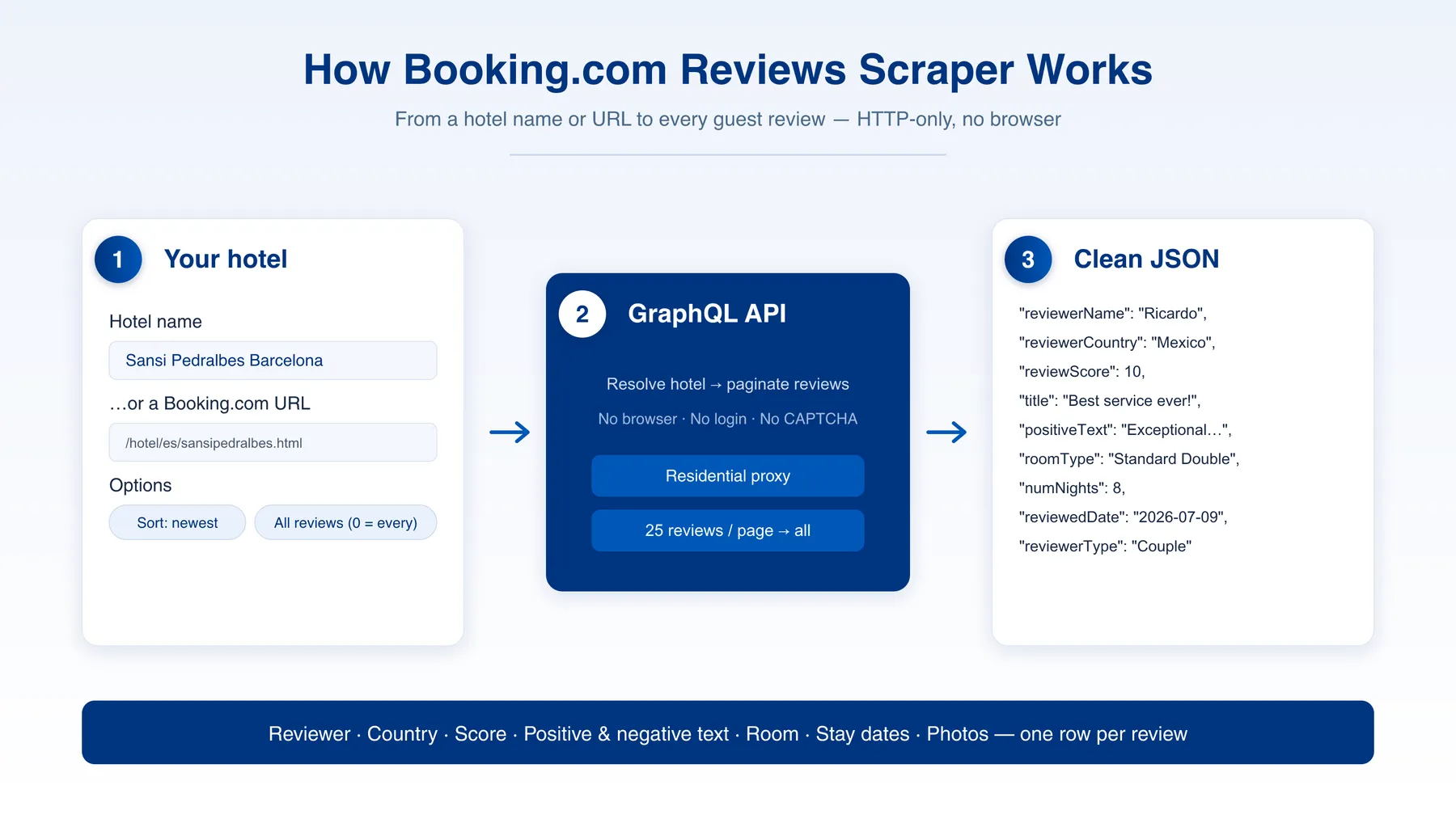
Scrape Booking.com hotel ratings and guest reviews. Get the overall guest score, total review count and category sub-scores per hotel, or every review with reviewer name, country, score, title, positive & negative text, room type, stay dates, helpful votes, partner replies and photos. Fast, HTTP-only, structured JSON/CSV/Excel out.
Why use Booking.com Reviews Scraper?
- Just the headline numbers, if that's all you need — switch on Skip reviews and get one row per hotel with the overall score, total review count, star rating and category sub-scores. No review rows, no pagination.
- Every review, not just the first page — or leave it off and paginate through a hotel's full review history.
- Rich per-review data — reviewer name & country, numeric score, title, separate positive and negative text, room type, check-in/out dates, number of nights, customer type, helpful votes, and any partner (hotel) reply.
- Category rating breakdown — cleanliness, staff, location, comfort, facilities, value and wifi, as a
categoryRatingsobject on the hotel row. - Find a hotel two ways — by name (e.g.
Sansi Pedralbes Barcelona) or by pasting a Booking.com hotel URL. - URLs resolve exactly, even after a rename — a slug and a listed name are independent (
/hotel/tc/the-alexandrais listed as "Alexandra Resort - All-Inclusive"). Each URL is read from the property's own page, so a renamed hotel returns its real reviews instead of being skipped. - Sort control — most relevant, newest, oldest, highest, or lowest score.
- No login, no browser — talks directly to Booking's data API, so runs are fast and cheap.
- Runs on any plan — the standard Apify proxy is enough, no residential subscription required.
- Pay only for what you scrape — pay-per-review pricing with volume discounts, no monthly rental.
What data can you extract from each review?
| Field | Type | Description |
|---|---|---|
| hotelName | string | Hotel the review belongs to |
| hotelId | number | Booking.com internal hotel ID |
| hotelUrl | string | Direct Booking.com hotel page URL |
| reviewUrl | string | Direct link to the review |
| reviewScore | number | Reviewer's overall score (0–10) |
| title | string | Review headline |
| positiveText | string | What the guest liked |
| negativeText | string | What the guest disliked |
| language | string | Language code of the review text |
| reviewedDate | string | ISO 8601 date the review was posted |
| helpfulVotes | number | Number of "helpful" votes |
| reviewerName | string | Reviewer's display name |
| reviewerCountry | string | Reviewer's country |
| reviewerCountryCode | string | ISO country code |
| reviewerType | string | Guest type (e.g. Couple, Family, Solo traveller) |
| reviewerReviewCount | number | How many reviews this guest has written |
| roomType | string | Room the guest stayed in |
| customerType | string | Booking customer type |
| checkinDate / checkoutDate | string | The guest's stay dates |
| numNights | number | Length of stay in nights |
| partnerReply | string | The hotel's reply to the review, if any |
| photos | string[] | URLs of photos attached to the review |
| scrapedAt | string | ISO 8601 timestamp of collection |
Use cases
- Reputation monitoring — track guest sentiment and scores for your property or competitors.
- Review analysis & NLP — feed positive/negative text into sentiment models and topic analysis.
- Hospitality benchmarking — compare category sub-scores (cleanliness, staff, location) across hotels.
- Content & research — surface authentic guest feedback for travel content or market studies.
How to scrape Booking.com reviews
- Enter a Hotel name (e.g.
Sansi Pedralbes Barcelona) or paste one or more Booking.com hotel URLs. - Decide what you want back. For just the headline numbers, switch on Skip reviews and you get one row per hotel. For the reviews themselves, leave it off and set how to sort them plus Max reviews per hotel (0 = all).
- Run and download the results as JSON, CSV, Excel, HTML, or XML.
Two output shapes
With Skip reviews on, you get one rowType: "hotel" row per property: overall score, score label, total review count, star rating, address, coordinates and categoryRatings. Nothing else.
With it off, you get one row per review (rowType: "review"). Switch on Include hotel summary row as well if you want the hotel row alongside them.
Input configuration
| Parameter | Type | Default | Description |
|---|---|---|---|
| hotelQuery | string | — | Hotel name (or "Hotel Name, City") to fetch reviews for. Provide this or Start URLs. |
| startUrls | array | — | Booking.com hotel page URLs (e.g. https://www.booking.com/hotel/es/sansipedralbes.html). |
| resolveUrlsViaPage | boolean | true | Read each start URL's own page for the hotel's exact identity, name, rating and review count. Leave this on — it is what makes renamed properties resolve. |
| skipReviews | boolean | false | Emit only the hotel-level summary row, no individual reviews. |
| includeHotelSummary | boolean | false | Add a rowType: "hotel" row alongside the review rows. Forced on when skipReviews is set. |
| includeCategoryRatings | boolean | true | Include the per-category breakdown (cleanliness, staff, location, comfort, facilities, value, wifi) on the hotel row. |
| maxHotels | integer | 1 | When the query is broad (a city), how many matching hotels to cover. Ignored for exact URLs. |
| maxReviews | integer | 100 | Max reviews per hotel. 0 = all available. |
| sortBy | enum | most_relevant | most_relevant, newest, oldest, score_high, score_low. |
| cutoffDate | string | — | Keep only reviews posted on or after this date, e.g. 2026-01-01. Sorting switches to newest-first automatically so pagination stops at the cutoff. |
| minReviewScore | integer | — | Keep only reviews scoring at least this (0-10). 8 for positive reviews only. |
| maxReviewScore | integer | — | Keep only reviews scoring at most this (0-10). 6 to study complaints. |
| language | string | en-us | Language code for review text and labels. |
| proxyConfiguration | object | Apify proxy | Proxy settings. The standard Apify proxy is the default and is enough; residential is supported but costs more and is not required. |
Output sample
FAQ
Do I need a Booking.com account or API key? No. The scraper pulls public review data directly — no login, cookies, or key required.
How do I target a specific hotel?
Either enter its name (e.g. Sansi Pedralbes Barcelona) or paste its Booking.com hotel URL. URLs are resolved by reading the property's own page, so they identify the hotel exactly.
I only want the rating and review count, not the reviews.
Switch on skipReviews. You get one row per hotel with the overall score, total review count, star rating and category sub-scores, and no review rows at all.
The name in my output doesn't match the URL. Is that wrong?
No. A slug and a listed name are independent, and properties get renamed. /hotel/tc/leeward-resort is listed as "Blue Haven Resort", /hotel/tc/windsong-resort as "Windsong on the Reef". The Actor returns the name Booking currently shows.
A hotel URL returned nothing. Why? Almost always because the property has been delisted — a removed hotel redirects to a generic destination page with no property record left to read. If it is still live on Booking, send the URL via the Issues tab.
Why are some positiveText / title fields empty?
Many Booking guests leave only a score with no written text — those fields are simply blank for those reviews.
Can I get every review?
Yes — set maxReviews to 0 to paginate through all available reviews for the hotel.
Can I scrape only new reviews since my last run?
Set cutoffDate to the date you last pulled. The Actor sorts newest-first and stops paginating once it reaches that date, so an incremental run costs a fraction of a full one. Filtered-out reviews are never pushed and never billed.
Can I get only good or only bad reviews?
Set minReviewScore (e.g. 8) or maxReviewScore (e.g. 6), on Booking's 0-10 scale. They combine with cutoffDate.
Do I need residential proxies? No. The default Apify proxy is enough and is what the Actor uses out of the box. Residential is supported if you prefer it, but it costs considerably more per run and buys you nothing here.
Support
Found a bug or need a field added? Open an issue on the Actor's Issues tab.
Additional services
Need hotel search data (prices, ratings, coordinates, room types) across a whole destination? See our companion Booking.com Scraper on the same fast, HTTP-only pipeline.
Explore more scrapers
Check the Apify Store for more travel and accommodation data tools.
🤖 For AI Agents & LLM Apps
Compact reference for AI agents calling this actor via the Apify MCP server or the Apify API (actor: memo23/booking-reviews-scraper).
Purpose: Returns a Booking.com hotel's overall rating and review count, its category sub-scores, and optionally every individual guest review, over Booking's data API.
Minimal input (rating and review count only):
Minimal input (the reviews themselves):
Output: two row shapes, distinguished by rowType.
rowType: "hotel" — hotelName, hotelId, ufi, hotelUrl, address, city, countryCode, latitude, longitude, starRating, reviewScore, reviewScoreWord, reviewCount, categoryRatings, scrapedAt.
rowType: "review" — hotelName, hotelId, hotelUrl, reviewUrl, reviewScore, title, positiveText, negativeText, language, reviewedDate, helpfulVotes, reviewerName, reviewerCountry, reviewerCountryCode, reviewerType, reviewerReviewCount, roomType, customerType, checkinDate, checkoutDate, numNights, partnerReply, photos, scrapedAt.
Behaviors an agent should know:
- Provide either
hotelQuery(hotel name, or "Hotel Name, City") orstartUrls(exact Booking.com hotel URLs). URLs are exact: each is resolved from the property's own page. - For the overall rating and review count only, set
skipReviews: true— one hotel row per property, no review rows. This is the cheapest way to get headline numbers. - To get both, leave
skipReviewsoff and setincludeHotelSummary: true. - The returned
hotelNameis the hotel's current listed name and may differ from the URL slug; slugs and names are independent and properties get renamed. This is expected, not an error. - A start URL that produces no row means the property is delisted. Live hotels always resolve.
- Always set
maxReviews(default 100;0= every available review, paginating the full history). - For incremental runs pass
cutoffDate(YYYY-MM-DD): sorting is forced to newest-first and pagination stops at that date, so only new reviews are read and billed. minReviewScore/maxReviewScorefilter on Booking's 0-10 scale; filtered rows are never pushed or charged.maxHotelscontrols how many matches a broad city-stylehotelQuerycovers; it is ignored for exact hotel URLs.sortByacceptsmost_relevant,newest,oldest,score_high,score_low;languagesets the review-text/label locale.- The default Apify proxy is sufficient. Residential is supported but unnecessary and more expensive.
- Billing is per review scraped, plus one event per hotel summary row, with volume discounts and no monthly rental.
⚠️ Disclaimer
This Actor scrapes only publicly available guest-review information from Booking.com. It does not log in, bypass access controls, or collect private personal data. You are responsible for how you use the extracted data, including compliance with Booking.com's Terms of Service, applicable laws (such as GDPR), and any copyright or database rights. Use the data lawfully and ethically.
SEO Keywords
booking.com reviews scraper, booking review scraper, hotel reviews scraper, scrape booking reviews, booking.com guest reviews, hotel review data, review sentiment data, accommodation reviews, booking.com ratings, hotel reputation monitoring, guest feedback scraper, review export, booking reviews api, hotel review extraction


![Collecting Cars [$3💰] | 33k SOLD prices + live bids avatar](https://images.apifyusercontent.com/Hbn_LDWbVTHAyPL8k_edq8GAZOEin7g5i4_bFf2WimM/rs:fill:76:76/cb:1/aHR0cHM6Ly9hcGlmeS1pbWFnZS11cGxvYWRzLXByb2QuczMudXMtZWFzdC0xLmFtYXpvbmF3cy5jb20vbmduOHZSRVNUa3NleVdFNnAtYWN0b3ItRm1EYVRESkEyWGNYU0s4N24tVkJhU3V5RENuYi1Db2xsZWN0aW5nX0NhcnMud2VicA.webp)


![Autotrader.com.au [$1💰] Australia Search & Details Scraper🇦🇺 avatar](https://images.apifyusercontent.com/pCkelbtHnioCVauMT6DM9tGYD81m-FmuhD-rXFDHMC4/rs:fill:76:76/cb:1/aHR0cHM6Ly9hcGlmeS1pbWFnZS11cGxvYWRzLXByb2QuczMudXMtZWFzdC0xLmFtYXpvbmF3cy5jb20vbmduOHZSRVNUa3NleVdFNnAtYWN0b3ItYWFINGlJOWIwc2dNNkNWeVMtanhmc2ZZeEVBWi1hdXRvdHJhZGVyLWF1cy5wbmc.webp)


