

Choice Hotels Scraper — rates, ratings & amenities
Pricing
from $4.00 / 1,000 hotel results
Choice Hotels Scraper — rates, ratings & amenities
Scrape Choice Hotels (choicehotels.com) — hotel name, brand, address, coordinates, star rating, review count, amenities, images, and nightly rates including the member price and discount. One search URL returns every hotel in the area. Residential proxy handled. JSON or CSV output.
Pricing
from $4.00 / 1,000 hotel results
Rating
0.0
(0)
Developer

Muhamed Didovic
Maintained by CommunityActor stats
0
Bookmarked
20
Total users
0
Monthly active users
5 days ago
Last modified
Share
Choice Hotels Scraper — hotels, rates & ratings from choicehotels.com
Scrape Choice Hotels (choicehotels.com) hotel data from any city or brand search page — name, brand, full address, coordinates, star rating and review count, amenities, images, and the current "from" nightly rate including the member price and discount. One search URL returns every hotel in the area in a single request. Clean JSON/CSV out.
About the rates: the price fields are Choice's current starting rate (the "from $X / night" figure shown on the search page for a default one-night stay). They are not quotes for specific check-in/check-out dates or guest counts — Choice only prices those through a separate, bot-protected API this actor doesn't use. Great for tracking how starting rates move over time; not a dated-availability quote engine. See the FAQ.
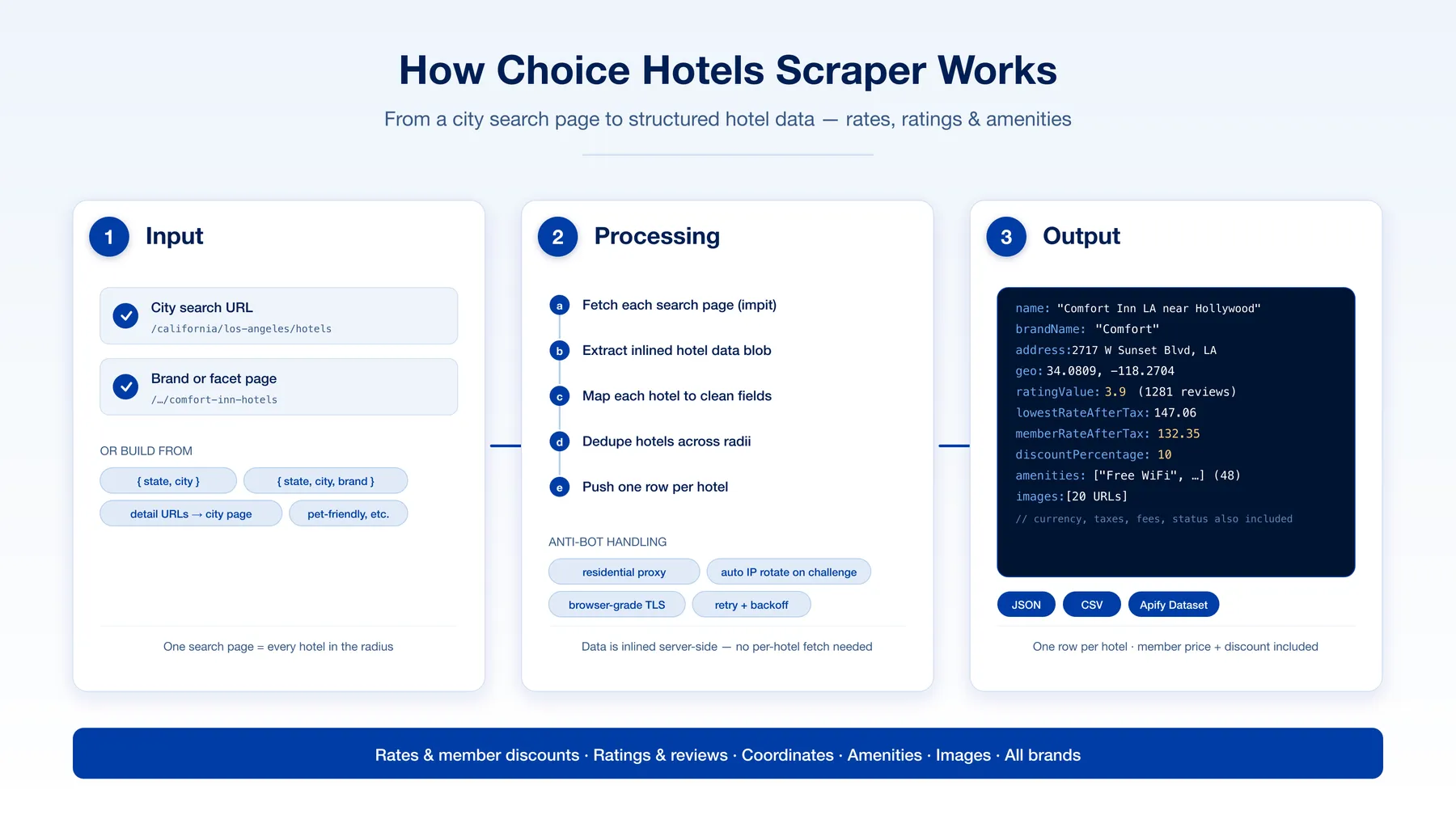
Why use this scraper?
- Whole city in one request — a single search page returns all hotels within an auto-expanding radius (often 40+), each fully detailed. No page-by-page crawling.
- Rates with member pricing — the current starting nightly rate, member rate, discount percentage, plus taxes and fees, all in the output (not date-specific — see the note above).
- Every Choice brand — Comfort, Quality Inn, Sleep Inn, Clarion, Econo Lodge, Rodeway Inn, Ascend, Cambria, WoodSpring, and more. Filter to one brand or scrape them all.
- Built-in filters — narrow results by brand, amenities (pool, free breakfast, EV charging…), pet-friendly, minimum rating/reviews, and max nightly price — all without extra requests.
- Rich structured data — coordinates, star rating + review count, coded amenities as readable labels, and image galleries.
- Bot-protection handled — browser-grade TLS via impit, residential proxy support, and automatic IP rotation when a challenge is detected.
- Flexible input — paste search URLs or build them from
{ state, city }locations.
Overview
Give the actor Choice Hotels search-results URLs (or locations to build them). For each, it fetches the search page, reads the hotel data Choice inlines in the page, and returns one clean row per hotel — identity, location, rating, amenities, images, and pricing. Overlapping searches are de-duplicated by hotel.
Supported inputs
| Input | Example | Result |
|---|---|---|
| City search URL | https://www.choicehotels.com/california/los-angeles/hotels | all hotels in/around the city |
| Brand-filtered URL | https://www.choicehotels.com/california/los-angeles/comfort-inn-hotels | one brand in the city |
| Facet URL | .../los-angeles/pet-friendly-hotels | facet-filtered hotels |
| Location object | { "state": "texas", "city": "austin" } | built into a city search URL |
| Location + brand | { "state": "texas", "city": "austin", "brand": "sleep-inn" } | brand search URL |
| Single-hotel URL | .../comfort-inn-hotels/ca785 | auto-collapsed to the city search |
Use cases
- Rate & competitive intelligence — track starting nightly rates and member discounts across a market or brand.
- Travel aggregators & meta-search — feed a hotel inventory with pricing, ratings, and amenities.
- Market research — brand footprint, average ratings, and amenity coverage by city or state.
- Lead lists — build a directory of hotels (name, address, coordinates) for a region.
- Price monitoring — schedule the actor and diff the starting rates over time to watch how they trend.
How it works
- Fetch — each search URL is requested with browser-grade impit TLS through a residential proxy.
- Extract — the hotel dataset Choice inlines in the search page is parsed directly (no per-hotel page fetch — the detail pages carry no extra data and are bot-walled).
- Map — each hotel becomes a clean, flat record: identity, address, geo, rating, amenities, images, and rates.
- Dedupe — hotels repeated across overlapping search radii are collapsed by hotel code.
- Push — one dataset row per hotel, JSON or CSV.
Input configuration
| Field | Type | Default | Description |
|---|---|---|---|
startUrls | array | — | Choice Hotels search-results URLs |
locations | array | [] | One City, State per line (state name or 2-letter code); add a brand as a third part to filter, e.g. Miami, Florida, Comfort Inn |
brands | array | [] | Keep only these Choice brands (multi-select) |
amenities | array | [] | Keep hotels having ALL these amenity keywords, e.g. pool, free breakfast, ev charging |
petFriendly | boolean | false | Keep only pet-friendly hotels |
minRating | integer | 0 | Minimum guest rating (0–5) |
minReviews | integer | 0 | Minimum number of reviews |
maxPrice | integer | 0 | Maximum starting nightly rate (0 = no cap) |
maxItems | integer | 1000 | Hard cap on hotels scraped |
maxConcurrency | integer | 3 | Parallel search pages — keep low (bot protection) |
proxy | object | RESIDENTIAL | Residential proxy strongly recommended |
Filters
Choice Hotels applies its on-site filters (brand, amenities, rating, price) through a bot-protected API rather than the search page itself, so this actor replicates them against the scraped results — you still get exactly the hotels that match, they're just filtered after extraction:
brands— pick one or more Choice brands (Comfort Inn, Sleep Inn, Cambria, …).amenities— list keywords; a hotel is kept only if it has all of them. Each keyword matches an amenity when every word appears in it, sofree breakfastmatches "Free Hot Breakfast" andev chargingmatches "EV Charging Station".petFriendly— only hotels that explicitly allow pets.minRating/minReviews— drop low-rated or sparsely-reviewed hotels.maxPrice— cap by the starting nightly rate (after taxes/fees).
Filters combine with AND, and are applied before the maxItems cap so the cap counts hotels you actually wanted. Every result still carries the full amenities, ratingValue, brandName, and rate fields, so you can also post-filter downstream.
Note: dates and guest counts still can't be filtered — those live only behind Choice's bot-walled pricing API (see the FAQ).
Locations format: each line is
City, State(e.g.Austin, TexasorLos Angeles, CA), optionallyCity, State, Brand(e.g.Miami, Florida, Comfort Inn). Every line becomes a city search that returns all hotels in that area.
Output overview
Key output fields
| Field | Description |
|---|---|
hotelCode | Choice Hotels property code (e.g. CA785) |
name / brandName / productName | Hotel name and brand |
address / latitude / longitude | Full address and coordinates |
ratingValue / ratingMax / reviews / recommends | Guest rating, scale, review count, recommend count |
lowestRateBeforeTax / lowestRateAfterTax | Current public starting nightly rate (default 1-night stay; not date-specific) |
memberRateAfterTax / discountPercentage | Member starting price and its discount |
currencyCode | Rate currency |
amenities | Readable amenity labels |
images | Hotel image URLs |
status | Property status (e.g. ACTIVE) |
sourceUrl | The search page this hotel came from |
FAQ
How many hotels do I get per search URL?
All hotels within the search radius, which auto-expands to fill results — often 40+ from a single city page. Set maxItems to cap billing.
Why are phone and description null?
Choice Hotels does not include those on its search pages (only on the bot-walled per-hotel detail API), so the actor surfaces the fields as null rather than fetching an unreliable extra page. Everything else — address, geo, rating, amenities, rates — is present.
Do I need a proxy? Yes, a residential proxy is strongly recommended and the default. Choice Hotels uses Akamai bot protection that flags datacenter IPs quickly; the actor rotates the residential IP automatically when it detects a challenge.
Can I set check-in / check-out dates or guest counts to get dated pricing? No. Choice Hotels' search page always renders the current starting rate for a default one-night stay — it does not re-price the page for dates, guests, or amenity filters passed in the URL. Those filters are applied by a separate, bot-protected pricing API that this actor intentionally does not use. So the rate fields are a live "from $X / night" figure, not a quote for a specific stay. If you need dated, per-guest availability quotes, that's a different (heavier) build — reach out via the Issues tab to discuss.
Do amenity / pet-friendly / "top-rated" filters work?
Those are applied by the same bot-protected API, not by the search page itself, so the actor returns the full hotel set for the city regardless. You can filter the results yourself on the amenities, ratingValue, and brandName fields in the output, or narrow the input to a single brand.
Which brands are covered?
All Choice Hotels brands appear on the all-brands city page; use a brand-filtered URL (e.g. /comfort-inn-hotels) or the brand location field to narrow to one.
Support
- Issues tab — fastest way to report a problem or request a field; I usually respond within 24 hours.
- The actor self-reports failed runs to me automatically, so breakages are often being fixed before you write in.
Additional services
Need scheduled rate monitoring, nationwide coverage from the Choice Hotels sitemap, a private variant, or a scraper for another hotel brand (Marriott, Hilton, IHG, Wyndham)? Reach out via the Issues tab or my Apify profile.
Explore more scrapers
Check my Apify profile for more scrapers — travel (Expedia, Booking), real estate (Zillow, Realtor, Rightmove, ImmoScout24, Idealista), jobs (LinkedIn, Indeed, Glassdoor), reviews (Trustpilot), social (Telegram, WhatsApp channels), and many more.
🤖 For AI Agents & LLM Apps
Compact reference for AI agents calling this actor via the Apify MCP server or the Apify API (actor: memo23/choicehotels-scraper).
Purpose: Scrape every hotel from a Choice Hotels (choicehotels.com) city or brand search page — identity, address, coordinates, rating, amenities, images, and the current starting nightly rate including the member price and discount — in one request per search.
Minimal input:
Instead of startUrls, you can build searches from locations: "locations": ["Austin, Texas", "Miami, Florida, Comfort Inn"] (one City, State or City, State, Brand per line).
Output: one dataset row per hotel — hotelCode, name, brandCode, brandName, productName, address {line1, line2, city, subdivision, postalCode, country}, latitude, longitude, ratingValue, ratingMax, reviews, recommends, status, currencyCode, lowestRateBeforeTax, lowestRateAfterTax, memberRateAfterTax, discountPercentage, amenities (labels), images, phone, description, sourceUrl, scrapedAt.
Behaviors an agent should know:
- Always set
maxItems— a single city page auto-expands its radius and can return 40+ hotels; overlapping searches are de-duplicated by hotel code. startUrlsandlocationsboth drive searches; provide either or both.- Filters (
brands,amenities,petFriendly,minRating,minReviews,maxPrice) are applied to the scraped results with AND logic, before themaxItemscap. - Residential proxy is the default and strongly recommended; keep
maxConcurrencylow (default 3) to avoid Akamai bot challenges. - Rate fields are Choice's live "from $X/night" starting price for a default one-night stay — not dated, per-guest quotes.
phoneanddescriptionarenull(not on search pages). - Pay-per-event billing — see the Pricing tab on the actor page.
⚠️ Disclaimer
This actor collects only publicly available data from Choice Hotels' public search-results pages — the same information any visitor sees in a browser. It does not access private data, does not log in, and does not place bookings. You are responsible for how you use the data: comply with Choice Hotels' Terms of Service, applicable data-protection laws (GDPR, CCPA), and platform policies in your jurisdiction. This actor is not affiliated with or endorsed by Choice Hotels International.
SEO Keywords
choice hotels scraper, choicehotels.com scraper, scrape choice hotels, hotel rates scraper, comfort inn scraper, quality inn scraper, hotel price scraper, hotel data scraper, hotel amenities scraper, hotel rating scraper, choice hotels api, scrape hotel prices, hotel rate monitoring, hotel listing scraper, comfort suites scraper, sleep inn scraper, clarion scraper, econo lodge scraper, rodeway inn scraper, hotel competitive intelligence


![Collecting Cars [$3💰] | 33k SOLD prices + live bids avatar](https://images.apifyusercontent.com/Hbn_LDWbVTHAyPL8k_edq8GAZOEin7g5i4_bFf2WimM/rs:fill:76:76/cb:1/aHR0cHM6Ly9hcGlmeS1pbWFnZS11cGxvYWRzLXByb2QuczMudXMtZWFzdC0xLmFtYXpvbmF3cy5jb20vbmduOHZSRVNUa3NleVdFNnAtYWN0b3ItRm1EYVRESkEyWGNYU0s4N24tVkJhU3V5RENuYi1Db2xsZWN0aW5nX0NhcnMud2VicA.webp)

![PistonHeads.com [$1💰] | Full 208k catalogue | Real pagination avatar](https://images.apifyusercontent.com/N5yGW7wlseLIwvxB9V1DcTJVHEdFqV2MhaITdnhRlFM/rs:fill:76:76/cb:1/aHR0cHM6Ly9hcGlmeS1pbWFnZS11cGxvYWRzLXByb2QuczMudXMtZWFzdC0xLmFtYXpvbmF3cy5jb20vbmduOHZSRVNUa3NleVdFNnAtYWN0b3IteEpXSmV2d2I5dVBrZDdwU08tOHRWc0xnWEUzZi1waXN0b25oZWFkcy5wbmc.webp)

![Car & Classic [$1💰] | Full 46k catalogue | Beats 10k cap avatar](https://images.apifyusercontent.com/yR5ZcWq7huml1KRn39casUADIIm6kQumb9tA8E00od4/rs:fill:76:76/cb:1/aHR0cHM6Ly9hcGlmeS1pbWFnZS11cGxvYWRzLXByb2QuczMudXMtZWFzdC0xLmFtYXpvbmF3cy5jb20vbmduOHZSRVNUa3NleVdFNnAtYWN0b3ItbmRLcGNQOFNyWFNueW5Na3IteGE3RlJRTHRTVy1jYXJfYW5kX2NsYXNzaWMuanBlZw.webp)


![Autotrader.com.au [$1💰] Australia Search & Details Scraper🇦🇺 avatar](https://images.apifyusercontent.com/pCkelbtHnioCVauMT6DM9tGYD81m-FmuhD-rXFDHMC4/rs:fill:76:76/cb:1/aHR0cHM6Ly9hcGlmeS1pbWFnZS11cGxvYWRzLXByb2QuczMudXMtZWFzdC0xLmFtYXpvbmF3cy5jb20vbmduOHZSRVNUa3NleVdFNnAtYWN0b3ItYWFINGlJOWIwc2dNNkNWeVMtanhmc2ZZeEVBWi1hdXRvdHJhZGVyLWF1cy5wbmc.webp)
